• Skip to main content
  • Skip to primary sidebar
  • Home
  • About
  • Recommended Readings
    • 2022 Book Reading
    • 2023 Recommended Readings
    • Book Reading 2024
    • Book Reading 2025
    • Book Reading 2026
  • Supply Chain Management Guide
  • PKM
  • Microsoft Excel
  • Microsoft Copilot in Office 365
  • Public Wiki Page

Ali Raza Zaidi

A practitioner’s musings on Dynamics 365 Finance and Operations

MS Dynamics Ax 7

Free introductory course on MVA for Dynamics 365 for finance and operations, enterprise edition.

October 31, 2017 by alirazazaidi

Do you want to introductory session, then this course is for you. Yes it is free any one can watch very basic level course on Microsoft Virtual Academy

https://mva.microsoft.com/en-US/training-courses/introduction-to-microsoft-dynamics-365-for-finance-and-operations-enterprise-edition-17908?l=AHneoTOJE_906312570

Course contents are amazing.


  •  Course Introduction Time00:01:3701 | Overview
  •  Cloud-Based Solution Time00:02:02
  •  Workspaces Driving Productivity Time00:02:48
  •  Workflows in Your Business Processes Time00:03:34
  •  Reporting Time00:01:12
  •  Industry Focus Time00:02:2902 | Introduction to Functionality
  •  Overview Time00:02:55
  •  Order-to-Cash Time00:00:33
  •  Demo: Order-to-Cash Functionality Time00:07:38
  •  Procure-to-Pay Time00:00:32
  •  Demo: Procure-to-Pay Functionality Time00:08:16
  •  Plan-to-Produce Time00:00:42
  •  Demo: Plan-to-Produce Functionality Time00:05:19
  •  Recruit-to-Hire Time00:00:59
  •  Demo: Create Jobs, Positions, and Recruitment Projects Time00:10:21
  •  Complete an Application and Hire a Worker Time00:00:11
  •  Demo: Complete an Application and Hire a Worker Time00:08:08Post-Course Survey
  •  Post-Course Survey (Optional) Assessment: Full Course
  •  Assessment: Full Course

Mass delete records D365 for Finance and Operations.

October 28, 2017 by alirazazaidi

I was testing one scenario, I have created some main account wrongly. So I want to delete them quickly.

Secondly I want to explore the Office integration In D365 for finance and operations.

So I did following steps to delete the required records quickly.

 Organization administration > Setup > Office integration > Excel workbook designer


Select entity “MainAccount”

. Create workbook

and download it

Login in Excel

Open excel

Delete selected records

Publish

Confirm.

Records are successfully deleted.

float value conversion in string SSRS expression and decimal points SSRS dynamics ax 2012 R3.

September 29, 2017 by alirazazaidi


Today I have to record very small tip. During development of on SSRS report for Dynamics Ax 2012 R3, End user wants a row at the report footer for  analysis. he wants some kind of percentage  calculation with ‘%’.  A For this I have to use CStr ssrs expression function  like


Ctr(((sum(DataSet!field.Value) / sum(DataSet!field.Value)))*100)+”%”.


Now it is string and shows number of decimal as it result from division. For example  5.4356333. But end user wants formatting like 5.43 .

It is string or text value and SSRS textbox formatting is not apply on it.


Following SSRS expression works for me.


Left(CStr(5.4356333),instr(CStr(5.4356333),”.”)+2)


My Updated expression is something like this


Left(CStr(IIF(Parameters!ProductionReportBM2DS_ItemName.Value = “ITEM-00000420”,((sum(Fields!Scrap.Value)/sum(Fields!TotalConsumption.Value))*100),((sum(Fields!CutLength.Value)/sum(Fields!TotalConsumption.Value))*100))),instr(CStr(IIF(Parameters!ProductionReportBM2DS_ItemName.Value = “ITEM-00000420″,((sum(Fields!Scrap.Value)/sum(Fields!TotalConsumption.Value))*100),((sum(Fields!CutLength.Value)/sum(Fields!TotalConsumption.Value))*100))),”.”)+2) +”%”

Custom financial Dimension shows in lookup D365 for Finance and operations

August 19, 2017 by alirazazaidi

I one of last post, I added the custom financial dimension in D365 for finance and operations.
You can find this post here
https://www.tech.alirazazaidi.com/custom-financial-dimension-in-dynamics-365-for-finance-and-operations-ax-7/

In next post I load financial dimension in custom lookup.

Custom lookup for Financial Dimension D365 for Finance and Operations (Dynamics Ax 7)

But above link shows only out of the box financial dimensions. But what about custom financial dimension,

I tested the following code snippet works custom dimension. It load custom dimension mentioned in

Custom Financial Dimension in Dynamics 365 for Finance and Operations (AX 7)


[FormControlEventHandler(formControlStr(FrmTestDetail, FormStringControl1), FormControlEventType::Lookup)]
public static void FormStringControl1_OnLookup(FormControl sender, FormControlEventArgs e)
{

SysTableLookup sysTableLookup;
Query query;
QueryBuildDataSource qbdsDimensionFinancialTag;
QueryBuildRange qbrFinancialTagCategory;
String20 LC;
RecId _recid;
DimensionAttribute _attribute;
Name _name=’jaggah_tax’;

;
// super();

//#define.MyCustomFinancialDimension(‘LC’)
// select * from attribute where attribute.Name ==_name;
// recid = attribute.financialTagCategory();

query = new Query();
qbdsDimensionFinancialTag = query.addDataSource(tableNum(DimensionFinancialTag));
qbrFinancialTagCategory = qbdsDimensionFinancialTag.addRange(fieldNum(DimensionFinancialTag, FinancialTagCategory));
qbrFinancialTagCategory.value(strFmt(‘%1’, DimensionAttribute::findByName(_name, false).financialTagCategory()));

sysTableLookup = sysTableLookup::newParameters(tableNum(DimensionFinancialTag), sender,true);
sysTableLookup.addLookupfield(fieldNum(DimensionFinancialTag, Value), true);
sysTableLookup.addLookupfield(fieldNum(DimensionFinancialTag, Description));
sysTableLookup.addSelectionField(fieldNum(DimensionFinancialTag, FinancialTagCategory));
sysTableLookup.parmQuery(query);

sysTableLookup.performFormLookup();

FormControlCancelableSuperEventArgs ce = e as FormControlCancelableSuperEventArgs;
//cancel super() to prevent error.
ce.CancelSuperCall();

}

Output is here

Dynamics 365 For Finance And Operations On Perm Demo Video

August 17, 2017 by alirazazaidi

I just completed first video. 9 minute video just explore the navigation of D365 for finance and operations.

Dynamics 365 For Finance And Operations On Perm Demo from alirazazaidi on Vimeo.

Custom Financial Dimension in Dynamics 365 for Finance and Operations (AX 7)

July 14, 2017 by alirazazaidi

Purpose of this post to share the procedure I learned yesterday for adding custom Financial dimension in Dynamics 365 for Finance and Operations aka (AX 7). So I added a fictional Financial dimension.

Suppose we have to create a financial dimension with “Jaggah Tax”. This financial dimension required in Sales order, Sales Line, Purchase Order, Purchase line.


New Custom financial can be added and activate by following steps.


First of all open Ax in browser and change its legal entity to USMF.

Now click on General Ledger ==> Charts of Accounts ==> Dimensions => Financial Dimensions.


From financial dimensions page Click on New button. As a result detail page open in new / create mode.


You will find here three editable controls. From Used value drop down, select custom dimension, in second text box type name of dimension and in third text box type Report column Name.


Now click on Activate button from top menu.


On pressing Activating menu button, on right hand side a popup dialog opens. You can select different options from here. I want to activate this financial dimension so I selected activate now option.


So progress dialog show activation is under progress.


Finally we created a new financial dimension.


Now next step is to add values for dimension. Suppose our organization pay two types of jaggah tax.

-Noori Naath

-Mola Jatt.


So for this click on Dimension values menu button after selecting dimension open in detail section.


Click on New and enter values as much as requires. With each value also add  activation date.


We successfully create custom financial dimension. But until we add financial dimension in accounting structure  it will not available for selection.


For this again open General Ledger => Setup => Ledger


From Ledger detail form, select Manufacturing P&L. either double click on it or after selection click on edit button.


Account Structure is open, Also click on add  segment.


On right side a pop up opens with all financial dimensions. You can select required dimension.

From right side a pop up opens from there you can select required Dimension.


After selection Accounting structure look a like below screenshot.


Now on update financial dimensions values below text boxes in grid to “”;*. By default it will be *. Which means value is required.  “”;*. Means empty value or null values also allow in dimension.

Now update top value and activate it.

Activation in progress.


Now open Purchase order and from Header view, select newly added financial dimension.


Values are available here.


Our newly add financial dimension successfully added


Skip certain values Report group sum SSRS Dynamics Ax 2012 R3. Dynamics 365 for operations

July 3, 2017 by alirazazaidi

There is again small tips. Let me share you again scenario. Suppose you have to show customer Sale With customer group level. And group footer want to sum of Sales of that group. Now requirement is that customer with certain sub classification will skip in group sum. For example those customer who are on hold or blocked will not shown in report group sum, but shown in report detail

I was developing RDP based reports. So I add a int field in table. So I can mark specific record need to skip at group level sum.

I update the following SSRS expression to skip certain records at group level.

=Sum(iif(Fields!Flag.Value= 0, Cdbl(Fields!Value.Value), 0.0),”Group Name”)

Customization in Dynamics 365 for operation (Dynamics AX, AX 7) – Part 8 Tree Control

June 5, 2017 by alirazazaidi

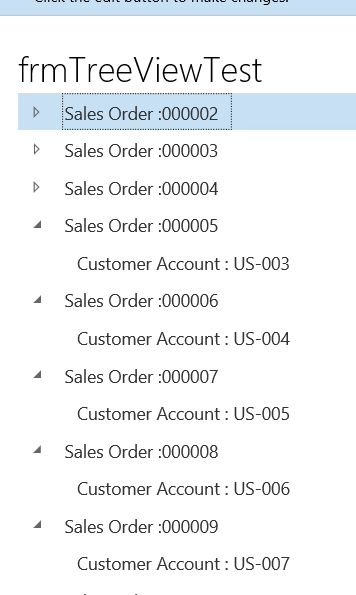
Recently I complete the custom Inquiry for Dynamics Ax 2012 R3. That customization is extensive and based on Tree control. Now I did experiment with Tree view control  in Dynamics 365 for operation and output will share here.  For this post I used Dynamics 365 for Operation Update 4 Vm with contoso data.

Suppose we need to build tree Where Sale order Number came as parent and Customer account is as its child node. There is thousand possibilities, but I use simplest way. So first step to add form. Then add tree control it. Set Form Name and Auto declaration property to true. So we can access control in code behind.


Next step is to insert following code snippet initial method.


public class frmTreeViewTest extends FormRun

{

/// <summary>

///

/// </summary>

public void init()

{

SalesTable _Table;

TreeItemIdx _TreeItemid;


super();


MyTreeView.deleteAll();

MyTreeView.lock();

while select * from _Table

{

// _TreeItemid = SysFormTreeControl::addTreeItem(MyTreeView, _Table.SalesId + " : " + _Table.CustAccount ,FormTreeAdd::Root,  _Table.RecId);


_TreeItemid = SysFormTreeControl::addTreeItem(MyTreeView, "Sales Order :" + _Table.SalesId ,FormTreeAdd::Root,  _Table.RecId);

SysFormTreeControl::addTreeItem(MyTreeView, " Customer Account : " + _Table.CustAccount ,_TreeItemid ,  _Table.RecId);


SysFormTreeControl::expandTree(MyTreeView,_TreeItemid);


}

}


}


Its works for me.


For rest Limit is only sky. Happy development.

Data Manipulation tip 5. Like operator wild card in Select query Dynamics ax 2012 D365 for Operations.

May 30, 2017 by alirazazaidi

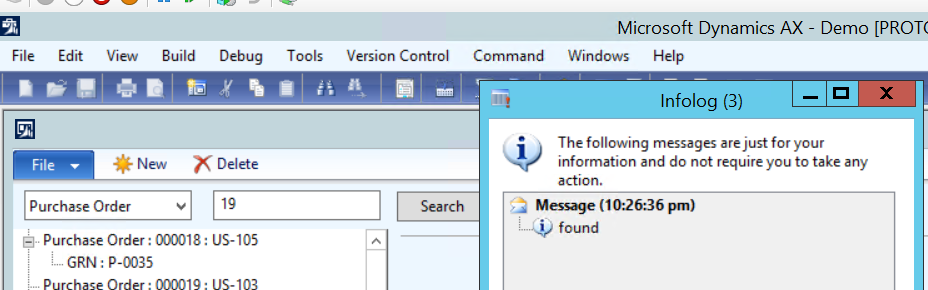
Currently I am writing an Inquiry for Client. For this inquiry I have to use Like operator functionality. For example end user wants to search Sale Orders. For this he/she enters the partial sale order number and Inquiry provides the result.

Microsoft provides “Like operator” functionality , I used it with text box in below code snippet. Suppose strProcumentValue is string edit control with auto declaration true.


void clicked()

{

PurchTable  _Table;


super();


select * from _Table where _Table.PurchId like “*” + strProcumentValue.text() +”*”;


if (_Table !=null)

{


info(“found”);


}

}

Its works for me,

reference: http://daxdude.blogspot.com/2011/02/use-x-wildcard-like-and-not-like-in-x.html

Data manipulation tip 2 Dynamics ax 2012 and D365 of Operations Table initialization method.

April 12, 2017 by alirazazaidi

If we consider the following code snippet.
CustSalesQty _temp1,_temp2;
_temp1.IntQty=100;

_temp1.CustAccount =”Cust00001″;

_temp1.insert();

_temp1.IntQty=200;

_temp1.insert();


_temp1.IntQty=300;

_temp1.CustAccount =”Cust00003″;

_temp1.insert();

while select * from _temp1

{

_temp2.data(_temp1);

_temp2.insert();


}


while select * from  _temp2

{

info( ” _temp2 with ” + _temp2.CustAccount + ” ” + int2Str(_temp2.IntQty));


}


}

You can check that when we insert the temp1.inQTY=200, We did not set Customer account. At result record new record will insert with customer Cust00001 . You can see output of above code


Point is simple, We need to initialize the table before populate for next values.  I found this scenario in custom Inventory reports. When we populate data in different fields based on issue status.

You can set initialized values after ate in side query execution loop. But that piece of code belongs to specific location.

Microsoft provide the out of the box base initValue method. You can add this method by following way.

Best practices says you have to initialize value in this method. And call this method with table reference. This way initialization is table dependent not class dependent.


So we can over write the code as follow

public class CustSalesQty extends common

{

/// <summary>

///

/// </summary>

public void initValue()

{

super();

this.IntQty =0;

this.CustAccount =””;

}


}

Now above code snippet will works as

class Job123

{

/// <summary>

/// Runs the class with the specified arguments.

/// </summary>

/// <param name = “_args”>The specified arguments.</param>

public static void main(Args _args)

{

CustSalesQty _temp1,_temp2;

_temp1.initValue();

_temp1.IntQty=100;

_temp1.CustAccount =”Cust00001″;

_temp1.insert();

_temp1.initValue();

_temp1.IntQty=200;

//  _temp1.CustAccount =”Cust00002″;

_temp1.insert();

_temp1.initValue();

_temp1.IntQty=300;

_temp1.CustAccount =”Cust00003″;

_temp1.insert();

while select * from _temp1

{

_temp2.initValue();

_temp2.data(_temp1);

_temp2.insert();


}


while select * from  _temp2

{

info( ” _temp2 with ” + _temp2.CustAccount + ” ” + int2Str(_temp2.IntQty));


}


}


}

« Previous Page
Next Page »

Primary Sidebar

About

I am Dynamics AX/365 Finance and Operations consultant with years of implementation experience. I has helped several businesses implement and succeed with Dynamics AX/365 Finance and Operations. The goal of this website is to share insights, tips, and tricks to help end users and IT professionals.

Legal

Content published on this website are opinions, insights, tips, and tricks we have gained from years of Dynamics consulting and may not represent the opinions or views of any current or past employer. Any changes to an ERP system should be thoroughly tested before implementation.

Categories

  • Accounts Payable (2)
  • Advance Warehouse (2)
  • AI (3)
  • Asset Management (3)
  • Azure Functions (1)
  • Books (6)
  • Certification Guide (3)
  • ChatGPT (3)
  • Claude (1)
  • Customization Tips for D365 for Finance and Operations (64)
  • D365OF (60)
  • Data Management (1)
  • database restore (1)
  • Dynamics 365 (59)
  • Dynamics 365 for finance and operations (139)
  • Dynamics 365 for Operations (175)
  • Dynamics AX (AX 7) (134)
  • Dynamics AX 2012 (274)
  • Dynamics Ax 2012 Forms (13)
  • Dynamics Ax 2012 functional side (16)
  • Dynamics Ax 2012 Reporting SSRS Reports. (31)
  • Dynamics Ax 2012 Technical Side (52)
  • Dynamics Ax 7 (65)
  • Exam MB-330: Microsoft Dynamics 365 Supply Chain Management (7)
  • Excel Addin (1)
  • Favorites (12)
  • Financial Modules (6)
  • Functional (8)
  • General Journal (1)
  • Implementations (1)
  • Ledger (1)
  • Lifecycle Services (1)
  • Logseq (4)
  • Management Reporter (1)
  • Microsoft Excel (4)
  • MS Dynamics Ax 7 (64)
  • MVP summit (1)
  • MVP summit 2016 (1)
  • New Dynamics Ax (19)
  • Non Defined (9)
  • Note taking Apps (2)
  • Obsidian (4)
  • Personal Knowledge Management (3)
  • PKM (16)
  • Power Platform (6)
  • Procurement (5)
  • procurement and sourcing (6)
  • Product Information Management (4)
  • Product Management (6)
  • Production Control D365 for Finance and Operations (10)
  • Sale Order Process (10)
  • Sale Order Processing (10)
  • Sales and Distribution (5)
  • Soft Skill (1)
  • Supply Chain Management D365 F&O (5)
  • Tips and tricks (278)
  • Uncategorized (165)
  • Upgrade (1)
  • Web Cast (7)
  • White papers (4)
  • X++ (10)

Wiki

  • SCM

Copyright © 2026 · Magazine Pro On Genesis Framework · WordPress · Log in