• Skip to main content
  • Skip to primary sidebar
  • Home
  • About
  • Recommended Readings
    • 2022 Book Reading
    • 2023 Recommended Readings
    • Book Reading 2024
    • Book Reading 2025
  • Supply Chain Management Guide
  • PKM
  • Microsoft Excel
  • Microsoft Copilot in Office 365
  • Public Wiki Page

Ali Raza Zaidi

A practitioner’s musings on Dynamics 365 Finance and Operations

Dynamics 365 for Operations

Purchase RFQ response is not allow to Edit

February 1, 2026 by alirazazaidi

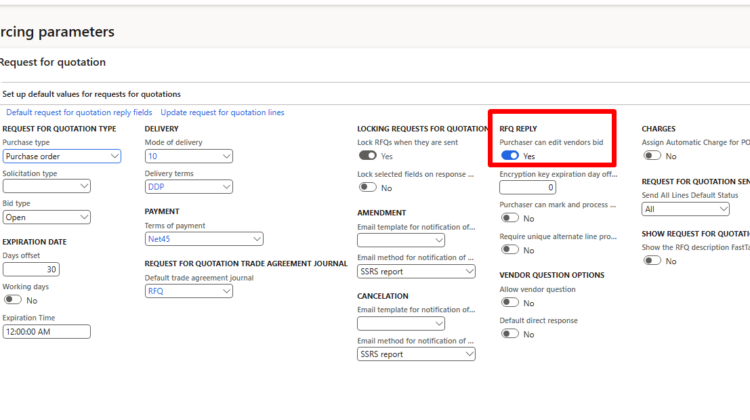
While working with Demo data in Dynamics 365, I recently encountered an issue where I was unable to add or edit a reply to an RFQ (Request for Quotation).

At first glance, everything looked correct—the RFQ was created properly, vendors were added, and the workflow seemed fine. However, the reply option was disabled, making it impossible to proceed.

After investigating the setup, I found the root cause was a missing parameter configuration.


Root Cause: RFQ Edit Permission Disabled

In Dynamics 365 Procurement and Sourcing, RFQ behavior is controlled by system parameters. In Demo data, one critical parameter is disabled by default, which blocks RFQ replies.


✅ Solution: Enable RFQ Editing for Purchasers

To resolve the issue, follow these steps:

  1. Navigate to
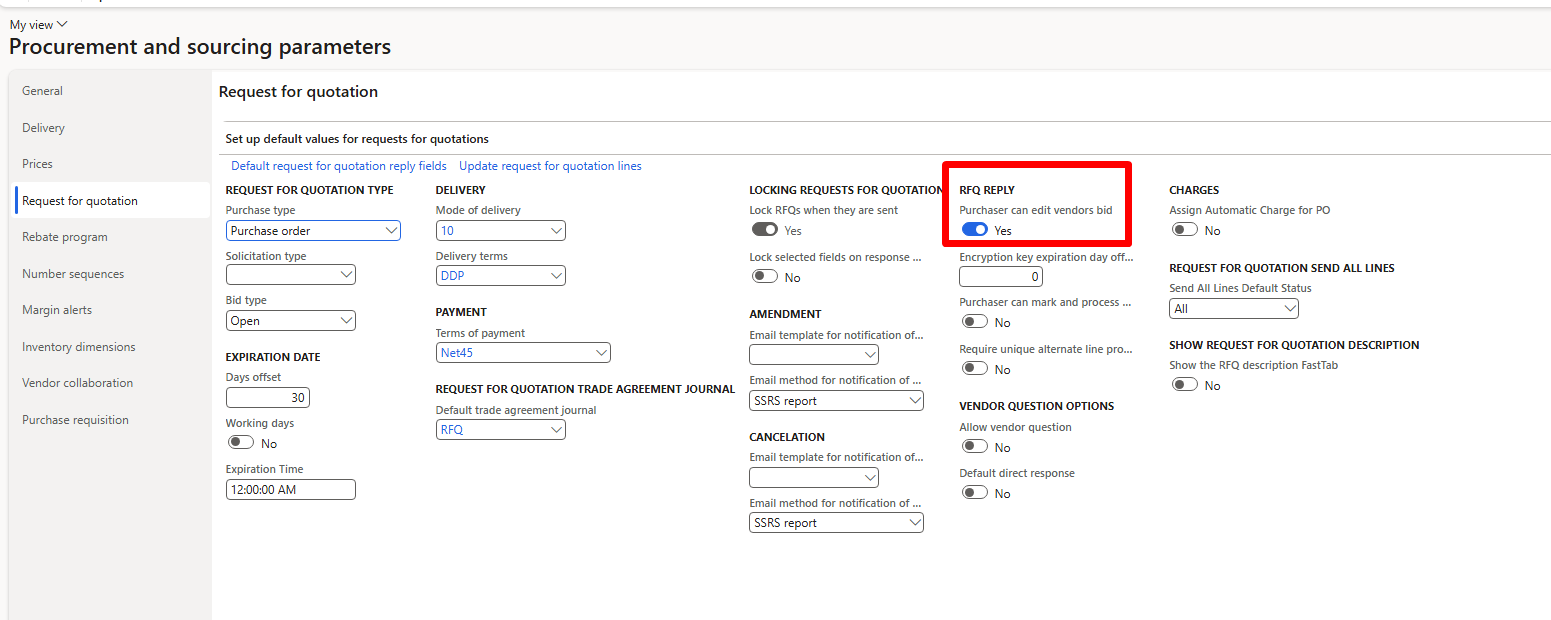
    Procurement and Sourcing > Setup > Procurement and Sourcing Parameters
  2. Open the Request for Quotation tab
  3. Set the following parameter to True:
    “Purchaser can edit”
  4. Save the changes

Consolidation of Purchase requisition lines in D365 Finance and Operations

January 27, 2026 by alirazazaidi

In this video, I explain the consolidation of purchase requisition lines in Dynamics 365 Finance & Operations.

In many real-world scenarios, different departments may create purchase requisitions for the same item. Instead of processing these requests separately and negotiating with vendors for each individual line, D365 F&O allows us to consolidate purchase requisition lines into a single consolidation.

This helps streamline vendor negotiation, enables better control over price, discounts, and vendor selection, and allows you to convert the consolidated requisition into a single purchase order efficiently.

I hope you find this video helpful. If you do, please like, share, and subscribe for more D365 F&O content.

Consider courses on udemy

https://www.udemy.com/user/alirazazaidi

Dynamics.AX.Application.CannotDisableFeatureTestClass” is not found in the map

November 22, 2025 by alirazazaidi

I am going to enable the subscriptio billing module on Devbox machine on my local vm.

I got this error

“Dynamics.AX.Application.CannotDisableFeatureTestClass” is not found in the map”

Solution to this to click on update button.

This resolve the issue

Free Course for Fixed asset module in D365 finance and Operations

November 5, 2025 by alirazazaidi

Hi, my first cousre on D365 Finance and Operation it free.

https://www.udemy.com/course/fixed-asset-module-in-d365-finance-and-operations

How to access enum values at database level D365 Finance and Operations

October 28, 2025 by alirazazaidi

On the live server, we don’t have direct database access. However, while assisting another user recently, I noticed that they could access the database through some method — possibly via the Entity Store or a similar mechanism.

I received a request from the client’s reporting team to provide a way for them to retrieve the text values of enums from the database.

On my development environment, I can access enum values using the following two tables: EnumValueTable and EnumIdTable.

For example, the following T-SQL query returns the values for the SalesStatus enum:

SELECT * 
FROM EnumValueTable
JOIN EnumIdTable 
    ON EnumValueTable.EnumId = EnumIdTable.Id
WHERE EnumIdTable.Name = 'SalesStatus'
ORDER BY EnumValueTable.EnumValue;

what is meaning of Calculate prorated depreciation

October 16, 2025 by alirazazaidi

“Calculate prorated depreciation” means calculating depreciation only for the portion of a period (month, quarter, or year) that an asset was actually in use — not for the full period.


💡 In simple terms:

Prorated depreciation = partial depreciation based on time the asset was active.

If an asset was acquired or disposed in the middle of a month (or year), you don’t depreciate it for the entire period — only for the time it was available for use.


🧮 Example:

Let’s say:

  • Depreciation = 1,200 per year
  • Method = Straight line
  • That’s 100 per month (1,200 ÷ 12)
  • Asset acquired on April 15

If you use prorated depreciation, and your policy is to calculate from the mid-month, you’ll only depreciate half of April:

👉 April depreciation = 100 × 0.5 = 50
Then from May onward, it’ll take full monthly depreciation (100 per month).

Without proration, it would incorrectly calculate 100 for April, as if the asset was in use the entire month.


⚙️ In D365 F&O:

In Fixed assets parameters or Depreciation profile setup, you can select:

  • Prorate acquisition date
  • Prorate disposal date
  • Prorate convention (full month, half month, actual days, etc.)

When you run depreciation, D365 calculates it proportionally based on the date the asset was acquired or disposed.


✅ Summary:

TermMeaning
DepreciationReduction in asset value over time
Prorated depreciationDepreciation calculated only for the time the asset was in use
PurposeFair and accurate expense allocation when asset not used the full period

Source : Chatgpt

What is stages of D365 Finance and Operations implementation

October 5, 2025 by alirazazaidi

Lets start to explore, Project Management for D365 Finance and Operations Implementation.

  • Pre-sales / Initiation – Scoping, high-level requirements, proposal.
  • Analysis / Discovery – Fit-gap analysis, requirements workshops.
  • Design – Solution design (Functional & Technical), architecture approval.
  • Build / Development – Configuration, customization, integrations, testing.
  • UAT / Deployment Prep – User acceptance testing, data migration, cutover plan.
  • Go-Live & Support – Hypercare, transition to support.

What is Microsoft Tenant, where we get it

September 30, 2025 by alirazazaidi

A Microsoft Entra tenant ID is a unique identifier (a GUID) assigned to your Microsoft Entra ID (formerly Azure Active Directory) tenant.

  • A tenant represents your organization’s instance of Microsoft Entra ID.
  • The tenant ID is a globally unique GUID (for example: 72f988bf-86f1-41af-91ab-2d7cd011db47) that identifies that tenant.
  • You usually need to enter it when configuring apps, APIs, or services that connect to Microsoft Entra.

How to find your Tenant ID

  1. Microsoft Entra admin center:
    • Go to entra.microsoft.com.
    • Navigate to Identity → Overview.
    • Copy the Tenant ID under Basic information.

Sharing My Daily Story – Trade Agreement Customization in D365 F&O

August 4, 2025 by alirazazaidi

I’ve been reading and listening to podcasts about how to market yourself better. One common piece of advice stood out: “Write your story every day—what you accomplished, what you struggled with, and what you tried. People love to read or listen to real stories.”

This blog has been around for over a decade. In this age of Generative AI, you might wonder: Who still reads blogs? But think about it—tools like ChatGPT and Copilot need to pull from somewhere. Blogs still matter. Content still matters. SEO is evolving into AEO—Answer Engine Optimization—where your story might just be someone else’s answer.

So here’s my story for today.

I was working on a trade agreement customization in D365 Finance and Operations. It was a small but tricky enhancement.

The requirement was simple in theory: Whenever a new trade agreement is posted, check if a similar record already exists. If it does, update its ToDate automatically.

I identified the right hook in the PriceDiscTable, and that became the key.

These three tables became the center of gravity for the customization:

PriceDiscTable
PriceDiscAdmTrans 
PriceDiscTable

It was one of those days where a deep dive into seemingly small logic led to satisfying results.

Thanks for reading. Hope you found this little story interesting. Let me know if you’d like me to share more from my D365 journey.

Json deserialize issue in service class An exception occured when invoking the operation – Type ‘Class’ is not supported by serializer. D365 Finance and operations

April 10, 2025 by alirazazaidi

Yesterday, I was working on integration, and everything was going fine. However, when I tried to retrieve a string from the DataContract, it threw an error: “Type ‘Class’ is not supported by the serializer.” The issue persisted even when I used Newtonsoft. The rest of the logic was functioning correctly.

Eventually, I discovered that the issue was due to missing AX 2012 attributes on the list’s getter/setter or parameter. Once I added those attributes, the actual getter/setter started working as expected.

 [
    DataMemberAttribute('transactions'),  
    DataCollectionAttribute(Types::Class, classStr(DSTTransactionDC))  
  ]  
  public List Parmtransactions(List _transactions = transactions)  
  {  
    transactions = _transactions;  
return transactions;
  }

I have to add following

  AifCollectionTypeAttribute('_transactions', Types::Class, classStr(DSTTransactionDC)),
  AifCollectionTypeAttribute('return', Types::Class, classStr(DSTTransactionDC))

After that getter setter become something similar

 [
    DataMemberAttribute('transactions'),  
    DataCollectionAttribute(Types::Class, classStr(DSTTransactionDC)),  
    AifCollectionTypeAttribute('_transactions', Types::Class, classStr(DSTTransactionDC)),  
    AifCollectionTypeAttribute('return', Types::Class, classStr(DSTTransactionDC))  
  ]  
  public List Parmtransactions(List _transactions = transactions)  
  {  
    transactions = _transactions;  
 return transactions;
  }

after this change, datacontract easily serialise. 
Also change attribute at class header from datacontracattribute to dataContract.

Hope you like this post.

Next Page »

Primary Sidebar

About

I am Dynamics AX/365 Finance and Operations consultant with years of implementation experience. I has helped several businesses implement and succeed with Dynamics AX/365 Finance and Operations. The goal of this website is to share insights, tips, and tricks to help end users and IT professionals.

Legal

Content published on this website are opinions, insights, tips, and tricks we have gained from years of Dynamics consulting and may not represent the opinions or views of any current or past employer. Any changes to an ERP system should be thoroughly tested before implementation.

Categories

  • Accounts Payable (2)
  • Advance Warehouse (2)
  • AI (1)
  • Asset Management (3)
  • Azure Functions (1)
  • Books (6)
  • Certification Guide (3)
  • ChatGPT (2)
  • Claude (1)
  • Customization Tips for D365 for Finance and Operations (62)
  • D365OF (60)
  • Data Management (1)
  • database restore (1)
  • Dynamics 365 (59)
  • Dynamics 365 for finance and operations (139)
  • Dynamics 365 for Operations (174)
  • Dynamics AX (AX 7) (134)
  • Dynamics AX 2012 (274)
  • Dynamics Ax 2012 Forms (13)
  • Dynamics Ax 2012 functional side (16)
  • Dynamics Ax 2012 Reporting SSRS Reports. (31)
  • Dynamics Ax 2012 Technical Side (52)
  • Dynamics Ax 7 (65)
  • Exam MB-330: Microsoft Dynamics 365 Supply Chain Management (7)
  • Excel Addin (1)
  • Favorites (12)
  • Financial Modules (6)
  • Functional (8)
  • General Journal (1)
  • Implementations (1)
  • Ledger (1)
  • Lifecycle Services (1)
  • Logseq (4)
  • Management Reporter (1)
  • Microsoft Excel (4)
  • MS Dynamics Ax 7 (64)
  • MVP summit (1)
  • MVP summit 2016 (1)
  • New Dynamics Ax (19)
  • Non Defined (9)
  • Note taking Apps (2)
  • Obsidian (4)
  • Personal Knowledge Management (3)
  • PKM (16)
  • Power Platform (6)
  • Procurement (5)
  • procurement and sourcing (6)
  • Product Information Management (4)
  • Product Management (6)
  • Production Control D365 for Finance and Operations (10)
  • Sale Order Process (10)
  • Sale Order Processing (10)
  • Sales and Distribution (5)
  • Soft Skill (1)
  • Supply Chain Management D365 F&O (5)
  • Tips and tricks (278)
  • Uncategorized (165)
  • Upgrade (1)
  • Web Cast (7)
  • White papers (4)
  • X++ (10)

Wiki

  • SCM

Copyright © 2026 · Magazine Pro On Genesis Framework · WordPress · Log in