• Skip to main content
  • Skip to primary sidebar
  • Home
  • About
  • Recommended Readings
    • 2022 Book Reading
    • 2023 Recommended Readings
    • Book Reading 2024
    • Book Reading 2025
  • Supply Chain Management Guide
  • PKM
  • Microsoft Excel
  • Microsoft Copilot in Office 365
  • Public Wiki Page

Ali Raza Zaidi

A practitioner’s musings on Dynamics 365 Finance and Operations

Tips and tricks

How to fetch un-Invoiced Delivery notes for sales order – D365 Finance and Operations

March 1, 2025 by alirazazaidi

So here is another code snippet, that I develop after two hours of testing and understanding the D365 F&O that get all non invoiced , delivery notes or packingslip. I want to restrict the code to invoice against Delivery note, If no non posted delivery note exists, Code will not generate the invoice.

 public static str getUninvoicedPackingSlipsBySalesId(SalesId _salesId)
 {
     CustPackingSlipJour custPackingSlipJour;    // Packing slip journal
     InventTrans         inventTrans;            // Inventory transaction

     str packingSlipIds = "";
     container distinctPackingSlips;             // Container to store unique Packing Slip IDs
     int i = 0;

     // Fetch only un-invoiced Packing Slips based on Sales ID
     while select inventTrans
     where inventTrans.InvoiceId == ""
     
     join custPackingSlipJour
     where custPackingSlipJour.PackingSlipId == inventTrans.PackingSlipId
       && custPackingSlipJour.SalesId == _salesId
     {
         // Check if the Packing Slip ID is already in the container
         if (conFind(distinctPackingSlips, custPackingSlipJour.PackingSlipId) == 0)
         {
             distinctPackingSlips += custPackingSlipJour.PackingSlipId;  // Add to container if unique
                          
         }
     }

     return con2Str(distinctPackingSlips);  // Return the comma-separated string or empty if none found
 }
How to convert utcdate time to ISO 8601 Formats D365 Finance and Operations

January 26, 2025 by alirazazaidi

Hi friends, recently I got chance to write a code to convert Utc date time to iso 8601. I wrote following code snippet you can modify as per your need

public static str GetEPochTime(utcdatetime _DateTimeValue)
{
    utcDateTime utcDateTimeValue;
    str formattedDateTime;
  
    date datepart;
    int milliseconds;
    TimeOfDay _time;
    // _DateTimeValue = DateTimeUtil::applyTimeZoneOffset(_DateTimeValue, Timezone::GMTPLUS0300KUWAIT_RIYADH); // Adjust for specific timezone if needed
    int _year= DateTimeUtil::year(_DateTimeValue);
    int _day = DateTimeUtil::day(_DateTimeValue);
    int _Month = DateTimeUtil::month(_DateTimeValue);
    int _Hour = DateTimeUtil::hour(_DateTimeValue);
    int _second = DateTimeUtil::second(_DateTimeValue);
    int _minute = DateTimeUtil::minute(_DateTimeValue);
    int _timetomilliSecond = 0;
    var localTime =  new System.DateTime(_year, _Month, _day, _Hour, _minute, _second,_timetomilliSecond, System.DateTimeKind::Utc);
    localTime =System.TimeZoneInfo::ConvertTime(localTime,System.TimeZoneInfo::FindSystemTimeZoneById("Arabic Standard Time"));
    // Example UTC DateTime
    // utcDateTimeValue = _DateTimeValue;
    formattedDateTime = localTime.ToString("o");
    // formattedDateTime =DateTimeUtil::toStr(_DateTimeValue);
    formattedDateTime =strReplace(formattedDateTime,".0000000",".00+03:00");
    return formattedDateTime;

Relation between VendPackingSlipTrans and VendInoiceTRans D365 Finance and Operation

May 27, 2024 by alirazazaidi

One of my young colleuge needs a query so he can get packingslip line agains vend inoice trans. He was developing some report for procurement and sourcing.

I found my documentation about something similar almost 9 years ago.

Relation between VendPackingSlipTrans and VendInoiceTRans Dynamics Ax 2012

But a lot of things change from Ax 2012 to d365 Finance and operations.

Now if you required something similar following query will work.

VendInvoicePackingSlipQuantityMatch vendInvoicePackingSlipQuantityMatch;
        VendPackingSlipTrans vendPackingSlipTrans;

        select firstonly vendPackingSlipTrans
            exists join vendInvoicePackingSlipQuantityMatch
                where vendInvoicePackingSlipQuantityMatch.InvoiceSourceDocumentLIne == VendPackingSlipTrans.SourceDocumentLine &&
                      vendPackingSlipTrans.SourceDocumentLine == vendInvoicePackingSlipQuantityMatch.PackingSlipSourceDocumentLine;

How to make dashboard with Power BI and Dynamics 365 For Finance and Operations

February 3, 2021 by alirazazaidi

Hi everyone this little bit longer video, more then 35 minutes. Where record the complete process from Power BI to D365. Power BI is extremely easy. If you know only excel then you can easily work.

In this video you can connect with Dynamics 365 for finance and operations and make dashboard on it. I used Contoso data. If you complete watch this video you can easily understand following points.

Power BI Connections.

Download and install power BI.

How to connect with Dynamics 365 for finance and operations.

Load data,

Transform data Create calculated columns

Create measures Creates Custom tables Make Model based on tables.

Then make use different charts to make dashboards.

Indentation short cut keys Dynamics 365 for finance and operations Visual Studio

June 22, 2020 by alirazazaidi

D365 finance and operations used Visual studio as development environment. Yes I know that is old story, whats new here. I just document here, Just document not create.

I faced problem to indent code in visual studio. I found following keyboard command

CTRL+K and after CTRL+D

How to hide Blank in Slicer – Power BI

April 7, 2020 by alirazazaidi

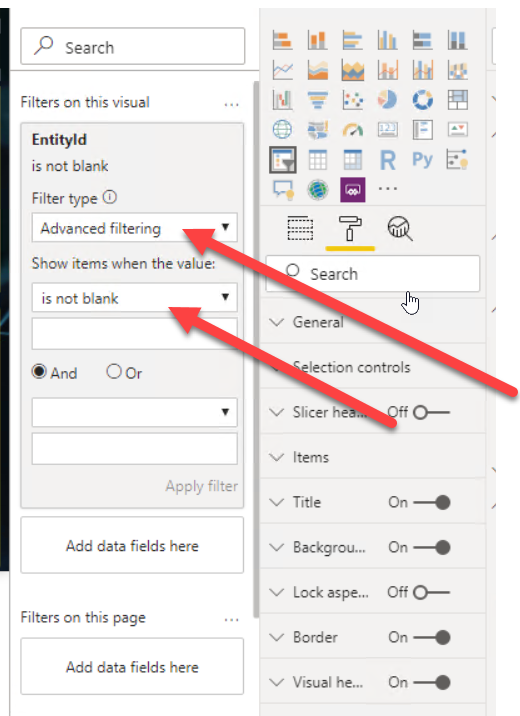
Select slicer,Expand visual filter,and select advance filter and and select is not blank.

Custom Column, If Statement Power BI

April 7, 2020 by alirazazaidi

Today I face simple requirement, I need count on Gender, Entered data most of employee did not filed Gender in ERP system. So it is decided we show These records as male.For this I have to edit query and add custom column and update its value with If Condition.

For this I have to edit Query in power BIAdd Custom column with Employee Gender and similar logic.

= if [Gender]= "None" then "Male"
else [Gender]

How to restore a Production database to the DevBox environment Dynamics 365 For Finance and Operations

March 27, 2020 by alirazazaidi

This blog post is for my notes, you can find more details on Microsoft link.

There are some extra steps in the Microsoft link, which I never used. I usually follow only these steps and it works for me. So Instead I need to search on Microsoft link. I wrote this post for my future use.

Step 1: You have to restore production database to UAT and then from uat to export it to Asset library

Step 2: Download Backpac file in specific location

Step 3:  Open Command prompt with run as administrator for locally hosted VM and go to following location

Cd C:\Program Files (x86)\Microsoft SQL Server\140\DAC\bin

Step 4: run the following command

SqlPackage.exe /a:import /sf:D:\Exportedbacpac\my.bacpac /tsn:localhost /tdn:<target database name> /p:CommandTimeout=1200

I modified the above statement as

SqlPackage.exe /a:import /sf:C:\Temp\hsauatbackup.bacpac /tsn:localhost /tdn:AxDb_6 /p:CommandTimeout=1200

Step 5: run the following command.

After the database is restored. Run the following command in SQL Server management

CREATE USER axdeployuser FROM LOGIN axdeployuser
EXEC sp_addrolemember 'db_owner', 'axdeployuser'

CREATE USER axdbadmin FROM LOGIN axdbadmin
EXEC sp_addrolemember 'db_owner', 'axdbadmin'

CREATE USER axmrruntimeuser FROM LOGIN axmrruntimeuser
EXEC sp_addrolemember 'db_datareader', 'axmrruntimeuser'
EXEC sp_addrolemember 'db_datawriter', 'axmrruntimeuser'

CREATE USER axretaildatasyncuser FROM LOGIN axretaildatasyncuser
EXEC sp_addrolemember 'DataSyncUsersRole', 'axretaildatasyncuser'

CREATE USER axretailruntimeuser FROM LOGIN axretailruntimeuser
EXEC sp_addrolemember 'UsersRole', 'axretailruntimeuser'
EXEC sp_addrolemember 'ReportUsersRole', 'axretailruntimeuser'

CREATE USER axdeployextuser FROM LOGIN axdeployextuser
EXEC sp_addrolemember 'DeployExtensibilityRole', 'axdeployextuser'

CREATE USER [NT AUTHORITY\NETWORK SERVICE] FROM LOGIN [NT AUTHORITY\NETWORK SERVICE]
EXEC sp_addrolemember 'db_owner', 'NT AUTHORITY\NETWORK SERVICE'

UPDATE T1
SET T1.storageproviderid = 0
    , T1.accessinformation = ''
    , T1.modifiedby = 'Admin'
    , T1.modifieddatetime = getdate()
FROM docuvalue T1
WHERE T1.storageproviderid = 1 --Azure storage

DROP PROCEDURE IF EXISTS SP_ConfigureTablesForChangeTracking
DROP PROCEDURE IF EXISTS SP_ConfigureTablesForChangeTracking_V2
GO
-- Begin Refresh Retail FullText Catalogs
DECLARE @RFTXNAME NVARCHAR(MAX);
DECLARE @RFTXSQL NVARCHAR(MAX);
DECLARE retail_ftx CURSOR FOR
SELECT OBJECT_SCHEMA_NAME(object_id) + '.' + OBJECT_NAME(object_id) fullname FROM SYS.FULLTEXT_INDEXES
    WHERE FULLTEXT_CATALOG_ID = (SELECT TOP 1 FULLTEXT_CATALOG_ID FROM SYS.FULLTEXT_CATALOGS WHERE NAME = 'COMMERCEFULLTEXTCATALOG');
OPEN retail_ftx;
FETCH NEXT FROM retail_ftx INTO @RFTXNAME;

BEGIN TRY
    WHILE @@FETCH_STATUS = 0 
    BEGIN 
        PRINT 'Refreshing Full Text Index ' + @RFTXNAME;
        EXEC SP_FULLTEXT_TABLE @RFTXNAME, 'activate';
        SET @RFTXSQL = 'ALTER FULLTEXT INDEX ON ' + @RFTXNAME + ' START FULL POPULATION';
        EXEC SP_EXECUTESQL @RFTXSQL;
        FETCH NEXT FROM retail_ftx INTO @RFTXNAME;
    END
END TRY
BEGIN CATCH
    PRINT error_message()
END CATCH

CLOSE retail_ftx; 
DEALLOCATE retail_ftx; 

Delete the AXDB. Create backup.

Rename current database to AXDB

How to enabled document attached on processed records Dynamics 365 for finance and operations

March 9, 2020 by alirazazaidi

In many cases, document attachment disabled on processed records. Usually this happened with respect to business requirements. For example when Purchased order invoiced and settled in ledger, attachment add, edit and delete can be disabled. Only existing attachment can be view on these documents.But some cases we have to forcefully enabled document attachment on these processed records.

I used following code snippet to enable the document attachment.

/ <param name="args"></param>
    [PostHandlerFor(formStr(DocuView), formMethodStr(DocuView, setEnabled))]
    public static void DocuView_Post_setEnabled(XppPrePostArgs args)
    {
        FormRun formRun; 
			//= sender;
        formRun  =Args.getThis();
        formrun.design().controlName("ctrlAdd").enabled(true);
        FormDataSource      DocuRef_DS =formRun.dataSource("DocuRef");
        DocuRef_DS.allowEdit(true);
        DocuRef_DS.allowCreate(true);
        DocuRef_DS.allowDelete(true);

    }

Custom lookup UIBuilder SSRS RDP Dynamics 365 for finance and operations

March 4, 2020 by alirazazaidi

Hi, Today I have simple code snippet to create a custom lookup in SSRS Reports in Dynamics 365 for finance and operations.

public class MyUIBuilder extends SrsReportDataContractUIBuilder
{

    private DialogField vendordf,dialogbranch;
    
    MyDC     contract;
    public void postBuild()
    {
        super();

        contract = this.dataContractObject();

        // binding dialogs with contract fields

        vendordf = this.bindInfo().getDialogField(this.dataContractObject(),
            methodStr(MyDC, parmHcmPerfPeriodId));
        dialogbranch = this.bindInfo().getDialogField(this.dataContractObject(),
            methodStr(MyDC, parmOMOperatingUnitNumber));

       dialogbranch.registerOverrideMethod(methodStr(FormStringControl,lookup),methodStr(BEHCMReviewUIBuilder,divisionCodeLookup),this);

  
        vendordf.registerOverrideMethod(methodStr(FormStringControl,lookup),methodStr(BEHCMReviewUIBuilder,PerfPeriodIdLookup),this);
       
    }

    public void postRun()
    {
    
    }

 
    private void PerfPeriodIdLookup(FormStringControl divisionCodeLookup)
    {
        Query                   query = new Query();
        QueryBuildDataSource    qbd, qbdPerson;
            QueryBuildDataSource qbds;
        QueryBuildDataSource qbdsJoin;
        SysTableLookup sysTableLookup = sysTableLookup::newParameters(tableNum(HcmPerfPeriod), divisionCodeLookup);
        qbds= query.addDataSource(tableNum(HcmPerfPeriod));
          sysTableLookup.parmQuery(query);
           sysTableLookup.addLookupfield(fieldNum(HcmPerfPeriod, PerfPeriodId), true);
     
        sysTableLookup.parmQuery(query);
        sysTableLookup.parmUseLookupValue(False);
        sysTableLookup.performFormLookup();
    }

    private void divisionCodeLookup(FormStringControl divisionCodeLookup)
    {
        Query          query;
        QueryBuildDataSource  qbds,qbds1;
        SysTableLookup     sysTableLookup;
        DimensionAttribute   dimAttr;
        ;
        sysTableLookup = SysTableLookup::newParameters(tablenum(OMOperatingUnit),divisionCodeLookup);
        sysTableLookup.addLookupfield(fieldnum(OMOperatingUnit, OmoperatingunitNumber));
        sysTableLookup.addLookupfield(fieldNum(OMOperatingUnit,Name));
        query = new Query();
        qbds = query.addDataSource(tableNum(OMOperatingUnit));
        qbds.addRange(fieldNum(OMOperatingUnit, OMOperatingUnitType)).value(queryvalue(OMOperatingUnitType::OMDepartment));
        sysTableLookup.parmQuery(query);
        sysTableLookup.parmUseLookupValue(False);
        sysTableLookup.performFormLookup();
    }

}
Next Page »

Primary Sidebar

About

I am Dynamics AX/365 Finance and Operations consultant with years of implementation experience. I has helped several businesses implement and succeed with Dynamics AX/365 Finance and Operations. The goal of this website is to share insights, tips, and tricks to help end users and IT professionals.

Legal

Content published on this website are opinions, insights, tips, and tricks we have gained from years of Dynamics consulting and may not represent the opinions or views of any current or past employer. Any changes to an ERP system should be thoroughly tested before implementation.

Categories

  • Accounts Payable (2)
  • Advance Warehouse (2)
  • AI (1)
  • Asset Management (3)
  • Azure Functions (1)
  • Books (6)
  • Certification Guide (3)
  • ChatGPT (2)
  • Claude (1)
  • Customization Tips for D365 for Finance and Operations (62)
  • D365OF (60)
  • Data Management (1)
  • database restore (1)
  • Dynamics 365 (59)
  • Dynamics 365 for finance and operations (139)
  • Dynamics 365 for Operations (174)
  • Dynamics AX (AX 7) (134)
  • Dynamics AX 2012 (274)
  • Dynamics Ax 2012 Forms (13)
  • Dynamics Ax 2012 functional side (16)
  • Dynamics Ax 2012 Reporting SSRS Reports. (31)
  • Dynamics Ax 2012 Technical Side (52)
  • Dynamics Ax 7 (65)
  • Exam MB-330: Microsoft Dynamics 365 Supply Chain Management (7)
  • Excel Addin (1)
  • Favorites (12)
  • Financial Modules (6)
  • Functional (8)
  • General Journal (1)
  • Implementations (1)
  • Ledger (1)
  • Lifecycle Services (1)
  • Logseq (4)
  • Management Reporter (1)
  • Microsoft Excel (4)
  • MS Dynamics Ax 7 (64)
  • MVP summit (1)
  • MVP summit 2016 (1)
  • New Dynamics Ax (19)
  • Non Defined (9)
  • Note taking Apps (2)
  • Obsidian (4)
  • Personal Knowledge Management (3)
  • PKM (16)
  • Power Platform (6)
  • Procurement (5)
  • procurement and sourcing (6)
  • Product Information Management (4)
  • Product Management (6)
  • Production Control D365 for Finance and Operations (10)
  • Sale Order Process (10)
  • Sale Order Processing (10)
  • Sales and Distribution (5)
  • Soft Skill (1)
  • Supply Chain Management D365 F&O (5)
  • Tips and tricks (278)
  • Uncategorized (165)
  • Upgrade (1)
  • Web Cast (7)
  • White papers (4)
  • X++ (10)

Wiki

  • SCM

Copyright © 2026 · Magazine Pro On Genesis Framework · WordPress · Log in