• Skip to main content
  • Skip to primary sidebar
  • Home
  • About
  • Recommended Readings
    • 2022 Book Reading
    • 2023 Recommended Readings
    • Book Reading 2024
    • Book Reading 2025
    • Book Reading 2026
  • Supply Chain Management Guide
  • PKM
  • Microsoft Excel
  • Microsoft Copilot in Office 365
  • Public Wiki Page

Ali Raza Zaidi

A practitioner’s musings on Dynamics 365 Finance and Operations

Customization Tips for D365 for Finance and Operations

D365 Technical Training Day 2 to Day 5

July 22, 2026 by alirazazaidi

Let’s revisit the fundamentals! I’m planning to create a 28-video technical training series on Microsoft Dynamics 365 Finance & Operations (D365 F&O). The goal is to build a strong foundation for beginners and aspiring D365 developers by covering core technical concepts step by step.

🎉 The first 4 videos are now completed and available on YouTube!

Current Playlist:

  • ✅ Day 2 – Download and Configure the D365 F&O OneBox VM
  • ✅ Day 3 – Visual Studio, Models & Packages
  • ✅ Day 3 – Primitive Data Types, Extended Data Types (EDTs) & Base Enums
  • ✅ Day 4 – D365 Technical Training Day 5 How to create table in D365 Finance and operations

I’ll continue uploading the remaining videos regularly, covering topics such as tables, forms, classes, queries, data entities, integrations, debugging, best practices, and much more.

If you’re starting your journey as a D365 F&O Technical Consultant or X++ Developer, this series is designed to help you learn from the ground up.

Don’t forget to Like, Share, and Subscribe to stay updated with every new lesson!

D365 Technical Training Day 2 : How to download and configure One Box VM on your laptop

D365 Techical Training Day 3 | Visual Studio, Model, packages

D365 F&O Technical Training – Day 4 | Primitive Data Types, Extended Data Types (EDTs) & Base Enums

D365 Technical Training Day 5 How to create table in D365 Finance and operations
Embedding Websites in Microsoft Dynamics 365 Finance & Operations (D365FO)

July 1, 2026 by alirazazaidi

esterday, I worked on a small proof of concept (POC) to embed an external web page inside Microsoft Dynamics 365 Finance & Operations.

Initially, I thought the solution would require using an iframe. However, after some research, I discovered that WebsiteHostControl provides a much cleaner and more suitable approach.

The implementation is straightforward:

  1. Create a custom form.
  2. Apply the appropriate form pattern.
  3. Add a Tab control with a Tab Page.
  4. Add a Group control inside the Tab Page.
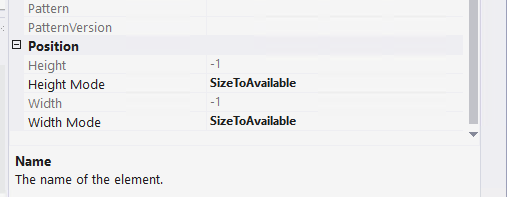
  5. Set the Group control’s Width Mode and Height Mode properties to Size to Available.

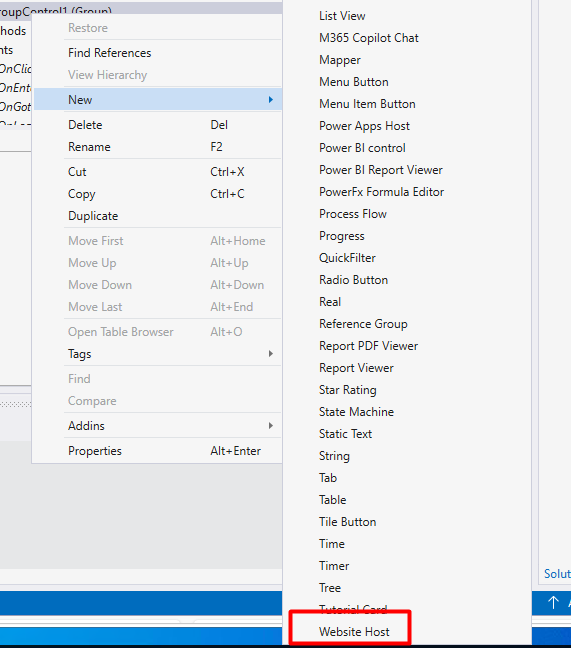
From there, you can add the WebsiteHostControl to the group and configure it to display the required external web page within the D365 Finance & Operations form.

Overall, it turned out to be much simpler than I initially expected, and WebsiteHostControl is the recommended approach for hosting external web content inside a D365 F&O form.

Then add a website host
Set its properties auto declaration to true
and Height mode and Width Mode to size to available

Inside form Initialize method just give url

public class FormTest extends FormRun
{
    /// <summary>
    ///
    /// </summary>
    public void init()
    {
        super();

        WebsiteHostControl1.url("https://www.tech.alirazazaidi.com");
    }

}


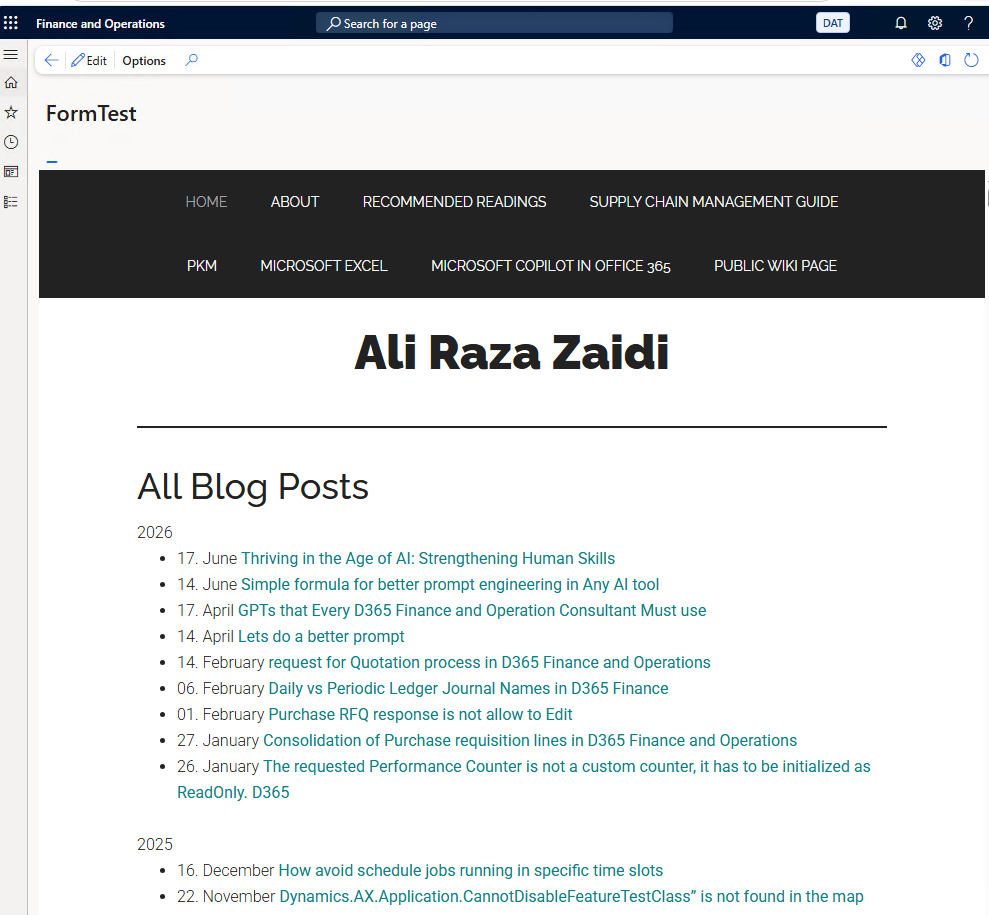
On running the form it will look like this

Json deserialize issue in service class An exception occured when invoking the operation – Type ‘Class’ is not supported by serializer. D365 Finance and operations

April 10, 2025 by alirazazaidi

Yesterday, I was working on integration, and everything was going fine. However, when I tried to retrieve a string from the DataContract, it threw an error: “Type ‘Class’ is not supported by the serializer.” The issue persisted even when I used Newtonsoft. The rest of the logic was functioning correctly.

Eventually, I discovered that the issue was due to missing AX 2012 attributes on the list’s getter/setter or parameter. Once I added those attributes, the actual getter/setter started working as expected.

 [
    DataMemberAttribute('transactions'),  
    DataCollectionAttribute(Types::Class, classStr(DSTTransactionDC))  
  ]  
  public List Parmtransactions(List _transactions = transactions)  
  {  
    transactions = _transactions;  
return transactions;
  }

I have to add following

  AifCollectionTypeAttribute('_transactions', Types::Class, classStr(DSTTransactionDC)),
  AifCollectionTypeAttribute('return', Types::Class, classStr(DSTTransactionDC))

After that getter setter become something similar

 [
    DataMemberAttribute('transactions'),  
    DataCollectionAttribute(Types::Class, classStr(DSTTransactionDC)),  
    AifCollectionTypeAttribute('_transactions', Types::Class, classStr(DSTTransactionDC)),  
    AifCollectionTypeAttribute('return', Types::Class, classStr(DSTTransactionDC))  
  ]  
  public List Parmtransactions(List _transactions = transactions)  
  {  
    transactions = _transactions;  
 return transactions;
  }

after this change, datacontract easily serialise. 
Also change attribute at class header from datacontracattribute to dataContract.

Hope you like this post.

How to apply updates on Cloud Hosted Environment D365 Finance and Operations

April 1, 2025 by alirazazaidi

I recently encountered a small functionality difference in the cloud-hosted environment.

Upon investigation, I found that the Dev machine is on 10.0.40, while the UAT environment is on 10.0.42.

This minor difference seems to be due to a Microsoft quality update. My next question is: How can I update it?

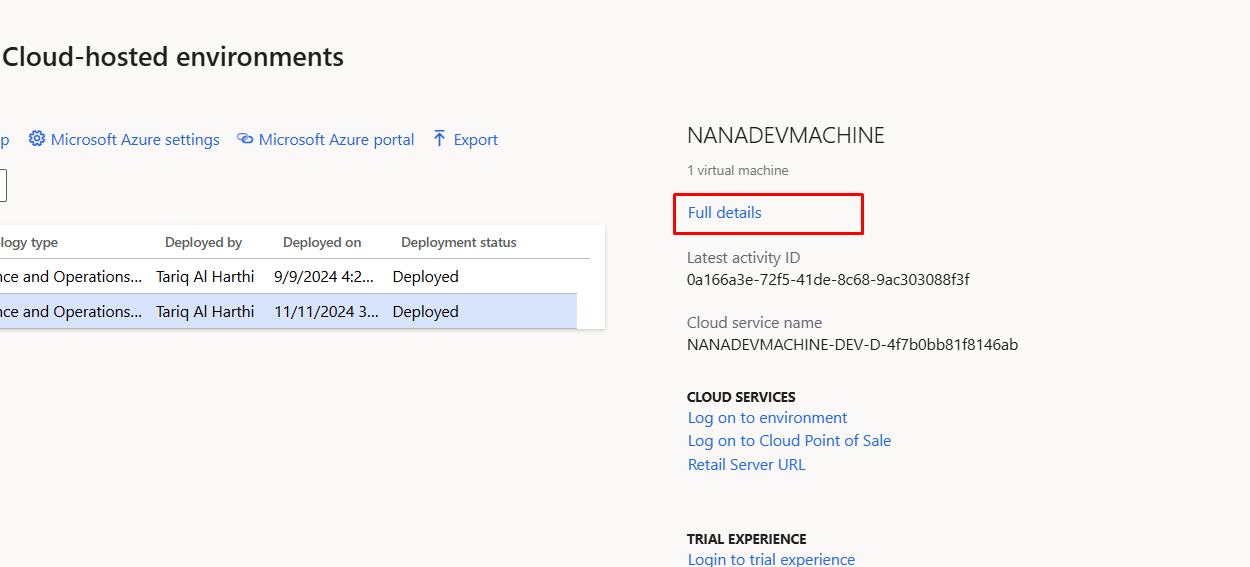
Essentially, the UAT and production environments are available on the project’s main page.

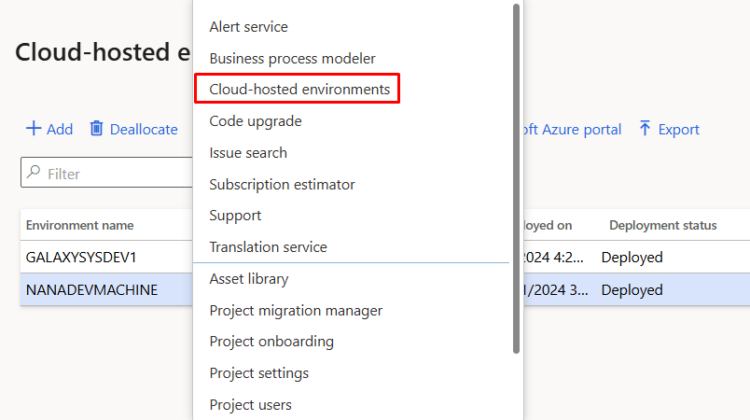
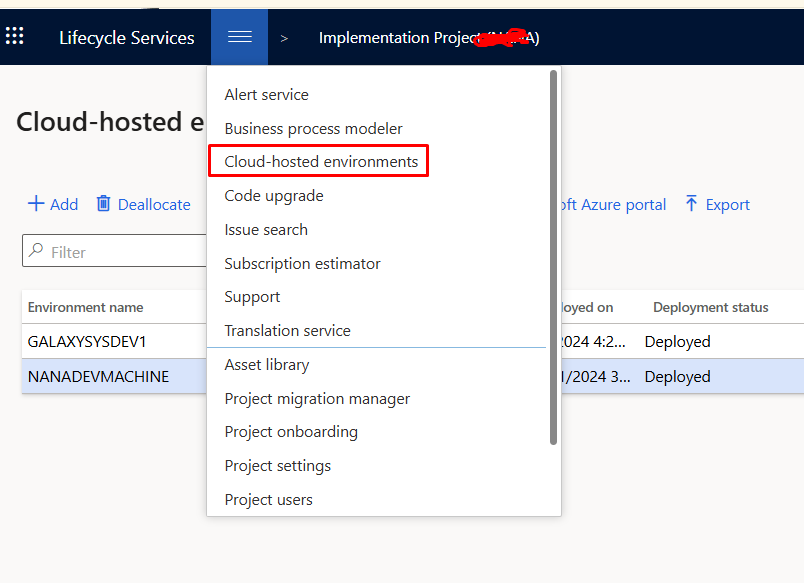
Dev machines are also cloud-hosted and can be found in the menu in LCS

After selecting the machine you need to click on Full details button

from top menu you can select and apply update.

Hope you like this small post

A Model with the same name already exists in the Metadata Store

March 19, 2025 by alirazazaidi

I learned a tough life lesson—greatness isn’t about doing big things. True greatness lies in doing small things with excellence.

Haha, this sounds familiar! I remember reading a quote from Napoleon Hill:

“If you cannot do great things, do small things in a great way.”

So here is small tip from my Personal Knowledge Management

I was importing a model to dev environment to built a common package for deployment. I found following error,

A Model with the same name already exists in the Metadata Store. Please delete the existing model if you want to install this model.

So I need to delete existing one and then import it again through command line

k:\AOSService\PackagesLocalDirectory\bin\ModelUtil.exe -delete -metadatastorepath=k:\AOSService\PackagesLocalDirectory -modelname="RanjahJogi"

After you can import model in some temp table in c drive.

k:\AOSService\PackagesLocalDirectory\bin\ModelUtil.exe -import -metadatastorepath=k:\aosservice\packageslocaldirectory -file=c:\temp\RanjahJogi.axmodel

Sales order cancellation validation through event handler X++

November 30, 2024 by alirazazaidi

Hi friends, small tip, I got chancel to add validation in Cancel functionality of D365 Finance and operations.Interestingly the menu button called the class. So I have to write the pre event handler for main method.

Following is the [[Code Snippet]]

public static void SalesCancelOrder_Pre_main(XppPrePostArgs _args)
    {
     

        Args args =_args.getArg("args");
        SalesTable salesTable = args.record();
        CustmTable _Response;

        select * from _Response where _Response.PrimaryKey == salesTable.SalesId && _Response.TransType == CustmTransType::SalesOrder;
         
        if (_Response.RecId !=0)
        {
           // validateEventArgs.parmValidateResult(false);
           Error("This sales order is integrationed with wms, Cancellation is not recommended, use the cancellation dailog for Cancel in wms.");
            if (Box::yesNo("Sales order is integrated with WMS, Do you really want to cancel it.", DialogButton::No) == DialogButton::No)
            {
                throw Exception::Error;
            }
        }

       
    }

Where is admin Provisioning tool in 10.0.39. vm

May 31, 2024 by alirazazaidi

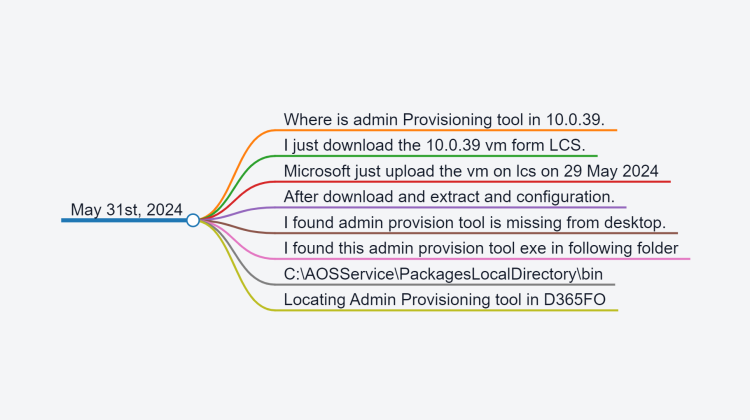
  • Where is admin Provisioning tool in 10.0.39.
  • I just download the 10.0.39 vm form LCS.
  • Microsoft just upload the vm on lcs on 29 May 2024
  • After download and extract and configuration.
  • I found admin provision tool is missing from desktop.
  • I found this admin provision tool exe in following folder
  • C:\AOSServicePackagesLocalDirectory\bin

How to configure vendor price discount group and assign to vendor

October 19, 2022 by alirazazaidi

TempDB, SrsReportDataProviderPreProcessTempDB And long Running Report Dynamics 365 Finance and operations

October 18, 2022 by alirazazaidi

Recently I got interesting issue. I developed the report based on RDP Class. I have to populate temp table. And based on this temp table I have to aggregate some calculation like sum, Average on Group by.

But when I populate another table based on this aggregation. Report starts to go long awaiting state. I dont know the reason. Later I found that I did not give active connection to temp table variables.

I added following line of code in reports and report processing reduce to less then 2 minutes

this.takeOwnershipOfTempTable(_BEGroupWiseSalarySheetTmp);
this.takeOwnershipOfTempTable(_BEBranchWiseSalarySheetTmp);

intvNo Interval method is obselete

October 10, 2022 by alirazazaidi

Code suddenly breaks. When I debug I found intvNo method which used to calculate days interval between two dates is not working.

intvNo(empLeave1.EndDate,periodStartDate,IntvScale::Day);

I have replace it with following way.

date2Num(periodEndDate) -date2Num(periodStartDate);

Next Page »

Primary Sidebar

About

I am Dynamics AX/365 Finance and Operations consultant with years of implementation experience. I has helped several businesses implement and succeed with Dynamics AX/365 Finance and Operations. The goal of this website is to share insights, tips, and tricks to help end users and IT professionals.

Legal

Content published on this website are opinions, insights, tips, and tricks we have gained from years of Dynamics consulting and may not represent the opinions or views of any current or past employer. Any changes to an ERP system should be thoroughly tested before implementation.

Categories

  • Accounts Payable (2)
  • Advance Warehouse (2)
  • AI (3)
  • Asset Management (3)
  • Azure Functions (1)
  • Books (6)
  • Certification Guide (3)
  • ChatGPT (3)
  • Claude (1)
  • Customization Tips for D365 for Finance and Operations (64)
  • D365OF (60)
  • Data Management (1)
  • database restore (1)
  • Dynamics 365 (59)
  • Dynamics 365 for finance and operations (139)
  • Dynamics 365 for Operations (175)
  • Dynamics AX (AX 7) (134)
  • Dynamics AX 2012 (274)
  • Dynamics Ax 2012 Forms (13)
  • Dynamics Ax 2012 functional side (16)
  • Dynamics Ax 2012 Reporting SSRS Reports. (31)
  • Dynamics Ax 2012 Technical Side (52)
  • Dynamics Ax 7 (65)
  • Exam MB-330: Microsoft Dynamics 365 Supply Chain Management (7)
  • Excel Addin (1)
  • Favorites (12)
  • Financial Modules (6)
  • Functional (8)
  • General Journal (1)
  • Implementations (1)
  • Ledger (1)
  • Lifecycle Services (1)
  • Logseq (4)
  • Management Reporter (1)
  • Microsoft Excel (4)
  • MS Dynamics Ax 7 (64)
  • MVP summit (1)
  • MVP summit 2016 (1)
  • New Dynamics Ax (19)
  • Non Defined (9)
  • Note taking Apps (2)
  • Obsidian (4)
  • Personal Knowledge Management (3)
  • PKM (16)
  • Power Platform (6)
  • Procurement (5)
  • procurement and sourcing (6)
  • Product Information Management (4)
  • Product Management (6)
  • Production Control D365 for Finance and Operations (10)
  • Sale Order Process (10)
  • Sale Order Processing (10)
  • Sales and Distribution (5)
  • Soft Skill (1)
  • Supply Chain Management D365 F&O (5)
  • Tips and tricks (278)
  • Uncategorized (165)
  • Upgrade (1)
  • Web Cast (7)
  • White papers (4)
  • X++ (10)

Wiki

  • SCM

Copyright © 2026 · Magazine Pro On Genesis Framework · WordPress · Log in