In this video, I shared complete process for sales order return.
Functional
Product Attribute Data Management D365 Finance and Operations
We are senior, or senior citizen. Most of the time, young champs do things. And we as senior, just control the situation or communicate.
We can not do everything. We need to delegate things. Today I got chance to work with a young champ to import the product attribute in a system.
I used following Data Entities
Product attribute enumeration types v3
Product attribute integer enumeration types
Attribute group
Product attributes – Specification of attribute types and attribute name
Product category attributes – combination of category and attribute on a product
Product attribute values – for attribute values assignment per product
Product entity attribute value entity – for attribute values assignment per product
Category hierarchies & product category hierarchy – for Procurement category
Internal organization product attribute values
Product category category attribute group assignments – attribute assignment on category
Product category product attribute group assignments
Currency Exchange Rate, Currency Exchange Rate Provider MSDyn365FO Dynamics 365 for Finance and operations

Hi all, Microsoft provide 3 currency Exchange rate providers, With these provider we get latest currency Exchange rates in Dynamics 365 for finance and operations. These exchange rates used when We required transactions in different currencies. In the current web cast I used one of Exchange rate provider get latest exchange rates. Its works excellent in my local laptop hosted VM. My English is improving day by day so bear with me.
Disable Editing Options for BOM, D365 for Finance and Operations

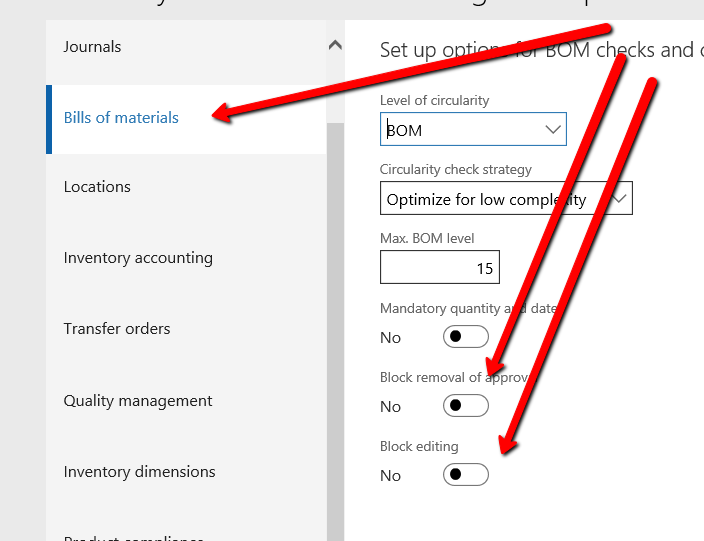
On the Business requirement, We can stop editing functionality for Approved BOM Item.
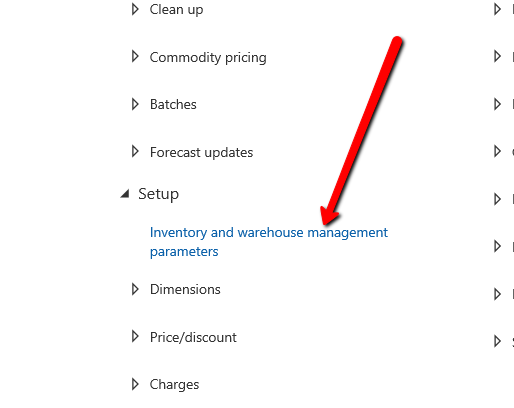
For This you have to visit
Inventory Management and warehouse management Parameter form.
And Enable following options boxes. In Bills of materials Block removal of approval and Block Editing.
Purchase order Preparation Workspace In D365 for finance and operations
Dynamics 365 for Finance and operations has amazing feature of Workspaces. Workspace contains all possible option related to one task. For example if we explore “Purchase Order Preparation” Workspace in “Procurement and sourcing” module. You find all options related to Purchase order.
Here workspaces divided into three section. Summary section, tabbed detail section and related link. If you access workspaces on Cloud. Certainly you will find here power BI section. With different Bars and Charts. I using Dynamics 365 for finance and operations on dev box on my laptop. So this feature is not enabled
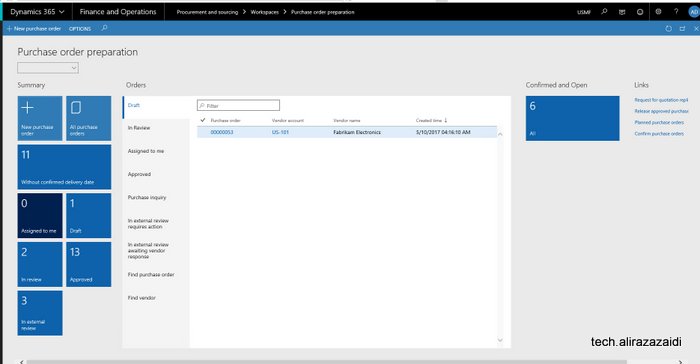
If we see Summary section. It will leads us to New purchase order screen, All Purchase Orders, And some other status, that orders without Confirm Delivery Date. Approved and review or external review.
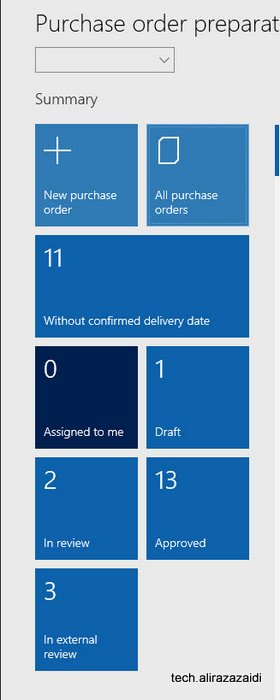
If we click any one of Summary boxes, these leads us to list pages. For example I clicked on in review box. This will leads to list page and detail of in review records are shown there.
If we click on All purchase orders, this leads us to list page, for example If I click on in review purchase orders. This will leads us to page these two in review records are showing.
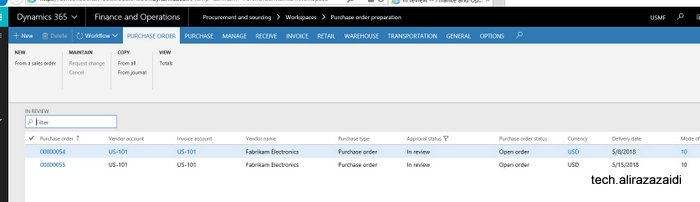
If We can see Workspace in detail, we found some tab, which shows the similar details. It is powerful and light weight feature. There are multiple grids and it load data in a few seconds.

Here I found two workflow related tabs . For example purchase order assigned to current user can be shown in “Assign to me” screen.
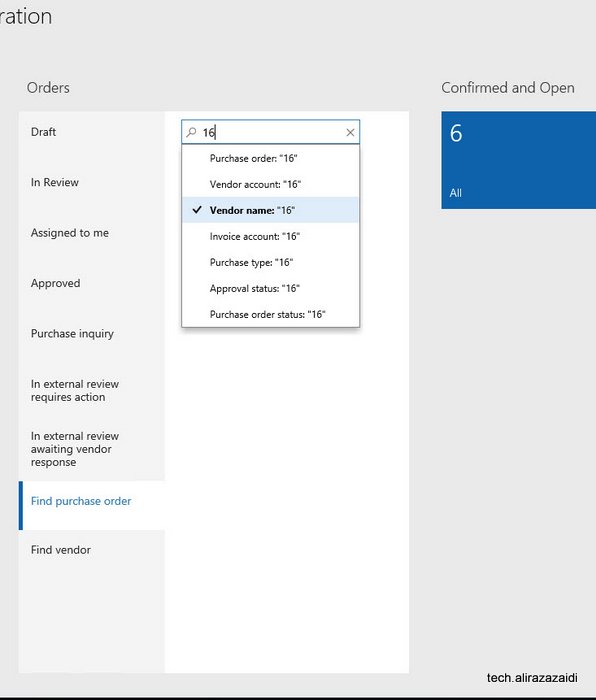
This workspace concept is amazing, It contains Inquiries , and list page on single list. For example you can search Purchase order in drop down.
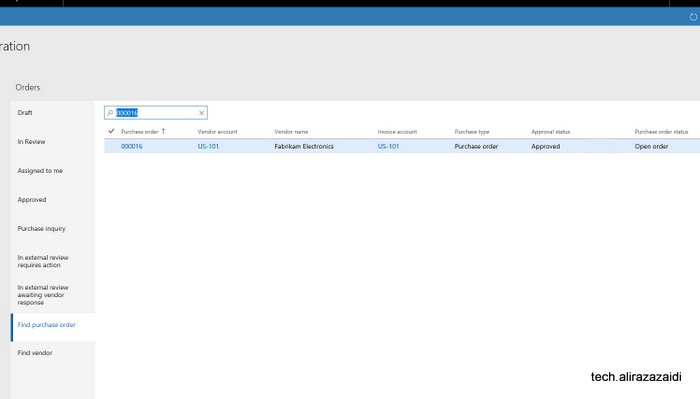
And Search result is here.
Sales Quotations Dynamics 365 for Finance and operations.
In response to Customer/ prospect request for quotation. Sale and marketing department generate Sales Quotations.
This Sales quotation can be generate existing customer. Otherwise D365 OF provide functionality to register sales Quotation against Prospect.

When Customer Response against Sales Quotation, We can confirm Sales Quotation convert to Sales Sale order and Prospect convert to Customer.
Similar to Sales order , Sale quotation is added in lines section. When entry is complete, from top menu and sent Sales quotation, Print can be generated.

There are multiple options available against Sales Quotations as response. We can find these options are available on “follow up” top tab menu.
Confirm:, Customer send confirmation so Sales Quotation convert to into Sales Order.
Cancel: Sales Quotations can be cancel, possible there will be no response form Prospect.
Lost quotation: In the case of another company won the quotation we can set as Lost. It is some kind of cancel. After that quotation is closed for edit.
Two options also found in sales and marketing parameter form.

You find in General tab

Days campaign expire, means sales quotation automatic expire the create of sales quotation.
Sales follow up date automatically created quotation creation date plus date mentioned here.
Sales follow up means, date of sales Quotation is created plus days mentioned here in setup.
Customer in Dynamics 365 for Finance and Operations
Every organization sold product or services to Customer. These Customer are main source of income to these organization. In Dynamics 365 for finance and operations we can create customer in Account receivable and sales and marketing modules. Customer basic information is saved per legal entity but his Name, address and contact save in global address book. That can be reusable in different legal entity with new customer account.
We can define customer from Account Receivable => Customer => All Customer

Sales and Marketing => Customers => All customers
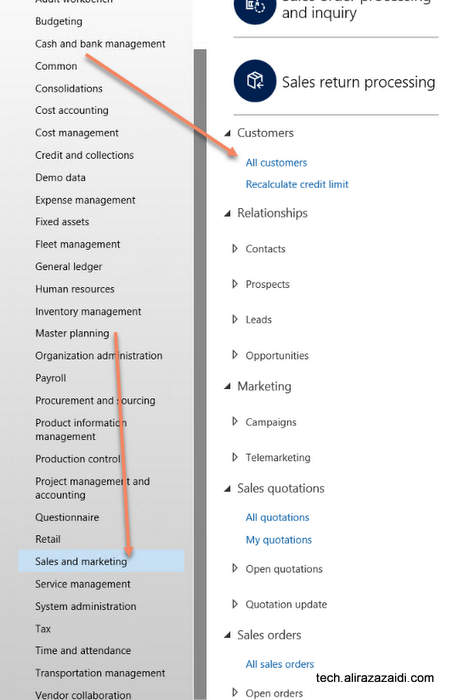
If we open the customer list page, similar page will be appear. This page can be used as inquiry too. The customer created here will be used for sales, payment, Invoices and ledger accounts. Customer information can be changed any time.

Every Customer is created with unique id in Customer Account. Default size of Customer Account is 20.
By clicking on new button from top menu , on list page a dialog opens where we can enter basic information. boxes with red boundaries are mandatory. Customer can be organization or individual entry. As I already mentioned that Customer Name, address and even contacts are global across application.
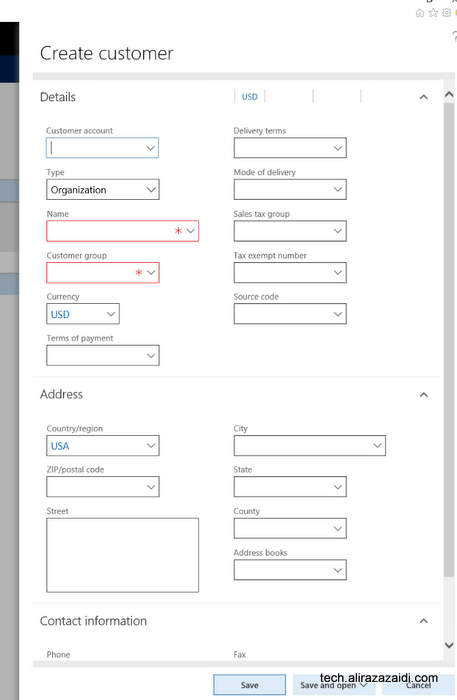
There are multiple options available on save . Default option is save and go in detail page.
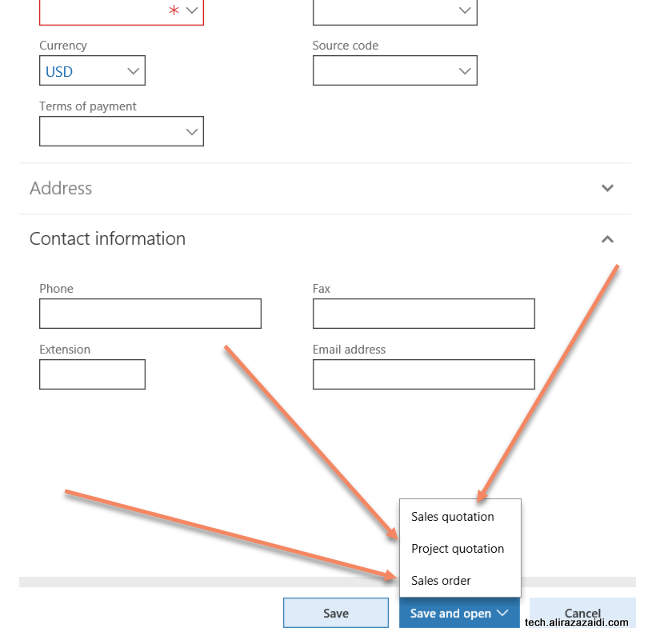
Other options are as follow
-Sales Quotations : Where we create Sales Quotations and start to enter the Sales quotations send to Customer in response to its RFQ.
-Project Order: Where customer saved and Project Quotations detail form opens.
-Sales Order: Customer Record saved and new sale order created against Customer and it goes directly Sales order detail page.
On click at Edit button to leads customer detail page in edit mode. We can modify information and save. This edit mode can available on detail page also.
Out of the box Customer detail will be something similar
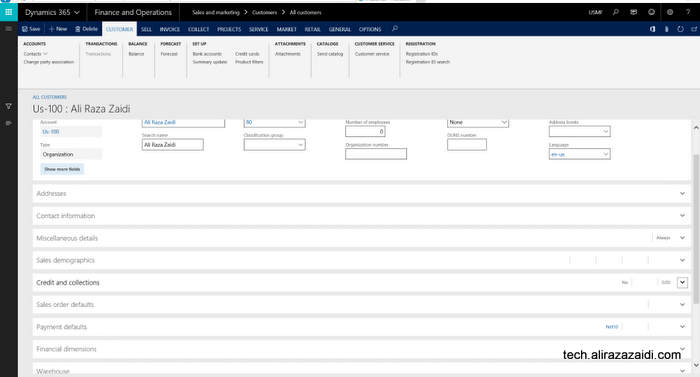
Customer Information and Contact:
Contact and Address can be added from Addresses and Contact information.
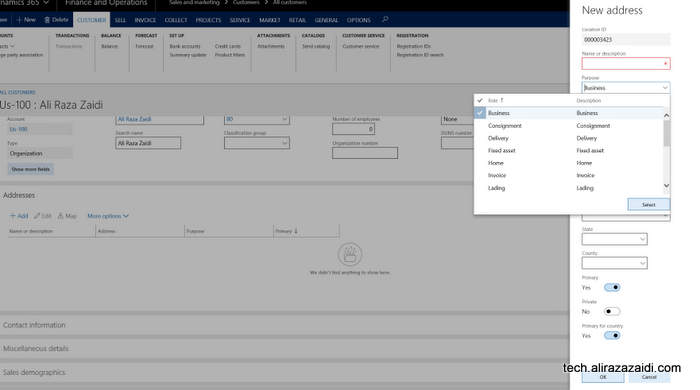
Invoice and delivery Information of Customer:
Some cases, we invoice the customer other then customer It self. Some times Same customer purchase things with different customer Account. In that case we invoiced shipment to another customer Id. For this purpose Dynamics 365 for finance provide Invoice Account in “Invoice and delivery” fast tab.
In the case of Invoice account not set in Invoice and Delivery fast tab then Invoice will be created against Customer Account as default.
The delivery terms, mode of delivery, receipt calendar can be specified in the Delivery area. This information will default to the sales order header.
If you want to calculate Sales tax against customer Invoice, you have to set Sales tax in Invoice and Delivery fat tab.

Customer Payment Information:
Payment management options can set in customer Payment fast tab
You can set
- Terms of payment
- Method of payment
- Payment specification
- Payment schedule.
- Payment day
- Cash discount. A cash discount is used as an incentive for customers that pay
- before due date.
- Bank account
- Bank account number

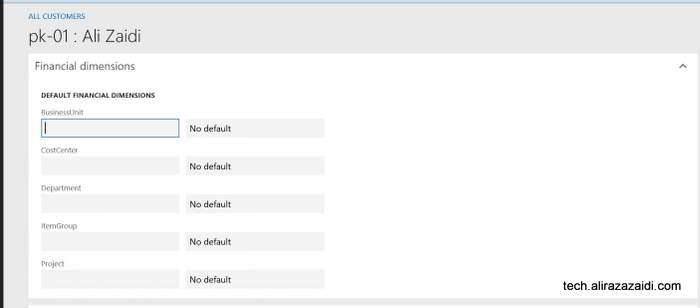
Customer Financial Dimension:
Customer financial dimension can be set from financial Dimension fast tab. These financial dimension automatically copied in sale order and customer invoices if they are set at customer level. These financial dimension can be modify and over right.
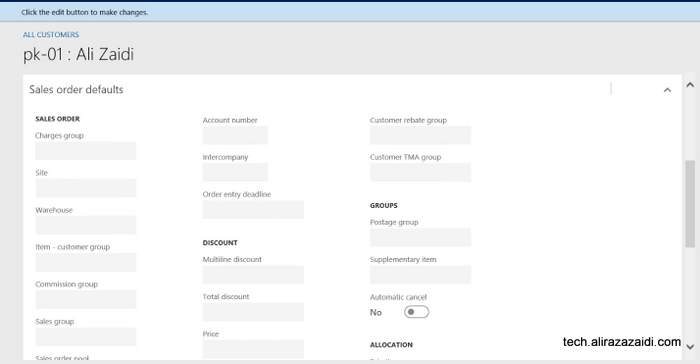
Sales order related default settings:
From Sale Order Defaults fast tab, you can set Preferred shipped from ware house and site and also Bill to customer. Bill to customer can be set in account number. This account number will be copied to Sale order header instead of customer own Account number. It means, we can set different Account for bill to customer .
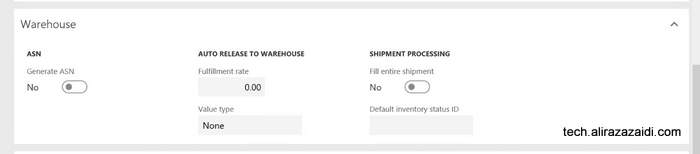
Ware house management Fast tab.
Here we can set Ware house management level information. Fast tab related to Advance ware house management module.
Following options are here.
ASN : Means, Advance shipment notification generate for customer.
Fulfillment rate. The threshold required before releasing to Warehouse.
Value Type: Fulfillment rate apply to Price, Quantity or to None.
Fill entire shipment- shipment processing parameter to control fully shipment allocation during work creation.
Default status id – default status for inventory transaction.
Customer Credit limit in Dynamics 365 for Finance and Operations

We can set credit limit for customer. Customer can purchase product or services up to certain limit. Even D365 for finance and operations provide us option to generate error message and stop processing of Sale order or just show error message and let the transaction happened.
For this you have to enable customer credit limit option from Account Receivable => step up => Account Receivable parameters.

In Account receivable parameter form, you can found Credit limit option in Credit Rating menu

If you explore Credit limit type you find following options

On selecting None, which is default means, credit limit functionality is disabled. Balance means, credit limit check against
Customer current balance, Next option is balance plus amount generated against packing slip and Product Receipt.
Third option is Balance + all include Packing slip, sale order and transaction activities.
Next option is when message exceeding the limit

We find one more option is on this page. This option is either apply credit limit on free text Invoice on .

Now we can set credit limit on Customer page, For this open required Customer and form detail page you can update credit limit. You can find Credit limit in Credit and collections fast tab

For more detail explore following link: