• Skip to main content
  • Skip to primary sidebar
  • Home
  • About
  • Recommended Readings
    • 2022 Book Reading
    • 2023 Recommended Readings
    • Book Reading 2024
    • Book Reading 2025
  • Supply Chain Management Guide
  • PKM
  • Microsoft Excel
  • Microsoft Copilot in Office 365
  • Public Wiki Page

Ali Raza Zaidi

A practitioner’s musings on Dynamics 365 Finance and Operations

Dynamics Ax 2012 R3

Dynamics AX2012 R3 – Virtual Machine download links

September 9, 2014 by alirazazaidi

Hello everybody!

Form the following links you can download the Microsoft Dynamics Ax2012 R3 with Demo data.


CostumerSource

https://mbs.microsoft.com/customersource/northamerica/AX/downloads/service-packs/AX2012DemoToolsMaterials


PartnerSource

https://mbs.microsoft.com/partnersource/northamerica/sales-marketing/demo-tools/virtual-machines/AX2012DemoToolsMaterials


Enjoy to discover numerous new features included in this new version!

How to get data from those AX tables which are not appear in SQL server

September 9, 2014 by alirazazaidi

During customization in Dynamics we usually check that what data store in Tables. For this I am more found of using SQL server then using table explore in AOT.  When we upgrade code from Dynamics Ax 2012 to R2, We found that many tables did not appear in SQL Server. Examples are EcoResProduct , BankLCImport and BankLCImportLine table.

It is not recommended by Microsoft to bypass Dynamics Ax 2012 and direct query on tables in Sql server. But sometimes it is requirement to get data direct form Sql Server. We finally found that if we build view in Dynamics on those tables either by creating Queries or by directly on table. These views are available in SQL Server. We can use that custom View in our query instead of tables in Sql server.

Dynamics Ax View :You are not authorized to access table. Contact your system administrator.

September 8, 2014 by alirazazaidi

Yesterday, I got error when I run the view which created on “” table  in Dynamics Ax 2012

9-9-2014 12-20-34 AM

“You are not authorized to access table ‘VBankLCImport’ (VBankLCImport). Contact your system administrator”.

Error was misleading because in development environment User have full access rights. And this error is not appear while running any view.

I also reset the license key, but problem does not resolve.

Finally it revealed that this error appear due to no field is added inside the view. I select the one key and drag and drop on fields in view section. Then right click on view. It successfully show me the values.

9-9-2014 12-21-42 AM

Currency exchange rate setup in Dynamics AX 2012

September 4, 2014 by alirazazaidi


We can create transaction entries in different currency. For Example default currency set of Legal entity is “USD” and we have to create Purchase Order in Pak Rupees.

For this purpose we have to create exchange in Dynamics Ax.

The link of currency exchange is Ledger module, in Setup section and under currency. You can saw it as follow.

Link


Click on Currency exchange rates


Empty Selection

Select “Default” from Exchange rate Type. By default application exchange rate from “Default”. And then click on New Button, from right pane select From Currency to USD and To Currency select PKR.

By Default From date Set to “Current Date” and To Date set one month to after current Day. You can modify it as per your requirement.

In current scenario 1 USD is equal to 150 Pak rupee.

Date

There is also Start Date which is used as effective date, It means, between from date and to Date we can use multiple exchange rate.


Now you can create Purchase Order in Pak rupees, The Values are automatically converted into Pak rupees.

To verify that we create two Purchase order first in USD and second one in Pak rupees and verify that Item price are came in different values.


First we create Purchase Order with USD dollar and then create PO with and see the purchase Item price.

PO with USD dallor


Purchase Price

Now we create Purchase Order in Pak rupees and see the unit price.

PakRuppee


Purchase Price in PakRuppee

How to Use AX Form As lookup in Dynamics Ax 2012

August 27, 2014 by alirazazaidi

Consider a scenario where, I required a StringEditControl and Clicking on Control a lookup is open where the list of Customer of selected Legal Entity are available. And After Selecting required Customer, Customer Id Or AccountNum is return form Lookup form.


For This purpose we have to create form, which will used as look Up.


Create a New form. Name It  “FormCustomerLookUp”

New Form

In Data Source Create and New dataSource Name It CustomerTable and Point to CustTable.


Customer Table As DataSource

Expand the Design node  and Right Click on It and Add Grid, Now from CustomerTable Data Source, Drag and drop “AccountNum” and “Party” on Grid. It will create two String Edit Control on Grid bound with CustomerTable.


CustomerFields

Now Select on “StringEdit:CustomerTable_AccountNum” select Properties. Form Properties window Set Its Auto declaration  property to True.


LookUpFieldAutoProperties

Now expend the Methods Node form and Right click and override the Init method from there and add following line of code there.


    element.selectMode(CustomerTable_AccountNum);


LookUpFormInitialization


Now right click on Design Node and Update following properties.

Width=360

Style=LookUP.

StyleToLookUp


Now Create a form where this lookup will use. For this Article I have to create very simple form with only on stringEdit textbox.

On its Design Right click and create StringEditButton with Name “LookUpTest” and from Its property window Auto Declare Property is set to Yes and lookupButton property to “Always”.


TargetFieldProperties


LookUpFields


Now Add two method, One used to Register control with Lookup, and Second method will use to call lookup form and gets its value.

protected void configureCustomerLookUp(FormStringControl stringControl)

{

if (stringControl)

{


stringControl.visible(true);

stringControl.registerOverrideMethod(

methodStr(FormStringControl, lookup),

identifierStr(CustomerLookUp), this);


}

}

LookupRegisteration


Second method will be called on lookup button click


private void CustomerLookUp(FormStringControl stringControl)

{

Args args = new Args(identifierStr(FormCustomerLookUp));

FormRun lookupFormRun;


args.parm(“”);

args.caller(this);


lookupFormRun = ClassFactory::formRunClassOnClient(args);

lookupFormRun.init();


stringControl.performFormLookup(lookupFormRun);

lookupFormRun.wait();


}

LookUpMethods

If you have already some knowledge above code is easily Understanable, where  Ax form Name set in args and instance of from is created at runtime and then attached the form to string controls performLookUp method.


Now run the form. And click on lookup button on textbox.

TargetButtonForm


Click on LookUp Button


LookUpClick

Selected Value will show on text box when you click on lookup grid


SelectedValueInTarget


Nice Experiments, Now you can use This functionality as you want,


Import Export Model with Dynamics Ax 2012 R3

August 21, 2014 by alirazazaidi

As per my understanding for commands, Examples are more easily understand and quick solution instead of syntax.


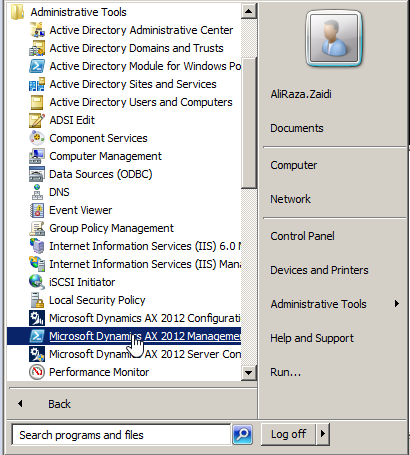
For model store export/import we have to use Dynamics Ax Management Shell. You can find “Dynamics Ax Management Shell” at  All Programs, Administrative Tools and Microsoft Dynamics Ax Management Shell.

Dynamics Ax Management Shell


Export Command Syntax  (Windows PowerShell) :

Export-AXModel –Model <name> -File <Filename.axmodel>

Example : abcd is name of Model, file name can be different model store name.

Export-AXModel -model  abcd -file c:\abcd.axmodel


Import Command Syntax (Windows PowerShell)


Install-AXModel -File <Filename.axmodel> -Details


Exmaple :

Install-AXModel -File C:\abcd.axmodel –Details


In the case of some files exist in another model then add “-Conflict Push”


The complete command is here


Install-AXModel -File C:\abcd.axmodel -Details -Conflict Push

How to clear inactive sessions from Dynamics Ax 2012

August 19, 2014 by alirazazaidi

If you check the online user in Administrator Module, You may be found some session with inactive and block status. These inactive and block session are due to crashing of AX clients. These sessions are not create any problem, but possible issues with limited number of active users under Dynamics Ax license. Best approach to clear these inactive and block session form Dynamics Ax to avoid any future conflict with Licensing. All these session information is stored in “SysClientSessions.” Table.

Second Problem we usually face that when we start AOS service, it take too much time change status from Starting to started. One of many reason for this phenomena that AX try to query and located any Active session in SysClientSessions.  To reduce the time is to remove all session inactive from SysClientSessions table or possible remove the inactive and block session form Database. In “SysClientSessions” Status with status 0 (Inactive), Status 2 (Ending Waiting for AOS), 3 (Ending –Block).


Perform following steps.

  1. Stop AOS service.
  2. Open SQL Server Management Studio
  3. Open any new query on Dynamics Ax Database.
  4. Run the following Query where sessions with status 0 (Inactive), Status 2 (Ending Waiting for AOS), 3 (Ending –Block).

delete from SysClientSessions where status in(0,2,3)

  1. Restart AOS.

Hopes this will works to start AOS service faster than previously.

Dynamics Ax 2012 R3 System Requirements

August 15, 2014 by alirazazaidi

System Requirements for Microsoft Dynamics Ax 2012 R3 Updated by Microsoft. For this purpose Microsoft uploaded a new document , you can download it from this link

http://www.microsoft.com/en-pk/download/details.aspx?id=11094

How to get Standard SQL out from Query Object in AOT?

August 15, 2014 by alirazazaidi

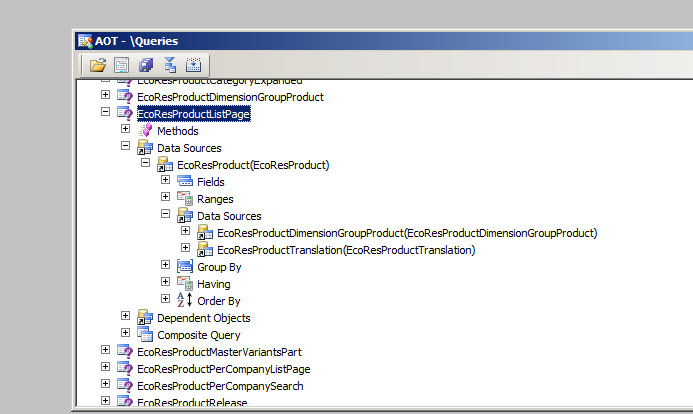
We can get standard sql from AOT Query object through X++ code.

Following X++ Code used to get Standard Sql out of EcoResProductListPage


EcoResProductListPage

static void Job2(Args _args)

{

Query query;

query = new Query(queryStr(EcoResProductListPage));

info(query.dataSourceNo(1).toString());

}

QueryInfo


Book “Inside Microsoft Dynamics Ax 2012 R3” is now available

August 13, 2014 by alirazazaidi

Updated version for “Inside Microsoft Dynamics Ax 2012” is now out. It is updated for AX 2012 R3 version.

What’s new :Inside Microsoft Dynamics AX 2012 R3

  • It include a new chapter about developing companion apps.
  • It include a new chapter about application life cycle.
  • A new sections about LINQ support and print management.


You can purchase inline from:

  • The Microsoft Press Store
  • Google Play Store
  • Amazon


« Previous Page
Next Page »

Primary Sidebar

About

I am Dynamics AX/365 Finance and Operations consultant with years of implementation experience. I has helped several businesses implement and succeed with Dynamics AX/365 Finance and Operations. The goal of this website is to share insights, tips, and tricks to help end users and IT professionals.

Legal

Content published on this website are opinions, insights, tips, and tricks we have gained from years of Dynamics consulting and may not represent the opinions or views of any current or past employer. Any changes to an ERP system should be thoroughly tested before implementation.

Categories

  • Accounts Payable (2)
  • Advance Warehouse (2)
  • AI (1)
  • Asset Management (3)
  • Azure Functions (1)
  • Books (6)
  • Certification Guide (3)
  • ChatGPT (2)
  • Claude (1)
  • Customization Tips for D365 for Finance and Operations (62)
  • D365OF (60)
  • Data Management (1)
  • database restore (1)
  • Dynamics 365 (59)
  • Dynamics 365 for finance and operations (139)
  • Dynamics 365 for Operations (174)
  • Dynamics AX (AX 7) (134)
  • Dynamics AX 2012 (274)
  • Dynamics Ax 2012 Forms (13)
  • Dynamics Ax 2012 functional side (16)
  • Dynamics Ax 2012 Reporting SSRS Reports. (31)
  • Dynamics Ax 2012 Technical Side (52)
  • Dynamics Ax 7 (65)
  • Exam MB-330: Microsoft Dynamics 365 Supply Chain Management (7)
  • Excel Addin (1)
  • Favorites (12)
  • Financial Modules (6)
  • Functional (8)
  • General Journal (1)
  • Implementations (1)
  • Ledger (1)
  • Lifecycle Services (1)
  • Logseq (4)
  • Management Reporter (1)
  • Microsoft Excel (4)
  • MS Dynamics Ax 7 (64)
  • MVP summit (1)
  • MVP summit 2016 (1)
  • New Dynamics Ax (19)
  • Non Defined (9)
  • Note taking Apps (2)
  • Obsidian (4)
  • Personal Knowledge Management (3)
  • PKM (16)
  • Power Platform (6)
  • Procurement (5)
  • procurement and sourcing (6)
  • Product Information Management (4)
  • Product Management (6)
  • Production Control D365 for Finance and Operations (10)
  • Sale Order Process (10)
  • Sale Order Processing (10)
  • Sales and Distribution (5)
  • Soft Skill (1)
  • Supply Chain Management D365 F&O (5)
  • Tips and tricks (278)
  • Uncategorized (165)
  • Upgrade (1)
  • Web Cast (7)
  • White papers (4)
  • X++ (10)

Wiki

  • SCM

Copyright © 2026 · Magazine Pro On Genesis Framework · WordPress · Log in