• Skip to main content
  • Skip to primary sidebar
  • Home
  • About
  • Recommended Readings
    • 2022 Book Reading
    • 2023 Recommended Readings
    • Book Reading 2024
    • Book Reading 2025
  • Supply Chain Management Guide
  • PKM
  • Microsoft Excel
  • Microsoft Copilot in Office 365
  • Public Wiki Page

Ali Raza Zaidi

A practitioner’s musings on Dynamics 365 Finance and Operations

X++

Microsoft Dynamics AX 2012 Xpp – Products Import

March 20, 2014 by alirazazaidi

Purpose: The purpose of this document is to illustrate how to write X++ code in Microsoft Dynamics AX 2012 in order to import Products and Released products.
Challenge: Data model changes in Microsoft Dynamics AX 2012 related to high normalization and introduction of surrogate keys made some imports more complex. In order to create a product in Microsoft Dynamics AX 2012 both product definition and released product information will have to be provided. Please note that in Dynamics AX 2012 Rich Client product definition is automatically created when released product is created using decentralized approach.
Solution: Appropriate tables buffers (EcoResProduct, EcoResDistinctProduct, InventTable, etc) will be used when writing X++ code in Microsoft Dynamics AX 2012 in order to import Products and Released products. Alternatively AxBC classes may be used instead of table buffers.
Assumption: The assumption is that appropriate reference data such as item groups, etc. was created in advance.
Data Model:
Table Name
Table Description
EcoResProduct
The EcoResProduct table stores products and is the base table in the products hierarchy.
EcoResProductIdentifier
The EcoResProductIdentifier table contains a product identification that is available for users.
EcoResDistinctProduct
The EcoResDistinctProduct table stores products.
EcoResStorageDimensionGroup
The EcoResStorageDimensionGroup table contains information about a storage dimension group.
EcoResTrackingDimensionGroup
The EcoResTrackingDimensionGroup table contains information about a tracking dimension group.
EcoResStorageDimensionGroupProduct
The EcoResStorageDimensionGroupProduct table contains information about the associations between products and storage dimension groups.
EcoResTrackingDimensionGroupProduct
The EcoResTrackingDimensionGroupProduct table contains information about the associations between products and tracking dimension groups.
EcoResStorageDimensionGroupItem
The EcoResStorageDimensionGroupItem table contains information about the associations between items and storage dimension groups.
EcoResTrackingDimensionGroupItem
The EcoResTrackingDimensionGroupItem table contains information about the associations between items and tracking dimension groups.
InventTable
The InventTable table contains information about items.
InventTableModule
The InventTableModule table contains information about purchase, sales, and inventory specific settings for items.
InventItemLocation
The InventItemLocation table contains information about items and the related warehouse and counting settings. The settings can be made specific based on the items configuration and vary from warehouse to warehouse.
InventItemSalesSetup
The InventItemSalesSetup table contains the default settings for items, such as site and warehouse. The values are related to sales settings.
InventItemInventSetup
The InventItemInventSetup table contains the default settings for items, such as site and warehouse. The values are related to inventory settings.
InventItemPurchSetup
The InventItemPurchSetup table contains the default settings for items, such as site and warehouse. The values are related to purchase settings.
InventItemSetupSupplyType
The InventItemSetupSupplyType table contains information about the sourcing of items.
InventModelGroupItem
The InventModelGroupItem table contains information about the associations between items and item model groups.
InventItemGroupItem
The InventItemGroupItem table contains information about the associations between items and item groups.
InventDim
The InventDim table contains values for inventory dimensions.
 
Data Model Diagram:
<![if !vml]><![endif]>
Zoom
VSD: https://docs.google.com/open?id=0B3rbAZy5q2ExMWUzOGM4ZDEtNzE2OS00Yzk2LWIxYzEtOTkzNTU3M2RiZTMw
Red area highlights tables forming Products and Product Masters data model
Green area highlights tables forming Released Products data models
Blue area highlights tables implementing Product Dimensions data model
 
Development:
ttsBegin: Use ttsBegin to start a transaction.
clear: The clear method clears the contents of the record.
initValue: The initValue method initializes the fields of the record.
initFrom*: The initFrom* methods usually populate the fields of the child record based on the fields on the parent record. Example is initFromEcoResProduct method on InventTable table.
validateWrite: The validateWrite method checks whether the record can be written.
write: The write method writes the record to the database.
insert: The insert method inserts the record into the database.
doInsert: The doInsert method inserts the record into the database. Calling doInsert ensures that any X++ code written in the insert method of the record is not executed. Calling insert always executes the X++ code written in theinsert method of the record.
ttsCommit: Use ttsCommit to commit a transaction.
Source code:
 
Products and Released products
 
static void ProductsXppImport(Args _args)
{
    #define.ProductNum()
    #define.SearchName()
    #define.StorageDim()
    #define.TrackingDim()
    #define.ItemId()
    #define.NameAlias()
    #define.ModelGroup()
    #define.ItemGroup()
    EcoResDistinctProduct               ecoResDistinctProduct;
    EcoResProductIdentifier             ecoResProductIdentifier;
    EcoResStorageDimensionGroupProduct  ecoResStorageDimensionGroupProduct;
    EcoResTrackingDimensionGroupProduct ecoResTrackingDimensionGroupProduct;
    InventTable                         inventTable;
    InventTableModule                   inventTableModule;
    InventItemSetupSupplyType           inventItemSetupSupplyType;
    EcoResStorageDimensionGroupItem     ecoResStorageDimensionGroupItem;
    EcoResTrackingDimensionGroupItem    ecoResTrackingDimensionGroupItem;
    InventModelGroupItem                inventModelGroupItem;
    InventItemGroupItem                 inventItemGroupItem;
    try
    {
        //Product
        ecoResDistinctProduct.clear();
        ecoResDistinctProduct.initValue();
        ecoResDistinctProduct.ProductType = EcoResProductType::Item;
        ecoResDistinctProduct.DisplayProductNumber = “Alex”;
        ecoResDistinctProduct.SearchName = “Alex”;
        if (ecoResDistinctProduct.validateWrite())
        {
            ecoResDistinctProduct.insert();
            ecoResProductIdentifier.clear();
            ecoResProductIdentifier.initValue();
            ecoResProductIdentifier.ProductNumber = “Alex”;
            ecoResProductIdentifier.Product = ecoResDistinctProduct.RecId;
            ecoResProductIdentifier.insert();
            //Storage dimension group
            ecoResStorageDimensionGroupProduct.clear();
            ecoResStorageDimensionGroupProduct.initValue();
            ecoResStorageDimensionGroupProduct.Product = ecoResDistinctProduct.RecId;
            ecoResStorageDimensionGroupProduct.StorageDimensionGroup = EcoResStorageDimensionGroup::findByDimensionGroupName(“Con-Dim”).RecId;
            if (ecoResStorageDimensionGroupProduct.validateWrite())
            {
                ecoResStorageDimensionGroupProduct.insert();
            }
            //Tracking dimension group
            ecoResTrackingDimensionGroupProduct.clear();
            ecoResTrackingDimensionGroupProduct.initValue();
            ecoResTrackingDimensionGroupProduct.Product = ecoResDistinctProduct.RecId;
            ecoResTrackingDimensionGroupProduct.TrackingDimensionGroup = EcoResTrackingDimensionGroup::findByDimensionGroupName(“Con-Dim”).RecId;
            if (ecoResTrackingDimensionGroupProduct.validateWrite())
            {
                ecoResTrackingDimensionGroupProduct.insert();
            }
            EcoResProductTranslation::createOrUpdateTranslation(ecoResDistinctProduct.RecId, “Alex”,”Alex”);
            //Released product
            inventTable.clear();
            inventTable.initValue();
            inventTable.initFromEcoResProduct(ecoResDistinctProduct);
            inventTable.ItemId = “Alex”;
            inventTable.NameAlias = “Alex”;
            if (inventTable.validateWrite())
            {
                inventTable.insert();
                //Inventory model group
                inventModelGroupItem.clear();
                inventModelGroupItem.initValue();
                inventModelGroupItem.ItemDataAreaId = inventTable.dataAreaId;
                inventModelGroupItem.ItemId = inventTable.ItemId;
                inventModelGroupItem.ModelGroupId = “FIFO”;
                inventModelGroupItem.ModelGroupDataAreaId = curext();
                inventModelGroupItem.insert();
                //Item group
                inventItemGroupItem.clear();
                inventItemGroupItem.initValue();
                inventItemGroupItem.ItemDataAreaId = inventTable.dataAreaId;
                inventItemGroupItem.ItemId = inventTable.ItemId;
                inventItemGroupItem.ItemGroupId = “Parts”;
                inventItemGroupItem.ItemGroupDataAreaId = curext();
                inventItemGroupItem.insert();
                //Extended product details – Inventory
                inventTableModule.clear();
                inventTableModule.initValue();
                inventTableModule.ItemId = inventTable.ItemId;
                inventTableModule.ModuleType = ModuleInventPurchSales::Invent;
                inventTableModule.insert();
                //Extended product details – Purchase
                inventTableModule.clear();
                inventTableModule.initValue();
                inventTableModule.ItemId = inventTable.ItemId;
                inventTableModule.ModuleType = ModuleInventPurchSales::Purch;
                inventTableModule.insert();
                //Extended product details – Sales
                inventTableModule.clear();
                inventTableModule.initValue();
                inventTableModule.ItemId = inventTable.ItemId;
                inventTableModule.ModuleType = ModuleInventPurchSales::Sales;
                inventTableModule.insert();
                //Warehouse items
                InventItemLocation::createDefault(inventTable.ItemId);
                //Supply type setup
                inventItemSetupSupplyType.clear();
                inventItemSetupSupplyType.initValue();
                inventItemSetupSupplyType.ItemId = inventTable.ItemId;
                inventItemSetupSupplyType.ItemDataAreaId = inventTable.DataAreaId;
                inventItemSetupSupplyType.insert();
                //Product storage dimension group
                ecoResStorageDimensionGroupProduct = EcoResStorageDimensionGroupProduct::findByProduct(ecoResDistinctProduct.RecId);
                if (ecoResStorageDimensionGroupProduct.RecId)
                {
                    ecoResStorageDimensionGroupItem.clear();
                    ecoResStorageDimensionGroupItem.initValue();
                    ecoResStorageDimensionGroupItem.ItemDataAreaId = inventTable.DataAreaId;
                    ecoResStorageDimensionGroupItem.ItemId = inventTable.ItemId;
                    ecoResStorageDimensionGroupItem.StorageDimensionGroup   = ecoResStorageDimensionGroupProduct.StorageDimensionGroup;
                    ecoResStorageDimensionGroupItem.insert();
                }
                //Product tracking dimension group
                ecoResTrackingDimensionGroupProduct = EcoResTrackingDimensionGroupProduct::findByProduct(ecoResDistinctProduct.RecId);
                if (ecoResTrackingDimensionGroupProduct.RecId)
                {
                    ecoResTrackingDimensionGroupItem.clear();
                    ecoResTrackingDimensionGroupItem.initValue();
                    ecoResTrackingDimensionGroupItem.ItemDataAreaId = inventTable.DataAreaId;
                    ecoResTrackingDimensionGroupItem.ItemId = inventTable.ItemId;
                    ecoResTrackingDimensionGroupItem.TrackingDimensionGroup = ecoResTrackingDimensionGroupProduct.TrackingDimensionGroup;
                    ecoResTrackingDimensionGroupItem.insert();
                }
            }
        }
    }
    catch
    {
        error(“Error!”);
        return;
    }
    info(“Done!”);
}
Result:
Microsoft Dynamics AX 2012 – Product
Microsoft Dynamics AX 2012 – Released product
Note: Microsoft Dynamics AX 2012 Demo Data (Company CEU) was used for this example
 
Version: Microsoft Dynamics AX 2012 RTM
 
Summary: In this document I explained how to write X++ code in Microsoft Dynamics AX 2012 in order to import Products and Released products. Appropriate table buffers were used when writing X++ code in Microsoft Dynamics AX 2012. This approach allows getting better performance during the import comparing to usage of Microsoft Dynamics AX 2012 Excel Add-in. Also this approach is more flexible for extending in the case of not yet fully defined or changing business requirements. Please consider using Data Import/Export Framework (former DMF, Data Migration Framework) for import of significant amounts of data when performance is an important consideration. Data Import/Export Framework provides a standard template for import of Products.
Author: Alex Anikiiev, PhD, MCP
Reference http://ax2012xppdataimport.blogspot.com/2013/03/microsoft-dynamics-ax-2012-xpp-products.html

How to extract all customer in X++

February 13, 2014 by alirazazaidi

A year ago, I have to write a custom AIF service, where I have to extract All customer in Particular Legal Entity. For this purpose I have to create data Contract Classes and then these populate them and return from Service. The Customer Extraction on AIF will done on Customer Table level. But Address and Contact will be extracted from at DirPartyPostalAddressView and DirPartyContactInfoView
Code will be as follow.

List CustomerList;
    List addresses;
    List Contacts;
    CustomerDataContract objCust;
   
     CustAddressDataContract               objCustAC;
    CustContactDataContract               objCustCC;
  
    
    CustTable custtable;
    
    DirPartyPostalAddressView   addressView;
    DirPartyContactInfoView     contactView;
    DirPartyPrimaryContactInfoView partyprimaryView;
    int chunkSize = 10;

    while SELECT *
    FROM  custtable     
    {
        if(chunkSize >0)
        {
           objCust = new CustomerDataContract();
           objCustAC = new CustAddressDataContract();
           objCustCC = new CustContactDataContract();


           objCust.parmAccountNum(custtable.AccountNum);
         objCust.parmCurrencyCode(custtable.Currency);
            //objCust.parmASNFlg(custtable.
            objCust.parmCustGroupId(custtable.CustGroup);
            objCust.parmOrganizationName(custtable.OrgId);
            objCust.parmInvoiceAccount(custtable.InvoiceAccount);
            objCust.parmCompanyChainId(custtable.CompanyChainId);
            objCust.parmPaymTermId (custtable.PaymTermId);
            objCust.parmPaymMode(custtable.PaymMode);
            objCust.parmCreditLimit(custtable.CreditMax);
            objCust.parmSiteId(custtable.InventSiteId);
            objCust.parmWarehouse(custtable.InventLocation);
            objCust.parmTaxGroup(custtable.TaxGroup);
            objCust.parmPriceGroup(custtable.PriceGroup);
            objCust.parmLineDisc(custtable.LineDisc);
            objCust.parmCountryId(custtable.PartyCountry);


              while SELECT *
              FROM  addressView where addressView.Party == custtable.Party
               {

                  objCustAC.parmStreet(addressView.Street);
                  objCustAC.parmCity(addressView.City);
                  objCustAC.parmState(addressView.state);
                  objCustAC.parmZip(addressView.ZipCode);
                  objCustAC.parmCountry(addressView.Address);
                  objCustAC.parmAccountNum(vendtable.AccountNum);

                  addresses.addEnd(objCustAC);

               }
              while SELECT *
              FROM  contactView where contactView.Party == custtable.Party
              {
                  objCustCC.parmAccountNum(custtable.AccountNum);
                  objCustCC.parmContactType(contactView.Type);
                  objCustCC.parmLocationName(contactView.LocationName);
                  objCustCC.parmLocator(contactView.Locator);
                  objCustCC.parmLocatorExtension(contactView.LocatorExtension);
                  objCustCC.parmPrimary(contactView.IsPrimary);


                 Contacts.addEnd(objCustCC);

              }
              objCust.parmAddresses(addresses);
              objCust.parmContacts(Contacts);
              vendorsList.addEnd(objCust);
       }
       chunkSize--;

   }


Microsoft dynamics ax 2012 development introduction part 2/3

October 26, 2013 by alirazazaidi

Microsoft dynamics ax 2012 development introduction part 2/3 from Ali Raza Zaidi

Microsoft dynamics ax 2012 development introduction part 1/3

October 20, 2013 by alirazazaidi

My Presentation on Dynamics AX 2012 Development Introduction.

Microsoft dynamics ax 2012 development introduction part 1/3 from Ali Raza Zaidi

Dynamics Ax 2012 : Exploring Data Base logging for Insert ,Update and Delete

July 1, 2013 by alirazazaidi

Dynamics Ax 2012 provide the functionality to log insert update and delete functionality on table as well as selected filed of a table. When tracking on any table in dynamics Ax, a new entry will be created in sysDatabaselog table.

Inside database logging required table will find with the help of label of function. For example if  we want to enable logging on table name Customer then we can find customer in table with label “Customer”. You can find the label of table by exploring the property of by selecting table.

Let’s we enable logging on our custom “Student” table.

For this purpose you have to go “System Administrator” Module of Dynamics Ax 2012. Under Step tab you will find database node, there you find “Database log” Click on it. Like this.

Log view


After that Database base logging Wizard will start

Studentselection


Press Next. On next page select “Not Specified” node of tree. All custom table/ user table will be placed under “Not Specified” Node. Dynamics Ax Default tables are placed under their respected module name.

Student


Expend the not specified node.  And select the student table there.

Student


Here you can track not only table but also possible you can track one or more fields of specific table. In current example we enable tracking or logging on whole student table.


Now question is how we can see what will comes in in sysdatabaselog table on insert update or delete on table.  You can view from this link

Node


All those table where “Save per company “ option enable, all log files will be stored in sysDatabaselog with respect to their legal entities where the insert update or delete occurs. All those tables where stored data gobally in “Dat” legal entities.  Logging records will be found in “Dat” company.

Now we explore the database structure of SysDatabaselog table. This will help us to get the logged information in X++ code.

Followings are some important fields of SysDatabaseLog table.

  1. Table:  This filed contains the integer value for each table. A unique integer number attached to each table in dynamics Ax. This fileds tells us on which table operation is performed.
  2.     Creation Date: This contains the date and time on which entry in sysDatabaseLog is created.
  3. Data:  X++ container type this contains the data.
  4. LoggType: This described insert, update or delete operation is pefromed at the result current entry is done in sysDatabaselog. It is of enum type. DatabaseLogType::Insert


For example, if database logging is enabled on our student table, we can track all insert, update or deleted record form database log table. For example if we have to pull all inserted today records form sysDatabaselog we can do by following way.

 Insert Case:

SysDataBaseLog sysDataBaseLog;

utcDateTime CurrentDate;

container tableRecord;

container recordInstance;

str selectedField;

str fieldName;

str fieldValue;

int idx;

int tableID;

str  databaseLogSourceCompany;

CurrentDate=DateTimeUtil::newDateTime(today(),str2time(“00:00:00”));

tableID = tableName2id(‘Student’);


while SELECT sysDataBaseLog

WHERE sysDataBaseLog.table ==  tableID && sysDataBaseLog.createdDateTime > CurrentDate && sysDataBaseLog.LogType == DatabaseLogType::Insert

{

selectedField = “RollNumber”;

fieldName=””;

fieldValue = “”;

tableRecord = (sysDataBaseLog.Data);


for( idx = 1; idx <= conLen(tableRecord); idx++)

{

recordInstance =  conpeek(tableRecord, idx);

fieldName = conpeek(recordInstance, 1);


fieldValue +=” ” + conpeek(recordInstance, 2) + ” , “;

break;


}


}


Update case will return three containers inside Data field of sysDataTable for each record, first one describe the field Name, second container returns the new value and third container will return old values. like


while SELECT sysDataBaseLog

WHERE sysDataBaseLog.table ==  tableID && sysDataBaseLog.createdDateTime > CurrentDate && sysDataBaseLog.LogType == DatabaseLogType::Update

{

selectedField = “RollNumber”;

fieldName=””;

fieldValue = “”;

tableRecord = (sysDataBaseLog.Data);


for( idx = 1; idx <= conLen(tableRecord); idx++)

{

// fields name in container.

recordInstance =  conpeek(tableRecord, idx);

fieldName = conpeek(recordInstance, 1);


// new values in container in same sequence as first container describe.

fieldValue +=” ” + conpeek(recordInstance, 2) + ” , “;

// Old set of value in same sequence.

fieldValue +=” ” + conpeek(recordInstance, 3) + ” , “;

}

Delete case:

Like Insert Delete case: you can find 2 containers first one contains fields name and second one contains the delete value in same sequence. But very important you can get recId of delete record as follow.


info(int642str(sysDataBaseLog.LogRecId)); complete code will be look like


while SELECT sysDataBaseLog


WHERE sysDataBaseLog.table ==  tableID && sysDataBaseLog.createdDateTime > CurrentDate && sysDataBaseLog.LogType == DatabaseLogType::Delete`


{


fieldName=””;


fieldValue = “”;


tableRecord = (sysDataBaseLog.Data);

info(int642str(sysDataBaseLog.RecId));

info(int642str(sysDataBaseLog.LogRecId));


for( idx = 1; idx <= conLen(tableRecord); idx++)


{


recordInstance =  conpeek(tableRecord, idx);


fieldName = conpeek(recordInstance, 1);

filevalue=conpeek(recordInstance, 2);


info (fieldName + ” Value : ” + fieldValue);


//}


}


Dynamics Ax 2012 : Exploring the Cross company Queries in dynamics Ax 2012

February 24, 2013 by alirazazaidi

Recently one of my assignments, I have to explore and use Cross company queries to fetch data. Although cross company queries have performance overhead, for example, if my custom AIF service return result in 4 seconds , Cross company returns in 30 seconds.  I found multiple design pattern,  The fastest  cross company query are by setting allow cross property to set true in static AOT Query or by setting Adding In Query Object. Lets explore these patterns

Static AOT Query:

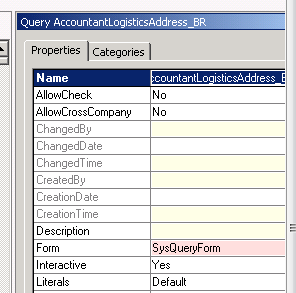
You can set Allow cross company true By properties of AOT Query .


Cross Company


X++ Query object:

One way to create query in dynamics Ax is Query object. You can add by following way.


Query query;

QueryRun queryRun;

QueryBuildRange queryBuildRange;

QueryBuildDataSource queryBuildDataSource;

query = new Query();

queryBuildDataSource = query.addDataSource(TableNum(CustTable));

query.allowCrossCompany(true);

//Executes query built so far

queryRun = new QueryRun(query);

queryRun.allowCrossCompany(true);

This is most fastest way to get cross company data.


While select Query:


There two ways for Get cross Company query and or Query inside the change company statement.

Cross company Keyword:

Add cross company query inside the while select statement to extract data all legal entities in Dynamics AX as  follow code.

Custtable _CustTable;

While select crosscompany * from _Custtable

{

Info (_Custtable.AccountNum + “   :  “ + int642str(_Custtable.DataAreaId);

}


If you want to restrict the query to fetch data from limited legal Entities you have to use a container as follow.


Container _ListOfLegalEntites ={ ‘mazang’,’Jubergi’,’Urdu Bazar’};

While select  crosscompany:_ListOfLegalEntites * from _Cust

{

Info(_Custtable.AccountNum + “  :  “ + _Custtable.DataAreaId);

}


Change Company Keyword:


One method is to use change company keyword. It is most time consuming method. To reduce its time, we have rest the table to null when Change Company happened. In Dynamics All legal entities name stored at  DataArea table we use this table to get the list of datarea and used inside the changeCompany  query on it as follow.

DataArea _DataArea;

Custtable _Custtable;

While select Id from _DataArea

changeCompany(_DataArea.Id)

{

_Custtable= null;

While select * from _Custtable

{

Info(_Custtable.AccountNum +”  :   “ + _Custtable.AreaId);

}

}

If you did not reset the table buffer , result will be too heavy, reason buffer contains old data as well. To reset or set null inside the change company statement and before query on buffer will be performance bust as well as design pattern.


Dynamics Ax 2012 : Exploring the Containers

February 10, 2013 by alirazazaidi

In Dynamics Ax there is structure known as containers. Here are some points for Containers

  • They are value based structure. So no class based object stored on it.
  • They are similar to linked list or array like structured.
  • Their size fixed at time of declaration. When you insert update or delete any value from container, a new container is created.
  • They always copied by value.
  • Containers are base 1 not like array based zero.

There is question arises why we use temporary tables when have containers . These containers which can stored almost very values data type value.  While there are lot of functions available for containers. Answer is that on temporary temple we can set indexes on fields and by this way we can fetch data much faster. Although data stored in container is sequentially but on insertion  a new copy is generated which is  performance over head. When data is increases in container, container starts to be heavy.  Similar when you passed temporary table to any method it passed by reference. But when we passed container to method, a new copy is generated and used in method. Container will used only when fewer values will be manipulated. In the case of larger set of data, we have to use temporary tables.


Declaration of containers.

container  firstContainer;

container  secondContainer = [3,"Ali","RAza"];


Read value from container.

The value from container can be read with conpeek function,  this method take two parameter, first one is container  and second parameter is for getting index. The conPeek function read value of any type so and read for any type.


_value  = conPeek(secondContainer,3);


Insert value:


There are two functions used for insert a value in container, conPoke and  conIns


ConIns


secondContainer=conIns(secondContainer,2,"Zaidi");


conPoke:


secondContainer=conpoke(secondContainer,2,”test");


There difference between conPoke and conIns is that conIns, insert a new value at location, and rest of value is shifted to one next Index. conPoke replace the value at insert location for example if


container  secondContainer = [3,”Ali”,”RAza”];
then conIns secondContainer=conIns(secondContainer,2,”Zaidi”);  will create new conainter like as

[3,”Zaidi”,”Ali”,”Raza”];

While conPok

secondContainer=conpoke(secondContainer,2,”test”);

will create a [3,”Zaidi”,”Ali”,”Raza”];


[3,”test”,”RAza”];


Removing the value from Container:


Condel function is used to remove the value from container.

secondContainer =conDel(secondContainer,2,1);

conNull function is used to clear all the value from container as

secondContainer=conNull() ;


Length of container is calculated as

int _lenght= conLen(secondContainer);

confind:


This method find the index the value which required to search, if value is not found zero will be return


_found =conFind(secondContainer,"RAza");

info(int2str(_found));

_found =conFind(secondContainer,"Abc");


Some important Global class functions for Container


Con2Str:

This method return container values as comma sparated string.

_value = con2Str(secondContainer);


Con2List:

This function converts the container into list.

List _myList=con2List(secondContainer);


Loop through container:


Usually we have to loop through the container.


_lenght = conLen(secondContainer);

for (counter =1; counter <=_lenght; count++)

{

_value=conPeek(secondContainer,counter);

info(_value);

}


Dynamics Ax 2012 : Exploring the Radio buttons as a report parameter

January 27, 2013 by alirazazaidi

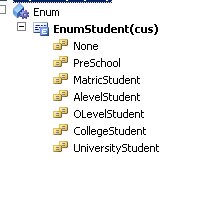
It is common scenario in report development to use check boxes or radio button as parameter.  Any Boolean variable define at data contract class become check boxes at report dialog. But how we make radio button on report dialog. When we require radio button then it means we have more than two values and one value is required to select. For this purpose we have to create a new enum at AOT.   Let see we create a new base enum with Name Enum student.

BaseEnum


Right click on EnumStudent and open property window and set Style property as Radio button

EnumProperty


Now you have to create a new data contract class where we define parameter that will contain the selected value for enum.


[DataContractAttribute]

public class StudentDataContacts

{

EnumStudent enumStudent;

}

[ DataMemberAttribute('Student By'),SysOperationLabelAttribute('Student By')

]
public EnumStudent parmStudent(EnumStudent _EnumStudent =

enumStudent )

{

enumStudent = _EnumStudent;

return enumStudent;

}

When we deploy the report and run from menu Item, Report dialog will be appear like as follow screenshot.
Report Dialog

Now questions is that how we used this radio button parameter.

At report level, we can use this radio button parameter for grouping or such other operations. It return string value. For example I used here to just display what value of radio button selected in report Expression as

Expression

We can use this parameter inside the Process report method of Data Provider class as

public void processreport()
{
EnumStudent _EnumStudent;
str _StudentType;
StudentDataContact _DataContact;

_DataContact = this.parmDataContract();

_EnumStudent= _DataContact.parmStudent();

_StudentType=enum2str(_EnumStudent);

_TempStudentList.Firstname ="Ali";
_TempStudentList.LastName="Raza";
_TempStudentList.StudentType=_StudentType;
_TempStudentList.insert();

_TempStudentList.Firstname ="Raza";
_TempStudentList.LastName="Ali";

_TempStudentList.StudentType=_StudentType;
_TempStudentList.insert();

}

Hope this helps.

Dynamics Ax 2012: Dynamics Ax reporting Model is MVC (Model View Controller)

January 14, 2013 by alirazazaidi

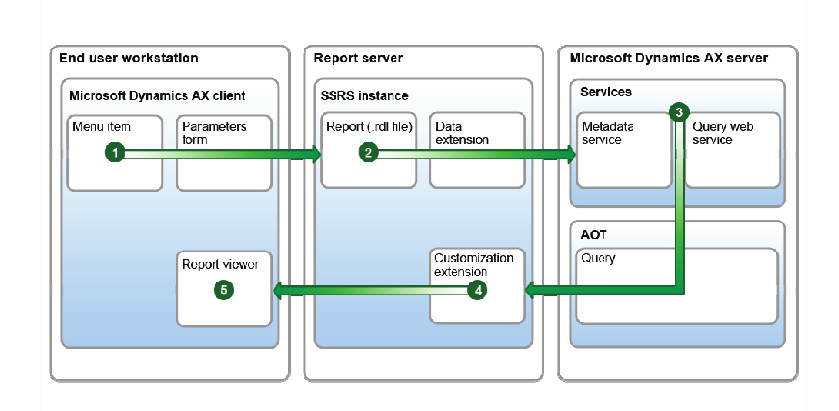
I just start writing on Dynamics Ax reporting. To write on Dynamics Ax  starting point is what is Dynamics Ax reporting Model. On Searching I found that Dynamics Ax 2012 reporting Model is based on Model View Controller pattern.  It means reporting services can be replaced by any other report rendering application. Currently Reporting services are called from dynamics ax client,  Share point portal and job batch.

Reporting Services Architure


So what is Model view Controller Pattern is.

Model View controller is a pattern to de-couple the business logic from the user interface.

Model: Responsible for retrieving data, operation performed on data with respect to business logic, This part contains queries, Communication with data layer.

View : Responsible for User interface,  how to display data. Capable to show the data on different views.

Controller:  It controls or change the flow of data between Model and View. It send instruction to Model and send data to view, or responsible for change the view of data on view. Also responsible for update the Model for its data.

Typical Model view controller diagram is as follow.

MVC-Process (1)

In dynamics Ax 2012 Report model are
Model: SrsReportDataContractUIBuilder
View: SrsReportDataContract
Controller: SrsReportRunController


For more information please consult : MSDN: Reporting Programming Guide [AX 2012].


Date to UTCDateTime Convertion Dynamics Ax 2012

September 3, 2012 by alirazazaidi

Usually we have to convert date to UTCDateTime. That is usally case when we have to query on createdatetime filed of very table, which filled when new row is created.

We for this purpose we have to create use DateTimeUtil::newDateTime function. This function takes two values one for date, and second for time. So time values will be range beween 0 and 86400. It means when value time is 00:00:00 value will be 0 and when time is 23:59:59 then value will be 86400. Consider following code which creates start and end date for same date.


Date _Currentdate;

utcDateTime _UtcStartPeriod;

utcDateTime _UtcEndPeriod;


;


_currentdate=today();


_UtcCurrentPeriod =  DateTimeUtil::newDateTime(_currentdate,0);

_UtcEndPeriod = DateTimeUtil::newDateTime(_UtcEndPeriod,86400);


What if we have to convert UCTDateTime to DateTime, We can do it like

_currentdate = DateTimeUtil::date(DateTimeUtil::applyTimeZoneOffset(_UtcEndPeriod, DateTimeUtil::getUserPreferredTimeZone()));

« Previous Page
Next Page »

Primary Sidebar

About

I am Dynamics AX/365 Finance and Operations consultant with years of implementation experience. I has helped several businesses implement and succeed with Dynamics AX/365 Finance and Operations. The goal of this website is to share insights, tips, and tricks to help end users and IT professionals.

Legal

Content published on this website are opinions, insights, tips, and tricks we have gained from years of Dynamics consulting and may not represent the opinions or views of any current or past employer. Any changes to an ERP system should be thoroughly tested before implementation.

Categories

  • Accounts Payable (2)
  • Advance Warehouse (2)
  • AI (3)
  • Asset Management (3)
  • Azure Functions (1)
  • Books (6)
  • Certification Guide (3)
  • ChatGPT (3)
  • Claude (1)
  • Customization Tips for D365 for Finance and Operations (63)
  • D365OF (60)
  • Data Management (1)
  • database restore (1)
  • Dynamics 365 (59)
  • Dynamics 365 for finance and operations (139)
  • Dynamics 365 for Operations (174)
  • Dynamics AX (AX 7) (134)
  • Dynamics AX 2012 (274)
  • Dynamics Ax 2012 Forms (13)
  • Dynamics Ax 2012 functional side (16)
  • Dynamics Ax 2012 Reporting SSRS Reports. (31)
  • Dynamics Ax 2012 Technical Side (52)
  • Dynamics Ax 7 (65)
  • Exam MB-330: Microsoft Dynamics 365 Supply Chain Management (7)
  • Excel Addin (1)
  • Favorites (12)
  • Financial Modules (6)
  • Functional (8)
  • General Journal (1)
  • Implementations (1)
  • Ledger (1)
  • Lifecycle Services (1)
  • Logseq (4)
  • Management Reporter (1)
  • Microsoft Excel (4)
  • MS Dynamics Ax 7 (64)
  • MVP summit (1)
  • MVP summit 2016 (1)
  • New Dynamics Ax (19)
  • Non Defined (9)
  • Note taking Apps (2)
  • Obsidian (4)
  • Personal Knowledge Management (3)
  • PKM (16)
  • Power Platform (6)
  • Procurement (5)
  • procurement and sourcing (6)
  • Product Information Management (4)
  • Product Management (6)
  • Production Control D365 for Finance and Operations (10)
  • Sale Order Process (10)
  • Sale Order Processing (10)
  • Sales and Distribution (5)
  • Soft Skill (1)
  • Supply Chain Management D365 F&O (5)
  • Tips and tricks (278)
  • Uncategorized (165)
  • Upgrade (1)
  • Web Cast (7)
  • White papers (4)
  • X++ (10)

Wiki

  • SCM

Copyright © 2026 · Magazine Pro On Genesis Framework · WordPress · Log in