• Skip to main content
  • Skip to primary sidebar
  • Home
  • About
  • Recommended Readings
    • 2022 Book Reading
    • 2023 Recommended Readings
    • Book Reading 2024
    • Book Reading 2025
  • Supply Chain Management Guide
  • PKM
  • Microsoft Excel
  • Microsoft Copilot in Office 365
  • Public Wiki Page

Ali Raza Zaidi

A practitioner’s musings on Dynamics 365 Finance and Operations

X++

Custom fields shows as un retrievable on Dynamics Ax 2012 Forms.

November 6, 2014 by alirazazaidi

Today I was facing the same Issued, I added a few custom fields in AX table. After update data source and dropped custom field at required Place on form. When I run the form, I found that field showed as un-editable and unretrievable written there.


I found that it is cache problem. It solved by click on Refresh element cache. You can found the menu From Tool Menu, Caches and sub menu element Cache,


Cache refresh


If problem not solved by this way then restart the Dynamics Ax 2012 service from services.
system does not support setup ‘continuous’ of number sequence in ax 2012

October 28, 2014 by alirazazaidi

During creating and assigning Sequence number in X++ code, I found this error continuously. Later i found that getting and assigning next sequence number should be  written inside transaction block. for example

ttsbegin;
itemId = NumberSeq::newGetNum(InventParameters::numRefItemId()).num();
ttscommit;

How to get exception detail and log into SysExpectionTable. Dynamics Ax 2012

October 25, 2014 by alirazazaidi

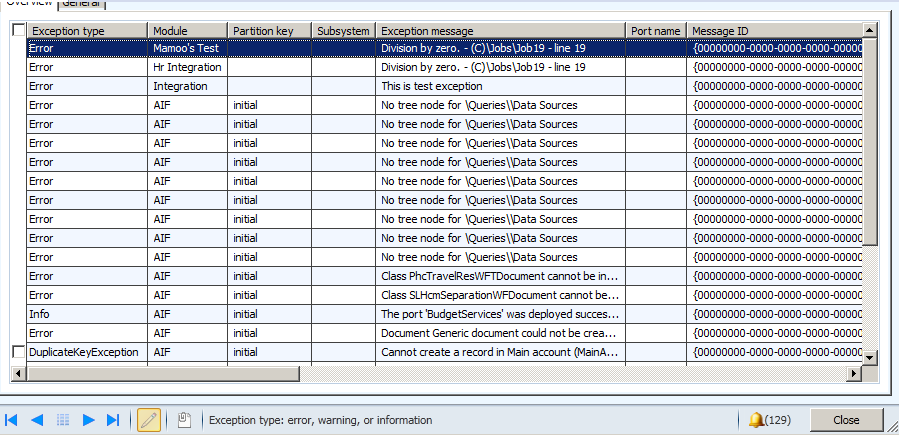
When we are working with Document Aif services, any exception is logged in SysExceptionTable. You can excess these details from following link.

Exceptions

There is client requirement that all exception must be log in SysExceptiontable in custom service. I did this with the help of following code snippets which just log the division by Zero exception in SysExceptionTable.


static void Job19(Args _args)

{


InfologData         infoData;

AifInfoLog          aifInfoLog;

container           infologData;

SysInfoLogEnumerator            infoLogEnum;

SysInfologMessageStruct         infoMessageStruct;


SysExceptiontable _Excep;

str  ExceptionMessage;

int ab=0;

int test=10;

int result;


try

{

aifInfoLog = new AifInfoLog();

result = test / ab;


}

catch

{

infologData = aifInfoLog.getInfoLogData();

infoLogEnum = SysInfoLogEnumerator::newData(infologData);

while(infoLogEnum.moveNext())

{

//Extract the message from the string

infoMessageStruct = SysInfologMessageStruct::construct(infoLogEnum.currentMessage());

ExceptionMessage +=”\n” + infoMessageStruct.message();


}

_Excep.Exception =Exception::Error;

_Excep.Description = ExceptionMessage;

_Excep.Module =”Mamoo’s Test”;

_Excep.insert();


}


}


Sysexceptiontable


Handling null values in dataset and DataReader in Dynamics ax 2012

October 22, 2014 by alirazazaidi


In X++ we can use System.Data.SqlClient.SqlReader or System.Data.DataSet, to Query on external database. But unfortunately there is No isDBNull function available for checking the null and same time system.string().isnullorempty and CLRInterop::Null is not work.


If you are using dataset or datatable then use datarow’s is null method

For example


If (!DataRow.isNull(“FirstName”)

{

Info(DataRow.get_Item(“FirstName”);

}


Second way to use the index of column according to field name in query, It is zero based index

If (!DataRow.isNull(0)

{

Info(DataRow.get_Item(“FirstName”);

}


If use data reader then use data reader is dbnull method, this method takes the index of field, there is no overload method for field Name,


int columnNum = datareader.GetOrdinal(“FirstName”);
if (datareader.IsDBNull(columnNum))
{
Info(datareader.get_item(“FirstName”);

}

execute stored procedure with parameters dynamics ax 2012

October 20, 2014 by alirazazaidi

During in one of my assignment, I have to call sql server stored procedure from X++ code. There is little tricky to call stored procedure with parameters. Following code will help me to call stored procedure with Parameters. Consider sp_StudentCreates a stored procedure with three parameters, first two string and last one is date.

private void InsertStudent( StudentDC  _dc)
{
    LoginProperty loginProperty;

OdbcConnection odbcConnection;

Statement statement;

ResultSet resultSet;

LoginProperty myLoginProperty;

str sql, criteria;

int output;

SqlStatementExecutePermission perm;

str myUserName="dynamicworld\\aliraza.zaidi";

str myPassword="xyz";

str myConnectionString;

myConnectionString=strfmt("UID=%1;PWD=%2",myUserName,myPassword);

myLoginProperty = new LoginProperty();

myLoginProperty.setServer("dynamicworld.com");

myLoginProperty.setDatabase("studentDb");

myLoginProperty.setOther(myConnectionString);


//Create a connection to external database.

odbcConnection = new OdbcConnection(myLoginProperty);


if (odbcConnection)

{


    sql = "Execute sp_StudentCreates   '"+_dc.parmFirstName())+"','"+_dc.parmLastMame())+"','"+date2str(_dc.parmDate(),321,DateDay::Digits2,DateSeparator::Hyphen,DateMonth::Digits2,DateSeparator::Hyphen,DateYear::Digits4)+"'";
 info(sql);

//Assert permission for executing the sql string.

perm = new SqlStatementExecutePermission(sql);

perm.assert();


//Prepare the sql statement.

statement = odbcConnection.createStatement();

output = statement.executeUpdate(sql);


statement.close();

}

else

{

error("Failed to log on to the database through ODBC.");
}

}

Connect to an external Database from Dynamics Ax 2012

October 18, 2014 by alirazazaidi

Sometimes we have to communicate with outside of Dynamics Ax with in boundaries of Dynamics ax.

Consider following scenario where I have to communicate with StudentDb in Sql server and insert rows in Student Info. We can do this with odbc connection.


Now create New AX job and paste following code there


LoginProperty loginProperty;

OdbcConnection odbcConnection;

Statement statement;

ResultSet resultSet;

LoginProperty myLoginProperty;

str sql, criteria;

int output;

SqlStatementExecutePermission perm;

str myUserName="dynamicworld\\aliraza.zaidi";

str myPassword="abcd";

str myConnectionString;


;


myConnectionString=strfmt("UID=%1;PWD=%2",myUserName,myPassword);

myLoginProperty = new LoginProperty();

myLoginProperty.setServer("WIN-IKPOSIU2SGD");

myLoginProperty.setDatabase("studentdb");

myLoginProperty.setOther(myConnectionString);


//Create a connection to external database.

odbcConnection = new OdbcConnection(myLoginProperty);


if (odbcConnection)

{


sql ="INSERT INTO ..[StudentInfo]([FirstName],[LastName]) VALUES ('aliraza','zaidi')";

//Assert permission for executing the sql string.

perm = new SqlStatementExecutePermission(sql);

perm.assert();


//Prepare the sql statement.

statement = odbcConnection.createStatement();

output = statement.executeUpdate(sql);


statement.close();

}

else

{

error("Failed to log on to the database through ODBC.");
}


How to Use AX Form As lookup in Dynamics Ax 2012

August 27, 2014 by alirazazaidi

Consider a scenario where, I required a StringEditControl and Clicking on Control a lookup is open where the list of Customer of selected Legal Entity are available. And After Selecting required Customer, Customer Id Or AccountNum is return form Lookup form.


For This purpose we have to create form, which will used as look Up.


Create a New form. Name It  “FormCustomerLookUp”

New Form

In Data Source Create and New dataSource Name It CustomerTable and Point to CustTable.


Customer Table As DataSource

Expand the Design node  and Right Click on It and Add Grid, Now from CustomerTable Data Source, Drag and drop “AccountNum” and “Party” on Grid. It will create two String Edit Control on Grid bound with CustomerTable.


CustomerFields

Now Select on “StringEdit:CustomerTable_AccountNum” select Properties. Form Properties window Set Its Auto declaration  property to True.


LookUpFieldAutoProperties

Now expend the Methods Node form and Right click and override the Init method from there and add following line of code there.


    element.selectMode(CustomerTable_AccountNum);


LookUpFormInitialization


Now right click on Design Node and Update following properties.

Width=360

Style=LookUP.

StyleToLookUp


Now Create a form where this lookup will use. For this Article I have to create very simple form with only on stringEdit textbox.

On its Design Right click and create StringEditButton with Name “LookUpTest” and from Its property window Auto Declare Property is set to Yes and lookupButton property to “Always”.


TargetFieldProperties


LookUpFields


Now Add two method, One used to Register control with Lookup, and Second method will use to call lookup form and gets its value.

protected void configureCustomerLookUp(FormStringControl stringControl)

{

if (stringControl)

{


stringControl.visible(true);

stringControl.registerOverrideMethod(

methodStr(FormStringControl, lookup),

identifierStr(CustomerLookUp), this);


}

}

LookupRegisteration


Second method will be called on lookup button click


private void CustomerLookUp(FormStringControl stringControl)

{

Args args = new Args(identifierStr(FormCustomerLookUp));

FormRun lookupFormRun;


args.parm(“”);

args.caller(this);


lookupFormRun = ClassFactory::formRunClassOnClient(args);

lookupFormRun.init();


stringControl.performFormLookup(lookupFormRun);

lookupFormRun.wait();


}

LookUpMethods

If you have already some knowledge above code is easily Understanable, where  Ax form Name set in args and instance of from is created at runtime and then attached the form to string controls performLookUp method.


Now run the form. And click on lookup button on textbox.

TargetButtonForm


Click on LookUp Button


LookUpClick

Selected Value will show on text box when you click on lookup grid


SelectedValueInTarget


Nice Experiments, Now you can use This functionality as you want,


How to get Standard SQL out from Query Object in AOT?

August 15, 2014 by alirazazaidi

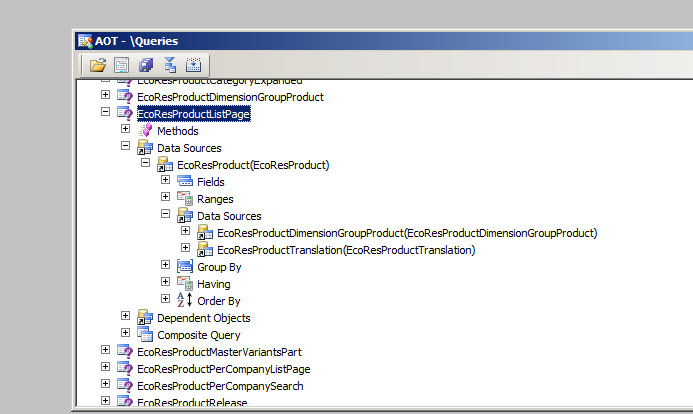
We can get standard sql from AOT Query object through X++ code.

Following X++ Code used to get Standard Sql out of EcoResProductListPage


EcoResProductListPage

static void Job2(Args _args)

{

Query query;

query = new Query(queryStr(EcoResProductListPage));

info(query.dataSourceNo(1).toString());

}

QueryInfo


Little bit taste of List In Dynamics Ax 2012

August 5, 2014 by alirazazaidi

In Dynamics Ax List is used as collection, You can add , remove or update elements in it. Type of list is define at the time of its declaration and cannot be change after initialization.

We can iterate in List with the help of ListIterator object, which have several methods to process on list.

   
 List           intList       = new List(Types::Integer);
    List           strList = new List(Types::String);
    ListIterator   literator  

    // add the element at the end of the list
    intList.addEnd(123); 

    // add the element at the start of the list
    intList.addStart(321); 

    intList.addEnd(300); 

    strList.addEnd ("Raza");

    strList.addStart ("Ali"); 

    strList.addStart ("Zaidi"); 

    // If you want to insert the data at some specific index, then you need to make use of the listIterator class 

    // Iterator performs a midpoint 

    // insert at current position. 

    literator = new ListIterator(strList);
    while (literator.more())
    {
        // can provide some condition, i.e. if check etc
        if (literator.value() == "Ali")
        {
            listIterator.insert ("Between Raza and Zaidi");
        }
    }

Getting Count in X++ using Select statement

July 27, 2014 by alirazazaidi

Hi, You can get Count X++ select statement as


/// <summary>
/// Get resource poool count.
/// </summary>
/// <returns>
/// resource pool count.
/// </returns>
protected int getResourcePoolCount()
{
select count(Rank) from resourceTable
where resourceTable.UserSession == _userSession
&& resourceTable.ResourceSet == ProjResourceSet::Pool;

return resourceTable.Rank;
}

« Previous Page
Next Page »

Primary Sidebar

About

I am Dynamics AX/365 Finance and Operations consultant with years of implementation experience. I has helped several businesses implement and succeed with Dynamics AX/365 Finance and Operations. The goal of this website is to share insights, tips, and tricks to help end users and IT professionals.

Legal

Content published on this website are opinions, insights, tips, and tricks we have gained from years of Dynamics consulting and may not represent the opinions or views of any current or past employer. Any changes to an ERP system should be thoroughly tested before implementation.

Categories

  • Accounts Payable (2)
  • Advance Warehouse (2)
  • AI (3)
  • Asset Management (3)
  • Azure Functions (1)
  • Books (6)
  • Certification Guide (3)
  • ChatGPT (3)
  • Claude (1)
  • Customization Tips for D365 for Finance and Operations (63)
  • D365OF (60)
  • Data Management (1)
  • database restore (1)
  • Dynamics 365 (59)
  • Dynamics 365 for finance and operations (139)
  • Dynamics 365 for Operations (174)
  • Dynamics AX (AX 7) (134)
  • Dynamics AX 2012 (274)
  • Dynamics Ax 2012 Forms (13)
  • Dynamics Ax 2012 functional side (16)
  • Dynamics Ax 2012 Reporting SSRS Reports. (31)
  • Dynamics Ax 2012 Technical Side (52)
  • Dynamics Ax 7 (65)
  • Exam MB-330: Microsoft Dynamics 365 Supply Chain Management (7)
  • Excel Addin (1)
  • Favorites (12)
  • Financial Modules (6)
  • Functional (8)
  • General Journal (1)
  • Implementations (1)
  • Ledger (1)
  • Lifecycle Services (1)
  • Logseq (4)
  • Management Reporter (1)
  • Microsoft Excel (4)
  • MS Dynamics Ax 7 (64)
  • MVP summit (1)
  • MVP summit 2016 (1)
  • New Dynamics Ax (19)
  • Non Defined (9)
  • Note taking Apps (2)
  • Obsidian (4)
  • Personal Knowledge Management (3)
  • PKM (16)
  • Power Platform (6)
  • Procurement (5)
  • procurement and sourcing (6)
  • Product Information Management (4)
  • Product Management (6)
  • Production Control D365 for Finance and Operations (10)
  • Sale Order Process (10)
  • Sale Order Processing (10)
  • Sales and Distribution (5)
  • Soft Skill (1)
  • Supply Chain Management D365 F&O (5)
  • Tips and tricks (278)
  • Uncategorized (165)
  • Upgrade (1)
  • Web Cast (7)
  • White papers (4)
  • X++ (10)

Wiki

  • SCM

Copyright © 2026 · Magazine Pro On Genesis Framework · WordPress · Log in