• Skip to main content
  • Skip to primary sidebar
  • Home
  • About
  • Recommended Readings
    • 2022 Book Reading
    • 2023 Recommended Readings
    • Book Reading 2024
    • Book Reading 2025
  • Supply Chain Management Guide
  • PKM
  • Microsoft Excel
  • Microsoft Copilot in Office 365
  • Public Wiki Page

Ali Raza Zaidi

A practitioner’s musings on Dynamics 365 Finance and Operations

Dynamics Ax 2012 : Exploring the Cross company Queries in dynamics Ax 2012

February 24, 2013 by alirazazaidi

Recently one of my assignments, I have to explore and use Cross company queries to fetch data. Although cross company queries have performance overhead, for example, if my custom AIF service return result in 4 seconds , Cross company returns in 30 seconds.  I found multiple design pattern,  The fastest  cross company query are by setting allow cross property to set true in static AOT Query or by setting Adding In Query Object. Lets explore these patterns

Static AOT Query:

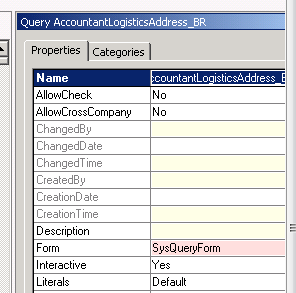
You can set Allow cross company true By properties of AOT Query .


Cross Company


X++ Query object:

One way to create query in dynamics Ax is Query object. You can add by following way.


Query query;

QueryRun queryRun;

QueryBuildRange queryBuildRange;

QueryBuildDataSource queryBuildDataSource;

query = new Query();

queryBuildDataSource = query.addDataSource(TableNum(CustTable));

query.allowCrossCompany(true);

//Executes query built so far

queryRun = new QueryRun(query);

queryRun.allowCrossCompany(true);

This is most fastest way to get cross company data.


While select Query:


There two ways for Get cross Company query and or Query inside the change company statement.

Cross company Keyword:

Add cross company query inside the while select statement to extract data all legal entities in Dynamics AX as  follow code.

Custtable _CustTable;

While select crosscompany * from _Custtable

{

Info (_Custtable.AccountNum + “   :  “ + int642str(_Custtable.DataAreaId);

}


If you want to restrict the query to fetch data from limited legal Entities you have to use a container as follow.


Container _ListOfLegalEntites ={ ‘mazang’,’Jubergi’,’Urdu Bazar’};

While select  crosscompany:_ListOfLegalEntites * from _Cust

{

Info(_Custtable.AccountNum + “  :  “ + _Custtable.DataAreaId);

}


Change Company Keyword:


One method is to use change company keyword. It is most time consuming method. To reduce its time, we have rest the table to null when Change Company happened. In Dynamics All legal entities name stored at  DataArea table we use this table to get the list of datarea and used inside the changeCompany  query on it as follow.

DataArea _DataArea;

Custtable _Custtable;

While select Id from _DataArea

changeCompany(_DataArea.Id)

{

_Custtable= null;

While select * from _Custtable

{

Info(_Custtable.AccountNum +”  :   “ + _Custtable.AreaId);

}

}

If you did not reset the table buffer , result will be too heavy, reason buffer contains old data as well. To reset or set null inside the change company statement and before query on buffer will be performance bust as well as design pattern.


Filed Under: Dynamics AX 2012, Tips and tricks Tagged With: Dynamics Ax 2012, X++

Primary Sidebar

About

I am Dynamics AX/365 Finance and Operations consultant with years of implementation experience. I has helped several businesses implement and succeed with Dynamics AX/365 Finance and Operations. The goal of this website is to share insights, tips, and tricks to help end users and IT professionals.

Legal

Content published on this website are opinions, insights, tips, and tricks we have gained from years of Dynamics consulting and may not represent the opinions or views of any current or past employer. Any changes to an ERP system should be thoroughly tested before implementation.

Categories

  • Accounts Payable (2)
  • Advance Warehouse (2)
  • AI (3)
  • Asset Management (3)
  • Azure Functions (1)
  • Books (6)
  • Certification Guide (3)
  • ChatGPT (3)
  • Claude (1)
  • Customization Tips for D365 for Finance and Operations (63)
  • D365OF (60)
  • Data Management (1)
  • database restore (1)
  • Dynamics 365 (59)
  • Dynamics 365 for finance and operations (139)
  • Dynamics 365 for Operations (174)
  • Dynamics AX (AX 7) (134)
  • Dynamics AX 2012 (274)
  • Dynamics Ax 2012 Forms (13)
  • Dynamics Ax 2012 functional side (16)
  • Dynamics Ax 2012 Reporting SSRS Reports. (31)
  • Dynamics Ax 2012 Technical Side (52)
  • Dynamics Ax 7 (65)
  • Exam MB-330: Microsoft Dynamics 365 Supply Chain Management (7)
  • Excel Addin (1)
  • Favorites (12)
  • Financial Modules (6)
  • Functional (8)
  • General Journal (1)
  • Implementations (1)
  • Ledger (1)
  • Lifecycle Services (1)
  • Logseq (4)
  • Management Reporter (1)
  • Microsoft Excel (4)
  • MS Dynamics Ax 7 (64)
  • MVP summit (1)
  • MVP summit 2016 (1)
  • New Dynamics Ax (19)
  • Non Defined (9)
  • Note taking Apps (2)
  • Obsidian (4)
  • Personal Knowledge Management (3)
  • PKM (16)
  • Power Platform (6)
  • Procurement (5)
  • procurement and sourcing (6)
  • Product Information Management (4)
  • Product Management (6)
  • Production Control D365 for Finance and Operations (10)
  • Sale Order Process (10)
  • Sale Order Processing (10)
  • Sales and Distribution (5)
  • Soft Skill (1)
  • Supply Chain Management D365 F&O (5)
  • Tips and tricks (278)
  • Uncategorized (165)
  • Upgrade (1)
  • Web Cast (7)
  • White papers (4)
  • X++ (10)

Wiki

  • SCM

Copyright © 2026 · Magazine Pro On Genesis Framework · WordPress · Log in