• Skip to main content
  • Skip to primary sidebar
  • Home
  • About
  • Recommended Readings
    • 2022 Book Reading
    • 2023 Recommended Readings
    • Book Reading 2024
    • Book Reading 2025
    • Book Reading 2026
  • Supply Chain Management Guide
  • PKM
  • Microsoft Excel
  • Microsoft Copilot in Office 365
  • Public Wiki Page

Ali Raza Zaidi

A practitioner’s musings on Dynamics 365 Finance and Operations

Uncategorized

Cannot locate document specification because multiple schemas matched the message type

December 11, 2011 by alirazazaidi


Currently working on BizTalk 2006 applications, during testing freshly created and deployed version of one application, I got error at failure executing the receive pipeline:


There was a failure executing the receive pipeline: “Microsoft.BizTalk.DefaultPipelines.XMLReceive, Microsoft.BizTalk.DefaultPipelines, Version=3.0.1.0, Culture=neutral, PublicKeyToken=31bf3856ad364e35” Source: “XML disassembler” Receive Port:

Reason:
Cannot locate document specification because multiple schemas matched the message type

Basically message type is combination of root node and namespace is one of the most typically used to promoted properties for subscription, in fact almost every orchestration uses Message Type as part of its subscription. So it is important to keep message type unique across the different schema deployed on server.

Possible solution:

Solution Number one :
If schema are same used in different application. Make an extra project for schemas, and placed require schemas there. Compiled the new project and created dll for schema in target applications. In this way we can exclude this exception.
Solution Number Two:
One solution is that if we are using xml Receive then in the pipeline definition at receive location level, set the “Allow Unrecognized Documents” to true. This will solve the schema conflict issue.

Solution Number Three :
if schema are different, but same namespace and root name then
create a new send port for service, go to send pipeline properties and set DocumentSpecNames property to fully qualified name of schema in format <schema type>+<root name> ,<schema assembly full name>. This Pipeline property tells BizTalk exact location of schema to be loaded and thus avoid conflict

for example:

ReportLostV2.CardReportLostPC_Package_STORED_PROCEDURES_2+STOP_LIST, Card.ReportLostV2, Version=1.0.0.0, Culture=neutral, PublicKeyToken=9b51853b6987xxxx


you can get DocumentSpecNames value from SchemStrongName context property.

Principles of Success Arces of diamonds summary

December 8, 2011 by alirazazaidi

How can we learn to discover these acres of diamonds in our own backyards?

  • Maintain a ready mind. Be open to the possibilities around you. Don’t let preconceived notions cloud your judgment. We often overlook the value of something because we believe we already know it.
  • Look at the familiar in new ways. Conwell lists some important inventions — the snap-button, the cotton gin, the mowing machine — and notes that these were created by everyday people who found new approaches and new uses for commonplace objects.
  • Learn what people want, then give it to them. Discover a market, and the provide a good or a service. Too many people do this the other way around. They develop a good or a service and then try to market it, try to manufacture desire. You’ll have more success if you see a desire and then try to meet it.
  • Knowledge is more important than capital. Lack of capital is a common excuse for not starting a business venture. How often have you heard, “You need money to make money.” Nonsense, says Conwell. He gives anecdotes of wealthy people who started with nothing but an idea.
  • Don’t put yourself down, and don’t belittle your environment. Don’t compare yourself with others. “Believe in the great opportunities that are right here not over in New York or Boston, but here — for business, for everything that is worth living for on earth. There was never an opportunity greater.” Find the best in what’s around you.

BizTalk Software Factory

December 6, 2011 by alirazazaidi


The BizTalk Software Factory supplies
guidance for developing BizTalk applications. There are 3 versions:

v1.7 is for BizTalk Server 2006 solutions,

v2.1 is for BizTalk Server 2009 solutions,

v3.0 is for BizTalk Server 2010 solutions.


v3.0 is for BizTalk Server 2010 solutions:

This release is updated for Visual Studio 2010 and BizTalk Server 2010.
It contains basically the same functionality as the v1.7 and V2.1 release but
updated with:
Class library for .NET 4.0
MS Test instead of nUnit
BizTalk Deployment Framework 5.0 RC
BizUnit 4.0
BizTalk Solution Instrumentation Framework

For this release you need to have the Guidance Automation Extensions, the
Guidance Automation Toolkit and the Visual Studio SDK installed.

Please check the documentation for installation information.


You can download from here

http://bsf.codeplex.com/

Error: Unable to install the assembly into the Global Assembly Cache – BizTalk Deployment

November 23, 2011 by alirazazaidi

Today during testing and redeploying the BizTalk 2006 application, I got this error.

Change requests failed for some resources. BizTalkAssemblyResourceManager failed to complete end type change request. Unable to install the assembly into the Global Assembly Cache.

Exception: A file load exception occurred while attempting to install the assembly into the Global Assembly Cache. This error may occur if the assembly is delay signed, or if assembly was renamed after creating/signing

Only solution to this problem was to close the visual studio solution and then reopen solution, this solved temporally.  Issue appears again after second or third deployment.

After doing google, I followed these steps to remove this error.

• I have to clear the temp files at machine. For this purpose I typed %temp% at run and it opened the temporary folder. Clear all directory alternatively we can get temp directory similar to following address “ X:Documents and SettingsUserNameLocal SettingsTempBT.

• Full stop the application at BizTalk console. And stop the BizTalk host instance on application is running. Then uninstall the previous/ current versions of dll from GAC and redeploy the application. If you got error message on uninstalling the assembly error “Cannot Uninstall as it is being used by another process”, then stop the host instance, close all applications and try again. If you still cant delete the dll, restart the PC.

• Check if the project is using any reference path that does not exist. ( For this, go to project properties -> Select Reference Paths -> Delete any References that doesn’t Exist)


Three Schema Design Approaches

October 13, 2011 by alirazazaidi

Article reference from :   http://technologyandleadership.com/three-schema-design-approaches/


In a project where multiple schemas are created it is critical to decide which namespace design approach is suitable for the project: (1)should we give each schema a different targetNamespace, (2)should we give all the schemas the same targetNamespace or (3)should some of the schemas have no targetNamespace. To make this critical design decision, let me illustrate the three schema design approaches in this article.

Heterogeneous Namespace Design

1. Give each schema a different targetNamespace
2. If required to re-use another schema in the current schema we need to import it

Benefits
1. Maximise the re-use of the types with separate namespaces
2. Namespace mapped to domain specific service
3. It would be easier to model all the domain-specific types in separate files with individual namespaces
4. Easier to understand
Drawbacks
1. There will be a large number of namespaces to manage
2. There will be a large number of namespaces to import
3. The granularity of the types in import would depend on the types defined and exposed in a particular domain-specific XSD

Homogenous Namespace Design

1. Give all schemas the same targetNamespace
2. As the schemas have the same targetNamespace, the method of accessing components is “include”.

Benefits
1. No need to either import a service or schemas
Drawbacks
1. Need to handle Name collisions
2. Generate code in a single Java package, for a service
3. chances for redundant types
4. does not allow for domain-specific namespaces

Chameleon Namespace Design

Give the main schema a targetNamespace and give no targetNamespace to the supporting schemas. The no-namespace schemas will take-on the targetNamepspace of the main schema.

Benefits
1. In this scheme, schemas are able to blend in with the main schemas that use them
2. Ability to provide application-specific namespace to the schema
Drawbacks
If the schema <include>s multiple no-namespace schemas then there will be a chance of name collisions. In fact, the schema may end up not being able to use some of the no-namespace schemas because their use results in name collisions with other Chameleon components

The most widely used schema design approach is heterogeneous schema design approach. Let me illustrate this with an example.

Step1: Create a schema file named Books.xsd


<!-- to store book information with targetNamespace declared as tns:Books-->
<?xml version="1.0"?>
<xsd:schema xmlns:xsd="http://www.w3.org/2001/XMLSchema"
            targetNamespace="tns:Books"
            elementFormDefault="unqualified">
    <xsd:complexType name="Book">
        <xsd:sequence>
           <xsd:element name="Author" type="xsd:string"/>
           <xsd:element name="Title" type="xsd:string"/>
           <xsd:element name="Price" type="xsd:double"/>
           <xsd:element name="Quantity" type="xsd:integer"/>
        </xsd:sequence>
    </xsd:complexType>
</xsd:schema>

Step2: Create another schema file Sales.xsd

<!-- to store the sales information with targetNamespace declared as tns:Sales-->
<?xml version="1.0"?>
<xsd:schema xmlns:xsd="http://www.w3.org/2001/XMLSchema"
            targetNamespace="tns:Sales"
            elementFormDefault="unqualified">
    <xsd:complexType name="Sales">
        <xsd:sequence>
             <xsd:element name="Customer" type="xsd:string"/>
             <xsd:element name="Region" type="xsd:string"/>
             <xsd:element name="TransactionStatus" type="xsd:string"/>
        </xsd:sequence>
    </xsd:complexType>
</xsd:schema>

Step3: Import the two schema files in Catalog.xsd file

<!--using the Heterogeneous namespace design approach-->
<?xml version="1.0"?>
<xsd:schema xmlns:xsd="http://www.w3.org/2001/XMLSchema" xmlns:b="tns:Books" xmlns:s="tns:Sales" xmlns:ns1="tns:Catalog" targetNamespace="tns:Catalog" elementFormDefault="unqualified">
	<xsd:import namespace="tns:Books" schemaLocation="Books.xsd"/>
	<xsd:import namespace="tns:Sales" schemaLocation="Sales.xsd"/>
	<xsd:element name="Catalog">
		<xsd:complexType>
			<xsd:sequence>
				<xsd:element name="Payment">
					<xsd:complexType>
						<xsd:sequence>
							<xsd:element name="CustomerID" type="xsd:integer"></xsd:element>
							<xsd:element name="PaymentType" type="xsd:string"></xsd:element>
							<xsd:element name="Currency" type="xsd:string"></xsd:element>
							<xsd:element name="ShippingAddress" type="xsd:string"></xsd:element>
						</xsd:sequence>
					</xsd:complexType>
				</xsd:element>
				<xsd:element name="Book" type="b:Book" maxOccurs="unbounded"/>
				<xsd:element name="Sales" type="s:Sales" maxOccurs="unbounded"/>
			</xsd:sequence>
		</xsd:complexType>
	</xsd:element>
</xsd:schema>

BizTalk 2010 Web Console

October 6, 2011 by alirazazaidi

With reference to Abdul Rafay’ he developed excellent web console for BizTalk .  You can find it form here (http://btswebconsole.codeplex.com/)


Project Description

BizTalk 2010 Web Console allows administrators/operators to perform operations below from the browser.

  • Stop/Start/Restart Host Instances
  • View Status of Service Instances by applying queries to the group.
  • Stop/Start/Unenlist Orchestrations, Send Ports and Send Port Group
  • Stop/Start Receive Locations
    It works on Single/Multi-Server environment and has been tested on BizTalk Server 2009 and BizTalk Server 2010.


reference : http://abdulrafaysbiztalk.wordpress.com/2011/10/01/biztalk-2010-web-console/


BizTalk 2010 Documenter is available on CodePlex.

October 5, 2011 by alirazazaidi

Yaa, another existing tool form Nigel Bachmann, a new version of BizTalk Documenter BizTalk Server 2010 documenter.  BizTalk 2006 Documenter is also available and developed by the same Person.  As from  CodePlex page following are extraction.


Overview
Having recently become involved in BizTalk I was happy to find the BizTalk Server 2006 Documenter but unfortunately it did not run correctly in  the environment that I was using.  I have spent some time modifying, fixing and enhancing the application for use in the environment I use in my work.  The project now includes modified files from the BizTalk OM project and the SSO Config project.  It has been compiled in Visual Studio 2010 and tested on BizTalk 2010 running on Windows Server 2008 R2.  Having now used it to successfully document the environments in my workplace I thought I should offer the installation files and source code to those who may find it useful as I found the original BizTalk Server 2006 Documenter.
Project Description
I have not removed any of the functionality of the original project. In this edition I have concentrated on the GUI and the compiled help functionality.  So the description remains the same as it did for the BizTalk Server 2006 Documenter, with the following fixes/enhancements:

  • GUI modified to resemble more of a wizard, step by step style.
  • Fixed, click through functionality on Orchestration diagram
  • Transformations added to Orchestration Code Elements page including input and output message(s).
  • New click through functionality on above transformations
  • Fixed, object descriptions pulled through into documentation (Code Elements page)
  • Added, SSO integration. Will now document SSO applications
  • Fixed, Documents exported BizTalk configuration file (xml)
  • Enhanced, can now include additional HTML documentation by selecting folder it is held in. These documents appear under ‘Additional Notes’. Any file called titlePage.htm will replace the default title page.


“


Enjoy this excellent tool. http://biztalk2010autodc.codeplex.com/

BAM Data read write from Dot net application

September 20, 2011 by alirazazaidi

You know that BAM is used to gather statistics from your BizTalk application. What you probably don’t know is that:

·          You can collect BAM data from your non-BizTalk applications such as external .NET components that BizTalk calls into.

·          Tracking profile editor (TPE) is not the only way to collect data you can use a set of APIs available in the Microsoft.BizTalk.Bam.EventObservation namespace to read and write directly into the BAMPrimaryImport database.

Check out some of the links here:

·          http://www.topxml.com/rbnews/BizTalk-BAM-activity/re-29195_Business-Activity-Monitoring–GenerateTypedBAMAPI-Tool.aspx

·          http://www.developer.com/net/net/article.php/11087_3587296_2

·          http://blogs.msdn.com/keithlim/archive/2006/02/02/522649.aspx

·          http://blogs.msdn.com/keithlim/archive/2006/03/08/545851.aspx   r


Original Article : http://geekswithblogs.net/benny/archive/2007/06/14/113219.aspx


Exploring the BizTalk 2010 schema Editor

September 14, 2011 by alirazazaidi

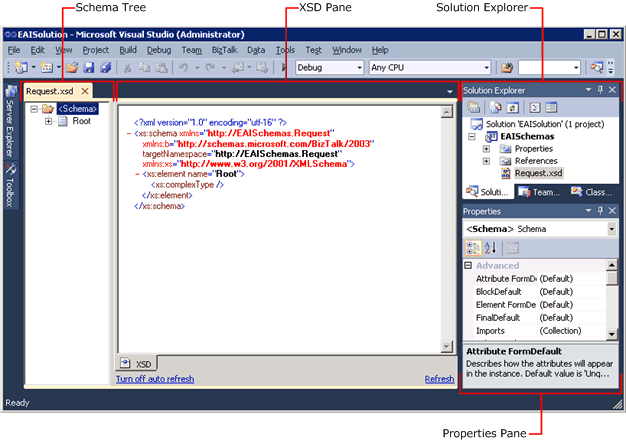
Whenever you create new schema in visual studio or open the exiting one in BizTalk application  you find similar window.

This screen shot is taken form  http://msdn.microsoft.com/en-us/library/aa559175%28v=bts.70%29.aspx.

[Read more…] about Exploring the BizTalk 2010 schema Editor

How BizTalk Server 2010 Works

September 13, 2011 by alirazazaidi

I found a very beatiful article on msnd about how Biztalk 2010 works. here some extraction complete artilce you can read from here
http://www.microsoft.com/biztalk/en/us/messaging.aspx

At the core of BizTalk Server are the Messaging Engine and the Orchestration Engine, which provide the underlying architecture for integrating and exchanging messages between various services, both within and outside your organization.

The BizTalk Messaging Engine:

Receives inbound messages.
Parses inbound messages to identify their specific formats.
Evaluates message content to identify how the message is to be routed and processed.
Delivers messages to their respective destinations.
Tracks the status and state of documents.
The BizTalk Orchestration Engine, in contrast, coordinates and schedules message processing and performs complex logic on the message as it is passed through a defined workflow.

For Complete article is here  http://www.microsoft.com/biztalk/en/us/messaging.aspx

« Previous Page
Next Page »

Primary Sidebar

About

I am Dynamics AX/365 Finance and Operations consultant with years of implementation experience. I has helped several businesses implement and succeed with Dynamics AX/365 Finance and Operations. The goal of this website is to share insights, tips, and tricks to help end users and IT professionals.

Legal

Content published on this website are opinions, insights, tips, and tricks we have gained from years of Dynamics consulting and may not represent the opinions or views of any current or past employer. Any changes to an ERP system should be thoroughly tested before implementation.

Categories

  • Accounts Payable (2)
  • Advance Warehouse (2)
  • AI (3)
  • Asset Management (3)
  • Azure Functions (1)
  • Books (6)
  • Certification Guide (3)
  • ChatGPT (3)
  • Claude (1)
  • Customization Tips for D365 for Finance and Operations (64)
  • D365OF (60)
  • Data Management (1)
  • database restore (1)
  • Dynamics 365 (59)
  • Dynamics 365 for finance and operations (139)
  • Dynamics 365 for Operations (175)
  • Dynamics AX (AX 7) (134)
  • Dynamics AX 2012 (274)
  • Dynamics Ax 2012 Forms (13)
  • Dynamics Ax 2012 functional side (16)
  • Dynamics Ax 2012 Reporting SSRS Reports. (31)
  • Dynamics Ax 2012 Technical Side (52)
  • Dynamics Ax 7 (65)
  • Exam MB-330: Microsoft Dynamics 365 Supply Chain Management (7)
  • Excel Addin (1)
  • Favorites (12)
  • Financial Modules (6)
  • Functional (8)
  • General Journal (1)
  • Implementations (1)
  • Ledger (1)
  • Lifecycle Services (1)
  • Logseq (4)
  • Management Reporter (1)
  • Microsoft Excel (4)
  • MS Dynamics Ax 7 (64)
  • MVP summit (1)
  • MVP summit 2016 (1)
  • New Dynamics Ax (19)
  • Non Defined (9)
  • Note taking Apps (2)
  • Obsidian (4)
  • Personal Knowledge Management (3)
  • PKM (16)
  • Power Platform (6)
  • Procurement (5)
  • procurement and sourcing (6)
  • Product Information Management (4)
  • Product Management (6)
  • Production Control D365 for Finance and Operations (10)
  • Sale Order Process (10)
  • Sale Order Processing (10)
  • Sales and Distribution (5)
  • Soft Skill (1)
  • Supply Chain Management D365 F&O (5)
  • Tips and tricks (278)
  • Uncategorized (165)
  • Upgrade (1)
  • Web Cast (7)
  • White papers (4)
  • X++ (10)

Wiki

  • SCM

Copyright © 2026 · Magazine Pro On Genesis Framework · WordPress · Log in