• Skip to main content
  • Skip to primary sidebar
  • Home
  • About
  • Recommended Readings
    • 2022 Book Reading
    • 2023 Recommended Readings
    • Book Reading 2024
    • Book Reading 2025
    • Book Reading 2026
  • Supply Chain Management Guide
  • PKM
  • Microsoft Excel
  • Microsoft Copilot in Office 365
  • Public Wiki Page

Ali Raza Zaidi

A practitioner’s musings on Dynamics 365 Finance and Operations

Tips and tricks

Exception has been thrown by the target of invocation in dynamics Ax

June 23, 2014 by alirazazaidi

Exception has been thrown by the target of invocation in dynamics Ax.
I got this error on my VM. On closely examination, I found that In AOT Data dictionary is not synchronize with Sql Server . I perform following steps to resolve this error
Exception Has been thrown by the traget of an invocation

• Right click on data Dictionary and synchronize the data Dictionary.
• Right click on AOT and compile it, it step take longer time. In the case of any error in any class, fix the issue and compiled.
• Generate full CIL.
Dynamics Ax 2012 : Exploring the Cross company Queries in dynamics Ax 2012

February 24, 2013 by alirazazaidi

Recently one of my assignments, I have to explore and use Cross company queries to fetch data. Although cross company queries have performance overhead, for example, if my custom AIF service return result in 4 seconds , Cross company returns in 30 seconds.  I found multiple design pattern,  The fastest  cross company query are by setting allow cross property to set true in static AOT Query or by setting Adding In Query Object. Lets explore these patterns

Static AOT Query:

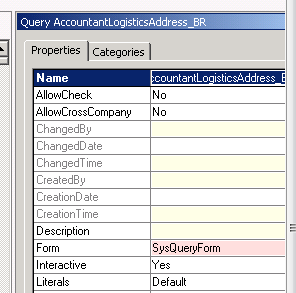
You can set Allow cross company true By properties of AOT Query .


Cross Company


X++ Query object:

One way to create query in dynamics Ax is Query object. You can add by following way.


Query query;

QueryRun queryRun;

QueryBuildRange queryBuildRange;

QueryBuildDataSource queryBuildDataSource;

query = new Query();

queryBuildDataSource = query.addDataSource(TableNum(CustTable));

query.allowCrossCompany(true);

//Executes query built so far

queryRun = new QueryRun(query);

queryRun.allowCrossCompany(true);

This is most fastest way to get cross company data.


While select Query:


There two ways for Get cross Company query and or Query inside the change company statement.

Cross company Keyword:

Add cross company query inside the while select statement to extract data all legal entities in Dynamics AX as  follow code.

Custtable _CustTable;

While select crosscompany * from _Custtable

{

Info (_Custtable.AccountNum + “   :  “ + int642str(_Custtable.DataAreaId);

}


If you want to restrict the query to fetch data from limited legal Entities you have to use a container as follow.


Container _ListOfLegalEntites ={ ‘mazang’,’Jubergi’,’Urdu Bazar’};

While select  crosscompany:_ListOfLegalEntites * from _Cust

{

Info(_Custtable.AccountNum + “  :  “ + _Custtable.DataAreaId);

}


Change Company Keyword:


One method is to use change company keyword. It is most time consuming method. To reduce its time, we have rest the table to null when Change Company happened. In Dynamics All legal entities name stored at  DataArea table we use this table to get the list of datarea and used inside the changeCompany  query on it as follow.

DataArea _DataArea;

Custtable _Custtable;

While select Id from _DataArea

changeCompany(_DataArea.Id)

{

_Custtable= null;

While select * from _Custtable

{

Info(_Custtable.AccountNum +”  :   “ + _Custtable.AreaId);

}

}

If you did not reset the table buffer , result will be too heavy, reason buffer contains old data as well. To reset or set null inside the change company statement and before query on buffer will be performance bust as well as design pattern.


Date to UTCDateTime Convertion Dynamics Ax 2012

September 3, 2012 by alirazazaidi

Usually we have to convert date to UTCDateTime. That is usally case when we have to query on createdatetime filed of very table, which filled when new row is created.

We for this purpose we have to create use DateTimeUtil::newDateTime function. This function takes two values one for date, and second for time. So time values will be range beween 0 and 86400. It means when value time is 00:00:00 value will be 0 and when time is 23:59:59 then value will be 86400. Consider following code which creates start and end date for same date.


Date _Currentdate;

utcDateTime _UtcStartPeriod;

utcDateTime _UtcEndPeriod;


;


_currentdate=today();


_UtcCurrentPeriod =  DateTimeUtil::newDateTime(_currentdate,0);

_UtcEndPeriod = DateTimeUtil::newDateTime(_UtcEndPeriod,86400);


What if we have to convert UCTDateTime to DateTime, We can do it like

_currentdate = DateTimeUtil::date(DateTimeUtil::applyTimeZoneOffset(_UtcEndPeriod, DateTimeUtil::getUserPreferredTimeZone()));

BizTalk Orchestrations XPath: Survival Guide

April 20, 2012 by alirazazaidi

Following are good links Xpath in BizTalk , Original Article is here
  • Common XPATH Examples, Questions, Issues with Biztalk 
  • Using XPath Inside BizTalk Orchestrations 
  • BizTalk Working With XPath – XPath 1.0 Function Library Quick Reference 
  • XPath – the hidden language of BizTalk? 
  • BizTalk 2010 Recipes : Orchestrations – Using XPath Queries on Messages 
  • BizTalk Server: Handling decimal types with the xpath() Function 
  • BizTalk: xpath: How to work with empty and Null elements in Orchestration 

Esb Itinerary beginner Samples

April 18, 2012 by alirazazaidi


Following links are best starting point for ESB Toolkit.

http://abhijitmahato.wordpress.com/2010/09/10/biztalk-esb-toolkit-2-0-samples-content-based-routing/

http://blogs.technet.com/b/meamcs/archive/2011/11/17/biztalk-esb-step-by-step-walkthrough-creating-a-custom-orchestration-service.aspx


http://www.codeproject.com/Articles/293385/Dynamic-message-processing-and-routing-in-Itinerar


http://www.codeproject.com/Articles/288285/Hello-World-in-BizTalk-ESB-Itinerary-using-a-Purch


ESB Toolkit 2.1 error: “Could not enlist Send Port ‘ALL.Exceptions’…”

April 17, 2012 by alirazazaidi

I found this error, when I just complete the installation of ESB toolkit on my machine. I found that I missed the following Filters on “All.Exceptions” send port

ErrorReport.FailureCode – Exists
Microsoft.Practices.ESB.ExceptionHandling.Schemas.Property.FaultCode – Exists

When I set the these filters on send port. All exception port successfully enlisted and start

File cannot be loaded because the execution of scripts is disabled on this system error in PowerShell

April 12, 2012 by alirazazaidi


While installing ESB portal on 64 bit machine I found following errors


File Management_Install.ps1 cannot be loaded because the execution of scripts is disabled on this system. Please see “get-help about_signing” for more details. At line:1 char:2

The reason for this error is the security setting on your pc that does not allow you to execute a script.  This is the so-called Execution Policy. By default, the Execution Policy is set to Restricted. This setting means that you may not run any PS1 script at all.

An overview of the policy levels: Set-ExecutionPolicy Unrestricted

But result is same, then its comes in my mind that machine is  64 bit.

I create a new file with cmd as follow and run it with administers.

%SystemRoot%syswow64WindowsPowerShellv1.0powershell.exe Set-ExecutionPolicy Unrestricted


For 32 bit machine at cmd write powershell and enter then just unrestricted policy level  

Set-ExecutionPolicy Unrestricted

for 64 bit machine  use following string at cmd open with administrator rights.


%SystemRoot%syswow64WindowsPowerShellv1.0powershell.exe Set-ExecutionPolicy Unrestricted


This will solve my problem.

set-executionpolicy unrestricted access denied

April 12, 2012 by alirazazaidi


open cmd with accessories with run as administer option.

When command prompot open. Write powershell. And press enter.

Powershell is opened. Now write set-executionpolicy unrestricted. It will run successfully.

Failed to connect to the SQL database SSODB on SQL Server

April 4, 2012 by alirazazaidi

After hundreds of time failure on BizTalk configuration failed at configuring SSOS with error

Failed to connect to the SQL database SSODB on SQL Server

The best solution I found was to re-register the ssosql.dll on the following manner:

1. start the visual studio command prompt
2. go to the ssosql.dll C:Program FilesCommon FilesEnterprise Single Sign-On
3. regasm ssosql.dll

and probably you are finished.

On 64 bit machine somehow or other regasm did not gac the ssosql.dll, when checked I assembly folder it contains old dll, so on 64 machine you have to regac ssosql.dll manually.

Insert with WCF-SQL-Adapter BizTalk 2010

March 25, 2012 by alirazazaidi


I decided to write a simple kick start tutorial for WCF-SQL Adapter for beginners.

In this tutorial where I just perform single operation insert. A simple BizTalk solution which read a value from file location and insert this value into table.

First of all I create a very simple category table. Which hold two fields. As


USE [Experiments]

GO


/****** Object:  Table [dbo].[CategoryWar]    Script Date: 03/25/2012 22:12:13 ******/

SET ANSI_NULLS ON

GO


SET QUOTED_IDENTIFIER ON

GO


CREATE TABLE [dbo].[CategoryWar](

[ID] [int] IDENTITY(1,1) NOT NULL,

[CategoryName] [nvarchar](255) NOT NULL,

CONSTRAINT [PK_CategoryWar] PRIMARY KEY CLUSTERED

(

[ID] ASC

)WITH (PAD_INDEX  = OFF, STATISTICS_NORECOMPUTE  = OFF, IGNORE_DUP_KEY = OFF, ALLOW_ROW_LOCKS  = ON, ALLOW_PAGE_LOCKS  = ON) ON [PRIMARY]

) ON [PRIMARY]


GO


Now I create a new solution with Name WCF_SQLAdapter. You can use as you like.


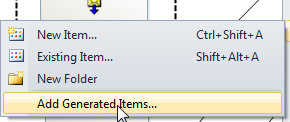
On solution explore, I right click  on add and then  select generate items.


Then select consumerAdapterServices  as follow.


Select SQLBinding from Consume Adapter Services Wizard. Like  as


Then click on Configure Button new popup windows  like that


Inter the Sql server Name. And Database Name in Initial Catalog. And press save button. Now URI look like as


Click on test button to verify the connection established. If connection is successful. Then Category section will below the connected button will populate as select from table all possible option appears at right side as follow.


Some Schemas and bind files generated as follow. Open schema name with

TableOperation.dbo.CategoryWar.xsd


Now we create one more schema, which will used as input to BizTalk solution. Like as


Now I create a map for send value from input schema to Request input message.


I used source input schema. And output schema I used to  insert schema from TableOperation.dbo.CategoryWar.xsd. Map will be like


After that I create new Orchestration with name InputProcessOrchestation.odx.

I create three message with One for input message, and two with Insert Request Method and one for Insert response.  Orchestation will be look like as


It is very simple orchestration, which reading input from file location transform it into request message. And request response call to WCF-SQL adapter and received message drop in other location.

For wcf-sql call I created send request port with specify later option. Remember the name of operation will be the same which will describe in binding. You can later change it. When I deploy the solution I found three ports on BizTalk console. I created two file ports one for receiving input and second for droping output. I import the binding which is created at the time of consuming the SQL Adpater. It will as


Generate instance form input schema and modify it and drop. This solution is works fine for me.  You can download solution from here.


« Previous Page
Next Page »

Primary Sidebar

About

I am Dynamics AX/365 Finance and Operations consultant with years of implementation experience. I has helped several businesses implement and succeed with Dynamics AX/365 Finance and Operations. The goal of this website is to share insights, tips, and tricks to help end users and IT professionals.

Legal

Content published on this website are opinions, insights, tips, and tricks we have gained from years of Dynamics consulting and may not represent the opinions or views of any current or past employer. Any changes to an ERP system should be thoroughly tested before implementation.

Categories

  • Accounts Payable (2)
  • Advance Warehouse (2)
  • AI (3)
  • Asset Management (3)
  • Azure Functions (1)
  • Books (6)
  • Certification Guide (3)
  • ChatGPT (3)
  • Claude (1)
  • Customization Tips for D365 for Finance and Operations (64)
  • D365OF (60)
  • Data Management (1)
  • database restore (1)
  • Dynamics 365 (59)
  • Dynamics 365 for finance and operations (139)
  • Dynamics 365 for Operations (175)
  • Dynamics AX (AX 7) (134)
  • Dynamics AX 2012 (274)
  • Dynamics Ax 2012 Forms (13)
  • Dynamics Ax 2012 functional side (16)
  • Dynamics Ax 2012 Reporting SSRS Reports. (31)
  • Dynamics Ax 2012 Technical Side (52)
  • Dynamics Ax 7 (65)
  • Exam MB-330: Microsoft Dynamics 365 Supply Chain Management (7)
  • Excel Addin (1)
  • Favorites (12)
  • Financial Modules (6)
  • Functional (8)
  • General Journal (1)
  • Implementations (1)
  • Ledger (1)
  • Lifecycle Services (1)
  • Logseq (4)
  • Management Reporter (1)
  • Microsoft Excel (4)
  • MS Dynamics Ax 7 (64)
  • MVP summit (1)
  • MVP summit 2016 (1)
  • New Dynamics Ax (19)
  • Non Defined (9)
  • Note taking Apps (2)
  • Obsidian (4)
  • Personal Knowledge Management (3)
  • PKM (16)
  • Power Platform (6)
  • Procurement (5)
  • procurement and sourcing (6)
  • Product Information Management (4)
  • Product Management (6)
  • Production Control D365 for Finance and Operations (10)
  • Sale Order Process (10)
  • Sale Order Processing (10)
  • Sales and Distribution (5)
  • Soft Skill (1)
  • Supply Chain Management D365 F&O (5)
  • Tips and tricks (278)
  • Uncategorized (165)
  • Upgrade (1)
  • Web Cast (7)
  • White papers (4)
  • X++ (10)

Wiki

  • SCM

Copyright © 2026 · Magazine Pro On Genesis Framework · WordPress · Log in