• Skip to main content
  • Skip to primary sidebar
  • Home
  • About
  • Recommended Readings
    • 2022 Book Reading
    • 2023 Recommended Readings
    • Book Reading 2024
    • Book Reading 2025
    • Book Reading 2026
  • Supply Chain Management Guide
  • PKM
  • Microsoft Excel
  • Microsoft Copilot in Office 365
  • Public Wiki Page

Ali Raza Zaidi

A practitioner’s musings on Dynamics 365 Finance and Operations

Tips and tricks

“Can not create a record in Audit trail (transactionLog). Dynamics Ax 2012 R3

September 12, 2015 by alirazazaidi

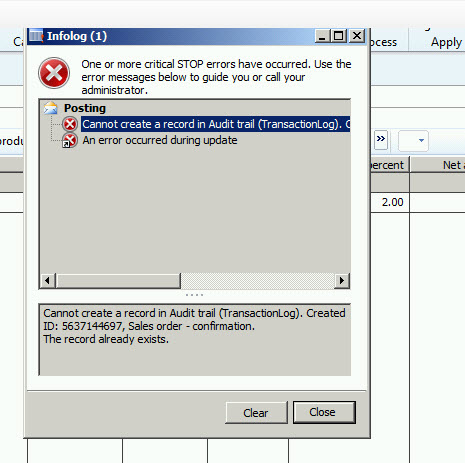
Today I face an error while confirm sales order

“Can not create a record in Audit trail (transactionLog).

AuditTrail

While searching I found solution already posted by “PavanKumar Idupulapati” at http://pavanidupulapati.blogspot.com/

That’s work for me, with link reference I update the transactionlog table’s create method with following statement

if (appl.lastTransactionIdCreated() != appl.curTransactionId())

{

if (!TransactionLog::find(appl.curTransactionId()))

{

transactionLog.Type = _type;

transactionLog.Txt = _txt;


transactionLog.insert();


appl.lastTransactionIdCreated(transactionLog.CreatedTransactionId);

}

appl.transactionlogUpdateTTSControl().revoke();

}


References I used

http://axfaq.blogspot.com/2013/09/transaction-log-ax-2012-cannot-create.html
http://pavanidupulapati.blogspot.com/

Exploring the Full text index In Dynamics Ax 2012 R3

August 23, 2015 by alirazazaidi

Consider following points for Full text index on Dynamics Ax 2012

  • Full text index used only on text fields on table.
  • They find all records from table which contains the key words
  • Queries can be used to and full text index used in range filters
  • If keywords contains spaces then it will used as “Or” operator.
  • X++ select statement cannot use full text index.


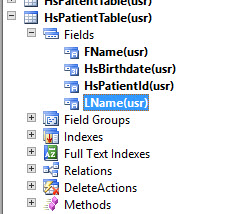
Let explore the full text index on our custom table “HSPatientTable”

2015-08-23_1-55-28

And we want full index search of FName of above mentioned table. First of all right click on table and from property window set table group property to “Main”.

2015-08-23_1-58-16

Now expand the full text Index node of table and create a new full index name it as IdxFName and drag drop the Fname in this index.

2015-08-23_2-00-55

Compile and synchronize table so changes reflect at sql server level.


Now create Now Ax job and paste following code there

static void Job1(Args _args)

{

HsPatientTable patientTable;

Query query;

QueryBuildDataSource queryBDSource;

QueryBuildRange queryBRange;

QueryRun queryRun; 

delete_from patientTable;

patientTable.HsPatientId ="01";

patientTable.FName =" Ali Raza zaidi";

patientTable.insert();

patientTable.HsPatientId ="02";

patientTable.FName =" Ranjah jogi";

patientTable.insert();

patientTable.HsPatientId ="03";

patientTable.FName ="Waseem akahram";

patientTable.insert();

patientTable.HsPatientId ="04";

patientTable.FName ="Shah jii";

patientTable.insert();

patientTable.HsPatientId ="05";

patientTable.FName ="AX guru";

patientTable.insert(); 

query = new Query();

queryBDSource = query.addDataSource(tableNum(HsPatientTable));

queryBRange = queryBDSource.addRange(fieldNum(HsPatientTable, FName));


queryBRange.rangeType(QueryRangeType::FullText);


// The space character is treated as a Boolean OR.

queryBRange.value("AX jii");


queryRun = new QueryRun(query);

while (queryRun.next())

{

patientTable = queryRun.get(tableNum(HsPatientTable));

info (" Patient Id: "  + patientTable.HsPatientId + " , Patient Name: " +patientTable.FName);

}


}

I used the value “AX jii”. The space between two words consider as Or and in result it will return two records

2015-08-23_13-41-18

Dimension did not save as Personalization Dynamics Ax 2012 R2, R3

August 21, 2015 by alirazazaidi

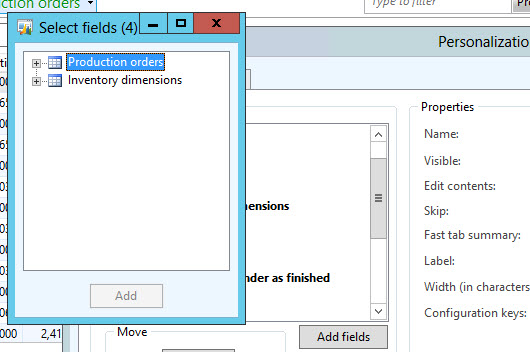
Today I got strange query from client that we are adding dimensions like Style in “All production Order” list page using Personalization option. Field added into grid but when we close and reopen the form, it disappear from grid. So there is possible issue with dynamics Ax installation.

ProductionOrder

When I started to investigate, it was only issue with dimension fields ,  if you save any field from Production order it will save, for example If I want to save “BomId”, It is properly save with respect to user and display on grid.


sss

For Dimensions, Please go to View tab and click on Dimension and add Dimension, it will save and will available for all

ddd22


sss222

Hopes this will helps

Invalid object name “tempd.dbo” Dynamics ax 2012 R2 cu7

August 21, 2015 by alirazazaidi

xyz.png

Yesterday at one of our company client was facing this issue, on every transaction or even on validating the Journal post error popup as

Invalid object name “tempd.dbo.t4887_”.

“Sql statement, select t1.recid from tempdb.”DBO”.t4887_”


I feel that this error is due  tempdb space fill in sql server or temp table created in SQL already exists. It did not let delete or create temp tables inside SQL server.  I solve this issue with following work around.


  1. Stop AOS.
  2. Stop, analysis services, and SSRS services
  3. Stop Sql server and sql server agent ( If running)
  4. Start SQL server.
  5. Start analysis services and ssrs services.
  6. Start AOS.

Last one week this error is not appear on client.


I think there will be planned down time on AX production environment, where AOS and SQL services must be restarted after weekly or monthly basis.

Field Mismatch in Union Query in Dynamics Ax 2012 R3

August 5, 2015 by alirazazaidi

Yesterday, after code merger or migrate from Dynamics Ax 2012 R2 to R3, I got very strange errors in AOT Query or static Query. Error was already reported and solved by different MVPs like Martin Darb and Tommy Skaue.
“Field Mismatch in Union Query”.

UninonError


In code migration, they increased the field length of EDT. For example for Unknown reason In one of customs code, they increase the “Name” EDT from 60 to 120 character. And this result into creating problems in Union Based Queries.

I solved it following way.

  • Expand the Union Query.
  • Select all views one by one. And check that field on which exception through.
  • Expand the query on which view,
  • Locate the table, and from field I get the EDT name
  • Change the length of EDT and let it synchronize.
  • Expand the table and check the field Length.
  • Expand the View it shows the old length.
  • Expand the query, Right click on it and restored. If length did not reflect change and no customization in View.
  • Right click and delete it. View will delete and restored again from Sys layer. New view will shows the update length.
  • Compile the query.

Reference : https://community.dynamics.com/ax/f/33/t/103490
http://axvuongbao.blogspot.com/2013/12/fix-parameter-could-not-be-serialized.html
http://dynamicsuser.net/forums/p/74382/400861.aspx

Relation between VendPackingSlipTrans and VendInoiceTRans Dynamics Ax 2012

July 31, 2015 by alirazazaidi

Today I got chance to find a relationship between vendor packing list and vendor Invoice.  I was expecting that it there was direct relationship between VendPackingtrans and VendInvocietrans. If you expand VendInvoceTrans, there will be a relation but that relation will never use in Dynamics ax 2012. After searching I found VendPackingSlipQuantityMatch table which has relation between VendPackingTrans and VendInvoiceTrans.

VendPackingSlipTrans _PackingTrans;

VendPackingSlipQuantityMatch _ VendPackingSlipQuantityMatch;

vendInvoicetrans _ vendInvoicetrans;

I got the VendInvoiceTrans and VendPackingTrans as follow.

select firstOnly * from _PackingTrans

join _VendPackingSlipQuantityMatch

where _VendPackingSlipQuantityMatch.InvoiceSourceDocumentLIne ==vendInvoiceTrans.SourceDocumentLine

&& _PackingTrans.SourceDocumentLine == _VendPackingSlipQuantityMatch.PackingSlipSourceDocumentLine;

Custom AIF Service in Dynamics Ax 2012 R3 from Scratch.

July 29, 2015 by alirazazaidi

Today I decide to experiment with custom service. So I decided to create custom table with Name MyColorTable.


This table contains only one field Name. and made it unique with no allow duplicate on Index.

MyColorTable


If we consider custom service in Dynamics Ax 2012, it contains following objects


  • X++ Data contract class
  • X++ Service contract class
  • Service Node
  • Service Group node.


Data Contract class

So first we create Data contract class

Suppose Our data contract class name is  ColorDc


[DataContractAttribute]

class ColorDC

{

Name ColorName;

}

Now add a new method with Name ParmColorName and set its as


[ DataMemberAttribute('ColorName')]

public Name parmColorName(Name _ColorName=ColorName)

{

ColorName=_ColorName;

return ColorName;

}


Service contract class:

Now we write a Service class which contains Three method Purpose of these method to explore the require attribute for getting parameter in service method and return list from service method.

InsertColor. (This method contains single color)

InsertColorList (This method take list of colorDC as parameter).

GetColorList ( This method return list of colorDC).


[SysEntryPointAttribute(true),

AifCollectionTypeAttribute('Colorobj', Types::Class)]

public void InsertColor(ColorDC Colorobj)

{

MyColorTable _Color;

Name _Name;


_Name = Colorobj.parmColorName();


select * from _Color where _Color.Name== _Name;


if (_Color==null)

{

try

{

ttsBegin;

_Color.Name = _Name;

_Color.insert();


ttsCommit;

}

catch

{

ttsAbort;

}


}

}

In above method we add some attribute which allow this method to act as web method and attribute help us define the expected parameter for this method call.


Now we call create another method, here attributes also described method as webmethod and also method expect what type of parameter.

[DataMemberAttribute("InsertColorList"),

AifCollectionTypeAttribute("ColorList",Types::Class, classStr(ColorDC))

]

public Void InsertColorList(List ColorList )

{

ListIterator  iterator;

ListEnumerator  enumerator;

ListIterator   literator;

ColorDC       _color;


enumerator = ColorList.getEnumerator();


while(enumerator.moveNext())

{

_color= enumerator.current();

if (_color !=null)

{

this.InsertColor(_color);

}

}


}


Now get method which return all color in Ax.

[SysEntryPointAttribute(true),

AifCollectionTypeAttribute('return', Types::Class, classStr(ColorDC))]

public list GetColorList()

{

ColorDC Colorobj;

List _ColorList = new List(Types::Class);

MyColorTable  Colorbuf;

while select * from Colorbuf

{


Colorobj = new ColorDC();

Colorobj.parmColorName(Colorbuf.Name);

_ColorList.addEnd(Colorobj);

}

return _ColorList;

}

Now compile it now

Service Object:

create a service object and set Service contract class there

New Service

Expand ColorService object and Right click on Operations and click on add method, this way we can restrict which method need to expose in service or which method need not.

AddOperation

2015-07-28_6-40-49

Click on all check boxes and enabled them

Service Group:

Create a new service group and drag and drop service object under it.

2015-07-28_6-41-15


Right click on ColorServiceGroup and deploy the service

Deploy


Wait and let It deploy Info box shows the message that service is deployed successfully

2015-07-28_12-38-21


No service is successfully deployed, Now open Ax client , from Administration section. Setup=> AIF => Inbond port.

AIF

Copy WSDL URI.


Open Visual studio and create a new Console application for testing the code.

Right click on references and ad service reference

ssss


2015-07-28_13-01-06


First we call insert the records in service.


using System;

using System.Collections.Generic;

using System.Linq;

using System.Text;


namespace ConsoleApplication2

{

class Program

{

static void Main(string[] args)

{

ColorServiceGroup.ColorDC cd1 = new ColorServiceGroup.ColorDC();

cd1.ColorName = "Red";

ColorServiceGroup.ColorDC cd2 = new ColorServiceGroup.ColorDC();

cd2.ColorName = "Blue";

ColorServiceGroup.ColorDC cd3 = new ColorServiceGroup.ColorDC();

cd3.ColorName = "Yellow";


ColorServiceGroup.ColorDC[] DcList = new ColorServiceGroup.ColorDC[] { cd1, cd2, cd3 };

ColorServiceGroup.ColorServiceClient _Client = new ColorServiceGroup.ColorServiceClient();


ColorServiceGroup.CallContext _CallContext = new ColorServiceGroup.CallContext();

_CallContext.Company = "USMF";

_Client.InsertColorList(_CallContext, DcList);


}

}

}

When I run the above code in Visual studio  records are successfully inserted in original table.

TableBrowser


Now we call list of colors exist in Dynamics Ax 2012.

using System;

using System.Collections.Generic;

using System.Linq;

using System.Text;


namespace ConsoleApplication2

{

class Program

{

static void Main(string[] args)

{


ColorServiceGroup.ColorServiceClient _Client = new ColorServiceGroup.ColorServiceClient();


ColorServiceGroup.CallContext _CallContext = new ColorServiceGroup.CallContext();

_CallContext.Company = "USMF";

ColorServiceGroup.ColorDC[] _DcList=   _Client.GetColorList(_CallContext);

//    ColorServiceGroup.ColorDC _Dc ;

foreach (ColorServiceGroup.ColorDC _Dc in _DcList)

{

Console.WriteLine(_Dc.ColorName);


}


Console.ReadKey();


}

}

}

When I run the above code, all records exists in Ax display on c# console

2015-07-29_15-49-25


Customer account is missing in general ledger entry by Using X++

July 23, 2015 by alirazazaidi

Today I was facing a strange problem. I use ledger entry for customer code which was freely available on different blog. You can find the same code here, which I used it two years ago.

Create and post Vendor Invoice Journals X++ Dynamics Ax 2012

This code will work perfectly fine. We create ledger entry for different customer and our customization is working fine. But when we create ledger entry for newly created customer. Ledger entry successfully created but customer account was not populated. More interestingly if we create or manually update same ledger entry for same customer account, the rest of customization works fines for same customer.

When I struck and no way out, I queried to NDA AX group, Only André Arnaud de Calavon

Replied with hint. Problem was that Customer account must exist in DimensionAttributeValueCombination.

When we create a ledger entry first time for customer, Ax create first customer entry in DimensionAttributeValueCombination table. Then go for Ledger entry.

After writing code, searched finally I found that following statement works for me.


DimensionStorage::getDynamicAccount(_FromAccount, LedgerJournalACType::Cust);

This statement, search Ledger dimension, if found it will return otherwise will create and return.

Why I love Dynamics Ax, Because, ERP is so vast that every day new challenge and every day something new for learning.

Dynamics AX 2012 R3 CU9 Update : Step-By-Step

July 12, 2015 by alirazazaidi

Download from partner source or customer source.

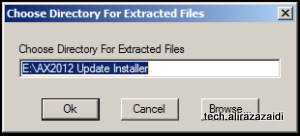
  • AXUpdateInstaller
  • DynamicsAX2012R3-KB3063879-SlipStreamOnly

Extract AXUpdateInstaller.

image001

Now also extract the silpstream  in same folder where AX 2012 AxUpdateInstaller extracted.

Extractioned folder


If you did not download slipstream, then during setup it will ask and download it at run time.

Now before running setup perform following steps to

Environment preparation:

  1. Backup business and model store databases. Backup the database that is being updated.
  2. Make sure that you are an Admin on local computer and System Administrator in Dynamics AX.
  3. Make sure that you are a member of “SecurityAdmin” server role on the SQL Server instance.
  4. Make sure that you are a “db_owner” role in model database.
  5. Make sure the system runs in single-user mode while installing this update (or down-time).


From extracted folder Click on axupdate.exe with administrator rights.

2015-07-12_11-49-57


Click on next

Next


Click on Accept and continue.

2015-07-12_11-52-56

It is my testing own Virtual machine, So select Model store According to your environment.


Click on it and it will take time, not more then 5 to 10 minutes.


2015-07-12_12-03-39

Click on next button


2015-07-12_12-50-39

Select the component you want to update , for current article I select all.


Let it install it.

2015-07-12_12-56-37

After that following screen appears describe the successful update

Installation

2015-07-12_15-33-52


Post Installation:

sss


Perform initialization steps

ss


How to handle long running reports in Dynamics Ax 2012 R3

July 8, 2015 by alirazazaidi


Consider a scenario that we are listing  sale line for  customers on RDP based report. Data is huge on server and report time out occur.

In Dynamics Ax 2012 R3 provide new class “SrsReportDataProviderPreProcessTempDB”  use this class instead of SRSReportDataProviderBase

For base for this report we please follow below link

RDP or Business logic based SSRS Reports in Dynamics Ax 2012 R3.


If you report is already developed you have to require three changes

Change 1:  RDP report always return table of type TempDB, If not then change it.


TempDbChange 2-Extend the class SrsReportDataProviderPreProcessTempDB instead of SRSReportDataProviderBase.

[


SRSReportParameterAttribute(classstr(CustomerSalesDataContract))

]


class CustomerSalesDataProvider extends  SrsReportDataProviderPreProcessTempDB

{

CustomerSaleTemp _CustomerSaleTemp;

}


Change 3.  Set report connection to temp data table.

The temp table connection string statement will be look like


  _CustomerSaleTemp.setConnection(this.parmUserConnection());


Rest of the logic remains same on report.

« Previous Page
Next Page »

Primary Sidebar

About

I am Dynamics AX/365 Finance and Operations consultant with years of implementation experience. I has helped several businesses implement and succeed with Dynamics AX/365 Finance and Operations. The goal of this website is to share insights, tips, and tricks to help end users and IT professionals.

Legal

Content published on this website are opinions, insights, tips, and tricks we have gained from years of Dynamics consulting and may not represent the opinions or views of any current or past employer. Any changes to an ERP system should be thoroughly tested before implementation.

Categories

  • Accounts Payable (2)
  • Advance Warehouse (2)
  • AI (3)
  • Asset Management (3)
  • Azure Functions (1)
  • Books (6)
  • Certification Guide (3)
  • ChatGPT (3)
  • Claude (1)
  • Customization Tips for D365 for Finance and Operations (64)
  • D365OF (60)
  • Data Management (1)
  • database restore (1)
  • Dynamics 365 (59)
  • Dynamics 365 for finance and operations (139)
  • Dynamics 365 for Operations (175)
  • Dynamics AX (AX 7) (134)
  • Dynamics AX 2012 (274)
  • Dynamics Ax 2012 Forms (13)
  • Dynamics Ax 2012 functional side (16)
  • Dynamics Ax 2012 Reporting SSRS Reports. (31)
  • Dynamics Ax 2012 Technical Side (52)
  • Dynamics Ax 7 (65)
  • Exam MB-330: Microsoft Dynamics 365 Supply Chain Management (7)
  • Excel Addin (1)
  • Favorites (12)
  • Financial Modules (6)
  • Functional (8)
  • General Journal (1)
  • Implementations (1)
  • Ledger (1)
  • Lifecycle Services (1)
  • Logseq (4)
  • Management Reporter (1)
  • Microsoft Excel (4)
  • MS Dynamics Ax 7 (64)
  • MVP summit (1)
  • MVP summit 2016 (1)
  • New Dynamics Ax (19)
  • Non Defined (9)
  • Note taking Apps (2)
  • Obsidian (4)
  • Personal Knowledge Management (3)
  • PKM (16)
  • Power Platform (6)
  • Procurement (5)
  • procurement and sourcing (6)
  • Product Information Management (4)
  • Product Management (6)
  • Production Control D365 for Finance and Operations (10)
  • Sale Order Process (10)
  • Sale Order Processing (10)
  • Sales and Distribution (5)
  • Soft Skill (1)
  • Supply Chain Management D365 F&O (5)
  • Tips and tricks (278)
  • Uncategorized (165)
  • Upgrade (1)
  • Web Cast (7)
  • White papers (4)
  • X++ (10)

Wiki

  • SCM

Copyright © 2026 · Magazine Pro On Genesis Framework · WordPress · Log in