• Skip to main content
  • Skip to primary sidebar
  • Home
  • About
  • Recommended Readings
    • 2022 Book Reading
    • 2023 Recommended Readings
    • Book Reading 2024
    • Book Reading 2025
  • Supply Chain Management Guide
  • PKM
  • Microsoft Excel
  • Microsoft Copilot in Office 365
  • Public Wiki Page

Ali Raza Zaidi

A practitioner’s musings on Dynamics 365 Finance and Operations

Dynamics AX 2012

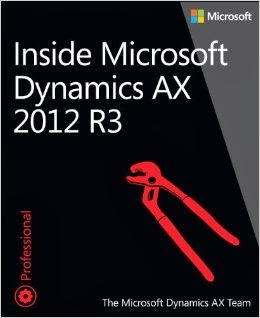
Book “Inside Microsoft Dynamics Ax 2012 R3” is now available

August 13, 2014 by alirazazaidi

Updated version for “Inside Microsoft Dynamics Ax 2012” is now out. It is updated for AX 2012 R3 version.

What’s new :Inside Microsoft Dynamics AX 2012 R3

  • It include a new chapter about developing companion apps.
  • It include a new chapter about application life cycle.
  • A new sections about LINQ support and print management.


You can purchase inline from:
  • The Microsoft Press Store
  • Google Play Store
  • Amazon


Clear the Cache on all clients Dynamics Ax 2012

August 10, 2014 by alirazazaidi

Last week I post a solution to problem of old code on Dynamics Ax 2012 Client, That work for single client and it is not possible to clear cache on manually on every client. Later I found better solution to reset the client cache at AOS. Reference is

Reset program cache file for all clients


According to that reference we have to reset the GUID, so all Clients have to reset its cache, this method required AOS restart.

static void ResetAUC(Args _args)
{
#AiF
SysSQMSettings _Settings;
;
ttsbegin;
update_recordset _Settings setting GlobalGUID = str2Guid(#EmptyGuidString);
ttscommit;
info("Now we have to Restart the AOS Service to use a new GlobalGUID.");
}

Its works for me.

Little bit taste of List In Dynamics Ax 2012

August 5, 2014 by alirazazaidi

In Dynamics Ax List is used as collection, You can add , remove or update elements in it. Type of list is define at the time of its declaration and cannot be change after initialization.

We can iterate in List with the help of ListIterator object, which have several methods to process on list.

   
 List           intList       = new List(Types::Integer);
    List           strList = new List(Types::String);
    ListIterator   literator  

    // add the element at the end of the list
    intList.addEnd(123); 

    // add the element at the start of the list
    intList.addStart(321); 

    intList.addEnd(300); 

    strList.addEnd ("Raza");

    strList.addStart ("Ali"); 

    strList.addStart ("Zaidi"); 

    // If you want to insert the data at some specific index, then you need to make use of the listIterator class 

    // Iterator performs a midpoint 

    // insert at current position. 

    literator = new ListIterator(strList);
    while (literator.more())
    {
        // can provide some condition, i.e. if check etc
        if (literator.value() == "Ali")
        {
            listIterator.insert ("Between Raza and Zaidi");
        }
    }

Dynamics Ax 2012 Error Code 90, Unable to connect to database

August 5, 2014 by alirazazaidi

My friend Bashir Ahmad Malik got following error during start up dynamics Ax service.


“The Microsoft Dynamics AX Object Server 6.2$01-MicrosoftDynamicsAX service terminated with service-specific error Code 90.
Suspect state of SQL Server database is a state when you are unable to connect to the database. “


During trouble shooting we find following root causes.


  • database is corrupted
  • database files are being “opened” or held by some process (operating system, other program(s)…)
  • not enough disk space for SQL Server
  • insufficient memory (RAM) for SQL Server
  • unexpected SQL Server shutdown caused by power failure


we solve this problem by following Sql Script.

  1. Connect database server with Microsoft SQL Server Management Studio.
  2. Execute the following SQL script in given order:

NOTE: replace [DatabaseName] with your database name

-- This query will rollback any transaction which is running on that database

-- and bring SQL Server database in a "single user" mode

ALTERDATABASEMicrosoftDynamicsAX SETSINGLE_USER WITHROLLBACKIMMEDIATE


-- Marking database READ_ONLY, disable logging,

-- and limiting access only to members of the sysadmin fixed server role

ALTERDATABASEMicrosoftDynamicsAX SETEMERGENCY


-- Checks the logical and physical integrity of all the objects in the specified database

DBCC checkdb(MicrosoftDynamicsAX)


-- In case of simple failure then we can use allow data loss option to recover Database


--  DBCC CheckDB (MicrosoftDynamicsAX, REPAIR_ALLOW_DATA_LOSS)


-- Set database accessibility to it's original state, allowing all logins

ALTERDATABASE MicrosoftDynamicsAX SETMULTI_USER

EXEC sp_resetstatus MicrosoftDynamicsAX


reference : http://social.technet.microsoft.com/wiki/contents/articles/25820.repair-a-suspect-database-in-sql-server.aspx

Dynamics Ax 2012 Client cache problem

August 3, 2014 by alirazazaidi

A few days ago, I was working on Dynamics Ax 2012 customization. When I shifted code to QA server, Compile, Generate CIL, but no changes display on client. I was shocked, latest code working fine on my machine but why it is not working on QA server. AOT shows the latest code. During troubleshooting I found that it is due to Client Cache.  For this I have to delete cache files form cache folder. AX cache files have “auc” extension.


I found auc files from following folder

C:\Users\aliraza.zaidi\AppData\Local\


I perform following steps.

  1. Close Client on machine.
  2. Stop AOS service.
  3. Delete all auc files from local cache folder.
  4. Restart AOS.
  5. Open client.


I found latest code working fine on QA server.

Install and configure Analysis Services for Dynamics AX 2012 R3

July 20, 2014 by alirazazaidi

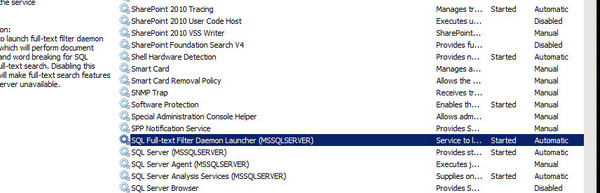
If analysis services are not deployed on machine, then deployed it and select analysis services from sql server installation wizard.

Insdy


After installation, Please verify that sql server analysis services are running in services.


Analysis services services


Run the Dynamics Ax 2012 R3 setup to install the Analysis services component.


Setup Dynamics Ax


Validate the prerequisite and if they failed install the prerequisites


successful Vaildation


During installation wizard select the service name.


7-20-2014 11-10-07 PM


Select the AOS server name and database. if default then set to Dynamics Ax


7-20-2014 11-10-29 PM


Setup complete


Now open the dynamics ax 2012 Client and form file menu ==> Tools ==> Business Intelligence ==> sql


Wizard


select next

wizard1


Select the Deploy option

Deploy


deployOptions

Deployment process

status

Deployment process took 1 hour on my machine.

Deployment

Deployment are successfully install on my machine.

image21

Little helpful X++ editor extensions for Dynamics Ax 2012 R3.

July 14, 2014 by alirazazaidi

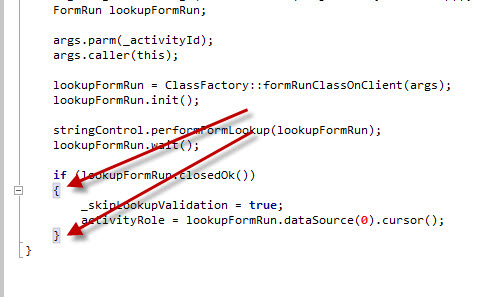
During search I found link codeplex for X++ extension, freely available Extensions at CodePlex by  José Antonio Estevan Estevan. This extension helped me to identify

  • Starting and ending of brackets.

–highlightbacket

  • Collapse and un-collapse sections wrapped with {- and }-brackets.

Collpase

  • Highlight the all occurrence of keyword in method similar to  NotePad++

HighlightKeyWords Installation of this extension is also very easy.

  • Download Zip file from following link from codeplex. http://ax2012editorext.codeplex.com/
  • Extract zip file.
  • Close all Dynamics Ax client instances on development machine.
  • Copy all files in extracted folder.
  • Paste all in following location.

X:\Program Files (x86)\Microsoft Dynamics AX\60\Client\Bin\EditorComponents Instal     Inspiration: http://yetanotherdynamicsaxblog.blogspot.com/2013/03/free-editor-extensions-for-ax2012.html

How to integrate Dynamics AX 2012 R3 AIF Document Service with BizTalk server

July 1, 2014 by alirazazaidi

Purpose: Purpose of this post is help to Consume AIF Document service in BizTalk and call its method.

Assumption: that target audience has deep knowledge of BizTalk, mapping, schema and orchestration.


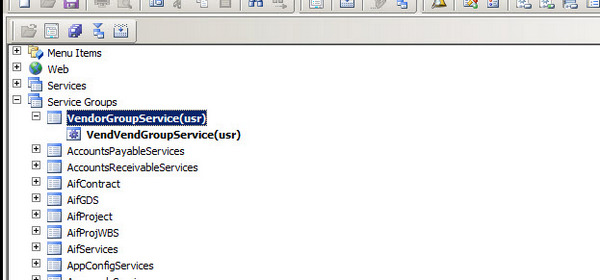
First of all you have to create service group that is gateway to your document service. For this post I have to consume VendVendGroupService. I create a new service group  in AOT and drop VendVendGroupService to that node as follow


ServiceGroup


Right click and deploy the service group.


Deploy Service Group


Wait for generate Increment CIL and Infobox shows deployment of All possible Service group

VendorServiceGroupInfolog


Now to System Administration module of dynamics Ax. Click on System Administrationè Setup è Services and Integration frameworkè inbound port.


InBound Port


Now create a visual studio project for BizTalk. There are three sub solution, One for Schema, Map and third for orchestration.


In Schema solution. Add the generate Items and then select consume wcf Service

ConsumingAiFservice


Now add copy wsdl to generate Schemas.

Select metadata Exchange (MEX) endpoint


MetaData


Click next and generate schema


Schema Generation


Wsdl


Schema is generated.


VendorGroupSchema


Go to Schema project and delete the Vendor Group Service Orchestration.


Required Services


Important Schema which will used in mapping.


EntityKeyList Schema has following fields which are used to set values in Request response methods.


Entity List Schema


This key value pair used for search , Field represent table field Name and value is search field.


VendorGroupSchemaDetail


VendorGroup schema is replicate of VendorGroup table, here we use SenderId is used legal entity where operation will perform.


If we see the Service Schema, here all request and response methods are generated.


ServiceSchema


One Schema I create to take input to Interface, and decide which operation is performed I called it for InputSchema.


CustomSchema


This Schema will use for input to Interface. We will discuss it later when we start mapping one by one.


Bindings:

As compare to other wcf service, when we consume wcf service, empty binding files are generated, so we have create binding operations manually.

These operations are based on AIF service Object not AIF service Group, where I wasted hours on it.

Please consider the following screenshot for Service operations used in binding files.

ServiceOperations


The operations in BtsAction will be generated as follow.

Namespace +/+ExternalName+”/”+method name. All Action are similar. For example


http://WIN-IKPOSIU2SGD:8101/DynamicsAx/Services/VendorGroupService/read.


Settings for BizTalk Send Receive port is as follow.


NetTCPBindings


Pipeline settings:

Send Pipeline should be XML Transmit.

Receive Pipeline should be XML Receive.

Click on Configure Button and set as following.


WCF Settings.


Remember the Operation Name in SOAP action header mast be identical to Operation Name in logical port in Orchestration.

1234


All action mapping is as follow.


<BtsActionMapping xmlns:xsi="http://www.w3.org/2001/XMLSchema-instance" xmlns:xsd="http://www.w3.org/2001/XMLSchema">

<Operation Name="ReadOP" Action="http://schemas.microsoft.com/dynamics/2008/01/services/VendGroupService/read" />

<Operation Name="CreateOP" Action="http://schemas.microsoft.com/dynamics/2008/01/services/VendGroupService/create" />

<Operation Name="UpdateOP" Action="http://schemas.microsoft.com/dynamics/2008/01/services/VendGroupService/update" />

<Operation Name="DeleteOP" Action="http://schemas.microsoft.com/dynamics/2008/01/services/VendGroupService/delete" />

<Operation Name="FindOP" Action="http://schemas.microsoft.com/dynamics/2008/01/services/VendGroupService/find" />

</BtsActionMapping>

Mappings:

I attached  screenshots for mapping used for calling AIF methods.


Read Method:


Read method is two-step process, first step map the input to Entity list, and then Entity list  to VendGroupReadRequest


Input_To_EntityList


Entitylist_to_VendGroupRequestRead


Create Method:

In the case of Create Mapping is as follow.


InputSchema_to_VendorGroup


VendorGroup_to_CreatVendorGroupRequest


Delete Method:


EntityList_To_DeleteRequest


Update Method:

Update is little tricky, There is field in Update Request Schema, _DocumentHASH, This Field is hidden and every row has its unique value, without that row is did not updated. According to Microsoft Documentation, First you get /find required record using read or find method and then use response data to Update it. For saving time and for the sake of this tutorial, I just pic the_docuemntHash key form previously read response method and hardcode it in map. This is not generic way, but this solve the temporary and my wants to run the Update AIF document method.


FindMessage


Find method:

Find method is works wonder, if you want to search more than one or all records you can call Find method, where is field with Operation, where you can mentions, value Equal, not equal, greater then equal etc. I want to get all vendor group from Dynamics In response, so I sent its value “not equal”. Response message return all values.


FindMessage


The code of this tutorial is attached, you can download it from here.


Exploring Drill-down SSRS Reports in Dynamics Ax 2012 R3.

June 23, 2014 by alirazazaidi

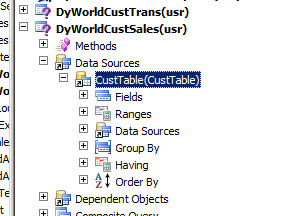
Drill drown reports in Dynamics Ax 2012 R3 are very Easy. For this purpose I have to create a new AOT/Static Query AOT. This query is join between CustTable and SalesTable. I want to create Inner Join so Only those Customer came who have Sales Orders. Consider following Steps to create A new report
Create a new Query with Name “DyWorldCustSales”
Drop or add Data Source with CustTable
6-21-2014 9-02-30 PM


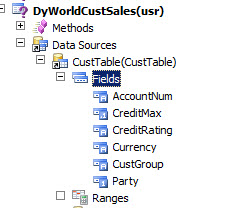
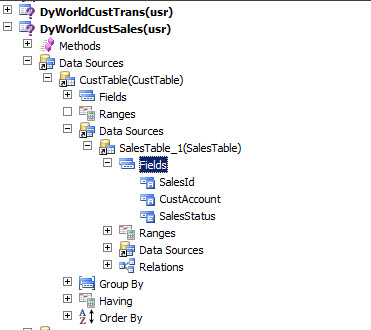
Right click on Fields and add following fields from Customer table.

CustomerFileds


Expand Data Source inside Custtable, Add or create DataSource with SalesTable and fields


SalesOrder


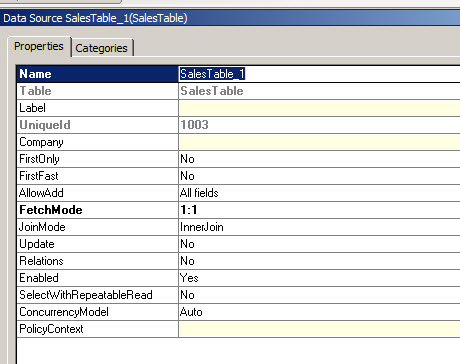
Right Click on  SalesTables Data Source and set its join properties as follow

DataSetProperties


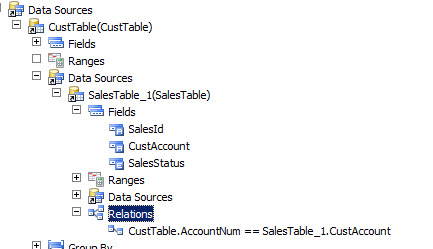
Expand Relationship node of SalesTable_1  Add Following relationship

Relations


Set it properties as follow

RelationshipDetail


New create a new report In existing or New DataModel Report in Visual Studio project

NewReport Project


Add New report with DyCustSalesOrderList

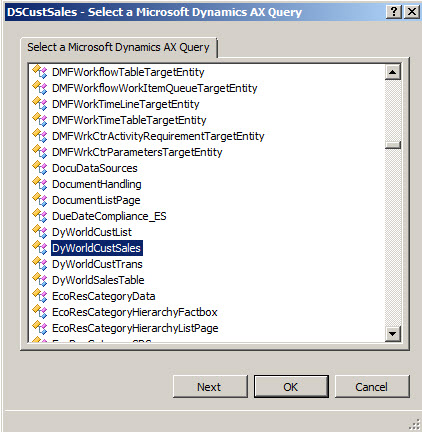
Add Dataset with Name DSCustomer and Point to Query which we create in above steps


PointToQuery QueryDataSet

Now drag and drop the dataset on designer to create a designer

And Update rename it to  DyCustSalesOrderList


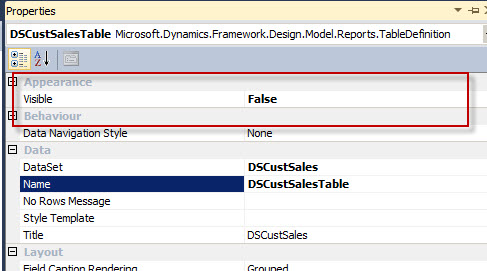
Set DataTable’s Propeties visible to set false

DataTable

Add a List and set its name to CustList

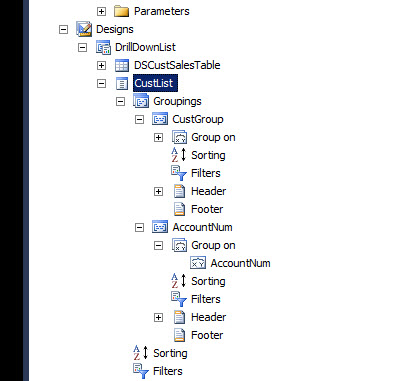
Create two groups there one for CustomerGroup and second for AccountNum

Groups


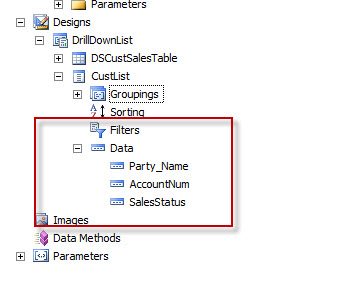
Now drop the fields from dataset which  you want to display on report

Fields


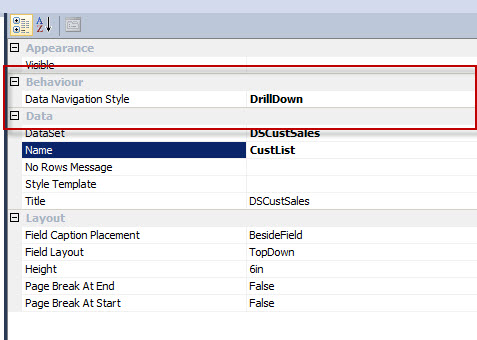
Right click on CustList and set Data Navigation Style to DrillDown from properties window

DrillDownProperties

Now right click add report to aot and then deploy to Report Server


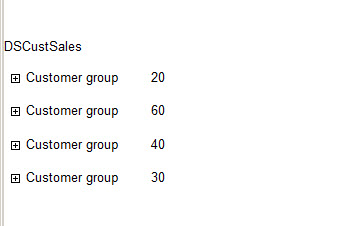
When you run the report  from meu Item you will find following

CustomerGroupClick


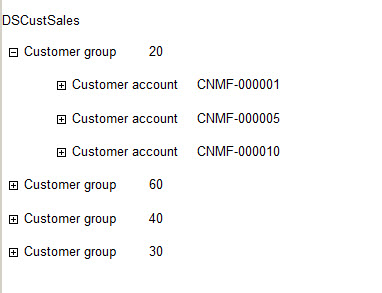
Click on Customer group this will open it

reportCustomerLevel


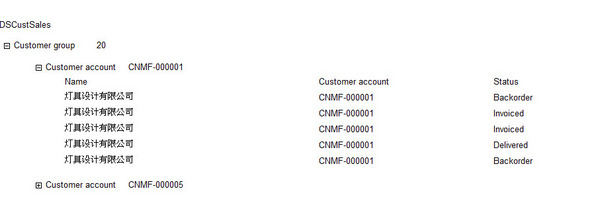
Click on Customer account it will drill down report on Detail level

Details


Exception has been thrown by the target of invocation in dynamics Ax

June 23, 2014 by alirazazaidi

Exception has been thrown by the target of invocation in dynamics Ax.
I got this error on my VM. On closely examination, I found that In AOT Data dictionary is not synchronize with Sql Server . I perform following steps to resolve this error
Exception Has been thrown by the traget of an invocation

• Right click on data Dictionary and synchronize the data Dictionary.
• Right click on AOT and compile it, it step take longer time. In the case of any error in any class, fix the issue and compiled.
• Generate full CIL.

« Previous Page
Next Page »

Primary Sidebar

About

I am Dynamics AX/365 Finance and Operations consultant with years of implementation experience. I has helped several businesses implement and succeed with Dynamics AX/365 Finance and Operations. The goal of this website is to share insights, tips, and tricks to help end users and IT professionals.

Legal

Content published on this website are opinions, insights, tips, and tricks we have gained from years of Dynamics consulting and may not represent the opinions or views of any current or past employer. Any changes to an ERP system should be thoroughly tested before implementation.

Categories

  • Accounts Payable (2)
  • Advance Warehouse (2)
  • AI (3)
  • Asset Management (3)
  • Azure Functions (1)
  • Books (6)
  • Certification Guide (3)
  • ChatGPT (3)
  • Claude (1)
  • Customization Tips for D365 for Finance and Operations (63)
  • D365OF (60)
  • Data Management (1)
  • database restore (1)
  • Dynamics 365 (59)
  • Dynamics 365 for finance and operations (139)
  • Dynamics 365 for Operations (174)
  • Dynamics AX (AX 7) (134)
  • Dynamics AX 2012 (274)
  • Dynamics Ax 2012 Forms (13)
  • Dynamics Ax 2012 functional side (16)
  • Dynamics Ax 2012 Reporting SSRS Reports. (31)
  • Dynamics Ax 2012 Technical Side (52)
  • Dynamics Ax 7 (65)
  • Exam MB-330: Microsoft Dynamics 365 Supply Chain Management (7)
  • Excel Addin (1)
  • Favorites (12)
  • Financial Modules (6)
  • Functional (8)
  • General Journal (1)
  • Implementations (1)
  • Ledger (1)
  • Lifecycle Services (1)
  • Logseq (4)
  • Management Reporter (1)
  • Microsoft Excel (4)
  • MS Dynamics Ax 7 (64)
  • MVP summit (1)
  • MVP summit 2016 (1)
  • New Dynamics Ax (19)
  • Non Defined (9)
  • Note taking Apps (2)
  • Obsidian (4)
  • Personal Knowledge Management (3)
  • PKM (16)
  • Power Platform (6)
  • Procurement (5)
  • procurement and sourcing (6)
  • Product Information Management (4)
  • Product Management (6)
  • Production Control D365 for Finance and Operations (10)
  • Sale Order Process (10)
  • Sale Order Processing (10)
  • Sales and Distribution (5)
  • Soft Skill (1)
  • Supply Chain Management D365 F&O (5)
  • Tips and tricks (278)
  • Uncategorized (165)
  • Upgrade (1)
  • Web Cast (7)
  • White papers (4)
  • X++ (10)

Wiki

  • SCM

Copyright © 2026 · Magazine Pro On Genesis Framework · WordPress · Log in