• Skip to main content
  • Skip to primary sidebar
  • Home
  • About
  • Recommended Readings
    • 2022 Book Reading
    • 2023 Recommended Readings
    • Book Reading 2024
    • Book Reading 2025
  • Supply Chain Management Guide
  • PKM
  • Microsoft Excel
  • Microsoft Copilot in Office 365
  • Public Wiki Page

Ali Raza Zaidi

A practitioner’s musings on Dynamics 365 Finance and Operations

Dynamics AX 2012

How to enable document attachment in Dynamics Ax 2012

November 26, 2014 by alirazazaidi


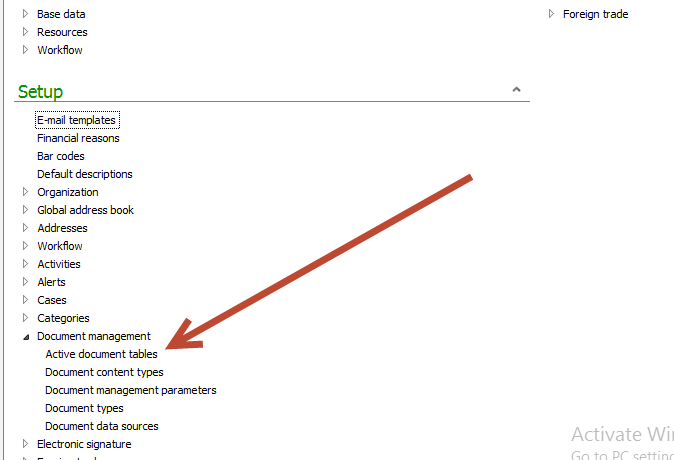
By default document attachment is not enabled on every table. To enable document attachment you have follow following links

Organization administration > Setup > Document management > Active document tables.

11-26-2014 5-20-18 PM


Search and add required table ie, custTable,VendTable,hrmRecuritmentTable,hcmApplicant, hcmApplicantion in “Table name” drop down and click on check box “always enabled” and Press Ctrl+S for save

11-26-2014 5-20-45 PM


Hopes this works
Import Export data: Excel Add-ins with AIF service Dynamics Ax 2012

November 25, 2014 by alirazazaidi


If you set up Aif service data in Dynamics Ax 2012, You can easily import and export data into AX using Excel Add-in.  You can export, import data with all out of the box AIF services.  In the case of table import export in Excel add-ins then under the hood AIF metadata service used.


For current post I am using my exists custom document Service in Excel Add-ins. The more complex custom services can be written.

This custom service is in detail you can follow following article.

http://tech.alirazazaidi.com/creating-and-consuming-custom-document-service-in-dynamics-ax-2012-r3/


  • Setting up data source in Ax for Excel Add ins

ddddeeeee


11-25-2014 3-21-48 AM


Now click open the Excel and create a new worksheet. You find Dynamics Ax  tab strip as follow

11-23-2014 10-26-45 PM


Click  and open the connection to Dynamics Ax 2012

11-25-2014 3-23-40 AM


Now click on add data at tab strip and click add data

11-25-2014 3-24-16 AM


Select the source

11-25-2014 3-24-39 AM

Now drag and expend it to required number columns.

11-25-2014 3-32-50 AM

11-25-2014 3-34-11 AM


Second way to select the header and click on add row button  from Dynamics AX tab strip.


11-25-2014 11-12-20 AM

Enter data and click on publish button. After pressing the publish button open table explorer in AOT, data is found.


11-25-2014 3-47-51 AM


Dynamics Ax Excel Add-Ins not visible in Excel

November 23, 2014 by alirazazaidi

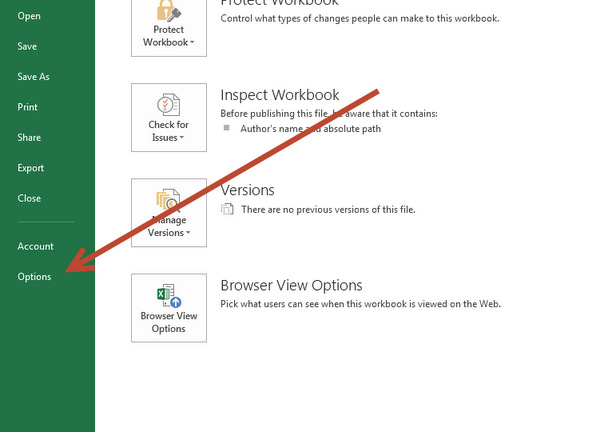
Some times after successful  installation of Dynamics Ax office Add ins, Add-in does not appear in Excel. To Enable Dynamics Ax Excel Add-ins. Click on Options in Excel.

Excel addin

Open it and select Ad-ins.


11-23-2014 10-08-35 PM

Now from down manage and select com Add-ins and click on go


11-23-2014 10-20-11 PM


Select check the “Microsoft Dynamics Ax Add-in for Microsoft Excel “click on Excel ok

11-23-2014 10-22-35 PM

Click on ok

11-23-2014 10-26-45 PM

Setup data source for excel add ins Dynamics Ax 2012

November 23, 2014 by alirazazaidi

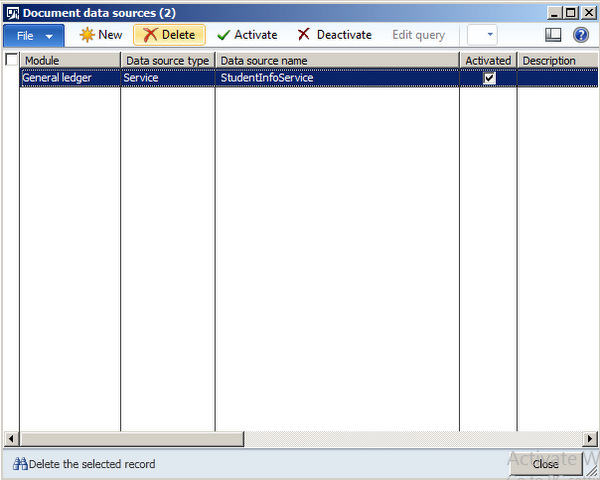
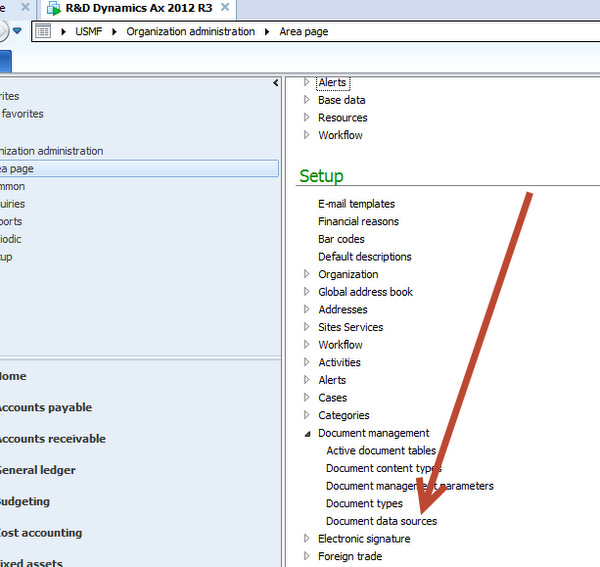
For accessing AIF service and custom Query, We have to set up the data source in AX, Later these data sources are available in Excel add in.


From Organization Setup Area page. Then setup, Document management and Document Data Sources setup.

ddddeeeee


Select module for example “Account Payable”, from data source Type “Service” and from Data source Name “VendVendGroup” Check button activated and click activated.

sswww

Dynamics ax 2012: excel add-in publish data button disabled

November 23, 2014 by alirazazaidi

Currently working with Excel add-in importing data into Dynamics Ax, I found that publish data is disabled,

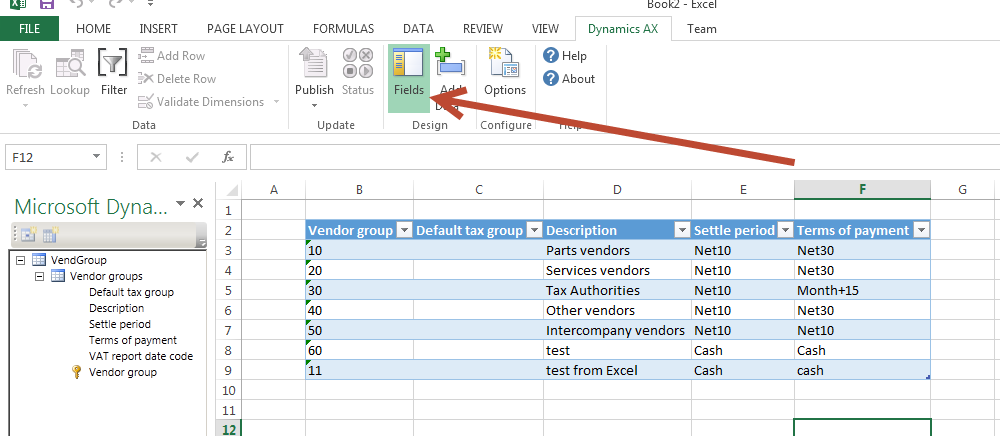
Field Option


Latter I found that push, status, add Row, delete row and other button remains disabled until you closed the field selection by re click on field’s button.


Enabled

How to download Latest Updates from Microsoft Life cycle services for Dynamics Ax 2012

November 20, 2014 by alirazazaidi


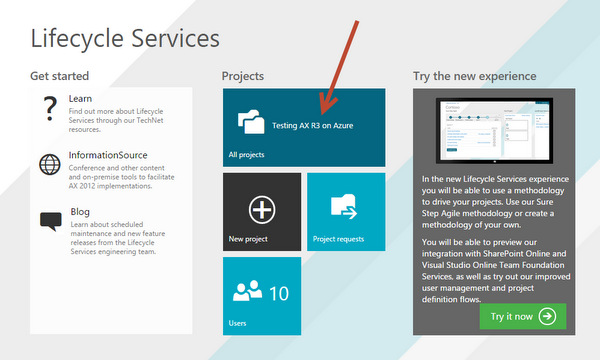
Login to https://lcs.dynamics.com/ with your CustomerSource or PartnerSource credentials.


11-20-2014 12-45-016

Open the existing project, if you have no project then created a new project.  For example I have Project. Click on it and open it.


From next screen. At button you find updates.

Updates-001

Next window you will find latest updates listed. For Example yesterday Dynamics Ax 2013 R3 Cu8 is released. Its updates appear at top. You can download it.

updateList

Invalid attempt to call DocuActionArchive.Add running in CIL on the client. Dynamics Ax 2012

November 18, 2014 by alirazazaidi


A few day ago I shared a code about to document attachment.

http://tech.alirazazaidi.com/document-attachment-through-x-code-dynamics-ax-2012-r3/

This code  works fine at client side, but in runbatchjob (batch process) run at server side It threw following error.


“Invalid attempt to call DocuActionArchive.Add running in CIL on the client.”

This is because in Add method winapi is used. This winapi written for running at client side.

I solve this problem by following steps.

  1. Duplicate the DocuActionArchive and rename the new classes as clsDocuActionArchieve
  2. Change the class run at client to run at server.
  3. Inside add method replace winapi to WinAPIServer. There are three places where you have to replace winapi to wimapiserver.
  • Comment the wimapi::getOpenFileName it did not exists in winserverapi.
  • Wimapi::fileSize to winserverapi::fileSize
  • Wimapi::copyFile to winserverapi::copyfile.


Compile the code and use the new class instead of DocuActionArchive. The code will work at server side.


Dynamics Ax 2012 Enterprise portal Architecture

November 18, 2014 by alirazazaidi

logo


Following is architecture diagram I  took from white paper.


archititure


You can download white paper from following link.

http://www.microsoft.com/en-us/download/details.aspx?id=30171


Enterprise portal is based on Standard flexible ASP.net controls used in web parts and Share point portal. Dynamics Ax 2012 serve  as data source. These data sources are written in X++  exposed to web controls through proxy classes or meta data API.


Enterprise portal is based on Web part framework of SharePoint. These web parts are easily customizable and personalized. Microsoft AX web part are used to expose the Dynamic Ax functionality.

These web parts can contains both Dynamics ax web controls like AXGridView and standard asp.net web controls like textbox.

Exploring proxy classes in Dynamics Ax 2012 R3

November 15, 2014 by alirazazaidi


In C# or vb.net we can connect and perform on Dynamics Ax classes and Tables with business connector.

logoThis technique is widely used in Dynamics Ax 2009 and rarely I saw these used in ax 2012. Its depends on

Requirement.

Consider following scenario where  I have to perform different operations on following custom table.

custom table structure

Create a New console application in C#

For this propose you have to add the reference of dll “Microsoft.Dynamics.BusinessConnectorNet.dll”


Usually you can find it following location.

C:\Program Files (x86)\Microsoft Dynamics AX\60\Client\Bin\


Proxy


Now following code will help perform different operation on Dynamics Ax Table through proxy classes.


Create


try

{

Axapta ax;

AxaptaRecord _recoder;

ax = new Axapta();

ax.Logon("Usmf", null, null, null);


_recoder = ax.CreateAxaptaRecord("StudentInfoTable");

_recoder.set_Field("Address", "Lahore");

_recoder.set_Field("DateOfBirth", new DateTime(1979, 4, 9));

_recoder.set_Field("FirstName", "Ali ");

_recoder.set_Field("LastName", "Zaidi");

_recoder.Insert();


}

catch (Exception ex)

{

Console.WriteLine(ex.Message);


}


Read all  

try

{

Axapta ax;

AxaptaRecord _recoder;

ax = new Axapta();

ax.Logon("Usmf", null, null, null);


_recoder = ax.CreateAxaptaRecord("StudentInfoTable");

_recoder.ExecuteStmt("Select * from %1");


while (_recoder.Found)

{


Console.WriteLine("FirstName " +_recoder.get_Field("FirstName"));

Console.WriteLine("LastName " + _recoder.get_Field("LastName"));


_recoder.Next();

}


Console.ReadKey();


}

catch (Exception ex)

{

Console.WriteLine(ex.Message);


}


Read specific


try

{

Axapta ax;

AxaptaRecord _recoder;

ax = new Axapta();

ax.Logon("Usmf", null, null, null);


_recoder = ax.CreateAxaptaRecord("StudentInfoTable");

_recoder.ExecuteStmt("Select * from %1 where %1.FirstName=='Ali'");


while (_recoder.Found)

{


Console.WriteLine("FirstName " +_recoder.get_Field("FirstName"));

Console.WriteLine("LastName " + _recoder.get_Field("LastName"));


_recoder.Next();

}


Console.ReadKey();


}

catch (Exception ex)

{

Console.WriteLine(ex.Message);


}

11-15-2014 6-38-17 AM

Update

try

{

Axapta ax;

AxaptaRecord _recoder;

ax = new Axapta();

ax.Logon("Usmf", null, null, null);


_recoder = ax.CreateAxaptaRecord("StudentInfoTable");

_recoder.ExecuteStmt("Select forupdate * from %1 where %1.FirstName=='Ali'");


while (_recoder.Found)

{


Console.WriteLine("FirstName " +_recoder.get_Field("FirstName"));

Console.WriteLine("LastName " + _recoder.get_Field("LastName"));

ax.TTSBegin();

_recoder.set_Field("LastName", " Raza  Zaidi");

_recoder.Update();

ax.TTSCommit();

_recoder.Next();

}


Console.ReadKey();


}

catch (Exception ex)

{

Console.WriteLine(ex.Message);


}


Delete

nbsp;


Axapta ax;

AxaptaRecord _recoder;

ax = new Axapta();

ax.Logon("Usmf", null, null, null);


_recoder = ax.CreateAxaptaRecord("StudentInfoTable");

_recoder.ExecuteStmt("Select forupdate * from %1 where %1.FirstName=='Ali'");


while (_recoder.Found)

{


Console.WriteLine("FirstName " +_recoder.get_Field("FirstName"));

Console.WriteLine("LastName " + _recoder.get_Field("LastName"));

ax.TTSBegin();

_recoder.set_Field("LastName", " Raza  Zaidi");

_recoder.Delete();

ax.TTSCommit();

_recoder.Next();

}


Console.ReadKey();


}

catch (Exception ex)

{

Console.WriteLine(ex.Message);


}

My Custom Batch class in not appear in task list ?

November 13, 2014 by alirazazaidi


If you consider my last post about creating, deploy and debug the custom batch job In Dynamics Ax 2012.

http://tech.alirazazaidi.com/exploring-the-batch-job-process-in-dynamics-ax-2012-r3/


I used X++ job to deploy the batch class as batch process.  But if we have to provide functionality that any person can schedule the class as batch from Dynamics Ax front end. We have to overwrite the canGoBatchJournal() in Class code. The default implementation comes with false return value so Job did not appear in Task List.


The complete code of class should be appear something like


class ProcessTableIncrement extends RunBaseBatch


{


}


public container pack()


{


return conNull();


}


public void run()


{


// The purpose of your job.


TblBatchHit _hit;


_hit.HitBy ="BatchJob";


_hit.hitTime= DateTimeUtil ::utcNow();


_hit.insert();


}


public boolean unpack(container packedClass)


{


return true;


}


boolean canGoBatchJournal()
{

return true;
}


Now Generate Increment CIL. Close clients on Dynamics and reopen client Dynamics Ax.


fffed

« Previous Page
Next Page »

Primary Sidebar

About

I am Dynamics AX/365 Finance and Operations consultant with years of implementation experience. I has helped several businesses implement and succeed with Dynamics AX/365 Finance and Operations. The goal of this website is to share insights, tips, and tricks to help end users and IT professionals.

Legal

Content published on this website are opinions, insights, tips, and tricks we have gained from years of Dynamics consulting and may not represent the opinions or views of any current or past employer. Any changes to an ERP system should be thoroughly tested before implementation.

Categories

  • Accounts Payable (2)
  • Advance Warehouse (2)
  • AI (3)
  • Asset Management (3)
  • Azure Functions (1)
  • Books (6)
  • Certification Guide (3)
  • ChatGPT (3)
  • Claude (1)
  • Customization Tips for D365 for Finance and Operations (63)
  • D365OF (60)
  • Data Management (1)
  • database restore (1)
  • Dynamics 365 (59)
  • Dynamics 365 for finance and operations (139)
  • Dynamics 365 for Operations (174)
  • Dynamics AX (AX 7) (134)
  • Dynamics AX 2012 (274)
  • Dynamics Ax 2012 Forms (13)
  • Dynamics Ax 2012 functional side (16)
  • Dynamics Ax 2012 Reporting SSRS Reports. (31)
  • Dynamics Ax 2012 Technical Side (52)
  • Dynamics Ax 7 (65)
  • Exam MB-330: Microsoft Dynamics 365 Supply Chain Management (7)
  • Excel Addin (1)
  • Favorites (12)
  • Financial Modules (6)
  • Functional (8)
  • General Journal (1)
  • Implementations (1)
  • Ledger (1)
  • Lifecycle Services (1)
  • Logseq (4)
  • Management Reporter (1)
  • Microsoft Excel (4)
  • MS Dynamics Ax 7 (64)
  • MVP summit (1)
  • MVP summit 2016 (1)
  • New Dynamics Ax (19)
  • Non Defined (9)
  • Note taking Apps (2)
  • Obsidian (4)
  • Personal Knowledge Management (3)
  • PKM (16)
  • Power Platform (6)
  • Procurement (5)
  • procurement and sourcing (6)
  • Product Information Management (4)
  • Product Management (6)
  • Production Control D365 for Finance and Operations (10)
  • Sale Order Process (10)
  • Sale Order Processing (10)
  • Sales and Distribution (5)
  • Soft Skill (1)
  • Supply Chain Management D365 F&O (5)
  • Tips and tricks (278)
  • Uncategorized (165)
  • Upgrade (1)
  • Web Cast (7)
  • White papers (4)
  • X++ (10)

Wiki

  • SCM

Copyright © 2026 · Magazine Pro On Genesis Framework · WordPress · Log in