• Skip to main content
  • Skip to primary sidebar
  • Home
  • About
  • Recommended Readings
    • 2022 Book Reading
    • 2023 Recommended Readings
    • Book Reading 2024
    • Book Reading 2025
  • Supply Chain Management Guide
  • PKM
  • Microsoft Excel
  • Microsoft Copilot in Office 365
  • Public Wiki Page

Ali Raza Zaidi

A practitioner’s musings on Dynamics 365 Finance and Operations

Dynamics AX 2012

Free text invoice in Dynamics Ax 2012 R3

December 28, 2014 by alirazazaidi

A common question arises in my mind that such a detail sales order invoiced exists then why we need free text invoice. I found two detail answers with reference

A free text invoice is an invoice that is not attached to a sales order. A free text invoice contains a header and one or more lines for items or services that are not tracked in inventory. Use a free text invoice for sales that do not require a sales order, packing slip, and customer invoice. For example, you can use a free text invoice for a consulting fee or services fee, or for a miscellaneous fee for an event reimbursement.

Reference: http://technet.microsoft.com/en-us/library/hh208454.aspx


A free text invoice is not related to a sales order. It contains order lines that include ledger accounts, free-text descriptions, and a sales amount that you enter. You cannot enter an item number on this kind of invoice. You must enter the appropriate sales tax information.  Also, the customer balance is posted to the summary account from the posting profile that is used for the free text invoice.

In addition,  a free text invoice line can be used to sell a quantity of any kind of goods, services, or rights – providing unit price and quantity information to the customer. It also helps basic amount calculation, and it helps to better identify and explain charges to customers.

http://www.dynamicsteaching.com/difference-between-customer-invoice-free-text-invoice-and-pro-forma-invoice-in-ax-2012/


Now if we want to create a free text Invoice and post It. You have to follow this, Currently I am using

Contoso demo data and usmf legal entity.


Account receivable => common=> Free text Invoices => All free text Invoices


FreeTextMenu


Free Text Invoice List page opens


Free Text Invoice List Page


Click on Free text Invoice, following form will open

New Free Text Invoice Create Page

Select the customer

Select Customer

Add invoice lines. And select main account, Sales tax group and Item sales tax group. Update the Unit price.

Line

Now click on post on top menu

Post Menu

Following form will open

Postings


Click on ok button to post it, On successfully posting following form will open.

Posted result

Session Date and time in Dynamics Ax 2012

December 23, 2014 by alirazazaidi

In dynamics Ax 2012, session date is appear in status bar. User can change it if required.

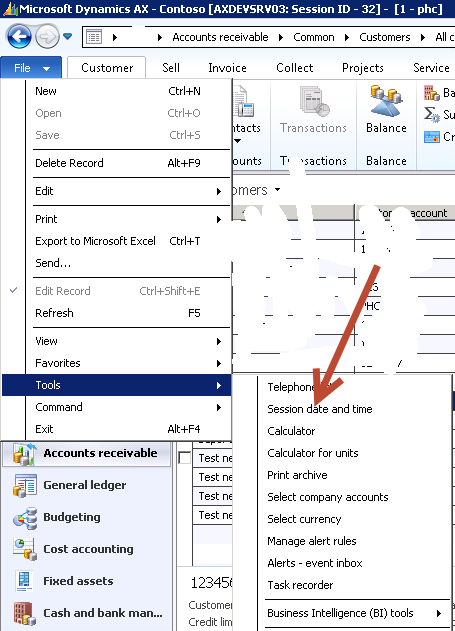
If you want to change it you can click on it fil=> tools=> session date and time

12-23-2014 7-20-10 PM


On click it similar form will appear.

Session Date and time


If session Date is not appear in Status bar, then you have to enable it from following link


File > Tools > Option s > Status bar

12-23-2014 7-25-36 PM

Enable session date time by clicking on “Show session date:”


12-23-2014 7-26-29 PM


Dynamics Ax 2012 BACKUP LOG cannot be performed because there is no current database backup

December 23, 2014 by alirazazaidi

After fresh installation on VM, we usually restored the database back of Production or QA server . And this technique usually applied in multi development environment. But yesterday I got this error when I tried to restore Dynamics AX database on my newly created Dynamics Ax 2012 VM.

BACKUP LOG cannot be performed because there is no current database backup. (Microsoft.SqlServer.Smo)

As per Sql Authority Website, it was backup creation issue, But surprisingly it was rights issue. I was trying to restored database from User who has not db owner or rights on the database. I switched the User and make my user as db owner, And then try to restored it. It works for me.

If this solution is not working then Please do the following.
• Stop the AOS service.
• Open BDS and delete the Dynamics Ax database.
• Restored the Dynamics Ax database from Back files
• Gave the db owner rights to service user on Dynamics Ax databases. Service user means that the user which Dynamics Ax service is running.
• Get the Current user SID by running following command in Powershell (Run as administrator).
$AdObj = New-Object System.Security.Principal.NTAccount(“administrator”)
$strSID = $AdObj.Translate([System.Security.Principal.SecurityIdentifier])
$strSID.Value

• Update the statement in database table

update userinfo set
networkdomain = ‘dynamicworlds.com’,
networkalias = ‘administrator’,
SID = ‘S-1-5-21-3030200632-4028267746-237368394-500’
where ID = ‘Admin’

Image stored in Dynamics Ax 2012 tables

December 19, 2014 by alirazazaidi

In dynamics Ax 2012, You can read image from physical path and stored in database as follow

BinData binData = new BinData();
str extention, path, nameOfFile;
container imageContainer;
str imageFilePathName;
imageFilePathName=”C:\\abc\\ali.jpg”;
// if ( WinAPI::fileExists(imageFilePathName))
{
binData.loadFile(imageFilePathName);
imageContainer = binData.getData();
table.Person = _Party.RecId;
table.Image = imageContainer;
table.insert();

}

This code runs both for server side and client side. At server side execution table use winserverapi::FileExists

request for the permission of type ‘fileiopermission’ failed. dynamics ax 2012

December 19, 2014 by alirazazaidi

During one of my development i got following error, which occurs when I try to convert image into bits and stored in tables. I solved this by adding before the code


FileIoPermission _perm;
_perm = new FileIoPermission("c:\\File.txt",'r'); 
_perm.assert(); 


Reference: http://msdn.microsoft.com/en-us/library/fileiopermission.aspx

How to setup Government and organization Identification Types in Dynamics Ax 2012

December 17, 2014 by alirazazaidi

In real world every person has unique identified number provided by Government of country or organization where he is working. For example if we talk about Pakistan every person either Applicant or worker has its unique CNIC (Computerized National Identity Card) or National Passport or NTN (National Tax Number).  And we have to store these in Human resource management implemented in organization.

For these implementation In Dynamics Ax 2012 provide a form for its set up. You can define these unique setup form and then links in Applicant or worker to step link


Human resource => Setup=> worker=> Identification types


Identification


When you click on button following form will open where you can set required Identification Types according to your country

Tyoes


Now you want to setup the values against these Values You can open Worker List page, select required worker and from top strip select Personal Information.

Worker SetUp From Top menu


Similar form open for selected worker.

National Identification Number setup form for worker


You can also set these Identification from detail form of work, Go on Personal Detail fast tab and click on “Government and Organizational Identifications”

Worker Setup


Similarly if you can select Identification for Applicant. Select the required Applicant form grid and click on personal Information from Top tab

12-17-2014 3-15-09 PM


Or open the detail from of applicant and from Personal Information fast tab you can enter its CNIC or Identification number.


12-17-2014 3-15-42 PM

Microsoft Dynamics AX 2012 Demo VM V1 R3 CU8 available for download

December 12, 2014 by alirazazaidi

Dynamics Ax 2012 R3 CU8 demo virtual machine, is available now.  You can deployed it on Azure services through Life cycle services.

Dynamics Ax 2012 R3 CU8 has following new features.


axdemotools


You can download demo vm from following link through partner source or customer source credential


https://mbs.microsoft.com/partnersource/uk/sales-marketing/demo-tools/virtual-machines/AX2012DemoToolsMaterials#MicrosoftDynamicsAX2012R3CU8SolutionDemoPackageV1.0


Original post: http://www.jaestevan.com/microsoft-dynamics-ax-2012-r3-cu8-demo-vm-v1

Product Management in Dynamics Ax 2012 R3 Part 2

December 10, 2014 by alirazazaidi

In previous post I just create an Item product without its variant and released it to required legal entity.

http://tech.alirazazaidi.com/product-management-in-dynamics-ax-2012-r3-part-1/

But product required one more step to finalize it before used in sales or purchase.


  • Item group
  • Item module group.
  • Storage dimension.
  • Tracking dimension.


For this purpose you have to go in Specific Legal entity and open the release product page.

12-10-2014 10-08-45 AM


When Release product form opens, select or highlight you required release product and click on Edit button.

select


You can find similar form.

Edit form

You find that there is validate button on Product tab, this button helps you to identify what is missing in finalizing the release product.


12-10-2014 10-15-11 AM

I clicked it for my newly released product.

12-9-2014 5-11-07 PM

It gives me warning that values for Item model group, Item group, storage Dimension groups and tracking dimension group values are missing.


Let’s first set the values for Storage and tracking dimension group.

For this purpose you have to click on top menu tab menu and click on Dimension groups

ddd


You can set values here for Storage Dimension group and Tracking Dimension group.

12-9-2014 5-16-14 PM

After setting dimensions go  to General fast tab you find the Item model group drop down, you have to set its value from there

12-9-2014 5-11-47 PM


For Item group please expend the Manage Costs fast tab and set its value from there.

12-9-2014 5-14-24 PM

After setting all these values click on Validate button to check that Release product is properly configured.


12-9-2014 5-18-03 PM

Product Management in Dynamics Ax 2012 R3 Part 1

December 9, 2014 by alirazazaidi


In Dynamics Ax 2012, there is separate module  made for product management. There are two types of products in Dynamics ax.

Product. It is bare bone and independent product no further variation is not possible or required.

Product Master. When same product has different variant for example if we consider the hair color product that same color, quantity but slight different of shade can make different Product. Here we can make a master product and then creates its variant. We use Ax configuration technology to create its variants.


In Dynamics Ax 2012, The product creation is 4 step process.

  • Create the product.
  • Release to different legal entities.
  • Update the release product information according to different Legal Entity.
  • Used the product in different operation like purchase, sales and inventory management.


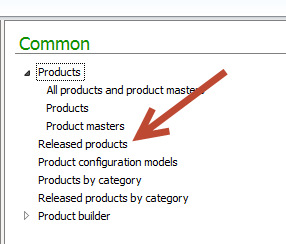
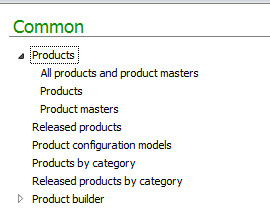
If you open the Product Management Area page in Dynamics Ax 2012 You can find following links that for product related information.

Product Managment


Currently If we open the All Product and Product Management then Product List Page will be appeared as.

In this article I am using contoso demo data.

12-8-2014 11-41-14 PM


Now click on top menu product to add new product.

New Product

Now if you see that there two important drop down first one is Product Type

And second one is Product Sub Type.

If we check the product type there is two values

Item and Services

Item type option is selected when product can be stored and Inventory can be manage.

Services Type can select when Product is non Inventory type. Or possible non tangible type.


Product sub type is option provided us capability to create standard product or Product which can be vary in terms of color size or config.

Product type: The standard product. There is no variant possible so no product associate with it.

Product Master: A template product its one or more than one variant can be exists. Variants exists in terms of its size, color and config.


If I am going to create a Product Master the New Product form will be look like.

Product Master


Currently I am interested in simple standard Product. So I go for first option

And click on ok.


New Product is created

Now click on top menu to release product, Here we release the product In Particular legal entity.


12-9-2014 12-40-17 AM


Now click on select companies

12-9-2014 1-09-41 AM

For example I want to release Product for Only USMF. Click on OK to release Product in USMF.


Fatal exception performing AXRDCE transformation step. Dynamics Ax 2012 R3

December 2, 2014 by alirazazaidi

During development of SSRS  report I got follow error,


“Fatal exception performing AXRDCE transformation step. The report cannot be rendered. Please contact your system administrator.”


and report stop working, It working perfectly write a few hours ago. The old trick works for me.

  1. Comment all the code in processReport method of RDP class, by adding /* and */ at end.
  2. Generate Incremental CIL.
  3. Run the report. (Which will result in empty report).
  4. Remove the /* at start of method and */.
  5. Generate Incremental CIL.
  6. Run the report, it works fine.
« Previous Page
Next Page »

Primary Sidebar

About

I am Dynamics AX/365 Finance and Operations consultant with years of implementation experience. I has helped several businesses implement and succeed with Dynamics AX/365 Finance and Operations. The goal of this website is to share insights, tips, and tricks to help end users and IT professionals.

Legal

Content published on this website are opinions, insights, tips, and tricks we have gained from years of Dynamics consulting and may not represent the opinions or views of any current or past employer. Any changes to an ERP system should be thoroughly tested before implementation.

Categories

  • Accounts Payable (2)
  • Advance Warehouse (2)
  • AI (3)
  • Asset Management (3)
  • Azure Functions (1)
  • Books (6)
  • Certification Guide (3)
  • ChatGPT (3)
  • Claude (1)
  • Customization Tips for D365 for Finance and Operations (63)
  • D365OF (60)
  • Data Management (1)
  • database restore (1)
  • Dynamics 365 (59)
  • Dynamics 365 for finance and operations (139)
  • Dynamics 365 for Operations (174)
  • Dynamics AX (AX 7) (134)
  • Dynamics AX 2012 (274)
  • Dynamics Ax 2012 Forms (13)
  • Dynamics Ax 2012 functional side (16)
  • Dynamics Ax 2012 Reporting SSRS Reports. (31)
  • Dynamics Ax 2012 Technical Side (52)
  • Dynamics Ax 7 (65)
  • Exam MB-330: Microsoft Dynamics 365 Supply Chain Management (7)
  • Excel Addin (1)
  • Favorites (12)
  • Financial Modules (6)
  • Functional (8)
  • General Journal (1)
  • Implementations (1)
  • Ledger (1)
  • Lifecycle Services (1)
  • Logseq (4)
  • Management Reporter (1)
  • Microsoft Excel (4)
  • MS Dynamics Ax 7 (64)
  • MVP summit (1)
  • MVP summit 2016 (1)
  • New Dynamics Ax (19)
  • Non Defined (9)
  • Note taking Apps (2)
  • Obsidian (4)
  • Personal Knowledge Management (3)
  • PKM (16)
  • Power Platform (6)
  • Procurement (5)
  • procurement and sourcing (6)
  • Product Information Management (4)
  • Product Management (6)
  • Production Control D365 for Finance and Operations (10)
  • Sale Order Process (10)
  • Sale Order Processing (10)
  • Sales and Distribution (5)
  • Soft Skill (1)
  • Supply Chain Management D365 F&O (5)
  • Tips and tricks (278)
  • Uncategorized (165)
  • Upgrade (1)
  • Web Cast (7)
  • White papers (4)
  • X++ (10)

Wiki

  • SCM

Copyright © 2026 · Magazine Pro On Genesis Framework · WordPress · Log in