• Skip to main content
  • Skip to primary sidebar
  • Home
  • About
  • Recommended Readings
    • 2022 Book Reading
    • 2023 Recommended Readings
    • Book Reading 2024
    • Book Reading 2025
  • Supply Chain Management Guide
  • PKM
  • Microsoft Excel
  • Microsoft Copilot in Office 365
  • Public Wiki Page

Ali Raza Zaidi

A practitioner’s musings on Dynamics 365 Finance and Operations

Dynamics AX 2012

Exploring the Batch Job process in Dynamics Ax 2012 R3

November 13, 2014 by alirazazaidi


There are many scenario where we have to schedule the tasks, so they execute in background. Real world scenarios are

  • Sales order with certain criteria will update status to Invoiced.
  • Scheduled job check the file location to find comma delimited files and after finding create sales order or purchased orders in Ax.
  • Schedule job clear the data in database logging after certain time.
  • Schedule job execute mid night to extract all sales order/ Purchase order and integrated it other system.


In dynamics Ax we can schedule the with help of RunBaseBatch framework.


For current example, I just wrote the batch job which just put its execution time in custom table.

First step for batch process is to enable the Dynamics Ax 2012 as Batch server.

Link


Enable Server

Consider a custom table with only two fields. These fields just dummy text and the time when batch process execute.


Table Structure


Now just create a class, set it run at server.


Class attributes

Extends the class with run batch base class.  The class logic should be same


class ProcessTableIncrement extends RunBaseBatch

{


}


public container pack()

{

return conNull();

}


public void run()

{


// The purpose of your job.

TblBatchHit _hit;


_hit.HitBy ="BatchJob";

_hit.hitTime= DateTimeUtil ::utcNow();

_hit.insert();

}


public boolean unpack(container packedClass)

{

return true;

}


Now compile the code and Generate Increment CIL. Incremental CIL generation is required to setup every time you update the code.


Now create ax job which deploy above class as batch Process job.


static void TestBatchHit(Args _args)

{

BatchHeader header;

SysRecurrenceData sysRecurrenceData;

Batch batch;

BatchJob batchJob;

ProcessTableIncrement _ProcessIncrement;

BatchInfo processBatchInfo;

BatchRetries noOfRetriesOnFailure = 4;

;


// Create the tutorial_RunBaseBatch job, only if one does not exist

select batch where batch.ClassNumber == classnum(ProcessTableIncrement);

if(!batch)

{

// Setup the tutorial_RunBaseBatch Job

header = BatchHeader::construct();

_ProcessIncrement = new ProcessTableIncrement();

processBatchInfo = _ProcessIncrement.batchInfo();

processBatchInfo.parmRetriesOnFailure(noOfRetriesOnFailure);

processBatchInfo.parmCaption("Table Increment");


header.addTask(_ProcessIncrement);


// Set the recurrence data

sysRecurrenceData = SysRecurrence::defaultRecurrence();

SysRecurrence::setRecurrenceStartDateTime(sysRecurrenceData, DateTimeUtil::addSeconds(DateTimeUtil::utcNow(), 20));

SysRecurrence::setRecurrenceNoEnd(sysRecurrenceData);

SysRecurrence::setRecurrenceUnit(sysRecurrenceData, SysRecurrenceUnit::Minute);

header.parmRecurrenceData(sysRecurrenceData);

// Set the batch alert configurations

header.parmAlerts(NoYes::No, NoYes::Yes, NoYes::No, NoYes::Yes, NoYes::Yes);

header.save();


// Update the frequency to run the job to every two minutes

ttsbegin;

select forupdate batchJob

join batch

where batchJob.RecId == batch.BatchJobId

&& batch.ClassNumber == classnum(ProcessTableIncrement);


sysRecurrenceData = batchJob.RecurrenceData;

sysRecurrenceData = conpoke(sysRecurrenceData, 8, [3]);

batchJob.RecurrenceData = sysRecurrenceData;

batchJob.update();

ttscommit;

}

}


When you execute the X++ job, you will find a new batch job created and waiting state at following link with caption Table Increment


Job Link


From top menu you can check the job execution history.


Batch Job


Job History


If any error occur or you put some info logs, these can be seen from Log from top menu.

For example in some other batch job I used many info boxes at different locations to trace.

11-12-2014 12-58-09 AM


Remove / Delete the batched job.

Delete the existing job is two-step process if job is in waiting step. First we have to convert it into withhold state and then delete it.

Select the required batch job for example if I want to delete Job with caption “Table Increment”. From top menu to select change state to with hold


select


withhold


Now again go in Functions top menu and select


delete

Now from dialog set status to withhold and click on ok

ddd

This will remove the Batch Job


Debug the Batch Process Job

Now question is how we can debug batch job, for that purpose we have to go in visual studio.


For debugging at AOS server following check box must be check form AOS server configuration.

“Enable breakpoints to debug x++ code running on this server on this machine”

X++


If Client and AOT are in same machine then open the Application explore and locate the file and attach debug there.

Visual studio debug


If files are at AOS is another machine go at XPPIL folder in visual studio and add break point.


From debug menu click on attached process

Attached process

From  Attach to select the manage code.

From top click on select button and select the Managed(v4.0) code

ttss

Check the two check boxes below “Show Processes from All Users and show processes in all sessions and click on refresh.

After refresh select Ax32Serv.exe and click on attach button.


When the job execute after certain time link appear on break point.

sss

Document Attachment through X++ code Dynamics Ax 2012 R3.

November 7, 2014 by alirazazaidi

During development there is requirement to import attached form physical location and shown in attachment to Dynamics AX.


I found X++ snippet from following links

http://theaxapta.blogspot.com/2013/04/x-code-for-document-attachment.html

http://microsoftdax.blogspot.com/2012/06/x-code-for-document-attachement-in-ax.html


In Dynamics Ax 2012 there is one table and one class which are responsible for holding and load document from file location and copied it to specific location.


  • DocuRef table
  • DocuActionArchive class


But there is one more thing, here we required two more reference, one is record recId and table where this rec Id exists. For example if we have to attached document with customer than we required the Recid of customer and table number for customer table.


Following code is attaching file form c drive and attached to Customer with account num “US-004” In demo data


static void Job3(Args _args)

{

DocuRef docuRef;

DocuActionArchive archive;

CustTable _custtable;

str _name;

;


_name=@"c:\\ddddd.docx";

select RecId from _custtable where _custtable.AccountNum =="us-004";


if (_custtable!=null)

{

ttsBegin;

docuRef.clear();

docuRef.RefRecId = _custtable.RecId;

docuRef.RefTableId = tableNum("custtable");

docuRef.RefCompanyId = curext();

docuRef.Name = _name;

docuRef.TypeId = 'File';

docuRef.insert();

archive = new DocuActionArchive();

archive.add(docuRef, _name);

ttsCommit;

}


}


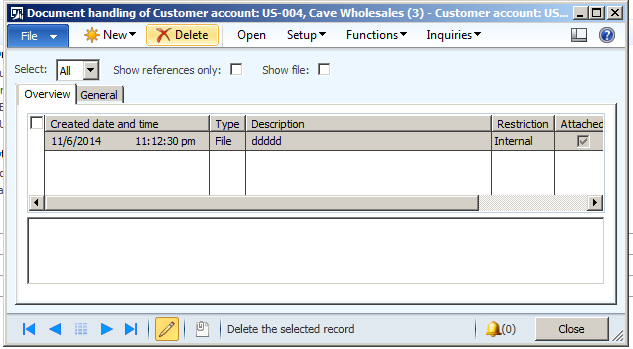
When I run this X++ test job I found document is attached as follow


FileDD

Custom fields shows as un retrievable on Dynamics Ax 2012 Forms.

November 6, 2014 by alirazazaidi

Today I was facing the same Issued, I added a few custom fields in AX table. After update data source and dropped custom field at required Place on form. When I run the form, I found that field showed as un-editable and unretrievable written there.


I found that it is cache problem. It solved by click on Refresh element cache. You can found the menu From Tool Menu, Caches and sub menu element Cache,


Cache refresh


If problem not solved by this way then restart the Dynamics Ax 2012 service from services.

How to find next value from sequence number when sequence number reference not in parameter table.

October 29, 2014 by alirazazaidi

Many times we have to generate and assign sequence number in X++. And usually we find attached sequence number form Parameter tables.  We can get customer through following X++ code


NumberSeq     _sequence;

ttsBegin;


_sequence = NumberSeq::newGetNum( CustParameters::numRefCustAccount());

    info((_sequence.num()));

info(_sequence.Num());

    info((_sequence.num()));


ttsCommit;


But sometimes these reference methods did not available in these Parameters table. For these fields you can get sequence number with reference to extended data type. For example if you have to find next value for CustInvoiceId of Free text Invoice of customer you have check the extended data type of field. And then get the next number with reference to Extended Data Type


NumberSeq     _sequence;

ttsBegin;

_sequence = NumberSeq::newGetNum( NumberSeqReference::findReference(extendedTypeNum(CustInvoiceId)));

info((_sequence.num()));

ttsCommit;


system does not support setup ‘continuous’ of number sequence in ax 2012

October 28, 2014 by alirazazaidi

During creating and assigning Sequence number in X++ code, I found this error continuously. Later i found that getting and assigning next sequence number should be  written inside transaction block. for example

ttsbegin;
itemId = NumberSeq::newGetNum(InventParameters::numRefItemId()).num();
ttscommit;

How to get exception detail and log into SysExpectionTable. Dynamics Ax 2012

October 25, 2014 by alirazazaidi

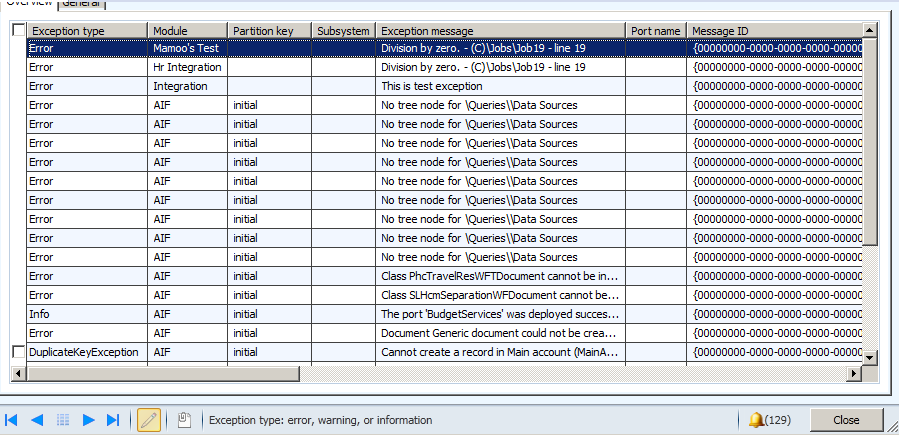
When we are working with Document Aif services, any exception is logged in SysExceptionTable. You can excess these details from following link.

Exceptions

There is client requirement that all exception must be log in SysExceptiontable in custom service. I did this with the help of following code snippets which just log the division by Zero exception in SysExceptionTable.


static void Job19(Args _args)

{


InfologData         infoData;

AifInfoLog          aifInfoLog;

container           infologData;

SysInfoLogEnumerator            infoLogEnum;

SysInfologMessageStruct         infoMessageStruct;


SysExceptiontable _Excep;

str  ExceptionMessage;

int ab=0;

int test=10;

int result;


try

{

aifInfoLog = new AifInfoLog();

result = test / ab;


}

catch

{

infologData = aifInfoLog.getInfoLogData();

infoLogEnum = SysInfoLogEnumerator::newData(infologData);

while(infoLogEnum.moveNext())

{

//Extract the message from the string

infoMessageStruct = SysInfologMessageStruct::construct(infoLogEnum.currentMessage());

ExceptionMessage +=”\n” + infoMessageStruct.message();


}

_Excep.Exception =Exception::Error;

_Excep.Description = ExceptionMessage;

_Excep.Module =”Mamoo’s Test”;

_Excep.insert();


}


}


Sysexceptiontable


Handling null values in dataset and DataReader in Dynamics ax 2012

October 22, 2014 by alirazazaidi


In X++ we can use System.Data.SqlClient.SqlReader or System.Data.DataSet, to Query on external database. But unfortunately there is No isDBNull function available for checking the null and same time system.string().isnullorempty and CLRInterop::Null is not work.


If you are using dataset or datatable then use datarow’s is null method

For example


If (!DataRow.isNull(“FirstName”)

{

Info(DataRow.get_Item(“FirstName”);

}


Second way to use the index of column according to field name in query, It is zero based index

If (!DataRow.isNull(0)

{

Info(DataRow.get_Item(“FirstName”);

}


If use data reader then use data reader is dbnull method, this method takes the index of field, there is no overload method for field Name,


int columnNum = datareader.GetOrdinal(“FirstName”);
if (datareader.IsDBNull(columnNum))
{
Info(datareader.get_item(“FirstName”);

}

execute stored procedure with parameters dynamics ax 2012

October 20, 2014 by alirazazaidi

During in one of my assignment, I have to call sql server stored procedure from X++ code. There is little tricky to call stored procedure with parameters. Following code will help me to call stored procedure with Parameters. Consider sp_StudentCreates a stored procedure with three parameters, first two string and last one is date.

private void InsertStudent( StudentDC  _dc)
{
    LoginProperty loginProperty;

OdbcConnection odbcConnection;

Statement statement;

ResultSet resultSet;

LoginProperty myLoginProperty;

str sql, criteria;

int output;

SqlStatementExecutePermission perm;

str myUserName="dynamicworld\\aliraza.zaidi";

str myPassword="xyz";

str myConnectionString;

myConnectionString=strfmt("UID=%1;PWD=%2",myUserName,myPassword);

myLoginProperty = new LoginProperty();

myLoginProperty.setServer("dynamicworld.com");

myLoginProperty.setDatabase("studentDb");

myLoginProperty.setOther(myConnectionString);


//Create a connection to external database.

odbcConnection = new OdbcConnection(myLoginProperty);


if (odbcConnection)

{


    sql = "Execute sp_StudentCreates   '"+_dc.parmFirstName())+"','"+_dc.parmLastMame())+"','"+date2str(_dc.parmDate(),321,DateDay::Digits2,DateSeparator::Hyphen,DateMonth::Digits2,DateSeparator::Hyphen,DateYear::Digits4)+"'";
 info(sql);

//Assert permission for executing the sql string.

perm = new SqlStatementExecutePermission(sql);

perm.assert();


//Prepare the sql statement.

statement = odbcConnection.createStatement();

output = statement.executeUpdate(sql);


statement.close();

}

else

{

error("Failed to log on to the database through ODBC.");
}

}

Connect to an external Database from Dynamics Ax 2012

October 18, 2014 by alirazazaidi

Sometimes we have to communicate with outside of Dynamics Ax with in boundaries of Dynamics ax.

Consider following scenario where I have to communicate with StudentDb in Sql server and insert rows in Student Info. We can do this with odbc connection.


Now create New AX job and paste following code there


LoginProperty loginProperty;

OdbcConnection odbcConnection;

Statement statement;

ResultSet resultSet;

LoginProperty myLoginProperty;

str sql, criteria;

int output;

SqlStatementExecutePermission perm;

str myUserName="dynamicworld\\aliraza.zaidi";

str myPassword="abcd";

str myConnectionString;


;


myConnectionString=strfmt("UID=%1;PWD=%2",myUserName,myPassword);

myLoginProperty = new LoginProperty();

myLoginProperty.setServer("WIN-IKPOSIU2SGD");

myLoginProperty.setDatabase("studentdb");

myLoginProperty.setOther(myConnectionString);


//Create a connection to external database.

odbcConnection = new OdbcConnection(myLoginProperty);


if (odbcConnection)

{


sql ="INSERT INTO ..[StudentInfo]([FirstName],[LastName]) VALUES ('aliraza','zaidi')";

//Assert permission for executing the sql string.

perm = new SqlStatementExecutePermission(sql);

perm.assert();


//Prepare the sql statement.

statement = odbcConnection.createStatement();

output = statement.executeUpdate(sql);


statement.close();

}

else

{

error("Failed to log on to the database through ODBC.");
}


Repeat the column header row on every page Tablix SSRS dynamics Ax 2012

October 13, 2014 by alirazazaidi

During SSRS report for Dynamics Ax 2012, I found that when report goes on multiple pages, column header did not appear all page except the first one.

I fix this problem by setting some properties to true.


Select the tablix and below right side of columns group header and click there on small arrow head and select the advance Mode.

10-13-2014 11-03-17 AM


This will open the row group  header and column groups like below picture.

10-13-2014 11-06-34 AM


Now right click on top static in row groups, or Press F4 to open the properties window.


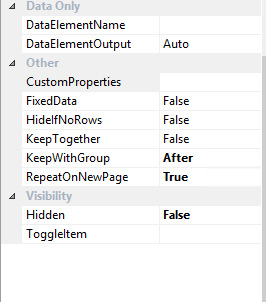
From property window, set propertyRepeatOnNewPage to True. Also set KeepWithGroup property to After


10-13-2014 11-06-24 AM


. When you deploy the report. Column header will appear on each page.

« Previous Page
Next Page »

Primary Sidebar

About

I am Dynamics AX/365 Finance and Operations consultant with years of implementation experience. I has helped several businesses implement and succeed with Dynamics AX/365 Finance and Operations. The goal of this website is to share insights, tips, and tricks to help end users and IT professionals.

Legal

Content published on this website are opinions, insights, tips, and tricks we have gained from years of Dynamics consulting and may not represent the opinions or views of any current or past employer. Any changes to an ERP system should be thoroughly tested before implementation.

Categories

  • Accounts Payable (2)
  • Advance Warehouse (2)
  • AI (3)
  • Asset Management (3)
  • Azure Functions (1)
  • Books (6)
  • Certification Guide (3)
  • ChatGPT (3)
  • Claude (1)
  • Customization Tips for D365 for Finance and Operations (63)
  • D365OF (60)
  • Data Management (1)
  • database restore (1)
  • Dynamics 365 (59)
  • Dynamics 365 for finance and operations (139)
  • Dynamics 365 for Operations (174)
  • Dynamics AX (AX 7) (134)
  • Dynamics AX 2012 (274)
  • Dynamics Ax 2012 Forms (13)
  • Dynamics Ax 2012 functional side (16)
  • Dynamics Ax 2012 Reporting SSRS Reports. (31)
  • Dynamics Ax 2012 Technical Side (52)
  • Dynamics Ax 7 (65)
  • Exam MB-330: Microsoft Dynamics 365 Supply Chain Management (7)
  • Excel Addin (1)
  • Favorites (12)
  • Financial Modules (6)
  • Functional (8)
  • General Journal (1)
  • Implementations (1)
  • Ledger (1)
  • Lifecycle Services (1)
  • Logseq (4)
  • Management Reporter (1)
  • Microsoft Excel (4)
  • MS Dynamics Ax 7 (64)
  • MVP summit (1)
  • MVP summit 2016 (1)
  • New Dynamics Ax (19)
  • Non Defined (9)
  • Note taking Apps (2)
  • Obsidian (4)
  • Personal Knowledge Management (3)
  • PKM (16)
  • Power Platform (6)
  • Procurement (5)
  • procurement and sourcing (6)
  • Product Information Management (4)
  • Product Management (6)
  • Production Control D365 for Finance and Operations (10)
  • Sale Order Process (10)
  • Sale Order Processing (10)
  • Sales and Distribution (5)
  • Soft Skill (1)
  • Supply Chain Management D365 F&O (5)
  • Tips and tricks (278)
  • Uncategorized (165)
  • Upgrade (1)
  • Web Cast (7)
  • White papers (4)
  • X++ (10)

Wiki

  • SCM

Copyright © 2026 · Magazine Pro On Genesis Framework · WordPress · Log in