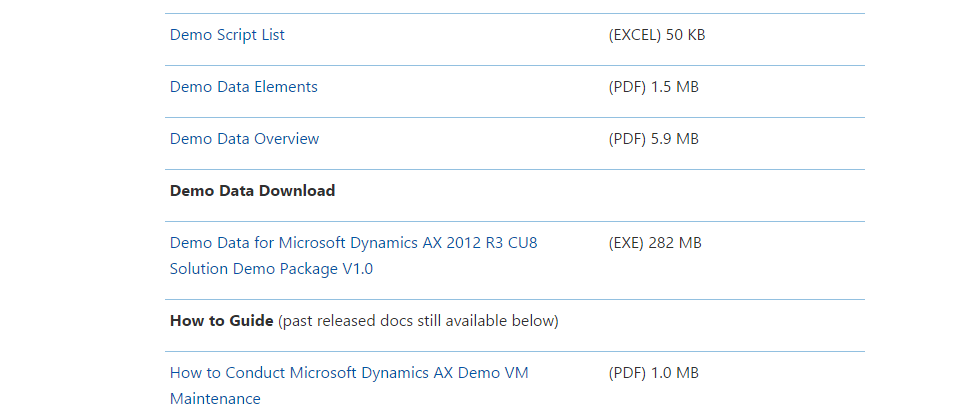
Demo data file for Dynamics Ax 2012 R3 CU8 is available for download. You can download it from following link
To log on here you must have partner source or customer source credentials.

A practitioner’s musings on Dynamics 365 Finance and Operations
Demo data file for Dynamics Ax 2012 R3 CU8 is available for download. You can download it from following link
To log on here you must have partner source or customer source credentials.
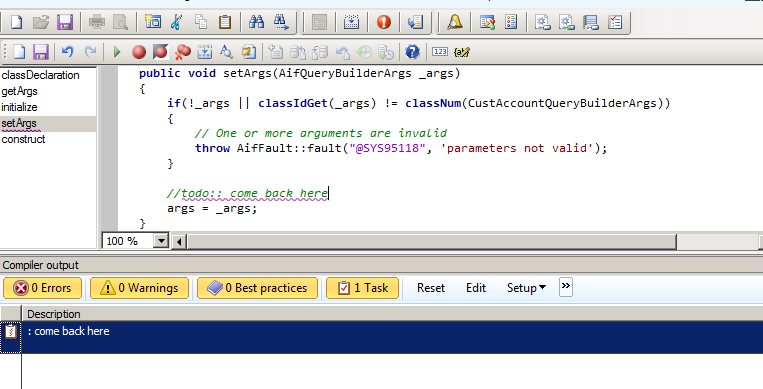
Very interesting feature for developers in dynamics Ax 2012 comes from its legacy version is
//Todo: come back here
During development many times, we have to comment some code because it is unfinished or generate errors and we cannot generate CIL. Later we forget where were we set commented lines of code because AX has thousands of classes.
The best option is to put comment with keyword “todo:” and leave message there or wrote the reason why we commented the line below.
When we compile the code there will be message in compile output window.

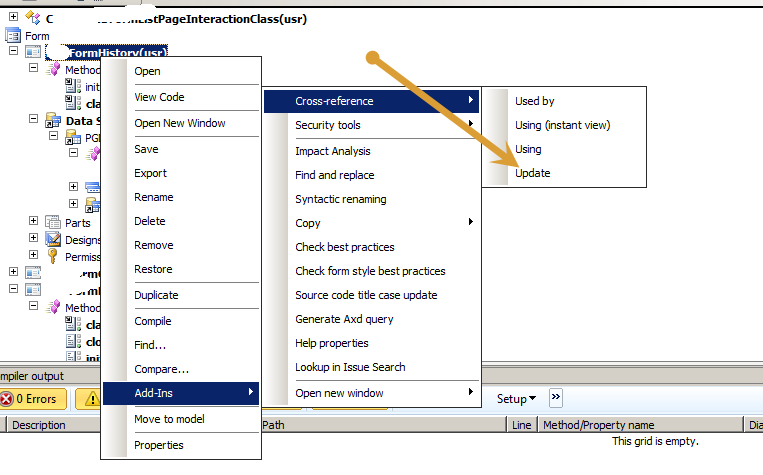
I got error message ” Unable to save method init” during saving the form. While surprising it gives no error on compiling the code. I also found some errors on classes too, I solved it by following way, possible it helps,

We can compile with whole AOT in less time as compared to compilation in Mophix. From Dynamics Ax 2012 R2 cu7 and later a utility provided for this purpose. You can found AXBuild exe from this location.
X:\Program Files\Microsoft Dynamics AX\60\Server\MicrosoftDynamicsAX\bin
And compilation command is as follow.
axbuild.exe xppcompileall /s=01 /altbin=”C:\Program Files (x86)\Microsoft Dynamics AX\60\Client\Bin” /log:”C:\Temp”
Where s=01 is the AOS server Id

During development, I wrote code in clicked event of Button. But requirement is that code will works only if form is in edit mode. I used following code to check it
boolean _bool;
supper();
_bool= element.inViewMode();
if (_bool==boolean::true)
{
info (“true”);
}
else
{
info (“false”);
}
This method element.inViewMode() return true when form is view mode.
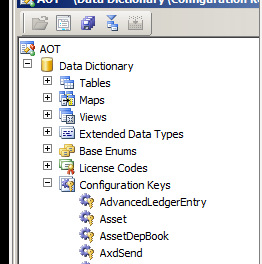
Go to Data Dictionary in AOT. Expand it and under configuration create a new configuration key.
Suppose we are going to create Module name with CustomModule, so we create is configuration key with same name. If you have license key then enter it other wise left it blank. This approach with out licence key works for development but for production you have must have ISV license.


Now go to Menu and create a menu with Name “CustomModule”.

Expand it and copy other menu and paste in it, then remove all menu items, left empty, common, step up, reports and inquiries.

Now right click on CustomModule and from properties set and set it configuration key mentioned in above step

Now expand the menu and right click on main menu and add reference to Custom Module menu.

Now add one menu Item in newly created menu for example just open a empty form from menu Item.
Save it and close the client and restart the AOS.
When AOS is restart you find a new module click it and open it.


We can get address for VendBankAccount table and BankAccountTable by following way.
VendBankAccount table has method which returns address VendBankAccount.addressing() ;
For BankAccountTable you can use following query to fetch its address, both table has similar releationship with logistic location table
BankAccountTable _BankAccount;
LogisticsPostalAddress _postalAddress;
LogisticsLocation _location;
while select * from _BankAccount
join * from _location
join _postalAddress
where _postalAddress.Location == _location.RecId
&& _BankAccount.Location == _location.RecId
{
info (_BankAccount.AccountID + ” address “+ _postalAddress.Address);
}
In my previous post, we create and post a request for Quotation for two different vendors,
http://tech.alirazazaidi.com/how-to-create-request-for-quotations-in-dynamics-ax-2012/
In this post I am going to register the response sent by vendors against request for Quotation.

By clicking on Request for quotation replies. A list page open, if you saw last two lines are against our required RFQ. because we send it to two different vendors.

We are going to register the response from the “Lande Packaging Supplies”.
From top menu select copy Data to reply and click on Edit.

On click on edit detail page opens you can update the information according to replies.

For first Item, I have to update price from 50 to 40 , We assume that Vendor offer us with less price.

Save it and similarly register response for other vendor.
Now go to back to all request Quotation form. Select the Request for Quotation and found request of Quotation as follow

From top menu strip click on compare replies

Following form will open which shows the line header with amount.

If you saw Vendor account 1001 offers less prices then vendor 1002. I am going to accept that response and that will result in Purchase Order convert from Request for Quotation.
Select the line and click on accept button.

Purchase order successfully created against accepted response.

Consider a scenario, where your organization “USMF” (demo data legal entity), what to purchase items from Vendors. They have different vendors who can provide these items / services on different discounted rate. So USMF create a request Items with specific quantity and send these request to different vendors. When vendors receives these request they evaluate different points and return the bids against them, We can register these responses in Ax against Request for which quotations they offered. After finalizing selected Quotes converted into Purchased order.
In this post we are going to request for quote and post this quote to different Vendors.
For creating request for Quotations you have to go Procurement and sourcing module.
The menu path will be Procurement and sourcing=> Request of Quotation=> All request for quotation

When you click on “All requests for quotations” link a list page will open

Click on Request for Quotation new button from top Quotation tab.

Select solicitation type and select RFQ-for Goods.

Update the delivery date to 2/28/2015 and also set expiration date and time to 1/21/2015.

Expiration date and time is means that vendor has to send response before the expiry date.
Click on Ok button and Request for Quotes detail page opens.

Here you can select item, its quantity and site id.


Now you can select the vendors for list against you send request for quotes by expending vendor fast tab below the

Select vendor account and click on add button.
For example I want to send this request for quotes to two vendors Acme Office Supplies and Lande Packaging Supplies.

Now vendors are selected we have to send these quotes to vendors, If your organization use the Enterprise portal then you can post this request for quote to vendor portal. But here I am just Request of quotes to posted

By Clicking on Send button following window will be open, If you are interested in printing you can click on print button.

After clicking on ok button you can check that in Request for quote detail page, that vendor highest status become sent.

If we saw the list page then find the status of request for quotes is also send

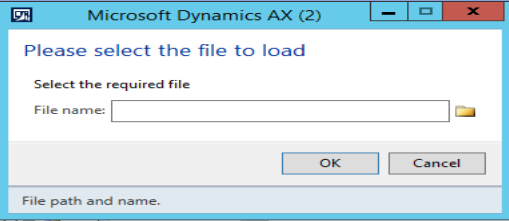
Some times we have to load files into dynamics Ax. Following X++ code helps to load files in Dynamics AX.
Dialog _dialog;
DialogField _file;
;//Prompt to import excel
_dialog = new Dialog(“Please select the file to load”);
_dialog.addText(“Select file:”);
_file = _dialog.addField(ExtendedTypeStr(“FilenameOpen”));_dialog.run();
if (_dialog.closedOK())
{
info(_file.value() );
}