• Skip to main content
  • Skip to primary sidebar
  • Home
  • About
  • Recommended Readings
    • 2022 Book Reading
    • 2023 Recommended Readings
    • Book Reading 2024
    • Book Reading 2025
    • Book Reading 2026
  • Supply Chain Management Guide
  • PKM
  • Microsoft Excel
  • Microsoft Copilot in Office 365
  • Public Wiki Page

Ali Raza Zaidi

A practitioner’s musings on Dynamics 365 Finance and Operations

Dynamics Ax 2012 functional side

Product Management in Dynamics Ax 2012 R3 Part 1

December 9, 2014 by alirazazaidi


In Dynamics Ax 2012, there is separate module  made for product management. There are two types of products in Dynamics ax.

Product. It is bare bone and independent product no further variation is not possible or required.

Product Master. When same product has different variant for example if we consider the hair color product that same color, quantity but slight different of shade can make different Product. Here we can make a master product and then creates its variant. We use Ax configuration technology to create its variants.


In Dynamics Ax 2012, The product creation is 4 step process.

  • Create the product.
  • Release to different legal entities.
  • Update the release product information according to different Legal Entity.
  • Used the product in different operation like purchase, sales and inventory management.


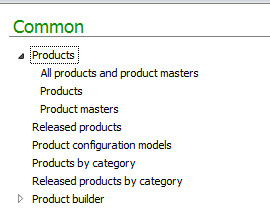
If you open the Product Management Area page in Dynamics Ax 2012 You can find following links that for product related information.

Product Managment


Currently If we open the All Product and Product Management then Product List Page will be appeared as.

In this article I am using contoso demo data.

12-8-2014 11-41-14 PM


Now click on top menu product to add new product.

New Product

Now if you see that there two important drop down first one is Product Type

And second one is Product Sub Type.

If we check the product type there is two values

Item and Services

Item type option is selected when product can be stored and Inventory can be manage.

Services Type can select when Product is non Inventory type. Or possible non tangible type.


Product sub type is option provided us capability to create standard product or Product which can be vary in terms of color size or config.

Product type: The standard product. There is no variant possible so no product associate with it.

Product Master: A template product its one or more than one variant can be exists. Variants exists in terms of its size, color and config.


If I am going to create a Product Master the New Product form will be look like.

Product Master


Currently I am interested in simple standard Product. So I go for first option

And click on ok.


New Product is created

Now click on top menu to release product, Here we release the product In Particular legal entity.


12-9-2014 12-40-17 AM


Now click on select companies

12-9-2014 1-09-41 AM

For example I want to release Product for Only USMF. Click on OK to release Product in USMF.
 

Vendor Reasons Lookup

October 12, 2014 by alirazazaidi

In Dynamics Ax 2012, you can create Vendor Reasons, These reasons helps to describe codes used to against the vendor, vendor transaction and vendor task. A reason code is used to justify the why change or transaction occurs.

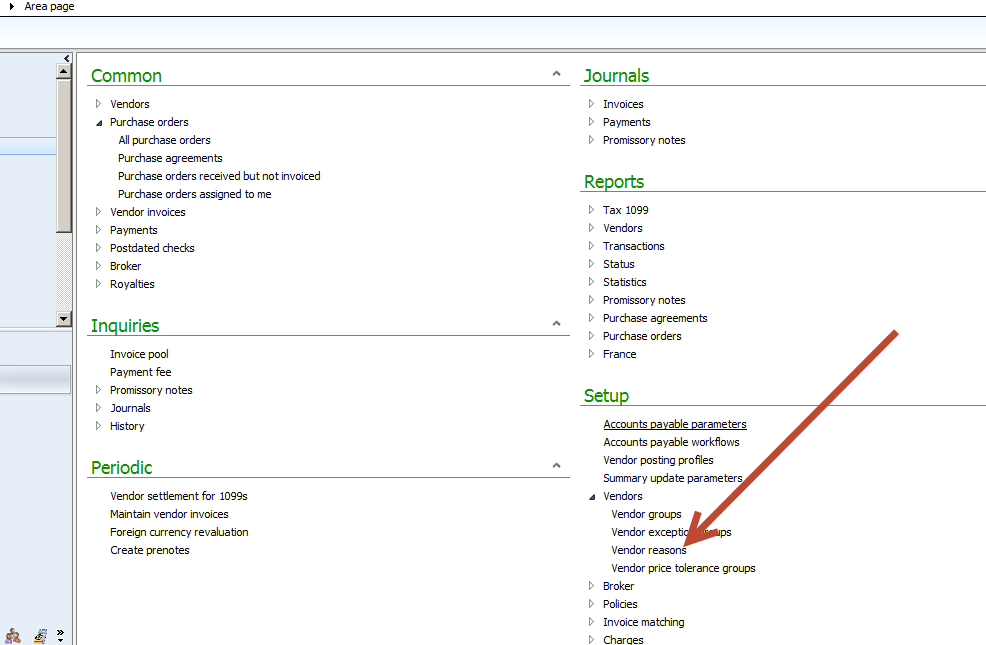
You can find Vendor reasons in Account Reasonable Area Page.

10-12-2014 11-10-47 AM


You can add vendor reason from Vendor Reason Form


VendorReason


If you go AOT you find that Data store in ReasonTable

Currency exchange rate setup in Dynamics AX 2012

September 4, 2014 by alirazazaidi


We can create transaction entries in different currency. For Example default currency set of Legal entity is “USD” and we have to create Purchase Order in Pak Rupees.

For this purpose we have to create exchange in Dynamics Ax.

The link of currency exchange is Ledger module, in Setup section and under currency. You can saw it as follow.

Link


Click on Currency exchange rates


Empty Selection

Select “Default” from Exchange rate Type. By default application exchange rate from “Default”. And then click on New Button, from right pane select From Currency to USD and To Currency select PKR.

By Default From date Set to “Current Date” and To Date set one month to after current Day. You can modify it as per your requirement.

In current scenario 1 USD is equal to 150 Pak rupee.

Date

There is also Start Date which is used as effective date, It means, between from date and to Date we can use multiple exchange rate.


Now you can create Purchase Order in Pak rupees, The Values are automatically converted into Pak rupees.

To verify that we create two Purchase order first in USD and second one in Pak rupees and verify that Item price are came in different values.


First we create Purchase Order with USD dollar and then create PO with and see the purchase Item price.

PO with USD dallor


Purchase Price

Now we create Purchase Order in Pak rupees and see the unit price.

PakRuppee


Purchase Price in PakRuppee

Functional side Training of new features of Dynamics Ax 2012 R3

April 8, 2014 by alirazazaidi

Recently I found the training session for new features of dynamics Ax 2012 R3 on Channel 9 website.

The important features of Dynamics Ax 2012 R3 are Warehouse management and Transportation management.  Presenters described these feature in brief and very precisely.  You can explore these features on below link of Channel 9.

http://channel9.msdn.com/Series/Microsoft-Dynamics-AX-2012-R3-Training

What’s New In dynamics Ax 2012 R3.

April 4, 2014 by alirazazaidi

I just saw the R3 demo VM. There is Lot of new features.  The major feature Include

  • Forecasting.
  • Budgeting
  • Transportation management
  • A wireless client for warehouse.
  • Retail Module has number of changes.

Let’s see small detail which I just collected.


  • Demand Planning – New Sales Forecasting Tool
    In Dynamics AX 2012 R3 a new Sales forecasting Tool giving which provide the more accurate for forecast.
  • Budget Planning – New tool for Budget Preparation 
    A budget planning include in Dynamics Ax R3 which will more standard to support the budgeting process.
  • Now Budget allocation based on allocation basis rules
  • Improved process flexibility and control by default and locked dimension values on certain type of budget plans
  • Evaluation of different scenarios for what-if analysis


  • Improved Warehouse Management functionality
    The warehouse management functionality enhanced to support for scanners, wave picking, license plates and process are more improve the warehouse.
  • Improved Inventory Control
  • Embedded Radio Frequency
  • Improved Inbound & Outbound Warehouse Operations


  • Transportation Management – New module for Shipment Planning and Control
    In transportation management, a new module that supports planning and packing containers, vehicles routes freight rates booking and billing, this will very important to enhancement for supply chain.
  • Rate, Route and Load Planning
  • Freight Reconciliation


Retail

  • A new and Windows 8 Tablet Point of Sales (POS) and Mobile POS.
  • A loyalty programs across legal entities and tiering of customer as well as enhanced gift card support.
  •  There are enrichments in pricing and promotions, assortment and catalog, BI and reporting and mark downs enhancements helping optimize revenue.


For developer or technical point of

  • a new compiler in Dynamics AX builds in the context of multiple developments integration.
  • A strong TFS Version Control support, which has previous version has problems.


References:

Here are some reference and  articles I found

A great article about compiler enhancement in Dynamics Ax 2012 R3 http://axwonders.blogspot.com/2014/03/hi-there-i-hope-everybody-is-doing.html


A detail article about Project management functionality enhancement in Dynamics Ax 2012 R3

http://sandeepchaudhury.wordpress.com/2014/01/26/enhancements-to-project-planning-functionality-in-ax-2012-r2-cu7/


There is registration going on for Webinar for Dynamics Ax 2012 R3 visit following link

https://presentations.inxpo.com/Shows/microsoft/4-10-14/Registration/Registration.html?AffiliateKey=21572&AffiliateData=


References : http://www.mwdata.dk/news/new-exciting-features-for-dynamics-ax-2012-coming-up/

http://blogs.msdn.com/b/dax/archive/2013/11/05/microsoft-dynamics-ax-2012-r3-a-preview.aspx

http://blog.encorebusiness.com/new-features-microsoft-dynamics-ax-2012-r3/

http://blog.encorebusiness.com/new-features-microsoft-dynamics-ax-2012-r3/

Exploring the Functional Side of Dynamics Ax 2012: How to create Legal entity.

January 20, 2014 by alirazazaidi

Today I decide to start Exploring the functional side of Dynamics AX 2012. The starting point certainly to create legal entity and explore the further options.

To Create a legal entity you have to open the legal entity form by the following link

  • Organizational Administrationè ==>Organization==>Legal Entities.01-legalEntitylink
  • To create a new legal entity click on new button and start enter the information. For example, in my case I am going to create a legal entity with Name “Lahore” and with company Name “Systems Ltd.” 02-New Legal Entity
  • After entering information of Legal entity Name, Organization Name and region area Name press on ok button to save it.03-New Legal Entity Save
  • Newly created Legal entity is shown in right side bar as follow.04-newlyCreated LegalEntity shown
  •  From right side window I can update further detail information for legal entity. There are following fast tabs are on the form

05-FastTabs 05-FastTabs


From General Tabs You can update following important information for legal entity

  • Language.
  • Search Name
  • Time Zone.

06-General Tab


Address Fast Tab:

From Address Fast tab: you can address information.

07-Address Fast tab


Click on Add button or Click on Edit button you can find more options.

08-Detail Address new


You can add Contact information from Contact fast There

There are 4 types of contact you can create

  • Phone Number
  • Email Address
  • URL
  • Telex
  • Fax.
  • If there are many contact number, you can make one of them primary by clicking check box on grid.09-Contact tab
  • From Tax Registration fast tab you can enter information regarding Taxation. Because Dynamics Ax is one of big ERP. It also option of Zakat.

10-Tax registration.


From Tax 1099 you can enter withholding tax information.

11-Tax1099


Statutory reporting fast tab, you can enter the registration information which will be used for statutory reporting.

12-Statutory reporting

12-Statutory reporting

Banking information can be add Banking information fast tab.
13-Banking information

Foreign trade and logistics Fast tab you can address shipment address

14-Foreign trade and logistics

If there is any Sequence number associated with legal entity that can be shown from here.

15-Sequence Number

reference : http://technet.microsoft.com/en-us/library/hh242184.aspx

« Previous Page

Primary Sidebar

About

I am Dynamics AX/365 Finance and Operations consultant with years of implementation experience. I has helped several businesses implement and succeed with Dynamics AX/365 Finance and Operations. The goal of this website is to share insights, tips, and tricks to help end users and IT professionals.

Legal

Content published on this website are opinions, insights, tips, and tricks we have gained from years of Dynamics consulting and may not represent the opinions or views of any current or past employer. Any changes to an ERP system should be thoroughly tested before implementation.

Categories

  • Accounts Payable (2)
  • Advance Warehouse (2)
  • AI (3)
  • Asset Management (3)
  • Azure Functions (1)
  • Books (6)
  • Certification Guide (3)
  • ChatGPT (3)
  • Claude (1)
  • Customization Tips for D365 for Finance and Operations (64)
  • D365OF (60)
  • Data Management (1)
  • database restore (1)
  • Dynamics 365 (59)
  • Dynamics 365 for finance and operations (139)
  • Dynamics 365 for Operations (175)
  • Dynamics AX (AX 7) (134)
  • Dynamics AX 2012 (274)
  • Dynamics Ax 2012 Forms (13)
  • Dynamics Ax 2012 functional side (16)
  • Dynamics Ax 2012 Reporting SSRS Reports. (31)
  • Dynamics Ax 2012 Technical Side (52)
  • Dynamics Ax 7 (65)
  • Exam MB-330: Microsoft Dynamics 365 Supply Chain Management (7)
  • Excel Addin (1)
  • Favorites (12)
  • Financial Modules (6)
  • Functional (8)
  • General Journal (1)
  • Implementations (1)
  • Ledger (1)
  • Lifecycle Services (1)
  • Logseq (4)
  • Management Reporter (1)
  • Microsoft Excel (4)
  • MS Dynamics Ax 7 (64)
  • MVP summit (1)
  • MVP summit 2016 (1)
  • New Dynamics Ax (19)
  • Non Defined (9)
  • Note taking Apps (2)
  • Obsidian (4)
  • Personal Knowledge Management (3)
  • PKM (16)
  • Power Platform (6)
  • Procurement (5)
  • procurement and sourcing (6)
  • Product Information Management (4)
  • Product Management (6)
  • Production Control D365 for Finance and Operations (10)
  • Sale Order Process (10)
  • Sale Order Processing (10)
  • Sales and Distribution (5)
  • Soft Skill (1)
  • Supply Chain Management D365 F&O (5)
  • Tips and tricks (278)
  • Uncategorized (165)
  • Upgrade (1)
  • Web Cast (7)
  • White papers (4)
  • X++ (10)

Wiki

  • SCM

Copyright © 2026 · Magazine Pro On Genesis Framework · WordPress · Log in