• Skip to main content
  • Skip to primary sidebar
  • Home
  • About
  • Recommended Readings
    • 2022 Book Reading
    • 2023 Recommended Readings
    • Book Reading 2024
    • Book Reading 2025
    • Book Reading 2026
  • Supply Chain Management Guide
  • PKM
  • Microsoft Excel
  • Microsoft Copilot in Office 365
  • Public Wiki Page

Ali Raza Zaidi

A practitioner’s musings on Dynamics 365 Finance and Operations

Dynamics 365

Customer in Dynamics 365 for Finance and Operations

October 15, 2017 by alirazazaidi

Every organization sold product or services to Customer. These Customer are main source of income to these organization. In Dynamics 365 for finance and operations we can create customer in Account receivable and sales and marketing modules.  Customer basic information is saved per legal entity but his Name, address and contact save in global address book. That can be reusable in different legal entity with new customer account.

We can define customer from Account Receivable => Customer => All Customer

Sales and Marketing => Customers => All customers
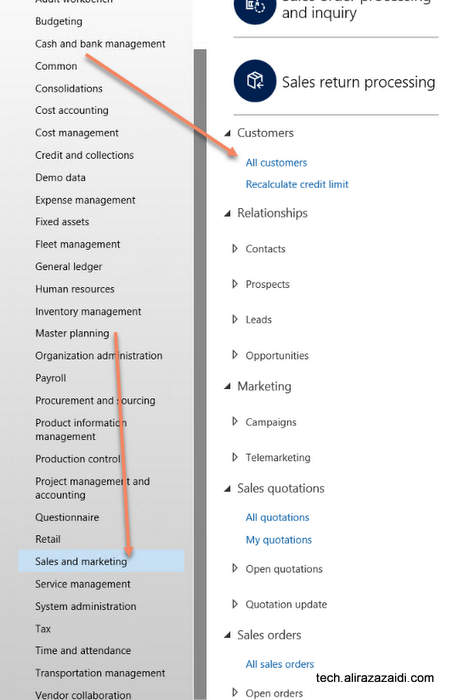


If we open the customer list page, similar page will be appear. This page can be used as inquiry too. The customer created here will be used for sales, payment, Invoices and ledger accounts. Customer information can be changed any time.


Every Customer is created with unique id in Customer Account.  Default size of Customer Account is 20.


By clicking on new button from top menu , on list page a dialog opens where we can enter basic information. boxes with red boundaries are mandatory. Customer can be organization or individual entry. As I already mentioned that Customer Name, address  and even contacts are global across  application.
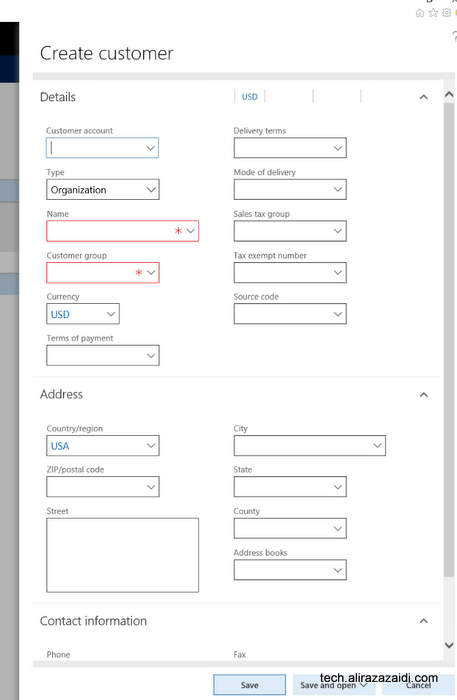


There are multiple options  available on save . Default option is save and go in detail page.
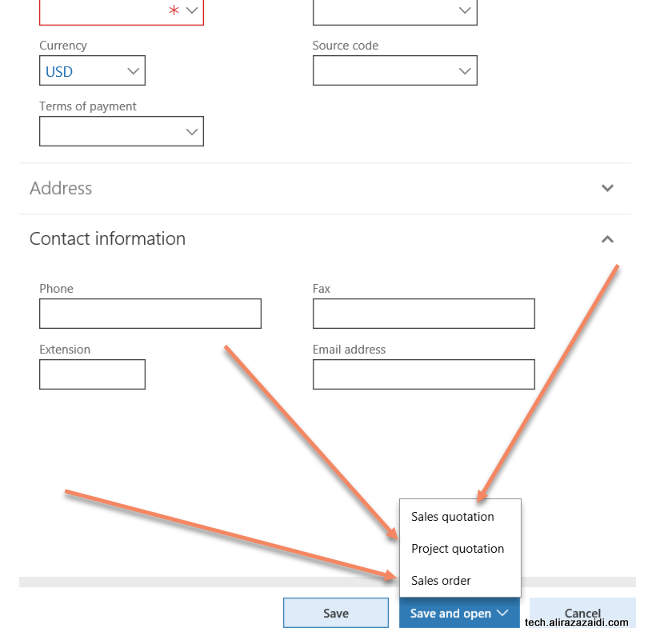
Other options are as follow


-Sales Quotations : Where we create Sales Quotations and start to enter the Sales quotations send to Customer in response to its RFQ.

-Project Order: Where customer saved and Project Quotations detail form opens.

-Sales Order: Customer Record saved and new sale order created against Customer and it goes directly Sales order detail page.


On click at Edit button to leads customer detail page in edit mode. We can modify information and save. This edit mode can available on detail page also.

Out of the box Customer detail will be something similar
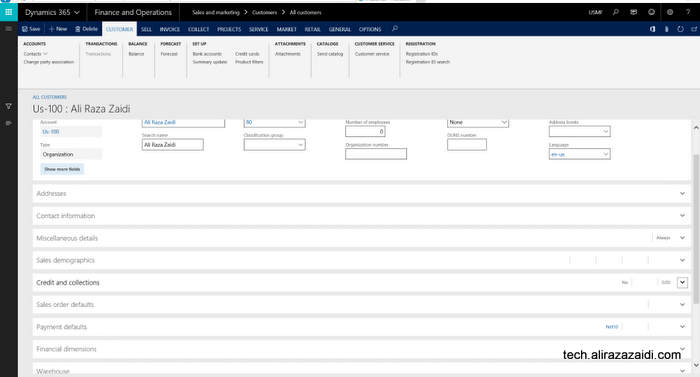
 

Customer Information and Contact:


Contact and Address can be added from Addresses and Contact information.
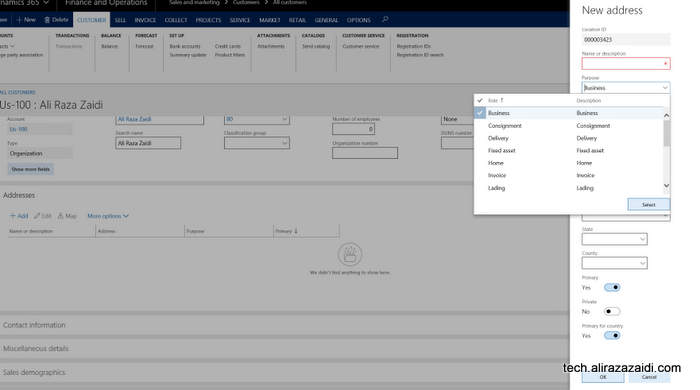


Invoice and delivery Information of Customer:


Some cases, we invoice the customer other then customer It self. Some times Same customer purchase things with different customer Account. In that case we invoiced shipment to another customer Id. For this purpose Dynamics 365 for finance provide Invoice Account in “Invoice and delivery” fast tab.

In the case of Invoice account not set in Invoice and Delivery fast tab then Invoice will be created against Customer Account as default.

The delivery terms, mode of delivery, receipt calendar can be specified in the Delivery area. This information will default to the sales order header.

If you want to calculate Sales tax against customer Invoice, you have to set Sales tax in Invoice and Delivery fat tab.


Customer Payment Information:


Payment management options can set in customer Payment fast tab


You can set

  • Terms of payment
  • Method of payment
  • Payment specification
  • Payment schedule.
  • Payment day
  • Cash discount. A cash discount is used as an incentive for customers that pay
  • before due date.
  • Bank account
  • Bank account number


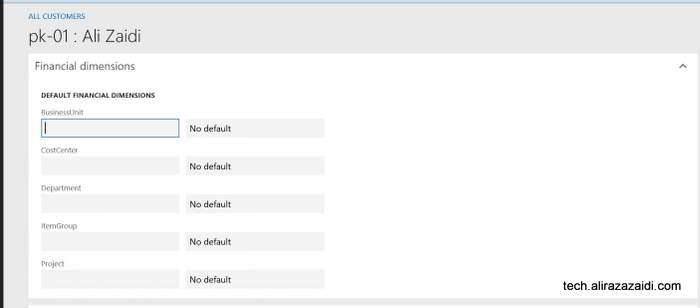
Customer Financial Dimension:

Customer financial dimension can be set from  financial Dimension fast tab. These financial dimension automatically copied in sale order and customer invoices if they are set at customer level. These financial dimension can be modify and over right.
Sales order related default settings:


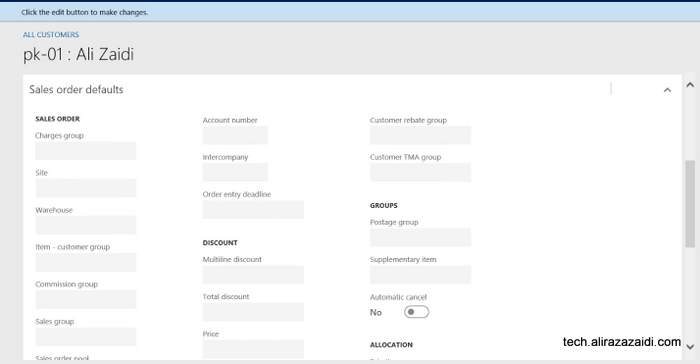
From Sale Order Defaults fast tab, you can set Preferred shipped from ware house and site and also Bill to customer. Bill to customer can be set in account number. This account number will be copied to Sale order header instead of customer own Account number. It means, we can set different Account for bill to customer .


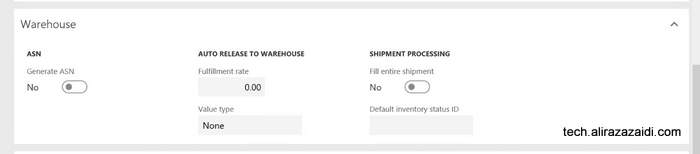
Ware house management Fast tab.


Here we can set Ware house management level information. Fast tab related to Advance ware house management module.

Following options are here.

ASN : Means, Advance shipment notification generate for customer.

Fulfillment rate.  The threshold required before releasing to Warehouse.

Value Type:  Fulfillment rate apply to Price, Quantity or to None.

Fill entire shipment- shipment processing parameter to control fully shipment allocation during work creation.

Default status id – default status for inventory transaction.
Dynamics Ax 2012 Project Types and Time and Material Video

October 5, 2017 by alirazazaidi

Hi All I found very interesting video about Project Management and accounting module of Dynamics 2012 R3 by Santosh kumar Singh. Video is worth to share.


Customer Credit limit in Dynamics 365 for Finance and Operations

September 22, 2017 by alirazazaidi

We can set credit limit for customer. Customer can purchase product or services up to certain limit. Even D365 for finance and operations provide us option to generate error message and stop processing of Sale order or just show error message and let the transaction happened.


For this you have to enable customer credit limit option from Account Receivable => step up => Account Receivable parameters.


In Account receivable parameter form, you  can found Credit limit option in Credit Rating  menu


If you explore Credit limit type you find following options


On selecting None, which is default means, credit limit functionality is disabled. Balance means, credit limit check against

Customer current balance, Next option is balance plus amount generated against packing slip and Product Receipt.

Third option is Balance + all include Packing slip, sale order and transaction activities.


Next option is when message exceeding the limit


We find one more option is on this page. This option is either apply credit limit on free text Invoice on .


Now we can set credit limit on Customer page, For this open required Customer and form detail page you can update credit limit. You can find Credit limit in Credit and collections fast tab


For more detail explore following link:

https://docs.microsoft.com/en-us/dynamics365/unified-operations/supply-chain/sales-marketing/credit-limits-customers

Dynamics 365 for Finance and Operations Development Cookbook Review.

September 16, 2017 by alirazazaidi


Book is excellent. It is handy and cover the almost all technical scenarios with very simple and precise examples. It is scenario based book, Instead a lot of story and unnecessary details, It focus to the point. As compare to previous cook books, which were more abstract, this feel book wrote in mind of fresh graduates or new developers in Dynamics Ax / Dynamics 365 for finance and operations.  After reading book, I feel it is like jigsaw puzzle, you can create a full customization by arrange piece by piece if you have this book. It contains everything which I come across in my 5 years’ experience for Dynamics.


Followings are chapters and my review.


Processing Data:


This chapter covers from creating new model, project in visual studio to complex Sql query execution.  Here you can find, creating a new sequence number, rename primary key, use regular table as temporary table. How to create query object at run time. And how to execute SQL Query directly in X++ code.

My favorite recipe here is ” How to use regular table as temporary table”.


Working with Forms

This chapter gives us very basics of Dynamics 365 for finance and operations forms. Very precise examples for day to day  scenarios.  These recipes contains how to make dialog, tips on catching dialog events, building dynamic form, creating a model form, storing the last values in form. Tree view control, Adding a view detail link. Also good detail of Dynamics form Patterns in Dynamics 365 for finance and operations.


My favorite recipe here is ” Storing Last values in form “.


Working with Data in Forms

This chapter covers the recipes for data manipulations in forms.  It covers sequence number handling, creating custom filter controls. Building a selected  or available list. Processing multiple record, Coloring the records, adding images to different record.

My favorite recipe is ” coloring the records “;


Building Lookups


This chapter covers the lookups based on different scenario, I found all are practical example for building Lookups


Processing Business Tasks.

This chapter is amazing. Containing everything you need to customize. You will find here, segment entry control, creating and posting general entry posting with X++ code, processing of Project ledger,  creating and posting of ledger voucher, creating Sales order, purchase order and electronic payment format.


Data Management

This chapter provide recipes of data migration for example,  data entities, data entities with multiple sources, Data packages, import export and trouble shooting.


Integration with Microsoft Office.


This chapter covers the integration with Excel and word using add-in, workbook designer, custom ax lookup in excel. And creating word document with repeated elements.


Integration with Power BI.

This chapter is also good, recipe for Dynamics 365 for finance and operations starts with Configuring Power BI, consuming data in Excel, Integration with excel, developing interactive Dashboards, embedding Power BI visuals.


Integration with services.


Couple of years back, I was integration expert, I did a lot of integration. This chapter is favorite for me. I was never be good designer, So services attract me more. Just write, consume, map fields schedule and run. I still do integrations of dynamics with. Even with devices like thumb recognition and attendance machines available locally with HR and Payroll.


This chapter contains the recipes

Custom service development, authentication with native client also with Azure. Consuming services in Json and soap. You can also find about Odata services. And also consuming external web services in Dynamics 365 for finance and operations.


Improving development efficiency and performance.


This chapter name seems not right, noting about performance here. It feels what left is placed here, Still recipes are valid and from practical day to day development / customization scenarios. Like extensions, display methods, calculate code execution time, enhance insert, delete and update time. Writing efficient SQL Queries. Event handler and delegate handlers.


I recommend you to read this book.

Custom financial Dimension shows in lookup D365 for Finance and operations

August 19, 2017 by alirazazaidi

I one of last post, I added the custom financial dimension in D365 for finance and operations.
You can find this post here
https://www.tech.alirazazaidi.com/custom-financial-dimension-in-dynamics-365-for-finance-and-operations-ax-7/

In next post I load financial dimension in custom lookup.

Custom lookup for Financial Dimension D365 for Finance and Operations (Dynamics Ax 7)

But above link shows only out of the box financial dimensions. But what about custom financial dimension,

I tested the following code snippet works custom dimension. It load custom dimension mentioned in

Custom Financial Dimension in Dynamics 365 for Finance and Operations (AX 7)


[FormControlEventHandler(formControlStr(FrmTestDetail, FormStringControl1), FormControlEventType::Lookup)]
public static void FormStringControl1_OnLookup(FormControl sender, FormControlEventArgs e)
{

SysTableLookup sysTableLookup;
Query query;
QueryBuildDataSource qbdsDimensionFinancialTag;
QueryBuildRange qbrFinancialTagCategory;
String20 LC;
RecId _recid;
DimensionAttribute _attribute;
Name _name=’jaggah_tax’;

;
// super();

//#define.MyCustomFinancialDimension(‘LC’)
// select * from attribute where attribute.Name ==_name;
// recid = attribute.financialTagCategory();

query = new Query();
qbdsDimensionFinancialTag = query.addDataSource(tableNum(DimensionFinancialTag));
qbrFinancialTagCategory = qbdsDimensionFinancialTag.addRange(fieldNum(DimensionFinancialTag, FinancialTagCategory));
qbrFinancialTagCategory.value(strFmt(‘%1’, DimensionAttribute::findByName(_name, false).financialTagCategory()));

sysTableLookup = sysTableLookup::newParameters(tableNum(DimensionFinancialTag), sender,true);
sysTableLookup.addLookupfield(fieldNum(DimensionFinancialTag, Value), true);
sysTableLookup.addLookupfield(fieldNum(DimensionFinancialTag, Description));
sysTableLookup.addSelectionField(fieldNum(DimensionFinancialTag, FinancialTagCategory));
sysTableLookup.parmQuery(query);

sysTableLookup.performFormLookup();

FormControlCancelableSuperEventArgs ce = e as FormControlCancelableSuperEventArgs;
//cancel super() to prevent error.
ce.CancelSuperCall();

}

Output is here

Custom Financial Dimension in Dynamics 365 for Finance and Operations (AX 7)

July 14, 2017 by alirazazaidi

Purpose of this post to share the procedure I learned yesterday for adding custom Financial dimension in Dynamics 365 for Finance and Operations aka (AX 7). So I added a fictional Financial dimension.

Suppose we have to create a financial dimension with “Jaggah Tax”. This financial dimension required in Sales order, Sales Line, Purchase Order, Purchase line.


New Custom financial can be added and activate by following steps.


First of all open Ax in browser and change its legal entity to USMF.

Now click on General Ledger ==> Charts of Accounts ==> Dimensions => Financial Dimensions.


From financial dimensions page Click on New button. As a result detail page open in new / create mode.


You will find here three editable controls. From Used value drop down, select custom dimension, in second text box type name of dimension and in third text box type Report column Name.


Now click on Activate button from top menu.


On pressing Activating menu button, on right hand side a popup dialog opens. You can select different options from here. I want to activate this financial dimension so I selected activate now option.


So progress dialog show activation is under progress.


Finally we created a new financial dimension.


Now next step is to add values for dimension. Suppose our organization pay two types of jaggah tax.

-Noori Naath

-Mola Jatt.


So for this click on Dimension values menu button after selecting dimension open in detail section.


Click on New and enter values as much as requires. With each value also add  activation date.


We successfully create custom financial dimension. But until we add financial dimension in accounting structure  it will not available for selection.


For this again open General Ledger => Setup => Ledger


From Ledger detail form, select Manufacturing P&L. either double click on it or after selection click on edit button.


Account Structure is open, Also click on add  segment.


On right side a pop up opens with all financial dimensions. You can select required dimension.

From right side a pop up opens from there you can select required Dimension.


After selection Accounting structure look a like below screenshot.


Now on update financial dimensions values below text boxes in grid to “”;*. By default it will be *. Which means value is required.  “”;*. Means empty value or null values also allow in dimension.

Now update top value and activate it.

Activation in progress.


Now open Purchase order and from Header view, select newly added financial dimension.


Values are available here.


Our newly add financial dimension successfully added


Dynamics 365 for Finance and operations on premise deployment Landing Page link

July 6, 2017 by alirazazaidi

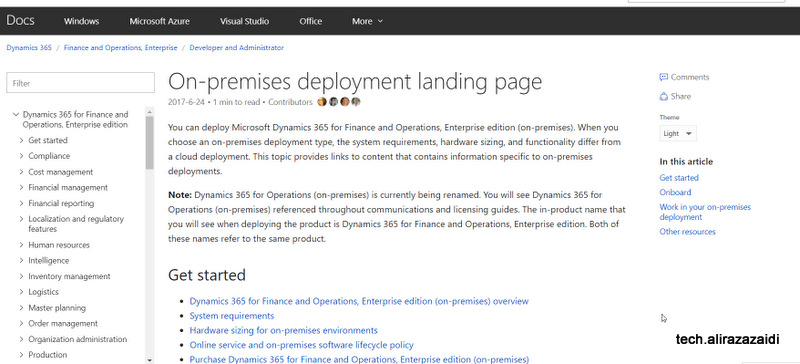
A month ago, Microsoft publish a link page for  On-premises deployment.

They titled it as Landing Page.

This page contains On premise infrastructure, hardware requirements, licensing polices,  purchasing license, configuration, deployment and much more. Page is worth reading, you can find its detail from link below.


https://docs.microsoft.com/en-us/dynamics365/unified-operations/dev-itpro/deployment/on-premises-deployment-landing-page

Enum value to Table Insertion Dynamics Ax 2012 R3, D365 for operations

June 23, 2017 by alirazazaidi

Let me share you a small tip, During customization We extend out of box Enum for classification. Later client requirement is extensive usage of new Values for classification. For adding new values in enum results dependency on technical person . So we did customization and provide form and custom table so he can create number of values as he want. But now next challenge was, copy enum values and labels in Custom table, So He can use these value instead create again. I used following code snippet to copy data from Enum and insert into Custom table. Hopes this helps.


EnumId   enumId   = enumNum(LedgerPostingType);

DictEnum dictEnum = new DictEnum(enumId);

int      _NoOfValueInEnum = dictEnum.values();

int      counter;

CustomTable  _header;

delete_from _header;

for(counter = 0; counter < _NoOfValueInEnum; counter ++)

{

_header.ReportHeaderCode = dictEnum.index2Label(counter);

_header.Description = dictEnum.index2Label(counter);

_header.SortOrder=0;

_header.EnumValue = dictEnum.index2Value(counter);

_header.insert();


}

Dynamics 365 for Finance and Operations, Enterprise edition (on-premises) system requirements White-Paper

June 20, 2017 by alirazazaidi

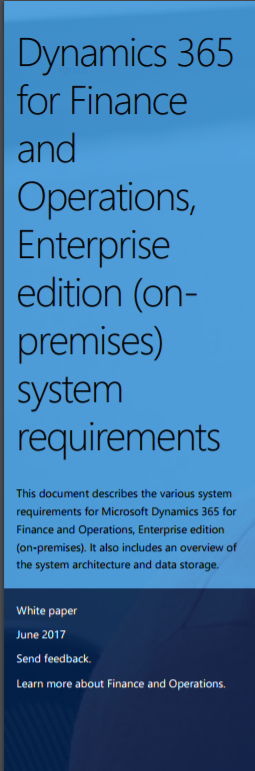
Microsoft just release the white paper about system requirement of Dynamics 365 for Finance and Operations and Enterprise edition In short Dynamics Ax 7 on premises.


You can download it from here
https://www.microsoft.com/en-us/download/confirmation.aspx?id=55496

Tips and Tricks in Dynamics 365: Export Excel Data to Dynamics 365 for Finance and Operations

June 5, 2017 by alirazazaidi

Hi All, I just enjoyed the video by Clients First Business Solutions on excel data export. I think its worth to share


« Previous Page
Next Page »

Primary Sidebar

About

I am Dynamics AX/365 Finance and Operations consultant with years of implementation experience. I has helped several businesses implement and succeed with Dynamics AX/365 Finance and Operations. The goal of this website is to share insights, tips, and tricks to help end users and IT professionals.

Legal

Content published on this website are opinions, insights, tips, and tricks we have gained from years of Dynamics consulting and may not represent the opinions or views of any current or past employer. Any changes to an ERP system should be thoroughly tested before implementation.

Categories

  • Accounts Payable (2)
  • Advance Warehouse (2)
  • AI (3)
  • Asset Management (3)
  • Azure Functions (1)
  • Books (6)
  • Certification Guide (3)
  • ChatGPT (3)
  • Claude (1)
  • Customization Tips for D365 for Finance and Operations (64)
  • D365OF (60)
  • Data Management (1)
  • database restore (1)
  • Dynamics 365 (59)
  • Dynamics 365 for finance and operations (139)
  • Dynamics 365 for Operations (175)
  • Dynamics AX (AX 7) (134)
  • Dynamics AX 2012 (274)
  • Dynamics Ax 2012 Forms (13)
  • Dynamics Ax 2012 functional side (16)
  • Dynamics Ax 2012 Reporting SSRS Reports. (31)
  • Dynamics Ax 2012 Technical Side (52)
  • Dynamics Ax 7 (65)
  • Exam MB-330: Microsoft Dynamics 365 Supply Chain Management (7)
  • Excel Addin (1)
  • Favorites (12)
  • Financial Modules (6)
  • Functional (8)
  • General Journal (1)
  • Implementations (1)
  • Ledger (1)
  • Lifecycle Services (1)
  • Logseq (4)
  • Management Reporter (1)
  • Microsoft Excel (4)
  • MS Dynamics Ax 7 (64)
  • MVP summit (1)
  • MVP summit 2016 (1)
  • New Dynamics Ax (19)
  • Non Defined (9)
  • Note taking Apps (2)
  • Obsidian (4)
  • Personal Knowledge Management (3)
  • PKM (16)
  • Power Platform (6)
  • Procurement (5)
  • procurement and sourcing (6)
  • Product Information Management (4)
  • Product Management (6)
  • Production Control D365 for Finance and Operations (10)
  • Sale Order Process (10)
  • Sale Order Processing (10)
  • Sales and Distribution (5)
  • Soft Skill (1)
  • Supply Chain Management D365 F&O (5)
  • Tips and tricks (278)
  • Uncategorized (165)
  • Upgrade (1)
  • Web Cast (7)
  • White papers (4)
  • X++ (10)

Wiki

  • SCM

Copyright © 2026 · Magazine Pro On Genesis Framework · WordPress · Log in