• Skip to main content
  • Skip to primary sidebar
  • Home
  • About
  • Recommended Readings
    • 2022 Book Reading
    • 2023 Recommended Readings
    • Book Reading 2024
    • Book Reading 2025
    • Book Reading 2026
  • Supply Chain Management Guide
  • PKM
  • Microsoft Excel
  • Microsoft Copilot in Office 365
  • Public Wiki Page

Ali Raza Zaidi

A practitioner’s musings on Dynamics 365 Finance and Operations

Dynamics 365

Good By AX Brand, Microsoft Officially retired the AX as brand

May 5, 2017 by alirazazaidi

The Dynamics AX brand has been officially retired by Microsoft. As of July 1, 2017, new customers will not be able to buy Dynamics AX 2012 R3.


Existing client still extended and renew their license.  But After 1 July new customer only purchase Dynamics 365 for operations.   There is possible release of on premise Dynamics 365 for operations in second Quarter and most probably last quarter of 2017.  cover the gap for those who want to purchase  dynamics ax  instead of Azure or cloud version.


Specially middle east, Pakistan and India market Business owners wants on premise version. Support for existing Dynamics Ax will be continue till 2021.

Existing 2009 version client who wants to upgrade will migrate to Dynamics 365 for operations.

Dynamics Ax brand was originally created in 2006 for AX 4.0 will be closed in July 2017.


Reference : https://ax-dynamics.com/article/the-official-end-of-dynamics-ax

Data manipulation tip 4 Dynamics ax 2012 and D365 of Operations Insert_recordset

April 24, 2017 by alirazazaidi

During report development we populate temp table and bind it to SSRS report. And most of the time we were doing one to one mapping inside while loop or query run loop., Kindly consider following code snippet.

While select sum(Qty) from Inventtrans group by 
ItemId, InventDimId , DatePhysical
Where datePahyical > _fromdaet
&& datePhayical <_todate
{
Tmp.ItemId= inventrans.ItemId;
Tmp.IventDim = inventtrans.InventId;
Tmp.Qty = inventtrans.QTY;
Tmp.Insert();

}

But if we replace loop with Insert_RecordSet , report execution time reduce much. Consider following code snippet used to replace loop with Insert_Recordset

Insert_recordset Tmp (ItemId,InventdimId,QTY)
Select forceplaceholders ItemId, InventDimId, sum(QTY)
From inventtrans
Group by ItemId,InventDimId
Where datePahyical > _fromdaet
&& datePhayical <_todate;

Data manipulation tip 2 Dynamics ax 2012 and D365 of Operations Table initialization method.

April 12, 2017 by alirazazaidi

If we consider the following code snippet.
CustSalesQty _temp1,_temp2;
_temp1.IntQty=100;

_temp1.CustAccount =”Cust00001″;

_temp1.insert();

_temp1.IntQty=200;

_temp1.insert();


_temp1.IntQty=300;

_temp1.CustAccount =”Cust00003″;

_temp1.insert();

while select * from _temp1

{

_temp2.data(_temp1);

_temp2.insert();


}


while select * from  _temp2

{

info( ” _temp2 with ” + _temp2.CustAccount + ” ” + int2Str(_temp2.IntQty));


}


}

You can check that when we insert the temp1.inQTY=200, We did not set Customer account. At result record new record will insert with customer Cust00001 . You can see output of above code


Point is simple, We need to initialize the table before populate for next values.  I found this scenario in custom Inventory reports. When we populate data in different fields based on issue status.

You can set initialized values after ate in side query execution loop. But that piece of code belongs to specific location.

Microsoft provide the out of the box base initValue method. You can add this method by following way.

Best practices says you have to initialize value in this method. And call this method with table reference. This way initialization is table dependent not class dependent.


So we can over write the code as follow

public class CustSalesQty extends common

{

/// <summary>

///

/// </summary>

public void initValue()

{

super();

this.IntQty =0;

this.CustAccount =””;

}


}

Now above code snippet will works as

class Job123

{

/// <summary>

/// Runs the class with the specified arguments.

/// </summary>

/// <param name = “_args”>The specified arguments.</param>

public static void main(Args _args)

{

CustSalesQty _temp1,_temp2;

_temp1.initValue();

_temp1.IntQty=100;

_temp1.CustAccount =”Cust00001″;

_temp1.insert();

_temp1.initValue();

_temp1.IntQty=200;

//  _temp1.CustAccount =”Cust00002″;

_temp1.insert();

_temp1.initValue();

_temp1.IntQty=300;

_temp1.CustAccount =”Cust00003″;

_temp1.insert();

while select * from _temp1

{

_temp2.initValue();

_temp2.data(_temp1);

_temp2.insert();


}


while select * from  _temp2

{

info( ” _temp2 with ” + _temp2.CustAccount + ” ” + int2Str(_temp2.IntQty));


}


}


}

Data manipulation tip 1 In Dynamics ax 2012 and D365 Of Operations Data copy method.

April 9, 2017 by alirazazaidi


Currently I am doing Report development project, I got some tips for Data manipulation , these tips I recently learned.


Copy data from one table buffer to other of same type.


During report development, We usually populate  temp table with result of Query execution. Usually we need copy of same data for aggregate functions.


Instead map each field of buffer with each other. We can copy the whole data by using .data method.


Suppose we have custom temp table CustSaleQtyTmp which we need to copy from one buffer to other.

class DataManipulationJob
{
/// <summary>
/// Runs the class with the specified arguments.
/// </summary>
/// <param name = "_args">The specified arguments.</param>
public static void main(Args _args)
{

CustSaleQtytmp _temp1,_temp2;
_temp1.IntQty=100;
_temp1.CustAccount =”Cust00001″;
_temp1.insert();
_temp1.IntQty=200;
_temp1.CustAccount =”Cust00002″;
_temp1.insert();

_temp1.IntQty=300;
_temp1.CustAccount =”Cust00003″;
_temp1.insert();
while select * from _temp1
{
// Instead copy like this we can use Data method
// _temp1.CustAccount = _temp2.CustAccount;
// _temp1.IntQty = _temp2.IntQty;

_temp2.data(_temp1);
_temp2.insert();

}

while select * from _temp2
{
info( ” _temp2 with ” + _temp2.CustAccount + ” ” + int2Str(_temp2.IntQty));

}
}

}

output like

Microsoft Dynamics 365 vs NetSuite White Paper by Merit solutions

February 12, 2017 by alirazazaidi

Currently I just complete small not more than 10-pages white paper released by http://www.meritsolutions.com

I love is definition of Dynamics 365 in article. For your reference I copied it

“Microsoft Dynamics 365 is Microsoft’s next generation of intelligent business applications delivered in a single-tenant cloud environment. Dynamics 365 unifies CRM, ERP, BI, IoT, and mobile capabilities by delivering new purpose-built applications to help manage specific business functions, including Dynamics 365 for Operations, Dynamics 365 for Sales, Dynamics 365 for Customer Service, Dynamics 365 for Field Service, and Dynamics 365 for Project Service Automation. Designed to be personalized, enable greater productivity, deliver deeper insights, and adapt to business needs, Microsoft Dynamics 365 applications help businesses accelerate digital transformation to meet the changing needs of customers and capture the new business opportunities of tomorrow.”


As white paper described with reference of Gartner That following four factor must be in consider the before purchase or ERP implementations.

  • IT cost savings.
  • Business process efficiency.
  • Process standardization on a business process platform.
  • Ability to be a catalyst for business innovation.


And In white paper, writer successfully proves that Dynamics 365 is qualifies and better then NetSuite


For more detail download it from

http://www.meritsolutions.com/microsoft-dynamics-365/microsoft-dynamics-365-vs-netsuite-white-paper/


Disclaimer

The screenshot used in this post is taken from white paper.

Whats Dynamics 365 offering today and What will it tomorrow, SL,GP,Nav also Part of it

November 23, 2016 by alirazazaidi

I took picture, not share from where, But certainly from Microsoft Slide. Yaa, SL , GP Nav also part of it.

dsc_0919

Introduction to New Dynamics 365 for operations in 90 seconds.

November 13, 2016 by alirazazaidi

Microsoft release a 90 seconds video as introduction to new Dynamics 365. More and less a advertisement video.  Video release with title


Increase the Speed of Doing Business with Microsoft Dynamics 365 for Operations


https://www.youtube.com/watch?v=MlxJRUN1EiI

Customization in New Dynamics Ax (Aka AX 7)- Part 6 Custom Workflow

October 19, 2016 by alirazazaidi

Customization in New Dynamics Ax (Aka AX 7)- Part 6 Custom Workflow


Hi, every one, Let’s explore the custom workflows in new Dynamics Ax commonly known as AX 7.

This blog post is part of series.

In this post, I build a custom workflow based on table and form build in pervious posts.

Below links leads you to older posts.


http://tech.alirazazaidi.com/customization-in-new-dynamics-ax-ax-7-part-1-creating-new-model/


http://tech.alirazazaidi.com/customization-in-new-dynamics-ax-aka-7-create-new-module/


http://tech.alirazazaidi.com/customization-in-new-dynamics-ax-ak-7-part-3-form-and-table-extensions/


http://tech.alirazazaidi.com/customization-in-new-dynamics-ax-ak-7-part-4-custom-tables/


http://tech.alirazazaidi.com/customization-in-new-dynamics-ax-aka-ax-7-part-5-custom-forms-simple-list-page/


As per Microsoft Documentation Custom workflow development is very similar to Dynamics Ax 2012.


Let’s do this in in following steps.

Custom Enum type.


We need Custom enum type for defining the States or status of Workflow. In Current Example I am using Al as naming convention for development.


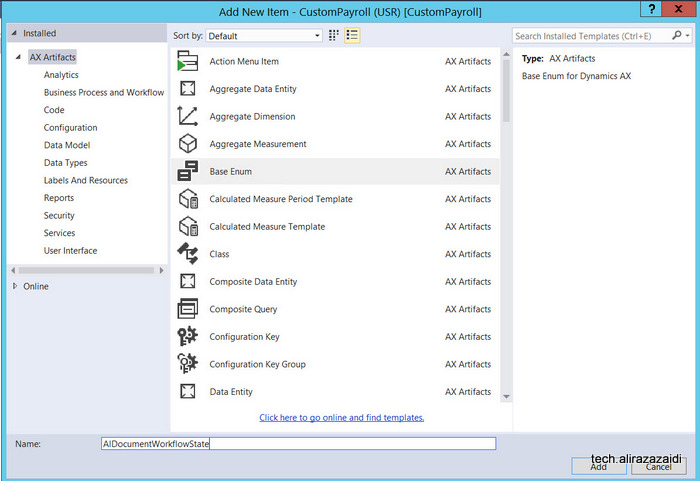
Right click on Solution explorer and then add a new from ax artifacts. Name it AlDocumentWorkflowState.

new-enumtype

When new AlDocumentWorkflowState enum is added in Solution explorer then double click on it to open it in designer mode. And then Add following Elements in it.

Add following elements in Enum

2016-09-20_22-56-56


Now drag this enum to required table and it will create a new field other wise you have to create a new field in table and set extended data type / base enum. For current example I used the AlEarningCodeGroup table which I created in my previous post.

workflowdrag


Table methods:

We need two methods in Table, first method is CanSubmitToWorkFlow.  This table help us to enable workflow based on specific condition, For example if table row has workflow state draft or not submitted, then workflow will processing will enable.

canworkflow


A new class is added in and update with logic, The condition on which Workflow enabled in class

public boolean canSubmitToWorkflow(str _workflowType = '')

{

boolean ret;

ret = super(_workflowType);

if (this.AlDocumentWorkflowState  == AlDocumentWorkflowState::NotSubmitted)

{

ret = boolean::true;

}

else

{

ret = boolean::false;

}

return ret;

}


Now add one more method in class We pass recId of current row and update its workflow state.

Public static void UpdateWorkFlow(RefRecId _RecId,AlDocumentWorkflowState _Status)

{

AlEarningCodeGroup _Group;

select forupdate * _Group where _Group.RecId == _RecId;

ttsbegin;

_Group.AlDocumentWorkflowState = _Status;

_Group.update();

ttscommit;


}


Custom Query:

Workflow uses the query to define the tables and fields that will be used by the workflow to define the data set available.

Again right click on solution explorer and add new Item and then select Query.

Now create a Query so we can build Document on that Query.

newquery


Name it AlEarningCodeGroupQuery .

Double click on Query and open it into Design mode and drag table in Data source. Save

querydetail

Now right click on Table and press Now F4 or open property window and set dynamics Field

fields

You find fields details.

query-building


Workflow Category:

A workflow category is used to determine the module in which the workflow will be available

Right click on project in solution explorer and add new Item.  From dialog window select workflow category.

workflowcategorydailog


Double click on workflow category created in previous step and open in designer view, press F4   to property window. set Module Property to HumanResource and Label to “AlEarningcodeGroupWFCategory” and save it.

categoryproperty


Workflow type.

Now to go to Solution explorer and add new item and from new Item dialog select

earncodetypewf


Name it AlEarningGrpWFType. A wizard will start and there you have to select Query , Workflow category and the link from which required form will be open. We build all these three things in previous steps.

ddde

When Wizard finish, number of classes, Workflow type and classes will be generated and added in Visual studio, you can find them in solution explorer.

menuee


Update label of workflow type open them in designer window and set its label.

earning-code-type

Similarly update labels of menu items to something good.

cancel


Similarly update the label of submit button.


Now expand the Submit Manager Class “AlEarnGrpWFTypeSubmitManager”  and update event handlers as follow.

/// <summary>

/// The AlEarnGrpWFTypeSubmitManager menu item action event handler.

/// </summary>

public class AlEarnGrpWFTypeSubmitManager

{

public static void main(Args _args)

{

AlEarningCodeGroup                           EarningCodeGroup;

AlEarnGrpWFTypeSubmitManager     submitManger;

recId _recId =                      _args.record().RecId;

WorkflowCorrelationId               _workflowCorrelationId;


workflowTypeName                    _workflowTypeName = workFlowTypeStr(“AlEarnGrpWFType”);

WorkflowComment                     note = “”;

WorkflowSubmitDialog                workflowSubmitDialog;

submitManger =                      new AlEarnGrpWFTypeSubmitManager();


//Opens the submit to workflow dialog.

workflowSubmitDialog = WorkflowSubmitDialog::construct(_args.caller().getActiveWorkflowConfiguration());

workflowSubmitDialog.run();


if (workflowSubmitDialog.parmIsClosedOK())

{

EarningCodeGroup = _args.record();

// Get comments from the submit to workflow dialog.

note = workflowSubmitDialog.parmWorkflowComment();


try

{

ttsbegin;

// Activate the workflow.

_workflowCorrelationId = Workflow::activateFromWorkflowType(_workflowTypeName, EarningCodeGroup.RecId, note, NoYes::No);


EarningCodeGroup.AlDocumentWorkflowState = AlDocumentWorkflowState::Submitted;

EarningCodeGroup.update();

ttscommit;


// Send an Infolog message.

info(“Submitted to workflow.”);

}

catch (Exception::Error)

{

error(“Error on workflow activation.”);

}

}


_args.caller().updateWorkFlowControls();

}


}


Now double click on event class “AlEarnGrpWFTypeEventHandler”  in solution explorer edit its events with table method call, We create this static method in one of above step.

/// <summary>

/// The AlEarnGrpWFTypeEventHandler workflow event handler.

/// </summary>

public class  AlEarnGrpWFTypeEventHandler implements WorkflowCanceledEventHandler,

WorkflowCompletedEventHandler,

WorkflowStartedEventHandler

{

public void started(WorkflowEventArgs _workflowEventArgs)

{

AlEarningCodeGroup::UpdateWorkFlow(_workflowEventArgs.parmWorkflowContext().parmRecId(),AlDocumentWorkflowState::Submitted);

}


public void canceled(WorkflowEventArgs _workflowEventArgs)

{

AlEarningCodeGroup::UpdateWorkFlow(_workflowEventArgs.parmWorkflowContext().parmRecId(),AlDocumentWorkflowState::PendingConcellation);

}


public void completed(WorkflowEventArgs _workflowEventArgs)

{

AlEarningCodeGroup::UpdateWorkFlow(_workflowEventArgs.parmWorkflowContext().parmRecId(),AlDocumentWorkflowState::Completed);

}


}


Workflow Approval:


Add new item and select Workflow Approval like in previous steps

approval


In wizard select Workflow document this will be generated by Workflow element step. Also select the field group from table on which we are building workflow. Also select form menu item which will open when user click on notification.


earaninggroupcodeapprovalwizard


earninggroupapprovalwizarddetails


In Solution explorer new menu items and classes are added.

new-items


Now double click and open the approval class and update it as AlEarningGroupWFApprEventHandler

And update workflow dates

/// <summary>

/// The AlEarningGroupWFApprEventHandler workflow outcome event handler.

/// </summary>

public final class AlEarningGroupWFApprEventHandler implements WorkflowElementCanceledEventHandler,

WorkflowElemChangeRequestedEventHandler,

WorkflowElementCompletedEventHandler,

WorkflowElementReturnedEventHandler,

WorkflowElementStartedEventHandler,

WorkflowElementDeniedEventHandler,

WorkflowWorkItemsCreatedEventHandler

{

public void started(WorkflowElementEventArgs _workflowElementEventArgs)

{


}


public void canceled(WorkflowElementEventArgs _workflowElementEventArgs)

{

AlEarningCodeGroup::UpdateWorkFlow(_workflowElementEventArgs.parmWorkflowContext().parmRecId(), AlDocumentWorkflowState::PendingConcellation);

}


public void completed(WorkflowElementEventArgs _workflowElementEventArgs)

{

AlEarningCodeGroup::UpdateWorkFlow(_workflowElementEventArgs.parmWorkflowContext().parmRecId(), AlDocumentWorkflowState::Approved);

}


public void denied(WorkflowElementEventArgs _workflowElementEventArgs)

{

AlEarningCodeGroup::UpdateWorkFlow(_workflowElementEventArgs.parmWorkflowContext().parmRecId(), AlDocumentWorkflowState::Reject);

}


public void changeRequested(WorkflowElementEventArgs _workflowElementEventArgs)

{

AlEarningCodeGroup::UpdateWorkFlow(_workflowElementEventArgs.parmWorkflowContext().parmRecId(), AlDocumentWorkflowState::ChangeRequest);

}


public void returned(WorkflowElementEventArgs _workflowElementEventArgs)

{

AlEarningCodeGroup::UpdateWorkFlow(_workflowElementEventArgs.parmWorkflowContext().parmRecId(), AlDocumentWorkflowState::Returned);

}


public void created(WorkflowWorkItemsEventArgs _workflowWorkItemsEventArgs)

{

// TODO:  Write code to execute once work items are created.

}


}


Now double click on workflow type and open in designer

workflow-type


workflowapproval


Update it workflow approval with name

approva

Form Properties to enable Workflow.


Now expand the form, double click on designer and set following properties.


Workflow data source, enable for workflow and workflow Type.

worktypedetial

Now save Compile And Run with Ctrl F5 to run without debugging to open Dynamics Ax web client

workflow-setup


Now we have to configure workflow.

We set workflow category is Human Resource Management, and you will find Human resource workflows

setupworkflow


Create a new workflow and select the workflow type we created in above step.

login


Enter credentials.


From designer window select and configure workflow.

setup


Save and activate.


Now when you open the client in browser. You will find workflow menu item you can run the workflow from here.


workflow-setss


6 new courses for Dynamics 365 on Dynamics learning Portal

October 13, 2016 by alirazazaidi

Just open then dynamics learning portal, two new menus or classification found on top menu.

Dynamics 365 enterprise and Dynamics 365 Business.

interesting-new-courses

I found that Microsoft just upload 6 new courses for Dynamics Enterprise on Dynamics Learning Portal.


If you have time and passion and more importantly Dynamics Learning Portal access credentials, you must enjoy the 365 degree change in World of ERP.

operations

List of courses are as below.

80731AE: Architecture of Microsoft Dynamics 365 for Operations

80777AE: Monitoring and Diagnostic Tools in Microsoft Dynamics 365 for Operations

80794AE: Deploying and Servicing Environments in Microsoft Dynamics 365 for Operations by using LCS

80773AE: System Administration in Microsoft Dynamics 365 for Operations

80774AE: Managing Users and Security in Microsoft Dynamics 365 for Operations

80795AE: Managing Users and Security in Microsoft Dynamics 365 for Operations


« Previous Page

Primary Sidebar

About

I am Dynamics AX/365 Finance and Operations consultant with years of implementation experience. I has helped several businesses implement and succeed with Dynamics AX/365 Finance and Operations. The goal of this website is to share insights, tips, and tricks to help end users and IT professionals.

Legal

Content published on this website are opinions, insights, tips, and tricks we have gained from years of Dynamics consulting and may not represent the opinions or views of any current or past employer. Any changes to an ERP system should be thoroughly tested before implementation.

Categories

  • Accounts Payable (2)
  • Advance Warehouse (2)
  • AI (3)
  • Asset Management (3)
  • Azure Functions (1)
  • Books (6)
  • Certification Guide (3)
  • ChatGPT (3)
  • Claude (1)
  • Customization Tips for D365 for Finance and Operations (64)
  • D365OF (60)
  • Data Management (1)
  • database restore (1)
  • Dynamics 365 (59)
  • Dynamics 365 for finance and operations (139)
  • Dynamics 365 for Operations (175)
  • Dynamics AX (AX 7) (134)
  • Dynamics AX 2012 (274)
  • Dynamics Ax 2012 Forms (13)
  • Dynamics Ax 2012 functional side (16)
  • Dynamics Ax 2012 Reporting SSRS Reports. (31)
  • Dynamics Ax 2012 Technical Side (52)
  • Dynamics Ax 7 (65)
  • Exam MB-330: Microsoft Dynamics 365 Supply Chain Management (7)
  • Excel Addin (1)
  • Favorites (12)
  • Financial Modules (6)
  • Functional (8)
  • General Journal (1)
  • Implementations (1)
  • Ledger (1)
  • Lifecycle Services (1)
  • Logseq (4)
  • Management Reporter (1)
  • Microsoft Excel (4)
  • MS Dynamics Ax 7 (64)
  • MVP summit (1)
  • MVP summit 2016 (1)
  • New Dynamics Ax (19)
  • Non Defined (9)
  • Note taking Apps (2)
  • Obsidian (4)
  • Personal Knowledge Management (3)
  • PKM (16)
  • Power Platform (6)
  • Procurement (5)
  • procurement and sourcing (6)
  • Product Information Management (4)
  • Product Management (6)
  • Production Control D365 for Finance and Operations (10)
  • Sale Order Process (10)
  • Sale Order Processing (10)
  • Sales and Distribution (5)
  • Soft Skill (1)
  • Supply Chain Management D365 F&O (5)
  • Tips and tricks (278)
  • Uncategorized (165)
  • Upgrade (1)
  • Web Cast (7)
  • White papers (4)
  • X++ (10)

Wiki

  • SCM

Copyright © 2026 · Magazine Pro On Genesis Framework · WordPress · Log in