• Skip to main content
  • Skip to primary sidebar
  • Home
  • About
  • Recommended Readings
    • 2022 Book Reading
    • 2023 Recommended Readings
    • Book Reading 2024
    • Book Reading 2025
    • Book Reading 2026
  • Supply Chain Management Guide
  • PKM
  • Microsoft Excel
  • Microsoft Copilot in Office 365
  • Public Wiki Page

Ali Raza Zaidi

A practitioner’s musings on Dynamics 365 Finance and Operations

Customization Tips for D365 for Finance and Operations

Custom designs for business documents- Issue Original report was running instead customized, Dynamics 365 for finance and operations

January 21, 2019 by alirazazaidi

I did some customization in Business Document or some places these reports are called control document. In classic Ax 2012 we overlay and a lot of efforts saves. But In D365 use extension, which is more powerful feature.


With help of a following article I did customization at least 3 to 4 reports and these reports works fine.

https://docs.microsoft.com/en-us/dynamics365/unified-operations/dev-itpro/analytics/custom-designs-business-docs


But In one case. It did not work, the required report designer did not show in

Setup > Forms > Form setup. Click Print Management . And original report with design run instead of custom design.

I tried on multiple environment, but issue sustain.


By adding following code snippet in my Extended Controller class will resolve the issue. It works for me.


protected void outputReport()

{

SRSCatalogItemName  reportDesign;

reportDesign = ssrsReportStr(MyPurchPurchaseOrder,Report);

this.parmReportName(reportDesign);

this.parmReportContract().parmReportName(reportDesign);

formletterReport.parmReportRun().settingDetail().parmReportFormatName(reportDesign);

super();

}
How to disabled workflow approval options in Dynamics 365 for finance and operations.

January 18, 2019 by alirazazaidi

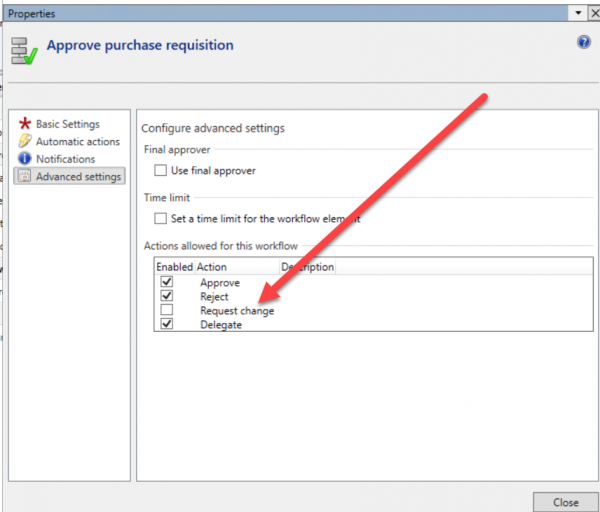
Amazing, I got requirement that Change request option need not in workflow. I opened the workflow approval in AOT. Approval all options were there. As compare to other AOT objects where we enable disabled two properties without creating extension are “Label” and visible. But here nothing found. There is no option to modify anything “out of the box” workflow.


While exploring workflow designer configuring Workflow. I found that some properties when we drag approval  object on workflow designer. Not step object inside approval.

In properties, I found some options. That works for me.


On workflow dialog change request options is gone.


List of best blog post and article for Customization with extensions. Dynamics 365 for finance and operations

January 5, 2019 by alirazazaidi

Here collection of good articles / blog posts for Extension framework.

I just completed the customization using extension. Initially, it’s really tough for me. But with passage of time and my library of code snippet increased, I  felt the power of extensions over old classic overlay concept. Even I used extension in custom forms instead write old age methods in controls and data sources.

Here are some  links which are very helpful for me and worth to share.


Event handling:


https://us.hitachi-solutions.com/knowledge-center/customize-dynamics-365-user-interface-extension-event-handler/

https://community.dynamics.com/365/financeandoperations/b/newdynamicsax/archive/2016/10/11/code-behind-extension-forms-how-to-add-state-variable-and-override-methods-without-overlayering


https://community.dynamics.com/ax/b/dynamicsaxconcoction/archive/2017/05/17/d3fo-customizing-interaction-classes-using-extensions


https://devserra.wordpress.com/2016/04/19/ax7-using-table-event-handler/

https://community.dynamics.com/365/financeandoperations/b/howtodynamics365/archive/2018/04/24/how-to-create-display-method-for-table-extension-in-dynamics-365

https://axility.net/en/access-stuff-in-the-new-event-subscriptions/


Workflow:

http://d365technext.blogspot.com/2018/07/avoid-over-layering-in-development-of.html


https://community.dynamics.com/365/financeandoperations/b/nareshsdynamicsaxblog/archive/2017/03/15/create-custom-workflow-in-d365-dynamics-365


https://devmusings.blog/2018/03/18/custom-workflows-in-microsoft-dynamics-365-for-operations/


https://community.dynamics.com/365/financeandoperations/b/dynamics365foaxhub/archive/2018/10/06/create-custom-workflow-participant-assignment-provider-type-in-ax-2012

https://workflowax.wordpress.com/2009/10/30/participant-provider-example/

https://www.lexisnexis-es.co.uk/blog/2018/10/22/workflows-in-microsoft-dynamics-365-for-finance-and-operations/


Model:


https://stoneridgesoftware.com/what-is-the-modelutil-exe-good-for/


https://community.dynamics.com/365/financeandoperations/f/765/t/223547

https://www.cloudfronts.com/model-importexport-in-dynamics-365-operations/

https://docs.microsoft.com/en-us/dynamics365/unified-operations/dev-itpro/dev-tools/models-export-import


Email templates


https://www.sikich.com/insight/how-to-email-purchase-orders-in-dynamics-365-for-operations/


Vendor Collaboration:


https://gfeaxblog.wordpress.com/2018/05/16/vendor-collaboration-in-microsoft-dynamics-365-for-finance-and-operations/


Reports through extension:

https://docs.microsoft.com/en-us/dynamics365/unified-operations/dev-itpro/analytics/custom-designs-business-docs

https://blogs.msdn.microsoft.com/dynamicsaxbi/2017/01/02/customizing-app-suite-reports-using-extensions/

https://docs.microsoft.com/en-us/dynamics365/unified-operations/dev-itpro/analytics/customize-app-suite-reports-with-extensions


Custom form:

https://dynamicsaxinsight.wordpress.com/2017/06/23/ax7-d365-operations-create-details-master-pattern-form/


Form did not refresh on workflow submit Dynamics 365 for finance and operations

December 26, 2018 by alirazazaidi

I just wrote couple of custom workflow. But on Submit workflow, form did not refresh and available for edit until, you manually refresh the form. That behavior is certainly not acceptable by end user.

usually “_args.caller().updateWorkflowControls();” will do this. Possible I missed something. But for its solution I add following code snippet for data set refresh that works for me.

dssRfpTable tableBuffer = _args.record();
FormDataSource custInvoiceTableDataSource;
custInvoiceTableDataSource = FormDataUtil::getFormDataSource(tableBuffer);


if (custInvoiceTableDataSource)
{
custInvoiceTableDataSource.research(true);
custInvoiceTableDataSource.refresh();
}

How to disabled check best practice in Dynamics 365 for finance and operations

December 26, 2018 by alirazazaidi

Buddy, Today I need to disabled the best practice check, It take too much time.

Usually rapid development, we did not care about best practice check. Otherwise compile take too much time.

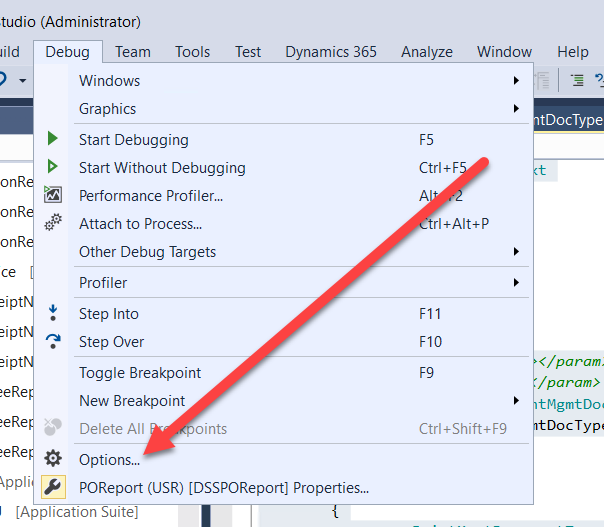
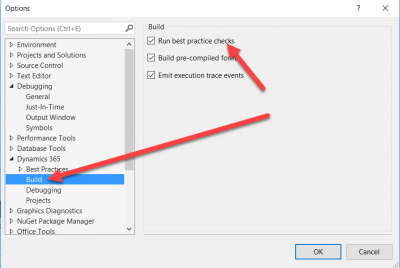
For disabled is You have to unchecked the check box in Debug => options and then expand d365 node and then build


Custom lookup field and group reference field D365 for finance and operations

December 17, 2018 by alirazazaidi

Hi all following code snippet for custom lookup. Copy the onlookup event handler and copy in extension class and the following code snippet


Field based

[FormControlEventHandler(formControlStr(Txxxx, Txxxx_ChildName), FormControlEventType::Lookup)]
public static void xxxxx_DssChildName_OnLookup(FormControl sender, FormControlEventArgs e)
{
Query query = new Query();
QueryBuildDataSource qbds;
QueryBuildDataSource qbdsJoin;
SysTableLookup sysTableLookup = sysTableLookup::newParameters(tableNum(DirPartyTable), sender);

qbds= query.addDataSource(tableNum(DirPartyTable));
qbdsJoin= qbds.addDataSource(tableNum(DirPartyRelationship));
//qbdsJoin.relations( false);
//qbdsJoin.fields().dynamic(NoYes::Yes);
// hcmWorkerCaller = HcmWorker::find(currentWorker());
// qbds.addRange(fieldNum(DirPartyTable, RecId)).value(int642Str(HcmWorker::find(currentWorker()).Person));
qbdsJoin.addRange(fieldNum(DirPartyRelationship, parentparty)).value(int642Str(HcmWorker::find(currentWorker()).Person));
qbdsJoin.addLink(fieldNum(DirPartyTable, RecId), fieldNum(DirPartyRelationship, childparty));
qbdsJoin.joinMode(JoinMode::InnerJoin);

sysTableLookup.parmQuery(query);
sysTableLookup.addLookupfield(fieldNum(DirPartyTable, Name), true);
sysTableLookup.addLookupfield(fieldNum(DirPartyTable, RecId));
sysTableLookup.performFormLookup();

FormControlCancelableSuperEventArgs event = e as FormControlCancelableSuperEventArgs;
event.CancelSuperCall();

}

Reference based is as follow

[FormControlEventHandler(formControlStr(xxxxx, Txeee_dddd), FormControlEventType::Lookup)]
public static void ddddee_DSSPerson_OnLookup(FormControl sender, FormControlEventArgs e)
{

Query query = new Query();
QueryBuildDataSource qbds;
QueryBuildDataSource qbdsJoin;
SysReferenceTableLookup _sysTableLookup = SysReferenceTableLookup::newParameters(tableNum(DirPartyTable), sender);

qbds= query.addDataSource(tableNum(DirPartyTable));
qbdsJoin= qbds.addDataSource(tableNum(DirPartyRelationship));
//qbdsJoin.relations( false);
//qbdsJoin.fields().dynamic(NoYes::Yes);
// hcmWorkerCaller = HcmWorker::find(currentWorker());
// qbds.addRange(fieldNum(DirPartyTable, RecId)).value(int642Str(HcmWorker::find(currentWorker()).Person));
qbdsJoin.addRange(fieldNum(DirPartyRelationship, parentparty)).value(int642Str(HcmWorker::find(currentWorker()).Person));
qbdsJoin.addLink(fieldNum(DirPartyTable, RecId), fieldNum(DirPartyRelationship, childparty));
qbdsJoin.joinMode(JoinMode::InnerJoin);

_sysTableLookup.parmQuery(query);
_sysTableLookup.addLookupfield(fieldNum(DirPartyTable, Recid));
_sysTableLookup.addLookupfield(fieldNum(DirPartyTable, Name));
//, true);
// _sysTableLookup.addLookupfield(fieldNum(DirPartyTable, recid));
_sysTableLookup.performFormLookup();

FormControlCancelableSuperEventArgs event = e as FormControlCancelableSuperEventArgs;
event.CancelSuperCall();
}


So Where comes fields in Workflow conditions. Dynamics 365 For finance and operations

November 30, 2018 by alirazazaidi

During writing custom workflow. I found interesting things. Worth to share. In workflow condition screen. I did not found a lot of options. First thing I found that these Fields in conditions comes from field group we used in Approval creation wizard. But where to come child level fields. ??


Interestingly, these child level fields comes from  Workflow Document Query. Required child fields comes from child or tables in main data source of query.

Following screenshots will helps you to more understanding


Avoid Over layering in Development of Workflows on Existing Form Extension version – Dynamics 365 for finance and operations

November 23, 2018 by alirazazaidi

Hi all,  My fellow Sohail Shaikh wrote an excellent blog Post, I used it in my customization to avoid overlay methods in some of out of the box table.

http://d365technext.blogspot.com/2018/07/avoid-over-layering-in-development-of.html


That article made my day and worked perfectly fine. But here one thing that article missed.  How we have to set form designer the custom workflow in list page . Something like If I copied from Sheiks sabs article.


There is error when I created on initialized of custom table in a extension class for list page . I got following error.


So it is not possible, I still not figure out. Later possible I will got they way to do so. Any how I achieved this in extension for interaction class.  I copied the  post event of initializeQuery method and copied in my class and following code will work for me. To enable or disabled workflow in list page


[PostHandlerFor(classStr(TableListPageInteraction), methodStr(ListPageInteraction, initializeQuery))]

public static void TableListPageInteraction_Post_initializeQuery(XppPrePostArgs args)

{

TableListPageInteraction TableListPageInteraction = args.getThis();

StatusTable RFQStatusTable = purchRFQCaseTableListPageInteraction.listPage().activeRecord(queryDataSourceStr(TableListPage, DDSRFQStatus)) as DDSRFQStatus;

FormRun formRun = TableListPageInteraction.listPage().formRun();


FormRun.design().workflowDatasource(formDataSourceStr(PurchRFQReplyTable, DDSRFQStatus));

FormRun.design().workflowEnabled(true);

FormRun.design().workflowType(workflowtypeStr(DSSRFQCaseWFType));


}


It works for me

Number Sequence framework webcast Part 2 -Demo Dynamics 365 for finance and operation

November 12, 2018 by alirazazaidi

This is second part of webcast. Here I demonstrate to setup number sequence in Dynamics 365 for finance and operations


Number sequence framework webcast Part 1 Dynamics 365 for finance and Operations

November 12, 2018 by alirazazaidi

First Part of number sequence framework webcast.

« Previous Page
Next Page »

Primary Sidebar

About

I am Dynamics AX/365 Finance and Operations consultant with years of implementation experience. I has helped several businesses implement and succeed with Dynamics AX/365 Finance and Operations. The goal of this website is to share insights, tips, and tricks to help end users and IT professionals.

Legal

Content published on this website are opinions, insights, tips, and tricks we have gained from years of Dynamics consulting and may not represent the opinions or views of any current or past employer. Any changes to an ERP system should be thoroughly tested before implementation.

Categories

  • Accounts Payable (2)
  • Advance Warehouse (2)
  • AI (3)
  • Asset Management (3)
  • Azure Functions (1)
  • Books (6)
  • Certification Guide (3)
  • ChatGPT (3)
  • Claude (1)
  • Customization Tips for D365 for Finance and Operations (64)
  • D365OF (60)
  • Data Management (1)
  • database restore (1)
  • Dynamics 365 (59)
  • Dynamics 365 for finance and operations (139)
  • Dynamics 365 for Operations (175)
  • Dynamics AX (AX 7) (134)
  • Dynamics AX 2012 (274)
  • Dynamics Ax 2012 Forms (13)
  • Dynamics Ax 2012 functional side (16)
  • Dynamics Ax 2012 Reporting SSRS Reports. (31)
  • Dynamics Ax 2012 Technical Side (52)
  • Dynamics Ax 7 (65)
  • Exam MB-330: Microsoft Dynamics 365 Supply Chain Management (7)
  • Excel Addin (1)
  • Favorites (12)
  • Financial Modules (6)
  • Functional (8)
  • General Journal (1)
  • Implementations (1)
  • Ledger (1)
  • Lifecycle Services (1)
  • Logseq (4)
  • Management Reporter (1)
  • Microsoft Excel (4)
  • MS Dynamics Ax 7 (64)
  • MVP summit (1)
  • MVP summit 2016 (1)
  • New Dynamics Ax (19)
  • Non Defined (9)
  • Note taking Apps (2)
  • Obsidian (4)
  • Personal Knowledge Management (3)
  • PKM (16)
  • Power Platform (6)
  • Procurement (5)
  • procurement and sourcing (6)
  • Product Information Management (4)
  • Product Management (6)
  • Production Control D365 for Finance and Operations (10)
  • Sale Order Process (10)
  • Sale Order Processing (10)
  • Sales and Distribution (5)
  • Soft Skill (1)
  • Supply Chain Management D365 F&O (5)
  • Tips and tricks (278)
  • Uncategorized (165)
  • Upgrade (1)
  • Web Cast (7)
  • White papers (4)
  • X++ (10)

Wiki

  • SCM

Copyright © 2026 · Magazine Pro On Genesis Framework · WordPress · Log in