• Skip to main content
  • Skip to primary sidebar
  • Home
  • About
  • Recommended Readings
    • 2022 Book Reading
    • 2023 Recommended Readings
    • Book Reading 2024
    • Book Reading 2025
    • Book Reading 2026
  • Supply Chain Management Guide
  • PKM
  • Microsoft Excel
  • Microsoft Copilot in Office 365
  • Public Wiki Page

Ali Raza Zaidi

A practitioner’s musings on Dynamics 365 Finance and Operations

Customization Tips for D365 for Finance and Operations

Unable to download report as PDF Microsoft.WindowsAzure.Storage.Core.Executor.Executor.ExecuteSync Dynamics 365 for finance and operations

May 22, 2019 by alirazazaidi

During Save as pdf custom report throw following error.

 
Unable to connect to the remote server at Microsoft.WindowsAzure.Storage.Core.Executor.Executor.ExecuteSync[T](RESTCommand`1 cmd, IRetryPolicy policy, OperationContext operationContext) at Microsoft.WindowsAzure.Storage.Table.CloudTable.Exists(Boolean primaryOnly, TableRequestOptions requestOptions, OperationContext operationContext) at Microsoft.WindowsAzure.Storage.Table.CloudTable.CreateIfNotExists(TableRequestOptions requestOptions, OperationContext operationContext) at Microsoft.DynamicsOnline.Infrastructure.Components.TableAccessor.TableStorageAccessor.PerformOperation(CloudStorageAccount storageAccount, String tableName, Func`1 operation) at Microsoft.DynamicsOnline.Infrastructure.Components.TableAccessor.TableStorageAccessor.AddRecord[T](CloudStorageAccount storageAccount, String tableName, T record) at Microsoft.DynamicsOnline.Infrastructure.Components.SharedServiceUnitStorage.SharedServiceUnitStorage.UploadData(SharedServiceUnitStorageData data, Stream stream) at
 
It was problem that Azure Storage emulator was not running on my machine. 
For this I have to open window start and write there Azure Storage emulator.
After it searched, click and run the Azure storage Emulator.

 In my Case  emulator Version was out date. I have to download it from Microsoft Cloud. After running that service. Issue was resolved. Report successfully download as pdf.
Reference : https://docs.microsoft.com/en-us/azure/storage/common/storage-use-emulator
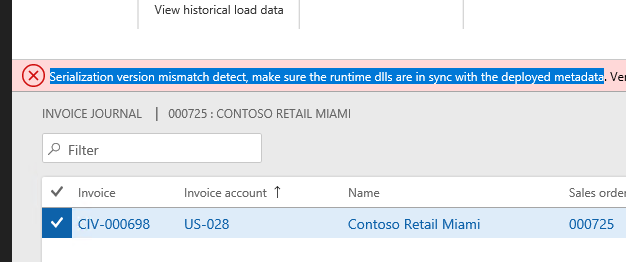
Serialization version mismatch detect, make sure the runtime dlls are in sync with the deployed metadata D365 For finance and operations

May 6, 2019 by alirazazaidi

Don’t what reason, possible I manually copied the model files to my dev one box. After compiling my model and run the customization, on one control document. I faced this issue.
Serialization version mismatch detect, make sure the runtime dlls are in sync with the deployed metadata. Version of file ‘12104’. Version of dll ‘172’.
Solution for that. I build all models by checking all models.

Add Financial dimension to Customer/Vender with X++ Dynamics 365 for finance and operations

April 23, 2019 by alirazazaidi

Small tip, I used following code snippet to add financial dimension in Customer / Vendor, You can extend this code by adding more dimension and values on Containers in following code snippet.
public class  iaxFinancialDimensionHelper
{
    Public static DimensionDefault ProjectDimension(ProjId _ProjId)
    {
        DimensionAttributeValueSetStorage valueSetStorage = new DimensionAttributeValueSetStorage();
        DimensionDefault result;
        int i;
        DimensionAttribute dimensionAttribute;
        DimensionAttributeValue dimensionAttributeValue;
        container conAttr = [“Projects”];
        container conValue = [_ProjId];
        str dimValue;
        for (i = 1; i <= conLen(conAttr); i++)
        {
            dimensionAttribute = dimensionAttribute::findByName(conPeek(conAttr,i));
            if (dimensionAttribute.RecId == 0)
            {
                continue;
            }
            dimValue = conPeek(conValue,i);
            if (dimValue != “”)
            {
                // The last parameter is “true”. A dimensionAttributeValue record will be created if not //found.
                dimensionAttributeValue =
dimensionAttributeValue::findByDimensionAttributeAndValue(dimensionAttribute,dimValue,false,true);
                // Add the dimensionAttibuteValue to the default dimension
                valueSetStorage.addItem(dimensionAttributeValue);
            }
        }
        result = valueSetStorage.save();
        return result;
    }
}
Reference : Internet. possible Dynamics forum. it works for me.

The field with ID ‘0’ does not exist in table Dynamics 365 For finance and operations

April 11, 2019 by alirazazaidi

Hi all, I face this error, while extended existing custom report. I added some fields in temp table, after update logic in dp class, On report data set update.

But at run time report shows this error. While debugging the code, I found the error occur on mapping the new fields in temp table.


Solution :

I build the whole model. After that error was removed.


How to copy financial dimension form one object to other. Dynamics 365 For finance and operations

March 27, 2019 by alirazazaidi

Hi all, In some cases we can need to copy  financial dimension from one object to  other for example Customer to Sales order or Vendor to purchase order.

In Ax 2012  it little easy. But in D365 For finance and operations, it is little bit tricky.


I did this with following code snippet.  With the help of out of box. LedgerDimensonDefaultFacade class i used the merge default dimension method and passed same table dimension in form and to dimension.

Result is interesting.


 salestable.DefaultDimension= LedgerDimensionDefaultFacade::serviceMergeDefaultDimensions(CustTable.DefaultDimension,CustTable.DefaultDimension);

Calling menu name in Extensions Dynamics 365 for finance and operations

March 23, 2019 by alirazazaidi

In Ax 2012 we get menu name with element.Args().CallMenu name, using  taking decision on menu name.


But same logic we need to apply in Extension. But in D365 For finance and operations we did not overlay. Following code snippet helps me to implement similar logic in Extension.


[ExtensionOf(formStr(CustTable))]

final class IaLogisticsContactInfoGrid_Extension

{


/// <summary>

///

/// </summary>

/// <param name=”sender”></param>

/// <param name=”e”></param>

[FormEventHandler(formStr(LogisticsContactInfoGrid), FormEventType::Initialized)]

public static void LogisticsContactInfoGrid_OnInitialized(xFormRun sender, FormEventArgs e)

{


FormRun formRun = sender;


;


info(formRun.args().menuItemName());

}


}

Journal name . does not support journal type Daily X++ Dynamics 2012 r3

March 23, 2019 by alirazazaidi

Hi did one customization, where I create Ledger Journal using X++ code. It was working perfectly fine with Ledger General Ledger entries. But threw error  on creating Ledger for AR,PR Payment.


I created ledger with following code snippet.  But it works only for Ledger for of Type Daily


AxLedgerJournalTable    header  = new AxLedgerJournalTable();
AxLedgerJournalTrans    trans   = new AxLedgerJournalTrans();

container               offsetDim;
LedgerJournalNameId     ledgerJournalNameId = “payment”;

header.parmJournalName(ledgerJournalNameId);
header.parmJournalType(LedgerJournalType::CustPayment);
header.save();

I replaced the above code with following snippet it works perfectly fine, rest of the code is works fine

LedgerJournalName ledgerJournalName;
LedgerJournalTable ledgerJournalTable;
LedgerJournalTrans ledgerJournalTrans;

select firstonly ledgerJournalName
where ledgerJournalName.JournalName == parameters.LedgerJournalNameId &&
ledgerJournalName.JournalType == LedgerJournalType::CustPayment;
if(!ledgerJournalName.RecId)
throw error(“@CAM184”);
if(ledgerJournalName)
{
ledgerJournalTable.JournalName = ledgerJournalName.JournalName;
ledgerJournalTable.Name = ledgerJournalName.Name;
ledgerJournalTable.insert();
}

Data source filter using extension Dynamics 365 for finance and operations

February 4, 2019 by alirazazaidi

Hi every one, Today I have very small tip. During customization we need to add filters at run time. Specially in the case of inquiry forms. But Now we have to work with extension. Extensions are much more powerful then over layering.


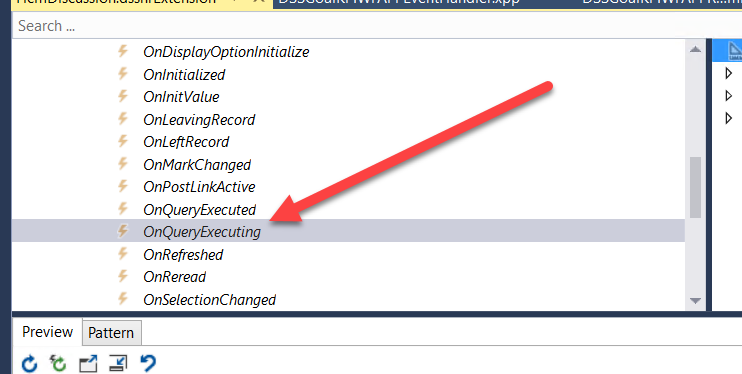
So first one thing to copy Datasource  OnQueryEXecuting event. And paste in Extension class.

The sample code snippet is here.


 [FormDataSourceEventHandler(formDataSourceStr(HcmDiscussion, HcmTopicRef), FormDataSourceEventType::QueryExecuting)]

public static void HcmTopicRef_OnQueryExecuting(FormDataSource sender, FormDataSourceEventArgs e)

{

FormRun          HcmDiscussionForm = sender.formRun();

sender.query().dataSourceName(sender.name()).addRange(fieldnum(HcmTopicRef,     HeadingRefRecId)).value(queryValue(_heading.RecId));

}

Report menu item is not found when constructing the query string” Dynamics 365 for finance and operations.

February 3, 2019 by alirazazaidi

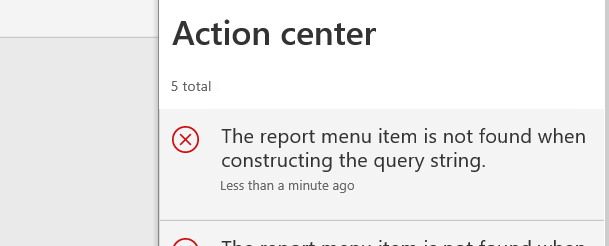
I found following error, while running custom report.


Following message shown message.


Report run from controller class.  I found “controller.parmArgs(_args);” was missing. That reason report threw this error.


Complete code will be similar.


        contract.parmRecordId(invoiceJour.RecId);

controller.parmArgs(_args);


controller.parmReportName(ssrsReportStr(DSSCompletionCertificate, Design));

controller.parmShowDialog(false);

controller.parmReportContract().parmRdpContract(contract);

controller.startOperation();

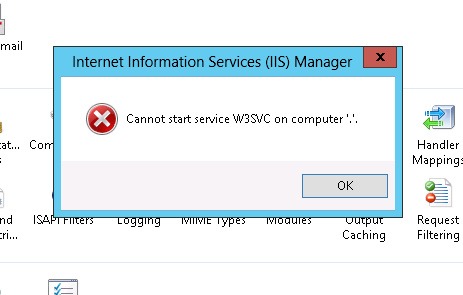
error : Can’t start service W3SVC on computer ‘.’. Dynamics 365 for finance and operations.

January 24, 2019 by alirazazaidi

I got error on My Dev box virtual machine. When I tried to restart AOS or IIS service.


I found that World wide web service is in stopping mode. Some reason it stuck. So I restart my machine.

AOS/ IIS works perfectly fine after restart. Basically two services need to run if you found this error


  • IIS admin service.
  •  World wide web service


« Previous Page
Next Page »

Primary Sidebar

About

I am Dynamics AX/365 Finance and Operations consultant with years of implementation experience. I has helped several businesses implement and succeed with Dynamics AX/365 Finance and Operations. The goal of this website is to share insights, tips, and tricks to help end users and IT professionals.

Legal

Content published on this website are opinions, insights, tips, and tricks we have gained from years of Dynamics consulting and may not represent the opinions or views of any current or past employer. Any changes to an ERP system should be thoroughly tested before implementation.

Categories

  • Accounts Payable (2)
  • Advance Warehouse (2)
  • AI (3)
  • Asset Management (3)
  • Azure Functions (1)
  • Books (6)
  • Certification Guide (3)
  • ChatGPT (3)
  • Claude (1)
  • Customization Tips for D365 for Finance and Operations (64)
  • D365OF (60)
  • Data Management (1)
  • database restore (1)
  • Dynamics 365 (59)
  • Dynamics 365 for finance and operations (139)
  • Dynamics 365 for Operations (175)
  • Dynamics AX (AX 7) (134)
  • Dynamics AX 2012 (274)
  • Dynamics Ax 2012 Forms (13)
  • Dynamics Ax 2012 functional side (16)
  • Dynamics Ax 2012 Reporting SSRS Reports. (31)
  • Dynamics Ax 2012 Technical Side (52)
  • Dynamics Ax 7 (65)
  • Exam MB-330: Microsoft Dynamics 365 Supply Chain Management (7)
  • Excel Addin (1)
  • Favorites (12)
  • Financial Modules (6)
  • Functional (8)
  • General Journal (1)
  • Implementations (1)
  • Ledger (1)
  • Lifecycle Services (1)
  • Logseq (4)
  • Management Reporter (1)
  • Microsoft Excel (4)
  • MS Dynamics Ax 7 (64)
  • MVP summit (1)
  • MVP summit 2016 (1)
  • New Dynamics Ax (19)
  • Non Defined (9)
  • Note taking Apps (2)
  • Obsidian (4)
  • Personal Knowledge Management (3)
  • PKM (16)
  • Power Platform (6)
  • Procurement (5)
  • procurement and sourcing (6)
  • Product Information Management (4)
  • Product Management (6)
  • Production Control D365 for Finance and Operations (10)
  • Sale Order Process (10)
  • Sale Order Processing (10)
  • Sales and Distribution (5)
  • Soft Skill (1)
  • Supply Chain Management D365 F&O (5)
  • Tips and tricks (278)
  • Uncategorized (165)
  • Upgrade (1)
  • Web Cast (7)
  • White papers (4)
  • X++ (10)

Wiki

  • SCM

Copyright © 2026 · Magazine Pro On Genesis Framework · WordPress · Log in