• Skip to main content
  • Skip to primary sidebar
  • Home
  • About
  • Recommended Readings
    • 2022 Book Reading
    • 2023 Recommended Readings
    • Book Reading 2024
    • Book Reading 2025
    • Book Reading 2026
  • Supply Chain Management Guide
  • PKM
  • Microsoft Excel
  • Microsoft Copilot in Office 365
  • Public Wiki Page

Ali Raza Zaidi

A practitioner’s musings on Dynamics 365 Finance and Operations

alirazazaidi

My first course on Udemy is launched

September 26, 2025 by alirazazaidi

Hi, I have over 20 years of experience in note-taking and knowledge organization, which has led me to reflect deeply on how different knowledge management systems work. I’ve decided to turn these reflections into a course. My goal is to complete my first course, as I strongly believe in finishing and sharing work, rather than leaving it unfinished in the pursuit of perfection.

https://www.udemy.com/course/master-obsidian-and-build-a-second-brain-youll-never-forget

Error importing database Could not load package from .bacpac. File contains corrupted data.

September 16, 2025 by alirazazaidi

So importing the latest backup on Dev machine, I found this error
It is very strange, because I installed from

And when I run the setup from this link Error appear.

Error importing database:Could not load package from ‘C:\temp-UATbackup.bacpac’.
File contains corrupted data.

Instead to download and install DacFramework.
Download and install latest .net version and extract it to your required folder

Download and Install SqlPackage – SQL Server | Microsoft Learn

From there, instead of using the Sqlpackage.exe under C:\Program Files (x86), please use the Sqlpackage.exe in C:\Temp\Sqlpackage-dotnetBoomb

Your import query will look like below

C:\Temp>SqlPackage.exe /a:import /sf:D:\Temp\UTup.bacpac /tsn:localhost /tdn:AxDB_fromProd1 /p:CommandTimeout=0

Ah, Obsidian Bases are finally here!

August 20, 2025 by alirazazaidi

Yesterday, the Obsidian team released this new core plugin in the latest update.

It’s not quite like Notion databases. Instead, it works more like a list of all your notes—yes, all notes.

There’s no folder-level organization built in, so if you want to narrow things down, you’ll need to use filters.

The views themselves aren’t reusable. To focus on a folder, you create a new view, apply a folder filter, then duplicate that Base and move it into the desired folder. Since I rely more on folder structure than tags, I wanted a “list page” in each folder. That’s what I ended up creating.

Properties play a big role here. Obsidian uses these properties to generate tables. I haven’t used the Dataview plugin before, so I can’t compare them directly. But if you’re thinking of something like a content calendar, you could make Status a property of type Category. One limitation, though: you can’t restrict property values. The only convenience is that once you enter a value, it will show up as a suggestion the next time you type in that column.

My solution was to create one Base per folder so I can access them easily. The workflow is simple: create a new view, apply the folder filter,

then duplicate

move it to the folder where I need it

And that works well enough for me.

So, What’s the Story Today? Security Objects in D365 Finance and Operations

August 7, 2025 by alirazazaidi

Today, I worked on creating a Security configuration in Dynamics 365 Finance and Operations. Let’s talk about best practices — because honestly, I see them ignored more often than not.

🔐 Start with Duties — Don’t Skip Them!

Most developers tend to skip duties and go straight to privileges. But best practice is to always create Duties, and then assign those Duties to Roles. This creates a clear, layered security structure.

🔧 Create Two Sets of Privileges

You should design two separate privileges — one for maintaining data and one for reviewing it.

🛠️ Maintain Privilege:
This should include full access, including delete rights.

👁️ Review Privilege:
This one only needs read-only access to tables, forms, and menus.

🏷️ Use Labels, Not Hardcoded Captions

Always use labels instead of writing static text directly in captions. This ensures easier localization and consistent UI across environments.

🚫 Avoid Bad Practices

What I often see: consultants creating privileges and directly assigning them to Roles — skipping Duties entirely. That’s not ideal and goes against best practice.

Today, I made sure to follow the right process:

  • Created duties ✔️
  • Made separate maintain/review privileges ✔️
  • Used labels ✔️
  • Assigned Duties to Roles, not privileges directly ✔️


✅ Summary

If you’re working with D365 Security:

  • Don’t skip Duties.
  • Separate maintain and review access.
  • Use labels, not hardcoded captions.
  • Always assign Duties to Roles, not privileges directly.

Let’s keep it clean, maintainable, and easy for others to follow.
End of story.

Sharing My Daily Story – Trade Agreement Customization in D365 F&O

August 4, 2025 by alirazazaidi

I’ve been reading and listening to podcasts about how to market yourself better. One common piece of advice stood out: “Write your story every day—what you accomplished, what you struggled with, and what you tried. People love to read or listen to real stories.”

This blog has been around for over a decade. In this age of Generative AI, you might wonder: Who still reads blogs? But think about it—tools like ChatGPT and Copilot need to pull from somewhere. Blogs still matter. Content still matters. SEO is evolving into AEO—Answer Engine Optimization—where your story might just be someone else’s answer.

So here’s my story for today.

I was working on a trade agreement customization in D365 Finance and Operations. It was a small but tricky enhancement.

The requirement was simple in theory: Whenever a new trade agreement is posted, check if a similar record already exists. If it does, update its ToDate automatically.

I identified the right hook in the PriceDiscTable, and that became the key.

These three tables became the center of gravity for the customization:

PriceDiscTable
PriceDiscAdmTrans 
PriceDiscTable

It was one of those days where a deep dive into seemingly small logic led to satisfying results.

Thanks for reading. Hope you found this little story interesting. Let me know if you’d like me to share more from my D365 journey.

Error Log level – Error | Infolog diagnostic message: ‘Cannot create a record in Entity (DMFEntity) – D365 Finance and operations

July 10, 2025 by alirazazaidi

During development, I initially used the arbitrary name for the custom data entity. Later, during the review session, I updated the Label property of the data entity to align with proper naming conventions.

🔍 Best practice: Always use the label for the data entity display name, not hardcoded strings.

Since this was a small customization, I had directly written string values in some places, bypassing the label. However, when I triggered database synchronization, I encountered the following error:


❌ Error Message:

Error Log level - Error | Infolog diagnostic message:
'Cannot create a record in Entity (DMFEntity). 
Entity: ProductCreationValidationEntityV2, DSTProductCreationValidationStaging.'

🧪 Root Cause:

Upon investigation, I found that the DMFEntity table contained multiple entries with conflicting labels for the same data entity names. This typically occurs when:

  • You change the label or name of a data entity without cleaning up old records
  • The model or metadata has inconsistencies after refactoring

✅ Solution:

You need to identify and delete the duplicate or orphaned records from the DMFEntity table.


🔍 Sample Queries:

Run the following queries in SQL Server Management Studio (SSMS) against your AXDB database:

-- View existing records for the custom entities
SELECT * FROM DMFENTITY WHERE ENTITYNAME = 'ProductCreationValidationEntityV2';
SELECT * FROM DMFENTITY WHERE ENTITYNAME = 'ProductCreationValidationEntityV2Lines';
SELECT * FROM DMFENTITY WHERE ENTITYNAME = 'DSTProductCreationValidationEntity';

-- Delete the orphan/conflicting records
DELETE FROM DMFENTITY WHERE ENTITYNAME = 'ProductCreationValidationEntityV2';
DELETE FROM DMFENTITY WHERE ENTITYNAME = 'ProductCreationValidationEntityV2Lines';
DELETE FROM DMFENTITY WHERE ENTITYNAME = 'DSTProductCreationValidationEntity';

⚠️ Warning: Always take a database backup before running any DELETE operation.


🧰 Next Steps:

  • Perform a full build of your model
  • Run database synchronization again
  • Re-deploy the data entities, if required

How to create task from google sheet to google tasks app

July 4, 2025 by alirazazaidi

Different people use different productivity systems. Some prefer Notion with its integrated calendar, while others use Todoist, which offers a powerful calendar feature—especially in the paid version. Based on my experience, if you want to implement a proper task management system or follow the Getting Things Done (GTD) methodology, Todoist is one of the best options available for just $5/month. However, it’s important to note that calendar integration is only available in the paid version.

One common limitation with both Notion and Todoist is that they rely on Google Calendar as a reference point. Whatever events you mark on Google Calendar will appear in Notion or Todoist. But when you open Google Calendar itself, it’s often blank—since these tools don’t actually write back to the calendar, they just display it. So the only real advantage is that tasks you manually add to Google Calendar will show up across these apps.

Recently, I’ve been working with the Saudi calendar setup, which uses Google Workspace—Google Meet, Sheets, Chat, and Group Chat. I’m becoming more comfortable using Google Workspace overall. At work, we track tasks and issues using Google Sheets as a tracker. Even for personal use, Google Sheets and Google Tasks are great because they’re free.

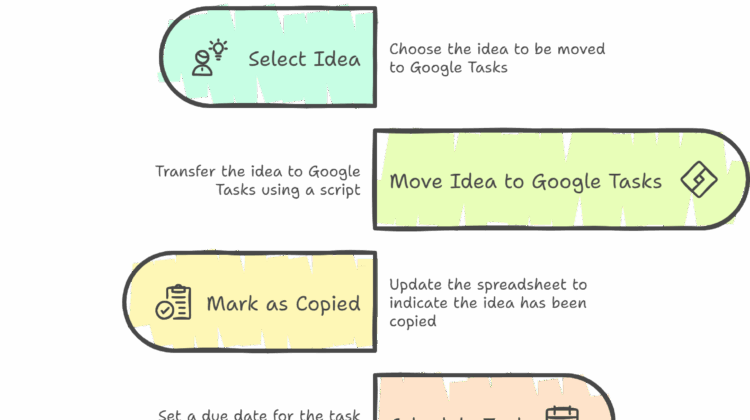
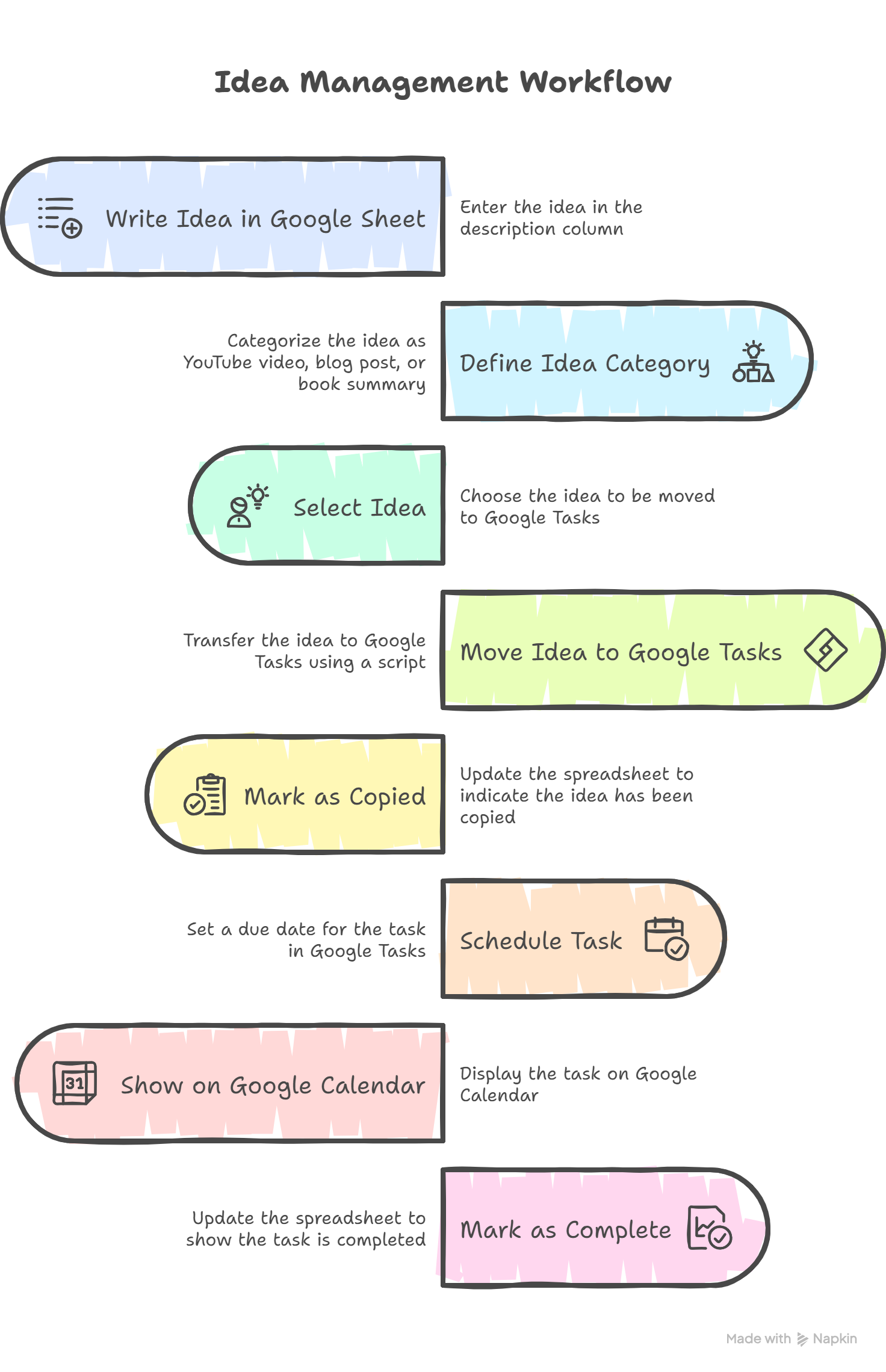
My actual goal was to have assigned tasks appear on Google Calendar. So, I decided to use Google Sheets as an idea tracker, Google Tasks for task management, and rely on deadlines in Google Tasks to display on Google Calendar.

The challenge is that while you can easily create tasks in Google Tasks from Gmail, there’s no native way to create them directly from Google Sheets. That’s why I’m working on a workflow to bridge this gap—using Google Sheets for planning and Google Tasks for execution, with deadlines syncing to the calendar.

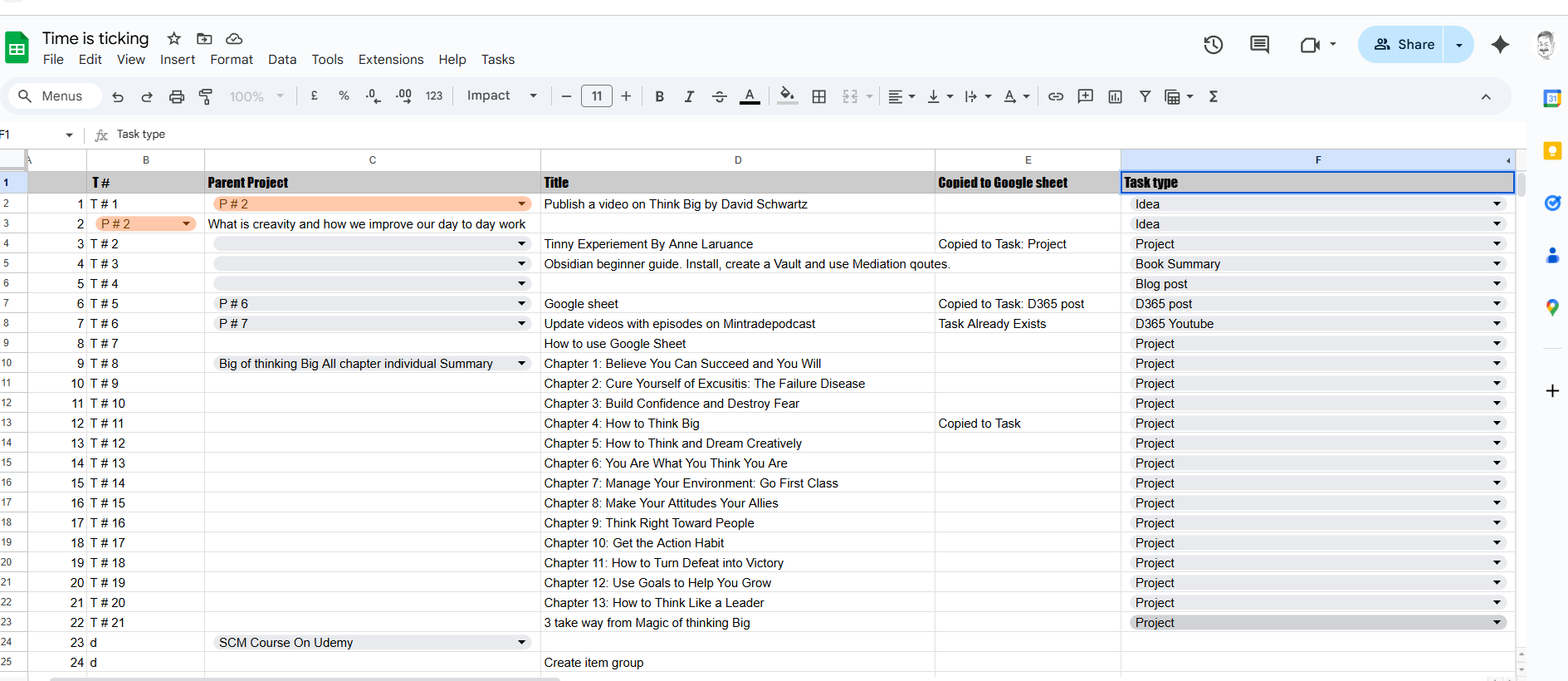
So, I created specific columns in Google Sheets to build my own active content planner.

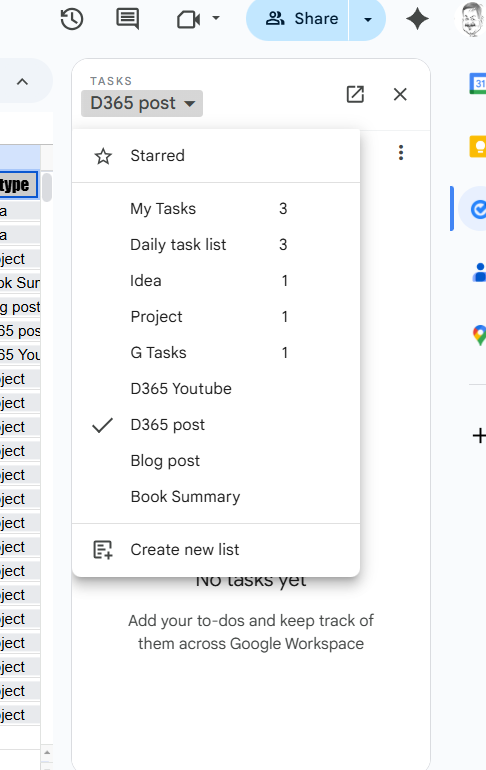
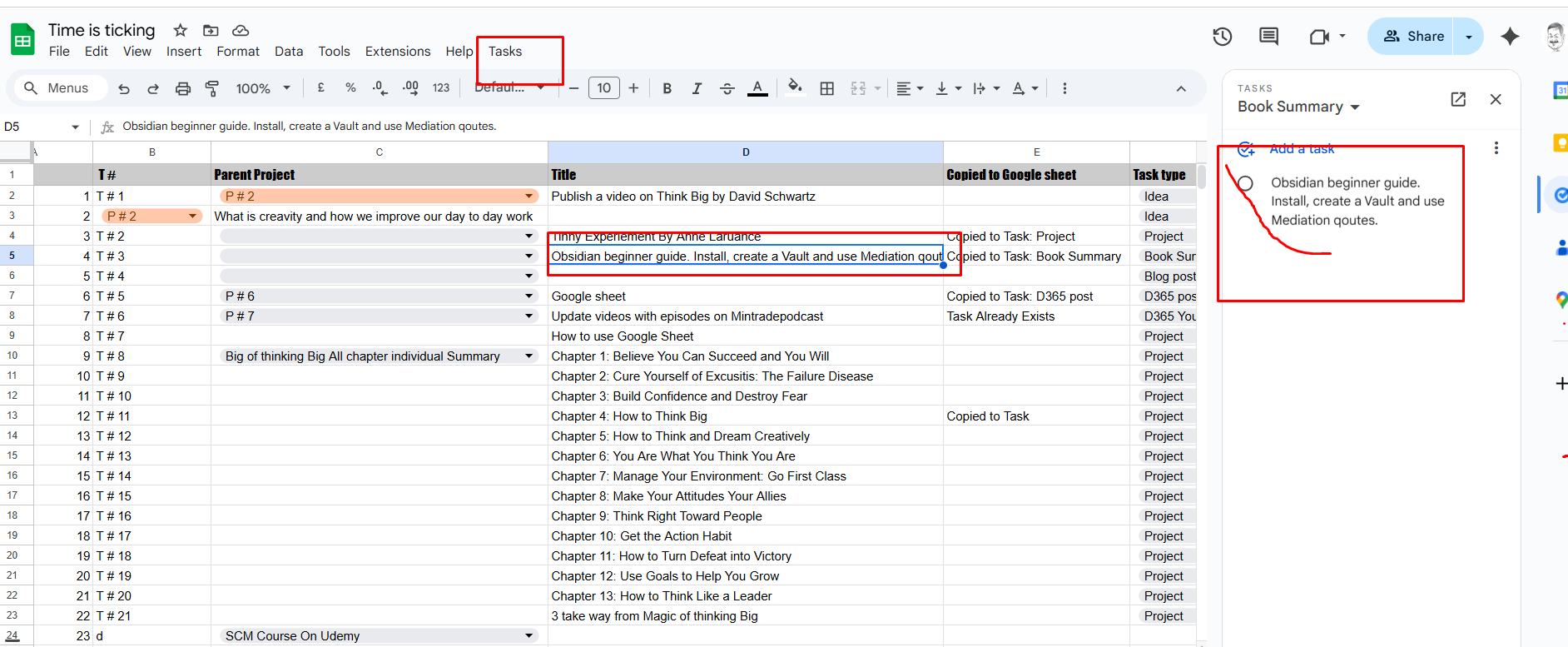
My goal is that when I click on a task title, it should automatically be added to Google Tasks under a specific task list. In the 5th column, I define the task type—such as “Idea,” “Blog Post,” or “YouTube Video”—and I’ve created matching task lists in Google Tasks to keep everything organized.

This is only possible automation. Google provide the Javascript based script writing. It is not much difficult.

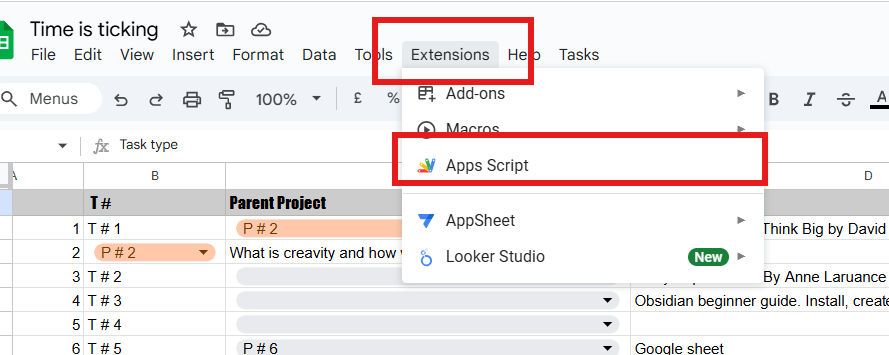
You can add them by click on top

For simple and helpful guide for google script use following Blog link
https://www.benlcollins.com/apps-script/google-apps-script-beginner-guide/

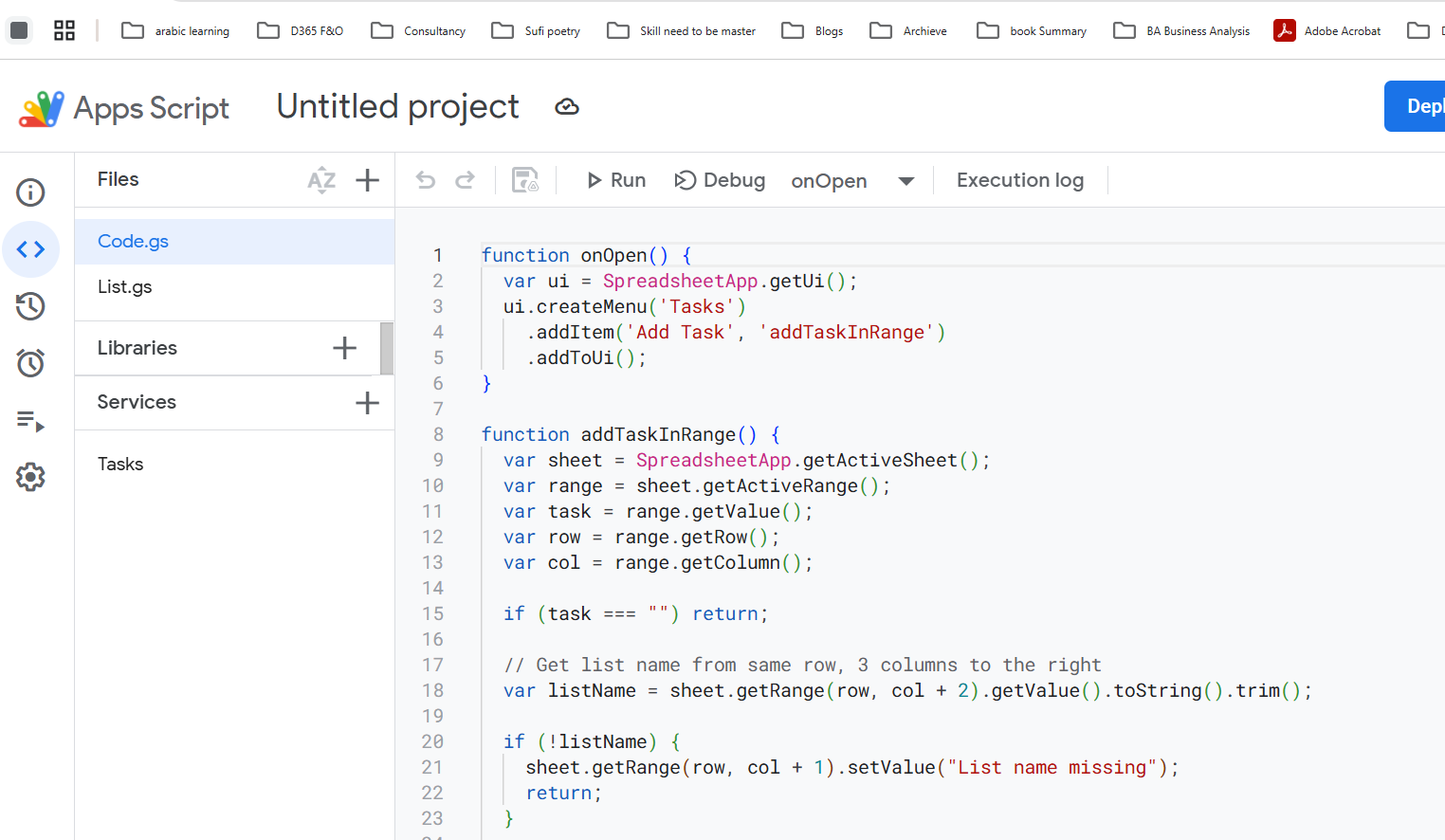
So from google script I used following script to create button and when you click on button. Task will copied to task management and from next column, in google sheet it add the message.
The list name it will get from column where I mentioned list name as task type or category

function onOpen() {

  var ui = SpreadsheetApp.getUi();

  ui.createMenu('Tasks')

    .addItem('Add Task', 'addTaskInRange')

    .addToUi();

}


function addTaskInRange() {

  var sheet = SpreadsheetApp.getActiveSheet();

  var range = sheet.getActiveRange();

  var task = range.getValue();

  var row = range.getRow();

  var col = range.getColumn();


  if (task === "") return;


  // Get list name from same row, 3 columns to the right

  var listName = sheet.getRange(row, col + 2).getValue().toString().trim();


  if (!listName) {

    sheet.getRange(row, col + 1).setValue("List name missing");

    return;

  }


  // Fetch all available task lists

  var taskLists = Tasks.Tasklists.list().items;

  if (!taskLists || taskLists.length === 0) {

    sheet.getRange(row, col + 1).setValue("No task lists found");

    return;

  }


  // Find task list by title

  var matchedList = taskLists.find(list => list.title.toLowerCase() === listName.toLowerCase());


  if (!matchedList) {

    sheet.getRange(row, col + 1).setValue("List not found: " + listName);

    return;

  }


  var taskListId = matchedList.id;


  // Check if task already exists in the matched list

  var taskExists = checkIfTaskExistsInList(task, taskListId);


  if (!taskExists) {

    var taskToAdd = { title: task };

    Tasks.Tasks.insert(taskToAdd, taskListId);

    sheet.getRange(row, col + 1).setValue("Copied to Task: " + listName);

  } else {

    sheet.getRange(row, col + 1).setValue("Task Already Exists in " + listName);

  }

}


function checkIfTaskExistsInList(taskTitle, taskListId) {

  var tasks = Tasks.Tasks.list(taskListId);


  if (!tasks.items) return false;


  for (var i = 0; i < tasks.items.length; i++) {

    if (tasks.items[i].title === taskTitle) {

      return true;

    }

  }

  return false;

}

This partial script as per my workflow. But you can extend

I used the basic code snippet to Add task to google task from google sheet.
I feel it is more good that I can modify it.

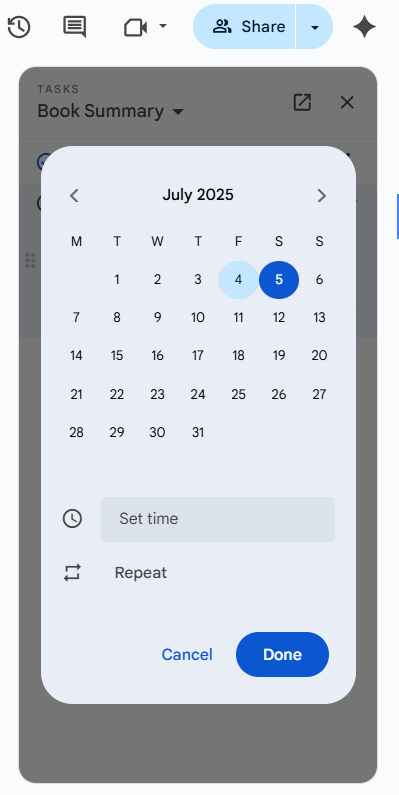
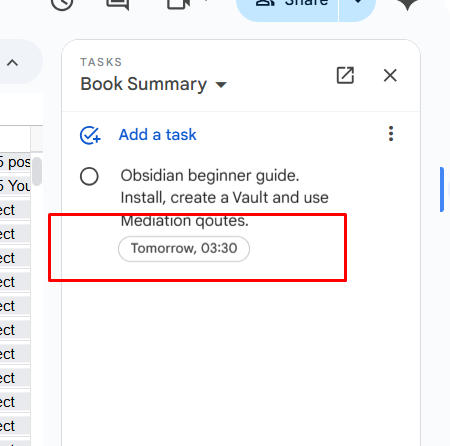
When I add deadline I see it in

after setting date and time,

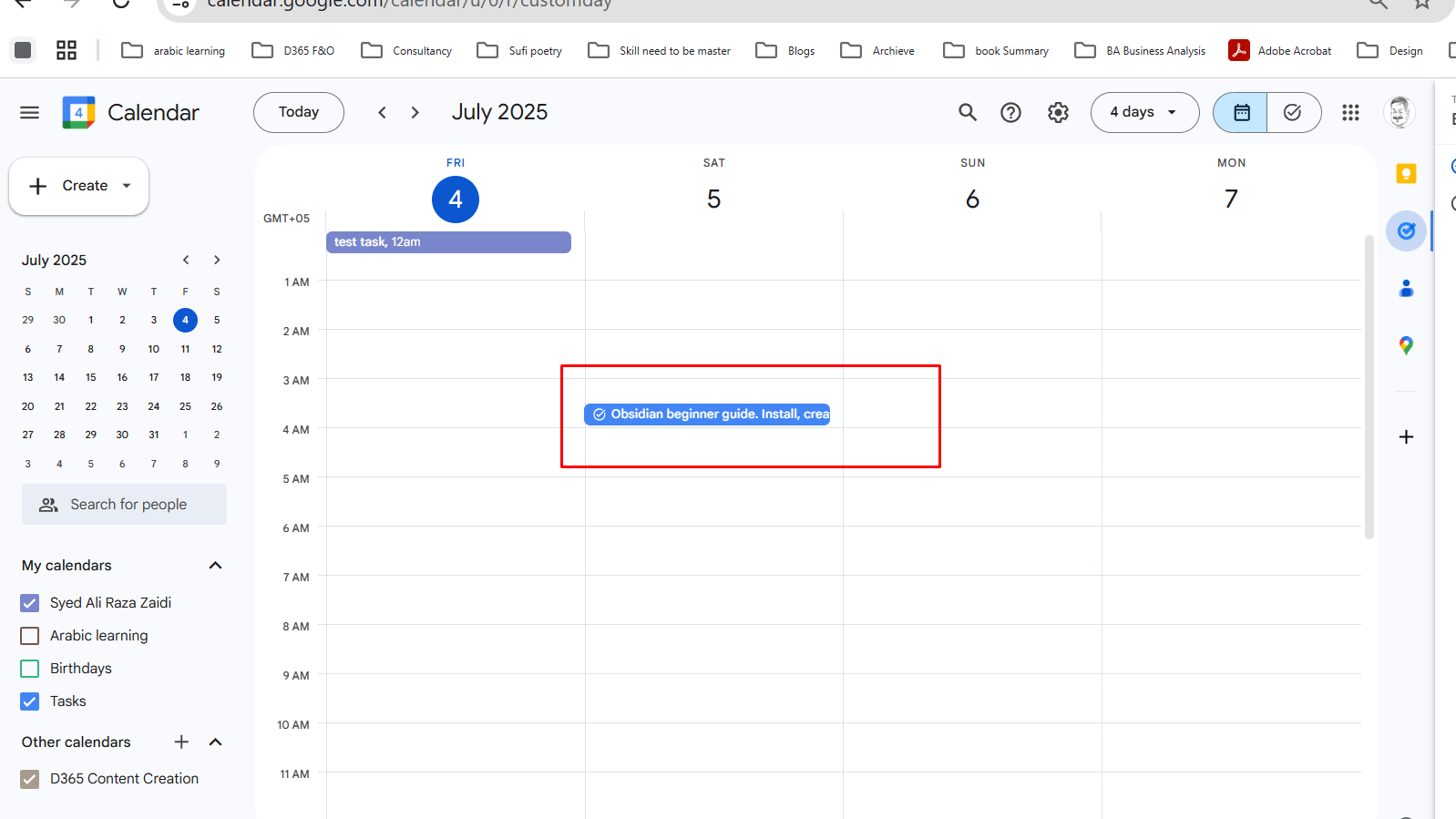
This task will start to appear in my google calendar

How you like this workflow. And if you want your own, you can use script as sample and make your own.

Sales price and discount is not added to sales line X++

May 26, 2025 by alirazazaidi

I encountered this issue and, during troubleshooting, I discovered that the system performs an update on the sales line to retrieve sales prices and discounts. This process has a performance impact. In fact, the prices are copied from the trade agreement in Dynamics 365 for Finance and Operations

For manual price use following code snippet

 salesLine.initFromInventTable(InventTable::find(salesLine.ItemId));
 salesLine.InventDimId = inventDim.inventDimId;
                        
                        
 salesLine.SalesQty = listObject.parmSalesQty();
 salesLine.SalesPrice = listObject.parmOriginalPrice();


 salesLine.SalesUnit = _InventItemBarcode.UnitID;
 salesLine.PriceUnit = 1.00;

 if ( (listObject.parmOriginalPrice() >= listObject.parmOfferPrice()) && !(listObject.parmOfferPrice() <0) && !(listObject.parmOriginalPrice() <=0))
 {
     if (listObject.parmOfferPrice()!=0)
     {
         real _Discount =listObject.parmOriginalPrice() -listObject.parmOfferPrice();
         salesLine.LineDisc = _Discount;
     }
     else
     {

         salesLine.LineDisc = 0;
     }
 }
 salesLine.DefaultDimension =LedgerDimensionDefaultFacade::serviceMergeDefaultDimensions(salesTable.DefaultDimension,InventTable::find(salesLine.ItemId).DefaultDimension);
 salesLine.setPriceDiscChangePolicy(PriceDiscSystemSource::ManualEntry, fieldNum(salesLine, SalesPrice));
 salesLine.setPriceDiscChangePolicy(PriceDiscSystemSource::ManualEntry, fieldNum(salesLine, LineDisc));
// salesLine.setPriceDiscChangePolicy(PriceDiscSystemSource::ManualEntry, fieldNum(salesLine, LinePercent));
 salesLine.setPriceDiscChangePolicy(PriceDiscSystemSource::ManualEntry, fieldNum(salesLine, PriceUnit));


 Try
 {
     ttsbegin;
     salesLine.CreateLine(NoYes::Yes,NoYes::Yes);
ttscommit;
}
catch
{}


How to implement Tiny Experiment in Logseq

April 18, 2025 by alirazazaidi

Hello friends,

Recently, I came across a new technique for goal-setting and its implementation — and it’s been a game-changer for me.

I discovered the concept of Tiny Experiments, and it helped me shift from a linear mindset to an experimental mindset. The core of this approach is curiosity — the genuine desire to see what happens if I try something new. It’s no longer about “achieving a goal” but rather asking, what can I learn from this experiment?

This idea may have existed before, but I recently discovered it through Anne-Laure Cunff’s book Tiny Experiments. (Disclaimer: I haven’t read the full book yet, but I picked up the essence from her podcast and various blog posts.)

Here are a few key insights I gathered:

  • Long-term goals are often linear — we set a vision, but over time, we lose interest or life takes us in different directions.
  • Instead of big, rigid goals, Anne suggests setting short-term, curiosity-driven experiments.
  • The magic lies in small iterations and consistent reflection — this helps us either continue with what works or pivot to something new.

Her core formula:

“I will do this action for X number of iterations.”

She herself wrote 100 articles in 100 days, using this method — not to go viral, but to learn what worked and what didn’t.

Here’s the simple yet powerful workflow:

Observation → Question → Hypothesis → Pact → Reflect (Repeat)

Or in even simpler terms: Do and Learn — or as we say in Urdu, “کر کے دیکھو” (Kar ke dekho).


Let’s break it down:

1. Observation

Look at any area of your life: personal finance, health, relationships, career, etc.
Ask yourself: What’s going on?
This is a form of reflection — remember, we don’t learn from experience, we learn by reflecting on experience.


2. Question

Ask yourself:

  • What needs to change?
  • What’s not working right now?
  • What’s possible if I approach this differently?

3. Hypothesis

Make an assumption: If I take a specific action, what result do I expect?
It’s not about being right or wrong — it’s about testing and learning.


4. Pact

Define the experiment:

  • What action will I take?
  • For how long? (e.g., 10 days, 30 iterations, etc.)

5. Reflect

After your experiment, reflect on:

  • What worked?
  • What didn’t?
  • What should I try next?

Example: Health & Fitness

Let’s say you want to feel healthier and look more fit.

Observation

I feel overweight and not in good shape.

Questions

  • Do I need to change my lifestyle?
  • Should I join a gym or just walk daily?
  • Should I change my diet?

Hypothesis

If I walk daily and reduce my food intake, I’ll lose 20 kg in 2 months.

Pact

  • Walk 40 minutes daily for 30 days.
  • Reduce roti intake to 1 per meal or 1 thali of rice, no refills, for the next 30 days.

Reflect (after 30 days)

What worked:

  • I feel better
  • My energy levels have increased
  • I feel more active

What didn’t:

  • My shape hasn’t changed much
  • Weight hasn’t reduced significantly

So now, you can design a new tiny experiment based on this reflection — and repeat the cycle.


Hope you found this helpful!
Try it out with an open mind. Start small, stay curious, and remember:

Don’t chase goals. Run experiments.

You can use logseq tempate and implement this in following ways.

And How we use this template something similar

How to make better linked notes – PKM

April 15, 2025 by alirazazaidi

I was facing an issue where many notes were just empty linked pages—basically serving only as references or bridges between other notes.

So, I created a separate folder called [[Linked Pages]] to store these.

For fleeting notes, I made a new folder named [[In Box]].

  • After reviewing and modifying them, I move them to specific folders as permanent notes.

For my daily journal, I created a separate folder called [[Jots]], which is linked to the calendar.

« Previous Page
Next Page »

Primary Sidebar

About

I am Dynamics AX/365 Finance and Operations consultant with years of implementation experience. I has helped several businesses implement and succeed with Dynamics AX/365 Finance and Operations. The goal of this website is to share insights, tips, and tricks to help end users and IT professionals.

Legal

Content published on this website are opinions, insights, tips, and tricks we have gained from years of Dynamics consulting and may not represent the opinions or views of any current or past employer. Any changes to an ERP system should be thoroughly tested before implementation.

Categories

  • Accounts Payable (2)
  • Advance Warehouse (2)
  • AI (3)
  • Asset Management (3)
  • Azure Functions (1)
  • Books (6)
  • Certification Guide (3)
  • ChatGPT (3)
  • Claude (1)
  • Customization Tips for D365 for Finance and Operations (64)
  • D365OF (60)
  • Data Management (1)
  • database restore (1)
  • Dynamics 365 (59)
  • Dynamics 365 for finance and operations (139)
  • Dynamics 365 for Operations (175)
  • Dynamics AX (AX 7) (134)
  • Dynamics AX 2012 (274)
  • Dynamics Ax 2012 Forms (13)
  • Dynamics Ax 2012 functional side (16)
  • Dynamics Ax 2012 Reporting SSRS Reports. (31)
  • Dynamics Ax 2012 Technical Side (52)
  • Dynamics Ax 7 (65)
  • Exam MB-330: Microsoft Dynamics 365 Supply Chain Management (7)
  • Excel Addin (1)
  • Favorites (12)
  • Financial Modules (6)
  • Functional (8)
  • General Journal (1)
  • Implementations (1)
  • Ledger (1)
  • Lifecycle Services (1)
  • Logseq (4)
  • Management Reporter (1)
  • Microsoft Excel (4)
  • MS Dynamics Ax 7 (64)
  • MVP summit (1)
  • MVP summit 2016 (1)
  • New Dynamics Ax (19)
  • Non Defined (9)
  • Note taking Apps (2)
  • Obsidian (4)
  • Personal Knowledge Management (3)
  • PKM (16)
  • Power Platform (6)
  • Procurement (5)
  • procurement and sourcing (6)
  • Product Information Management (4)
  • Product Management (6)
  • Production Control D365 for Finance and Operations (10)
  • Sale Order Process (10)
  • Sale Order Processing (10)
  • Sales and Distribution (5)
  • Soft Skill (1)
  • Supply Chain Management D365 F&O (5)
  • Tips and tricks (278)
  • Uncategorized (165)
  • Upgrade (1)
  • Web Cast (7)
  • White papers (4)
  • X++ (10)

Wiki

  • SCM

Copyright © 2026 · Magazine Pro On Genesis Framework · WordPress · Log in