• Skip to main content
  • Skip to primary sidebar
  • Home
  • About
  • Recommended Readings
    • 2022 Book Reading
    • 2023 Recommended Readings
    • Book Reading 2024
    • Book Reading 2025
    • Book Reading 2026
  • Supply Chain Management Guide
  • PKM
  • Microsoft Excel
  • Microsoft Copilot in Office 365
  • Public Wiki Page

Ali Raza Zaidi

A practitioner’s musings on Dynamics 365 Finance and Operations

alirazazaidi

The requested Performance Counter is not a custom counter, it has to be initialized as ReadOnly. D365

January 26, 2026 by alirazazaidi

On new vm, I found following error, when ever, i try to create a new PR or purchase order.

Following script helped me

$AOSDirectory = ‘c:\AOSService\PackagesLocalDirectory’
$AOSBinDirectory = $AOSDirectory + ‘\bin’

[Reflection.Assembly]::LoadFrom(“$AOSBinDirectory\Microsoft.Diagnostics.Tracing.EventSource.dll”)

$sharedDLL = ‘Microsoft.Dynamics.AX.Xpp.AxShared.dll’
$subledgerDLL = ‘Microsoft.Dynamics.Subledger.Instrumentation.dll’
$taxDLL = ‘Microsoft.Dynamics.Tax.Instrumentation.dll’
$prodCfgDLL = ‘Microsoft.Dynamics.ProductConfiguration.Instrumentation.dll’
$sourceDocDLL = ‘Microsoft.Dynamics.SourceDocumentation.Instrumentation.dll’

Copy-Item $(Join-Path $AOSDirectory -ChildPath “Subledger\bin” | Join-Path -ChildPath $subledgerDLL) -Destination $AOSBinDirectory
[Reflection.Assembly]::LoadFrom($(Join-Path $AOSBinDirectory -ChildPath $subledgerDLL))
[Microsoft.Dynamics.Subledger.Instrumentation.PerformanceCounterCatalog]::Setup()

Copy-Item $(Join-Path $AOSDirectory -ChildPath “Tax\bin” | Join-Path -ChildPath $taxDLL) -Destination $AOSBinDirectory
[Reflection.Assembly]::LoadFrom($(Join-Path $AOSBinDirectory -ChildPath $taxDLL))
[Microsoft.Dynamics.Tax.Instrumentation.PerformanceCounterCatalog]::Setup()

Copy-Item $(Join-Path $AOSDirectory -ChildPath “SourceDocumentation\bin” | Join-Path -ChildPath $sourceDocDLL) -Destination $AOSBinDirectory
[Reflection.Assembly]::LoadFrom($(Join-Path $AOSBinDirectory -ChildPath $sourceDocDLL))
[Microsoft.Dynamics.SourceDocumentation.Instrumentation.PerformanceCounterCatalog]::Setup()

Copy-Item $(Join-Path $AOSDirectory -ChildPath “ApplicationSuite\bin” | Join-Path -ChildPath $prodCfgDLL) -Destination $AOSBinDirectory
[Reflection.Assembly]::LoadFrom($(Join-Path $AOSBinDirectory -ChildPath $prodCfgDLL))
[Microsoft.Dynamics.ProductConfiguration.Instrumentation.PerformanceCounterCatalog]::Setup()

[Reflection.Assembly]::LoadFrom($(Join-Path $AOSBinDirectory -ChildPath $sharedDLL))
[Microsoft.Dynamics.Ax.Xpp.AxShared.AxPerformanceCounters]::InitializePerformanceCounterCategories()

Refrence : https://blog.monsieurwinner.com/2025/11/20/d365-finance-and-operations-the-requested-performance-counter-is-not-a-custom-counter-it-has-to-be-initialized-as-readonly/

How avoid schedule jobs running in specific time slots

December 16, 2025 by alirazazaidi

Recently, I discovered an interesting and useful feature in D365 Finance and Operations.

Most of the time, there are peak hours when the system is heavily loaded. During these periods, we may not want certain batch jobs to run in order to avoid performance issues.

D365 Finance and Operations (now rebranded as ERP AI) provides a feature to control this behavior.

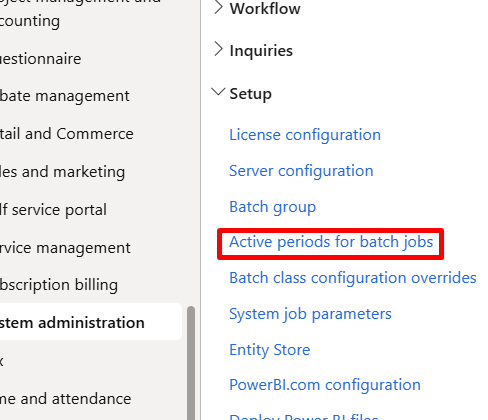
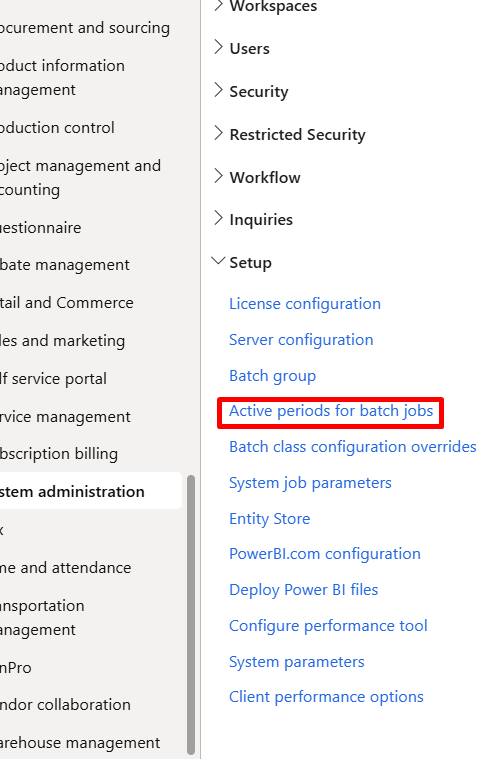
You can find it here:
System administration > Setup > Active periods for batch jobs

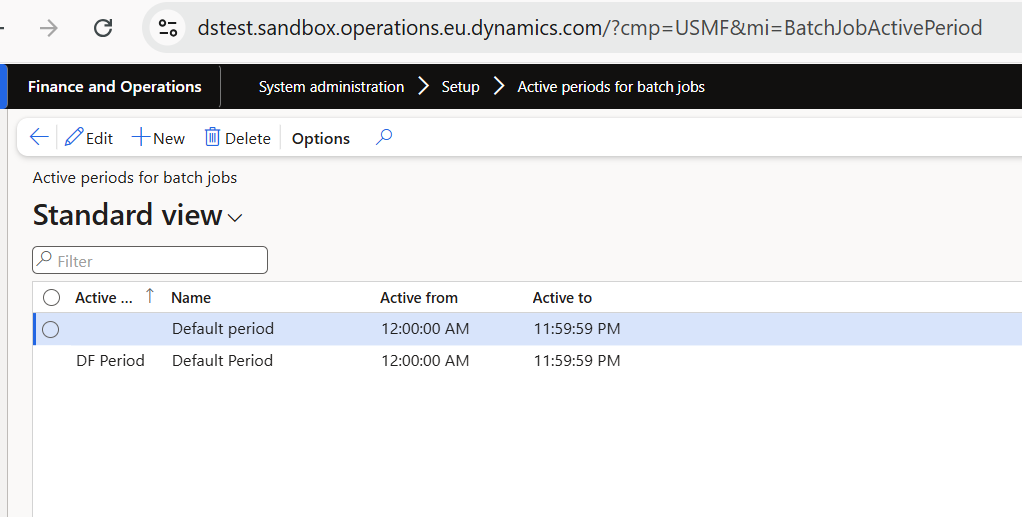
Using this setup, you can define active periods and assign batch groups to them. Within each batch group, you can add batch jobs with their normal recurrence settings.

The key benefit is that batch jobs assigned to these groups will not execute during the defined inactive hours. This allows you to prevent batch jobs from running during peak system usage times and ensures better system performance.

Dynamics.AX.Application.CannotDisableFeatureTestClass” is not found in the map

November 22, 2025 by alirazazaidi

I am going to enable the subscriptio billing module on Devbox machine on my local vm.

I got this error

“Dynamics.AX.Application.CannotDisableFeatureTestClass” is not found in the map”

Solution to this to click on update button.

This resolve the issue

Free Course for Fixed asset module in D365 finance and Operations

November 5, 2025 by alirazazaidi

Hi, my first cousre on D365 Finance and Operation it free.

https://www.udemy.com/course/fixed-asset-module-in-d365-finance-and-operations

Getting Started with D365 Finance and Operations: The Core Financial Setup

November 3, 2025 by alirazazaidi

When you set up a new Dynamics 365 Finance and Operations environment, everything starts with Finance. A solid financial foundation is essential for accurate reporting, smooth integration, and proper functioning of other modules.

Here are the three key configurations you should always begin with:

  1. Fiscal and Ledger Calendars
    Define your financial periods — whether monthly, quarterly, or yearly — to manage transactions within a specific accounting structure.
  2. Currencies and Exchange Rates
    Set up the currencies your organisation uses and the rules for exchange rate management. This ensures accurate conversions in global operations.
  3. Chart of Accounts (COA)
    Create your ledger accounts and structure them according to your organization’s financial reporting needs. The COA forms the backbone of your entire financial system.

Getting these core setups right helps avoid major rework later and provides a stable foundation for other functional areas like Supply Chain, Projects, and HR.

How to access enum values at database level D365 Finance and Operations

October 28, 2025 by alirazazaidi

On the live server, we don’t have direct database access. However, while assisting another user recently, I noticed that they could access the database through some method — possibly via the Entity Store or a similar mechanism.

I received a request from the client’s reporting team to provide a way for them to retrieve the text values of enums from the database.

On my development environment, I can access enum values using the following two tables: EnumValueTable and EnumIdTable.

For example, the following T-SQL query returns the values for the SalesStatus enum:

SELECT * 
FROM EnumValueTable
JOIN EnumIdTable 
    ON EnumValueTable.EnumId = EnumIdTable.Id
WHERE EnumIdTable.Name = 'SalesStatus'
ORDER BY EnumValueTable.EnumValue;

Free Text Invoice Posting and accounts allocation in D365 Finance and Operations

October 25, 2025 by alirazazaidi

In this video, I shared you how accounts hit when you post free text Invoice in D365 Finance and Operations.

what is meaning of Calculate prorated depreciation

October 16, 2025 by alirazazaidi

“Calculate prorated depreciation” means calculating depreciation only for the portion of a period (month, quarter, or year) that an asset was actually in use — not for the full period.


💡 In simple terms:

Prorated depreciation = partial depreciation based on time the asset was active.

If an asset was acquired or disposed in the middle of a month (or year), you don’t depreciate it for the entire period — only for the time it was available for use.


🧮 Example:

Let’s say:

  • Depreciation = 1,200 per year
  • Method = Straight line
  • That’s 100 per month (1,200 ÷ 12)
  • Asset acquired on April 15

If you use prorated depreciation, and your policy is to calculate from the mid-month, you’ll only depreciate half of April:

👉 April depreciation = 100 × 0.5 = 50
Then from May onward, it’ll take full monthly depreciation (100 per month).

Without proration, it would incorrectly calculate 100 for April, as if the asset was in use the entire month.


⚙️ In D365 F&O:

In Fixed assets parameters or Depreciation profile setup, you can select:

  • Prorate acquisition date
  • Prorate disposal date
  • Prorate convention (full month, half month, actual days, etc.)

When you run depreciation, D365 calculates it proportionally based on the date the asset was acquired or disposed.


✅ Summary:

TermMeaning
DepreciationReduction in asset value over time
Prorated depreciationDepreciation calculated only for the time the asset was in use
PurposeFair and accurate expense allocation when asset not used the full period

Source : Chatgpt

What is stages of D365 Finance and Operations implementation

October 5, 2025 by alirazazaidi

Lets start to explore, Project Management for D365 Finance and Operations Implementation.

  • Pre-sales / Initiation – Scoping, high-level requirements, proposal.
  • Analysis / Discovery – Fit-gap analysis, requirements workshops.
  • Design – Solution design (Functional & Technical), architecture approval.
  • Build / Development – Configuration, customization, integrations, testing.
  • UAT / Deployment Prep – User acceptance testing, data migration, cutover plan.
  • Go-Live & Support – Hypercare, transition to support.

What is Microsoft Tenant, where we get it

September 30, 2025 by alirazazaidi

A Microsoft Entra tenant ID is a unique identifier (a GUID) assigned to your Microsoft Entra ID (formerly Azure Active Directory) tenant.

  • A tenant represents your organization’s instance of Microsoft Entra ID.
  • The tenant ID is a globally unique GUID (for example: 72f988bf-86f1-41af-91ab-2d7cd011db47) that identifies that tenant.
  • You usually need to enter it when configuring apps, APIs, or services that connect to Microsoft Entra.

How to find your Tenant ID

  1. Microsoft Entra admin center:
    • Go to entra.microsoft.com.
    • Navigate to Identity → Overview.
    • Copy the Tenant ID under Basic information.
« Previous Page
Next Page »

Primary Sidebar

About

I am Dynamics AX/365 Finance and Operations consultant with years of implementation experience. I has helped several businesses implement and succeed with Dynamics AX/365 Finance and Operations. The goal of this website is to share insights, tips, and tricks to help end users and IT professionals.

Legal

Content published on this website are opinions, insights, tips, and tricks we have gained from years of Dynamics consulting and may not represent the opinions or views of any current or past employer. Any changes to an ERP system should be thoroughly tested before implementation.

Categories

  • Accounts Payable (2)
  • Advance Warehouse (2)
  • AI (3)
  • Asset Management (3)
  • Azure Functions (1)
  • Books (6)
  • Certification Guide (3)
  • ChatGPT (3)
  • Claude (1)
  • Customization Tips for D365 for Finance and Operations (64)
  • D365OF (60)
  • Data Management (1)
  • database restore (1)
  • Dynamics 365 (59)
  • Dynamics 365 for finance and operations (139)
  • Dynamics 365 for Operations (175)
  • Dynamics AX (AX 7) (134)
  • Dynamics AX 2012 (274)
  • Dynamics Ax 2012 Forms (13)
  • Dynamics Ax 2012 functional side (16)
  • Dynamics Ax 2012 Reporting SSRS Reports. (31)
  • Dynamics Ax 2012 Technical Side (52)
  • Dynamics Ax 7 (65)
  • Exam MB-330: Microsoft Dynamics 365 Supply Chain Management (7)
  • Excel Addin (1)
  • Favorites (12)
  • Financial Modules (6)
  • Functional (8)
  • General Journal (1)
  • Implementations (1)
  • Ledger (1)
  • Lifecycle Services (1)
  • Logseq (4)
  • Management Reporter (1)
  • Microsoft Excel (4)
  • MS Dynamics Ax 7 (64)
  • MVP summit (1)
  • MVP summit 2016 (1)
  • New Dynamics Ax (19)
  • Non Defined (9)
  • Note taking Apps (2)
  • Obsidian (4)
  • Personal Knowledge Management (3)
  • PKM (16)
  • Power Platform (6)
  • Procurement (5)
  • procurement and sourcing (6)
  • Product Information Management (4)
  • Product Management (6)
  • Production Control D365 for Finance and Operations (10)
  • Sale Order Process (10)
  • Sale Order Processing (10)
  • Sales and Distribution (5)
  • Soft Skill (1)
  • Supply Chain Management D365 F&O (5)
  • Tips and tricks (278)
  • Uncategorized (165)
  • Upgrade (1)
  • Web Cast (7)
  • White papers (4)
  • X++ (10)

Wiki

  • SCM

Copyright © 2026 · Magazine Pro On Genesis Framework · WordPress · Log in