• Skip to main content
  • Skip to primary sidebar
  • Home
  • About
  • Recommended Readings
    • 2022 Book Reading
    • 2023 Recommended Readings
    • Book Reading 2024
    • Book Reading 2025
  • Supply Chain Management Guide
  • PKM
  • Microsoft Excel
  • Microsoft Copilot in Office 365
  • Public Wiki Page

Ali Raza Zaidi

A practitioner’s musings on Dynamics 365 Finance and Operations

X++

Date in Advance filter Dynamics Ax 2012

February 7, 2015 by alirazazaidi

Consider we are going to build a Inquiry form, where we are applying different filter criteria’s.

One of them is date time filter. Consider this post is second part of one of my previous post. Where we created filter on Sales line.

http://tech.alirazazaidi.com/how-to-create-a-custom-filter-on-list-or-inquiry-form-in-dynamics-ax-2012/


For this filter add two utcdatetimeEdit control and set auto declaration to true so these control accessible in code. Set first Name is From_Date and second Name is To_Date.

Now drag and drop shippingDateConfirm field to Grid.


Now In DataSource Execute Query Method which we over write in previous post  add following lines


public void executeQuery()

{

QueryBuildRange QcustomerFilter;

QueryBuildRange ShippingDateConfirmedFileter;

QcustomerFilter = SysQuery::findOrCreateRange(SalesLine_q.datasourceTable(tableNum(SalesLine)),fieldNum(SalesLine,CustAccount));

ShippingDateConfirmedFileter = SysQuery::findOrCreateRange(SalesLine_q.datasourceTable(tableNum(SalesLine)),fieldNum(SalesLine,ShippingDateConfirmed));

if (txtCustomerNumber.text()!=””)

{

QcustomerFilter.value(queryValue(txtCustomerNumber.text()));


}

else

{

QcustomerFilter.value(SysQuery::valueUnlimited());

}

if (to_date.dateTimeValue() !=utcdatetimenull() && from_date.dateTimeValue() !=utcdatetimenull())

{


ShippingDateConfirmedFileter.value(SysQuery::range(from_date.dateTimeValue(),to_date.dateTimeValue()));

}

else

{

ShippingDateConfirmedFileter.value(SysQuery::valueUnlimited());

}


//ShippingDateConfirmed

super();

}


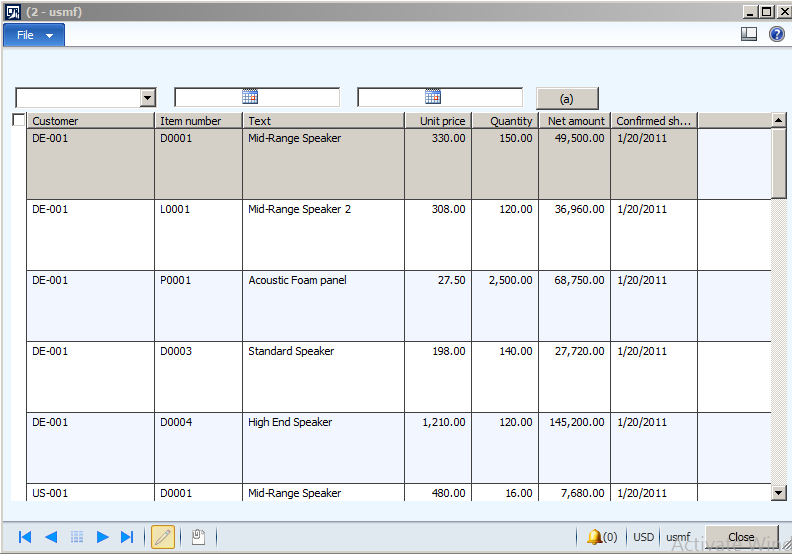
Now run the form , It look likes

2-7-2015 10-46-13 PM

Now click on button to apply the new added filter

2-7-2015 11-00-00 PM

Current language of client Dynamics Ax 2012

February 4, 2015 by alirazazaidi

static void Job5(Args _args)
{
info(companyinfo::languageId());
}

How to get trade agreement price for An Item or for customer Dynamics Ax 2012

February 1, 2015 by alirazazaidi

When we make trade agreement, there are 3 possibilities

  • On some products we make discounted price for all Customers.
  • On some products we make discounted for selected Customers
  • All products have discounted or fixed prices for some customers.

Third case is exceptional, but there is possibility that organization set sales prices on all items for some customers or all customer.

If we dig deep, we find that trade agreements stored in

PRICEDISCTABLE and PriceDiscAdmTrans


I am sharing code which just check that particular item exists in trade agreement. These both table have item variant level detail. You can extended the code according to your need. Code is running on Contoso data.


PRICEDISCTABLE _PRICEDISCTABLE,priceDiscTable;

PriceDiscAdmTrans  _trans;

ItemId _Item=”C10034″;

ItemId itemRelation=”C0001″;

ItemId _itemWithCustomer =”D0011″;

CustAccount  accountRelation =”US-001″;

Price _price;

PriceType  relation =PriceType::PriceSales;

NoYes _RelationExist=NoYes::No;

// Item scenerio for all customer.

//  _RelationExist= PRICEDISCTABLE::existItemRelation(PriceType::PriceSales,_Item);


/// First if  trade agreement exist for Item for all customer.


select firstonly RecId from priceDiscTable

where priceDiscTable.Relation           == relation                 &&

priceDiscTable.ItemCode           == TableGroupAll::Table  &&

priceDiscTable.ItemRelation       == itemRelation

&& priceDiscTable.AccountCode ==  TableGroupAll::All;


if (priceDiscTable !=null)

{


info (“found”);

}


 // trade agreement exist for particular item for particular customer

    select firstonly RecId from priceDiscTable

where priceDiscTable.Relation           == relation                 &&

priceDiscTable.AccountCode        == TableGroupAll::Table   &&

priceDiscTable.AccountRelation    == accountRelation &&

priceDiscTable.ItemCode           == TableGroupAll::Table  &&

priceDiscTable.ItemRelation       == _itemWithCustomer;

if (priceDiscTable !=null)

{


info (“found”);

}


   // third possibility is that when Customer have to all product with same price of amount.


      select firstonly RecId from priceDiscTable

where priceDiscTable.Relation           == relation                 &&

priceDiscTable.ItemCode           == TableGroupAll::All  &&

priceDiscTable.AccountRelation    == accountRelation &&

priceDiscTable.AccountCode ==  TableGroupAll::Table; //&&

//   priceDiscTable.AccountRelation == accountRelation;


if (priceDiscTable !=null)

{


info (“found”);

}


Hopes this helps


How to check Dynamics Ax 2012 form is in edit mode

January 16, 2015 by alirazazaidi

During development, I wrote code in clicked event of Button. But requirement is that code will works only if form is in edit mode. I used following code to check it


boolean _bool;

supper();

_bool=   element.inViewMode();

if (_bool==boolean::true)
{
info (“true”);
}
else
{
info (“false”);
}

This  method element.inViewMode() return true when form is view mode.
 

VendBankAccount and BankAccountTable address relation Dynamics Ax 2012

January 10, 2015 by alirazazaidi

We can get address for VendBankAccount table and BankAccountTable by following way.


VendBankAccount  table has method which returns address VendBankAccount.addressing() ;

For BankAccountTable you can use following query to fetch its address, both table has similar releationship with logistic location table

BankAccountTable  _BankAccount;

LogisticsPostalAddress _postalAddress;

LogisticsLocation  _location;

while select * from _BankAccount

join * from _location

join _postalAddress

where _postalAddress.Location == _location.RecId

&& _BankAccount.Location == _location.RecId

{

info (_BankAccount.AccountID + ” address “+ _postalAddress.Address);

}


How to create request for quotations in Dynamics AX 2012

January 8, 2015 by alirazazaidi


Consider a scenario, where your organization “USMF” (demo data legal entity), what to purchase items from Vendors. They have different vendors who can provide these items / services on different discounted rate. So USMF create a request Items with specific quantity and send these request to different vendors. When vendors receives these request they evaluate different points and return the bids against them, We can register these responses in Ax against Request for which quotations they offered.  After finalizing selected Quotes converted into Purchased order.

In this post we are going to request for quote and post this quote to different Vendors.


For creating request for Quotations you have to go Procurement and sourcing module.


The menu path will be Procurement and sourcing=> Request of Quotation=> All request for quotation

request for Quotation


When you click on “All requests for quotations” link a list page will open

All Request for Quotetion list page


Click on Request for Quotation new button from top Quotation tab.


Create New Quotation


Select solicitation type and select RFQ-for Goods.

1-8-2015 3-31-19 PM


Update the delivery date to 2/28/2015 and also set expiration date and time to 1/21/2015.

Request for Delivery Date

Expiration date and time is means that vendor has to send response before the expiry date.

Click on Ok button and Request for Quotes detail page opens.

line Item


Here you can select item, its quantity and site id.

sss

Quantatity


Now you can select the vendors for list against you send request for quotes by expending vendor fast tab below the

Vendor

Select vendor account and click on add button.

For example I want to send this request for quotes to two vendors Acme Office Supplies and Lande Packaging Supplies.

selected vendor

Now vendors are selected we have to send these quotes to vendors, If your organization use the Enterprise portal then you can post this request for quote to vendor portal. But here I am just Request of quotes to posted

dd


By Clicking on Send button following window will be open, If you are interested in printing you can click on print button.

1-8-2015 4-49-52 PM


After clicking on ok button you can check that in Request for quote detail page, that vendor highest status  become sent.

Vendor status

If we saw the list page then find the status of request for quotes is also send

1-8-2015 5-03-15 PM

Image stored in Dynamics Ax 2012 tables

December 19, 2014 by alirazazaidi

In dynamics Ax 2012, You can read image from physical path and stored in database as follow

BinData binData = new BinData();
str extention, path, nameOfFile;
container imageContainer;
str imageFilePathName;
imageFilePathName=”C:\\abc\\ali.jpg”;
// if ( WinAPI::fileExists(imageFilePathName))
{
binData.loadFile(imageFilePathName);
imageContainer = binData.getData();
table.Person = _Party.RecId;
table.Image = imageContainer;
table.insert();

}

This code runs both for server side and client side. At server side execution table use winserverapi::FileExists

request for the permission of type ‘fileiopermission’ failed. dynamics ax 2012

December 19, 2014 by alirazazaidi

During one of my development i got following error, which occurs when I try to convert image into bits and stored in tables. I solved this by adding before the code


FileIoPermission _perm;
_perm = new FileIoPermission("c:\\File.txt",'r'); 
_perm.assert(); 


Reference: http://msdn.microsoft.com/en-us/library/fileiopermission.aspx

Exploring the Batch Job process in Dynamics Ax 2012 R3

November 13, 2014 by alirazazaidi


There are many scenario where we have to schedule the tasks, so they execute in background. Real world scenarios are

  • Sales order with certain criteria will update status to Invoiced.
  • Scheduled job check the file location to find comma delimited files and after finding create sales order or purchased orders in Ax.
  • Schedule job clear the data in database logging after certain time.
  • Schedule job execute mid night to extract all sales order/ Purchase order and integrated it other system.


In dynamics Ax we can schedule the with help of RunBaseBatch framework.


For current example, I just wrote the batch job which just put its execution time in custom table.

First step for batch process is to enable the Dynamics Ax 2012 as Batch server.

Link


Enable Server

Consider a custom table with only two fields. These fields just dummy text and the time when batch process execute.


Table Structure


Now just create a class, set it run at server.


Class attributes

Extends the class with run batch base class.  The class logic should be same


class ProcessTableIncrement extends RunBaseBatch

{


}


public container pack()

{

return conNull();

}


public void run()

{


// The purpose of your job.

TblBatchHit _hit;


_hit.HitBy ="BatchJob";

_hit.hitTime= DateTimeUtil ::utcNow();

_hit.insert();

}


public boolean unpack(container packedClass)

{

return true;

}


Now compile the code and Generate Increment CIL. Incremental CIL generation is required to setup every time you update the code.


Now create ax job which deploy above class as batch Process job.


static void TestBatchHit(Args _args)

{

BatchHeader header;

SysRecurrenceData sysRecurrenceData;

Batch batch;

BatchJob batchJob;

ProcessTableIncrement _ProcessIncrement;

BatchInfo processBatchInfo;

BatchRetries noOfRetriesOnFailure = 4;

;


// Create the tutorial_RunBaseBatch job, only if one does not exist

select batch where batch.ClassNumber == classnum(ProcessTableIncrement);

if(!batch)

{

// Setup the tutorial_RunBaseBatch Job

header = BatchHeader::construct();

_ProcessIncrement = new ProcessTableIncrement();

processBatchInfo = _ProcessIncrement.batchInfo();

processBatchInfo.parmRetriesOnFailure(noOfRetriesOnFailure);

processBatchInfo.parmCaption("Table Increment");


header.addTask(_ProcessIncrement);


// Set the recurrence data

sysRecurrenceData = SysRecurrence::defaultRecurrence();

SysRecurrence::setRecurrenceStartDateTime(sysRecurrenceData, DateTimeUtil::addSeconds(DateTimeUtil::utcNow(), 20));

SysRecurrence::setRecurrenceNoEnd(sysRecurrenceData);

SysRecurrence::setRecurrenceUnit(sysRecurrenceData, SysRecurrenceUnit::Minute);

header.parmRecurrenceData(sysRecurrenceData);

// Set the batch alert configurations

header.parmAlerts(NoYes::No, NoYes::Yes, NoYes::No, NoYes::Yes, NoYes::Yes);

header.save();


// Update the frequency to run the job to every two minutes

ttsbegin;

select forupdate batchJob

join batch

where batchJob.RecId == batch.BatchJobId

&& batch.ClassNumber == classnum(ProcessTableIncrement);


sysRecurrenceData = batchJob.RecurrenceData;

sysRecurrenceData = conpoke(sysRecurrenceData, 8, [3]);

batchJob.RecurrenceData = sysRecurrenceData;

batchJob.update();

ttscommit;

}

}


When you execute the X++ job, you will find a new batch job created and waiting state at following link with caption Table Increment


Job Link


From top menu you can check the job execution history.


Batch Job


Job History


If any error occur or you put some info logs, these can be seen from Log from top menu.

For example in some other batch job I used many info boxes at different locations to trace.

11-12-2014 12-58-09 AM


Remove / Delete the batched job.

Delete the existing job is two-step process if job is in waiting step. First we have to convert it into withhold state and then delete it.

Select the required batch job for example if I want to delete Job with caption “Table Increment”. From top menu to select change state to with hold


select


withhold


Now again go in Functions top menu and select


delete

Now from dialog set status to withhold and click on ok

ddd

This will remove the Batch Job


Debug the Batch Process Job

Now question is how we can debug batch job, for that purpose we have to go in visual studio.


For debugging at AOS server following check box must be check form AOS server configuration.

“Enable breakpoints to debug x++ code running on this server on this machine”

X++


If Client and AOT are in same machine then open the Application explore and locate the file and attach debug there.

Visual studio debug


If files are at AOS is another machine go at XPPIL folder in visual studio and add break point.


From debug menu click on attached process

Attached process

From  Attach to select the manage code.

From top click on select button and select the Managed(v4.0) code

ttss

Check the two check boxes below “Show Processes from All Users and show processes in all sessions and click on refresh.

After refresh select Ax32Serv.exe and click on attach button.


When the job execute after certain time link appear on break point.

sss

Document Attachment through X++ code Dynamics Ax 2012 R3.

November 7, 2014 by alirazazaidi

During development there is requirement to import attached form physical location and shown in attachment to Dynamics AX.


I found X++ snippet from following links

http://theaxapta.blogspot.com/2013/04/x-code-for-document-attachment.html

http://microsoftdax.blogspot.com/2012/06/x-code-for-document-attachement-in-ax.html


In Dynamics Ax 2012 there is one table and one class which are responsible for holding and load document from file location and copied it to specific location.


  • DocuRef table
  • DocuActionArchive class


But there is one more thing, here we required two more reference, one is record recId and table where this rec Id exists. For example if we have to attached document with customer than we required the Recid of customer and table number for customer table.


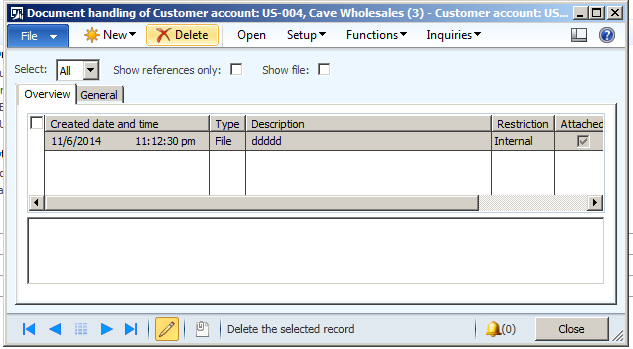
Following code is attaching file form c drive and attached to Customer with account num “US-004” In demo data


static void Job3(Args _args)

{

DocuRef docuRef;

DocuActionArchive archive;

CustTable _custtable;

str _name;

;


_name=@"c:\\ddddd.docx";

select RecId from _custtable where _custtable.AccountNum =="us-004";


if (_custtable!=null)

{

ttsBegin;

docuRef.clear();

docuRef.RefRecId = _custtable.RecId;

docuRef.RefTableId = tableNum("custtable");

docuRef.RefCompanyId = curext();

docuRef.Name = _name;

docuRef.TypeId = 'File';

docuRef.insert();

archive = new DocuActionArchive();

archive.add(docuRef, _name);

ttsCommit;

}


}


When I run this X++ test job I found document is attached as follow


FileDD

« Previous Page
Next Page »

Primary Sidebar

About

I am Dynamics AX/365 Finance and Operations consultant with years of implementation experience. I has helped several businesses implement and succeed with Dynamics AX/365 Finance and Operations. The goal of this website is to share insights, tips, and tricks to help end users and IT professionals.

Legal

Content published on this website are opinions, insights, tips, and tricks we have gained from years of Dynamics consulting and may not represent the opinions or views of any current or past employer. Any changes to an ERP system should be thoroughly tested before implementation.

Categories

  • Accounts Payable (2)
  • Advance Warehouse (2)
  • AI (3)
  • Asset Management (3)
  • Azure Functions (1)
  • Books (6)
  • Certification Guide (3)
  • ChatGPT (3)
  • Claude (1)
  • Customization Tips for D365 for Finance and Operations (63)
  • D365OF (60)
  • Data Management (1)
  • database restore (1)
  • Dynamics 365 (59)
  • Dynamics 365 for finance and operations (139)
  • Dynamics 365 for Operations (174)
  • Dynamics AX (AX 7) (134)
  • Dynamics AX 2012 (274)
  • Dynamics Ax 2012 Forms (13)
  • Dynamics Ax 2012 functional side (16)
  • Dynamics Ax 2012 Reporting SSRS Reports. (31)
  • Dynamics Ax 2012 Technical Side (52)
  • Dynamics Ax 7 (65)
  • Exam MB-330: Microsoft Dynamics 365 Supply Chain Management (7)
  • Excel Addin (1)
  • Favorites (12)
  • Financial Modules (6)
  • Functional (8)
  • General Journal (1)
  • Implementations (1)
  • Ledger (1)
  • Lifecycle Services (1)
  • Logseq (4)
  • Management Reporter (1)
  • Microsoft Excel (4)
  • MS Dynamics Ax 7 (64)
  • MVP summit (1)
  • MVP summit 2016 (1)
  • New Dynamics Ax (19)
  • Non Defined (9)
  • Note taking Apps (2)
  • Obsidian (4)
  • Personal Knowledge Management (3)
  • PKM (16)
  • Power Platform (6)
  • Procurement (5)
  • procurement and sourcing (6)
  • Product Information Management (4)
  • Product Management (6)
  • Production Control D365 for Finance and Operations (10)
  • Sale Order Process (10)
  • Sale Order Processing (10)
  • Sales and Distribution (5)
  • Soft Skill (1)
  • Supply Chain Management D365 F&O (5)
  • Tips and tricks (278)
  • Uncategorized (165)
  • Upgrade (1)
  • Web Cast (7)
  • White papers (4)
  • X++ (10)

Wiki

  • SCM

Copyright © 2026 · Magazine Pro On Genesis Framework · WordPress · Log in