• Skip to main content
  • Skip to primary sidebar
  • Home
  • About
  • Recommended Readings
    • 2022 Book Reading
    • 2023 Recommended Readings
    • Book Reading 2024
    • Book Reading 2025
  • Supply Chain Management Guide
  • PKM
  • Microsoft Excel
  • Microsoft Copilot in Office 365
  • Public Wiki Page

Ali Raza Zaidi

A practitioner’s musings on Dynamics 365 Finance and Operations

X++

Data Manipulation in Dynamics Ax 2012- Array as Extended Data Type

July 2, 2018 by alirazazaidi

I found a array based field in TSTimesheetLineWeek table, Field TSWeeklyHours

Now challenge is to enabled field based on Array. For example need to disabled on day 6.

Following code snippet help me to enabled disabled fields generated on the base of array extended Type

TSTimesheetLineWeek_ds.object(fieldId2Ext(fieldNum(TSTimesheetLineWeek, Hours), 6)).allowEdit(false);

Reference :

https://msdn.microsoft.com/en-us/library/aa675074.aspx

https://docs.microsoft.com/en-us/previous-versions/dynamicsax-2009/developer/aa592700(v=ax.50)

Enum value to Table Insertion Dynamics Ax 2012 R3, D365 for operations

June 23, 2017 by alirazazaidi

Let me share you a small tip, During customization We extend out of box Enum for classification. Later client requirement is extensive usage of new Values for classification. For adding new values in enum results dependency on technical person . So we did customization and provide form and custom table so he can create number of values as he want. But now next challenge was, copy enum values and labels in Custom table, So He can use these value instead create again. I used following code snippet to copy data from Enum and insert into Custom table. Hopes this helps.


EnumId   enumId   = enumNum(LedgerPostingType);

DictEnum dictEnum = new DictEnum(enumId);

int      _NoOfValueInEnum = dictEnum.values();

int      counter;

CustomTable  _header;

delete_from _header;

for(counter = 0; counter < _NoOfValueInEnum; counter ++)

{

_header.ReportHeaderCode = dictEnum.index2Label(counter);

_header.Description = dictEnum.index2Label(counter);

_header.SortOrder=0;

_header.EnumValue = dictEnum.index2Value(counter);

_header.insert();


}

How to run RDP based report from X++ and passing parameter using Data contract.

July 19, 2016 by alirazazaidi

Interesting, I was modifying some RDP based report, I found that parameter was passed to report through custom table, As report will run form button, and based on current selected record. So former developer did that on pressing button, selected value inserted some custom table. When report run, query on table and fetch required value form custom table and whole report logic run on that value. That approach works fine, single user environment. Problem I found to send parameter to report through x++ code. I found SrsReportRunController works wonder here.

Suppose we are running some report for customer, And Report Name is customer Report and we have to pass current customer account on form as parameter. If you report is based on Report data provider than following code snippet works for you.


SrsReportRunController          controller = new SrsReportRunController();

CustomerReprtDC  rdpContract = new CustomerReprtDC  ();

SRSPrintDestinationSettings     settings;

super();

controller.parmReportName(ssrsReportStr(CustomerReport,CustomerCopy));


controller.parmShowDialog(false);

rdpContract.parmCustAccount(CustTable.AccountNum);

controller.parmReportContract().parmRdpContract(rdpContract);

controller.startOperation();

Unit Conversion Real world scenario, Dynamics Ax 2012 X++

April 26, 2016 by alirazazaidi

A few days ago, I got requirement, where I have to sum up the total quantity and amount of all Purchase line. Here we assume that All lines in Purchase order belongs to same set or convertible unit.

You can set these unit conversion settings at

Organization administration > Setup > Units > Unit conversions.


Public void SumQTYAndAmount(PurchTable  PurchTable)

{

PurchLine               line;


UnitOfMeasureSymbol     toSymbol ="Ranjah";

UnitOfMeasureSymbol     fromSymbol;

Qty                     SumQty=0;

AmountCur AmountPurch=0;

UnitOfMeasureRecId      fromRecid,toRecid;

;


select * from plan where plan.PurchTable == PurchTable.PurchId;


//  select sum(LineAmount), sum(QtyOrdered) from line where line.PurchId == PurchTable.PurchId;

while  select * from LineQty where LineQty.PurchId == PurchTable.PurchId

{

if ( LineQty.PurchUnit ==toSymbol)

{

SumQty +=LineQty.QtyOrdered;

amountQty+=LineQty.LineAmount;

}

else

{

fromSymbol = LineQty.PurchUnit;

toRecid =UnitOfMeasure::findBySymbol(toSymbol).RecId;

fromRecid =UnitOfMeasure::findBySymbol(fromSymbol).RecId;

landQty += UnitOfMeasureConverter::convert(landQty,fromRecid,toRecid,NoYes::Yes);

amountQty+=LineQty.LineAmount;


}


}

}

Custom lookup in reference group Dynamics Ax 2012

January 30, 2016 by alirazazaidi

Here is little tip regarding look up.
A few days ago, I have to take join with employee with my custom table. if you check that The primary key of HCMWORKER IS RecId.
So I have to create worker relation based on primary key i.e recid.\

2016-01-30_10-34-25

But when I drop the foreign key on form Grid. It creates reference group. And surprising this create out of the box lookup with similar to same based on alternative key.
2016-01-30_10-35-02

Now there is query appears that we have to filter it the workers of certain cariteria. for example you can certain designation or not terminate. now I face question how to add custom lookup in Reference group. Now there is no lookup function and same time if exists it will not work.
After searching I found referenceLookup method at data source field instead of grid text field. So Overwrite the method and similar code snippet creates the similar to out of the box lookup. You can extend it according to need.

2016-01-30_10-36-29


public Common lookupReference(FormReferenceControl _formReferenceControl)
{

HcmWorker HcmWorker;
Query query = new Query();
QueryBuildDataSource queryBuildDataSource;
QueryBuildRange queryBuildRange;

SysReferenceTableLookup sysTableLookup = SysReferenceTableLookup::newParameters(tableNum(HcmWorker), _formReferenceControl, true);
;
sysTableLookup.addLookupField(fieldNum(HcmWorker, PersonnelNumber));
sysTableLookup.addLookupField(fieldNum(HcmWorker, Person));

queryBuildDataSource = query.addDataSource(tableNum(HcmWorker));

return sysTableLookup.performFormLookup();

}

Reference I used for this post, They help me during doing day to day task
http://devexpp.blogspot.com/2013/06/dynamics-ax-custom-reference-group.html
https://dynamicsaxposed.wordpress.com/2011/11/04/sysreferencetablelookup-class-for-reference-group/


Try catch and finally in new Dynamics Ax (aka AX7)

January 24, 2016 by alirazazaidi

Finally I found that in new Dynamics Ax finally statement introduce in exception handling statement.

try
{
}
catch
{
}
finally
{
}

It means, everything written in finally must be execute. For testing this functionality I just create a runnable class and written following code.

class HelloWorld

{

/// <summary>

/// Runs the class with the specified arguments.

/// </summary>

/// <param name = "_args">The specified arguments.</param>

public static void main(Args _args)

{

ColorDC dc = new ColorDC();

ColorSc Sc = new ColorSc();


try

{

dc.parmColorName("Red");

Sc.InsertColor(dc);

dc.parmColorName("Green");

Sc.InsertColor(dc);

} catch (Exception::Error)

{

info("error");

}

finally

{

info("finally");

}


}


}


When run the code.

I found Info box in browser as

2016-01-24_12-47-01

Process Indicator in Dynamics Ax 2012

March 3, 2015 by alirazazaidi

During one of my customization, I have perform a lengthy operation, during this process there is requirement to show process indicator, Code snippets I have found from

https://msdn.microsoft.com/en-us/library/aa841990.aspx


For this method I have to create a process helper class and add following snippet its static method


static void operationProgress_progressBars(Args _args)

{

#AviFiles

SysOperationProgress progress = new SysOperationProgress();

int i;


;


progress.setCaption(“File Transfer with Payment entries are in progess…”);

progress.setAnimation(#AviUpdate);

progress.setTotal(50000);

for (i = 1; i <= 50000; i++)

{

progress.setText(strfmt(“The value of i is %1”, i));

progress.setCount(i, 1);

}

}


For testing purpose I add a new form and on its button click, I added from following line code.


void clicked()

{

Args arg = new Args();

super();


startLengthyOperation();


ABCDHelper::operationProgress_progressBars(arg);

sleep(10000);

endLengthyOperation();


}


This progress operation must be run between two build in functions, that helps to cover the lengthy process in Dynamics Ax 2012.

3-3-2015 1-22-46 PM

split string in dynamics ax 2012

February 28, 2015 by alirazazaidi

During one of customization scenario, I have come across to field which contains comma separated values. In C# and VB.net string.split method return into array of string. But in X++  split method return list. Following simple tip helps me to check that my required value exists in comma separated value.

public boolean getValidateStudentName(String50 _splitString)

{


List strlist=new List(Types::String);

ListIterator    iterator;

str _Value;

boolean _NotFound=boolean::true;

;

strlist=strSplit(_splitString,”,”);

iterator = new ListIterator(strlist);

while(iterator.more())

{

_Value =iterator.value();

if (_Value ==”Ali”)

{

_NotFound=boolean::false;

}

if (_Value ==”Raza”)

{

_NotFound=boolean::false;

}

if (_Value ==”Zaidi”)

{

_NotFound=boolean::false;

}

if (_Value ==”Lahore”)

{

_NotFound=boolean::false;

}

if (_Value ==”Pakistan”)

{

_NotFound=boolean::false;

}

iterator.next();

}

return _NotFound;

}

Customer as offset account Dynamics Ax 2012 R3

February 23, 2015 by alirazazaidi

During one of my customization, I have to transfer customer balance from one customer to another, for this purpose

ledger entry for old customer as debit amount and other customer account set in offset account.


I used following code Snippet to achieve this functionality

LedgerJournalCheckPost  jourCheckPost;

LedgerJournalTable      jourTable;


AxLedgerJournalTable    header  = new AxLedgerJournalTable();

AxLedgerJournalTrans    trans   = new AxLedgerJournalTrans();


container               offsetDim;

LedgerJournalNameId     ledgerJournalNameId = “payment”;

LedgerJournalACType         accType, offsetAccType;

BankAccountTable            bankAccountTable;

accType         = LedgerJournalACType::Cust;

offsetAccType   = LedgerJournalACType::Cust;


header.parmJournalName(ledgerJournalNameId);

header.parmJournalType(LedgerJournalType::CustPayment);

header.save();


select firstOnly RecId from ToCustomer

where ToCustomer.DisplayValue == _ToAccount;


;

select firstOnly RecId from FromCustomer

where FromCustomer.DisplayValue == _OldAccount;


trans.parmLedgerDimension(ToCustomer.RecId);

trans.parmAmountCurCredit(PaymentAmount);

trans.parmOffsetAccountType(offsetAccType);

trans.parmOffsetLedgerDimension (FromCustomer.RecId);

trans.save();


The above mentioned code works 100 percent fine when I give offset account as ledger or bank ( did not try for vendor :)). When I used customer as offset I don’t know what reason it let offset account as empty. I debug  the code and watch windows show that valide value is parked at  trans.parmOffsetLedgerDimension


I don’t know it bug in Dynamics Ax 2012 R3, or some issue in my development environment, After 1 hours try and try, I decided to shift the code to enter data directly into table at line level. That works perfectly fine and entry is successfully parked and show on screen.

Only one extra line of code I need to add that is to set current currency code for ledger entry, which possibly set by default in  ABC classes

New code snippet is something similar at line level


LedgerJournalTrans  trans;


DimensionAttributeValueCombination  FromCustomer,ToCustomer;


LedgerJournalACType         accType, offsetAccType;


accType         = LedgerJournalACType::Cust;

offsetAccType   = LedgerJournalACType::Cust;


trans.AccountType = accType;

trans.OffsetAccountType =offsetAccType;


// ledger Header

trans.JournalNum = _JournalNum;


trans.CurrencyCode = Ledger::accountingCurrency(CompanyInfo::current());


trans.AmountCurDebit = PaymentAmount;


select firstOnly RecId from ToCustomer

where ToCustomer.DisplayValue == _ToAccount;


;

select firstOnly RecId from FromCustomer

where FromCustomer.DisplayValue == _OldAccount;


trans.LedgerDimension =FromCustomer.RecId;

trans.OffsetLedgerDimension = ToCustomer.RecId;

trans.insert();


Exploring the message box in Dynamics Ax 2012 R3

February 22, 2015 by alirazazaidi

Message box are common tools that helps us show messages, results and Provide choices to preform actions or not.

Here are some messagebox with examples.


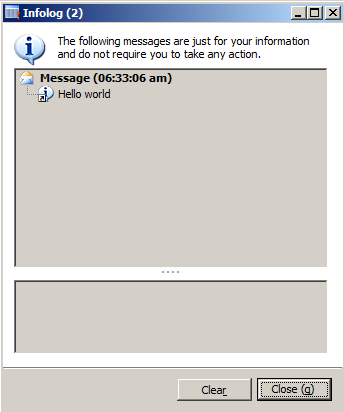
Info box : this is simple box used to display any message other than warnings or error messages.


static void JobInfoBox(Args _args)

{

info (“Hello world”);


}

Infobox

infoOnce:

This message box is similar to infobox only difference here you can set message header and message details. This message box shows option to disable message box if warning or message is continuously appear in code iteration.


void clicked()

{

Box::infoOnce(“this is message box “, ” For detail click http://tech.alirazazaidi”,” Only once”);

super();


}

InfoOnceBox


infoOnceEx:


This message allows us to display caption of messagebox, header of message, Detail or information, gives us option to stop at execution of code until we click on ok button or move forward by showing message box.


void clicked()

{

//   Box::infoOnce(“this is message box “, ” For detail click http://tech.alirazazaidi”,” Only once”);

super();

Box::infoOnceEx(“this is message box”,”http://tech.alirazazaidi.com”,” Hello”,” this is testing”,boolean::true);

}


You can saw  caption of Dialog “This is testing” is coming from code.

InfoOncEx


Ok cancel box: Allows us to option Provide accept and rejection to proceed further


void clicked()

{

DialogButton Button;

super();


Button=  Box::okCancel(“This is test”,DialogButton::No);


if (Button == DialogButton::Ok)

info(“Allo”);

else

info(“NotAllo”);

}

Messagebox


Warning:

This messagebox used to show warning message


void clicked()

{

super();

Box::warning(“this is warning”);


}


Warning


yesAllNoAllCancel


This message provide option to yes , yes for all, no, no for all or cancel

void clicked()

{

//   Box::infoOnce(“this is message box “, ” For detail click http://tech.alirazazaidi”,” Only once”);

DialogButton _Button;

super();

// Box::infoOnceEx(“this is message box”,”http://tech.alirazazaidi.com”,” Hello”,” this is testing”,boolean::true);


_Button=  Box::yesAllNoAllCancel(“This is test”,DialogButton::No);


if (_Button == DialogButton::NoToAll)

{

info(“OK”);

}

else if (_Button==DialogButton::YesToAll)

{

info (“Yes to All”);

}

else if (_Button==DialogButton::Cancel)

{

info(“Cancel”);

}


}

Yes no Yes to all


Other message box like yesno, yesnoonce has similar options

Error:

One important message box is Error box, Under the hood it use Info box but with error icon is used in infobox.

void clicked()
{
super();

error ( ” This exceptional blog “);

}

Error message

« Previous Page
Next Page »

Primary Sidebar

About

I am Dynamics AX/365 Finance and Operations consultant with years of implementation experience. I has helped several businesses implement and succeed with Dynamics AX/365 Finance and Operations. The goal of this website is to share insights, tips, and tricks to help end users and IT professionals.

Legal

Content published on this website are opinions, insights, tips, and tricks we have gained from years of Dynamics consulting and may not represent the opinions or views of any current or past employer. Any changes to an ERP system should be thoroughly tested before implementation.

Categories

  • Accounts Payable (2)
  • Advance Warehouse (2)
  • AI (3)
  • Asset Management (3)
  • Azure Functions (1)
  • Books (6)
  • Certification Guide (3)
  • ChatGPT (3)
  • Claude (1)
  • Customization Tips for D365 for Finance and Operations (63)
  • D365OF (60)
  • Data Management (1)
  • database restore (1)
  • Dynamics 365 (59)
  • Dynamics 365 for finance and operations (139)
  • Dynamics 365 for Operations (174)
  • Dynamics AX (AX 7) (134)
  • Dynamics AX 2012 (274)
  • Dynamics Ax 2012 Forms (13)
  • Dynamics Ax 2012 functional side (16)
  • Dynamics Ax 2012 Reporting SSRS Reports. (31)
  • Dynamics Ax 2012 Technical Side (52)
  • Dynamics Ax 7 (65)
  • Exam MB-330: Microsoft Dynamics 365 Supply Chain Management (7)
  • Excel Addin (1)
  • Favorites (12)
  • Financial Modules (6)
  • Functional (8)
  • General Journal (1)
  • Implementations (1)
  • Ledger (1)
  • Lifecycle Services (1)
  • Logseq (4)
  • Management Reporter (1)
  • Microsoft Excel (4)
  • MS Dynamics Ax 7 (64)
  • MVP summit (1)
  • MVP summit 2016 (1)
  • New Dynamics Ax (19)
  • Non Defined (9)
  • Note taking Apps (2)
  • Obsidian (4)
  • Personal Knowledge Management (3)
  • PKM (16)
  • Power Platform (6)
  • Procurement (5)
  • procurement and sourcing (6)
  • Product Information Management (4)
  • Product Management (6)
  • Production Control D365 for Finance and Operations (10)
  • Sale Order Process (10)
  • Sale Order Processing (10)
  • Sales and Distribution (5)
  • Soft Skill (1)
  • Supply Chain Management D365 F&O (5)
  • Tips and tricks (278)
  • Uncategorized (165)
  • Upgrade (1)
  • Web Cast (7)
  • White papers (4)
  • X++ (10)

Wiki

  • SCM

Copyright © 2026 · Magazine Pro On Genesis Framework · WordPress · Log in