• Skip to main content
  • Skip to primary sidebar
  • Home
  • About
  • Recommended Readings
    • 2022 Book Reading
    • 2023 Recommended Readings
    • Book Reading 2024
    • Book Reading 2025
    • Book Reading 2026
  • Supply Chain Management Guide
  • PKM
  • Microsoft Excel
  • Microsoft Copilot in Office 365
  • Public Wiki Page

Ali Raza Zaidi

A practitioner’s musings on Dynamics 365 Finance and Operations

Dynamics Ax 2012

exception has been thrown by the target of an invocation Dynamics Ax 2012 R3

February 9, 2016 by alirazazaidi

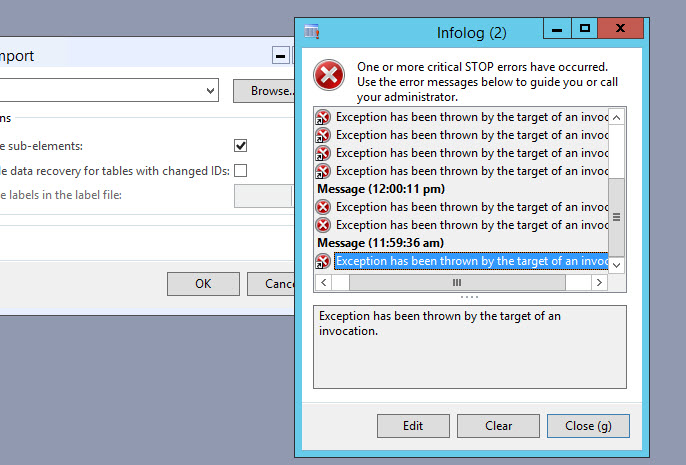
A few days ago I face again the old error “Exception has been thrown by target of an invocation.

This time this error did not let us do anything on client.

2016-02-01_11-57-33


Finally I found that AOS server Configuration utility, database server is set as Server Name for example as “DB server” instead of  server IP. When sometimes Database server name is resolved by network configuration, AX working fine and some time when it unable to resolve the server IP with its name “Target of Invocation” error appears. On opening the AOS server configuration utility i found following error

Prod


When I click the ok button, AOS server configuration utility did not open, it shown in windows task management. So I kill its instance. Then Stop the AOS service form windows services management. Again open AOS server utility, it opened with in a few minutes (Still takes time). Then I create a new active configuration. And replace database server name with its IP. for example Instead of Database server name “DB server” I used the “192.168.1.1”. Save the settings and start the AOS service.  AX working fine and error disappears.


Custom lookup in reference group Dynamics Ax 2012

January 30, 2016 by alirazazaidi

Here is little tip regarding look up.
A few days ago, I have to take join with employee with my custom table. if you check that The primary key of HCMWORKER IS RecId.
So I have to create worker relation based on primary key i.e recid.\

2016-01-30_10-34-25

But when I drop the foreign key on form Grid. It creates reference group. And surprising this create out of the box lookup with similar to same based on alternative key.
2016-01-30_10-35-02

Now there is query appears that we have to filter it the workers of certain cariteria. for example you can certain designation or not terminate. now I face question how to add custom lookup in Reference group. Now there is no lookup function and same time if exists it will not work.
After searching I found referenceLookup method at data source field instead of grid text field. So Overwrite the method and similar code snippet creates the similar to out of the box lookup. You can extend it according to need.

2016-01-30_10-36-29


public Common lookupReference(FormReferenceControl _formReferenceControl)
{

HcmWorker HcmWorker;
Query query = new Query();
QueryBuildDataSource queryBuildDataSource;
QueryBuildRange queryBuildRange;

SysReferenceTableLookup sysTableLookup = SysReferenceTableLookup::newParameters(tableNum(HcmWorker), _formReferenceControl, true);
;
sysTableLookup.addLookupField(fieldNum(HcmWorker, PersonnelNumber));
sysTableLookup.addLookupField(fieldNum(HcmWorker, Person));

queryBuildDataSource = query.addDataSource(tableNum(HcmWorker));

return sysTableLookup.performFormLookup();

}

Reference I used for this post, They help me during doing day to day task
http://devexpp.blogspot.com/2013/06/dynamics-ax-custom-reference-group.html
https://dynamicsaxposed.wordpress.com/2011/11/04/sysreferencetablelookup-class-for-reference-group/


How to enable country or regional functionality to every country or region in Dynamics Ax 2012

December 20, 2015 by alirazazaidi

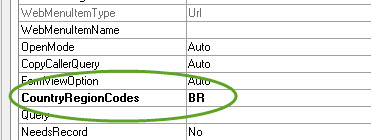
During customization, the requirement for client is met by feature built for certain region ie. China and Brazil. Instead of develop that functionality we have to enable this functionality to available in other region too. For this we have to clear the  “CountryRegionCodes” property.

2015-12-20_20-53-04


If we remove this property from menu, menu item, extended data types, enums, tables and forms.

Then this functionality will be available in all legal entities of every region. And more importantly we have to debug the code to remove any country or region specific checks.

Unable to preview the report, install the Business Intelligence Dynamics Ax 2012

December 6, 2015 by alirazazaidi

A few days ago, I had to modify reports in standard Dynamics Ax 2012 R3. Report successfully opened in Visual studio 2010, but when I tried to modify the report design, visual studio throw following error.

Unable to preview the report, install the Business Intelligence. Development Studio feature.

2015-11-29_9-59-09

For this I had to install the Business Intelligence Development Studio from SQL Sever 2008 R2 setup.

2015-11-29_17-14-13

After Installment this error resolved.

Reference: http://msdynamicsaxtips.blogspot.com/2015/02/unable-to-preview-report-install.html


Valid Time State Tables and Date Effective Data on custom table dynamics ax 2012.

October 30, 2015 by alirazazaidi

Hi all, today I have very small tip, I have inject some data on one of custom table written by some different team.  But update throw exception

 Update on a valid time state table is not allowed without specifying a ValidTimeStateUpdateMode


Table is custom I update the required filed by following code snippet.

Suppose table name is “Xyz”.


select forUpdate * from xyz where xyz.recid== _RecId ;

try {

ttsBegin;

_Value= “Abcd”;

xyz.Name = _Value;

xyz.validTimeStateUpdateMode(ValidTimeStateUpdate::Correction);

xyz.ValidFrom =today();

xyz.ValidTo=dateMax();

xyz.update();

ttsCommit;

}

catch

{

ttsAbort;

}


Reference https://community.dynamics.com/ax/b/axstart/archive/2014/03/02/valid-time-state-tables-and-date-effective-data-in-combination-with-dmf-and-wcf-aif

How to enable debugging on Server 2012 R3.

October 14, 2015 by alirazazaidi

Usually we have to debug on server, while debugging option is not enabled. Right way to enable it from AX server configuration utility, but some Ax server configuration utility needs is on default setting and any setting on Configuration utility is un-Affordable due AOS service going to restart.

On other way is to enable debugging option through Window registry. It helps me to enable debugging on server without restart of AOS server.

Windows => run write REGEDIT

Expand  HKEY_LOCAL_MACHINE => MICROSOFT

2015-10-14_20-56-39

Dynamic => 6.0 =>configuration => Original (install configuration) => xppdebug

2015-10-14_20-58-15

Set xppdebug to zero

2015-10-14_20-58-43


reference :http://blogs.msdn.com/b/cesardelatorre/archive/2008/01/05/how-to-enable-debugging-on-server-dynamics-ax.aspx

Out of box Workflow tables and relation with Document table Dynamics Ax 2012

October 5, 2015 by alirazazaidi

A few days ago I got chance to work on list page which contains the lines which are assign to current user or login user for approval.

In Dynamics Ax 2012, every workflow is based on some table. Here we create Query and enable workflow on it.

When any record is submit for approval. So how the other Dynamics Ax 2012 workflow create entries in out of the box workflow tables.  If we open AOT there a lot of table which is used by Workflow engine.

WorkFlowTables


For current requirement we have to create custom query which is based on document table and out of the box workflow table. But problem is there too much table and how to understand relation ship between tables.


In Dynamics Ax, when no solution available then best solution is reverse engineering. Explore what Microsoft already did, try to understand it and then create your own solution.


After exploring I found that in procurement module there is “Purchase requisition assign to me” list page where the similar task is done by Microsoft itself.


This list page is based on AOT /Static Query “PurchReqTableAssignedToMe”.

Requisiation AssignToMe

On expanding I found relationship between following tables.


-Document table current example it is PurchReqTable

-SysworkFlowTable (as parent or Header table).

-SysWorkFlowTable ( as child or line table).

-WorkflowWorkItemTable.

purch Assign to me


You can explore this query in more detail and replicate this with respect to required table on your workflow based and use this query in list page.

In this form you have to set design properties to enable it for workflow. For example current PurchRequistionAssignToMe list page has following properties.

WorkFlowEnabled


Hope this helps


Field ‘abcd’ in table ‘CompanyInfo’ has not been explicitly selected Dynamics Ax 2012 R3.

September 17, 2015 by alirazazaidi

Today we face an error on our client environment that when we run the report Customer Account Statement shows error in info box as.

Stack trace: Field ‘abcd’ in table ‘CompanyInfo’ has not been explicitly selected.

Stack trace

(C)\Classes\CustAccountStatementExtController\setCommonData – line 29

(C)\Classes\CustAccountStatementExtController\runPrintMgmt – line 76

(C)\Classes\SrsPrintMgmtController\run – line 14

(C)\Classes\SysOperationController\startOperation – line 10

(C)\Classes\SrsReportRunController\startOperation – line 12

(C)\Classes\SrsPrintMgmtController\startOperation – line 14

(C)\Classes\SrsPrintMgmtFormLetterController\startOperation – line 14

(C)\Classes\CustAccountStatementExtController\main – line 6


After searching I found reply on Dynamics Ax forum by André Arnaud de Calavon where he gave the link Dick Wenning post, Hat off for them.

http://www.axstart.com/unretrieved-values-on-the-companyinfo-table-in-ax-2012r2/


Problem was in company info table value of “abcd” is null, and by unknown reason Ax did not recognize null value and show as Un retrieve. Due to this error report did not works. I found there are many other fields’ in a row are un-retrieve.


Solution open Sql server and run update query on Dynamics Ax 2012 Database ie. MSDynamicsAX or it depends on installation of Dynamics Ax 2012,


Update table CompanyInfo set “abcd”=”” where Name =”us01”.


Cheers, report run successfully.


“Can not create a record in Audit trail (transactionLog). Dynamics Ax 2012 R3

September 12, 2015 by alirazazaidi

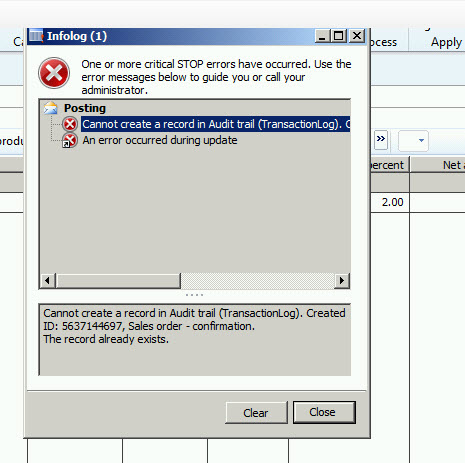
Today I face an error while confirm sales order

“Can not create a record in Audit trail (transactionLog).

AuditTrail

While searching I found solution already posted by “PavanKumar Idupulapati” at http://pavanidupulapati.blogspot.com/

That’s work for me, with link reference I update the transactionlog table’s create method with following statement

if (appl.lastTransactionIdCreated() != appl.curTransactionId())

{

if (!TransactionLog::find(appl.curTransactionId()))

{

transactionLog.Type = _type;

transactionLog.Txt = _txt;


transactionLog.insert();


appl.lastTransactionIdCreated(transactionLog.CreatedTransactionId);

}

appl.transactionlogUpdateTTSControl().revoke();

}


References I used

http://axfaq.blogspot.com/2013/09/transaction-log-ax-2012-cannot-create.html

http://pavanidupulapati.blogspot.com/

Exploring data cache in Dynamics Ax 2012

September 7, 2015 by alirazazaidi

In Dynamics Ax 2012, table level cache has been performance improving feature.

In Dynamics Ax 2012 we can set both client and server side (AOS) level caches.

When cache at client and server side enabled. Then user query, first search will be done on client side cache, result not found then Ax tries to locate record at server side. In the case of record not found at server side, they will be fetch from table.

Client side cache is exclusive for every  client, while Server side cache can be access by any client.


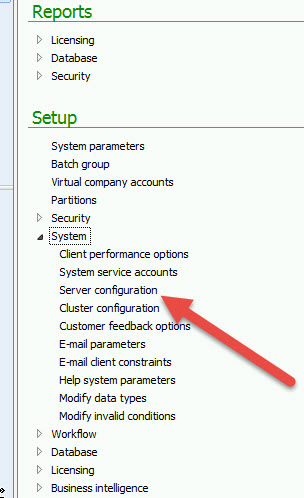
We can set number of records from System administrator module

server Menu

At performance optimization tab we can set both client side and server side AOS.

2015-09-06_22-41-26


In Dynamics Ax 2012, we can set two types of Cache, Single record or set based Cache.

We can set cache type in cacheLookup property of table.

For example we can set cache lookup for custtable as follow

CustTableCahchLookup-001


In the case of single record based cache, we can set following properties in cache lookup

  • NotInTTS,
  • Found
  • FoundAndEmpty


For Set-based cache, we have to set the cache lookup to Entire table.

According to Microsoft Documentation

When the CacheLookup table property is set to EntireTable, all the records in the table are put in the cache only if the WHERE clause in the SELECT statement includes equality tests on all fields of the unique index that is defined in the PrimaryIndex table property.

Following consideration required for Set-based or entire table cache.

  • Cluster index must be set on table so it will quickly load
  • Cache size must be under 218, otherwise cache is moved to disk which is much slower to access.
  • Should be used on lookup tables because data is less there.


https://community.dynamics.com/ax/b/axsupport/archive/2015/02/20/dynamics-ax-table-caching-basic-rules

« Previous Page
Next Page »

Primary Sidebar

About

I am Dynamics AX/365 Finance and Operations consultant with years of implementation experience. I has helped several businesses implement and succeed with Dynamics AX/365 Finance and Operations. The goal of this website is to share insights, tips, and tricks to help end users and IT professionals.

Legal

Content published on this website are opinions, insights, tips, and tricks we have gained from years of Dynamics consulting and may not represent the opinions or views of any current or past employer. Any changes to an ERP system should be thoroughly tested before implementation.

Categories

  • Accounts Payable (2)
  • Advance Warehouse (2)
  • AI (3)
  • Asset Management (3)
  • Azure Functions (1)
  • Books (6)
  • Certification Guide (3)
  • ChatGPT (3)
  • Claude (1)
  • Customization Tips for D365 for Finance and Operations (64)
  • D365OF (60)
  • Data Management (1)
  • database restore (1)
  • Dynamics 365 (59)
  • Dynamics 365 for finance and operations (139)
  • Dynamics 365 for Operations (175)
  • Dynamics AX (AX 7) (134)
  • Dynamics AX 2012 (274)
  • Dynamics Ax 2012 Forms (13)
  • Dynamics Ax 2012 functional side (16)
  • Dynamics Ax 2012 Reporting SSRS Reports. (31)
  • Dynamics Ax 2012 Technical Side (52)
  • Dynamics Ax 7 (65)
  • Exam MB-330: Microsoft Dynamics 365 Supply Chain Management (7)
  • Excel Addin (1)
  • Favorites (12)
  • Financial Modules (6)
  • Functional (8)
  • General Journal (1)
  • Implementations (1)
  • Ledger (1)
  • Lifecycle Services (1)
  • Logseq (4)
  • Management Reporter (1)
  • Microsoft Excel (4)
  • MS Dynamics Ax 7 (64)
  • MVP summit (1)
  • MVP summit 2016 (1)
  • New Dynamics Ax (19)
  • Non Defined (9)
  • Note taking Apps (2)
  • Obsidian (4)
  • Personal Knowledge Management (3)
  • PKM (16)
  • Power Platform (6)
  • Procurement (5)
  • procurement and sourcing (6)
  • Product Information Management (4)
  • Product Management (6)
  • Production Control D365 for Finance and Operations (10)
  • Sale Order Process (10)
  • Sale Order Processing (10)
  • Sales and Distribution (5)
  • Soft Skill (1)
  • Supply Chain Management D365 F&O (5)
  • Tips and tricks (278)
  • Uncategorized (165)
  • Upgrade (1)
  • Web Cast (7)
  • White papers (4)
  • X++ (10)

Wiki

  • SCM

Copyright © 2026 · Magazine Pro On Genesis Framework · WordPress · Log in