• Skip to main content
  • Skip to primary sidebar
  • Home
  • About
  • Recommended Readings
    • 2022 Book Reading
    • 2023 Recommended Readings
    • Book Reading 2024
    • Book Reading 2025
    • Book Reading 2026
  • Supply Chain Management Guide
  • PKM
  • Microsoft Excel
  • Microsoft Copilot in Office 365
  • Public Wiki Page

Ali Raza Zaidi

A practitioner’s musings on Dynamics 365 Finance and Operations

Dynamics Ax 2012

SSIS Vs BizTalk which is best tool for integration/migration with Dynamics Ax

November 13, 2013 by alirazazaidi

During last couple of years, I have integrate data with Dynamics Ax both with SSIS and BizTalk. I common question is asked to me what is difference when every thing is possible in SSIS why we need BizTalk or what BizTalk provide different from SSIS. So My answer to this question is something like

Everything what BizTalk provide can be implemented in SSIS. But major difference is batch processing. Usually SSIS package are used to migrate large set of data or dataset. BizTalk provide the operations to be perform on one message at time or real time processing. Because everything in BizTalk is XML so BizTalk is very slow on large set of data. BizTalk provide large number of adapters, while In SSIS you have to use direct connection by Oldb, or Sql db to communicate with different database and depend on OlDb connections. In BizTalk large number of Adapter provided to communicate which may or may not be depend on OlDB connection. Build in Tracking system (BAM) and its display on BAM portal is also big advantage on SSIS. For this purpose you have to made custom tracking system in SSIS which require a lot of coding. Third advantage of BizTalk over SSIS is BRE. Business rule engine. BRE provide the condition whose value can be changed and complete follow of BizTalk application. These BRE roles can be used in multiple biztalk application while these functionality can be achieved on config files in SSIS.

In conclusion when we required less data integration/migration and require complex decision making we are used BizTalk for example we have to implement complex work flow on single record. BizTalk application also used route data, read from one location, transform it and drop on other location. Simple example of this transactional data, when one transaction is occur in one system and its impact or integration will required on other system we will used BizTalk. BizTalk is rapid development tool as compare to SSIS.

When we have large sum of data , required less complexity and requirement of integrated systems are based on Same technology then we have to use SSIS. Usually SSIS used to migrate or integrate the non-transaction data or step up data. The delay of migration and integration possible or example Batch processing. SSIS is built for ETL process, it is not rapid integration tool.

Dynamics Ax 2012: How to Edit the Existing Report.

November 10, 2013 by alirazazaidi

In Ax Dynamics usually work is pop out regarding customization of what is existing In Dynamics Ax. Usually is one of them is Report customization. If you are new in Dynamics Ax, Report locate and open mode will create more headache then modifying it. Let’s explore what steps require to open report in Edit Mode.

First step is determining the Name of report. You can identify it by menu item from it is running.

For example we want to edit the following report as per MSDN link


Menus > InventoryAndWarehouseManagement > Reports >BaseData > Quantity setup


menu


Now Go to AOT and expend InventoryAndWareHouseManagement and  right click to view the properties of Quantity Setup.

Menu click Menu Detail


From Property you can identify the Name of MenuItem and its type. The menu item for Quantity setup is InventTableQuantity.


Now expand from AOT and Expend Menu Items and then Output Node. Because there are too many menu Items in AOT Node so you have to type when you reach on InventTableQuantity right click on it and explore the properties. You can find the Object property described the report Name of Quatity Setup is InventTableQuantity.


MenuItem Detail


Now third step is go to locate the Visual Studio Projects and then Edit it.

For this purpose in the AOT, expand the node for Visual Studio Projects and then expand the node for Dynamics Ax Model Project. The project name will be similar to report Name, There are too much visual studio project so type InventTablQuantyReport. Right click on it and select edit.

Menu click

Report project will be open to Visual studio, where you can modify.


Report Menu

Entity Relationship diagrams of Dynamics Ax 2012 Tables

November 4, 2013 by alirazazaidi

Today I found the link on Microsoft website, where they upload the Entity Relationship diagrams for dynamics Ax 2012 table.

Module Name


ERD Link


Module-Tables Link


Parent-to-Child Link

Accounts payable ERDs Module-Tables Foreign Keys
Accounts receivable ERDs Module-Tables Foreign Keys
Budgeting ERDs Module-Tables Foreign Keys
Cash and bank management ERDs Module-Tables Foreign Keys
Compliance and internal controls ERDs Module-Tables Foreign Keys
Fixed assets ERDs Module-Tables Foreign Keys
General ledger ERDs Module-Tables Foreign Keys
Human resources ERDs Module-Tables Foreign Keys
Inventory and warehouse management ERDs Module-Tables Foreign Keys
Procurement and sourcing ERDs Module-Tables Foreign Keys
Production control ERDs Module-Tables Foreign Keys
Project management and accounting ERDs Module-Tables Foreign Keys
Retail ERDs Module-Tables Foreign Keys
Sales and marketing ERDs Module-Tables Foreign Keys
Service management ERDs Module-Tables Foreign Keys
Travel and expense ERDs Module-Tables Foreign Keys


Further detail link is below.


http://www.microsoft.com/dynamics/ax/erd/ax2012r2/

Dynamics Ax 2012: Configuration of basic Setup or basic company data in Dynamics Ax 2012

November 4, 2013 by alirazazaidi

Recently I made a new Virtual machine for dynamics Ax 2012. The issue was the VM was clean, no legal entity and no step up data present in it. Purpose of making this virtual machine is to study functional side of dynamics Ax 2012. On Searching start up data, I found excellent article by MVP Murray Fife.

Murray Fife identity following steps for configuration of dynamics Ax 2012
Configuring the Legal Entity:
This is require for Legal entity, form which everything will operate. In my Case it will be Lahore 01 i.e. lh01 Legal entity.
Configuring a Business Unit:
For ledger it is a better to create a new business unit for Legal Entity.
Configuring Account Structures:
Account structure will be required to post new company ledger from within the organization.
Configuring Company Ledger:
After configuration of account structure, company ledger will link to this structure and define the Account codes.
Configuring Automatic Transaction Accounts:
There is requirement of auto transaction accounts at organization level.
Creating a Bank Account:
Last step is configuration of Default Bank Account.

The complete article by MVP Murray Fife.

Configuring a Basic Company in Dynamics AX

Microsoft dynamics ax 2012 development introduction part 1/3

October 20, 2013 by alirazazaidi

My Presentation on Dynamics AX 2012 Development Introduction.

Microsoft dynamics ax 2012 development introduction part 1/3 from Ali Raza Zaidi

Dynamics Ax 2012 : “Only integrated security is supported for AX queries.”

October 19, 2013 by alirazazaidi

Recently I update my dynamics Ax development Environment by restoring Database from Production Dynamics AX Db. After the restoring the database, when I run any  SSRS report form Dynamics Ax, it  starts to give error  “Only integrated security is supported for AX queries.”

The reporting Services are working perfectly other than Dynamics Ax reports.

One way to apply the Windows Integrated Security on required report. By following way

  • Open Reporting Services Configuration Manager ( All Programs > Microsoft SQL Server 2008/2012 > Configuration Tools > Reporting Services Configuration Manager)
  • Go to “Report Manager URL” Tab and click on URL
  • Typically, URL will be in the format http://<ServerName>:80/Reports
  • Select the  Report under Dynamics Ax Folder

postSSRSRepMgr


  • In the opened page, select Data Sources on the left pane.
  • And apply Windows integrated security and click Apply.

postSSRSDSprop


But I found that error on all SSRS reports for Dynamics Ax 2012. For this, best way to delete all reports and redeploy them.
Steps are as follows:

  • First step to delete all reports, by selecting Dynamics Ax folder in Report server and delete it, this will all reports inside the reporting reports.

postSSRSDelDynAx


  • Then go to Report servers form in Dynamics Ax 2012 and click on “create report folder” button to create the Folder Dynamics Ax again

postSSRSRepSerForm


  • Now you can open Powershell (Administrative Tools > Microsoft Dynamics Ax 2012 Management Shell). Make sure you run Powershell as Administrator.
  • Deploy all the reports with the help of command:
    Publish-AXReport -ReportName *
  • Wait for completing the report deployment after it all reports will run fine.


Dynamics Ax 2012 : Exploring Data Base logging for Insert ,Update and Delete

July 1, 2013 by alirazazaidi

Dynamics Ax 2012 provide the functionality to log insert update and delete functionality on table as well as selected filed of a table. When tracking on any table in dynamics Ax, a new entry will be created in sysDatabaselog table.

Inside database logging required table will find with the help of label of function. For example if  we want to enable logging on table name Customer then we can find customer in table with label “Customer”. You can find the label of table by exploring the property of by selecting table.

Let’s we enable logging on our custom “Student” table.

For this purpose you have to go “System Administrator” Module of Dynamics Ax 2012. Under Step tab you will find database node, there you find “Database log” Click on it. Like this.

Log view


After that Database base logging Wizard will start

Studentselection


Press Next. On next page select “Not Specified” node of tree. All custom table/ user table will be placed under “Not Specified” Node. Dynamics Ax Default tables are placed under their respected module name.

Student


Expend the not specified node.  And select the student table there.

Student


Here you can track not only table but also possible you can track one or more fields of specific table. In current example we enable tracking or logging on whole student table.


Now question is how we can see what will comes in in sysdatabaselog table on insert update or delete on table.  You can view from this link

Node


All those table where “Save per company “ option enable, all log files will be stored in sysDatabaselog with respect to their legal entities where the insert update or delete occurs. All those tables where stored data gobally in “Dat” legal entities.  Logging records will be found in “Dat” company.

Now we explore the database structure of SysDatabaselog table. This will help us to get the logged information in X++ code.

Followings are some important fields of SysDatabaseLog table.

  1. Table:  This filed contains the integer value for each table. A unique integer number attached to each table in dynamics Ax. This fileds tells us on which table operation is performed.
  2.     Creation Date: This contains the date and time on which entry in sysDatabaseLog is created.
  3. Data:  X++ container type this contains the data.
  4. LoggType: This described insert, update or delete operation is pefromed at the result current entry is done in sysDatabaselog. It is of enum type. DatabaseLogType::Insert


For example, if database logging is enabled on our student table, we can track all insert, update or deleted record form database log table. For example if we have to pull all inserted today records form sysDatabaselog we can do by following way.

 Insert Case:

SysDataBaseLog sysDataBaseLog;

utcDateTime CurrentDate;

container tableRecord;

container recordInstance;

str selectedField;

str fieldName;

str fieldValue;

int idx;

int tableID;

str  databaseLogSourceCompany;

CurrentDate=DateTimeUtil::newDateTime(today(),str2time(“00:00:00”));

tableID = tableName2id(‘Student’);


while SELECT sysDataBaseLog

WHERE sysDataBaseLog.table ==  tableID && sysDataBaseLog.createdDateTime > CurrentDate && sysDataBaseLog.LogType == DatabaseLogType::Insert

{

selectedField = “RollNumber”;

fieldName=””;

fieldValue = “”;

tableRecord = (sysDataBaseLog.Data);


for( idx = 1; idx <= conLen(tableRecord); idx++)

{

recordInstance =  conpeek(tableRecord, idx);

fieldName = conpeek(recordInstance, 1);


fieldValue +=” ” + conpeek(recordInstance, 2) + ” , “;

break;


}


}


Update case will return three containers inside Data field of sysDataTable for each record, first one describe the field Name, second container returns the new value and third container will return old values. like


while SELECT sysDataBaseLog

WHERE sysDataBaseLog.table ==  tableID && sysDataBaseLog.createdDateTime > CurrentDate && sysDataBaseLog.LogType == DatabaseLogType::Update

{

selectedField = “RollNumber”;

fieldName=””;

fieldValue = “”;

tableRecord = (sysDataBaseLog.Data);


for( idx = 1; idx <= conLen(tableRecord); idx++)

{

// fields name in container.

recordInstance =  conpeek(tableRecord, idx);

fieldName = conpeek(recordInstance, 1);


// new values in container in same sequence as first container describe.

fieldValue +=” ” + conpeek(recordInstance, 2) + ” , “;

// Old set of value in same sequence.

fieldValue +=” ” + conpeek(recordInstance, 3) + ” , “;

}

Delete case:

Like Insert Delete case: you can find 2 containers first one contains fields name and second one contains the delete value in same sequence. But very important you can get recId of delete record as follow.


info(int642str(sysDataBaseLog.LogRecId)); complete code will be look like


while SELECT sysDataBaseLog


WHERE sysDataBaseLog.table ==  tableID && sysDataBaseLog.createdDateTime > CurrentDate && sysDataBaseLog.LogType == DatabaseLogType::Delete`


{


fieldName=””;


fieldValue = “”;


tableRecord = (sysDataBaseLog.Data);

info(int642str(sysDataBaseLog.RecId));

info(int642str(sysDataBaseLog.LogRecId));


for( idx = 1; idx <= conLen(tableRecord); idx++)


{


recordInstance =  conpeek(tableRecord, idx);


fieldName = conpeek(recordInstance, 1);

filevalue=conpeek(recordInstance, 2);


info (fieldName + ” Value : ” + fieldValue);


//}


}


Dynamics Ax 2012 : Number of months between two dates

June 11, 2013 by alirazazaidi

Recently I got small problem to calculate no of months between two dates. Dynamics Ax 2012 provides a default function which calculates no of intervals between two dates based on enumeration.

int intvNo(date input_date, date ref_date, int func)

You can use it as

noOfIntervals = intvNo(refDate, inputDate, intvScale::Month);

intvScale enumation have two values for months

  • Month
  • YearMonth

If we provide the intvScale::Month then X++ ignores the year and assumes that month is calculated within one year.

If we provide the intvScale::YearMonth then X++ calculate the number of months between different years. Consider following example.

static void NumberofMonthsbetweenTwodates(Args _args)

{

date inputDate = str2Date("1/1/2007", 213);

date refDate = str2Date("3/1/2009", 213);

int noOfMonths,noOfMonthsBetweenYears;

;

noOfMonths = intvNo(refDate, inputDate, intvScale::Month);

noOfMonthsBetweenYears = intvNo(refDate, inputDate, intvScale::YearMonth);

//  noOfMonths= intvNo(firstdate,seconddate,IntvScale::Month);

print("noOfMonths  :"+int2str(noOfMonths) + "  ,noOfMonthsBetweenYears  :"+int2str(noOfMonthsBetweenYears));

}

Info box will be return like

noOfMonths  :2  ,noOfMonthsBetweenYears  :26

Some cases above code did not works then used following function.

InfAdjValidation_MX::monthDifference(FromDate _fromDate, ToDate _toDate)

Example is as follow.

FromDate _fromDate = mkDate(1,1,2018);
ToDate _toDate =mkDate(31,1,2018);
info(int2str( InfAdjValidation_MX::monthDifference( fromDate, toDate)));

Dynamics Ax 2012 : Exploring the Cross company Queries in dynamics Ax 2012

February 24, 2013 by alirazazaidi

Recently one of my assignments, I have to explore and use Cross company queries to fetch data. Although cross company queries have performance overhead, for example, if my custom AIF service return result in 4 seconds , Cross company returns in 30 seconds.  I found multiple design pattern,  The fastest  cross company query are by setting allow cross property to set true in static AOT Query or by setting Adding In Query Object. Lets explore these patterns

Static AOT Query:

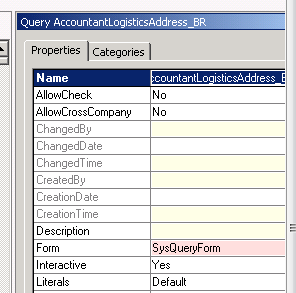
You can set Allow cross company true By properties of AOT Query .


Cross Company


X++ Query object:

One way to create query in dynamics Ax is Query object. You can add by following way.


Query query;

QueryRun queryRun;

QueryBuildRange queryBuildRange;

QueryBuildDataSource queryBuildDataSource;

query = new Query();

queryBuildDataSource = query.addDataSource(TableNum(CustTable));

query.allowCrossCompany(true);

//Executes query built so far

queryRun = new QueryRun(query);

queryRun.allowCrossCompany(true);

This is most fastest way to get cross company data.


While select Query:


There two ways for Get cross Company query and or Query inside the change company statement.

Cross company Keyword:

Add cross company query inside the while select statement to extract data all legal entities in Dynamics AX as  follow code.

Custtable _CustTable;

While select crosscompany * from _Custtable

{

Info (_Custtable.AccountNum + “   :  “ + int642str(_Custtable.DataAreaId);

}


If you want to restrict the query to fetch data from limited legal Entities you have to use a container as follow.


Container _ListOfLegalEntites ={ ‘mazang’,’Jubergi’,’Urdu Bazar’};

While select  crosscompany:_ListOfLegalEntites * from _Cust

{

Info(_Custtable.AccountNum + “  :  “ + _Custtable.DataAreaId);

}


Change Company Keyword:


One method is to use change company keyword. It is most time consuming method. To reduce its time, we have rest the table to null when Change Company happened. In Dynamics All legal entities name stored at  DataArea table we use this table to get the list of datarea and used inside the changeCompany  query on it as follow.

DataArea _DataArea;

Custtable _Custtable;

While select Id from _DataArea

changeCompany(_DataArea.Id)

{

_Custtable= null;

While select * from _Custtable

{

Info(_Custtable.AccountNum +”  :   “ + _Custtable.AreaId);

}

}

If you did not reset the table buffer , result will be too heavy, reason buffer contains old data as well. To reset or set null inside the change company statement and before query on buffer will be performance bust as well as design pattern.


Dynamics Ax 2012 : Exploring the Containers

February 10, 2013 by alirazazaidi

In Dynamics Ax there is structure known as containers. Here are some points for Containers

  • They are value based structure. So no class based object stored on it.
  • They are similar to linked list or array like structured.
  • Their size fixed at time of declaration. When you insert update or delete any value from container, a new container is created.
  • They always copied by value.
  • Containers are base 1 not like array based zero.

There is question arises why we use temporary tables when have containers . These containers which can stored almost very values data type value.  While there are lot of functions available for containers. Answer is that on temporary temple we can set indexes on fields and by this way we can fetch data much faster. Although data stored in container is sequentially but on insertion  a new copy is generated which is  performance over head. When data is increases in container, container starts to be heavy.  Similar when you passed temporary table to any method it passed by reference. But when we passed container to method, a new copy is generated and used in method. Container will used only when fewer values will be manipulated. In the case of larger set of data, we have to use temporary tables.


Declaration of containers.

container  firstContainer;

container  secondContainer = [3,"Ali","RAza"];


Read value from container.

The value from container can be read with conpeek function,  this method take two parameter, first one is container  and second parameter is for getting index. The conPeek function read value of any type so and read for any type.


_value  = conPeek(secondContainer,3);


Insert value:


There are two functions used for insert a value in container, conPoke and  conIns


ConIns


secondContainer=conIns(secondContainer,2,"Zaidi");


conPoke:


secondContainer=conpoke(secondContainer,2,”test");


There difference between conPoke and conIns is that conIns, insert a new value at location, and rest of value is shifted to one next Index. conPoke replace the value at insert location for example if


container  secondContainer = [3,”Ali”,”RAza”];
then conIns secondContainer=conIns(secondContainer,2,”Zaidi”);  will create new conainter like as

[3,”Zaidi”,”Ali”,”Raza”];

While conPok

secondContainer=conpoke(secondContainer,2,”test”);

will create a [3,”Zaidi”,”Ali”,”Raza”];


[3,”test”,”RAza”];


Removing the value from Container:


Condel function is used to remove the value from container.

secondContainer =conDel(secondContainer,2,1);

conNull function is used to clear all the value from container as

secondContainer=conNull() ;


Length of container is calculated as

int _lenght= conLen(secondContainer);

confind:


This method find the index the value which required to search, if value is not found zero will be return


_found =conFind(secondContainer,"RAza");

info(int2str(_found));

_found =conFind(secondContainer,"Abc");


Some important Global class functions for Container


Con2Str:

This method return container values as comma sparated string.

_value = con2Str(secondContainer);


Con2List:

This function converts the container into list.

List _myList=con2List(secondContainer);


Loop through container:


Usually we have to loop through the container.


_lenght = conLen(secondContainer);

for (counter =1; counter <=_lenght; count++)

{

_value=conPeek(secondContainer,counter);

info(_value);

}


« Previous Page
Next Page »

Primary Sidebar

About

I am Dynamics AX/365 Finance and Operations consultant with years of implementation experience. I has helped several businesses implement and succeed with Dynamics AX/365 Finance and Operations. The goal of this website is to share insights, tips, and tricks to help end users and IT professionals.

Legal

Content published on this website are opinions, insights, tips, and tricks we have gained from years of Dynamics consulting and may not represent the opinions or views of any current or past employer. Any changes to an ERP system should be thoroughly tested before implementation.

Categories

  • Accounts Payable (2)
  • Advance Warehouse (2)
  • AI (3)
  • Asset Management (3)
  • Azure Functions (1)
  • Books (6)
  • Certification Guide (3)
  • ChatGPT (3)
  • Claude (1)
  • Customization Tips for D365 for Finance and Operations (64)
  • D365OF (60)
  • Data Management (1)
  • database restore (1)
  • Dynamics 365 (59)
  • Dynamics 365 for finance and operations (139)
  • Dynamics 365 for Operations (175)
  • Dynamics AX (AX 7) (134)
  • Dynamics AX 2012 (274)
  • Dynamics Ax 2012 Forms (13)
  • Dynamics Ax 2012 functional side (16)
  • Dynamics Ax 2012 Reporting SSRS Reports. (31)
  • Dynamics Ax 2012 Technical Side (52)
  • Dynamics Ax 7 (65)
  • Exam MB-330: Microsoft Dynamics 365 Supply Chain Management (7)
  • Excel Addin (1)
  • Favorites (12)
  • Financial Modules (6)
  • Functional (8)
  • General Journal (1)
  • Implementations (1)
  • Ledger (1)
  • Lifecycle Services (1)
  • Logseq (4)
  • Management Reporter (1)
  • Microsoft Excel (4)
  • MS Dynamics Ax 7 (64)
  • MVP summit (1)
  • MVP summit 2016 (1)
  • New Dynamics Ax (19)
  • Non Defined (9)
  • Note taking Apps (2)
  • Obsidian (4)
  • Personal Knowledge Management (3)
  • PKM (16)
  • Power Platform (6)
  • Procurement (5)
  • procurement and sourcing (6)
  • Product Information Management (4)
  • Product Management (6)
  • Production Control D365 for Finance and Operations (10)
  • Sale Order Process (10)
  • Sale Order Processing (10)
  • Sales and Distribution (5)
  • Soft Skill (1)
  • Supply Chain Management D365 F&O (5)
  • Tips and tricks (278)
  • Uncategorized (165)
  • Upgrade (1)
  • Web Cast (7)
  • White papers (4)
  • X++ (10)

Wiki

  • SCM

Copyright © 2026 · Magazine Pro On Genesis Framework · WordPress · Log in