• Skip to main content
  • Skip to primary sidebar
  • Home
  • About
  • Recommended Readings
    • 2022 Book Reading
    • 2023 Recommended Readings
    • Book Reading 2024
    • Book Reading 2025
    • Book Reading 2026
  • Supply Chain Management Guide
  • PKM
  • Microsoft Excel
  • Microsoft Copilot in Office 365
  • Public Wiki Page

Ali Raza Zaidi

A practitioner’s musings on Dynamics 365 Finance and Operations

Uncategorized

Primary SSO Server ” failed. Cannot perform encryption or decryption

February 5, 2012 by alirazazaidi

I face an error while creation file location at my personal computer for

Could not store transport type data for Primary Transport of Send Port ‘SendPort1’ to config store. Primary SSO Server ‘ALIRAZA-PC’ failed. Cannot perform encryption or decryption because the secret is not available from the master secret server. See the event log (on computer ‘ALIRAZA-PC’) for related errors.
(Microsoft.BizTalk.ExplorerOM)

After doing google i found following solution.

REASON:
——-
Maybe someone had reset the service account password or any other cause.

———
SOLUTION:
———

If you get this SSO error:
Cannot perform encryption or decryption because the secret is not available from the master secret server, do the following steps:
1. Open command prompt:
2. Go to c:program filescommon filesenterprise single sign-on
type: ssoconfig -restoresecret SSO9F54.bak (the sso back up file created at the time of biztalk configuration)
3) Give the valid password

4)On success, type: ssoconfig -backupsecret latestbackup.dat
Give a password, and perform them successfully to take the backup of latest sso config file.
Distinguished vs. Promoted Properties

February 5, 2012 by alirazazaidi

There are two ways to get content of message specified filed directly in BizTalk in message.

Distinguished fields and Promoted property.


Distinguished fields/properties

When you need to access  the content of filed only in orchestration level prefer Distinguished fields. Distinguished fields are xpath equivalent and these xpath stored insisted XSD.  Due these fields are xpath equivalent these are light weight. There are no restriction of size of filed.  There is common practice to use Distinguished properties instead of xpath, if any change in namespace of any schema, all xpath on the schema used in orchestration are lost. If you used distinguished properties then on update of target namespace all , distinguished proprieties also update and there will no change in orchestration.

When to use distinguished fields:

If you make decision, read values, update values of any message inside the orchestration Use distinguished properties.

Promoted Properties:

When required value of filed at port level then used Promoted properties. These Usually used for Routing purposes. When we promoted any field in Schema, these fields stored in separated Schema, known as Property schema. These have performance over head, due to these promoted values stored in Message box.  There is also restriction on Size of promoted properties the field size should not be exceed more the 256 character.

When to use Promoted Properties:

– Routing

– Tracking

– Correlating

– Driving built in pipeline component behavior

how to write a tab delimited text file using C#.net

February 2, 2012 by alirazazaidi

Use following Code

StreamReader sr = new StreamReader(@"d:simpleTabDelimeterFile.txt");
                StreamWriter outputFile = new StreamWriter(@"d:out.txt");
                string strline = "";            

                string[] _values = null;
                while (!sr.EndOfStream)
                {
                    strline = sr.ReadLine();
                    _values = strline.Split('t');
                    if( _values.Length == 3 )  
                    {
                        strline = _values[0] + 't' + _values[1] + 't' + _values[2];
                        outputFile.WriteLine(strline);
                    }
                }
                sr.Close();
                outputFile.Close();

Drill Down Report SSRS with the Visibility Property

January 25, 2012 by alirazazaidi

Too the point, opens your Reporting Services project in BIDS and add report menu.  The database is used in report can be download from here

http://tsql.solidq.com/books/tsqlfund2008/


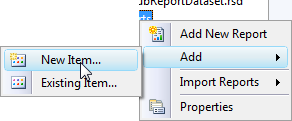
Select new report like as

After creating new report you have to add new dataset form data source panel.

In Dataset Properties window you have to use dataset from already created and shared dataset or create new one which is embedded into you report, I select the embedded option.

For data source I used already created and shared data source for local instance of Sql server

I add the following Query for report creation.

SELECT P.productId,p.Productname,p.CategoryId,P.unitPrice,c.categoryId, c.categoryName,s.companyname,s.ContactName,s.Address,s.City FROM production.products as p
INNER JOIN production.Suppliers s

ON p.supplierid = s.supplierid

INNER JOIN Production.Categories c
ON C.categoryId = p.categoryId

Add a new table on report designer area

Right click on report design area and Table form . and drop fields like follow.

When I click on preview button, I found following report.

Now on design pane. Right click on report and add new parent group as

Select CategoryName as Group header.

Now go at the bottom of report

Select the visibility selection from Group and select display options as follow.


Press ok and click on preview button, Report should be look like as

Now click on + sign The report will open like as

Nice starting point cheers 🙂

SSIS Community Tasks and Components

January 23, 2012 by alirazazaidi

There are hundreds of free SSIS tools available, which provide additional functionality. Codeplex listed them as http://ssisctc.codeplex.com/. These divided into following sections

  • Tools
  • Connection Managers
  • Log Providers
  • Task (for Control Flow)
  • Foreach Enumerators
  • Script Task Script Samples
  • Components ( for Data Flow)
  • Script Component Samples
  • Sources
  • Transforms
  • Destinations

cannot transfer unicode to non-unicode string ssis

January 18, 2012 by alirazazaidi

Today I face the following Error, when I transfer data from excel file to sql server server through SSIS package.

Problem is that in excel data is stored in Unicode. And  transfer data to field of sql server which is define as varchar.


Solution 1. Change the sql data type   to nvarchar instead varchar. Unicode sql table will be define as


CREATE TABLE [dbo].[Product](

[ProductName] [nvarchar](50) NULL,

[ProductDetail] [nvarchar](50) NULL

) ON [PRIMARY]

Now try again. Data will successfully migrate. But this not good solution.


Solution 2

Work around to this problem is use data Conversion task between the excel source and destination sql server  As


So to get around this problem we have to also use a Data Conversion task.


BIDS Helper

January 18, 2012 by alirazazaidi

http://bidshelper.codeplex.com/

There are many advantages in using this tool…
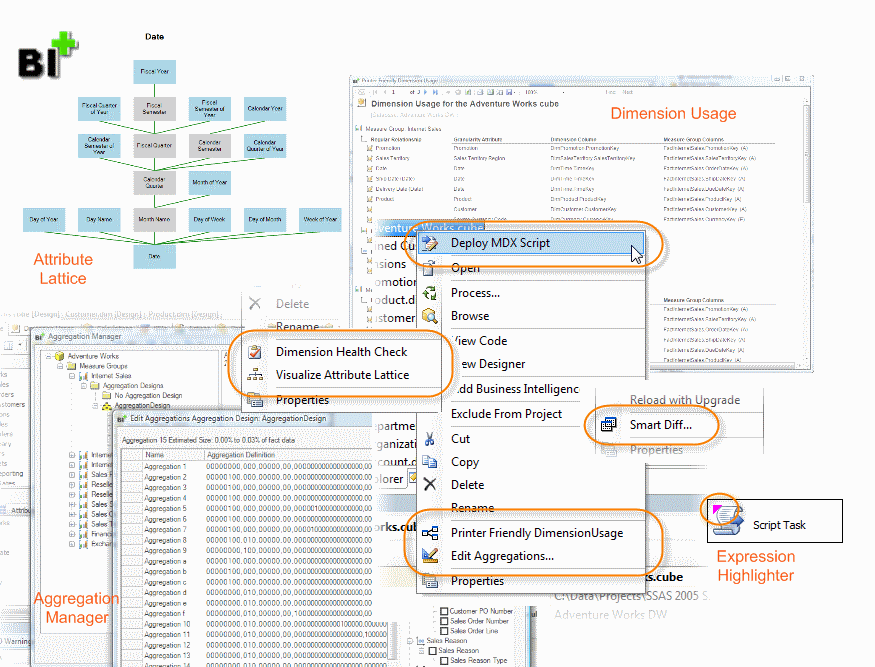
1. The first thing which I use this is for checking the dimension health, this is very helpful especially when you are dealing with the hierarchies…this helps in checking the data which is violating the hierarchy rule like data with many to many relationship etc…
2. There are many other useful options available like smartdiff (for finding the difference in code between versions), Deleting the Report Dataset Catch files (to make sure we see the refreshed data), Roles Report (gives the detail on the roles used in the cube) etc…
I would strongly recommend using this tool as this helps in improving and analysing many things while doing the BI development work.

A Visual Studio.Net add-in with features that extend and enhance the functionality of the SQL Server 2008 BI Development Studio (BIDS).


Features
  • Analysis Services
    • Aggregation Manager
    • Calculation Helpers
    • Column Usage Reports
    • Delete Unused Aggregations
    • Deploy Aggregation Designs
    • Deploy MDX Script
    • Dimension Data Type Discrepancy Check
    • Dimension Health Check
    • Dimension Optimization Report
    • Duplicate Role
    • Many-to-Many Matrix Compression
    • Measure Group Health Check
    • Non-Default Properties Report
    • Parent-Child Dimension Naturalizer
    • Printer Friendly Aggregations
    • Printer Friendly Dimension Usage
    • Roles Report
    • Similar Aggregations
    • Smart Diff
    • Show Extra Properties
    • Sync Descriptions
    • Test Aggregation Performance
    • Tri-State Perspectives
    • Update Estimated Counts
    • Validate Aggregations
    • Visualize Attribute Lattice
  • Integration Services
    • Batch Property Update
    • Biml Package Generator
    • Create Fixed Width Columns
    • Deploy SSIS Packages
    • Design Warnings
    • dtsConfig File Formatter
    • Expression and Configuration Highlighter
    • Expression List
    • Fix Relative Paths
    • Non-Default Properties Report
    • Pipeline Component Performance Breakdown
    • Reset GUIDs
    • Smart Diff
    • Sort Project Files
    • Sortable Package Properties Report
    • SSIS Performance Visualization
    • Variables Window Extensions
  • Reporting Services
    • Dataset Usage Reports
    • Delete Dataset Cache Files
    • Smart Diff
  • General
    • Enable/Disable features
    • Preferences
    • Version Notification


MSDN Virtual Labs for BI project

January 17, 2012 by alirazazaidi

  • MSDN Virtual Lab: Building Your First Cube with SQL Server 2008 R2 Analysis Services
  • MSDN Virtual Lab: Building Your First Data Mining Model with SQL Server 2008 R2 Analysis Services
  • MSDN Virtual Lab: Building Your First Extract-Transform-Load Process with SQL Server 2008 R2 Integration Services

AdventureWorks2008R2 download link

January 17, 2012 by alirazazaidi

Are you searching the download location for sample Databases for Microsoft SQL Server 2008R2 RTM (May 2010) ?

You can download it from Click here

It contains the complete set of databases:
– AdventureWorks
– AdventureWorks2008R2
– AdventureWorksDW2008R2
– AdventureWorksLT
– AdventureWorksLT2008R2


How to get Tables list in database TSQL

January 15, 2012 by alirazazaidi


Main object is sys.tables. you can get all information about tables by query on sys.tables.


User databasename

Select * from sys.tables;.


SELECT SCHEMA_NAME(schema_id) AS table_schema_name, name AS table_Name

FROM  sys.tables;


SCHEMA_NAME convert  schema_id into schema name.

« Previous Page
Next Page »

Primary Sidebar

About

I am Dynamics AX/365 Finance and Operations consultant with years of implementation experience. I has helped several businesses implement and succeed with Dynamics AX/365 Finance and Operations. The goal of this website is to share insights, tips, and tricks to help end users and IT professionals.

Legal

Content published on this website are opinions, insights, tips, and tricks we have gained from years of Dynamics consulting and may not represent the opinions or views of any current or past employer. Any changes to an ERP system should be thoroughly tested before implementation.

Categories

  • Accounts Payable (2)
  • Advance Warehouse (2)
  • AI (3)
  • Asset Management (3)
  • Azure Functions (1)
  • Books (6)
  • Certification Guide (3)
  • ChatGPT (3)
  • Claude (1)
  • Customization Tips for D365 for Finance and Operations (64)
  • D365OF (60)
  • Data Management (1)
  • database restore (1)
  • Dynamics 365 (59)
  • Dynamics 365 for finance and operations (139)
  • Dynamics 365 for Operations (175)
  • Dynamics AX (AX 7) (134)
  • Dynamics AX 2012 (274)
  • Dynamics Ax 2012 Forms (13)
  • Dynamics Ax 2012 functional side (16)
  • Dynamics Ax 2012 Reporting SSRS Reports. (31)
  • Dynamics Ax 2012 Technical Side (52)
  • Dynamics Ax 7 (65)
  • Exam MB-330: Microsoft Dynamics 365 Supply Chain Management (7)
  • Excel Addin (1)
  • Favorites (12)
  • Financial Modules (6)
  • Functional (8)
  • General Journal (1)
  • Implementations (1)
  • Ledger (1)
  • Lifecycle Services (1)
  • Logseq (4)
  • Management Reporter (1)
  • Microsoft Excel (4)
  • MS Dynamics Ax 7 (64)
  • MVP summit (1)
  • MVP summit 2016 (1)
  • New Dynamics Ax (19)
  • Non Defined (9)
  • Note taking Apps (2)
  • Obsidian (4)
  • Personal Knowledge Management (3)
  • PKM (16)
  • Power Platform (6)
  • Procurement (5)
  • procurement and sourcing (6)
  • Product Information Management (4)
  • Product Management (6)
  • Production Control D365 for Finance and Operations (10)
  • Sale Order Process (10)
  • Sale Order Processing (10)
  • Sales and Distribution (5)
  • Soft Skill (1)
  • Supply Chain Management D365 F&O (5)
  • Tips and tricks (278)
  • Uncategorized (165)
  • Upgrade (1)
  • Web Cast (7)
  • White papers (4)
  • X++ (10)

Wiki

  • SCM

Copyright © 2026 · Magazine Pro On Genesis Framework · WordPress · Log in