• Skip to main content
  • Skip to primary sidebar
  • Home
  • About
  • Recommended Readings
    • 2022 Book Reading
    • 2023 Recommended Readings
    • Book Reading 2024
    • Book Reading 2025
    • Book Reading 2026
  • Supply Chain Management Guide
  • PKM
  • Microsoft Excel
  • Microsoft Copilot in Office 365
  • Public Wiki Page

Ali Raza Zaidi

A practitioner’s musings on Dynamics 365 Finance and Operations

Uncategorized

SSIS – Pass a date variable to a OLE DB Source in a Data Flow

February 28, 2012 by alirazazaidi

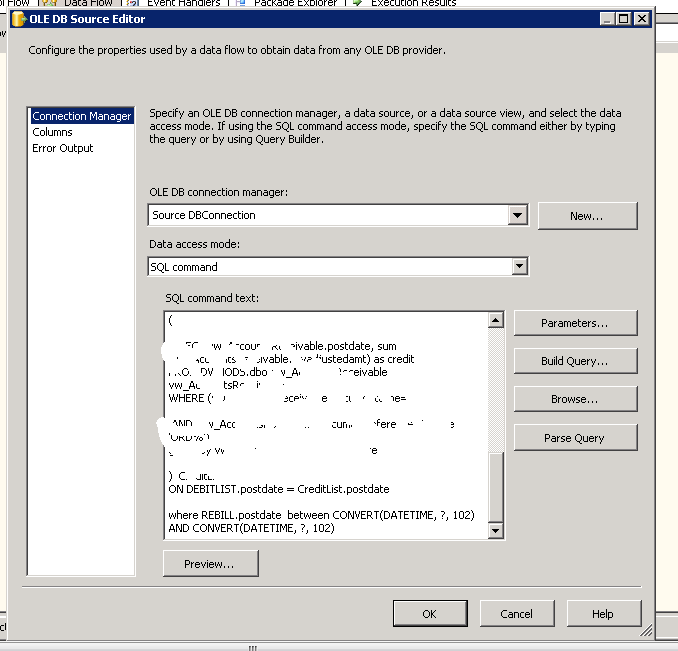
Currently i have to make query dynamic, i have to  pass date variable to query to execute for specific date range, and this date range could be very time by time, Previously I tried for script component or expression of variable to build query but failed, but then I found command option of  oledb command. I placed query there with “?” sign at places where my parameter will replace the date value . Consider following


When I passed query there Parameter button on wizard activate.  I set there variable to parameter .


This approach is work fine for me, but if you have places are more then 3 to 4 , query parsing failed. so you have to write query in such a way that minimum number of places parameter are used.
Delete with identity reset

February 27, 2012 by alirazazaidi

I am dropping the rows but insertion start with next to last max identity . Something was missing in my knowledge. To reset Identity i have use one extra statement, other option is use trunc  statement to drop rows.  but if i have too drop rows with delete statement and reset the identity what should do,   i have to use

DBCC CHECKIDENT("table_name", RESEED, "reseed_value")
This will reset identity back to 1. for example

DELETE from tblstudent;


DBCC CHECKIDENT("tblstudent, RESEED, 0)


How to convert date to interger In TSQL

February 27, 2012 by alirazazaidi

During my assignment I have to generate Integer value from datetime filed for Date Dimension . I found excellent  id this way.


CAST(CONVERT(varchar(8),StartDATE,112) AS int) DateDateKey,


The whole Query is  as follow.


SELECT
CAST(CONVERT(varchar(8),BEGDATE,112) AS int) DateDateKey,
,Name
,Address
,Joindate
,EndDate
FROM dbo.from Student
 

🙂 its works for me.

How to get site visitor Api in asp.net

February 25, 2012 by alirazazaidi

How to get IP Host Address of remote Client

// To get IP of the client meachine
// There is two methods to obtain IP address

// Method 1
//     Gets the IP host address of the remote client.
// Returns:
//     The IP address of the remote client.
string ipMethod1 = Request.UserHostAddress; // HttpContext.Current.Request.UserHostAddress;

//Methord 2
//Request.ServerVariables is a Name Value Collection
//     Gets a collection of Web server variables.
// Returns:
//     A System.Collections.Specialized.NameValueCollection of server variables.
string ipMethod2 = Request.ServerVariables["REMOTE_ADDR"]; //HttpContext.Current.Request.ServerVariables["REMOTE_ADDR"];
Response.Write(ipAdddress);

How to create dynamic connection string with variables SSIS

February 22, 2012 by alirazazaidi

Create Parameter on package level with string datatype with following Name, set default value with respect to your machine configuration I set according to mine

VServerName =”pc-aliraza”

VSQLUserName=”aliraza”

VSQLDbName =”Nwind”

VSQLPassword =”123”

If  integrated securtity with database is false or you connect with windows authentication following is the expression you have to set  expression at connection string property.


"Data Source=" + @[User::VServerName]  + ";Initial Catalog=" + @[User:: VSQLDbName]   + ";Provider=SQLNCLI10.1;Integrated Security=SSPI;"


If you want to connect with database with  Sql server authentication you have to use following expression string at  expression of connection string at connection in SSIS.

"Data Source="+ @[User::VServerName] +";User ID="+ @[User::VSQLUserName]  +"Password= "+ @[User::VSQLPassword] +" ;Initial Catalog=" + @[User::VSQLDbName] + ";Provider=SQLNCLI10.1;Persist Security Info=True;"

how to get lastest inserted identity working with access database

February 20, 2012 by alirazazaidi

You know the word “@@IDENTITY” it really has magic, It returns me the latest inserted rows identity in my access database using oldebcommand. For this purpose i have to execute command object two times first for insert query and second time by execute secular for getting value back


public void InsertReviews(string _Nick, string _Name, string _EmailAddress, string _RealStateTitle, string _Address, string _City, string _ZipCode, string _Country, string _Comments, string _FromIP, string _Status, string _Langi, string _Lit)
{
string ConnString = Util.GetConnString();
string SqlString = "Insert Into ClientInfo (Nick,Name,EmailAddress,RealStateTitle,Address,City,ZipCode,Country,Comments,FromIP,Status,Langi,Lit) Values (?,?,?,?,?,?,?,?,?,?,?,?,?)";
  string SqlString2 = "Select @@Identity";
using (OleDbConnection conn = new OleDbConnection(ConnString))
{
using (OleDbCommand cmd = new OleDbCommand(SqlString, conn))
{
cmd.CommandType = CommandType.Text;
cmd.Parameters.AddWithValue("Nick", _Nick);
cmd.Parameters.AddWithValue("Name", _Name);
cmd.Parameters.AddWithValue("EmailAddress", _EmailAddress);
cmd.Parameters.AddWithValue("RealStateTitle", _RealStateTitle);
cmd.Parameters.AddWithValue("Address", _Address);
cmd.Parameters.AddWithValue("City", _City);
cmd.Parameters.AddWithValue("ZipCode", _ZipCode);
cmd.Parameters.AddWithValue("Country", _Country);
cmd.Parameters.AddWithValue("Comments", _Comments);
cmd.Parameters.AddWithValue("FromIP", _FromIP);
cmd.Parameters.AddWithValue("Status", _Status);
cmd.Parameters.AddWithValue("Langi", _Langi);
cmd.Parameters.AddWithValue("Lit", _Lit);
conn.Open();
cmd.ExecuteNonQuery();
cmd.CommandText = SqlString2;
  int _Count = (int) cmd.ExecuteScalar();
}
}

}

Its working for me

Simple Data Access Class for Access database

February 19, 2012 by alirazazaidi

After little time i have to wrote a simple data access layer for MS Access database,

For Connection string I wrote a simple Util Class as

using System;
using System.Collections.Generic;
using System.Linq;
using System.Web;
using System.Web.Configuration; 

/// <summary>
/// Summary description for Util
/// </summary>
public static  class Util
{

    public static string GetConnString()
    {
        return WebConfigurationManager.ConnectionStrings["myConnStr"].ConnectionString;
    }
}


Then i Wrote another class where Insert , update ,delete and simple select method placed as

Insert method

 public void InsertReviews(string _Nick, string _Name, string _EmailAddress, string _RealStateTitle, string _Address, string _City, string _ZipCode, string _Country, string _Comments, string _FromIP, string _Status, string _Langi, string _Lit)
    {
        string ConnString = Util.GetConnString();
        string SqlString = "Insert Into ClientInfo (Nick,Name,EmailAddress,RealStateTitle,Address,City,ZipCode,Country,Comments,FromIP,Status,Langi,Lit) Values (?,?,?,?,?,?,?,?,?,?,?,?,?)";
        using (OleDbConnection conn = new OleDbConnection(ConnString))
        {
            using (OleDbCommand cmd = new OleDbCommand(SqlString, conn))
            {
                cmd.CommandType = CommandType.Text;
                cmd.Parameters.AddWithValue("Nick", _Nick);
                cmd.Parameters.AddWithValue("Name", _Name);
                cmd.Parameters.AddWithValue("EmailAddress", _EmailAddress);
                cmd.Parameters.AddWithValue("RealStateTitle", _RealStateTitle);
                cmd.Parameters.AddWithValue("Address", _Address);
                cmd.Parameters.AddWithValue("City", _City);
                cmd.Parameters.AddWithValue("ZipCode", _ZipCode);
                cmd.Parameters.AddWithValue("Country", _Country);
                cmd.Parameters.AddWithValue("Comments", _Comments);
                cmd.Parameters.AddWithValue("FromIP", _FromIP);
                cmd.Parameters.AddWithValue("Status", _Status);
                cmd.Parameters.AddWithValue("Langi", _Langi);
                cmd.Parameters.AddWithValue("Lit", _Lit);
                conn.Open();
                cmd.ExecuteNonQuery();
            }
        }

    }

Update Method

  public void UpdateReviews(int _ID,string _Nick, string _Name, string _EmailAddress, string _RealStateTitle, string _Address, string _City, string _ZipCode, string _Country, string _Comments, string _FromIP, string _Status, string _Langi, string _Lit)
    {
        string ConnString = Util.GetConnString();
        string SqlString = "Update ClientInfo Set Nick=?,Name=?,EmailAddress=?,RealStateTitle=?,Address=?,City=?,ZipCode=?,Country=?,Comments=?,FromIP=?,Status=?,Langi=?,Lit=? where IDs=?";
        using (OleDbConnection conn = new OleDbConnection(ConnString))
        {
            using (OleDbCommand cmd = new OleDbCommand(SqlString, conn))
            {
                cmd.CommandType = CommandType.Text;
                cmd.Parameters.AddWithValue("Nick", _Nick);
                cmd.Parameters.AddWithValue("Name", _Name);
                cmd.Parameters.AddWithValue("EmailAddress", _EmailAddress);
                cmd.Parameters.AddWithValue("RealStateTitle", _RealStateTitle);
                cmd.Parameters.AddWithValue("Address", _Address);
                cmd.Parameters.AddWithValue("City", _City);
                cmd.Parameters.AddWithValue("ZipCode", _ZipCode);
                cmd.Parameters.AddWithValue("Country", _Country);
                cmd.Parameters.AddWithValue("Comments", _Comments);
                cmd.Parameters.AddWithValue("FromIP", _FromIP);
                cmd.Parameters.AddWithValue("Status", _Status);
                cmd.Parameters.AddWithValue("Langi", _Langi);
                cmd.Parameters.AddWithValue("Lit", _Lit);
                cmd.Parameters.AddWithValue("IDs", _ID);
               conn.Open();
                cmd.ExecuteNonQuery();
            }
        }
    }

Delete Method

 public void DelteReviews(int _ID)
    {
        string ConnString = Util.GetConnString();
        string SqlString = "Delete * From ClientInfo where IDs=?";
        using (OleDbConnection conn = new OleDbConnection(ConnString))
        {
            using (OleDbCommand cmd = new OleDbCommand(SqlString, conn))
            {
                cmd.CommandType = CommandType.Text;
                cmd.Parameters.AddWithValue("IDs", _ID);
                conn.Open();
                cmd.ExecuteNonQuery();
            }
        }

    }

Select Method as

 public DataSet SelectReviews(int _ID)
    {
        string ConnString = Util.GetConnString();
        string SqlString = "Select * From ClientInfo where IDs=?";
        DataSet _ds = new DataSet();
        using (OleDbConnection conn = new OleDbConnection(ConnString))
        {
            using (OleDbCommand cmd = new OleDbCommand(SqlString, conn))
            {
                cmd.CommandType = CommandType.Text;
                cmd.Parameters.AddWithValue("IDs", _ID);
                OleDbDataAdapter _Adp = new OleDbDataAdapter();
                _Adp.SelectCommand = cmd;
                _Adp.Fill(_ds);
                _Adp.Dispose();
                conn.Open();
            }

        }
        return _ds;
    }

Chears 🙂

Using a Common Table Expression (CTE) with an Delete statement

February 14, 2012 by alirazazaidi

Delete Part of ETL Process

If any row is deleted at source table, but destination table rows  exits. So I did to make a inner join with source table with destination table I used right join in this case, so I got all rows from destination which I placed at right side of query. The result set I got with null at left side form source table. I filter the result set and got all the Keys which have null at source table. And call delete at destination on filter keys.

My common table Expression for Delete will be as follow


with DeleteRows as

(

SELECT     sourceEmp.empid, DestEmployee.SourceEmpId

FROM         TSQLFundamentals2008.HR.Employees sourceEmp right join

TSQLFundamentals2008DW.HR.DimEmployees DestEmployee

on

sourceEmp.empid = DestEmployee.SourceEmpId

)

--select SourceEmpId from DeleteRows where empid is null

delete from TSQLFundamentals2008DW.HR.DimEmployees

where TSQLFundamentals2008DW.HR.DimEmployees.SourceEmpId in (

select SourceEmpId from DeleteRows where empid is null)

How to create SSIS Package Configuration in SQL server 2008

February 7, 2012 by alirazazaidi

There will be change possible of server name at connection strings, file paths when deploying SSIS packages  in production and same issue appears  when ssis package will go from development environment to QA server for testing. So what is workaround.  SSIS configuration wizard allow us to generate configuration settings for  connection string and properties of other objects. And this allows us to update these settings at run time at any place, dev, QA or Production.


Benfites

  • This way we can resolve the connection strings on runtime.
  • Easily update the application on different server without redeploying the application.
  • Change the behavior of Package at runtime, by update the configuration settings of variables.


Let see how we can do this


Open the package for which you want to generation configuration

Check the enable button.

Click on enable button. To start Wizard

From the above configuration type dialogue box, Specify the configuration type and then set the property types relevant to the configuration type.

Configuration type source can be

  • XML Configuration file
  • Environment Variable
  • Registry Entry
  • SQL server

Specify the configuration file name and then say next then you will get the following dialogue box
Select the object and properties you want in configuration file.


Press next and then press finish button.


You can open the created file with extension “dtsConfig” in notepad, notepad++ , visual studio or any text editor supports xml to update the required filed.


Configurations are included in when you create package deployment utility for Installing packages.

BizTalk Interview Advice

February 5, 2012 by alirazazaidi


Excellent article from Seroter.

http://seroter.wordpress.com/2007/07/27/biztalk-interview-advice/

« Previous Page
Next Page »

Primary Sidebar

About

I am Dynamics AX/365 Finance and Operations consultant with years of implementation experience. I has helped several businesses implement and succeed with Dynamics AX/365 Finance and Operations. The goal of this website is to share insights, tips, and tricks to help end users and IT professionals.

Legal

Content published on this website are opinions, insights, tips, and tricks we have gained from years of Dynamics consulting and may not represent the opinions or views of any current or past employer. Any changes to an ERP system should be thoroughly tested before implementation.

Categories

  • Accounts Payable (2)
  • Advance Warehouse (2)
  • AI (3)
  • Asset Management (3)
  • Azure Functions (1)
  • Books (6)
  • Certification Guide (3)
  • ChatGPT (3)
  • Claude (1)
  • Customization Tips for D365 for Finance and Operations (64)
  • D365OF (60)
  • Data Management (1)
  • database restore (1)
  • Dynamics 365 (59)
  • Dynamics 365 for finance and operations (139)
  • Dynamics 365 for Operations (175)
  • Dynamics AX (AX 7) (134)
  • Dynamics AX 2012 (274)
  • Dynamics Ax 2012 Forms (13)
  • Dynamics Ax 2012 functional side (16)
  • Dynamics Ax 2012 Reporting SSRS Reports. (31)
  • Dynamics Ax 2012 Technical Side (52)
  • Dynamics Ax 7 (65)
  • Exam MB-330: Microsoft Dynamics 365 Supply Chain Management (7)
  • Excel Addin (1)
  • Favorites (12)
  • Financial Modules (6)
  • Functional (8)
  • General Journal (1)
  • Implementations (1)
  • Ledger (1)
  • Lifecycle Services (1)
  • Logseq (4)
  • Management Reporter (1)
  • Microsoft Excel (4)
  • MS Dynamics Ax 7 (64)
  • MVP summit (1)
  • MVP summit 2016 (1)
  • New Dynamics Ax (19)
  • Non Defined (9)
  • Note taking Apps (2)
  • Obsidian (4)
  • Personal Knowledge Management (3)
  • PKM (16)
  • Power Platform (6)
  • Procurement (5)
  • procurement and sourcing (6)
  • Product Information Management (4)
  • Product Management (6)
  • Production Control D365 for Finance and Operations (10)
  • Sale Order Process (10)
  • Sale Order Processing (10)
  • Sales and Distribution (5)
  • Soft Skill (1)
  • Supply Chain Management D365 F&O (5)
  • Tips and tricks (278)
  • Uncategorized (165)
  • Upgrade (1)
  • Web Cast (7)
  • White papers (4)
  • X++ (10)

Wiki

  • SCM

Copyright © 2026 · Magazine Pro On Genesis Framework · WordPress · Log in