• Skip to main content
  • Skip to primary sidebar
  • Home
  • About
  • Recommended Readings
    • 2022 Book Reading
    • 2023 Recommended Readings
    • Book Reading 2024
    • Book Reading 2025
    • Book Reading 2026
  • Supply Chain Management Guide
  • PKM
  • Microsoft Excel
  • Microsoft Copilot in Office 365
  • Public Wiki Page

Ali Raza Zaidi

A practitioner’s musings on Dynamics 365 Finance and Operations

Tips and tricks

Parent child form Customization D365 for Finance and Operations

January 21, 2018 by alirazazaidi

Today I just noted down a very simple parent child form customization in D365 for Finance and operations.


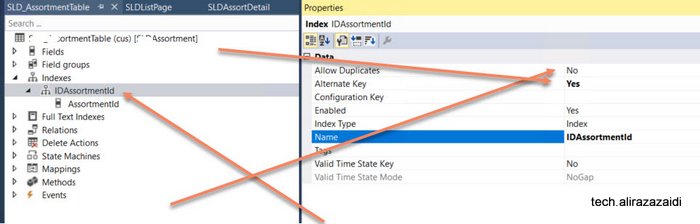
First step is to create a primary key or alternative key  For this create a Index

and set Alternative key true and Allow duplicate set to no.
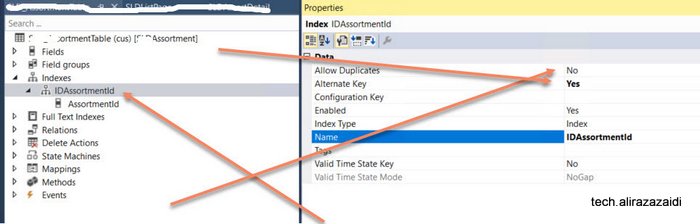


Next step expand the table Property and set following properties. With newly created Index.
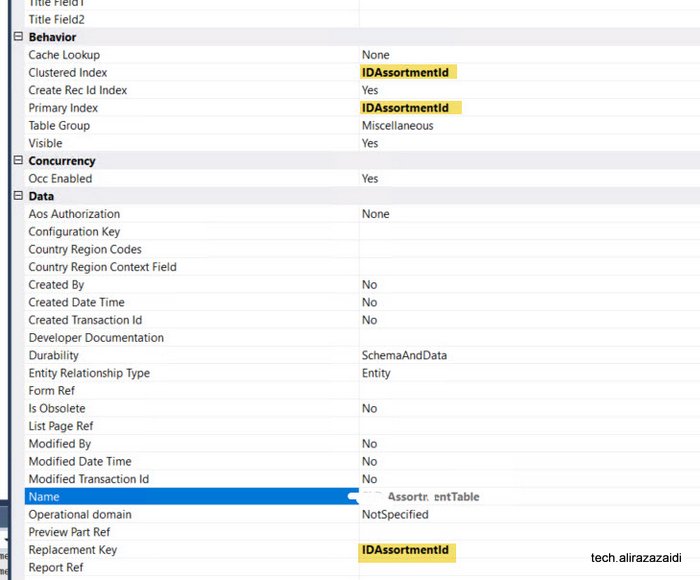


As different to Dynamics Ax 2012. Reference field you have to manually created in child table.


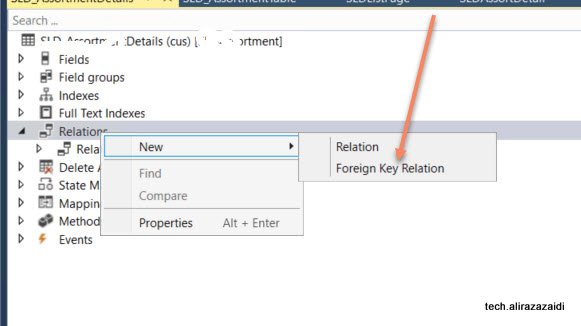
Now expand relationship node of child and right click and add relation
 

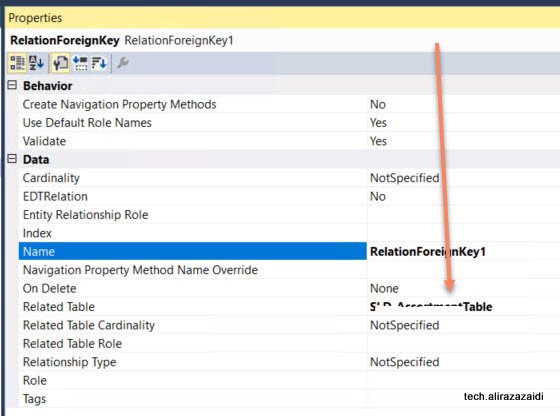
Relationship property window set table


Now relight click on it and add normal relationship
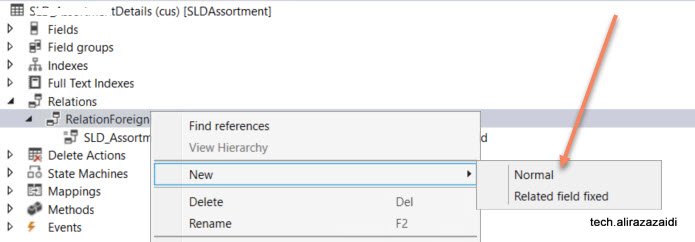


Set new  both side of required field.
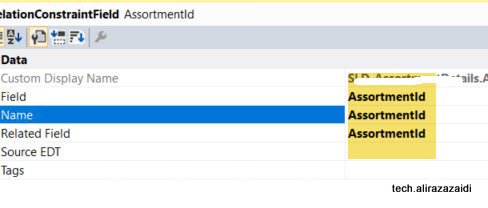


Table relation is complete.


As I am fan of old style Dynamics Ax 2012 Style development So I made Customization similar to that.

There are multiple way to build parent child forms, with a new form Patterns of D365 for Finance and operations


For Detail page. Add new form in your project and did not select any form pattern.


Then add Tab control and add two tab pages, one for Parent and one for child
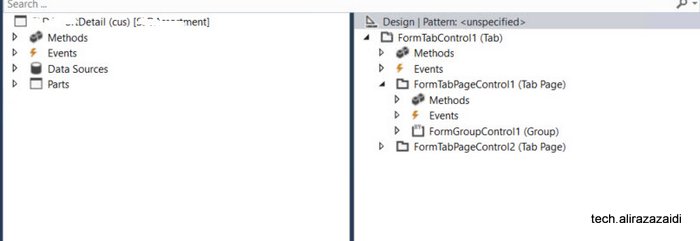


Set tab control style property to FastTabs.



Now add both Tables in data source of form.


Set Join Source of child table set parent table

 

Now Drag required fields in group in parent area.


Now in child tab page, Add action pane, Action Tab control ,Button group and add three command buttons with Name add, edit and delete also set their command  type respectively.


Also set action tab as Strip.
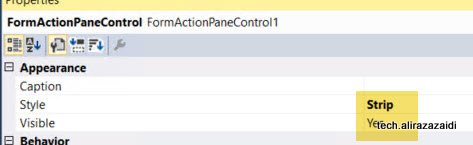


Also Set Button group data source property to child data source so Add, edit and Delete works on child table.


Now Add grid below action tab and Set its data source to child data source.


Also drag child table fields under the grid.


Tab page structure look like similar.
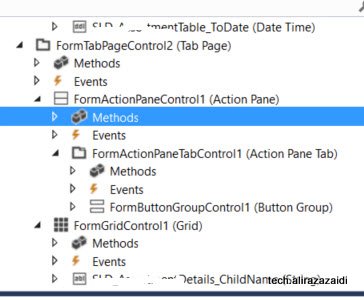
 

Now click on tab Design and  Set its data source to Parent Table, so out of the box button on form works for parent table.


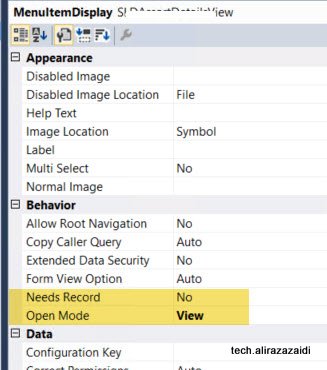
Now create three display menu and set one for Edit, one for View and Add new also set object property to detail form.


Like this. For new  set open mode to new and Set form in object
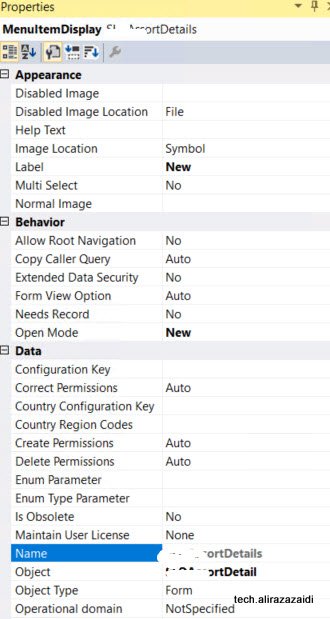


Similar edit menu, View menus the difference is open mode.


Now create a new form and a form and apply simple list pattern.

Also resolve pattern requirement, by adding Grid, Action Pane, and Group, Apply pattern on and then add Search
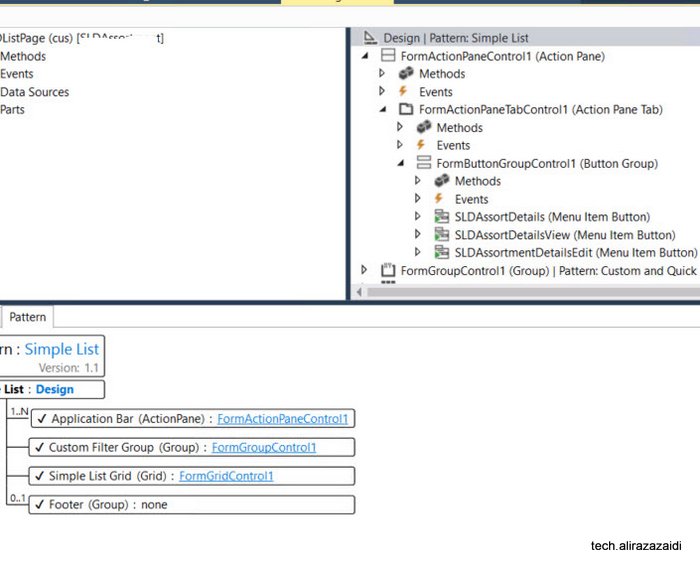
Like follow


Now drag three display menu drag them in Button group on List page’s action pane.


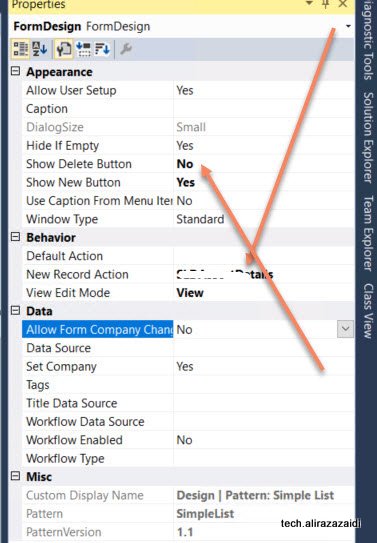
Right click Design and from properties  set New Record Action property to menu button of Action pane so on click on new button redirect to child page in new mode.


And set the


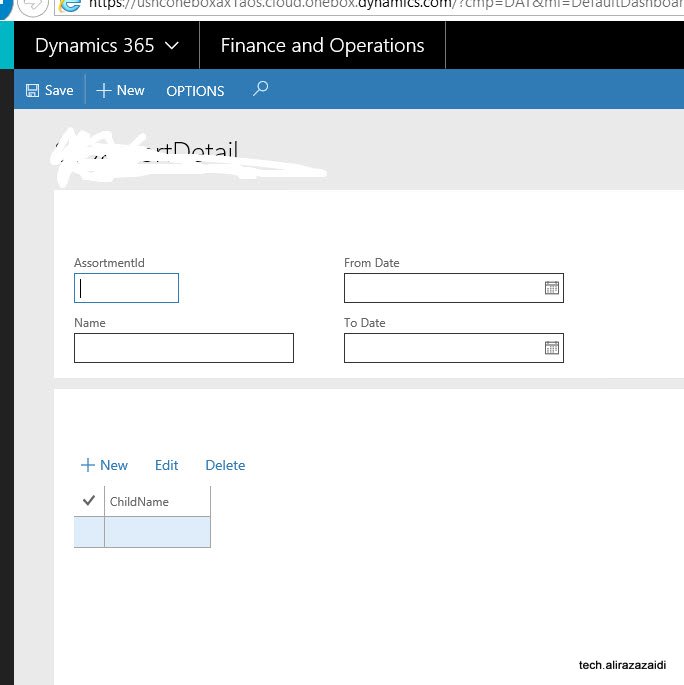
Let see the out put


If we click on new button, it will leads us to child page for create new, edit and delete records


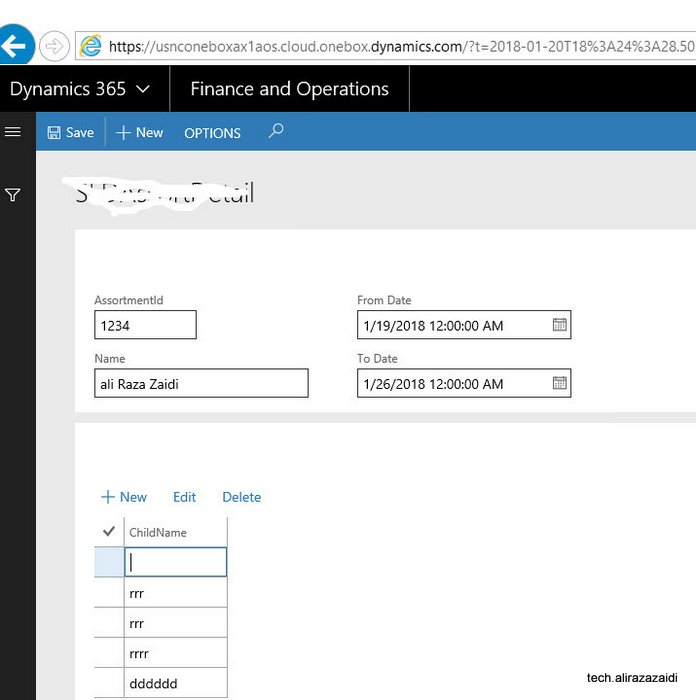
On Clicking on link this will leads to detail page for selected record, which where we can add entries for child records.
 

How to apply application hot fix on Dynamics 365 for finance and operations

January 19, 2018 by alirazazaidi

Hi a couple of days ago, I got chance to apply application hot fixes required to apply on cloud dev environment.

So I made this very short post.


First Step:

Check in all changes in TFS and make sure no error in AOT.


Second step:


You need to download hot fix from LCS.


Third Step:

To download vm RDP file and credential from LCS and login in VM.


Fourth step:


Open visual studio with run as admin.


Then from Dynamics 365 menu click on addins and from contex menu click on hot fix.


fifth Step:


Extract the zip file and extract the hot fix file and load into dialog. Also set TFS settings.


Apply And in couple of second patch is applied


Sixth Step:


After path applied, Synchronization database from Dynamics 365 menu.


Seventh Step:

Check all compile model, Make sure that all models are check in.


Eighth Step:


Resolve error in the case errors occurs,

In my case no error occurs.


9th step:


Check in everything into TFS with hot fix name in comments.

Manually deploy all reports on a D365 for Finance and operations one box

January 15, 2018 by alirazazaidi

Run power shell as an admin and run below command (change path if needed) J:\AosService\PackagesLocalDirectory\Plugins\AxReportVmRoleStartupTask\DeployAllReportsToSSRS.ps1 -PackageInstallLocation “J:\AosService\PackagesLocalDirectory”


Reference:

Process upload jobs encountered ProcessSourceRequestHeaderException Dynamics Ax 2012 R3.

December 26, 2017 by alirazazaidi

After completing VAT patch in Dynamics Ax 2012 R3, We got error in Retail Process job.


Process upload jobs encountered ProcessSourceRequestHeaderException. Error Details: Microsoft.Dynamics.Retail.StoreConnect.Request.SQLHandler.ProcessSourceRequestHeaderException: ProcessSourceRequestHeader failed to execute all delete requests —> Microsoft.Dynamics.Retail.StoreConnect.Request.SQLHandler.ProcessReadRequestsException: Read request num: 1 on table:[ax].[RETAILFISCALDOCUMENT_BR] failed to execute. —> Microsoft.Dynamics.Retail.StoreConnect.Request.SQLHandler.RunException: Query: SELECT [ACCESSKEY],[AUTHORITYCODE],[CHANNEL],[CONSUMEREFDOCINQUIRYURL],[CONTINGENCYDATETIME],[CONTING FROM [ax].[RETAILFISCALDOCUMENT_BR] WHERE [ReplicationCounterFromOrigin]>@__scSqlFilterParam0 AND [ReplicationCounterFromOrigin]<=@__scSqlFilterParam1;;

ParamNameList: ;

ParamValueList:  —> System.Data.SqlClient.SqlException: Invalid column name ‘EFRREGISTERNUMBER’.

Invalid column name ‘FISCALESTABLISHMENTTRADENAME’.

Invalid column name ‘ORIGINALDISCOUNTAMOUNT’.

Invalid column name ‘SENDBYEMAIL’.

Invalid column name ‘SOFTWAREHOUSECNPJ’.

Invalid column name ‘TAXAUTHORITYINFO’.

Invalid column name ‘THIRDPARTYFORMATTEDADDRESS’.

Invalid column name ‘THIRDPARTYICMSCONTRIBUTOR’.

Invalid column name ‘THIRDPARTYIE’


Yes one thing is clear that some fields in missing In Retail store database. On opening in AX, The same table has more fields then retail store db, these fields came with Patch. Some Sync problem.  So I have to follow these steps to complete the sync


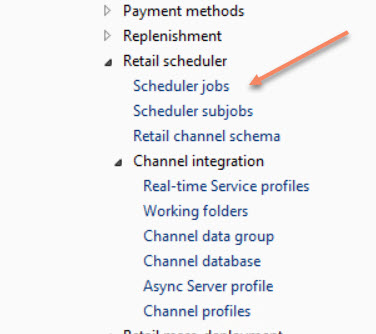
Retails==> setup ==> Scheduler subjobs.


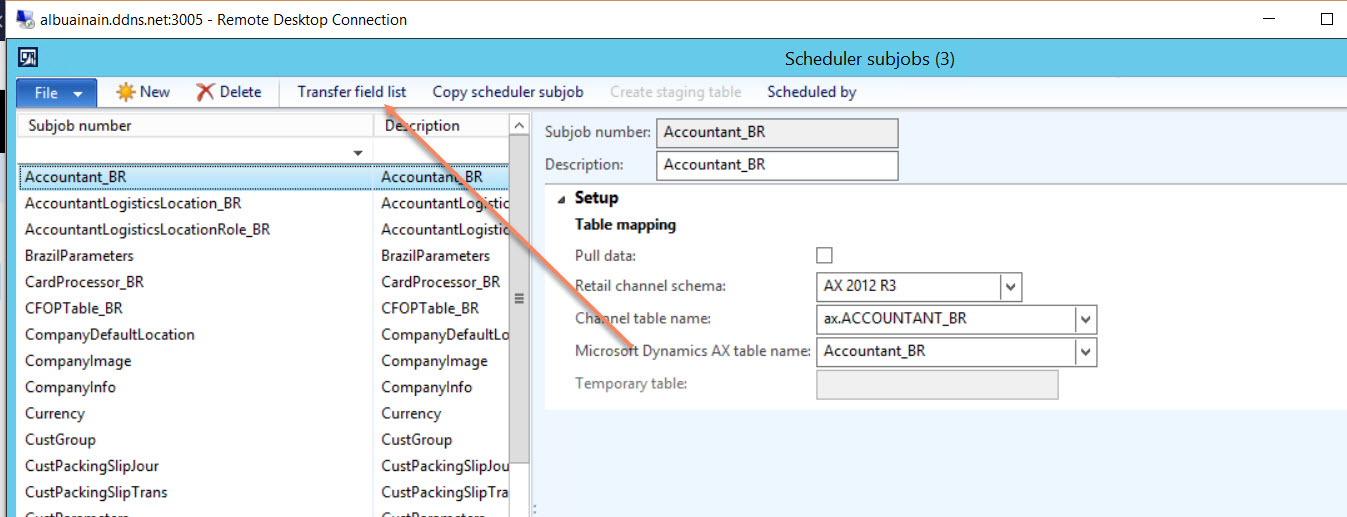
Scheduler Sub jobs select the required table and click on Transfer folder list


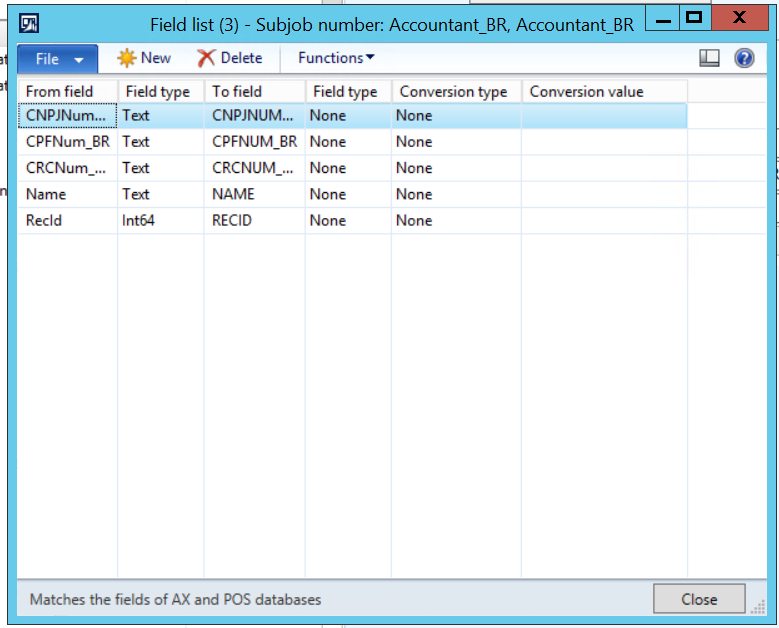
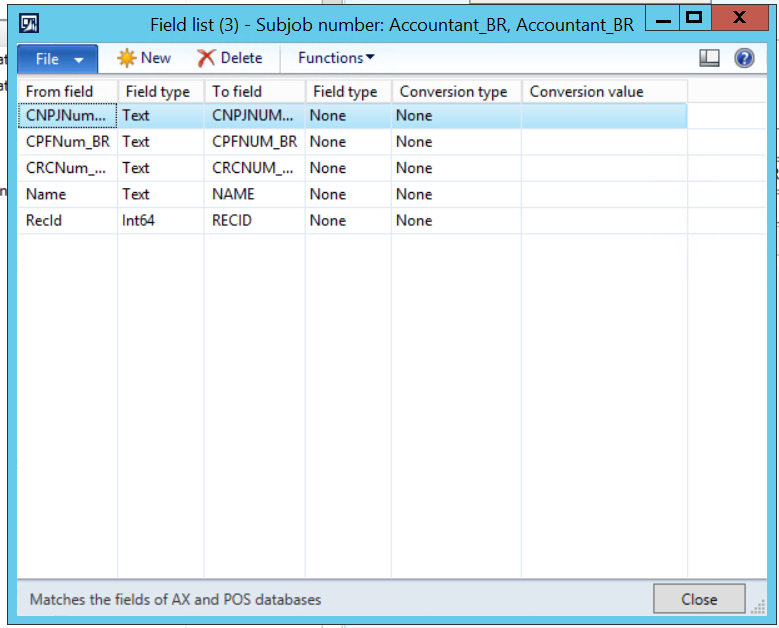
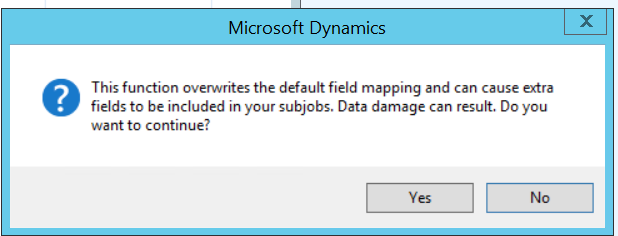
Functions => mapping.


Click on Yes


Run the process job, error is gone.

Update Has been Cancelled, Sale Order Invoice Dynamics Ax 2012 R3

December 23, 2017 by alirazazaidi

I was got following error on test server.


“Update Has Been Cancelled”


I just fixed the Error with following article.

From <https://stoneridgesoftware.com/update-has-been-cancelled-error-when-generating-a-purchase-order-invoice-in-dynamics-ax/>


Posted by


Eric Meissner


I used to write post, which 100 % true what Gary Vaynerchuk Once said ” Document don’t create”.


The whole idea of creating vs Documenting is interesting. Yes I am doing Documenting.

According To Gary


In very simple terms, “documenting” versus “creating” is what The Real World and the Kardashians is to Star Wars and Friends. And don’t get confused—just because you’re “documenting” doesn’t mean you’re not creating content. It’s just a version of creating that is predicated more on practicality instead of having to think of stories or fantasy—something that’s very hard for most people (including myself).


From <https://www.garyvaynerchuk.com/creating-content-that-builds-your-personal-brand/>


Domain role with multiplicity 0..1 or 1 can hold at most 1 link Dynamics Ax 2012 R3

December 22, 2017 by alirazazaidi

I just applied the patch. After resolving all errors, I got errors when I try to refresh DataSet in Report designer. I added the new custom fields in temp table.


I got this error


I follow http://axdax.blogspot.com/2015/11/Domain-role-with-multiplicity-0..1-or-1.html


Which described as Follow


  1. Change the datasource type to Query.
  2. Delete the whole query text in the “Query” field.
  3. Save, rebuild and change the values on the datasource back to the ones intended


This results number of ambiguous report parameters. If you can delete old parameters and use new, It will perfectly fine. Its works for me. But it creates problem where report has multiple DataSet ie. PurchOrderconfirm report.

What I configure that there is version difference of report’s dataset and temp Table returned by DRP report. So I revert back report and dataset and First I compiled the temp table and then synchronized it. After that I refreshed the DataSet. The error removed. Later I added custom fields in Temp table and refresh the data set. Report successfully shows the custom report.

Best why, export last version of both report and Temp table. Compile and refresh the report dataset. After that start adding custom filed and refresh data set.

Team Explorer for Microsoft Visual Studio 2012 not found for Code merge Dynamics Ax 2012 R3 apply update

December 19, 2017 by alirazazaidi

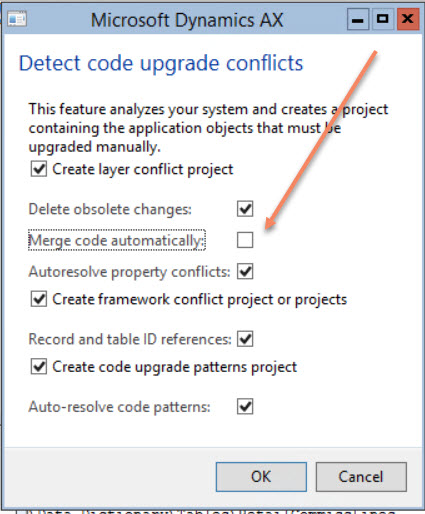
I was apply patch on Dynamics AX 2012 R3. During update checklist process. I found, Code merge check box was disabled. Message described that we need Team Explorer for Microsoft Visual Studio 2012 to enable it.


Microsoft Official download link was not working.  I downloaded it from here, And it works for me.

https://download.freedownloadmanager.org/Windows-PC/Team-Explorer-for-Microsoft-Visual-Studio-2012/FREE-


Remember, the above link is unauthenticated and third party, download it on your own risk. But some how the other we need to download it.

Table in which Update check list placed in Dynamics Ax 2012

December 19, 2017 by alirazazaidi

Hi, I did multiple update in Dynamics Ax 2012 R3. Some times update Checklist disappeared, Some times it did not go, it struck. For reference

enable / disabled MinorUpgrade in  ReleaseUpdateConfiguration to enable or by pass update checklist.


Relation between VendPackingSlipJour and PurchParmTable Dynamics Ax 2012 R3

December 7, 2017 by alirazazaidi

Couple of days ago, I was helping a young developer. Who was doing some customization. He added some customization in PurchParmtable and want information in VendPackingSlipJour Table.

It was very strange that there is no direct relationship between vendPackingSlipJour and  PurchParmTable.


After Exploring I found that There is ParmId field in VendPackingSlipVersion table.

And we can get VendPackingSlipVersion by static method with PurchId and PackingSlipId, DeliveryDate.


This ParmId has relation with PurchParmTable.

I wrote down following code snippet to get Value from PurchParmTable, with respect to VendPackingSlipVersion.


display real _netWeight()
{
PurchParmTable _purchParmTbl;
parmid _id;
_id=VendPackingSlipVersion::findFromInterCompanyPackingSlip((this.PurchId),
(this.PackingSlipId),(this.DeliveryDate)).ParmId;
select *from _purchParmTbl where _purchParmTbl.ParmId==_id;
return _purchParmTbl.NetWeght;
}


Hopes this help

ODBC connection and Null value Handling Dynamics Ax 2012 R3.

December 5, 2017 by alirazazaidi

Today I have very small tip to share. I noted down, some odbc connection posts in my blog. All these post shares the code snippets , that used to open odbc connection and did query on SQL server directly. Couple of days ago, I need similar code snippet to read data from SQL server and Insert into another connect. But that code did not had reference to handling null values. So I note down that code snippet too, for future reference.


These all odbc connection , command return results in “ResultSet” class.


This ResultSet  class has method  “wasnull”. According to documentation, its behavior is strange. First we have to call the get method and then we call “WasNull” to verify that value appears is null or not.

https://msdn.microsoft.com/en-us/library/resultset.wasnull.aspx


So whole code snippet will be like.

public void run()
 

{

Connection Con = new Connection();

ResultSet R;

str sql;

Statement Stmt;

SqlStatementExecutePermission permission;

Real _RealValue;

sql = "SELECT * FROM InventTrans ";

Stmt = Con.createStatement();

permission = new SqlStatementExecutePermission(sql);

permission.assert();

R =Stmt.executeQuery(sql);


while ( R.next() )

{

_RealValue =R.getReal(1);

if (  R.wasNull(1) ==boolean::false)

{


info (" Not null");

}

Else

{

Info (" Null ");

}


}

CodeAccessPermission::revertAssert();


}
« Previous Page
Next Page »

Primary Sidebar

About

I am Dynamics AX/365 Finance and Operations consultant with years of implementation experience. I has helped several businesses implement and succeed with Dynamics AX/365 Finance and Operations. The goal of this website is to share insights, tips, and tricks to help end users and IT professionals.

Legal

Content published on this website are opinions, insights, tips, and tricks we have gained from years of Dynamics consulting and may not represent the opinions or views of any current or past employer. Any changes to an ERP system should be thoroughly tested before implementation.

Categories

  • Accounts Payable (2)
  • Advance Warehouse (2)
  • AI (3)
  • Asset Management (3)
  • Azure Functions (1)
  • Books (6)
  • Certification Guide (3)
  • ChatGPT (3)
  • Claude (1)
  • Customization Tips for D365 for Finance and Operations (64)
  • D365OF (60)
  • Data Management (1)
  • database restore (1)
  • Dynamics 365 (59)
  • Dynamics 365 for finance and operations (139)
  • Dynamics 365 for Operations (175)
  • Dynamics AX (AX 7) (134)
  • Dynamics AX 2012 (274)
  • Dynamics Ax 2012 Forms (13)
  • Dynamics Ax 2012 functional side (16)
  • Dynamics Ax 2012 Reporting SSRS Reports. (31)
  • Dynamics Ax 2012 Technical Side (52)
  • Dynamics Ax 7 (65)
  • Exam MB-330: Microsoft Dynamics 365 Supply Chain Management (7)
  • Excel Addin (1)
  • Favorites (12)
  • Financial Modules (6)
  • Functional (8)
  • General Journal (1)
  • Implementations (1)
  • Ledger (1)
  • Lifecycle Services (1)
  • Logseq (4)
  • Management Reporter (1)
  • Microsoft Excel (4)
  • MS Dynamics Ax 7 (64)
  • MVP summit (1)
  • MVP summit 2016 (1)
  • New Dynamics Ax (19)
  • Non Defined (9)
  • Note taking Apps (2)
  • Obsidian (4)
  • Personal Knowledge Management (3)
  • PKM (16)
  • Power Platform (6)
  • Procurement (5)
  • procurement and sourcing (6)
  • Product Information Management (4)
  • Product Management (6)
  • Production Control D365 for Finance and Operations (10)
  • Sale Order Process (10)
  • Sale Order Processing (10)
  • Sales and Distribution (5)
  • Soft Skill (1)
  • Supply Chain Management D365 F&O (5)
  • Tips and tricks (278)
  • Uncategorized (165)
  • Upgrade (1)
  • Web Cast (7)
  • White papers (4)
  • X++ (10)

Wiki

  • SCM

Copyright © 2026 · Magazine Pro On Genesis Framework · WordPress · Log in