• Skip to main content
  • Skip to primary sidebar
  • Home
  • About
  • Recommended Readings
    • 2022 Book Reading
    • 2023 Recommended Readings
    • Book Reading 2024
    • Book Reading 2025
  • Supply Chain Management Guide
  • PKM
  • Microsoft Excel
  • Microsoft Copilot in Office 365
  • Public Wiki Page

Ali Raza Zaidi

A practitioner’s musings on Dynamics 365 Finance and Operations

Dynamics AX 2012

Data Manipulation tip 5. Like operator wild card in Select query Dynamics ax 2012 D365 for Operations.

May 30, 2017 by alirazazaidi

Currently I am writing an Inquiry for Client. For this inquiry I have to use Like operator functionality. For example end user wants to search Sale Orders. For this he/she enters the partial sale order number and Inquiry provides the result.

Microsoft provides “Like operator” functionality , I used it with text box in below code snippet. Suppose strProcumentValue is string edit control with auto declaration true.


void clicked()

{

PurchTable  _Table;


super();


select * from _Table where _Table.PurchId like “*” + strProcumentValue.text() +”*”;


if (_Table !=null)

{


info(“found”);


}

}
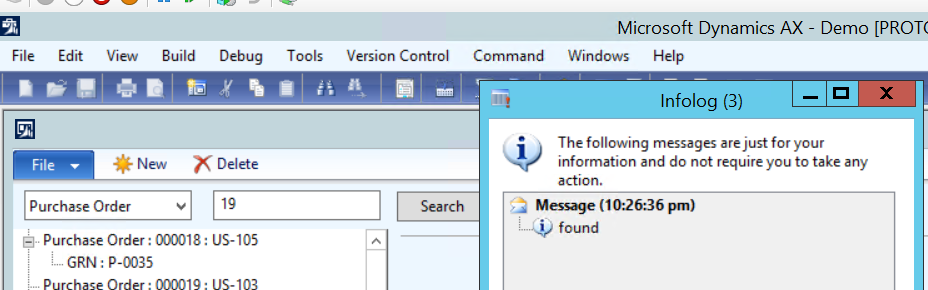
Its works for me,

reference: http://daxdude.blogspot.com/2011/02/use-x-wildcard-like-and-not-like-in-x.html

Relation between VendInvoiceInfoTable and VendInvoiceJour Dynamics Ax 2012 R3

May 29, 2017 by alirazazaidi

Relationship between VendInvoiceInfoTable and VendInvoiceJour. Is Parm Id. This problem occurs when we need some customization on vendor Invoice form and values of these fields required in reporting. Due to minor nature no impact on calculation. For getting these fields to VendorInoviceJour required complex customization, God knows what will broke or long way of testing require for it. So best way to fetch it form VendorInvoiceInfoTable.

I test it on SQL Server on contoso data  with following Query

select parmid,* from vendinvoicejour where parmid in(
select parmid from VendInvoiceInfoTable where PURCHID=’000003′)


Its works for me.

Reference: https://community.dynamics.com/ax/f/33/t/187795


Good By AX Brand, Microsoft Officially retired the AX as brand

May 5, 2017 by alirazazaidi

The Dynamics AX brand has been officially retired by Microsoft. As of July 1, 2017, new customers will not be able to buy Dynamics AX 2012 R3.


Existing client still extended and renew their license.  But After 1 July new customer only purchase Dynamics 365 for operations.   There is possible release of on premise Dynamics 365 for operations in second Quarter and most probably last quarter of 2017.  cover the gap for those who want to purchase  dynamics ax  instead of Azure or cloud version.


Specially middle east, Pakistan and India market Business owners wants on premise version. Support for existing Dynamics Ax will be continue till 2021.

Existing 2009 version client who wants to upgrade will migrate to Dynamics 365 for operations.

Dynamics Ax brand was originally created in 2006 for AX 4.0 will be closed in July 2017.


Reference : https://ax-dynamics.com/article/the-official-end-of-dynamics-ax

Special character In Query range, Dynamics ax 2012 R3 and DFO 365 for operation.

April 26, 2017 by alirazazaidi

Yesterday I got very interesting issue. So When put filter on color, config, style and size. A strange error occur. Filter works for 99% of records but on 1 percent time out occurs. When we dig deep into issue, we found that End user, used the special character ‘(‘ in style. And when we execute the filter on dim of special character reports goes toward timeout. It means some infinite loop occurs.

Our code snippet was

 findOrCreateRange_W(query.dataSourceTable(tableNum(InventDim)), fieldNum(InventDim, InventStyleId)).value(InventDimParm.InventStyleId);

Later we found that queryValue is missing in our statement. That was the reason statement was goes into infinite loop.

The correct statement is below as.

  findOrCreateRange_W(query.dataSourceTable(tableNum(InventDim)), fieldNum(InventDim, InventStyleId)).value(queryValue(InventDimParm.InventStyleId));

Data manipulation tip 4 Dynamics ax 2012 and D365 of Operations Insert_recordset

April 24, 2017 by alirazazaidi

During report development we populate temp table and bind it to SSRS report. And most of the time we were doing one to one mapping inside while loop or query run loop., Kindly consider following code snippet.

While select sum(Qty) from Inventtrans group by 
ItemId, InventDimId , DatePhysical
Where datePahyical > _fromdaet
&& datePhayical <_todate
{
Tmp.ItemId= inventrans.ItemId;
Tmp.IventDim = inventtrans.InventId;
Tmp.Qty = inventtrans.QTY;
Tmp.Insert();

}

But if we replace loop with Insert_RecordSet , report execution time reduce much. Consider following code snippet used to replace loop with Insert_Recordset

Insert_recordset Tmp (ItemId,InventdimId,QTY)
Select forceplaceholders ItemId, InventDimId, sum(QTY)
From inventtrans
Group by ItemId,InventDimId
Where datePahyical > _fromdaet
&& datePhayical <_todate;

Data manipulation tip 2 Dynamics ax 2012 and D365 of Operations Table initialization method.

April 12, 2017 by alirazazaidi

If we consider the following code snippet.
CustSalesQty _temp1,_temp2;
_temp1.IntQty=100;

_temp1.CustAccount =”Cust00001″;

_temp1.insert();

_temp1.IntQty=200;

_temp1.insert();


_temp1.IntQty=300;

_temp1.CustAccount =”Cust00003″;

_temp1.insert();

while select * from _temp1

{

_temp2.data(_temp1);

_temp2.insert();


}


while select * from  _temp2

{

info( ” _temp2 with ” + _temp2.CustAccount + ” ” + int2Str(_temp2.IntQty));


}


}

You can check that when we insert the temp1.inQTY=200, We did not set Customer account. At result record new record will insert with customer Cust00001 . You can see output of above code


Point is simple, We need to initialize the table before populate for next values.  I found this scenario in custom Inventory reports. When we populate data in different fields based on issue status.

You can set initialized values after ate in side query execution loop. But that piece of code belongs to specific location.

Microsoft provide the out of the box base initValue method. You can add this method by following way.

Best practices says you have to initialize value in this method. And call this method with table reference. This way initialization is table dependent not class dependent.


So we can over write the code as follow

public class CustSalesQty extends common

{

/// <summary>

///

/// </summary>

public void initValue()

{

super();

this.IntQty =0;

this.CustAccount =””;

}


}

Now above code snippet will works as

class Job123

{

/// <summary>

/// Runs the class with the specified arguments.

/// </summary>

/// <param name = “_args”>The specified arguments.</param>

public static void main(Args _args)

{

CustSalesQty _temp1,_temp2;

_temp1.initValue();

_temp1.IntQty=100;

_temp1.CustAccount =”Cust00001″;

_temp1.insert();

_temp1.initValue();

_temp1.IntQty=200;

//  _temp1.CustAccount =”Cust00002″;

_temp1.insert();

_temp1.initValue();

_temp1.IntQty=300;

_temp1.CustAccount =”Cust00003″;

_temp1.insert();

while select * from _temp1

{

_temp2.initValue();

_temp2.data(_temp1);

_temp2.insert();


}


while select * from  _temp2

{

info( ” _temp2 with ” + _temp2.CustAccount + ” ” + int2Str(_temp2.IntQty));


}


}


}

Data manipulation tip 1 In Dynamics ax 2012 and D365 Of Operations Data copy method.

April 9, 2017 by alirazazaidi


Currently I am doing Report development project, I got some tips for Data manipulation , these tips I recently learned.


Copy data from one table buffer to other of same type.


During report development, We usually populate  temp table with result of Query execution. Usually we need copy of same data for aggregate functions.


Instead map each field of buffer with each other. We can copy the whole data by using .data method.


Suppose we have custom temp table CustSaleQtyTmp which we need to copy from one buffer to other.

class DataManipulationJob
{
/// <summary>
/// Runs the class with the specified arguments.
/// </summary>
/// <param name = "_args">The specified arguments.</param>
public static void main(Args _args)
{

CustSaleQtytmp _temp1,_temp2;
_temp1.IntQty=100;
_temp1.CustAccount =”Cust00001″;
_temp1.insert();
_temp1.IntQty=200;
_temp1.CustAccount =”Cust00002″;
_temp1.insert();

_temp1.IntQty=300;
_temp1.CustAccount =”Cust00003″;
_temp1.insert();
while select * from _temp1
{
// Instead copy like this we can use Data method
// _temp1.CustAccount = _temp2.CustAccount;
// _temp1.IntQty = _temp2.IntQty;

_temp2.data(_temp1);
_temp2.insert();

}

while select * from _temp2
{
info( ” _temp2 with ” + _temp2.CustAccount + ” ” + int2Str(_temp2.IntQty));

}
}

}

output like

Code permission Error, SSRS report missing. Dynamics Ax 2012 R3.

April 1, 2017 by alirazazaidi

Today after Db resorted form Production / live server, Full CIL failed, And During compilation I found very strange error.

Error described that ” Code Permission Error” And It pointed to out of box SSRS report.

Interestingly a junior developer added customization on report. And there is no error on report.

Finally I found that that report has some out of the box Design for different country localization. Junior developer add customization and delete rest of Designs. So solution is restored the original. Report again deployed, Compiled and error resolved.


Management Reporter 2012 CU16 is now available

March 12, 2017 by alirazazaidi

With reference to blog.MSdn.Microsoft, New version for Microsoft Management Report for Dynamics Ax 2012 is now available. You can download it from

https://mbs.microsoft.com/customersource/northamerica/MR/downloads/service-packs/MROverview

For more information kindly visit following link

https://blogs.msdn.microsoft.com/axinthefield/management-reporter-2012-cu16-is-now-available

Advance SSRS Report Drill Through Action URL Dynamics ax 2012 R3

February 24, 2017 by alirazazaidi

Let discuss real time scenario. In one of my custom SSRS report, Client wants to open Saleorder form by clicking on Customer Account, By default it leads to customer detail form. I used following link to build this functionality.

https://technet.microsoft.com/en-us/library/cc582049.aspx

https://dynamicsaxinsight.wordpress.com/2014/12/23/ax-2012-ssrs-report-drill-through-action-url/ to complete the re

If you read the Microsoft link on TechNet in one of above. It also described the way to call the form, whose reference method is not include in existing Drill through Common Helper class of SRSDrillThroughtCommon project.

But one thing is missing. What if the targeted form did not have code to catch coming record and did not show the desired result. For this we have to add some customization or add code to read upcoming record.

With following line of code you can catch SSRS passed record with Element.args().lookupRecord().

Common commonLookup;

commonLookup= element.args().lookupRecord();

  .

« Previous Page
Next Page »

Primary Sidebar

About

I am Dynamics AX/365 Finance and Operations consultant with years of implementation experience. I has helped several businesses implement and succeed with Dynamics AX/365 Finance and Operations. The goal of this website is to share insights, tips, and tricks to help end users and IT professionals.

Legal

Content published on this website are opinions, insights, tips, and tricks we have gained from years of Dynamics consulting and may not represent the opinions or views of any current or past employer. Any changes to an ERP system should be thoroughly tested before implementation.

Categories

  • Accounts Payable (2)
  • Advance Warehouse (2)
  • AI (3)
  • Asset Management (3)
  • Azure Functions (1)
  • Books (6)
  • Certification Guide (3)
  • ChatGPT (3)
  • Claude (1)
  • Customization Tips for D365 for Finance and Operations (63)
  • D365OF (60)
  • Data Management (1)
  • database restore (1)
  • Dynamics 365 (59)
  • Dynamics 365 for finance and operations (139)
  • Dynamics 365 for Operations (174)
  • Dynamics AX (AX 7) (134)
  • Dynamics AX 2012 (274)
  • Dynamics Ax 2012 Forms (13)
  • Dynamics Ax 2012 functional side (16)
  • Dynamics Ax 2012 Reporting SSRS Reports. (31)
  • Dynamics Ax 2012 Technical Side (52)
  • Dynamics Ax 7 (65)
  • Exam MB-330: Microsoft Dynamics 365 Supply Chain Management (7)
  • Excel Addin (1)
  • Favorites (12)
  • Financial Modules (6)
  • Functional (8)
  • General Journal (1)
  • Implementations (1)
  • Ledger (1)
  • Lifecycle Services (1)
  • Logseq (4)
  • Management Reporter (1)
  • Microsoft Excel (4)
  • MS Dynamics Ax 7 (64)
  • MVP summit (1)
  • MVP summit 2016 (1)
  • New Dynamics Ax (19)
  • Non Defined (9)
  • Note taking Apps (2)
  • Obsidian (4)
  • Personal Knowledge Management (3)
  • PKM (16)
  • Power Platform (6)
  • Procurement (5)
  • procurement and sourcing (6)
  • Product Information Management (4)
  • Product Management (6)
  • Production Control D365 for Finance and Operations (10)
  • Sale Order Process (10)
  • Sale Order Processing (10)
  • Sales and Distribution (5)
  • Soft Skill (1)
  • Supply Chain Management D365 F&O (5)
  • Tips and tricks (278)
  • Uncategorized (165)
  • Upgrade (1)
  • Web Cast (7)
  • White papers (4)
  • X++ (10)

Wiki

  • SCM

Copyright © 2026 · Magazine Pro On Genesis Framework · WordPress · Log in
