• Skip to main content
  • Skip to primary sidebar
  • Home
  • About
  • Recommended Readings
    • 2022 Book Reading
    • 2023 Recommended Readings
    • Book Reading 2024
    • Book Reading 2025
  • Supply Chain Management Guide
  • PKM
  • Microsoft Excel
  • Microsoft Copilot in Office 365
  • Public Wiki Page

Ali Raza Zaidi

A practitioner’s musings on Dynamics 365 Finance and Operations

Dynamics AX 2012

Voucher not specified as of … Dynamics Ax 2012 R3

February 12, 2017 by alirazazaidi

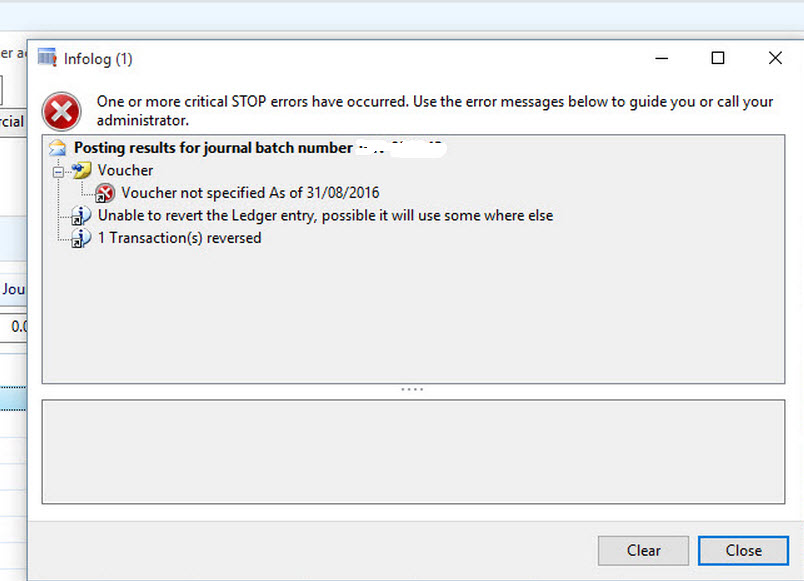
A year ago, I did some customization, where ledger entries are done with X++ code. Now client wants Reverse ledger entries. As per logic reverse ledger entries has only difference is debit amount will be credit amount and versa vise. With X++ code  80 percent of these entries are successful, But 20 percent were fail with following Error.

Voucher not Specified as of …

So what is solution. I found only solution to read next voucher from sequence number and assign to ledger trans before posting it. I used following code snippet to get and set next voucher


    select firstOnly numSeqTable

where numSeqTable.RecId  == ledgerJournalName.NumberSequenceTable;

if (numSeqTable)

{

numberseq = numberseq::newGetVoucherFromCode(numSeqTable.NumberSequence);

trans.parmVoucher( numberseq.voucher());

}


Now customization works perfectly fine.


Stopped (unrecoverable) workflow dynamics ax 2012 R3

January 31, 2017 by alirazazaidi

Yesterday I face a problem; some Ledger journal records are stuck into Workflow. In Error message, described about issues in  customization. In the after last deployment code full cil was not generated. So first step is full Cil generation.

For resubmit these pending records, I used the code snippet delivered on Microsoft Forum by Dick wenning. It help me to resolve ledgers records.

https://community.dynamics.com/ax/f/33/t/77311


WorkflowTrackingStatusTable WorkflowTrackingStatusTable;

while select WorkflowTrackingStatusTable where WorkflowTrackingStatusTable.TrackingStatus == WorkflowTrackingStatus::Faulted &&

WorkflowTrackingStatusTable.WorkflowType == WorkflowTrackingStatusWorkflowType::Workflow

{

Workflow::resumeWorkflow(WorkflowTrackingStatusTable.CorrelationId);

}


I updated the code snippet based on reci id instead of all faulted records.


WorkflowTrackingStatusTable WorkflowTrackingStatusTable;


select * from WorkflowTrackingStatusTable where WorkflowTrackingStatusTable.RecId ==5637166344;

    if (WorkflowTrackingStatusTable!=null)

{

Workflow::resumeWorkflow(WorkflowTrackingStatusTable.CorrelationId);


}


You can get recid from workflow history screen.

But one record remains unrecoverable. For this I explored tables  as follow.

If we explore workflow tables, you find that main player tables are

SysWorkflowTable

WorkflowTrackingStatusTable

WorkflowTrackingTable


In workflowTrackingStatusTable ContexttableId feild contains the table id of ledgerjournaltable and contextrecid contains the records recid of ledgerjoural row on workflow is applied.

SysWorkflowTable correlation id is key relation between Sysworkflow.


In current scenario, when all records are recovered, but one record is not recoverable. The follow these steps, but you can use them but your own risk.


  • Get recid from workflowTrackstatusTable from workflow history. Or Use contextrecid of LedgerJournalTable.
  • Sql Query on workflowtrackingSTatusTable and get correlationId.
  • Query on SysworkflowTable workflowcorrelationid and get the reference sysworkflow table and get reference id
  • Query on Select WorkflowTrackingTable workflowTrackingTable.WORKFLOWTRACKINGSTATUSTABLE Which is based on recid of workflowTrackStatusTable.
  • Delete the records based on reference and reset the ledgerJournaltable status to draft.


For your reference I used following Select query.

select from WorkflowTrackingStatusTable where CONTEXTRECID =5637239972

select * from WorkflowTrackingTable where WorkflowTrackingTable.WORKFLOWTRACKINGSTATUSTABLE =5637166344

select * from SysWorkflowTable where workflowcorrelationid =’D4AF23DF-9CC1-40F9-B886-DAB1CD6B35DE’


update LEDGERJOURNALTABLE set WORKFLOWAPPROVALSTATUS=1 where lEDGERJOURNALTABLE.JOURNALNUM =’xyze’


Run time workflow Type Change Customization in Dynamics Ax 2012.

January 2, 2017 by alirazazaidi

Recently I completed a customization.  Basic requirement is workflow type have to decide on Certain enum based value at run time.

For dumpy example, I have two customized type for Sales Order. External Sales and Internal Sales.

And Workflow based on same query or table will be different for external sales and internal sales.

For this you have to left empty Workflow in Design Property of form.


You have to over write. LoadWorkflowConfiguration


For more reference Kindly explore the ledgerjournaltable form.

Dynamics Ax 2012 R3 RTM upgrade to Cu12 step by step.

December 9, 2016 by alirazazaidi

Recently I upgrade the Dynamics Ax 2012 R3 RTM environment to CU12.

You can find official Microsoft guide for CU12 form following link.

https://mbs.microsoft.com/Files/public/CS/AX2012R3/CumulativeUpdate12InstallationGuideforMicrosoftDynamicsAX2012R3.pdf

Following are my notes during upgrade process.

First step to download patch KB3199741.

https://mbs2.microsoft.com/Knowledgebase/KBDisplay.aspx?scid=kb;EN-US;3199741

This link requires  login to partner source. You have to add email address and then Microsoft send you email where you can download patch.


Second step is to download cu12 silpstream.  For this you have to login LCS .


If you don’t have any cloud environment No issue Microsoft still let you download Cu12 slipstream.

create a new project if there is no project available in LCS.

I create a project with Name test.

Click on it and let the project open and navigate the screen and then click on Update.

From next screen download Cumulative Update 12 sliptream

Download depends on speed of internet. Size of file is round 931 MB.


I copied both patch and slipsteam on required folder and extract both in one folder. First I extract the patch and then extract the slipsteam.


Similarly

Now I run the AxUpdate


Next

Accept and Continue.


But I face the problem that Visual Studio 2013 Dev Tools are not enable. For it solution I found following link which help me.

https://blogs.msdn.microsoft.com/axsupport/2014/11/24/visual-studio-tools-for-microsoft-dynamics-ax-2012-r3-cu8-now-requires-microsoft-visual-studio-2013/

In short, I stop the Installation. And do the following steps.

Run the Dynamics Ax 2012 setup and Uninstall the Visual studio 2012 tools.

Install Visual studio 2013 VS2013_U4 on machine.

Download and install Report Viewer 2012 runtime component. You can found it from following link.

https://www.microsoft.com/en-pk/download/details.aspx?id=35747


After all these step I again run the Cu12 setup and Visual 2013 tools are enabled.

Check this box and click on next.


After that I restart the AOS service. And open the AX client and select option from update check list and select first option.

Let the complete the database synchronize, Compile and Full CIL.

My environment is successfully Upgrade to CU12. Now next step is code merge or code upgrade That is not part of this post.

If you want new installation  direct to CU12. Then copy content of Dynamics Ax 2012 R3 into hard disk and then extract slipsteam to update folder. And run the Default setup. Hopes this will work.


The formatter threw an exception while trying to deserialize the message Dynamics Ax 2012 R3 SSRS

December 6, 2016 by alirazazaidi

On running report, following error message appear in info box.

The formatter threw an exception while trying to deserialize the message: There was an error while trying to deserialize parameter http://tempuri.org/:queryBuilderArgs. The InnerException message was ‘Element ‘http://tempuri.org/:queryBuilderArgs’ contains data from a type that maps to the name ‘http://schemas.datacontract.org/2004/07/XppClasses:SrsReportProviderQueryBuilderArgs’. The deserializer has no knowledge of any type that maps to this name. Consider using a DataContractResolver if you are using DataContractSerializer or add the type corresponding to ‘SrsReportProviderQueryBuilderArgs’ to the list of known types – for example, by using the KnownTypeAttribute attribute or by adding it to the list of known types passed to the serializer.’. Please see InnerException for more details.

2016-12-06_9-58-01


Solution:

  • Stop AOS service.
  • Stop Sql Server Service.
  • Start SQL server Service.
  • Restart SQL Server reporting services.


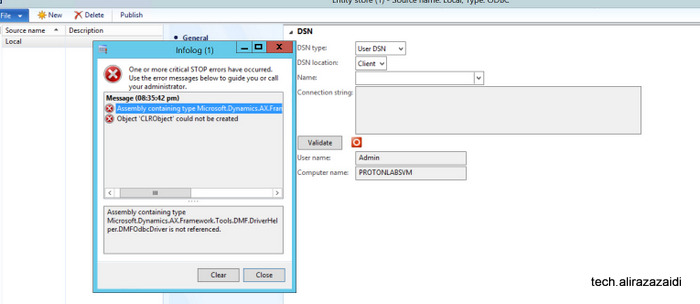
Entity Store and error Microsoft.Dynamics.AX.Framework.Tools.DMF.DriverHelper.DMFOdbcDriver Dynamics Ax 2012 R3

December 5, 2016 by alirazazaidi

After Installation and configuration, When I connect the Entity store and establish DNS error, I got following error.

error-detail


error


I found that Data Import and export framework did not installed on machine.

solution


I log this error for my future reference I got its solution from Deepak Agrwal Sahib, He blog this issue on following link

https://community.dynamics.com/ax/b/axaptavsme/archive/2015/02/14/dixf-error-assembly-containing-type-microsoft-dynamics-ax-framework-tools-dmf-serviceproxy-dmfentityproxy-is-not-referenced

Entity store for Dynamics Ax 2012 R3 step by Step installation and configuration.

December 5, 2016 by alirazazaidi

I observed that Many developers are using Power BI with Dynamics Ax 2012 R3 by using Direct SQL server connection on Dynamics Ax database. Which is not good approach? This will expose Dynamics Ax 2012 database outside Dynamics Ax 2012 security. Especially when you expose or deploy Power BI on public URL.

With entity Store, Microsoft provide near to real time database access to Power BI.

In this approach, you can extract data to external database by Designing entities and data extraction from Dynamics ax tables and populate that staging entities and then to database. And this process can schedule into Dynamics Ax.

2016-12-03_4-55-24

This approach is faster and more secure in the sense

  • Only required data available for Query, Unnecessary fields and table already removed.
  • No extra overhead on OLTP Dynamics Ax 2012 Database.
  • You can create more indexes on target database to faster fetch. As compare to indexes on Ax tables which creates performance overhead on Dynamics Ax.
  • Instead of Creating complex data mart, cubes and complex queries. We can create simple table structure and build dashboard on them.
  • Certainly external database can share and access on Internet or reporting is much more secure instead expose Dynamics Ax 2012 database for reporting.


For reference you can explore following links.

https://blogs.msdn.microsoft.com/intel/archives/185

http://download.microsoft.com/download/2/4/2/242608B8-7F6A-4A59-8AAF-545EBE5166BA/Entity%20store%20Microsoft%20Dynamics%20AX%202012%20R3.pdf


Microsoft release the Entity Store for Dynamics Ax 2012 R3 back in May 2016.

But somehow I decide to explore it. So today I decide to Install Entity store on my local VM. And My local vm had Dynamics Ax 2012 R3 RTM. No other Dynamics Ax 2012 Update Installed on machine. Entity stored is already part of Cu 11 for Dynamics Ax 2012 R3.


So First step is download and install KB. You can find It from following link

https://mbs2.microsoft.com/Knowledgebase/KBDisplay.aspx?scid=kb;EN-US;3147499


I have to enter my email address and Microsoft send download link for patch.

I recommend to explore the following link for Installation of any update for Dynamics.

https://technet.microsoft.com/en-us/library/hh335183.aspx


For this article I just extract the self-extract file.

2016-11-24_20-09-04

Extraction result in folder something like

2016-11-24_20-12-002

This file is again extracted exe. On its extraction it creates two folders

2016-11-24_20-29-005

And again these two folder contains two self-extracted exe files..

On extracting these exes, one update for Model store and second for Kernel update.

Model Store Update:

So First I decide to install update for Model store.

Before that I stopped the AOS service. Otherwise update process takes unnecessary time.


So I Click on update Ax exe in Application folder.

2016-11-24_20-14-06

Click on Next

2016-11-24_20-14-031

Accept and Continue

2016-11-24_20-14-50


Select you model store and Click on next.

2016-11-24_20-16-07

On this steps you find conflict then first resolve them. In my clean installation there will be no conflict. Press next.

2016-11-24_20-16-30

Next

2016-11-24_20-16-046

Click on Install.

2016-11-24_20-16-59

And finally Update is successful.

2016-11-24_21-28-034


Kernel Update.

Now I decide to install what ever exe at Kernel folder.

So I go the extracted folder and run the update ax exe there

2016-11-24_21-29-16

Next

2016-11-24_21-29-49

Accept and Continue
2016-11-24_21-33-13

Next

2016-11-24_21-35-02

Click on Install

2016-11-24_21-35-24

Finally it also installed successfully.


Post Installation update challenges:

After installation when I start AOS service and open Ax Client. I found check list, with different options for example database synchronization, compilation and full cil Generation.

In my case, this check list did not perform anything.

2016-11-24_21-51-51

So closed the Ax client and in Windows command prompt, I run following command. Remember, run Windows command prompt as run as administrator.


AXUTIL set /noinstallmode

Now open Dynamics Ax client and perform following steps.

  • Synchronize the database.
  • Full compile and resolve any error.
  • Generate Full CIL.


Interestingly I got errors. And errors are related to Payroll some symmentic dll. Each line shows error 99999.

I used very strange trick. Just add new empty line and add empty comment //. Save it and compile and as result error resolved. I resolved all these error 99999 by same way.

More details I follow my own link.

http://tech.alirazazaidi.com/errors-in-payroll-classes-symmetry-dynamics-ax-2012-r3/


After that, I found Entity store menus in Import export framework.

2016-11-26_1-52-35


DNS and Entity store connection.

Now open Windows control panel, Administrator tools.

2016-12-03_5-43-01


Select ODBC Driver 11 or it depends on installation.

connection


Enter Name of User dsn.

2016-12-04_9-25-26

Set default database.

2016-12-04_9-26-36


Now test the connection.

2016-12-04_9-27-24


2016-12-04_9-27-43


Now go back to Dynamics Ax client and click on entity store. Select on User DNS. And set User DSN in last step. And click on test.

dns


ddd


2016-12-04_10-23-44

.


Dynamics Ax 2012 R3 Check list dialog did not Post Installation or Upgrade

December 5, 2016 by alirazazaidi

After upgrade process, Dynamics Ax checklist dialog did not let me do anything. 2016-11-24_21-51-51


So closed the Ax client and in Windows command prompt, I run following command. Remember, run Windows command prompt as run as administrator.


AXUTIL set /noinstallmode

Now open Dynamics Ax client and perform following steps.

  • Synchronize the database.
  • Full compile and resolve any error.
  • Generate Full CIL.


What’s New In Dynamics Ax 2012 R3 Cu12

November 23, 2016 by alirazazaidi

Microsoft release update Cu12 for dynamics Ax 2012 R3. Microsoft Also release the what’s new document to describe what in this Update. You can found it in this location

This picture is Micorosft property, I took it from PDF Shared by Microsoft


https://mbs.microsoft.com/Files/public/CS/AX2012R3/WhatsNewinAX2012R3CU12.pdf

Workflow resubmit code snippet dynamics ax 2012

November 3, 2016 by alirazazaidi

Recently I wrote the code for Custom workflow for resubmit.  It took me half an hour to explore out of box code for resubmit.

While working in ERP, we have to daily learn new things and handle new situation.

Most of resubmit functionality is done through a lot of inheritance and much complex way.  Finally I found simplest resubmit code from “LedgerJournalWFApprResubmitToWF” class. I modified that code snippet, that works for me. Here is complete resubmit code. You have to update the resubmit event handler class generated by Workflow Approval Wizard as follow

public static void main(Args _args)
{
recID recID = _args.record().RecId;
tableId tableId = _args.record().TableId;
tableName tableBuffer = _args.record();
WorkflowWorkItemTable workItem = _args.caller().getActiveWorkflowWorkItem();
WorkflowWorkItemActionDialog workflowWorkItemActionDialog;
if (workItem.RecId > 0)
{
try
{

workflowWorkItemActionDialog = WorkflowWorkItemActionDialog::construct( workItem,
WorkflowWorkItemActionType::Resubmit,
new MenuFunction(_args.menuItemName(),_args.menuItemType()));
workflowWorkItemActionDialog.run();

if (workflowWorkItemActionDialog.parmIsClosedOK())
{
if ( tableName.WorkflowStatus == WorkflowStatus::ChangeRequest)
{
workItem = _args.caller().getActiveWorkflowWorkItem();
WorkflowWorkItemActionManager::dispatchWorkItemAction( workItem,
workflowWorkItemActionDialog.parmWorkflowComment(),
workflowWorkItemActionDialog.parmTargetUser(),
WorkflowWorkItemActionType::Resubmit,
_args.menuItemName(),
false);

tableName.WorkflowStatus= WorkflowStatus::Submitted;
ttsbegin;
tableName.dataSource().write();

ttscommit;
}
else
{
throw Exception::Error;
}
}
}

catch(Exception::Error)
{
throw error(strfmt("Can not resubmit some error occur"));
}
}
// Make the form refresh its common workflow UI controls.
_args.caller().updateWorkflowControls();
}


« Previous Page
Next Page »

Primary Sidebar

About

I am Dynamics AX/365 Finance and Operations consultant with years of implementation experience. I has helped several businesses implement and succeed with Dynamics AX/365 Finance and Operations. The goal of this website is to share insights, tips, and tricks to help end users and IT professionals.

Legal

Content published on this website are opinions, insights, tips, and tricks we have gained from years of Dynamics consulting and may not represent the opinions or views of any current or past employer. Any changes to an ERP system should be thoroughly tested before implementation.

Categories

  • Accounts Payable (2)
  • Advance Warehouse (2)
  • AI (3)
  • Asset Management (3)
  • Azure Functions (1)
  • Books (6)
  • Certification Guide (3)
  • ChatGPT (3)
  • Claude (1)
  • Customization Tips for D365 for Finance and Operations (63)
  • D365OF (60)
  • Data Management (1)
  • database restore (1)
  • Dynamics 365 (59)
  • Dynamics 365 for finance and operations (139)
  • Dynamics 365 for Operations (174)
  • Dynamics AX (AX 7) (134)
  • Dynamics AX 2012 (274)
  • Dynamics Ax 2012 Forms (13)
  • Dynamics Ax 2012 functional side (16)
  • Dynamics Ax 2012 Reporting SSRS Reports. (31)
  • Dynamics Ax 2012 Technical Side (52)
  • Dynamics Ax 7 (65)
  • Exam MB-330: Microsoft Dynamics 365 Supply Chain Management (7)
  • Excel Addin (1)
  • Favorites (12)
  • Financial Modules (6)
  • Functional (8)
  • General Journal (1)
  • Implementations (1)
  • Ledger (1)
  • Lifecycle Services (1)
  • Logseq (4)
  • Management Reporter (1)
  • Microsoft Excel (4)
  • MS Dynamics Ax 7 (64)
  • MVP summit (1)
  • MVP summit 2016 (1)
  • New Dynamics Ax (19)
  • Non Defined (9)
  • Note taking Apps (2)
  • Obsidian (4)
  • Personal Knowledge Management (3)
  • PKM (16)
  • Power Platform (6)
  • Procurement (5)
  • procurement and sourcing (6)
  • Product Information Management (4)
  • Product Management (6)
  • Production Control D365 for Finance and Operations (10)
  • Sale Order Process (10)
  • Sale Order Processing (10)
  • Sales and Distribution (5)
  • Soft Skill (1)
  • Supply Chain Management D365 F&O (5)
  • Tips and tricks (278)
  • Uncategorized (165)
  • Upgrade (1)
  • Web Cast (7)
  • White papers (4)
  • X++ (10)

Wiki

  • SCM

Copyright © 2026 · Magazine Pro On Genesis Framework · WordPress · Log in