• Skip to main content
  • Skip to primary sidebar
  • Home
  • About
  • Recommended Readings
    • 2022 Book Reading
    • 2023 Recommended Readings
    • Book Reading 2024
    • Book Reading 2025
  • Supply Chain Management Guide
  • PKM
  • Microsoft Excel
  • Microsoft Copilot in Office 365
  • Public Wiki Page

Ali Raza Zaidi

A practitioner’s musings on Dynamics 365 Finance and Operations

Dynamics AX 2012

List of user under certain Role Dynamics Ax 2012

May 26, 2015 by alirazazaidi

Consider a real time scenario, where we have to send alerts to all user in certain Role In Dynamics.

For this purpose we have to loop through all user in certain role.

User, roles and role assignment are done three tables, these tables are hidden in AOT.


These table are

UserInfo : This table holds all User Ids In Dynamics Ax 2012.

SecurityRole : This table hold all Security Roles, In this table has two important fields “Name” which is descriptive and second one is AOTName. If you get the current customer assigned role using then this AOTName will be return.

SecurityUserRole: This table holds many to many relation with security and User.


For below snippet, I loop through all user assigned in Sales Representative.


   static void RoleUSerID(Args _args)

{

UserInfo    userInfo;

SecurityUserRole securityUserRole;

SecurityRole       Roles;


while select userInfo

join securityUserRole

where securityUserRole.User == userInfo.Id

join Roles where Roles.RecId  == securityUserRole.SecurityRole

&& Roles.AotName ==”TradeSalesRepresentative”

{

info(userInfo.Id);

}


internal server error 500 in enterprise portal dynamics ax 2012

May 20, 2015 by alirazazaidi

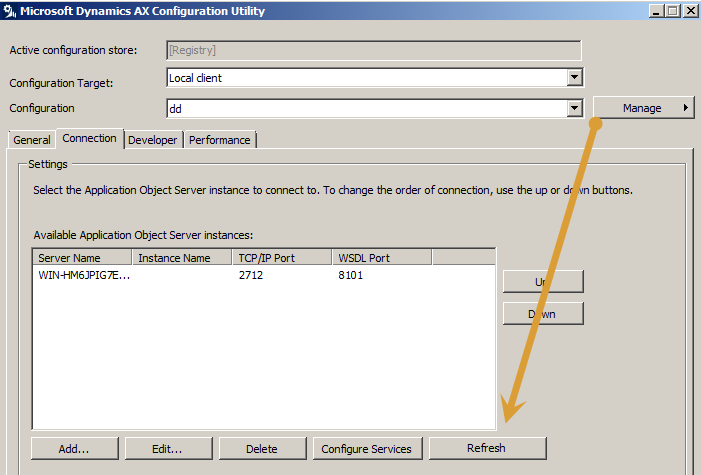
There are several reasons for internal server Error 500,  But today i was facing this error in local deployment of enterprise portal. Previously enterpise portal works perfectly fine. I solve it in two steps

  1. Restart the IIS.
  2. Regenerate the WCF configuration By clicking on refresh button  from Dynamics Ax Server configuration. Following screenshot will help you.

Regergenerationing


Hopes this helps.


How to get time difference between two different time values (TimeEdit control) in MS Dynamics Ax 2012

May 14, 2015 by alirazazaidi

Today I got change to work with timeedit control in Ax where we have to get input of time and then take difference to get number of hours.

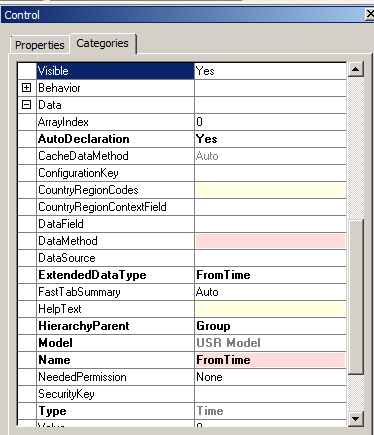
For this example I used timeEdit control and add two timeEdit control in form.These timeEdit controls are unbound, I set the out of the box FromTime and ToTime extended data Type and set auto declaration property to true so these controls can be access by name in code.

TimePropertiesInAx

Similarly set the properties ToTime.


Now add button and add its click method. The time difference between two times value can be get with timeConsumed out of the box function.


void clicked()

{


super();


info(timeConsumed(txtFromTime.value(),txtToTime.value()));

}

5-15-2015 12-19-11 AM

output is as

5-15-2015 12-19-25 AM


endtime


out put is as


5-15-2015 12-19-51 AM

unchecked’ cannot be called on the client Dynamics Ax 2012 R3

May 6, 2015 by alirazazaidi

Today  I was debugging the logic written for Custom AIF services  using X++ job before deploy it as AIF service, I got strange error


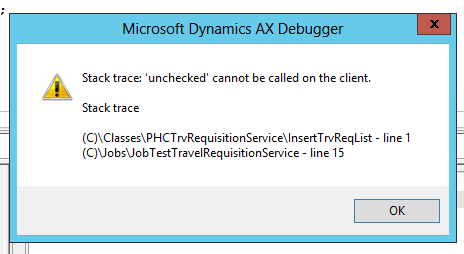
“Stack trace: ‘unchecked’ cannot be called on the client.”. 


5-6-2015 2-30-14 PM


It was due that Service class was set as run  at “Called from”, Only solution is to change run at to Server. Job will successfully run.

5-6-2015 2-30-53 PM

Deploy and configure Dev/ Test Retail essential environment on Azure Dynamics Ax 2012 R3 Part 1

May 3, 2015 by alirazazaidi

Dev and test Retail essential is single VM based environment, On which everything need for Retail customization is available.  Yesterday I successfully configured for me. following are some step by step notes for its deployment and configuration.


Login in on following link to login in you Lifecycle services for Dynamics. For this you must have partner source or customer source credentials

https://lcs.dynamics.com/Logon/Index?redirectUrl=https%3A%2F%2Flcs.dynamics.com%2F%3Flc%3D1033

Lcs


After successful login create a new Project.


For Example I created a new project “Azure On Ax” with following configuration

Create Ax

New Project

Now go on at new Azure based environment a click on this. Here add Guid for you Azure subscription.

New Azure deployment

Click on next button.

4-28-2015 11-42-36 PM

Click on download button to download the certificate and now login in your azure from Azure management portal.

4-28-2015 11-44-33 PM

From setting menu, upload the certificate.


sss


ss

Now go back to Life cycle services page and click on next button.

4-28-2015 11-42-36 PM

Select location.

4-28-2015 11-49-07 PM

Click on Test / dev environment because we want test and dev environment.


4-28-2015 11-49-28 PM

From Advanced menu you can change environment form Dynamics Ax 2012 R3 CU8 to Dynamics AX 2012 R3. By default it will configure the Dynamics Ax 2012 R3.

dev


sqq

Wait it to deployment complete.


When Vm deployed, in Life cycle services you will find user name and password.

Login

I am more Interested in work with axlocalAdmin user so I want to make axlocalAdmin as system administrator ,  You can skip the following step.

If you saw in above picture you find that DynamicsInstallUser is built in user is used to configure the AX.


Login with SQL server user in VM and set axlocalAdmin as System Administrator In AX.

Run the PowerShell and run the following command.


So create user as log in with following command


$AdObj = New-Object System.Security.Principal.NTAccount(“axlocaladmin”)


$strSID = $AdObj.Translate([System.Security.Principal.SecurityIdentifier])


$strSID.Value

This command return the SID id of axlocalAdmin.


Copy the sid id update the following command and open the Dynamics Ax database in SQL server and run the update sql command.


update userinfo set

networkdomain = ‘contoso’,


networkalias = ‘dynamicAdmin’,


name = ‘axlocaladmin’


SID = ‘S-1-5-21-602381161-1523875512-907902364-500’


where ID = ‘Admin’


Now back login in with axlocaladmin

And first step to compile the Dynamics Ax with AX build command. For this


Open cmd run as administrator

axbuild.exe xppcompileall /s=01 /altbin=”C:\Program Files (x86)\Microsoft Dynamics AX\60\Client\Bin” /log:”C:\Temp”

axbuild.exe found at following location


C:\Program Files\Microsoft Dynamics AX\60\Server\MicrosoftDynamicsAX\bin

Build


”


When above step is successfully completed.

Open AX and complete the Initialization check list.

4-29-2015 10-29-14 AM


When Initialization check list is complete, Again log in with SQL server User and inject the demo data.


On Ax environment testTransfterTool found following location.

F:\TestTransferTool


Demo data files path is as

G:\DemoData


Stop the AOS services and run the following command.


“dp.exe import D:\DemoData MicrosoftDynamicsAx”


When data import completed. Login back axloginAdmin


And start configuring retail features.


Now go to retail sessional area page. If Retail essential area page enabled it. From File => Module=> Retail essentials.


Retail Parameters

Retail essentials => channels => retail parameters

Parameters


Retail parameter


From top menu click on Initialize

4-29-2015 10-55-41 PM


wait until info log show up

4-22-2015 1-03-28 AM


Retail subject


Retail Scheduler parameters:


No click on Data synchronization => setup =>Retail Scheduler parameters

4-29-2015 11-28-12 PM


In the next open screen, set following things

  • Server Name
  • Sync meta data button at the top of the form

Enter Sync metadata button and  click on yes to confirm it


Sychn


Real time services profiles setup:

4-30-2015 12-44-44 AM


Set server name and common name and close the form.

ss222


Working folder:

workingFolder

You can set download and upload folder. But as per documentation they are as follow.

And set download and upload folder as per following By default these are something like

C:\DemoFiles\Retail\CDX\Download.

C:\DemoFiles\Retail\CDX\Upload.


Paths


Now go to setup the Channel database

Retail database


As per MSDN select Houston and click on Full data Sync and select 9999 and click ok on it.


database 9999


Reference :  https://technet.microsoft.com/EN-US/library/dn798905.aspx

errors in Payroll classes Symmetry dynamics ax 2012 r3

May 1, 2015 by alirazazaidi

Today I was configuring POS on Azure test/dev environment, I got very strange errors during compilation  of classes node.

All these classes were belong to Payroll modules.

5-2-2015 3-50-44 AM

Error described that Symmetry variable is not declare.

5-2-2015 3-50-28 AM


Later I discover that reference of ste-net.dll is missing in AOT.

This mysterious dll (mysterious for me) is found at  C:\Program Files (x86)\Microsoft Dynamics AX\60\Client\Bin


Yu can add  its reference by right click on reference node In AOT

5-2-2015 3-59-36 AM


5-2-2015 3-59-58 AM

Click on browse and go to  C:\Program Files (x86)\Microsoft Dynamics AX\60\Client\Bin

Select

5-2-2015 4-08-59 AM

Select and click on ok

5-2-2015 4-10-42 AM

As reference is added into AOT. Compilation errors are gone.


Reference:  https://community.dynamics.com/ax/f/33/t/150222


Reading CSV files in Dynamics Ax 2012.

April 28, 2015 by alirazazaidi

Today I come across a scenario where, I have to read data from csv file.


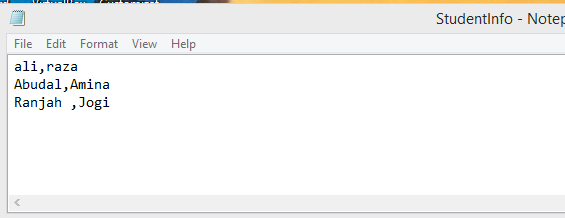
Reading data from csv file is very easy with IO operation. For example I have csv file with following student first name and last name which I have to migrate into custom ax table.

CVS file


Custom Ax table.

StudentInfoTable


Following a simple code snippet which read csv file and insert data into custom data

static void Job9(Args _args)

{

#File

IO  iO;

Name FirstName;

Name LastName;

StudentInfo _StudentInfo;

FilenameOpen        filename = “c:\\StudentInfo.csv”;//To assign file name

Container           record;

boolean first = true;

;

    iO = new CommaTextIo(filename,#IO_Read);

if (! iO || iO.status() != IO_Status::Ok)

{

throw error(“@SYS19358”);

}

while (iO.status() == IO_Status::Ok)

{

record = iO.read();// To read file

if (record)

{

if (first)  //To skip header

{

first = false;

}

else

{


FirstName = conpeek(record, 1);//To peek record

LastName = conpeek(record, 2);

_StudentInfo.FirstName=FirstName;

_StudentInfo.LastName =LastName;

_StudentInfo.insert();

//     info(strfmt(‘%1–%2’,custAccount,custname));

}

}

}

}


After running the ax job, I found following data into Ax table.

4-28-2015 9-59-45 PM


If you saw, first row of csv is missing in table. The reason for that above code snippet consider first row as header so it did not require to insert it.


One thing I missed, The reference, original code snippet is belongs to “Jitendra Kumar Singh”

http://axaptacorner.blogspot.com/2012/09/how-to-read-csv-files-in-ax-2012.html

Dynamics Ax 2012 R3 Architecture:

April 26, 2015 by alirazazaidi

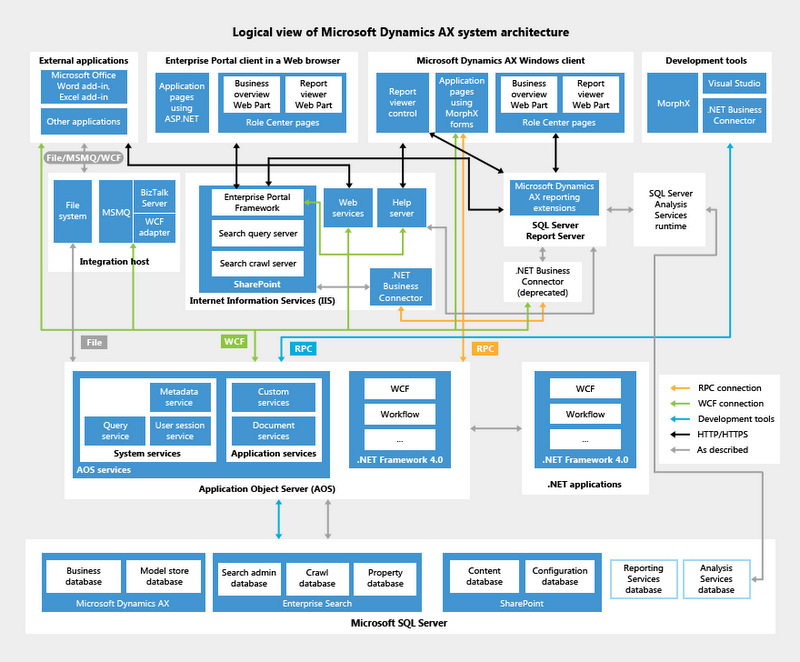
Dynamics Ax 7 is now at door step. But still there are many things to explore Dynamics AX 2012.   Here I started again from basics from Dynamics Ax 2012 architecture.


Dynamics Ax 2012 is based on  Three tier Architecture consists of


  1. Database tier.
  2. Application tier
  3. Presentation tier.

Architecture

Database tier:

If you saw standard Dynamics Ax databases with default installation you found. Three databases


MicrosoftDynamicsAX:

This database contains the data used in Dynamics Ax. AOS used this database for transaction.

MicrosoftDynamicsAX_model:

Meta data for forms, tables, and all other code are stored in model_store exists in MicrosoftDynamicsAX_model database. It contains the all application element data inside Microsoft Dynamics Ax.

MicrosoftDynamicsAXBaseline:

This baseline database stores the model store that is used to upgrade X++ code to Microsoft Dynamics AX 2012. The Baseline database is used to analyze application updates before they are applied.

It stored the old model store before applying the upgrade.


There more databases are installed which has no direct link Microsoft Dynamics Ax 2012. These are

SSRS database, Sql server analysis server database and if you installed the Interpise portal then data bases required for Share point also include installed.


Application Tier.

In Dynamics Ax 2012 AOS, Reporting server extensions, enterprise portal, Workflow, Application Interface Framework all consider to be application tier,


AOS Application object server.

AOS is responsible for communication between Client and Database. Services also deployed on AOS so external application can communicate with AOS. Dynamics Ax 2012. Application business logic resides at AOS.

Enterprise portal.

Enterprise portal is asp.net and share point porta also consider to be at application tier. SSRS reports, dashboards and other websites are hosted on IIS.


Workflow. Also consider to be application tier. These allow to user to create and automate some workflow activities.


Reporting and analytical services.  Reporting using SSRS and Analytical services used in Dynamics Ax 2012 also part of application Tier.


Application integration framework.

Services and integration framework that is used to communicate external and internal system is also part of Application tier.


Presentation Tier.

Microsoft Dynamics Ax 2012 client, Enterprise portal and external application that communicate with Dynamics Ax all are consider to be Presentation tier.


Reference : https://technet.microsoft.com/en-us/library/dd362112.aspx

Advance filter Dynamics Ax 2012 Similar to Like wildcard functionality

April 22, 2015 by alirazazaidi

Today during development of inquiry form, I had chance to explore filters in little more depth.

For example if you have to add functionality similar to wildcard like operator.


“Select * from customer where Customer.Name is like ‘%Ali%’

You have to use static functions  SysQuery::valueLike and SysQuery::ValueLikeAfter. For example If I had customer table as data source then I create a new filter inside ExecuteQuery method


QueryBuildRange customerFilter;

customerFilter  =SysQuery::findOrCreateRange(PGDFileline_q.dataSourceTable(tablenum(custtable)),fieldNum(Custtable,AccountNum));


if (custTxt.text()=="")

{

customerFilter .value(SysQuery::valueUnlimited());

}

else

{

customerFilter.value(SysQuery::valueLikeAfter(custTxt.text()));

}

super();

}


Similar posts are


http://tech.alirazazaidi.com/how-to-create-a-custom-filter-on-list-or-inquiry-form-in-dynamics-ax-2012/


Date in Advance filter Dynamics Ax 2012

Fetching data from AX table using Query AIF service Dynamics Ax 2012 R3

April 11, 2015 by alirazazaidi

We can expose AOT query as service which can consume in any WCF client. We can call and fetch data from any AX table,  without Static AOT query. For this purpose Dynamics Ax provide the methods to create a query at run time and call with Query service.


This Query service is built in feature if during Application Interface framework component installed with Dynamics Ax Setup.

http://[HostName]/DynamicsAx/Services/QueryService


using System;

using System.Collections.Generic;

using System.Linq;

using System.Text;

using System.Data;

//using Microsoft.Dynamics.AX.Framework.Services.Metadata.Contracts;


namespace ConsoleApplication1

{

class Program

{

static void Main(string[] args)

{

testService.QueryServiceClient _QueryClient = new testService.QueryServiceClient();

DataSet dataSet;

testService.Paging paging = null;

testService.QueryMetadata query;

testService.QueryDataSourceMetadata customerDataSource;


query = new testService.QueryMetadata();


// Set the properties of the query.

query.QueryType = testService.QueryType.Join;

query.AllowCrossCompany = true;

query.DataSources = new testService.QueryDataSourceMetadata[1];


// Set the properties of the Customers data source.

customerDataSource = new testService.QueryDataSourceMetadata();

customerDataSource.Name = "DataArea";

customerDataSource.Enabled = true;

customerDataSource.FetchMode = testService.FetchMode.OneToOne;

customerDataSource.Table = "DataArea";

// Setting DynamicFieldList property to true returns all fields.

customerDataSource.DynamicFieldList = true;

//Add the data source to the query.

query.DataSources[0] = customerDataSource;


dataSet = _QueryClient.ExecuteQuery(query, ref paging);

foreach (DataRow dr in dataSet.Tables[0].Rows)

{


Console.WriteLine(dr["Id"].ToString());


}

Console.ReadKey();


}


}

}


if you got error with similar message “The maximum message size quota for incoming messages (65536) has been exceeded. To increase the quota, use the MaxReceivedMessageSize property on the appropriate binding element.

update the binding section of app.config

<bindings>
<netTcpBinding>
<binding name=”QueryServiceEndpoint” transferMode=”Streamed”
maxReceivedMessageSize=”20000000″
maxBufferSize=”20000000″
maxBufferPoolSize=”20000000″
>
<readerQuotas maxDepth=”32″
maxArrayLength=”200000000″
maxStringContentLength=”200000000″/>
</binding>
</netTcpBinding>
</bindings>


« Previous Page
Next Page »

Primary Sidebar

About

I am Dynamics AX/365 Finance and Operations consultant with years of implementation experience. I has helped several businesses implement and succeed with Dynamics AX/365 Finance and Operations. The goal of this website is to share insights, tips, and tricks to help end users and IT professionals.

Legal

Content published on this website are opinions, insights, tips, and tricks we have gained from years of Dynamics consulting and may not represent the opinions or views of any current or past employer. Any changes to an ERP system should be thoroughly tested before implementation.

Categories

  • Accounts Payable (2)
  • Advance Warehouse (2)
  • AI (3)
  • Asset Management (3)
  • Azure Functions (1)
  • Books (6)
  • Certification Guide (3)
  • ChatGPT (3)
  • Claude (1)
  • Customization Tips for D365 for Finance and Operations (63)
  • D365OF (60)
  • Data Management (1)
  • database restore (1)
  • Dynamics 365 (59)
  • Dynamics 365 for finance and operations (139)
  • Dynamics 365 for Operations (174)
  • Dynamics AX (AX 7) (134)
  • Dynamics AX 2012 (274)
  • Dynamics Ax 2012 Forms (13)
  • Dynamics Ax 2012 functional side (16)
  • Dynamics Ax 2012 Reporting SSRS Reports. (31)
  • Dynamics Ax 2012 Technical Side (52)
  • Dynamics Ax 7 (65)
  • Exam MB-330: Microsoft Dynamics 365 Supply Chain Management (7)
  • Excel Addin (1)
  • Favorites (12)
  • Financial Modules (6)
  • Functional (8)
  • General Journal (1)
  • Implementations (1)
  • Ledger (1)
  • Lifecycle Services (1)
  • Logseq (4)
  • Management Reporter (1)
  • Microsoft Excel (4)
  • MS Dynamics Ax 7 (64)
  • MVP summit (1)
  • MVP summit 2016 (1)
  • New Dynamics Ax (19)
  • Non Defined (9)
  • Note taking Apps (2)
  • Obsidian (4)
  • Personal Knowledge Management (3)
  • PKM (16)
  • Power Platform (6)
  • Procurement (5)
  • procurement and sourcing (6)
  • Product Information Management (4)
  • Product Management (6)
  • Production Control D365 for Finance and Operations (10)
  • Sale Order Process (10)
  • Sale Order Processing (10)
  • Sales and Distribution (5)
  • Soft Skill (1)
  • Supply Chain Management D365 F&O (5)
  • Tips and tricks (278)
  • Uncategorized (165)
  • Upgrade (1)
  • Web Cast (7)
  • White papers (4)
  • X++ (10)

Wiki

  • SCM

Copyright © 2026 · Magazine Pro On Genesis Framework · WordPress · Log in