• Skip to main content
  • Skip to primary sidebar
  • Home
  • About
  • Recommended Readings
    • 2022 Book Reading
    • 2023 Recommended Readings
    • Book Reading 2024
    • Book Reading 2025
  • Supply Chain Management Guide
  • PKM
  • Microsoft Excel
  • Microsoft Copilot in Office 365
  • Public Wiki Page

Ali Raza Zaidi

A practitioner’s musings on Dynamics 365 Finance and Operations

Dynamics AX 2012

‘Invalid enum value ‘GMTPLUS0500ISLAMABAD_KARACHI’ cannot be deserialized into type Dynamics Ax 2012 R3 WorkFlow Error.

May 14, 2016 by alirazazaidi

Couple of months ago, I have to face a strange error and its very strange solution. So I decide to share it and document so it helps others as well as I remember if I face it again.

Error occur when we try to create, edit or delete workflow. This error is certainly because of time zone. And As we are in Pakistan so certainly the Legal entity have to use local time zone.

But interestingly Workflow works fine in all other legal entity with same time zone. So what is problem with certain legal entity.

Short detail of error is as follow

‘Invalid enum value ‘GMTPLUS0500ISLAMABAD_KARACHI’ cannot be deserialized into type ‘Microsoft.Dynamics.AX.Framework.Workflow.Model.AxWorkflowServiceReference.Timezone


This error  occurs when following statement execute.

    workflowConfiguration = Microsoft.Dynamics.AX.Framework.Workflow.Model.WorkflowModel::

Create(templateName, curext(), curUserId(), domainUser);

As per my understanding we cannot debug framework classes. So We cannot get understand what cause problem.


After efforts, I found that this error is caused by time zone set in legal entity’s primary Address instead of legal entity’ own time zone.  I changed it to Central time zone US and Canada, Everything starts to working fine.  I am surprised, what logic required to create Workflow based on Primary Address time zone.

image010


The detail error message is looked like

System.Reflection.TargetInvocationException: Exception has been thrown by the target of an invocation. —> System.ServiceModel.Dispatcher.NetDispatcherFaultException: The formatter threw an exception while trying to deserialize the message: There was an error while trying to deserialize parameter http://tempuri.org:response. The InnerException message was ‘Invalid enum value ‘GMTPLUS0500ISLAMABAD_KARACHI’ cannot be deserialized into type ‘Microsoft.Dynamics.AX.Framework.Workflow.Model.AxWorkflowServiceReference.Timezone’. Ensure that the necessary enum values are present and are marked with EnumMemberAttribute attribute if the type has DataContractAttribute attribute.’.  Please see InnerException for more details. —> System.Runtime.Serialization.SerializationException: Invalid enum value ‘GMTPLUS0500ISLAMABAD_KARACHI’ cannot be deserialized into type ‘Microsoft.Dynamics.AX.Framework.Workflow.Model.AxWorkflowServiceReference.Timezone’. Ensure that the necessary enum values are present and are marked with EnumMemberAttribute attribute if the type has DataContractAttribute attribute.


If we see description that problem is conversion between two time Zone. On comparison

I found time zone enum  “Microsoft.Dynamics.AX.Framework.WorkFlow.Model.AXWorkflowServiceReference.TimeZone” did not have GMTPLUS0500ISLAMABAD_KARACHI.

2016-04-15_11-39-18

2016-04-15_11-40-27


Workflow status and comments Query Dynamics Ax 2012.

May 11, 2016 by alirazazaidi


I have to explore Out of the box workflow status and comments.  After dig down, I found following three tables are important to get all information.


WorkflowTrackingCommentTable

WorkflowTrackingStatusTable

WorkflowTrackingTable


Reference of row on which workflow is applied or run can be found workflowTrackingStatusTable two field ContextRecid and ContextTableId

Unit Conversion Real world scenario, Dynamics Ax 2012 X++

April 26, 2016 by alirazazaidi

A few days ago, I got requirement, where I have to sum up the total quantity and amount of all Purchase line. Here we assume that All lines in Purchase order belongs to same set or convertible unit.

You can set these unit conversion settings at

Organization administration > Setup > Units > Unit conversions.


Public void SumQTYAndAmount(PurchTable  PurchTable)

{

PurchLine               line;


UnitOfMeasureSymbol     toSymbol ="Ranjah";

UnitOfMeasureSymbol     fromSymbol;

Qty                     SumQty=0;

AmountCur AmountPurch=0;

UnitOfMeasureRecId      fromRecid,toRecid;

;


select * from plan where plan.PurchTable == PurchTable.PurchId;


//  select sum(LineAmount), sum(QtyOrdered) from line where line.PurchId == PurchTable.PurchId;

while  select * from LineQty where LineQty.PurchId == PurchTable.PurchId

{

if ( LineQty.PurchUnit ==toSymbol)

{

SumQty +=LineQty.QtyOrdered;

amountQty+=LineQty.LineAmount;

}

else

{

fromSymbol = LineQty.PurchUnit;

toRecid =UnitOfMeasure::findBySymbol(toSymbol).RecId;

fromRecid =UnitOfMeasure::findBySymbol(fromSymbol).RecId;

landQty += UnitOfMeasureConverter::convert(landQty,fromRecid,toRecid,NoYes::Yes);

amountQty+=LineQty.LineAmount;


}


}

}

SSRS for Dynamics Ax 2012, group sum based on condition

April 7, 2016 by alirazazaidi

Small tip today, In one of my custom SSRS report for Dynamics Ax 2012 on group total, requires conditioning,
For example sum did not include the value in the based on certain value of other field.

I used following expression to solve this problem.
=Sum(iif(Fields!FieldName.Value <> “abcdxyz”, Fields!FieldName.Value, CDbl(0)))
I took help from following link:

http://www.sqlservercentral.com/Forums/Topic1174757-150-1.aspx

Git with Dynamics ax 2012

April 5, 2016 by alirazazaidi

Recently I explored GIT as source control tool. As per work with Microsoft Technologies I worked with TFS and Source save.  In Dynamics Ax 2012 context I found AX2GIT on codeplex and

https://github.com/Go-ERP/Ax2Git/wiki

https://github.com/Go-ERP/Ax2Git

https://ax2git.codeplex.com/


I download ax2git zip. After extraction I found  XPO.

ssss-001


So I decided first to download its perquisites. i.e. Git and tortoise for Git. I used following links

Git from   http://msysgit.github.io/


Tortoise Git from http://tortoisegit.org/


After Installing tortoise and Git, windows right click popup menu shows me  git and tortoise options as follow

www


To check git works, I create a new folder and create Git Repository there by windows right click popup menu.


Following popup appeared

333

After click on ok, I found following pop up to show success message

ss


Now I opened Dynamics ax and import the ax2GIt.xpo


Import it, it overwrite some Ax artifacts.  When Xpo successfully imported, right click on any node in AOT => add-ins have Git menu.


Git


Currently Ax2Git support only export.

I opened one of my existing project and export it GIT options. Right click on project node when project open with all its detail. And click on add-ins=>Git=> Export AOT selection.

2016-04-05_12-58-10


And click on Export AOT selection

welcome to the world of git


As I am working Dynamics Ax 2012 CU8 demo vm so current layer option will.  Other as per documentation, it will create separate branch for each layer.

Export to folder process starts

process

And I target folder I found folders in all files are exported properly.

It will creat


Selected all folder and commit the changes.


asdsa


All files are successfully committed.


For testing it reflect changes, I open Ax form and add following empty comment in one of the form

2016-04-05_13-11-50


On again export project from AX. Repository folder it shows some changes are not commit.

Reflect changes

On checking the right click to see the diff
reflect 2-001

Yellow highlighted items line it shows the difference, what previously checked in new exported code

2016-04-05_13-23-28


dynamics ax 2012 form datasource sort X++

April 4, 2016 by alirazazaidi

Today I got requirement to insert record at run time and shows result in sorted order. I used following code code snippets. Suppose we are sorting on Customer
in required field

CusTable_ds.query().dataSourceNo(1).sortClear();

CusTable_ds.query().dataSourceNo(1).addSortField(fieldNum(CustTable, AccountNum), SortOrder::Ascending);
CusTable_ds.executeQuery();

error : Object ‘FormRun’ could not be created. when submit workflow from EP Dynamics Ax 2012

March 26, 2016 by alirazazaidi

I got error  “‘FormRun’ could not be created “on EP. When I test the submit for approval in EP.

I have to reimplement all methods with respect to following link


https://msdn.microsoft.com/EN-US/library/ee677503.aspx


Labels migration from one environment to other Dynamics AX 2012

March 9, 2016 by alirazazaidi

Usually I forget this step during code migration from environment to other. So I note it down for future reference.

The best way to move labels from environment to copy the *.lac file form location

C:\Program Files\Microsoft Dynamics AX\60\Server\MicrosoftDynamicsAX\bin\Application\Appl\Standard

And paste on some common folder in target environment.

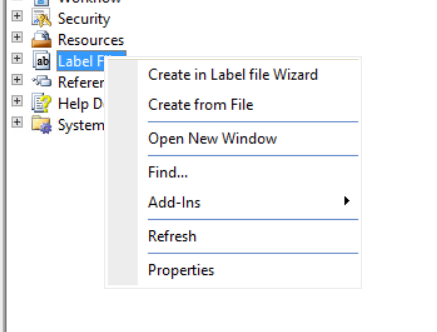
And then import it by right click on aot => labels =right click and create from file.

new enviroment

The new Dynamics AX (aka AX 7) RTW vm component now available for download

February 28, 2016 by alirazazaidi

Hi, All I found new Dynamics AX RTW download link on Microsoft connect.  Microsoft update that link at 24/2/2016. After download you have to follow following two links to configure it on your machine.


https://ax.help.dynamics.com/en/wiki/access-microsoft-dynamics-ax-7-instances-2/

Running Dynamics Ax 7 CT8 Vm on Windows 8.1

Excel power query with Dynamics Ax 2012 R3

February 19, 2016 by alirazazaidi


End user in Pakistan industry love the Excel. I worked in local Pepsi franchise for two years. Everything they need raw data or reporting data into excel. They called it cycle. Because their office work cycle starts and end on excel. How much complex report you developed for them, if it not converted into excel it is useless (I was working in Oracle 6i reports at that time). So recently I decided to explore excel power query that helps to extract complex data from AX to excel. Later user can easily convert or format according to his / her needs. So here are some my key notes to connectivity with Excel power Query.

Currently for this article I used demo data and Microsoft demo vm AX R3 cu9.

For Excel power Query you have to download add in from following link. It works fine for excel 2013.

https://www.microsoft.com/en-us/download/details.aspx?id=39379&CorrelationId=be43bca0-3131-4c19-940f-f3d4f441efa2


When you open the above link in browser following screen will open

Download Link

Click on download button. Following screen will open

2016-02-19_10-27-38

As per my machine has 64 bit version of excel so I download 64 bit version of it.


After download run it setup.

2016-02-18_12-07-31

Click on next

2016-02-18_12-08-21

Click on next

2016-02-18_12-22-34


Finally click on finished button.


Now open Excel and you find following new tab will be added on tab strip.

2016-02-18_12-27-38

If you did not find this tab in excel. Check the excel option and enable power query add-in. You can possibly found it at this location.

2016-02-18_12-25-12

Now its time to connect excel with Ax. For this you have to verify that you AIF services are successfully configured and deployed on AX. If not then generate incremental CIL to verify that no error in your environment and AIF services are successfully working.

Now open Ax client and go in organization administrator module. You can follow menu link as

Organization administrator =>Setup=> Document management=> Document data source

2016-02-18_15-33-04

On click on it you found following form.

2016-02-18_15-33-52

As I am going to test on out of the box Query so I decided to use “USSalesUSMF2011”. You want to use your own query then select it in above screen and also activate it.


Now switch back to excel and from Power Query tab select  “From Other Sources” => “From OData Feed”

2016-02-18_15-36-07

From new screen select following Ax Query service with default url

http://localhost:8101/DynamicsAX/services/OdataQueryService

Query address will be vary if you are using excel add in on client and AOS on some other location.

2016-02-18_15-37-07

Click on Ok. From next screen click on windows screen. As I am trying to connect on demo machine with default admin user so I select my current credentials. Otherwise you have to create a user in AX and he has to write Access on ODataQueryService and all tables in side Query to fetch data.

2016-02-18_15-38-08


Click on next  you find navigator from

2016-02-18_15-43-13

Select required query. And click on ok.

You find data against query in Excel as following

2016-02-19_10-23-49


Now if you expert in excel, you can make magic from here.


« Previous Page
Next Page »

Primary Sidebar

About

I am Dynamics AX/365 Finance and Operations consultant with years of implementation experience. I has helped several businesses implement and succeed with Dynamics AX/365 Finance and Operations. The goal of this website is to share insights, tips, and tricks to help end users and IT professionals.

Legal

Content published on this website are opinions, insights, tips, and tricks we have gained from years of Dynamics consulting and may not represent the opinions or views of any current or past employer. Any changes to an ERP system should be thoroughly tested before implementation.

Categories

  • Accounts Payable (2)
  • Advance Warehouse (2)
  • AI (3)
  • Asset Management (3)
  • Azure Functions (1)
  • Books (6)
  • Certification Guide (3)
  • ChatGPT (3)
  • Claude (1)
  • Customization Tips for D365 for Finance and Operations (63)
  • D365OF (60)
  • Data Management (1)
  • database restore (1)
  • Dynamics 365 (59)
  • Dynamics 365 for finance and operations (139)
  • Dynamics 365 for Operations (174)
  • Dynamics AX (AX 7) (134)
  • Dynamics AX 2012 (274)
  • Dynamics Ax 2012 Forms (13)
  • Dynamics Ax 2012 functional side (16)
  • Dynamics Ax 2012 Reporting SSRS Reports. (31)
  • Dynamics Ax 2012 Technical Side (52)
  • Dynamics Ax 7 (65)
  • Exam MB-330: Microsoft Dynamics 365 Supply Chain Management (7)
  • Excel Addin (1)
  • Favorites (12)
  • Financial Modules (6)
  • Functional (8)
  • General Journal (1)
  • Implementations (1)
  • Ledger (1)
  • Lifecycle Services (1)
  • Logseq (4)
  • Management Reporter (1)
  • Microsoft Excel (4)
  • MS Dynamics Ax 7 (64)
  • MVP summit (1)
  • MVP summit 2016 (1)
  • New Dynamics Ax (19)
  • Non Defined (9)
  • Note taking Apps (2)
  • Obsidian (4)
  • Personal Knowledge Management (3)
  • PKM (16)
  • Power Platform (6)
  • Procurement (5)
  • procurement and sourcing (6)
  • Product Information Management (4)
  • Product Management (6)
  • Production Control D365 for Finance and Operations (10)
  • Sale Order Process (10)
  • Sale Order Processing (10)
  • Sales and Distribution (5)
  • Soft Skill (1)
  • Supply Chain Management D365 F&O (5)
  • Tips and tricks (278)
  • Uncategorized (165)
  • Upgrade (1)
  • Web Cast (7)
  • White papers (4)
  • X++ (10)

Wiki

  • SCM

Copyright © 2026 · Magazine Pro On Genesis Framework · WordPress · Log in