• Skip to main content
  • Skip to primary sidebar
  • Home
  • About
  • Recommended Readings
    • 2022 Book Reading
    • 2023 Recommended Readings
    • Book Reading 2024
    • Book Reading 2025
    • Book Reading 2026
  • Supply Chain Management Guide
  • PKM
  • Microsoft Excel
  • Microsoft Copilot in Office 365
  • Public Wiki Page

Ali Raza Zaidi

A practitioner’s musings on Dynamics 365 Finance and Operations

MS Dynamics Ax 7

Build Dynamics Query in Dynamics 365 for Finance and Operations – Video Webcast MsDyn365FO

October 11, 2018 by alirazazaidi


Hi every one, here is another video.  Perfection is enemy of best and Best is enemy of good.  I spend 3 less sleep nights but unable to attain perfection in terms of presentation, I decided to complete it in good condition. It is beginner level video for developers. Certainly It based my 6 years technical work in Dynamics Ax 2012 and Dynamics 365 for Finance and Operations. Imagine how much I explored while making this video.   I used many reference to complete the code snippet form Internet.  Ahhoo

  • Build Query in AOT

  You can build a query in the AOT using Visual Studio. An advantage of creating the query in the AOT is that it can be reused in various places, saving lines of identical code, and making wide-reaching query adjustment easier.


  • Build Query in X++

Queries can also be built dynamically with X++ code. Both approaches are used in the standard application. One advantage of making the query dynamic is that it is not public in the AOT and is protected against unintentional AOT changes.


  • X++ Query Component
    • QueryRun
    • Query
    • QueryBuildDataSource
    • QueryBuildFieldList
    • QueryBuildRange
    • QueryFilter
    • QueryBuildDynaLink
    • QueryBuildLink


  • QueryRun

Use the queryRun object to execute the query and fetch data.

 QueryRun queryRun;

    queryRun = new QueryRun(query);

    if (queryRun.prompt())

    {

        while (queryRun.next())

        {

            inventTrans = queryRun.get(tableNum(InventTrans));

        }

}

  • Query

 The query object is the definition master. It has its own properties and has one or more related data sources.

        Query query;

       query = new Query();

        query.addDataSource(tableNum(InventTrans));

  • QueryBuildDataSource

Using QueryBuildDataSources you add all the tables you want joined (just one in this example). This is also where you define how the resultset is to be sorted. The orderMode() method lets you define:

  • OrderBy
  • GroupBy

QueryBuildDataSource queryBuildDataSourceTrans, queryBuildDataSourceDim;

queryBuildDataSourceTrans = query.addDataSource(tableNum(InventTrans));

queryBuildDataSourceDim = queryBuildDataSourceTrans.addDataSource(tableNum(InventDim));

 queryBuildDataSourceDim.addGroupByField(fieldNum(InventDim, InventBatchId));

 queryBuildDataSourceDim.relations(true);


  • QueryBuildFieldList

 The queryBuildFieldList object defines which fields to fetch from the database. The default is a dynamic field list that is equal to a “select * from …”. Each data source has only one queryBuildFieldList object which contains information about all selected fields. You can also specify aggregate functions like sum, count, and avg with the field list object.

 QueryBuildFieldList  qbfl       = qbds.fields();

 qbfl.addField(fieldNum(CustTable,CreditMax),SelectionField::Sum);

   qbfl.addField(fieldnum(CustTable,RecId),SelectionField::Count);


  • QueryBuildRange

  QueryBuildRange – The queryBuildRange object contains a limitation of the query on a single field.

QueryBuildDataSource    custTableQBDS, custTransQBDS;

QueryBuildRange         qbr1, qbr2;

custTableQBDS = query.addDataSource(tablenum(custTable));

qbr1 = query.dataSourceTable(tableNum(CustTable)).addRange(fieldNum(CustTable, AccountNum));

    qbr2 = query.dataSourceTable(tableNum(CustTable)).addRange(fieldNum(CustTable, InvoiceAccount));

    qbr1.value(SysQuery::value(‘4011’));

    qbr2.value(SysQuery::value(‘4010’));

  • QueryFilter

QueryFilter – The queryFilter object is used to filter the result set of an outer join. It filters the data at a later stage than the queryBuildRange object and filters the parent table based on the child table results.

QueryBuildDataSource    custTableQBDS, custTransQBDS;

 QueryFilter qFilter1, qFilter2;

custTableQBDS = query.addDataSource(tablenum(custTable));

qFilter1 = query.addQueryFilter(custTableQBDS,”AccountNum”);

qFilter1.value(“4011″);

qFilter2 = query.addQueryFilter(custTableQBDS,” InvoiceAccount”);

qFilter1.value(“4010″);


  • QueryBuildDynalink

QueryBuildDynalink – Contains information regarding a relation (limitation) to an external record. When the query is run, this information is converted to additional entries in the WHERE clause of the query SQL statement. Can only exist on the parent data source of a query. The function is used by forms, when two data sources are synchronized. Then the child data source will contain a dynalink or dynalinks to the parent data source. The function is used even if the two data sources are placed in two different forms but are still synchronized.

  • QueryBuildLink

QueryBuildLink  –  Specifies the relation between the two data sources in the join. Can only exist on a child data source.

QueryBuildLink          qbl;

QueryBuildDataSource    custTableQBDS, custTransQBDS;

custTableQBDS = query.addDataSource(tablenum(custTable));

custTransQBDS = custTableQBDS.addDataSource(tableNum(CustTrans));

qbl = custTransQBDS.addLink(fieldNum(CustTable, AccountNum), fieldNum(CustTrans, AccountNum));


Reference : 

http://www.axaptapedia.com/Query_class

https://docs.microsoft.com/en-us/dynamicsax-2012/developer/query-object-model

Cleanup routines in Dynamics 365 for Finance and Operations- From Microsoft Blog post shared

October 5, 2018 by alirazazaidi

In Dynamics 365 for Finance and Operations cleanup routines are available across various modules within the product. It is important to note that these cleanup routines should be only executed after detailed analysis and confirmation from the business this data is no longer needed. Also always test each routine first in test environment prior executing it in production. This article provides an overview on what is available today.

read complete article from this link https://blogs.msdn.microsoft.com/axsa/2018/09/05/cleanup-routines-in-dynamics-365-for-finance-and-operations/

Upgrade from Ax 2012 to Dynamics 365 Finance and Operations – Ignite Video

October 3, 2018 by alirazazaidi

Dear fellows, Ex-Microsoft MVP and Now Microsoft Employee Lane Swenka Presented at Microsoft Ignite 2018. Microsoft Shared video of his presentation on Youtube. This video is give you good insight upgrade from Dynamics Ax 2012 to D365 Finance and operations.

Introduction to Microsoft Dynamics 365 Business Central – Microsoft Video

September 12, 2018 by alirazazaidi

View Details User Tip MSDyn365FO Dynamics 365 for finance and operations

September 9, 2018 by alirazazaidi

Hi everyone this is user level tip for Dynamics 365 for finance and operations. We can add and remove Values in any drop down or lookup field by right click and from view details on menu. It is very beginner level tip.

Currency Exchange Rate, Currency Exchange Rate Provider MSDyn365FO Dynamics 365 for Finance and operations

September 1, 2018 by alirazazaidi

Hi all, Microsoft provide 3 currency Exchange rate providers, With these provider we get latest currency Exchange rates in Dynamics 365 for finance and operations. These exchange rates used when We required transactions in different currencies.  In the current web cast I used one of Exchange rate provider get latest exchange rates. Its works excellent in my local laptop hosted VM. My English is improving day by day so bear with me.

Disable export to Excel Customization D365 for finance and operations

August 27, 2018 by alirazazaidi

We can disable the export to Excel option in list pages, There is option on grid properties “Export to Excel”. Its by default true. By changing it to false disable export to excel on specific form.

Fix Certificate Issues on Development Machines Dyn365FO Dynamics 365 for finance and operations.

August 27, 2018 by alirazazaidi

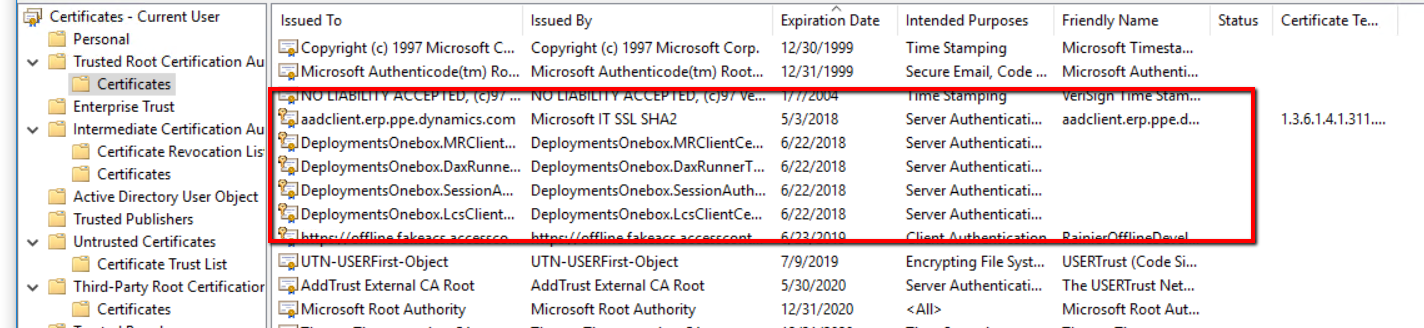
Today I got issue on my Dev vm hosted in local environment.  Some certificate was expired.

open windows menu 

Certificates – Local Computer > Personal > Certificates.

And find expired certificate

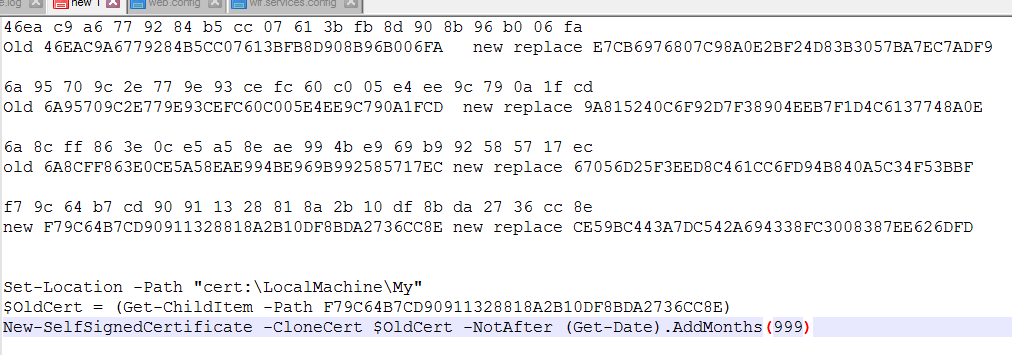
Open these certificate and copy thumbprints in Notepad ++ 

Open PowerShell with run as administrator and generate new clone certificates  


Set-Location -Path “cert:\LocalMachine\My”
$OldCert = (Get-ChildItem -Path F79C64B7CD90911328818A2B10DF8BDA2736CC8E)
New-SelfSignedCertificate -CloneCert $OldCert -NotAfter (Get-Date).AddMonths(999)
 

My notepad++ files look like similar after copy paste new thumbprints

Then open following three files form C:\AOSService\webroot:

  • web.config
  • wif.config
  • wif.services.config

Search old thumbprints with new one.

Save and restart the machine.

After reboot, Successfully login

More detail article which helps me by

Reference : https://community.dynamics.com/365/financeandoperations/b/axilitynet/archive/2018/03/27/fix-certificate-issues-on-development-machines

Sale Order Processing Part 4 Line Level Discount Sales Trade Agreement Video- D365 for Finance and Operations

July 28, 2018 by alirazazaidi

Fourth video in Sale order processing video series. I shared very precise how to, Line level discount trade agreement and apply it on Sales order.

MICROSOFT RELEASES OCTOBER 2018 FEATURES ROADMAP FOR BUSINESS APPLICATIONS

July 28, 2018 by alirazazaidi

You can found document   here.

« Previous Page
Next Page »

Primary Sidebar

About

I am Dynamics AX/365 Finance and Operations consultant with years of implementation experience. I has helped several businesses implement and succeed with Dynamics AX/365 Finance and Operations. The goal of this website is to share insights, tips, and tricks to help end users and IT professionals.

Legal

Content published on this website are opinions, insights, tips, and tricks we have gained from years of Dynamics consulting and may not represent the opinions or views of any current or past employer. Any changes to an ERP system should be thoroughly tested before implementation.

Categories

  • Accounts Payable (2)
  • Advance Warehouse (2)
  • AI (3)
  • Asset Management (3)
  • Azure Functions (1)
  • Books (6)
  • Certification Guide (3)
  • ChatGPT (3)
  • Claude (1)
  • Customization Tips for D365 for Finance and Operations (64)
  • D365OF (60)
  • Data Management (1)
  • database restore (1)
  • Dynamics 365 (59)
  • Dynamics 365 for finance and operations (139)
  • Dynamics 365 for Operations (175)
  • Dynamics AX (AX 7) (134)
  • Dynamics AX 2012 (274)
  • Dynamics Ax 2012 Forms (13)
  • Dynamics Ax 2012 functional side (16)
  • Dynamics Ax 2012 Reporting SSRS Reports. (31)
  • Dynamics Ax 2012 Technical Side (52)
  • Dynamics Ax 7 (65)
  • Exam MB-330: Microsoft Dynamics 365 Supply Chain Management (7)
  • Excel Addin (1)
  • Favorites (12)
  • Financial Modules (6)
  • Functional (8)
  • General Journal (1)
  • Implementations (1)
  • Ledger (1)
  • Lifecycle Services (1)
  • Logseq (4)
  • Management Reporter (1)
  • Microsoft Excel (4)
  • MS Dynamics Ax 7 (64)
  • MVP summit (1)
  • MVP summit 2016 (1)
  • New Dynamics Ax (19)
  • Non Defined (9)
  • Note taking Apps (2)
  • Obsidian (4)
  • Personal Knowledge Management (3)
  • PKM (16)
  • Power Platform (6)
  • Procurement (5)
  • procurement and sourcing (6)
  • Product Information Management (4)
  • Product Management (6)
  • Production Control D365 for Finance and Operations (10)
  • Sale Order Process (10)
  • Sale Order Processing (10)
  • Sales and Distribution (5)
  • Soft Skill (1)
  • Supply Chain Management D365 F&O (5)
  • Tips and tricks (278)
  • Uncategorized (165)
  • Upgrade (1)
  • Web Cast (7)
  • White papers (4)
  • X++ (10)

Wiki

  • SCM

Copyright © 2026 · Magazine Pro On Genesis Framework · WordPress · Log in