I got error “‘FormRun’ could not be created “on EP. When I test the submit for approval in EP.
I have to reimplement all methods with respect to following link
https://msdn.microsoft.com/EN-US/library/ee677503.aspx
A practitioner’s musings on Dynamics 365 Finance and Operations
I got error “‘FormRun’ could not be created “on EP. When I test the submit for approval in EP.
I have to reimplement all methods with respect to following link
https://msdn.microsoft.com/EN-US/library/ee677503.aspx
During development suddenly Ax stop working. When I try to connect web url https://usnconeboxax1aos.cloud.onebox.dynamics.com. It shows page can not display. Previously it was working fine.
On Event viewer I found following exception.
The description for Event ID 110 from source Microsoft Dynamics AX cannot be found. Either the component that raises this event is not installed on your local computer or the installation is corrupted. You can install or repair the component on the local computer.
If the event originated on another computer, the display information had to be saved with the event.
The following information was included with the event:
AX is shutting down due to an error.
Duplicate metadata element has been detected in multiple modules. Please verify that application is deployed correctly and installed modules are compatible. Following elements are defined in more than one module:
Element AxService/tstColorService is defined in the following modules: ServiceTest, ApplicationSuite
Solution: During development I created artifacts with same name in different models on different occasions. Surprisingly no warning or error appears during development about object of same name already exists in AOT. I open required solution rename artifacts and build solution. AX web application start working again.
Usually I forget this step during code migration from environment to other. So I note it down for future reference.
The best way to move labels from environment to copy the *.lac file form location
C:\Program Files\Microsoft Dynamics AX\60\Server\MicrosoftDynamicsAX\bin\Application\Appl\Standard
And paste on some common folder in target environment.
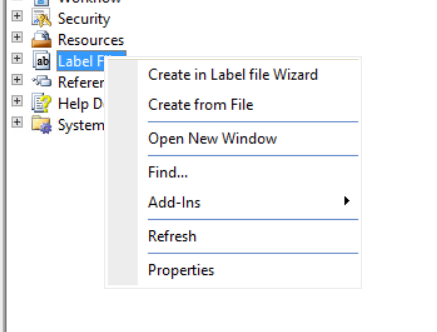
And then import it by right click on aot => labels =right click and create from file.

Hi, All I found new Dynamics AX RTW download link on Microsoft connect. Microsoft update that link at 24/2/2016. After download you have to follow following two links to configure it on your machine.
https://ax.help.dynamics.com/en/wiki/access-microsoft-dynamics-ax-7-instances-2/
End user in Pakistan industry love the Excel. I worked in local Pepsi franchise for two years. Everything they need raw data or reporting data into excel. They called it cycle. Because their office work cycle starts and end on excel. How much complex report you developed for them, if it not converted into excel it is useless (I was working in Oracle 6i reports at that time). So recently I decided to explore excel power query that helps to extract complex data from AX to excel. Later user can easily convert or format according to his / her needs. So here are some my key notes to connectivity with Excel power Query.
Currently for this article I used demo data and Microsoft demo vm AX R3 cu9.
For Excel power Query you have to download add in from following link. It works fine for excel 2013.
When you open the above link in browser following screen will open

Click on download button. Following screen will open

As per my machine has 64 bit version of excel so I download 64 bit version of it.
After download run it setup.

Click on next

Click on next

Finally click on finished button.
Now open Excel and you find following new tab will be added on tab strip.

If you did not find this tab in excel. Check the excel option and enable power query add-in. You can possibly found it at this location.

Now its time to connect excel with Ax. For this you have to verify that you AIF services are successfully configured and deployed on AX. If not then generate incremental CIL to verify that no error in your environment and AIF services are successfully working.
Now open Ax client and go in organization administrator module. You can follow menu link as
Organization administrator =>Setup=> Document management=> Document data source

On click on it you found following form.

As I am going to test on out of the box Query so I decided to use “USSalesUSMF2011”. You want to use your own query then select it in above screen and also activate it.
Now switch back to excel and from Power Query tab select “From Other Sources” => “From OData Feed”

From new screen select following Ax Query service with default url
http://localhost:8101/DynamicsAX/services/OdataQueryService
Query address will be vary if you are using excel add in on client and AOS on some other location.

Click on Ok. From next screen click on windows screen. As I am trying to connect on demo machine with default admin user so I select my current credentials. Otherwise you have to create a user in AX and he has to write Access on ODataQueryService and all tables in side Query to fetch data.

Click on next you find navigator from

Select required query. And click on ok.
You find data against query in Excel as following

Now if you expert in excel, you can make magic from here.
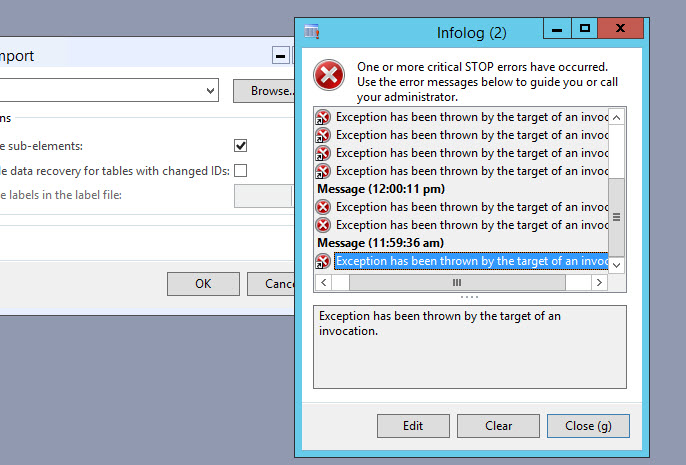
A few days ago I face again the old error “Exception has been thrown by target of an invocation.
This time this error did not let us do anything on client.

Finally I found that AOS server Configuration utility, database server is set as Server Name for example as “DB server” instead of server IP. When sometimes Database server name is resolved by network configuration, AX working fine and some time when it unable to resolve the server IP with its name “Target of Invocation” error appears. On opening the AOS server configuration utility i found following error

When I click the ok button, AOS server configuration utility did not open, it shown in windows task management. So I kill its instance. Then Stop the AOS service form windows services management. Again open AOS server utility, it opened with in a few minutes (Still takes time). Then I create a new active configuration. And replace database server name with its IP. for example Instead of Database server name “DB server” I used the “192.168.1.1”. Save the settings and start the AOS service. AX working fine and error disappears.
I found following links for Dynamics Perf 2.0
http://blogs.msdn.com/b/axinthefield/archive/2015/12/18/what-s-new-in-dynamicsperf-2-0.aspx
http://blogs.msdn.com/b/axinthefield/archive/2016/01/03/dynamicsperf-2-0-scheduling-engine.aspx
http://blogs.msdn.com/b/axinthefield/archive/2016/01/06/dynamicsperf-2-0-is-here.aspx
http://blogs.msdn.com/b/axinthefield/archive/2015/12/30/dynamicsperf-2-0-deployment-guide.aspx
Suppose we have to insert data into VendGroup table through TSQL, this scenario usually appear when integration or data migration team inject data into AX using TSQL without using AIF.
There are two tables are important SQLDICTONARY and SYSTEMSEQUENCES.
SQLDictonary table contains the table id for example Vendtable has 490 id.
SYSTEMSEQUENCES table contains the sequence number in nextVal field.
I used following code snippet which helps me to insert into AX through TSQL.
declare @tableId as int = (select tableid from SQLDICTIONARY where name like 'VendGroup' and FIELDID=0);
print @tableId;
declare @recId as bigint =(select nextval from SYSTEMSEQUENCES where TABID=@tableId and name='seqno');
print @recId;
select @recId set @recId =@recId + 1;
print @recId;
insert into DBO.VENDGROUP ([VENDGROUP],[NAME],[RECID],DATAAREAID,CREATEDBY,DEL_CREATEDTIME,CLEARINGPERIOD,PAYMTERMID,RECVERSION) values ('80','TSQLTest',@recId,'usmf','ALICIA',19372,'Net10','Net10',0 );
update SYSTEMSEQUENCES set NEXTVAL = @recId where TABID=@tableId and name='seqno';

reference:
Here is little tip regarding look up.
A few days ago, I have to take join with employee with my custom table. if you check that The primary key of HCMWORKER IS RecId.
So I have to create worker relation based on primary key i.e recid.\

But when I drop the foreign key on form Grid. It creates reference group. And surprising this create out of the box lookup with similar to same based on alternative key.

Now there is query appears that we have to filter it the workers of certain cariteria. for example you can certain designation or not terminate. now I face question how to add custom lookup in Reference group. Now there is no lookup function and same time if exists it will not work.
After searching I found referenceLookup method at data source field instead of grid text field. So Overwrite the method and similar code snippet creates the similar to out of the box lookup. You can extend it according to need.

public Common lookupReference(FormReferenceControl _formReferenceControl)
{

HcmWorker HcmWorker;
Query query = new Query();
QueryBuildDataSource queryBuildDataSource;
QueryBuildRange queryBuildRange;

SysReferenceTableLookup sysTableLookup = SysReferenceTableLookup::newParameters(tableNum(HcmWorker), _formReferenceControl, true);
;
sysTableLookup.addLookupField(fieldNum(HcmWorker, PersonnelNumber));
sysTableLookup.addLookupField(fieldNum(HcmWorker, Person));

queryBuildDataSource = query.addDataSource(tableNum(HcmWorker));

return sysTableLookup.performFormLookup();

}

Reference I used for this post, They help me during doing day to day task
http://devexpp.blogspot.com/2013/06/dynamics-ax-custom-reference-group.html
https://dynamicsaxposed.wordpress.com/2011/11/04/sysreferencetablelookup-class-for-reference-group/
Now in Dynamics Ax 7, now developer can declare variable/object where they need it. Instead ax 2012, where variable declaration is only possible in very beginning of method or function.
For ( int counter =0; counter < 10; counter++)

{


If ( counter >10)

{

Int value= counter+10;

}

Else

{

Real percentage = (counter  *20) /100;

}

}
That’s good: Its ease to developer to declare variable where he needs.
That’s bad : it will disorganize the code, Its look better as in Ax 2012 that variables will declare in separate section. It was better to search reference of class object or table buffer