• Skip to main content
  • Skip to primary sidebar
  • Home
  • About
  • Recommended Readings
    • 2022 Book Reading
    • 2023 Recommended Readings
    • Book Reading 2024
    • Book Reading 2025
    • Book Reading 2026
  • Supply Chain Management Guide
  • PKM
  • Microsoft Excel
  • Microsoft Copilot in Office 365
  • Public Wiki Page

Ali Raza Zaidi

A practitioner’s musings on Dynamics 365 Finance and Operations

Document Router

Document Routing Installation in D365 Finance & Operations

October 28, 2026 by alirazazaidi

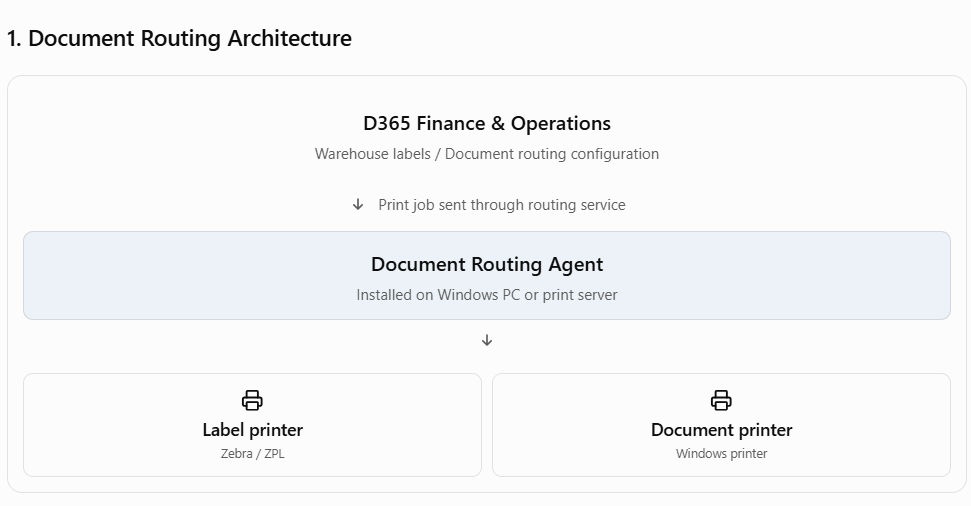
In Microsoft Dynamics 365 Finance & Operations (D365 F&O), Document Routing is primarily used to print documents such as warehouse labels, shipping labels, and other reports directly to network or local printers.

The main component is the Document Routing Agent (DRA), which is installed on a Windows machine that has access to the required printers.

1. Document Routing Architecture
2. Installation steps

  1. Sign in to D365 F&O with an account that has the required administration permissions.
  2. Navigate to Warehouse management → Setup → Document routing → Document routing agents.
  3. Download the Document Routing Agent installer from the available download option.
  4. Install the agent on the Windows machine or print server.
  5. Launch the agent and sign in using the appropriate Microsoft Entra ID account.
  6. Register the agent against the correct D365 F&O environment.
  7. Make sure the printers are installed and accessible on that machine.
  8. In D365 F&O, configure the printers and document routing rules, then test printing.

For warehouse label printing, also configure the relevant document routing layouts and printer selections.

3. Important prerequisites

According to Microsoft’s documentation, verify these requirements before installation:

  • .NET Framework 4.7.2 or later.
  • Adobe Acrobat Reader.
  • D365 security role: Document routing client.
  • Microsoft Entra ID authentication.
  • Printer drivers installed on the agent machine.

4. Run as a Windows service

For production environments, you can configure DRA to run as a Windows service rather than requiring an interactive desktop session.

In DRA, open Settings → Run as a Windows Service, then configure the service account in Windows Services.

The service name is:

Microsoft Dynamics 365 Finance Document Routing Service

Microsoft also specifies that the authentication token must be refreshed every 90 days. Microsoft Learn+1

5. Official Microsoft documentation

Install the Document Routing Agent – Microsoft LearnConfigure Document Routing Agent as Windows Service

Primary Sidebar

About

I am Dynamics AX/365 Finance and Operations consultant with years of implementation experience. I has helped several businesses implement and succeed with Dynamics AX/365 Finance and Operations. The goal of this website is to share insights, tips, and tricks to help end users and IT professionals.

Legal

Content published on this website are opinions, insights, tips, and tricks we have gained from years of Dynamics consulting and may not represent the opinions or views of any current or past employer. Any changes to an ERP system should be thoroughly tested before implementation.

Categories

  • Accounts Payable (2)
  • Advance Warehouse (2)
  • AI (3)
  • Asset Management (3)
  • Azure Functions (1)
  • Books (6)
  • Certification Guide (3)
  • ChatGPT (3)
  • Claude (1)
  • Customization Tips for D365 for Finance and Operations (65)
  • D365OF (60)
  • Data Management (1)
  • database restore (1)
  • Dynamics 365 (59)
  • Dynamics 365 for finance and operations (140)
  • Dynamics 365 for Operations (176)
  • Dynamics AX (AX 7) (134)
  • Dynamics AX 2012 (274)
  • Dynamics Ax 2012 Forms (13)
  • Dynamics Ax 2012 functional side (16)
  • Dynamics Ax 2012 Reporting SSRS Reports. (31)
  • Dynamics Ax 2012 Technical Side (52)
  • Dynamics Ax 7 (65)
  • ERP implementation (1)
  • Exam MB-330: Microsoft Dynamics 365 Supply Chain Management (7)
  • Excel Addin (1)
  • Favorites (12)
  • Financial Modules (6)
  • Functional (8)
  • General Journal (1)
  • Implementations (1)
  • Ledger (1)
  • Lifecycle Services (2)
  • Logseq (4)
  • Management Reporter (1)
  • Microsoft Excel (4)
  • MS Dynamics Ax 7 (64)
  • MVP summit (1)
  • MVP summit 2016 (1)
  • New Dynamics Ax (19)
  • Non Defined (9)
  • Note taking Apps (2)
  • Obsidian (5)
  • Personal Knowledge Management (3)
  • PKM (17)
  • Postman (1)
  • Power Platform (6)
  • Procurement (5)
  • procurement and sourcing (6)
  • Product Information Management (4)
  • Product Management (6)
  • Production Control D365 for Finance and Operations (10)
  • Project Management (2)
  • Sale Order Process (10)
  • Sale Order Processing (10)
  • Sales and Distribution (5)
  • Soft Skill (1)
  • Supply Chain Management D365 F&O (5)
  • Team Lead tips (1)
  • Team Management (1)
  • Tips and tricks (278)
  • Uncategorized (165)
  • Upgrade (1)
  • Web Cast (7)
  • White papers (4)
  • X++ (12)

Wiki

  • SCM

Copyright © 2026 · Magazine Pro On Genesis Framework · WordPress · Log in