In this video, I demonstrate how to make product in Dynamics and released in legal entity
d365 for finance and operations
MB-330: Microsoft Dynamics 365 Supply Chain Management | Product and Product Master
First video in the series of preparation guide for MB-330 Certification guide.
How hide SSRS Parameter RDP Menu Name Dynamics 365 Finance and Operations
Again documentation
class XYZUIBuilder extends SrsReportDataContractUIBuilder
{
public void build()
{
    RecId       hcmWorkerRecId;
    str         name, menuItemName;
    FormBuildGroupControl grp;
    //Dialog    dialogLocal = this.dialog();
    XYZDC   rdpContract = this.dataContractObject();
    DialogField                             workerfieldDiff;
    DialogField  _FromDate,_Todate;

    // Add the pay cycle field.


    menuItemName = this.controller().parmArgs().menuItemName();
    workerfieldDiff = this.addDialogField(methodStr(XYZDC ,parmworkerrecid),rdpContract);
 //   hcmWorkerRecId = HcmWorker::userId2Worker(curUserId());
    if (menuItemName =="ESSReport")
    {

        workerfieldDiff.visible(false);
        workerfieldDiff.value(0);
    }
    _FromDate= this.addDialogField(methodStr(BEKenyaP9DC,parmFromDate),rdpContract);
    _Todate = this.addDialogField(methodStr(BEKenyaP9DC,parmToDate),rdpContract);

}
}
Procure to Pay Demo-D365 Finance and Operations

In this demo video, I shared the Procure to Pay process. It is simple and basic step,
I shared following steps as part of process
1- Create a new Vendor
2-Create a purchase order for Vendor.
3-Receive Purchase order or register the product receipet.
4- Invoice Purchase Order
5- Vendor payment Journal to settle the payment.
How to make dashboard with Power BI and Dynamics 365 For Finance and Operations
Hi everyone this little bit longer video, more then 35 minutes. Where record the complete process from Power BI to D365. Power BI is extremely easy. If you know only excel then you can easily work.
In this video you can connect with Dynamics 365 for finance and operations and make dashboard on it. I used Contoso data. If you complete watch this video you can easily understand following points.
Power BI Connections.
Download and install power BI.
How to connect with Dynamics 365 for finance and operations.
Load data,
Transform data Create calculated columns
Create measures Creates Custom tables Make Model based on tables.
Then make use different charts to make dashboards.
Sale Order Processing Part 6 Manual Charges Video- D365 for Finance and Operations t

This is 6th to the point video in Sales order processing series, where I shared the manual charges applied on Sale Order Header. Hope this helps.
Sale Order Processing Part 3 Price Listing Sales Trade Agreement Video- D365 for Finance and Operations
This is third video in Sale order Processing series using D365 for finance and operations. We use trade agreements for Price listing for Customer or group of customers.
Required table did not appear in relation drop-down D365 for Finance and Operations.
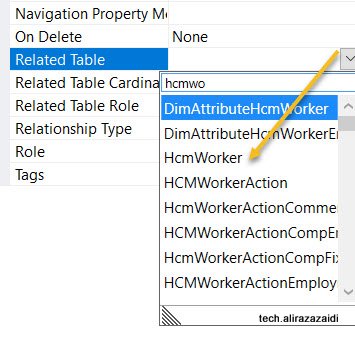
Hi All, I was doing my Pilot project in D365 for Finance and operations. I want to add HCMWorker relation to my custom table. But did not found in drop down.
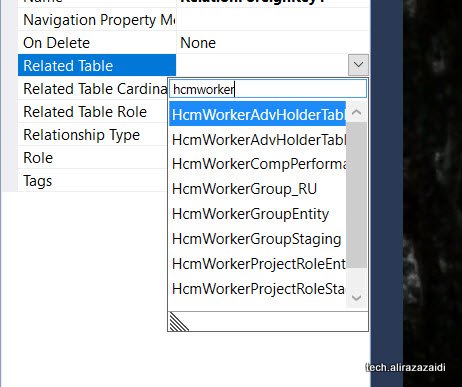
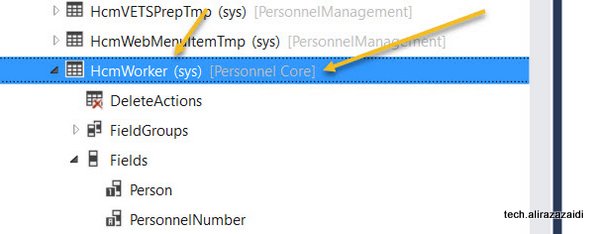
It means model reference(Package) was not included in Current Model. For this
For this first check Required model on table and add its reference On AOT
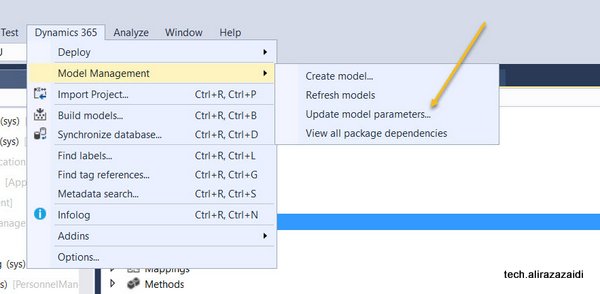
For adding this click on Dynamics 365 Menu on top. Model Management => Update Model Parameters
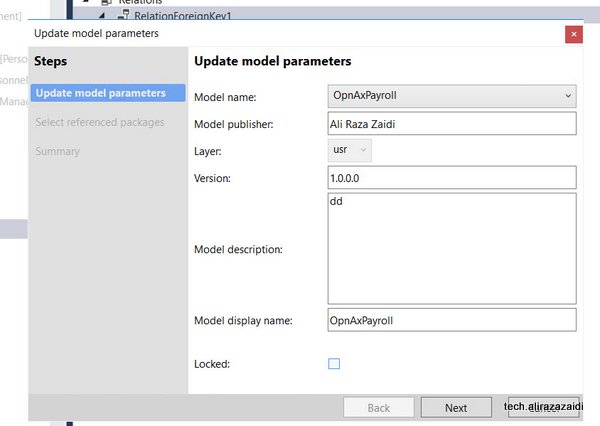
Select your current Model, for example, My Pilot Model is OpnAxPayroll I selected that.
Select required Models and

Now I found the HCMWorker in relation dropdown.
Sales Quotations Dynamics 365 for Finance and operations.
In response to Customer/ prospect request for quotation. Sale and marketing department generate Sales Quotations.
This Sales quotation can be generate existing customer. Otherwise D365 OF provide functionality to register sales Quotation against Prospect.

When Customer Response against Sales Quotation, We can confirm Sales Quotation convert to Sales Sale order and Prospect convert to Customer.
Similar to Sales order , Sale quotation is added in lines section. When entry is complete, from top menu and sent Sales quotation, Print can be generated.

There are multiple options available against Sales Quotations as response. We can find these options are available on “follow up” top tab menu.
Confirm:, Customer send confirmation so Sales Quotation convert to into Sales Order.
Cancel: Sales Quotations can be cancel, possible there will be no response form Prospect.
Lost quotation: In the case of another company won the quotation we can set as Lost. It is some kind of cancel. After that quotation is closed for edit.
Two options also found in sales and marketing parameter form.

You find in General tab

Days campaign expire, means sales quotation automatic expire the create of sales quotation.
Sales follow up date automatically created quotation creation date plus date mentioned here.
Sales follow up means, date of sales Quotation is created plus days mentioned here in setup.
Trello as lean project management tool for Dynamics Ax 2012 R3
Hi All, from last two years, I used Trello as lean project management tool. I used it track different customization task and its status.
This was wonderful free tool for post implementation or support projects. I tried to share some tips. Remember this is just small overview video for Trello.