- Most to organization enable the functionality of “Change Management” for Purchase order in their procurement process.
- In Some cases change management is not required for specific vendors.
- For this functionality Microsoft provide the functionality to override vendor functionality. Following is walkthrough.
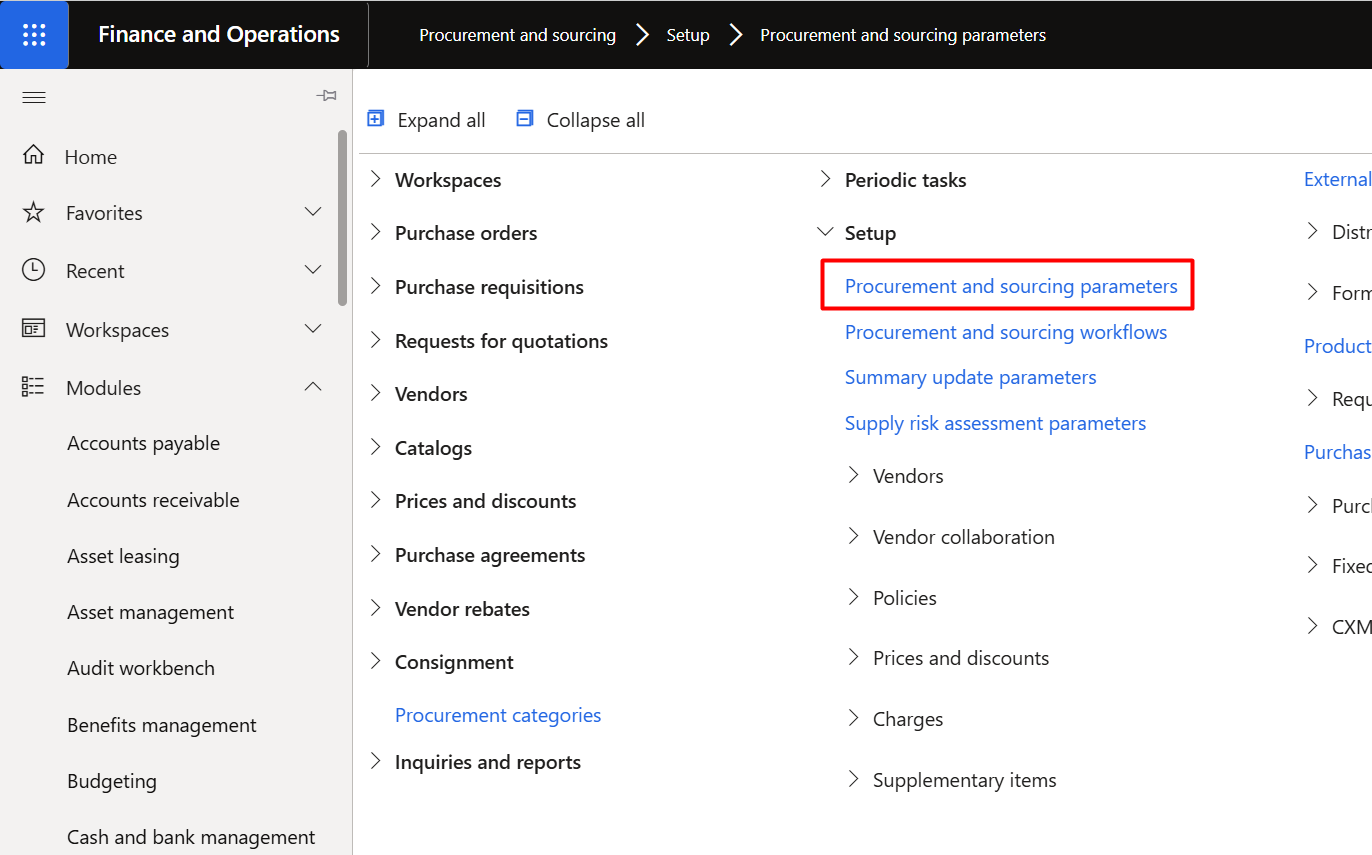
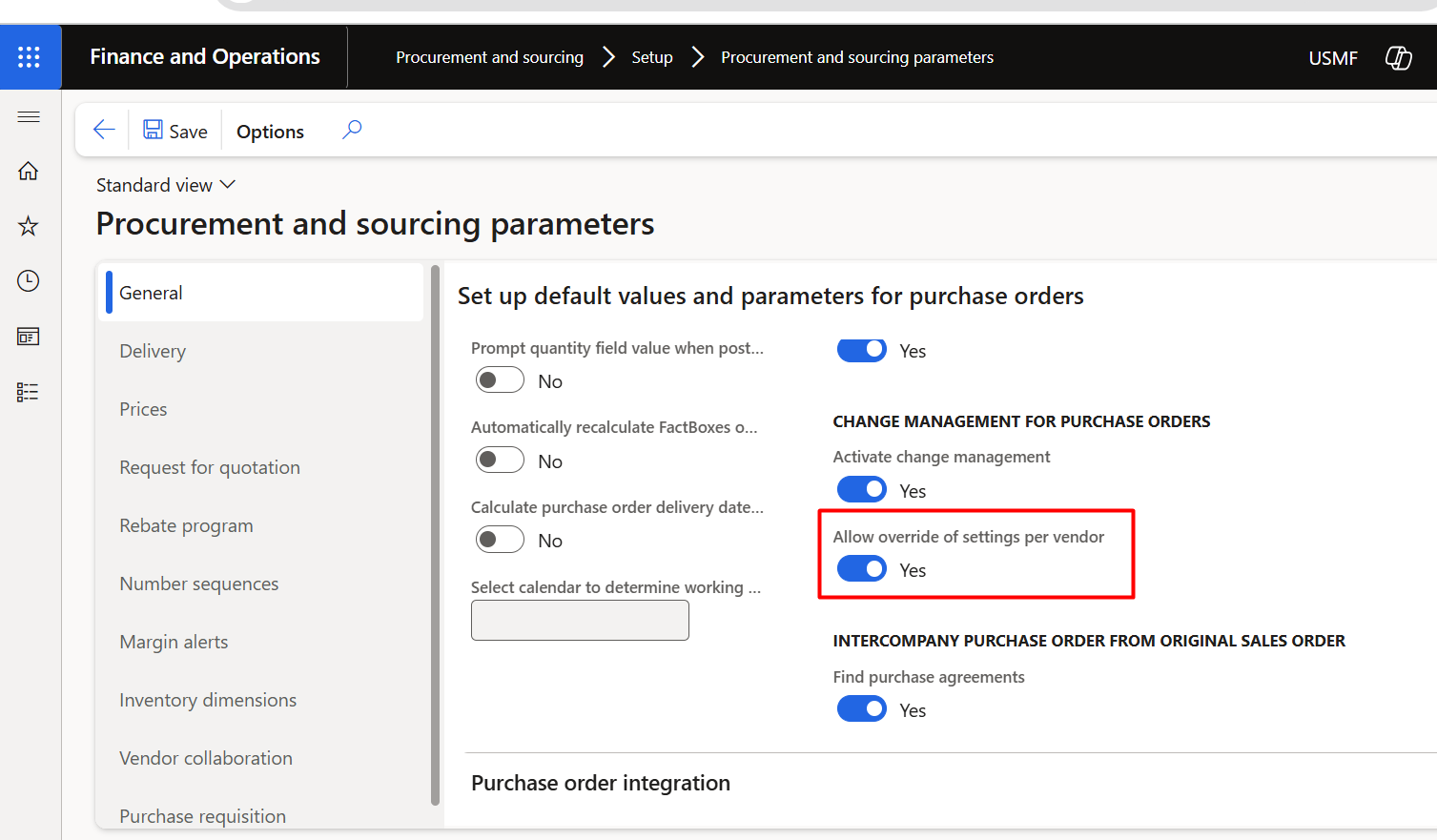
- In Pocurement parameters (Procurement and sourcing> Setup> Procurement and sourcing parameters, tab Default values and parameters in the section General) there is option for disable functionality by setting true / Yes for “Allow overright of settings per [[Vendor]]
- Now go to Vendor details form
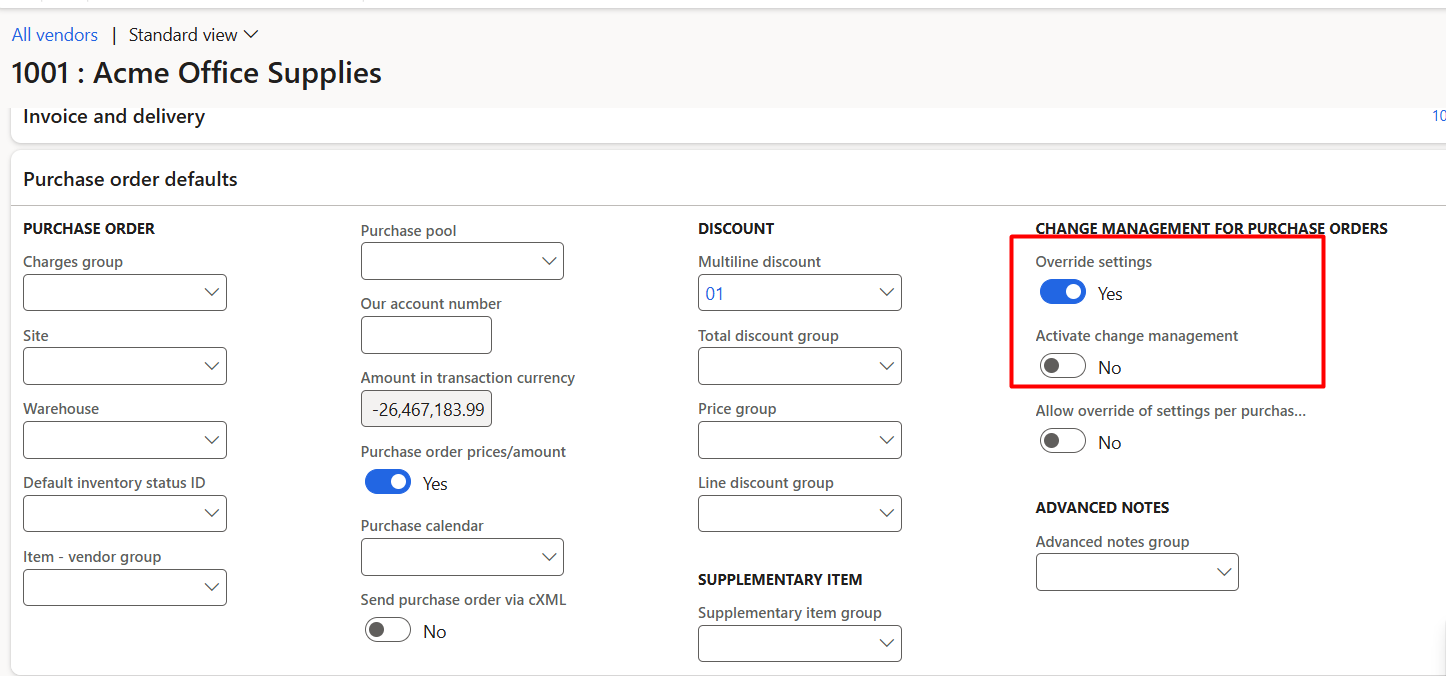
- Open in tab “Purchase Order defaults” and
- set Override settings to “yes” and
- set Activate change Management to “No”.
- Hope you like this log style blog post from Roam Research.
d365 for finance and operations
Write Extensible Data Security (XDS) in Dynamics 365 Finance and Operation
In D365, with Role based security we can restrict specific operations
to Certain user. Role based security will restrict the menu, forms and report.
It did not restrict certain records to view.
For example, They want to see only vendor with certain vendor group.
Customer for certain key market.
For this blog post, there is scenario that end user can be his created sales order.
For this requirement, we can use [[Extensible Data Security (XSD)]].
For this we require three elements.
AOT query.
Security Policy
And last one is Security Role.
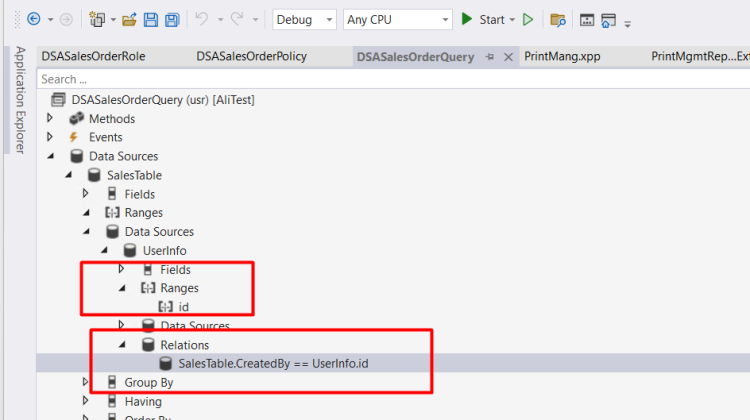
First we create AOT Query and add Sales table and inner join with userInfo Table and make join with userInfo.Id with SalesTable.CreatedBy

Then add range in UserInfo and add (CurrentUserId())

Now Create a new role. That will used in Security policy and later used for End user.

Now add a new Security policy

and set following properties.

Set following properties.
Constraint Table Yes
Context Type RoleName
Operations All Operations
Primary Table set as SalesTable
Query set the name of Query
Set Role Name with Role we created in above role.
Build and Sync Database.
Open D365 Finance and Operations goes and Userinfo in System Administrator and assign to specific end user.
Remember, that either assign, Sales Clerk role or Sales Manager role.
Extensible Data Security (XDS) is not working for system administrator role.

Sales order list will comes with sales order with filter.

Prepayment for Purchase order step by Step D365 Finance and Operations
In this video I shared how you can configure prepayment for purchase order and how we can settle it with purchase Invoice.
Product Attribute Data Management D365 Finance and Operations
We are senior, or senior citizen. Most of the time, young champs do things. And we as senior, just control the situation or communicate.
We can not do everything. We need to delegate things. Today I got chance to work with a young champ to import the product attribute in a system.
I used following Data Entities
Product attribute enumeration types v3
Product attribute integer enumeration types
Attribute group
Product attributes – Specification of attribute types and attribute name
Product category attributes – combination of category and attribute on a product
Product attribute values – for attribute values assignment per product
Product entity attribute value entity – for attribute values assignment per product
Category hierarchies & product category hierarchy – for Procurement category
Internal organization product attribute values
Product category category attribute group assignments – attribute assignment on category
Product category product attribute group assignments
How to see if a Vendor Invoice has been settled or not

In this post, we are going to verify vendor invoice is settle / paid or not.
For this you have to go Accounts payable module on following module.
For this we have to Vendor list page by this path
Account payable ⇒ common ⇒ Vendor ⇒ All Vendor.

Click on it and following forum is opened

Select vendor on which invoice you want to see.
Click on top menu, Vendor > Transactions > Transactions

Following form opens

Now you select any invoiced line and click on top View settlement

Following form will open with detail.

If you see the transaction form, you found two things
Balance and amount
The amount is amount of vendor invoice. If it is positive mean, mean, organization need to pay it. In the case of negative it mean, it is credit memo, Vendor owes the our organizational amount.
Balance is the amount the amount has not paid yet, If it is -negative, means, amount need to pay.
In the case of positive amount it means, it is created towards vendor, it is credit memo.
How to use Voucher Template Dynamics 365 finance and Operations
Version used 10.0.24
Legal Entity Specific overwrite On Main Account Dynamics 365 Finance and Operations
I made video at update 10.0.24 Dynamics 365 Finance and operations
How to create Fiscal Year in D365 Finance & Operations
MB-330: Microsoft Dynamics 365 Supply Chain Management | Product release Details Demo
Demo of Product release details
MB-330: Microsoft Dynamics 365 Supply Chain Management | Product release Details
Product release detail page