This is third video in Sale order Processing series using D365 for finance and operations. We use trade agreements for Price listing for Customer or group of customers.
A practitioner’s musings on Dynamics 365 Finance and Operations
This is third video in Sale order Processing series using D365 for finance and operations. We use trade agreements for Price listing for Customer or group of customers.
Hi all I faced this error on Production server. Error occur when User Post Purchase Invoice.
[Microsoft][SQL Server Native Client 11.0][SQL Server]BudgetControlProcessProc ( in
SysRaiseErrorProc): Trying:exec BudgetControlCheckBudgetProc :BudgetControlCheckBudgetProc:
Trying:Initial insert #BSTDStage – BudgetSourceTrackingDetail:String or binary data would be
truncated.(8152) at line 369 at line 67
Solution: I found out of box length of Purchase Invoice number is 20. Some one extend the length and it is used notes like functionality. But extension of length did not reflect on BudgetControlCheckBudgetProc.
When we enter the Purchase Invoice number value as 20. Invoice is posted without error.
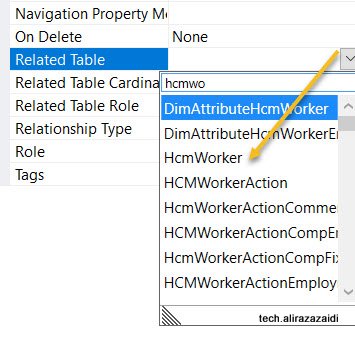
Hi All, I was doing my Pilot project in D365 for Finance and operations. I want to add HCMWorker relation to my custom table. But did not found in drop down.
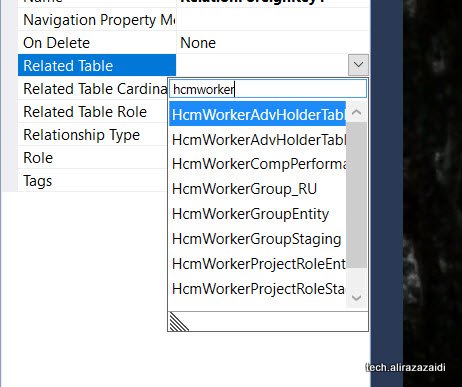
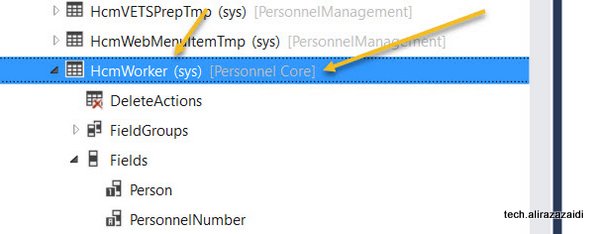
It means model reference(Package) was not included in Current Model. For this
For this first check Required model on table and add its reference On AOT
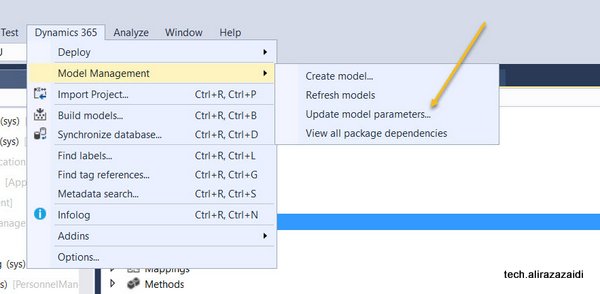
For adding this click on Dynamics 365 Menu on top. Model Management => Update Model Parameters
Select your current Model, for example, My Pilot Model is OpnAxPayroll I selected that.
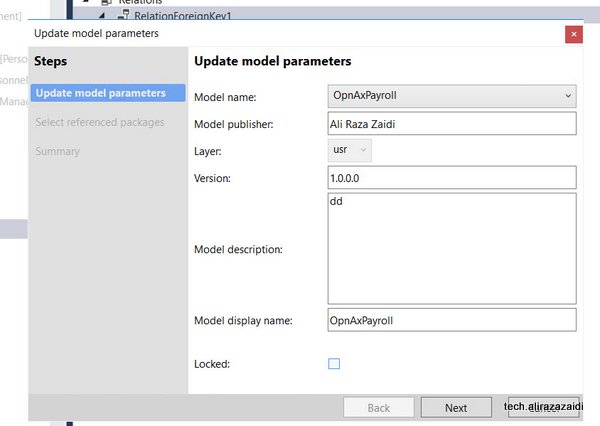
Select required Models and

Now I found the HCMWorker in relation dropdown.
I found a array based field in TSTimesheetLineWeek table, Field TSWeeklyHours
Now challenge is to enabled field based on Array. For example need to disabled on day 6.

Following code snippet help me to enabled disabled fields generated on the base of array extended Type
TSTimesheetLineWeek_ds.object(fieldId2Ext(fieldNum(TSTimesheetLineWeek, Hours), 6)).allowEdit(false);
Reference :
https://msdn.microsoft.com/en-us/library/aa675074.aspx
https://docs.microsoft.com/en-us/previous-versions/dynamicsax-2009/developer/aa592700(v=ax.50)
Here is small and quick tip. Couple of Days ago I helped a developer to get Dependent out of worker.
Microsoft provide a View DirPartyRelationshipsUnionView. Here Worker Party Id is saved as “otherParty” and dependent Party id can be found as ” SELFPARTY”.
Quick SQL query is below,
select name from DIRPARTYTABLE where recid in (
select SELFPARTY from DirPartyRelationshipsUnionView where OTHERPARTY =5637146826)
I was struggling to update Date Effective Table in Dynamics Ax 2012 R3. At least one hour of struggle, finally I update the required record.
Only good post which helps is by Agnela GoldBrg.
http://ibisinc.com/blog/updating-date-effective-tables-in-ax-2012/
One line tip from this post is on Date Effective table, The active record reference can be get with of
DateTimeUtil::utcNow()
Its really small tip, yes learning and solving problem at hand waste hours.
Lets take a real world example We have to update Job detail with X++.
For HCMJobDetail table following way works for me.
hcmJobDetail= HcmJobDetail::findByJob(hcmJob.RecId,DateTimeUtil::utcNow(),DateTimeUtil::utcNow(),true);
We can query on required table with following way
_validFrom = DateTimeUtil::utcNow();
_validTo =DateTimeUtil::utcNow();
select ValidTimeState(_validFrom, _validTo) hcmJobDetail
where hcmJobDetail.Job == _job;
The complete code snippet which works for me is here.
HcmJobDetail hcmJobDetail;
HcmJob hcmJob;
HCMJOBID _id=’XyZ’;
date dateToday,
hcmJob = HcmJob::findByJob(_id);
_validFrom = DateTimeUtil::utcNow();
_validTo =DateTimeUtil::utcNow();
select ValidTimeState(_validFrom, _validTo) hcmJobDetail
where hcmJobDetail.Job == _job;
hcmJobDetail= HcmJobDetail::findByJob(hcmJob.RecId,DateTimeUtil::utcNow(),DateTimeUtil::utcNow(),true);
if (hcmJobDetail!=null)
{
try
{
ttsBegin;
hcmJobDetail.validTimeStateUpdateMode(ValidTimeStateUpdate::Correction);
hcmJobDetail.SL_TempEndDate = today();
hcmJobDetail.SL_TempStartDate = today();
hcmJobDetail.Note = ” test and test”;
hcmJobDetail.update();
ttsCommit;
}
catch
{
ttsAbort;
HcmJob::CheckFailed(‘ Unable to update job’);
// status = SL_EntityStatus::Error;
}
}
}
}
The piece of code you wrote, take long way to reach production server. And usually different errors occurs when we take code one server to other. I test restful service code C# class and call it form X++ code multiple times and it works perfectly fine on QA. But when I took same code to Uat server it started throw following error
System.Net.ProtocolViolationException: Cannot send a content-body with this verb-type.
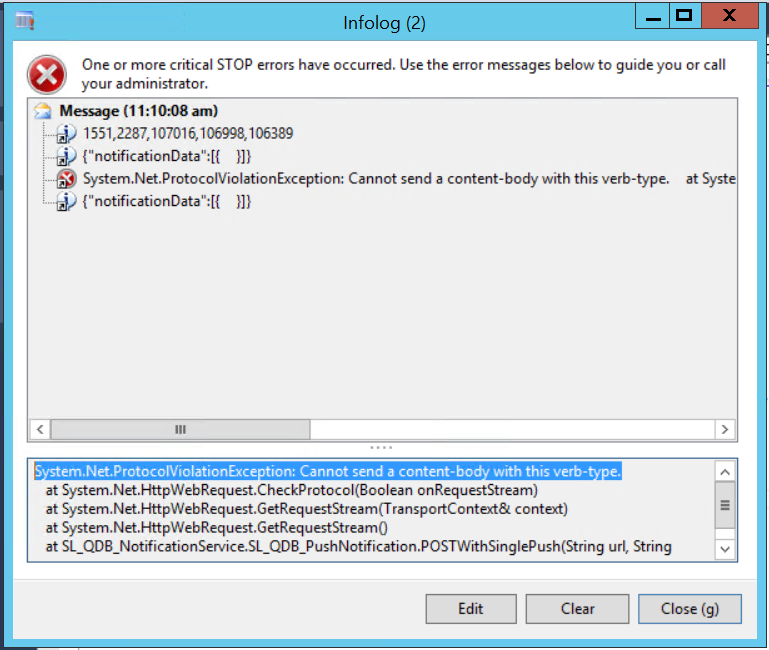
And why the same code works perfectly on DEV while calling same service method UAT throw errors.
Any how I found that I missed the request. Method = Post in code snippet I used for service call. something like
request.Method = “POST”;
Recently I got chance to call restful Json based service in Dynamics Ax 2012.
I used a C# class library and then add to AOT. AX 2012
Json based service successfully called both client side and server side. Only tricky part was to make Json string or payload.
I used to make Json string something similar. Both works in C# as well as X++
payload += “{\”ApproversEmpCode\”:\””+ employeeCode +”\”,”;
payload += “\”message\”:\””+table.Message +” “+ strReplace(Message,”\'”,”`”)+”\”,”;
payload += “\”requestType\”:\”” +tableId2Name(TableId) +”\”,”;
payload += “\”transactionId\”:\””+int642str(RecId)+”\”}”;
Happy Daxing.
Helped a junior, build a small SSRS expression, who build hyperlink to Course page on SSRS. You can modify it with respect your need.
=Microsoft.Dynamics.Framework.Reports.BuiltInMethods.GenerateDrillThroughLink( Parameters!AX_ReportContext.Value, Parameters!AX_UserContext.Value, “HRMCourseTable”, “Display”, “HRMCourseTable”, “hrmCourseId”, Fields!hrmCourseId.Value)
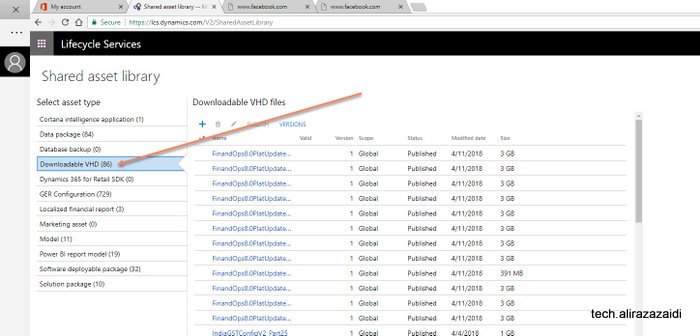
Hi all, connect link is now part of past. VHD link on collaboration site did not work. You can down it from lcs.
For this you have subscription on LCS.Dynamics.com for D365 for Finance and operations.
After successful, login you will find Shared Asset in boxes section.
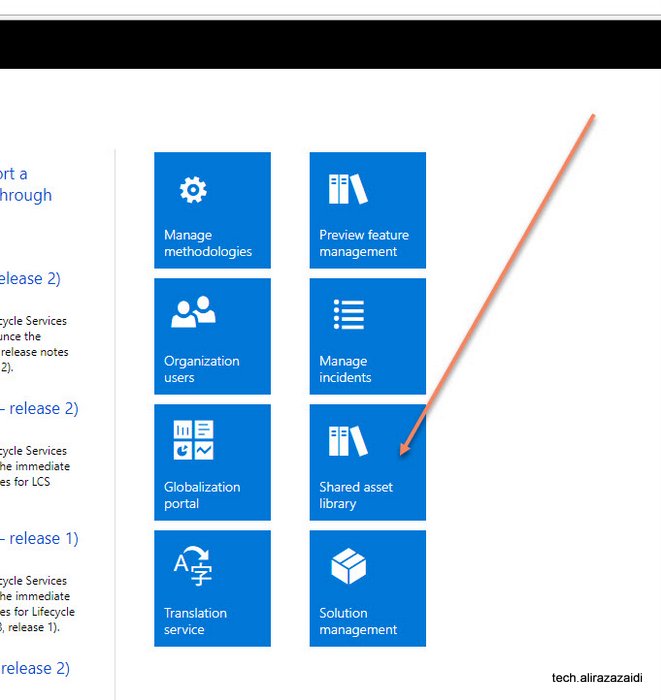
At the time of writing this small tip, Dynamics 365 for Finance and operations 8.0 platform Update 15 is just released