• Skip to main content
  • Skip to primary sidebar
  • Home
  • About
  • Recommended Readings
    • 2022 Book Reading
    • 2023 Recommended Readings
    • Book Reading 2024
    • Book Reading 2025
  • Supply Chain Management Guide
  • PKM
  • Microsoft Excel
  • Microsoft Copilot in Office 365
  • Public Wiki Page

Ali Raza Zaidi

A practitioner’s musings on Dynamics 365 Finance and Operations

Dynamics AX 2012

Exploring the little complex custom service in Dynamics Ax 2012

January 7, 2013 by alirazazaidi

In this example, we explore a complex custom services. Which perform a insert , update, delete and return all the records form table. If you interested in basics of custom services you have to visit my pervious post on this topic
http://tech.alirazazaidi.com/explore-the-custom-service-in-dynamics-ax-2012/.


For this example, I create a very simple custom table . This table contains following fields.

FieldName dataType
Roll Number string
FistName string
LastName string
Address string
DateOfBirth date.

For Data contract we have to create a new class. On class declaration method you have to put the attribute with name like as [DataContractAttribute]

[DataContractAttribute]
class StudnetDC
{
str rollNumber;
str address;
date dateOfBirth;
str firstName;
str lastName;

}

For each field I have to declare a separate param method with are equivalent to C# or Vb.net property method like as We have to use again a attribute on each method [ DataMemberAttribute(‘Parameter Name’)]


[ DataMemberAttribute('Address')]
public str paramAddress(str _address=address)
{
address=_address;
return address;
}


[ DataMemberAttribute('Date of Birth')]
public date paramDateOfBirth(date _dateOfBirth=dateOfBirth)
{
dateOfBirth=_dateOfBirth;
return dateOfBirth;
}


[ DataMemberAttribute('First Name')]
public str paramFirstName(str _firstName=firstName)
{
firstName= _firstName;
return firstName;
}


[ DataMemberAttribute('Last Name')]
public str paramLastName(str _lastName=lastName )
{
lastName= _lastName;
return lastName;
}


[ DataMemberAttribute('RollNumber')]

public str paramRollNumber(str _rollNumber= rollNumber)
{
rollNumber= _rollNumber;
return _rollNumber;
}

Then I create a service class. On each method I have to use attributes for passing parameter to method in my case, insert method will take parameter of contract class as follow.


[SysEntryPointAttribute(true),
AifCollectionTypeAttribute('Studentobj', Types::Class)]

public void InsertStudent(StudnetDC Studentobj)
{

Student studentbuf;
studentbuf.RollNumber = Studentobj.paramRollNumber();
studentbuf.FirstName = Studentobj.paramFirstName();
studentbuf.LastName = Studentobj.paramLastName();
studentbuf.DateOfBirth = Studentobj.paramDateOfBirth();
studentbuf.Address = Studentobj.paramAddress();
studentbuf.insert();

}


[SysEntryPointAttribute(true),
AifCollectionTypeAttribute('Studentobj', Types::Class)]
public void UpdateStudent(StudnetDC Studentobj)
{

Student studentbuf;

while select forUpdate studentbuf
where studentbuf.RollNumber== Studentobj.paramRollNumber()
{
studentbuf.RollNumber = Studentobj.paramRollNumber();
studentbuf.FirstName = Studentobj.paramFirstName();
studentbuf.LastName = Studentobj.paramLastName();
studentbuf.DateOfBirth = Studentobj.paramDateOfBirth();
studentbuf.Address = Studentobj.paramAddress();

}

}


[SysEntryPointAttribute(true),
AifCollectionTypeAttribute('Studentobj', Types::Class)]

public void DeleteStudent(StudnetDC Studentobj)
{

Student studentbuf;

while select forUpdate studentbuf
where studentbuf.RollNumber== Studentobj.paramRollNumber()
{
studentbuf.delete();

}

}

To return a list form Class method we have to use following attribute on method.
[SysEntryPointAttribute(true),
AifCollectionTypeAttribute(‘return’, Types::Class, classStr(MyParam))]

[SysEntryPointAttribute(true),
AifCollectionTypeAttribute('return', Types::Class, classStr(StudnetDC))]
public list SelectStudent()
{
StudnetDC studentobj;
List _StudentList = new List(Types::Class);
Student studentbuf;
while select * from studentbuf

{
studentobj = new StudnetDC();
studentobj.paramFirstName( studentbuf.FirstName);
studentobj.paramLastName(studentbuf.LastName);
studentobj.paramRollNumber(studentbuf.RollNumber);
studentobj.paramAddress(studentbuf.Address);
studentobj.paramDateOfBirth(studentbuf.DateOfBirth);
_StudentList.addEnd(studentobj);

}
return _StudentList;
}

Now compile the both classes. Service node.

Exploring the current session user Id in AX 2012

January 4, 2013 by alirazazaidi

You can get current session log in id in AX 2012 by this method


str curUserId()


Complete example is as follow.

static void curUserInfo(Args _arg)
{
    str sUserId;
    ;
    sUserId = curUserId();
    info "Current user ID is " + sUserId;

}


Explore the custom service in Dynamics Ax 2012

December 29, 2012 by alirazazaidi

In Dynamics Ax 2012 you can expose your custom logic as Custom service.

Like wcf service the custom ax services also contains Data contracts and Custom business logic.


Simplest customer services contains three things


  • X++ Class
  • Service Node
  • Service Group node.

Very simple custom service project structure will be look like as follow,

Project Structure

X++ Class as service Business logic:

You can create as many methods which will become operation in as many as you want in X++. These method must be tagged with SysEntryPointAttribute. You have to set property of class run at server.

Class Run at Server

The class method which will be exposing as service method will be public and SysEntryPointAttribute attribute will be define on above the method signature.

Currently our service just exposes one method which return one integer value representing how many times the method called.


The Class method will be look like

Operation Method

Compile the class.

Service node:

To expose services implementation class as service. You have to create a new service under services node of AOT. On newly created service following three things required to expose class as service.


  • Service implementation Class
  • Namespaces
  • External Name.

AifServiceNodeProperties


Service Implementation Class is required property, We have to select the implementation service class here.

Namespaces : this optional but some times services deployment generates various deployment error. To avoid these deployment errors you must define this. In my example I define it with following UrL

http://schemas.microsoft.com/dynamics/2008/01/services


External Name: this is optional you can define external name for each service. Currently we are use the same name of service name as its external name

Now create a new service node. Right click on service node and from property window select class which you just created.

In Service Node with public methods declared in class and tags with (SysEntryPointAttribute tagged) become as operations.

After that click on operations node in service node and right click and select add Operation.

Add Service method

This will show you all methods of service class which can be expose as service method. In our case it is only one.

Add Operation


Select that and click on ok.

This will show the CountNumberOfHits method under operations. Right click on services and select compile.

operation


Service groups:

Services group node contains the services and provide the public address used to consume by other application.

, One way to drag and drop you service into Main AOT node of service group This will create a new service group. Rename it accordingly. Second way to create a new service node and add our custom services as service of service group.

ServiceGroup


Right click on Service group and select deploy the service group.


Deployed Services

After successful incremental CIL generation services will be deployed and you can see it at in AIF framework on Dynamics AX application in following. Path.

System Administration è  Services and application integration framework è in bound ports.


AIF port


How to get default dimensions for Vendor and Customer in dynamics ax 2012

October 18, 2012 by alirazazaidi

I used following code for this


CustTable custTable = CustTable::find(“1101”);
VendTable _VendTable= VendTable::find(‘54278’);

DimensionAttributeValueSetStorage dimStorage;
Counter i;

dimStorage = DimensionAttributeValueSetStorage::find(_VendTable.DefaultDimension );

for (i=1 ; i<= dimStorage.elements() ; i++)
{
info(strFmt(“%1 = %2”, DimensionAttribute::find(dimStorage.getAttributeByIndex(i)).Name,
dimStorage.getDisplayValueByIndex(i)));
}

Dynamics Ax 2012: Xpp.ErrorException

October 3, 2012 by alirazazaidi

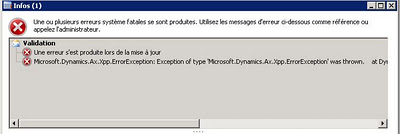
While positing sales order I got following exception.


Exception of type ‘Microsoft.Dynamics.Ax.Xpp.ErrorException’ was thrown

On event log on Server OSA, I found following message.

Object Server: RPC error: RPC exception 1702 occurred in session 8 process is Ax32Serv.exe thread is 19640 (User: username, ClientType: Worker)


For Correct the problem, I recompile the CIL via System Administration Periodic  Compile into CIL NET Framework and restart the AOS needed.

In statement functionality dynamics ax++

September 3, 2012 by alirazazaidi

Sometimes we have to get rows from one table based on the list of value form other tables. We use in statement queries. For example I have to display only those customers which have at least one sales order in sales table. In this scenario we have to use in statement. But there is no in statement queries in dynamics Ax, We achieve this functionality with Exist join. Consider following code which result only Customer  form Custtable who have entries in SalesTable.


Query                   query;

QueryBuildDatasource    datasource,SalesDataSource,CustomerDataSource;

QueryRun   queryrun;

CustTable custtable;

SalesTable salesTable;


query = new Query();

CustomerDataSource  = query.addDataSource(tableNum(CustTable ));

SalesDataSource  = CustomerDataSource.addDataSource(tableNum(SalesTable ));


SalesDataSource.joinMode(JoinMode::ExistsJoin   );


SalesDataSource.relations(false);


SalesDataSource.addLink(fieldNum(CustTable, AccountNum),

fieldNum(SalesTable  , CustAccount ));

queryrun = new QueryRun(query);


while(queryRun.next())

{

custtable = queryRun.get(tablenum(CustTable ));


Info(custtable.AccountNum);

}

Date to UTCDateTime Convertion Dynamics Ax 2012

September 3, 2012 by alirazazaidi

Usually we have to convert date to UTCDateTime. That is usally case when we have to query on createdatetime filed of very table, which filled when new row is created.

We for this purpose we have to create use DateTimeUtil::newDateTime function. This function takes two values one for date, and second for time. So time values will be range beween 0 and 86400. It means when value time is 00:00:00 value will be 0 and when time is 23:59:59 then value will be 86400. Consider following code which creates start and end date for same date.


Date _Currentdate;

utcDateTime _UtcStartPeriod;

utcDateTime _UtcEndPeriod;


;


_currentdate=today();


_UtcCurrentPeriod =  DateTimeUtil::newDateTime(_currentdate,0);

_UtcEndPeriod = DateTimeUtil::newDateTime(_UtcEndPeriod,86400);


What if we have to convert UCTDateTime to DateTime, We can do it like

_currentdate = DateTimeUtil::date(DateTimeUtil::applyTimeZoneOffset(_UtcEndPeriod, DateTimeUtil::getUserPreferredTimeZone()));

Some Useful date functions in dynamics ax X++

September 3, 2012 by alirazazaidi

There are a lot of functions in dynamics Ax for dates. Followings are some date time functions I used extensively.

Some times we need to get month, year form date we can get these with the use of following functions in Dynamics ax

int _Months;
int _Years;

//Get day from date
_DayOfMonth =dayOfMth(systemdateget());;
// Get month from date
_Months = dayOfMth(systemdateget());

//Get month from date
//mthOfYr(systemdateget())

//Get year from date
_Years =year(systemdateget());

Mkdate.

This functions help you create date from input values.  For example if you have input for month and year, and want to create date for first of selected month of selected year, you can create it as.


Date _CustomDate;

Date _LastDateOf Month;

Int month_number;

Int years_numbers;

Int day_number;

;

Day_number=1;

Month_number=4 ; // say April

Years_Number=2012;

_customDate =mkdate(Day_number, Month_number, Years_Number);


Info _customDate;


Endmth;


This method returns the last date of month what ever the date we given to it. for example if we give the above created  date then it will return the last date of april

_LastDateOfMonth = endmth(_customDate);


Usually we need loop through next month, next year , nextQtr,prevQtr, pervious month, pervious year.


We are use them as


Date _nextDate;


_NextDate = nextMth(today);

_NextDate=prevMth(today);

_NextDate=nextYr(today);

_NextDate =preYr(today);

_NextDate=prevQtr(today);

_NextDate=nextQtr(today);


Usually we have to convert date to UTCDateTime. That is usally case when we have to query on createdatetime filed of very table, which filled when new row is created.

We for this purpose we have to create use DateTimeUtil::newDateTime function. This function takes two values one for date, and second for time. So time values will be range beween 0 and 86400. It means when value time is 00:00:00 value will be 0 and when time is 23:59:59 then value will be 86400. Consider following code which creates start and end date for same date.


Date _Currentdate;

utcDateTime _UtcStartPeriod;

utcDateTime _UtcEndPeriod;


;


_currentdate=today();


_UtcCurrentPeriod =  DateTimeUtil::newDateTime(_currentdate,0);

_UtcEndPeriod = DateTimeUtil::newDateTime(_UtcEndPeriod,86400);


How to disable AutoComplete functionality on controls Dynamics Ax

August 28, 2012 by alirazazaidi

How to disable autocomplete functionality on Form Control in dynamics Ax.

Currently I was facing the problem of autocomplete functionality, every time user enter text for search, stringEdit control filled with autocomplete and error message display. I was using TextChange Method of String Edit Control. I add the following line of code in TextChange method alongside other code that works for search functionality.

element.delAutoCompleteString(this);

If you want to disable functionality on single control you can add same code text modify of control like as

public boolean modified()
{
boolean ret;
;

ret = super();

element.delAutoCompleteString(this);

return ret;
}

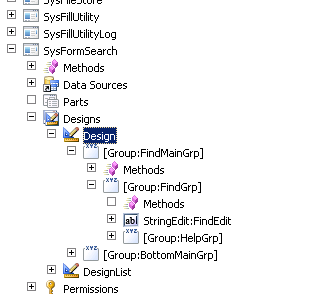
Sometimes we have to disable the autoComplete at application level so all autocomplete functionality will disable on all control. For this purpose you have the override the leave method of StringEdit:FindEdit field on theSysFormSearch form that is in the FindGrp group: as

ret = super();
if (ret)
element.delAutoCompleteString(this);

return ret;

How to execute Sql directly form Dynamics AX X++

August 9, 2012 by alirazazaidi

Dynamics Ax provide many other ways to communicate with database, but sometimes we have to execute direct query to database. For example I have to delete all items form InventTable of particular company or dataarea. I execute it as follow.


Connection      connection;

Statement       statement;

str             query;

DataAreaId      currentDataArea;


// create connection object

connection = new Connection();


// create statement

statement = connection.createStatement();


//Find current company

currentDataArea = curext();


if(! Box::yesNo(“You are in Company: ” + currentDataArea + “. Proceed to Delete?”,DialogButton::No))

{

return;

}


//Vendors delete

query = “delete from inventTable where dataAreaId = ‘” + currentDataArea + “‘”;

new SqlStatementExecutePermission(query).assert();

statement.executeUpdate(query);

CodeAccessPermission::revertAssert();


info(“InventItems Deleted from Company: ” + currentDataArea);


« Previous Page
Next Page »

Primary Sidebar

About

I am Dynamics AX/365 Finance and Operations consultant with years of implementation experience. I has helped several businesses implement and succeed with Dynamics AX/365 Finance and Operations. The goal of this website is to share insights, tips, and tricks to help end users and IT professionals.

Legal

Content published on this website are opinions, insights, tips, and tricks we have gained from years of Dynamics consulting and may not represent the opinions or views of any current or past employer. Any changes to an ERP system should be thoroughly tested before implementation.

Categories

  • Accounts Payable (2)
  • Advance Warehouse (2)
  • AI (3)
  • Asset Management (3)
  • Azure Functions (1)
  • Books (6)
  • Certification Guide (3)
  • ChatGPT (3)
  • Claude (1)
  • Customization Tips for D365 for Finance and Operations (63)
  • D365OF (60)
  • Data Management (1)
  • database restore (1)
  • Dynamics 365 (59)
  • Dynamics 365 for finance and operations (139)
  • Dynamics 365 for Operations (174)
  • Dynamics AX (AX 7) (134)
  • Dynamics AX 2012 (274)
  • Dynamics Ax 2012 Forms (13)
  • Dynamics Ax 2012 functional side (16)
  • Dynamics Ax 2012 Reporting SSRS Reports. (31)
  • Dynamics Ax 2012 Technical Side (52)
  • Dynamics Ax 7 (65)
  • Exam MB-330: Microsoft Dynamics 365 Supply Chain Management (7)
  • Excel Addin (1)
  • Favorites (12)
  • Financial Modules (6)
  • Functional (8)
  • General Journal (1)
  • Implementations (1)
  • Ledger (1)
  • Lifecycle Services (1)
  • Logseq (4)
  • Management Reporter (1)
  • Microsoft Excel (4)
  • MS Dynamics Ax 7 (64)
  • MVP summit (1)
  • MVP summit 2016 (1)
  • New Dynamics Ax (19)
  • Non Defined (9)
  • Note taking Apps (2)
  • Obsidian (4)
  • Personal Knowledge Management (3)
  • PKM (16)
  • Power Platform (6)
  • Procurement (5)
  • procurement and sourcing (6)
  • Product Information Management (4)
  • Product Management (6)
  • Production Control D365 for Finance and Operations (10)
  • Sale Order Process (10)
  • Sale Order Processing (10)
  • Sales and Distribution (5)
  • Soft Skill (1)
  • Supply Chain Management D365 F&O (5)
  • Tips and tricks (278)
  • Uncategorized (165)
  • Upgrade (1)
  • Web Cast (7)
  • White papers (4)
  • X++ (10)

Wiki

  • SCM

Copyright © 2026 · Magazine Pro On Genesis Framework · WordPress · Log in