• Skip to main content
  • Skip to primary sidebar
  • Home
  • About
  • Recommended Readings
    • 2022 Book Reading
    • 2023 Recommended Readings
    • Book Reading 2024
    • Book Reading 2025
    • Book Reading 2026
  • Supply Chain Management Guide
  • PKM
  • Microsoft Excel
  • Microsoft Copilot in Office 365
  • Public Wiki Page

Ali Raza Zaidi

A practitioner’s musings on Dynamics 365 Finance and Operations

Dynamics 365 for finance and operations

what is meaning of Calculate prorated depreciation

October 16, 2025 by alirazazaidi

“Calculate prorated depreciation” means calculating depreciation only for the portion of a period (month, quarter, or year) that an asset was actually in use — not for the full period.


💡 In simple terms:

Prorated depreciation = partial depreciation based on time the asset was active.

If an asset was acquired or disposed in the middle of a month (or year), you don’t depreciate it for the entire period — only for the time it was available for use.


🧮 Example:

Let’s say:

  • Depreciation = 1,200 per year
  • Method = Straight line
  • That’s 100 per month (1,200 ÷ 12)
  • Asset acquired on April 15

If you use prorated depreciation, and your policy is to calculate from the mid-month, you’ll only depreciate half of April:

👉 April depreciation = 100 × 0.5 = 50
Then from May onward, it’ll take full monthly depreciation (100 per month).

Without proration, it would incorrectly calculate 100 for April, as if the asset was in use the entire month.


⚙️ In D365 F&O:

In Fixed assets parameters or Depreciation profile setup, you can select:

  • Prorate acquisition date
  • Prorate disposal date
  • Prorate convention (full month, half month, actual days, etc.)

When you run depreciation, D365 calculates it proportionally based on the date the asset was acquired or disposed.


✅ Summary:

TermMeaning
DepreciationReduction in asset value over time
Prorated depreciationDepreciation calculated only for the time the asset was in use
PurposeFair and accurate expense allocation when asset not used the full period

Source : Chatgpt

What is stages of D365 Finance and Operations implementation

October 5, 2025 by alirazazaidi

Lets start to explore, Project Management for D365 Finance and Operations Implementation.

  • Pre-sales / Initiation – Scoping, high-level requirements, proposal.
  • Analysis / Discovery – Fit-gap analysis, requirements workshops.
  • Design – Solution design (Functional & Technical), architecture approval.
  • Build / Development – Configuration, customization, integrations, testing.
  • UAT / Deployment Prep – User acceptance testing, data migration, cutover plan.
  • Go-Live & Support – Hypercare, transition to support.

What is Microsoft Tenant, where we get it

September 30, 2025 by alirazazaidi

A Microsoft Entra tenant ID is a unique identifier (a GUID) assigned to your Microsoft Entra ID (formerly Azure Active Directory) tenant.

  • A tenant represents your organization’s instance of Microsoft Entra ID.
  • The tenant ID is a globally unique GUID (for example: 72f988bf-86f1-41af-91ab-2d7cd011db47) that identifies that tenant.
  • You usually need to enter it when configuring apps, APIs, or services that connect to Microsoft Entra.

How to find your Tenant ID

  1. Microsoft Entra admin center:
    • Go to entra.microsoft.com.
    • Navigate to Identity → Overview.
    • Copy the Tenant ID under Basic information.

So, What’s the Story Today? Security Objects in D365 Finance and Operations

August 7, 2025 by alirazazaidi

Today, I worked on creating a Security configuration in Dynamics 365 Finance and Operations. Let’s talk about best practices — because honestly, I see them ignored more often than not.

🔐 Start with Duties — Don’t Skip Them!

Most developers tend to skip duties and go straight to privileges. But best practice is to always create Duties, and then assign those Duties to Roles. This creates a clear, layered security structure.

🔧 Create Two Sets of Privileges

You should design two separate privileges — one for maintaining data and one for reviewing it.

🛠️ Maintain Privilege:
This should include full access, including delete rights.

👁️ Review Privilege:
This one only needs read-only access to tables, forms, and menus.

🏷️ Use Labels, Not Hardcoded Captions

Always use labels instead of writing static text directly in captions. This ensures easier localization and consistent UI across environments.

🚫 Avoid Bad Practices

What I often see: consultants creating privileges and directly assigning them to Roles — skipping Duties entirely. That’s not ideal and goes against best practice.

Today, I made sure to follow the right process:

  • Created duties ✔️
  • Made separate maintain/review privileges ✔️
  • Used labels ✔️
  • Assigned Duties to Roles, not privileges directly ✔️


✅ Summary

If you’re working with D365 Security:

  • Don’t skip Duties.
  • Separate maintain and review access.
  • Use labels, not hardcoded captions.
  • Always assign Duties to Roles, not privileges directly.

Let’s keep it clean, maintainable, and easy for others to follow.
End of story.

Sharing My Daily Story – Trade Agreement Customization in D365 F&O

August 4, 2025 by alirazazaidi

I’ve been reading and listening to podcasts about how to market yourself better. One common piece of advice stood out: “Write your story every day—what you accomplished, what you struggled with, and what you tried. People love to read or listen to real stories.”

This blog has been around for over a decade. In this age of Generative AI, you might wonder: Who still reads blogs? But think about it—tools like ChatGPT and Copilot need to pull from somewhere. Blogs still matter. Content still matters. SEO is evolving into AEO—Answer Engine Optimization—where your story might just be someone else’s answer.

So here’s my story for today.

I was working on a trade agreement customization in D365 Finance and Operations. It was a small but tricky enhancement.

The requirement was simple in theory: Whenever a new trade agreement is posted, check if a similar record already exists. If it does, update its ToDate automatically.

I identified the right hook in the PriceDiscTable, and that became the key.

These three tables became the center of gravity for the customization:

PriceDiscTable
PriceDiscAdmTrans 
PriceDiscTable

It was one of those days where a deep dive into seemingly small logic led to satisfying results.

Thanks for reading. Hope you found this little story interesting. Let me know if you’d like me to share more from my D365 journey.

Json deserialize issue in service class An exception occured when invoking the operation – Type ‘Class’ is not supported by serializer. D365 Finance and operations

April 10, 2025 by alirazazaidi

Yesterday, I was working on integration, and everything was going fine. However, when I tried to retrieve a string from the DataContract, it threw an error: “Type ‘Class’ is not supported by the serializer.” The issue persisted even when I used Newtonsoft. The rest of the logic was functioning correctly.

Eventually, I discovered that the issue was due to missing AX 2012 attributes on the list’s getter/setter or parameter. Once I added those attributes, the actual getter/setter started working as expected.

 [
    DataMemberAttribute('transactions'),  
    DataCollectionAttribute(Types::Class, classStr(DSTTransactionDC))  
  ]  
  public List Parmtransactions(List _transactions = transactions)  
  {  
    transactions = _transactions;  
return transactions;
  }

I have to add following

  AifCollectionTypeAttribute('_transactions', Types::Class, classStr(DSTTransactionDC)),
  AifCollectionTypeAttribute('return', Types::Class, classStr(DSTTransactionDC))

After that getter setter become something similar

 [
    DataMemberAttribute('transactions'),  
    DataCollectionAttribute(Types::Class, classStr(DSTTransactionDC)),  
    AifCollectionTypeAttribute('_transactions', Types::Class, classStr(DSTTransactionDC)),  
    AifCollectionTypeAttribute('return', Types::Class, classStr(DSTTransactionDC))  
  ]  
  public List Parmtransactions(List _transactions = transactions)  
  {  
    transactions = _transactions;  
 return transactions;
  }

after this change, datacontract easily serialise. 
Also change attribute at class header from datacontracattribute to dataContract.

Hope you like this post.

How to apply updates on Cloud Hosted Environment D365 Finance and Operations

April 1, 2025 by alirazazaidi

I recently encountered a small functionality difference in the cloud-hosted environment.

Upon investigation, I found that the Dev machine is on 10.0.40, while the UAT environment is on 10.0.42.

This minor difference seems to be due to a Microsoft quality update. My next question is: How can I update it?

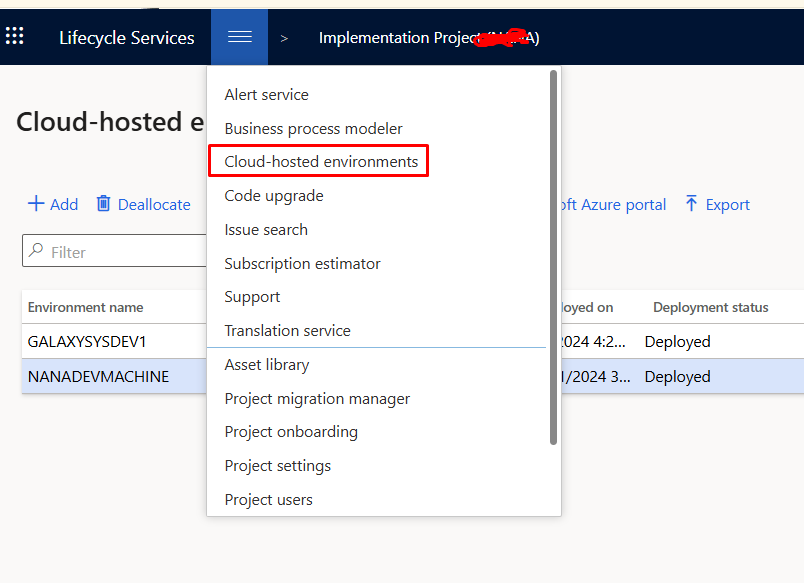
Essentially, the UAT and production environments are available on the project’s main page.

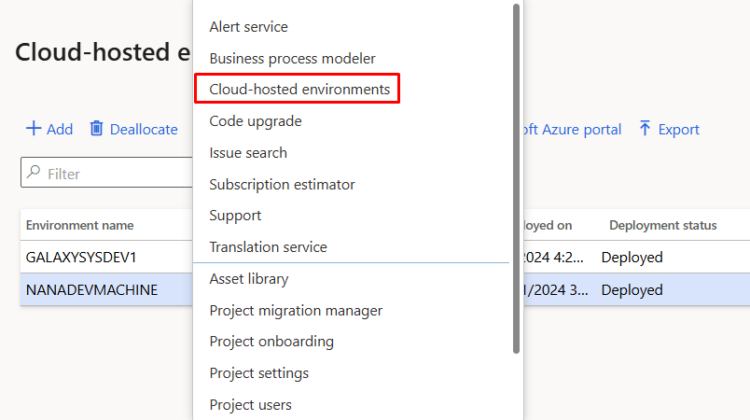
Dev machines are also cloud-hosted and can be found in the menu in LCS

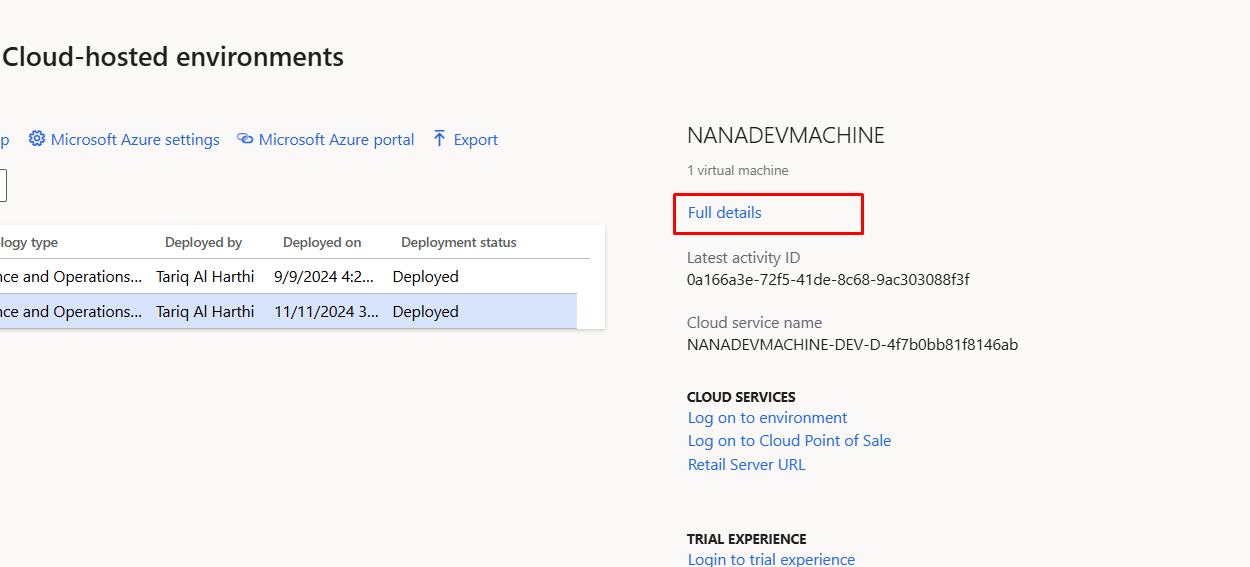
After selecting the machine you need to click on Full details button

from top menu you can select and apply update.

Hope you like this small post

A Model with the same name already exists in the Metadata Store

March 19, 2025 by alirazazaidi

I learned a tough life lesson—greatness isn’t about doing big things. True greatness lies in doing small things with excellence.

Haha, this sounds familiar! I remember reading a quote from Napoleon Hill:

“If you cannot do great things, do small things in a great way.”

So here is small tip from my Personal Knowledge Management

I was importing a model to dev environment to built a common package for deployment. I found following error,

A Model with the same name already exists in the Metadata Store. Please delete the existing model if you want to install this model.

So I need to delete existing one and then import it again through command line

k:\AOSService\PackagesLocalDirectory\bin\ModelUtil.exe -delete -metadatastorepath=k:\AOSService\PackagesLocalDirectory -modelname="RanjahJogi"

After you can import model in some temp table in c drive.

k:\AOSService\PackagesLocalDirectory\bin\ModelUtil.exe -import -metadatastorepath=k:\aosservice\packageslocaldirectory -file=c:\temp\RanjahJogi.axmodel

Service Item with Stocked Item Model

March 17, 2025 by alirazazaidi

I conducted an experiment to see what happens when we create a service item but select the item group as stocked.

To test this, I created an item called “Service 101” using the FIFO model, which is typically used for stocked items.

Next, I purchased it as a normal item.

When I checked the inventory transactions, I noticed that transactions were recorded—this happened because the FIFO item model treats it as a stocked item.

Inventory transactions

Why would we need such an item?

If we define an item as a service and assign it to a non-stocked item group, it means we can use it as a service charge—either as a service received or provided to a customer. In this case, no inventory transactions would be recorded.

However, in production orders, when defining the Bill of Materials (BOM), there are certain non-physical costs (such as floor charges) that need to be accounted for. The problem is that BOM does not support service items.

To work around this, we need to create a service item using a stocked item model, ensuring that it can be included in BOM calculations while still serving its intended purpose as a service-related charge.

BRD, Requirement Register, Fit GAP, FDD, TDD

March 14, 2025 by alirazazaidi

1. BRD (Business Requirements Document):

  • Purpose: Captures high-level business requirements and objectives. It focuses on what the business needs, not how to implement it.
  • Key Components:
    • Project objectives and scope
    • Business processes to be supported by the ERP
    • Functional requirements (features and capabilities needed)
    • Non-functional requirements (performance, security, compliance)
    • Stakeholder roles and responsibilities
  • Audience: Business stakeholders, project sponsors, and the implementation team.

2. Requirement Register:

  • Purpose: A detailed log of all requirements gathered during the project. Acts as a central repository for tracking requirements throughout the ERP lifecycle.
  • Key Components:
    • Unique ID for each requirement
    • Description and category (functional, non-functional, technical)
    • Priority (high, medium, low)
    • Status (proposed, approved, implemented, tested, etc.)
    • Ownership (who requested and who is responsible)
  • Audience: Project managers, business analysts, and the implementation team.

3. Fit-GAP Analysis:

  • Purpose: Assesses how well the ERP system’s out-of-the-box features match the business requirements. Identifies gaps that need customization or process changes.
  • Key Components:
    • Fit: Requirements that the ERP system meets without modification.
    • GAP: Requirements that need customization, integration with other systems, or process adjustments.
    • Recommendations for handling gaps (customization, workaround, process change).
  • Audience: Functional consultants, business analysts, and decision-makers.

4. FDD (Functional Design Document):

  • Purpose: Provides a detailed description of how the business requirements will be implemented functionally in the ERP system.
  • Key Components:
    • Functional workflows and use cases
    • Screen layouts, fields, and user interactions
    • Business rules and validations
    • Integration points with other systems
  • Audience: Functional consultants, developers, and QA teams.

5. TDD (Technical Design Document):

  • Purpose: Describes the technical implementation details for the requirements specified in the FDD. Focuses on how to build the solution technically.
  • Key Components:
    • System architecture and data models
    • Detailed specifications for customizations (code, scripts, reports)
    • Database schemas and API details
    • Security and compliance considerations
  • Audience: Technical consultants, developers, and system architects.

Summary:

  • BRD: What the business needs.
  • Requirement Register: Tracks all requirements.
  • Fit-GAP: Matches requirements with ERP capabilities.
  • FDD: Functional solution design.
  • TDD: Technical implementation plan.
« Previous Page
Next Page »

Primary Sidebar

About

I am Dynamics AX/365 Finance and Operations consultant with years of implementation experience. I has helped several businesses implement and succeed with Dynamics AX/365 Finance and Operations. The goal of this website is to share insights, tips, and tricks to help end users and IT professionals.

Legal

Content published on this website are opinions, insights, tips, and tricks we have gained from years of Dynamics consulting and may not represent the opinions or views of any current or past employer. Any changes to an ERP system should be thoroughly tested before implementation.

Categories

  • Accounts Payable (2)
  • Advance Warehouse (2)
  • AI (3)
  • Asset Management (3)
  • Azure Functions (1)
  • Books (6)
  • Certification Guide (3)
  • ChatGPT (3)
  • Claude (1)
  • Customization Tips for D365 for Finance and Operations (64)
  • D365OF (60)
  • Data Management (1)
  • database restore (1)
  • Dynamics 365 (59)
  • Dynamics 365 for finance and operations (139)
  • Dynamics 365 for Operations (175)
  • Dynamics AX (AX 7) (134)
  • Dynamics AX 2012 (274)
  • Dynamics Ax 2012 Forms (13)
  • Dynamics Ax 2012 functional side (16)
  • Dynamics Ax 2012 Reporting SSRS Reports. (31)
  • Dynamics Ax 2012 Technical Side (52)
  • Dynamics Ax 7 (65)
  • Exam MB-330: Microsoft Dynamics 365 Supply Chain Management (7)
  • Excel Addin (1)
  • Favorites (12)
  • Financial Modules (6)
  • Functional (8)
  • General Journal (1)
  • Implementations (1)
  • Ledger (1)
  • Lifecycle Services (1)
  • Logseq (4)
  • Management Reporter (1)
  • Microsoft Excel (4)
  • MS Dynamics Ax 7 (64)
  • MVP summit (1)
  • MVP summit 2016 (1)
  • New Dynamics Ax (19)
  • Non Defined (9)
  • Note taking Apps (2)
  • Obsidian (4)
  • Personal Knowledge Management (3)
  • PKM (16)
  • Power Platform (6)
  • Procurement (5)
  • procurement and sourcing (6)
  • Product Information Management (4)
  • Product Management (6)
  • Production Control D365 for Finance and Operations (10)
  • Sale Order Process (10)
  • Sale Order Processing (10)
  • Sales and Distribution (5)
  • Soft Skill (1)
  • Supply Chain Management D365 F&O (5)
  • Tips and tricks (278)
  • Uncategorized (165)
  • Upgrade (1)
  • Web Cast (7)
  • White papers (4)
  • X++ (10)

Wiki

  • SCM

Copyright © 2026 · Magazine Pro On Genesis Framework · WordPress · Log in