• Skip to main content
  • Skip to primary sidebar
  • Home
  • About
  • Recommended Readings
    • 2022 Book Reading
    • 2023 Recommended Readings
    • Book Reading 2024
    • Book Reading 2025
    • Book Reading 2026
  • Supply Chain Management Guide
  • PKM
  • Microsoft Excel
  • Microsoft Copilot in Office 365
  • Public Wiki Page

Ali Raza Zaidi

A practitioner’s musings on Dynamics 365 Finance and Operations

alirazazaidi

Fix “The permission ‘KILL DATABASE CONNECTION’ is not supported in this version of SQL Server” while importing a D365FO .bacpac (10.0.39

May 30, 2024 by alirazazaidi

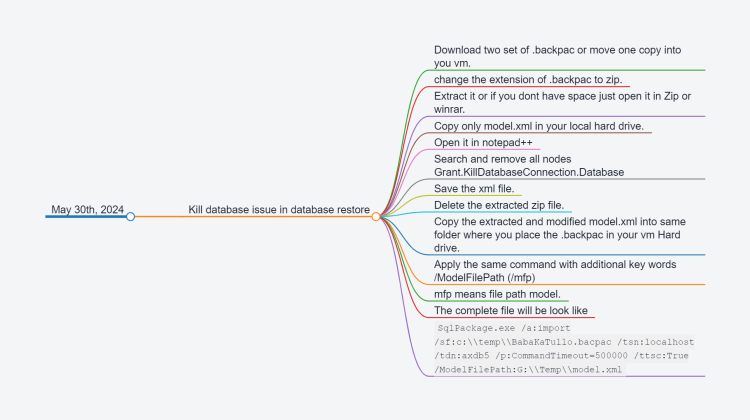
  • Kill database issue in database restore
    • Download two set of .backpac or move one copy into you vm.
    • change the extension of .backpac to zip.
    • Extract it or if you dont have space just open it in Zip or winrar.
    • Copy only model.xml in your local hard drive.
    • Open it in notepad++
    • Search and remove all nodes Grant.KillDatabaseConnection.Database
    • Save the xml file.
    • Delete the extracted zip file.
    • Copy the extracted and modified model.xml into same folder where you place the .backpac in your vm Hard drive.
    • Apply the same command with additional key words /ModelFilePath (/mfp)
    • mfp means file path model.
    • The complete file will be look like
    • SqlPackage.exe /a:import /sf:c:\\temp\\BabaKaTullo.bacpac /tsn:localhost /tdn:axdb5 /p:CommandTimeout=500000 /ttsc:True /ModelFilePath:G:\\Temp\\model.xml
Relation between VendPackingSlipTrans and VendInoiceTRans D365 Finance and Operation

May 27, 2024 by alirazazaidi

One of my young colleuge needs a query so he can get packingslip line agains vend inoice trans. He was developing some report for procurement and sourcing.

I found my documentation about something similar almost 9 years ago.

Relation between VendPackingSlipTrans and VendInoiceTRans Dynamics Ax 2012

But a lot of things change from Ax 2012 to d365 Finance and operations.

Now if you required something similar following query will work.

VendInvoicePackingSlipQuantityMatch vendInvoicePackingSlipQuantityMatch;
        VendPackingSlipTrans vendPackingSlipTrans;

        select firstonly vendPackingSlipTrans
            exists join vendInvoicePackingSlipQuantityMatch
                where vendInvoicePackingSlipQuantityMatch.InvoiceSourceDocumentLIne == VendPackingSlipTrans.SourceDocumentLine &&
                      vendPackingSlipTrans.SourceDocumentLine == vendInvoicePackingSlipQuantityMatch.PackingSlipSourceDocumentLine;

Custom Cell format – Excel for Consultant

April 10, 2024 by alirazazaidi

I was doing some data cleansing and data entry I was facing problem

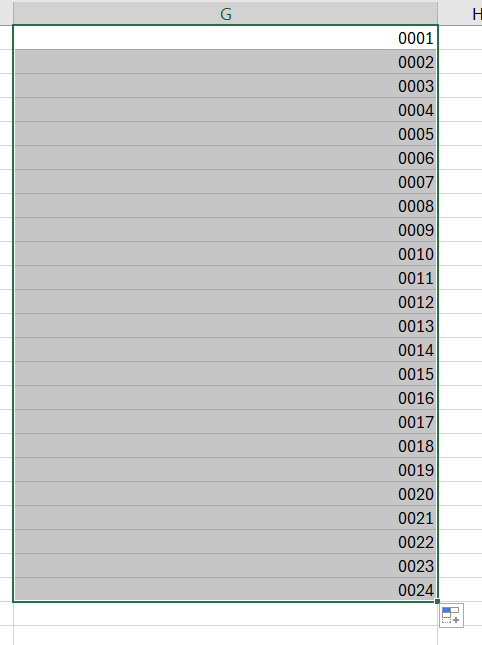
for number in such a way 4 digits: 0001, 0002, … , 1000 etc.

Now I do not want to type “0001” in excel, instead I wanted to type 1 and I want excel to convert that to 0001 for me. So I started looking for a custom cell format and dug a little deeper to understand those. I thought it would be nice to share them to you all.

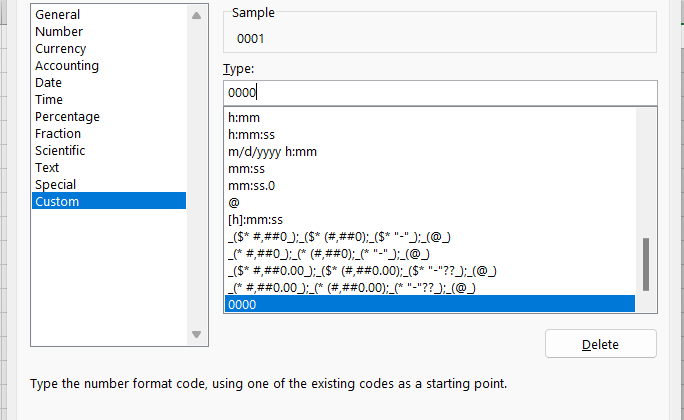
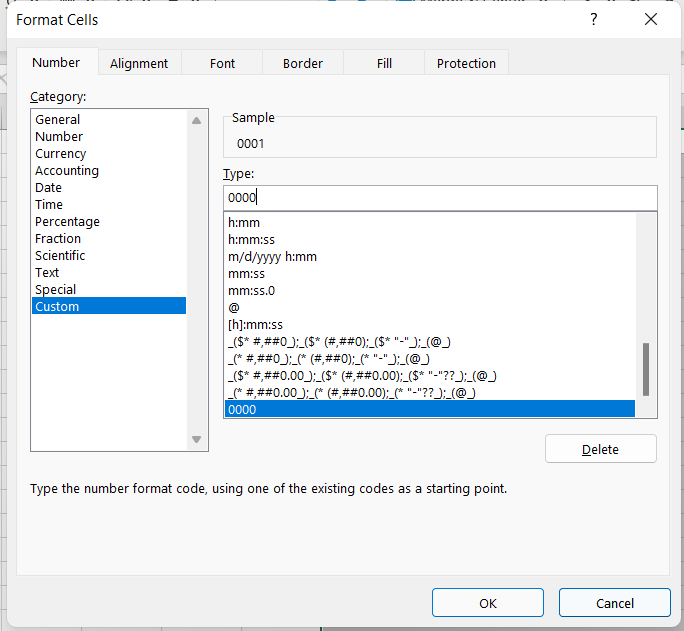
First take a look at how the cell formatting dialog box – number tab looks like:

I found two things for

Special: Used for phone number, zipcode, social security number formats depending on the locale you select. For eg. for US they would be phone number [xxx-xxx-xxxx], ssn [xxx-xx-xxxx], zipcode[xxxxx, xxxxx-xxxx].

Custom: Used for creating your own cell formatting structure.

Ok, without further confusion, this is probably how you can use the custom cell formatting feature in Microsoft excel.

Some explanation that you can skip if you already get it

  • For formatting a number [eg. 1] to fixed number of digits [eg. 0001] you have to use 0000 as the custom formatting code

More interesting If you drag it will automatically fill the sell as follow.

Sale group or item sale group is missing, complete your input.

April 4, 2024 by alirazazaidi

While processing Purchase Invoice I got this error

Sale group or item sale group is missing, complete your input.

On Release product Item sales group was missing. I update Item sales tax group on Invoice header. After that Invoice is successfully posted.

Sales Order Return In D365 Finance and Operations

April 3, 2024 by alirazazaidi

In this video, I shared complete process for sales order return.

Sales Categories Deep dive Dynamics 365 Finance and Operations

March 23, 2024 by alirazazaidi

In this video, is shared

How to configure Sales category.

How to add Category heriarchy.

Tangeble and non tangibal heriarachy.

How to add attribute on heriarachy,

How to configure posting profile for Heriarachy.

How to set Default Sales Category.

How use sort order in sales Category heriarchy.

How to create a sales order for Sales Category.

How to create Item Batch manually in D365 F&O

March 4, 2024 by alirazazaidi

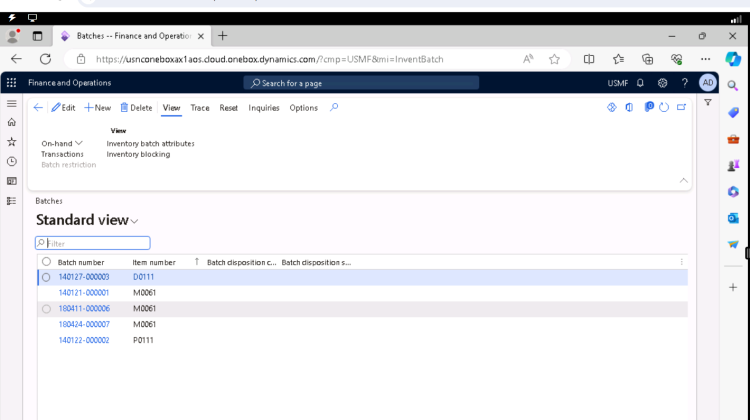
I love D365 F&O because every day I have to learn something new. At the same time, D365 F&O was so big that I started to forget things very fast. What I did a year ago is just a vivid memory. Yesterday, an interesting thing happened. During testing for one customisation, I had to deal with batch-enabled items. I have to raise stock on more than 20 items. So I can test sale order scenarios. So instead of creating a purchase order, I decided to make inventory adjustments. And when I post the inventory adjustment journal, it gives me an error message for each batch for each item required. Hmm, what to do now? I have to create batches manually and then associate them with items. And these batches I have to copy into inventory adjustment lines. Go to Inventory Management> Inquiries and Reports > Tracking Dimensions > Batches. This is a wonderful page. Here, I can reset the expiration dates of the selected batch. Shelf life. It reminds me of a common requirement. The system should not receive or ship the product, which has more than 60 percent shelf life. There should be special approval for products that have a 60 percent shelf life.  I am not giving a solution here. But whatever solution you provide, its origin lies here.

Go to Inventory Management> Inquiries and reports > Tracking dimensions > Batches.

Before creating a new batch, I got attention to reset button.

On that tab, I found three options, It works for selected row on grid. above screenshot I took when I click on Reset shelf Life dates.

I am not interested in Dates because these are too sweet. Arab called dates as “Timmer”

Timmerun Halwa jinduun

التمر حلو جدًا

Its same Hawla, that happen in Ichra Lahore Pakistan.

Pakistani like Halwah too much

You can reset dates from here.

Let it.

I have to create new batch, that I can use in Inventory Journal. so I clicked on New button. Detail page opens where I have to add multiple things.

Like Item, batch code, Disposition code and things related to shelf life.

Hope you like this article, why I do blog because I forget things very fast.

Consignment Inventory Handling in D365 Finance and Operations

January 20, 2024 by alirazazaidi

Hi friends, In this post, I am going to share my notes about consignment inventory in D365 Finance and Operations.

So what is consignment inventory? Consignment inventory is stock stored in our warehouse but actually owned by its supplier.

If you remember, there is a tracking dimension called “Owner.” In product configuration, we have set this owner as inventory.

The complete process is as follows:.

While writing this article, I am using Contoso data, the USMF legal entity, and the following version and update of D365.

Installed product version: 10.0.37 (10.0.1725.47)

Installed platform version: Update61 (7.0.7068.67).

The first step is to create a vendor.  I am going to create a new vendor with the ID “Consignment Vendor”

The second step is to set up a consignment owner.

For this, we have to follow the below navigation.

Inventory Management > Setup> Dimension > Inventory Owner

Here we can add a vendor account and set an ID as the owner.

With the vendor account plus its owner.

The third step is to enable the tracking dimension. In the CONSO demo data, we can find already-configured tracking dimensions.

The tracking dimension form can be found at the following location:

Product and Information Management > Setup > Dimension and Variant Groups > Tracking Dimension.

The tracking dimension is active in the case of the Active check box, which is marked.

So we use this tracking dimension in new products.

To make things simple, we are going to create a simple product.

A new product name is “Consignment_0001.”

Consignment inventory works only on the moving average or standard cost method. We are going to use the moving average item model group. I also used the owner as a tracking dimension.

On release, product details form. Or in the purchase order tab, set the primary vendor.

We need to create a trade agreement for $80. This step is required, so when a purchase order is created, the price will be picked from here. Otherwise, it will pick the price set during item creation, whether you enter it or not.

So all steps have been taken. Let’s go to the consignment replenishment order. So vendors deliver stock to your organization.

The navigation for consignment replenishment orders is as follows:.

Procurement and sourcing > Consignment > Consignment replenishment orders

I am placing the 100 quantities in the 1, 11, and 12 warehouses.

On this screen, enter the quantity 100. You can also modify the requested delivery date for product delivery.

From the top menu, we can receive quantities.

Product receipts have no impact on inventory costs. If we see the inventory transaction details for the product, we will find no impact on cost. And the reason for that is that we did not own the quantity.

Inventory Owner Change Journal.

So we got a request from one of our customers for 10 units. For owning and selling this 10 quantity, we have to generate and post our own inventory change journal.

The navigation of Inventory owner journal at following location in D365 finance and operations.

Procurement and sourcing> consignment > inventory ownership change

Here is a very interesting thing. Here, the owner changes from vendor to legal entity. It means that if the consignment is owned by a current legal entity, we can sell it.

Let’s try this. I am going to post 10 quantities and then see what purchase order was created and what product receipt was posted against it.

The system generated a purchased order with a received status.

If we note, the price is coming with a unit price of $80. This price is coming from a trade agreement.

On checking the inventory transaction generated against. The physical date and physical cost amount are updated.

On the vendor invoice and its posting in the system, the financial date and financial cost are also updated.

Inventory ownership changed, and now we can sell or consume this quantity.

Following the screenshot, the sales order quantity is sold and delivered to the customer.

How you like this post, see you in another blog post.

Unregister Purchase Order line register quantity which is received via mobile device OR Remove Stock via PO in D365FO

January 2, 2024 by alirazazaidi

A small tip: I just create a purchase order and register the quantity. Either directly on the purchase order or through the mobile app, advance warehouse in D365 Finance and Operations. Now I want to cancel that line or unregister the quantity for that line.

As compared to Ax 2012, it is relatively easy in D365 Finance and Operations.

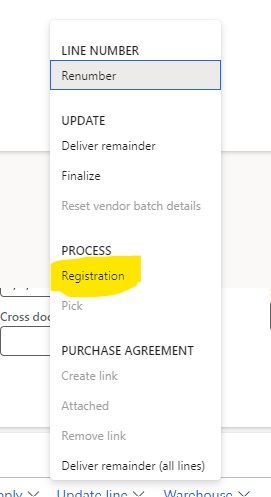
For this, open the purchase order and go to a specific line, click on the update line, and click on registration.

From registration form click on ” Add registration line”

On clicking add registration line, you will find negative values.

Click on Confirm Registration. This will reverse the registration process after closing this form you can remove the line from purchase order

Similar way you can unregister the picked quantity in Sales order processing.

Glossary to Business Analysis

November 19, 2023 by alirazazaidi

As business analysts, we deal with people, processes, and technology. We have to listen to user stories and understand their needs. Separate their wants from their needs. What is actually required as compared to their wants? Most importantly, what is actually possible with respect to their budget?

During communication between professionals as well as end users, we use different terms and jurgans. I listed some of them here.

Here is a list of some common terminology that you might come across in a business analysis glossary:

  1. Business Analyst: Consider a specialist who understands the organization’s processes, procedures, existing systems, and goals and provides the solution.
  2. Stakeholders: people or groups of people who have involvement in both ownership and investment and direct efficacy of the success or failure of the system.
  3. Requirements: detailed statements that explain the functions, processes, and pain areas of the end user or group of users.
  4. SWOT Analysis: Decision-making tools that help organizations identify their strengths, weaknesses, and opportunities
  5. Use Case: A use case is a sample event or process, or an example of documenting the interaction of a system or process with actors, users, or systems.
  6. Gap Analysis: difference between the actual system functionality provided by the system and the requirements that come from stakeholders
  7. Agile: A project management approach for requirement gathering, development, testing, and delivery to the end user that focuses on flexibility, collaboration, and customer feedback.
  8. Waterfall: A transition to requirement gathering, software development, and implementation Linear and sequential framework.
  9. Business Process Modeling: The graphical representation of business processes for the purposes of understanding, analyzing, and improving them.
  10. ROI (Return on Investment): measure the profit or value gained from an investment.
  11. KPI (Key Performance Indicator): measurement of key factors for success in implementation or success in requirement gathering. or preformance.
  12. RACI Matrix: A technique for clarifying project or process roles and responsibilities (responsible, accountable, consulted, and informed).
  13. Scope creep: uncontrolled changes and additions to the scope of a project. This leads to delays and overbudgeting for the project.
  14. Change Management: The process of planning, implementing, and managing organizational changes
  15. BRD (Business Needs Document): A document that outlines a project’s high-level business needs.
  16. User Story: Understanding and documentation of presepective end uses; this term is widely used in Agile.
  17. Decision Matrix: requirements and their solutions vs. possibilities based on established criteria
  18. Feasibility Study: Documentation for the proposed solution: is it viable or possible, both in terms of cost and time?
  19. Sprint: what will be delivered, requirement gathering, and development within a 2-4 week period for a defined requirement or set of features.
« Previous Page
Next Page »

Primary Sidebar

About

I am Dynamics AX/365 Finance and Operations consultant with years of implementation experience. I has helped several businesses implement and succeed with Dynamics AX/365 Finance and Operations. The goal of this website is to share insights, tips, and tricks to help end users and IT professionals.

Legal

Content published on this website are opinions, insights, tips, and tricks we have gained from years of Dynamics consulting and may not represent the opinions or views of any current or past employer. Any changes to an ERP system should be thoroughly tested before implementation.

Categories

  • Accounts Payable (2)
  • Advance Warehouse (2)
  • AI (3)
  • Asset Management (3)
  • Azure Functions (1)
  • Books (6)
  • Certification Guide (3)
  • ChatGPT (3)
  • Claude (1)
  • Customization Tips for D365 for Finance and Operations (64)
  • D365OF (60)
  • Data Management (1)
  • database restore (1)
  • Dynamics 365 (59)
  • Dynamics 365 for finance and operations (139)
  • Dynamics 365 for Operations (175)
  • Dynamics AX (AX 7) (134)
  • Dynamics AX 2012 (274)
  • Dynamics Ax 2012 Forms (13)
  • Dynamics Ax 2012 functional side (16)
  • Dynamics Ax 2012 Reporting SSRS Reports. (31)
  • Dynamics Ax 2012 Technical Side (52)
  • Dynamics Ax 7 (65)
  • Exam MB-330: Microsoft Dynamics 365 Supply Chain Management (7)
  • Excel Addin (1)
  • Favorites (12)
  • Financial Modules (6)
  • Functional (8)
  • General Journal (1)
  • Implementations (1)
  • Ledger (1)
  • Lifecycle Services (1)
  • Logseq (4)
  • Management Reporter (1)
  • Microsoft Excel (4)
  • MS Dynamics Ax 7 (64)
  • MVP summit (1)
  • MVP summit 2016 (1)
  • New Dynamics Ax (19)
  • Non Defined (9)
  • Note taking Apps (2)
  • Obsidian (4)
  • Personal Knowledge Management (3)
  • PKM (16)
  • Power Platform (6)
  • Procurement (5)
  • procurement and sourcing (6)
  • Product Information Management (4)
  • Product Management (6)
  • Production Control D365 for Finance and Operations (10)
  • Sale Order Process (10)
  • Sale Order Processing (10)
  • Sales and Distribution (5)
  • Soft Skill (1)
  • Supply Chain Management D365 F&O (5)
  • Tips and tricks (278)
  • Uncategorized (165)
  • Upgrade (1)
  • Web Cast (7)
  • White papers (4)
  • X++ (10)

Wiki

  • SCM

Copyright © 2026 · Magazine Pro On Genesis Framework · WordPress · Log in