• Skip to main content
  • Skip to primary sidebar
  • Home
  • About
  • Recommended Readings
    • 2022 Book Reading
    • 2023 Recommended Readings
    • Book Reading 2024
    • Book Reading 2025
    • Book Reading 2026
  • Supply Chain Management Guide
  • PKM
  • Microsoft Excel
  • Microsoft Copilot in Office 365
  • Public Wiki Page

Ali Raza Zaidi

A practitioner’s musings on Dynamics 365 Finance and Operations

alirazazaidi

Dynamics Ax 7 RTW update 1 available for download.

July 4, 2016 by alirazazaidi

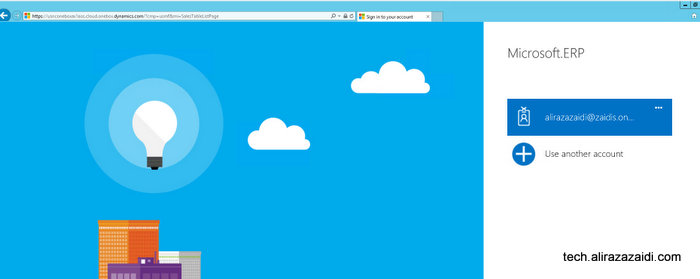
You can download Dynamics AX 7 RTW update 1 from Microsoft connect with following link.

https://connect.microsoft.com/site1321/Downloads/DownloadDetails.aspx?DownloadID=61368

2016-07-04_14-08-14

More interestingly, now You can download it in browser, I used Internet download manager.


You can find detail about what’s new in update 1 in following links


https://ax.help.dynamics.com/en/wiki/whats-new-or-changed-in-dynamics-ax-7/


https://blogs.msdn.microsoft.com/lcs/2016/05/27/may-2016-release-notes/
 

Display methods in Report SSRS Dynamics Ax 2012 .

June 13, 2016 by alirazazaidi

Hi, All, today I have to modify the report. Interestingly this report was built on AOT Query, instead of Data provider class. Current Scenario I was working on Worker Report. The requirement was to show’s primary position and department. HCMWorker table has two display method returns these values.

We can add these display methods into reports by following way.

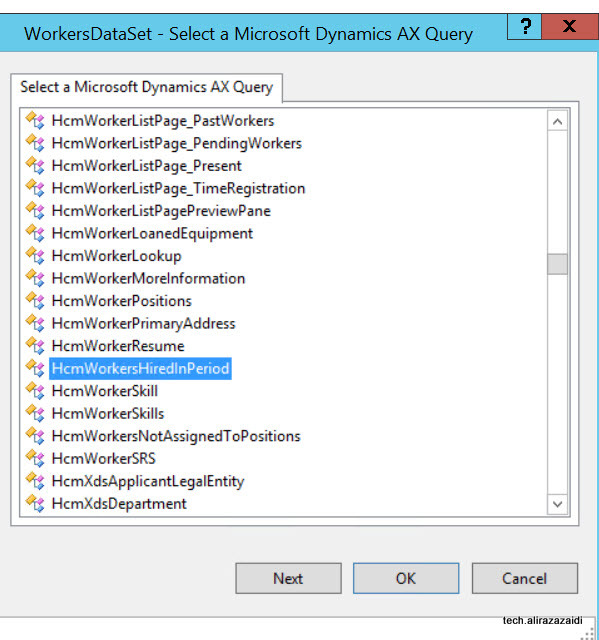
For example I am modify the out of the box HCMWorkersHiredInPeriod Report.


2016-06-13_15-25-16 2016-06-13_15-25-51


2016-06-13_15-47-15


ddd


Now Problem appears, we need different values then provided by out of the box display methods. For example we need Position Title instead of Primary Position Id. for this Add new display method that will return the Position Title instead of Position Id, compile table synchronize table, restore the AOT Query and refresh the report data Set. If there is no error in your working environment you will find required methods in report Data set.


Exploring Currency Exchange Rate in New Dynamics Ax.

June 8, 2016 by alirazazaidi

Suppose we need exchange rate from In Dynamics AX, For example dollar to Pakistani Rupee exchange rate.

We can do this in three steps


Currency Exchange rate Type in Dynamics Ax (Aka AX 7)


Create a new Currency exchange rate in new Dynamics Ax (Aka 7)


Setup Currency Exchange rate in Ledger Dynamics Ax 7

Currency Exchange rate Type in Dynamics Ax (Aka AX 7)

June 8, 2016 by alirazazaidi

For creating new exchange rate type click on top menu and click on ledger.

2016-06-08_20-14-42


From detail menu click on Exchange Rate Type

Exchange Rate Type


Click on new button from exchange rate types list page


new Echange Rate Type


Enter PkR and detail about it and click on save.

PkrType

Create a new Currency exchange rate in new Dynamics Ax (Aka 7)

June 8, 2016 by alirazazaidi

2016-06-08_20-14-42

Click on General ledger from Ax menu.

Exchange Rate

When currency exchange rates page opens, it load default rate change. Select required rate exchange type.

2016-06-08_20-29-28


From currency select dollar and to currency Pkr and set conversion factor to 100.

Step up 2


Also save and then add effective dates.

2016-06-08_20-54-50


Setup Currency Exchange rate in Ledger Dynamics Ax 7

June 8, 2016 by alirazazaidi

2016-06-08_20-14-42


Ledger Setup

Chane


Rate Update


Basic level sale order processing In New Dynamics AX (Aka AX 7) Step by Step.

May 23, 2016 by alirazazaidi

In very basic level we can divide the Sale order into following steps

basic


  1. Create New Customer
  2. Create a Sale order
  3. Pick the Sale Order
  4. Pack the Sale order
  5. Invoice the Sale Order

Create a new customer in New Dynamics Ax (Aka AX 7)

May 23, 2016 by alirazazaidi

Login in to Ax

2016-05-23_1-42-28


On successful login dashboard page is open in web browser.


Change legal entity from top menu to USMF

Change legal entity

We can create sales order from either Sales and marketing and Account Receivable module


Click on top menu.

Menu


Select Account Receivable menu

account Receviable


Or Sales and Marketing

Sales and marketing


Click on account receivable


Click on All customers

Customer List page link

Customer list page opens. Now click on new button to open customer form.


Customer List page

Enter Customer account for example I Added “MVP0007” as customer account And Name as Ali Raza Zaidi, select 80 in Customer Group.

Create Customer

In Address just select any Zip code for current article I Select 00210.

Sales Order Creation


Click on Save button, If you want to create Sales order directly click on Save and open then click on Sales Order.


Create a new Sales Order in New Dynamics AX (Aka AX 7)

May 23, 2016 by alirazazaidi

Either you create new customer and then click on Save and open. Otherwise click on new Sales Order and select customer.

NewSalesOrder

Select Customer selection for Sale order.


Select Customer


Select customer and save.


As we create very simple sale order so we select only one Item D0001 and set quantity 10 and also select change warehouse to 11.

Sales order create


Save the sale order

Save Sale Order


When the sales order is saved. The go to Sales Order tab => Generate=> Confirm Sales Order is enable. Click on it


Confirm Sales Order


Confirm Sales Order Form


Click on Ok.

Confirm2


You can find that status of Sales order is Open.

Sales Order Status


Pick The Sale Order in New Dynamics Ax (Aka AX 7)

May 23, 2016 by alirazazaidi

When Sale order is confirm. Select pick and Pack => Generate => Generate picking list.

Pick 1


Click on Ok.

Coddd


Confirm2

« Previous Page
Next Page »

Primary Sidebar

About

I am Dynamics AX/365 Finance and Operations consultant with years of implementation experience. I has helped several businesses implement and succeed with Dynamics AX/365 Finance and Operations. The goal of this website is to share insights, tips, and tricks to help end users and IT professionals.

Legal

Content published on this website are opinions, insights, tips, and tricks we have gained from years of Dynamics consulting and may not represent the opinions or views of any current or past employer. Any changes to an ERP system should be thoroughly tested before implementation.

Categories

  • Accounts Payable (2)
  • Advance Warehouse (2)
  • AI (3)
  • Asset Management (3)
  • Azure Functions (1)
  • Books (6)
  • Certification Guide (3)
  • ChatGPT (3)
  • Claude (1)
  • Customization Tips for D365 for Finance and Operations (64)
  • D365OF (60)
  • Data Management (1)
  • database restore (1)
  • Dynamics 365 (59)
  • Dynamics 365 for finance and operations (139)
  • Dynamics 365 for Operations (175)
  • Dynamics AX (AX 7) (134)
  • Dynamics AX 2012 (274)
  • Dynamics Ax 2012 Forms (13)
  • Dynamics Ax 2012 functional side (16)
  • Dynamics Ax 2012 Reporting SSRS Reports. (31)
  • Dynamics Ax 2012 Technical Side (52)
  • Dynamics Ax 7 (65)
  • Exam MB-330: Microsoft Dynamics 365 Supply Chain Management (7)
  • Excel Addin (1)
  • Favorites (12)
  • Financial Modules (6)
  • Functional (8)
  • General Journal (1)
  • Implementations (1)
  • Ledger (1)
  • Lifecycle Services (1)
  • Logseq (4)
  • Management Reporter (1)
  • Microsoft Excel (4)
  • MS Dynamics Ax 7 (64)
  • MVP summit (1)
  • MVP summit 2016 (1)
  • New Dynamics Ax (19)
  • Non Defined (9)
  • Note taking Apps (2)
  • Obsidian (4)
  • Personal Knowledge Management (3)
  • PKM (16)
  • Power Platform (6)
  • Procurement (5)
  • procurement and sourcing (6)
  • Product Information Management (4)
  • Product Management (6)
  • Production Control D365 for Finance and Operations (10)
  • Sale Order Process (10)
  • Sale Order Processing (10)
  • Sales and Distribution (5)
  • Soft Skill (1)
  • Supply Chain Management D365 F&O (5)
  • Tips and tricks (278)
  • Uncategorized (165)
  • Upgrade (1)
  • Web Cast (7)
  • White papers (4)
  • X++ (10)

Wiki

  • SCM

Copyright © 2026 · Magazine Pro On Genesis Framework · WordPress · Log in