• Skip to main content
  • Skip to primary sidebar
  • Home
  • About
  • Recommended Readings
    • 2022 Book Reading
    • 2023 Recommended Readings
    • Book Reading 2024
    • Book Reading 2025
    • Book Reading 2026
  • Supply Chain Management Guide
  • PKM
  • Microsoft Excel
  • Microsoft Copilot in Office 365
  • Public Wiki Page

Ali Raza Zaidi

A practitioner’s musings on Dynamics 365 Finance and Operations

alirazazaidi

ODBC connection and Null value Handling Dynamics Ax 2012 R3.

December 5, 2017 by alirazazaidi

Today I have very small tip to share. I noted down, some odbc connection posts in my blog. All these post shares the code snippets , that used to open odbc connection and did query on SQL server directly. Couple of days ago, I need similar code snippet to read data from SQL server and Insert into another connect. But that code did not had reference to handling null values. So I note down that code snippet too, for future reference.


These all odbc connection , command return results in “ResultSet” class.


This ResultSet  class has method  “wasnull”. According to documentation, its behavior is strange. First we have to call the get method and then we call “WasNull” to verify that value appears is null or not.

https://msdn.microsoft.com/en-us/library/resultset.wasnull.aspx


So whole code snippet will be like.

public void run()
 

{

Connection Con = new Connection();

ResultSet R;

str sql;

Statement Stmt;

SqlStatementExecutePermission permission;

Real _RealValue;

sql = "SELECT * FROM InventTrans ";

Stmt = Con.createStatement();

permission = new SqlStatementExecutePermission(sql);

permission.assert();

R =Stmt.executeQuery(sql);


while ( R.next() )

{

_RealValue =R.getReal(1);

if (  R.wasNull(1) ==boolean::false)

{


info (" Not null");

}

Else

{

Info (" Null ");

}


}

CodeAccessPermission::revertAssert();


}

Trello as lean project management tool for Dynamics Ax 2012 R3

December 1, 2017 by alirazazaidi

Hi All, from last two years, I used Trello as lean project management tool. I used it track different customization task and its status.

This was wonderful free tool for post implementation or support projects. I tried to share some tips. Remember this is just small overview video for Trello.

Relation between PurchLine and PurchReqline Tables in Dynamics AX 2012 R3.

November 9, 2017 by alirazazaidi

In one of SSRS Report requirement, client wants to see Purchase order quantity, Invoice Quantity against items purchase requisition Quantity.


Instead of writing a query on ItemId and InventdimId, I found out of the box function In PurchReqLine table. This method return the reference of Purchline. With reference of Purchline, I can get Purchase order Number and get Item Invoiced quantity.


PurchLine       purchLine;

PurchReqLine reqline;


_purchLine = reqline.purchLine();


The relationship between Purchline and PurchReqline is RecId, Purchline contains the Reference RecId of PurchReqline.


PurchLine       purchLine;


if (this.PurchId && this.LineRefId)

{

select firstonly purchLine

where purchLine.PurchId           == this.PurchId    &&

purchLine.PurchReqLineRefId == this.LineRefId  &&

!purchLine.IsDeleted;

}

Free introductory course on MVA for Dynamics 365 for finance and operations, enterprise edition.

October 31, 2017 by alirazazaidi

Do you want to introductory session, then this course is for you. Yes it is free any one can watch very basic level course on Microsoft Virtual Academy

https://mva.microsoft.com/en-US/training-courses/introduction-to-microsoft-dynamics-365-for-finance-and-operations-enterprise-edition-17908?l=AHneoTOJE_906312570

Course contents are amazing.


  •  Course Introduction Time00:01:3701 | Overview
  •  Cloud-Based Solution Time00:02:02
  •  Workspaces Driving Productivity Time00:02:48
  •  Workflows in Your Business Processes Time00:03:34
  •  Reporting Time00:01:12
  •  Industry Focus Time00:02:2902 | Introduction to Functionality
  •  Overview Time00:02:55
  •  Order-to-Cash Time00:00:33
  •  Demo: Order-to-Cash Functionality Time00:07:38
  •  Procure-to-Pay Time00:00:32
  •  Demo: Procure-to-Pay Functionality Time00:08:16
  •  Plan-to-Produce Time00:00:42
  •  Demo: Plan-to-Produce Functionality Time00:05:19
  •  Recruit-to-Hire Time00:00:59
  •  Demo: Create Jobs, Positions, and Recruitment Projects Time00:10:21
  •  Complete an Application and Hire a Worker Time00:00:11
  •  Demo: Complete an Application and Hire a Worker Time00:08:08Post-Course Survey
  •  Post-Course Survey (Optional) Assessment: Full Course
  •  Assessment: Full Course

Mass delete records D365 for Finance and Operations.

October 28, 2017 by alirazazaidi

I was testing one scenario, I have created some main account wrongly. So I want to delete them quickly.

Secondly I want to explore the Office integration In D365 for finance and operations.

So I did following steps to delete the required records quickly.

 Organization administration > Setup > Office integration > Excel workbook designer


Select entity “MainAccount”

. Create workbook

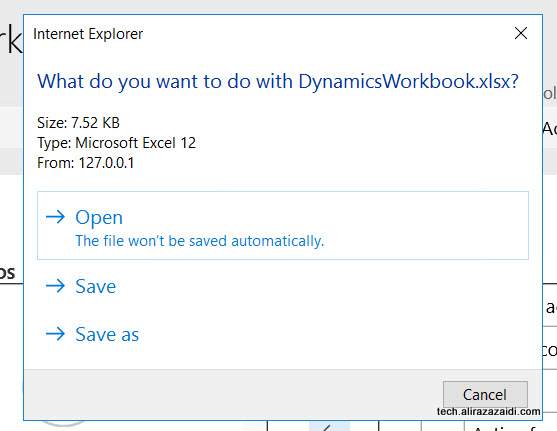
and download it

Login in Excel

Open excel

Delete selected records

Publish

Confirm.

Records are successfully deleted.

Could not upload to the storage location Dynamics 365 for finance and operations.

October 28, 2017 by alirazazaidi

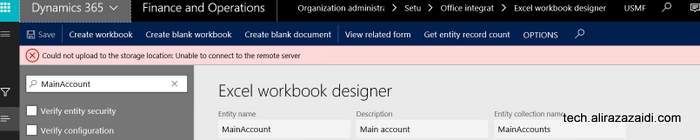
I was experimenting with Office integration in Dynamics 365 for finance and operations. On Create Excel worksheet. I got following error

Could not upload to the storage location: Unable to connect to the remote server.

Later I found that on my onbox, Azure Emulator was not running.

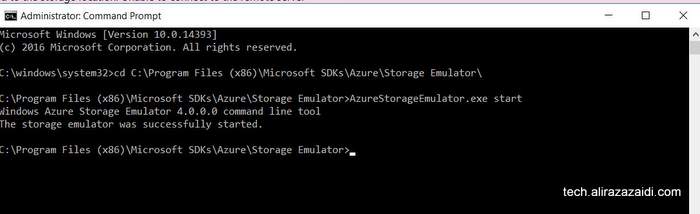
So I did

  1. On OneBox VM, run command prompt as administrator.
  2. Navigate to “C:\Program Files (x86)\Microsoft SDKs\Azure\Storage Emulator\”
  3. Run “AzureStorageEmulator.exe start”

After running that service, Download options perfectly worked

Microsoft Management Report installation, configuration links Dynamics Ax 2012 R3

October 26, 2017 by alirazazaidi

Couple of days ago, I configure the Management Report on client machine. I found following links helps to install and reconfigure.


You can download Microsoft Management Report integration guide from here. It was last updated Feb 2017

https://www.microsoft.com/en-us/download/details.aspx?id=5916


For me the most important thing I found is user role in white paper.


https://www.microsoft.com/en-us/download/details.aspx?id=5916


A lot of useful time from My fellow MVP to Tommy Skaue

http://yetanotherdynamicsaxblog.blogspot.com/2013/12/installation-of-management-reporter.html


http://yetanotherdynamicsaxblog.blogspot.com/2014/03/adding-users-in-management-reporter.html


Important posts from Kaya Consultancy

https://kaya-consulting.com/management-reporter/

https://kaya-consulting.com/troubleshooting-management-reporter-integration-with-ax-2012/


Some other links


http://www.crestwood.com/blog/view/back-to-basics-create-a-new-user-in-management-reporter/

http://www.uxceclipse.com/how-to-rebuild-datamart-ddm-for-management-reporter-2012-in-microsoft-dynamics-erp/


http://www.everythingdynamicsaxbi.com/2016/02/01/management-reporter-rebuilding-your-data-mart/


Dr. Ludwig Reinhardz


https://dynamicsax-fico.com/2017/01/20/link-multiple-management-reporter-reports/

https://dynamicsax-fico.com/2015/12/03/management-reporter-reports-based-on-different-chart-of-accounts/

https://dynamicsax-fico.com/2016/09/18/management-reporter-unit-security/

https://dynamicsax-fico.com/2015/12/03/management-reporter-reports-based-on-different-chart-of-accounts/

https://dynamicsax-fico.com/2015/11/23/management-reporter-excel-import/

https://dynamicsax-fico.com/2015/03/01/switching-accounts/


Customer in Dynamics 365 for Finance and Operations

October 15, 2017 by alirazazaidi

Every organization sold product or services to Customer. These Customer are main source of income to these organization. In Dynamics 365 for finance and operations we can create customer in Account receivable and sales and marketing modules.  Customer basic information is saved per legal entity but his Name, address and contact save in global address book. That can be reusable in different legal entity with new customer account.

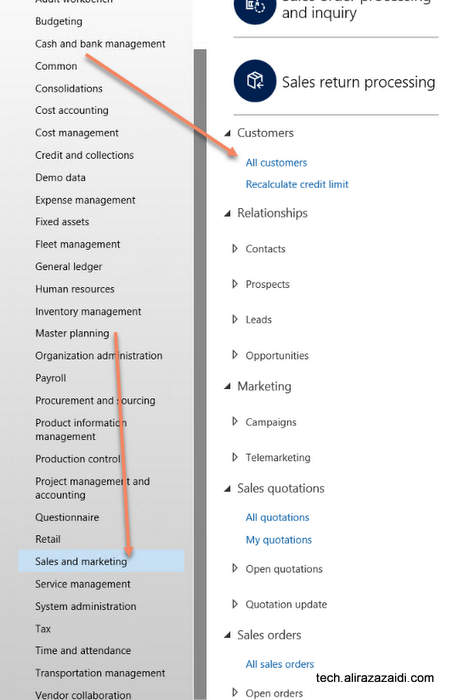
We can define customer from Account Receivable => Customer => All Customer

Sales and Marketing => Customers => All customers


If we open the customer list page, similar page will be appear. This page can be used as inquiry too. The customer created here will be used for sales, payment, Invoices and ledger accounts. Customer information can be changed any time.


Every Customer is created with unique id in Customer Account.  Default size of Customer Account is 20.


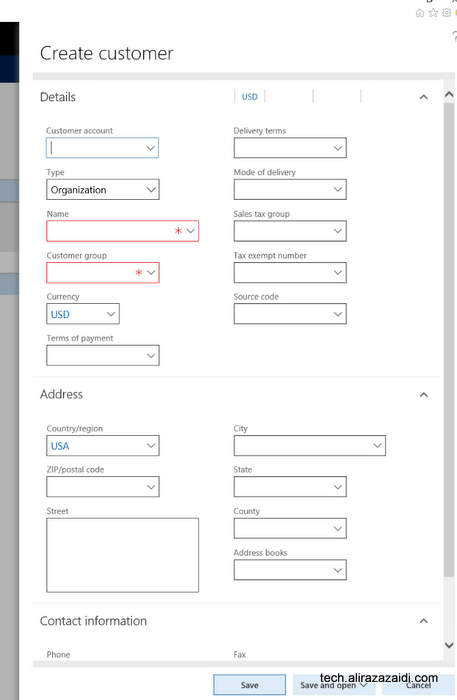
By clicking on new button from top menu , on list page a dialog opens where we can enter basic information. boxes with red boundaries are mandatory. Customer can be organization or individual entry. As I already mentioned that Customer Name, address  and even contacts are global across  application.


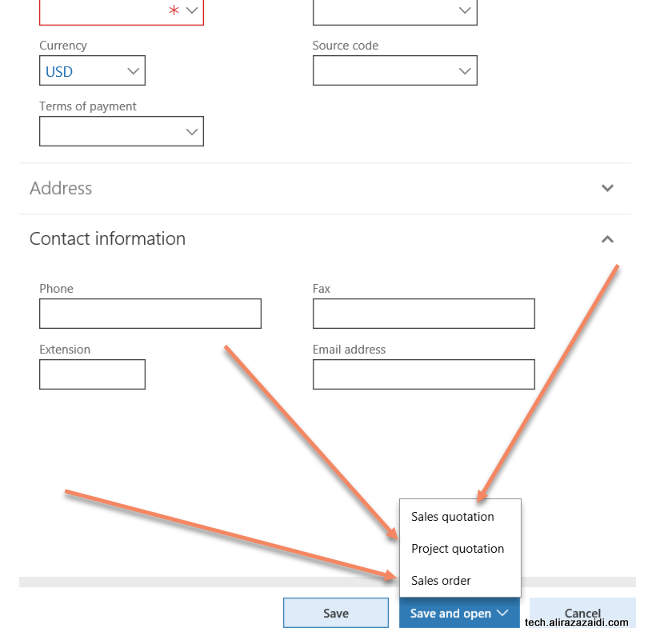
There are multiple options  available on save . Default option is save and go in detail page.

Other options are as follow


-Sales Quotations : Where we create Sales Quotations and start to enter the Sales quotations send to Customer in response to its RFQ.

-Project Order: Where customer saved and Project Quotations detail form opens.

-Sales Order: Customer Record saved and new sale order created against Customer and it goes directly Sales order detail page.


On click at Edit button to leads customer detail page in edit mode. We can modify information and save. This edit mode can available on detail page also.

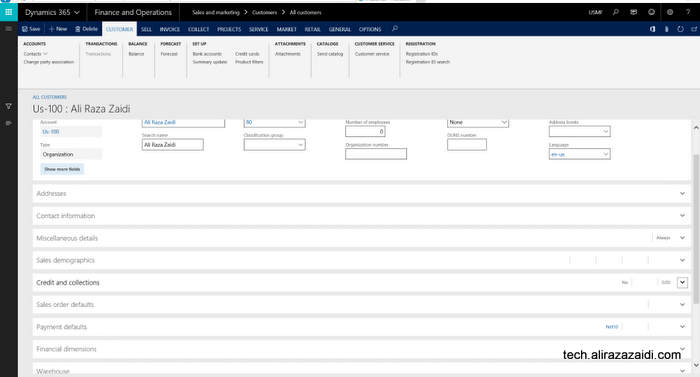
Out of the box Customer detail will be something similar


Customer Information and Contact:


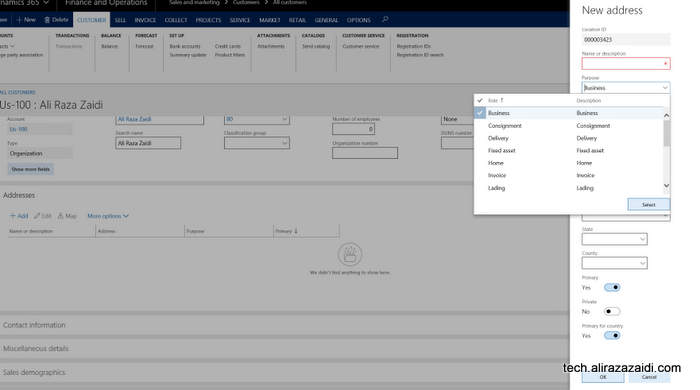
Contact and Address can be added from Addresses and Contact information.


Invoice and delivery Information of Customer:


Some cases, we invoice the customer other then customer It self. Some times Same customer purchase things with different customer Account. In that case we invoiced shipment to another customer Id. For this purpose Dynamics 365 for finance provide Invoice Account in “Invoice and delivery” fast tab.

In the case of Invoice account not set in Invoice and Delivery fast tab then Invoice will be created against Customer Account as default.

The delivery terms, mode of delivery, receipt calendar can be specified in the Delivery area. This information will default to the sales order header.

If you want to calculate Sales tax against customer Invoice, you have to set Sales tax in Invoice and Delivery fat tab.


Customer Payment Information:


Payment management options can set in customer Payment fast tab


You can set

  • Terms of payment
  • Method of payment
  • Payment specification
  • Payment schedule.
  • Payment day
  • Cash discount. A cash discount is used as an incentive for customers that pay
  • before due date.
  • Bank account
  • Bank account number


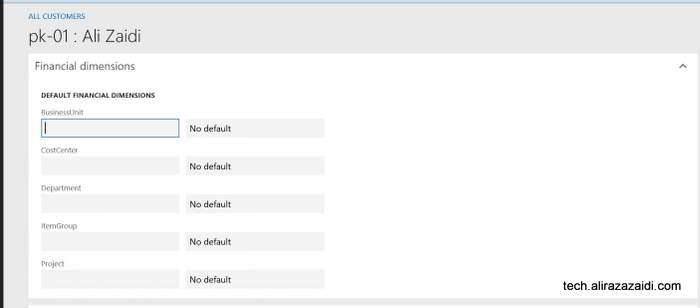
Customer Financial Dimension:

Customer financial dimension can be set from  financial Dimension fast tab. These financial dimension automatically copied in sale order and customer invoices if they are set at customer level. These financial dimension can be modify and over right.

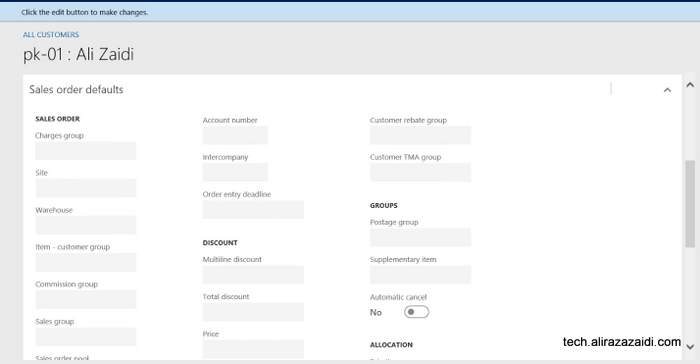
Sales order related default settings:


From Sale Order Defaults fast tab, you can set Preferred shipped from ware house and site and also Bill to customer. Bill to customer can be set in account number. This account number will be copied to Sale order header instead of customer own Account number. It means, we can set different Account for bill to customer .


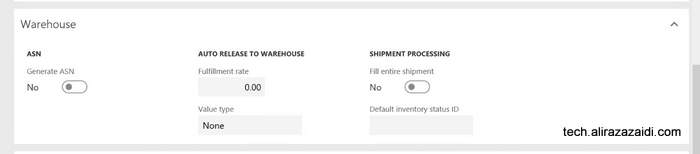
Ware house management Fast tab.


Here we can set Ware house management level information. Fast tab related to Advance ware house management module.

Following options are here.

ASN : Means, Advance shipment notification generate for customer.

Fulfillment rate.  The threshold required before releasing to Warehouse.

Value Type:  Fulfillment rate apply to Price, Quantity or to None.

Fill entire shipment- shipment processing parameter to control fully shipment allocation during work creation.

Default status id – default status for inventory transaction.

Procurement and sourcing

October 6, 2017 by alirazazaidi

Dynamics Ax 2012 Project Types and Time and Material Video

October 5, 2017 by alirazazaidi

Hi All I found very interesting video about Project Management and accounting module of Dynamics 2012 R3 by Santosh kumar Singh. Video is worth to share.


« Previous Page
Next Page »

Primary Sidebar

About

I am Dynamics AX/365 Finance and Operations consultant with years of implementation experience. I has helped several businesses implement and succeed with Dynamics AX/365 Finance and Operations. The goal of this website is to share insights, tips, and tricks to help end users and IT professionals.

Legal

Content published on this website are opinions, insights, tips, and tricks we have gained from years of Dynamics consulting and may not represent the opinions or views of any current or past employer. Any changes to an ERP system should be thoroughly tested before implementation.

Categories

  • Accounts Payable (2)
  • Advance Warehouse (2)
  • AI (3)
  • Asset Management (3)
  • Azure Functions (1)
  • Books (6)
  • Certification Guide (3)
  • ChatGPT (3)
  • Claude (1)
  • Customization Tips for D365 for Finance and Operations (64)
  • D365OF (60)
  • Data Management (1)
  • database restore (1)
  • Dynamics 365 (59)
  • Dynamics 365 for finance and operations (139)
  • Dynamics 365 for Operations (175)
  • Dynamics AX (AX 7) (134)
  • Dynamics AX 2012 (274)
  • Dynamics Ax 2012 Forms (13)
  • Dynamics Ax 2012 functional side (16)
  • Dynamics Ax 2012 Reporting SSRS Reports. (31)
  • Dynamics Ax 2012 Technical Side (52)
  • Dynamics Ax 7 (65)
  • Exam MB-330: Microsoft Dynamics 365 Supply Chain Management (7)
  • Excel Addin (1)
  • Favorites (12)
  • Financial Modules (6)
  • Functional (8)
  • General Journal (1)
  • Implementations (1)
  • Ledger (1)
  • Lifecycle Services (1)
  • Logseq (4)
  • Management Reporter (1)
  • Microsoft Excel (4)
  • MS Dynamics Ax 7 (64)
  • MVP summit (1)
  • MVP summit 2016 (1)
  • New Dynamics Ax (19)
  • Non Defined (9)
  • Note taking Apps (2)
  • Obsidian (4)
  • Personal Knowledge Management (3)
  • PKM (16)
  • Power Platform (6)
  • Procurement (5)
  • procurement and sourcing (6)
  • Product Information Management (4)
  • Product Management (6)
  • Production Control D365 for Finance and Operations (10)
  • Sale Order Process (10)
  • Sale Order Processing (10)
  • Sales and Distribution (5)
  • Soft Skill (1)
  • Supply Chain Management D365 F&O (5)
  • Tips and tricks (278)
  • Uncategorized (165)
  • Upgrade (1)
  • Web Cast (7)
  • White papers (4)
  • X++ (10)

Wiki

  • SCM

Copyright © 2026 · Magazine Pro On Genesis Framework · WordPress · Log in