Hi all, small tip. I faced this issue, when I extend the custom report in D365 for finance and operations. During development on onebox
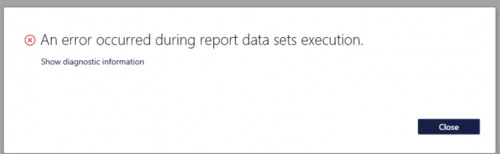
Solution was simple,
- restart IIS services
- Restart Reporting Services.
Happy Daxing.
A practitioner’s musings on Dynamics 365 Finance and Operations
Hi all, small tip. I faced this issue, when I extend the custom report in D365 for finance and operations. During development on onebox
Solution was simple,
Happy Daxing.
Hi all, In some cases we can need to copy financial dimension from one object to other for example Customer to Sales order or Vendor to purchase order.
In Ax 2012 it little easy. But in D365 For finance and operations, it is little bit tricky.
I did this with following code snippet. With the help of out of box. LedgerDimensonDefaultFacade class i used the merge default dimension method and passed same table dimension in form and to dimension.
Result is interesting.
salestable.DefaultDimension= LedgerDimensionDefaultFacade::serviceMergeDefaultDimensions(CustTable.DefaultDimension,CustTable.DefaultDimension);
Today I faced this issue, While deployment of package on-premises deployment. Deployment failed, even rollback failed. log files shows following message
“Could not find FileLocations.xml in the package”

But event log files on orch 2 has very different story. It says
Task OrchestrationService.DeployModulesRunnerTask,OrchestrationService failed for command id 2b462374-eda7-41e5-88d5-da2fe3de9202
System.AggregateException: One or more errors occurred. —> System.TimeoutException: Operation timed out. —> System.Runtime.InteropServices.COMException: Exception from HRESULT: 0x80071BFF at System.Fabric.Interop.NativeClient.IFabricApplicationManagementClient10.EndProvisionApplicationType3(IFabricAsyncOperationContext context) at
But both these error was misleading. Deployment successful, after stopping the antivirus.
In Ax 2012 we get menu name with element.Args().CallMenu name, using taking decision on menu name.
But same logic we need to apply in Extension. But in D365 For finance and operations we did not overlay. Following code snippet helps me to implement similar logic in Extension.
[ExtensionOf(formStr(CustTable))]
final class IaLogisticsContactInfoGrid_Extension
{
/// <summary>
///
/// </summary>
/// <param name=”sender”></param>
/// <param name=”e”></param>
[FormEventHandler(formStr(LogisticsContactInfoGrid), FormEventType::Initialized)]
public static void LogisticsContactInfoGrid_OnInitialized(xFormRun sender, FormEventArgs e)
{
FormRun formRun = sender;
;
info(formRun.args().menuItemName());
}
}
Hi did one customization, where I create Ledger Journal using X++ code. It was working perfectly fine with Ledger General Ledger entries. But threw error on creating Ledger for AR,PR Payment.
I created ledger with following code snippet. But it works only for Ledger for of Type Daily
AxLedgerJournalTable header = new AxLedgerJournalTable();
AxLedgerJournalTrans trans = new AxLedgerJournalTrans();container offsetDim;
LedgerJournalNameId ledgerJournalNameId = “payment”;header.parmJournalName(ledgerJournalNameId);
header.parmJournalType(LedgerJournalType::CustPayment);
header.save();I replaced the above code with following snippet it works perfectly fine, rest of the code is works fine
LedgerJournalName ledgerJournalName;
LedgerJournalTable ledgerJournalTable;
LedgerJournalTrans ledgerJournalTrans;select firstonly ledgerJournalName
where ledgerJournalName.JournalName == parameters.LedgerJournalNameId &&
ledgerJournalName.JournalType == LedgerJournalType::CustPayment;
if(!ledgerJournalName.RecId)
throw error(“@CAM184”);
if(ledgerJournalName)
{
ledgerJournalTable.JournalName = ledgerJournalName.JournalName;
ledgerJournalTable.Name = ledgerJournalName.Name;
ledgerJournalTable.insert();
}
Hi Today I found very interesting post here , where we can use “In” keyword for While select or Select statement.
in will be enum based.
SalesTable salesTable;container con = [SalesType::Sales, SalesType::ReturnItem, SalesType::Subscription];while select * from salesTablewhere salesTable.SalesType in con{Info(salesTable.SalesId);}https://allaboutmsdynamics.wordpress.com/2019/02/18/d365-ax7sql-in-operator-in-x-where-clause-enum-fields-only/
Does experience count, As ERP consultant, There are always new challenge. With 7 years core Dynamics Customization Experience, Still found new things to learn. Experience told you how to hide your fear of unknown and possibility.
Today very small tip. Which i resolve with experience. We usually create Ledger General With X++ code. The code is available in many webs sites. But today I need to copy financial dimension of Customer/ Vendor/Bank/ Assets to Ledger Journal trans. I found function in AxdDimensionUtil Class provide the functionality.
The code snippet is as follow. The ledger Journal trans have to two default dimension, one for account and second for offset account.
Suppose we are copy financial dimension form customer account to customer.
trans.parmAccountType(LedgerJournalACType::Cust);
custTable =CustTable::find(_account);
conDim= AxdDimensionUtil::getDimensionAttributeValueSetValue(custTable.DefaultDimension);
trans.parmDefaultDimension(AxdDimensionUtil::getDimensionAttributeValueSetId(conDim)
);
For paging in X++ Query. There are three steps required. Rest of Query Code is same.
We have to set following things in Query data source
Here is code snippet
QueryBuildRange qbr,qbrStartDate,qbrEndDate;
QueryBuildDataSource qbd;
IAPageSize EnumPageSize;QueryRun qr;
Query query = new Query();
Int pageSize = 2;
qbd = query.addDataSource(TableNum(ProjPlanVersion));
qbd.addOrderByField(fieldNum(ProjPlanVersion,HierarchyId));qr = new QueryRun(query);
qr.enablePositionPaging(true);
CurrentPageNumber =1;
startingposition = CurrentPageNumber * pagesize;
qr.addPageRange(startingposition, totalRows);
while(qr.next())
{
Info (“”);
}
I still like the Idea shared by “Gary Vaynerchuk ” Post ” Document dont create” So I document what I face today and resolved.
Today I am facing Project compilation Error in Visual studio output pane, I am struggling to understand Table control, so I can meet the development of my next assignment. Error was
Severity Code Description Project File Line Suppression State
Error One or more errors occurred. —> System.InvalidOperationException: Cannot stop DynamicsAxBatch service on computer ‘.’. —> System.ComponentModel.Win32Exception: The service cannot accept control messages at this time
— End of inner exception stack trace —
at System.ServiceProcess.ServiceController.Stop()

When I open Services, I found that DynamicsAXBatch services is in stopping mode and stuck.
So I killed the service process with CMD command. “taskkill /f /pid [pid number]”
The message already shows the service name. ” DynamicsAXBatch” You can copy it from Service detail dialog.
So Open CMD with run as administrator and run the following command and get pid
sc queryex DynamicsAxBatch
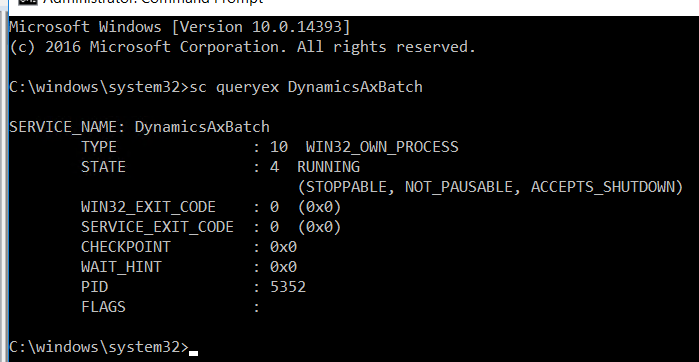
Now I have IP.
And kill the Process Id
taskkill /f /pid 5352

Now I start the service again.
Project is successfully complied.
Today I need to explore some control sample in Dynamics ax 2012 R3. For opening Ax 2012 r3 on my machine, I need a demo license.
I found demo license for 2019 on following location.

