• Skip to main content
  • Skip to primary sidebar
  • Home
  • About
  • Recommended Readings
    • 2022 Book Reading
    • 2023 Recommended Readings
    • Book Reading 2024
    • Book Reading 2025
    • Book Reading 2026
  • Supply Chain Management Guide
  • PKM
  • Microsoft Excel
  • Microsoft Copilot in Office 365
  • Public Wiki Page

Ali Raza Zaidi

A practitioner’s musings on Dynamics 365 Finance and Operations

alirazazaidi

Allow duplicate check Global Address Book Dynamics 365 for finance and operations.

May 31, 2019 by alirazazaidi

Dynamics 365 for finance and operations provide functionality of check Party Name already exists in Global Address book, So End user can select instead create a new one if required.

Here is video I shared this functionality in small less then 5 minutes series.


The internal time zone version number stored in the database Dynamics 365 for finance and operations

May 28, 2019 by alirazazaidi

I  faced database Synch Error after deploying latest code to my Onebox VM.


The internal time zone version number stored in the database is higher than the version supported by the kernel (15/13). Use a newer Microsoft Dynamics 365 for Finance and Operations kernel


Solution is

Open local Database in SQL server management Studio

And run following Query on AXDB.


update SQLSystemVariables set VALUE = 7 where parm =’SYSTIMEZONESVERSION’


Reference:  http://dilliraj.blogspot.com/2016/07/the-internal-time-zone-version-number.html


Unable to download report as PDF Microsoft.WindowsAzure.Storage.Core.Executor.Executor.ExecuteSync Dynamics 365 for finance and operations

May 22, 2019 by alirazazaidi

During Save as pdf custom report throw following error.

 
Unable to connect to the remote server at Microsoft.WindowsAzure.Storage.Core.Executor.Executor.ExecuteSync[T](RESTCommand`1 cmd, IRetryPolicy policy, OperationContext operationContext) at Microsoft.WindowsAzure.Storage.Table.CloudTable.Exists(Boolean primaryOnly, TableRequestOptions requestOptions, OperationContext operationContext) at Microsoft.WindowsAzure.Storage.Table.CloudTable.CreateIfNotExists(TableRequestOptions requestOptions, OperationContext operationContext) at Microsoft.DynamicsOnline.Infrastructure.Components.TableAccessor.TableStorageAccessor.PerformOperation(CloudStorageAccount storageAccount, String tableName, Func`1 operation) at Microsoft.DynamicsOnline.Infrastructure.Components.TableAccessor.TableStorageAccessor.AddRecord[T](CloudStorageAccount storageAccount, String tableName, T record) at Microsoft.DynamicsOnline.Infrastructure.Components.SharedServiceUnitStorage.SharedServiceUnitStorage.UploadData(SharedServiceUnitStorageData data, Stream stream) at
 
It was problem that Azure Storage emulator was not running on my machine. 
For this I have to open window start and write there Azure Storage emulator.
After it searched, click and run the Azure storage Emulator.

 In my Case  emulator Version was out date. I have to download it from Microsoft Cloud. After running that service. Issue was resolved. Report successfully download as pdf.
Reference : https://docs.microsoft.com/en-us/azure/storage/common/storage-use-emulator

List of Vendor Invoices against Payment General Entry

May 15, 2019 by alirazazaidi

Between posted Vendor Payment Journal and Settled Invoice only relation is Voucher number in ledger Journal Trans and VendSettlement Table.

So My friends my code snippet is here,

        VendTrans               vendTrans;

        VendSettlement          VendSettlement;

  while select * from VendSettlement

                join  * from vendTrans

                where VendTrans.DataAreaId == VendSettlement.TransCompany

                && VendTrans.RecId  == VendSettlement.TransRecId

                && VendTrans.AccountNum == VendSettlement.AccountNum

                && VendSettlement.OFFSETTRANSVOUCHER == _ledgerJournalTrans.Voucher

Haaapy Daxinggg

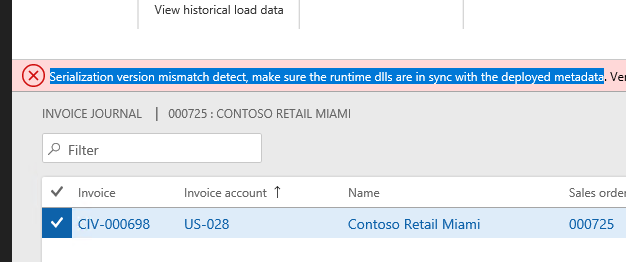
Serialization version mismatch detect, make sure the runtime dlls are in sync with the deployed metadata D365 For finance and operations

May 6, 2019 by alirazazaidi

Don’t what reason, possible I manually copied the model files to my dev one box. After compiling my model and run the customization, on one control document. I faced this issue.
Serialization version mismatch detect, make sure the runtime dlls are in sync with the deployed metadata. Version of file ‘12104’. Version of dll ‘172’.
Solution for that. I build all models by checking all models.

Set collections in X++ Dynamics 365 for finance and operations

April 28, 2019 by alirazazaidi

The menu item with name sysloadstartpage could not be opened. Dynamics 365 for finance and operations

April 28, 2019 by alirazazaidi

Today I faced this issue, when I deployed latest code on one box. Code is fully compiled. On opening browser, I found following error.
Solution. Build model “Application foundation” and  your custom model.  After that do db sync.

unable to read beyond the end of stream Dynamics 365 for finance and operations

April 25, 2019 by alirazazaidi

After deployment of custom report on my  Dev one box. I faced this error when I run the report for testing. IIS restart, Project compilation and Service restart did not solve the problem.
“

unable to read beyond the end of stream

“
Solution was simple, Build the full model.

Add Financial dimension to Customer/Vender with X++ Dynamics 365 for finance and operations

April 23, 2019 by alirazazaidi

Small tip, I used following code snippet to add financial dimension in Customer / Vendor, You can extend this code by adding more dimension and values on Containers in following code snippet.
public class  iaxFinancialDimensionHelper
{
    Public static DimensionDefault ProjectDimension(ProjId _ProjId)
    {
        DimensionAttributeValueSetStorage valueSetStorage = new DimensionAttributeValueSetStorage();
        DimensionDefault result;
        int i;
        DimensionAttribute dimensionAttribute;
        DimensionAttributeValue dimensionAttributeValue;
        container conAttr = [“Projects”];
        container conValue = [_ProjId];
        str dimValue;
        for (i = 1; i <= conLen(conAttr); i++)
        {
            dimensionAttribute = dimensionAttribute::findByName(conPeek(conAttr,i));
            if (dimensionAttribute.RecId == 0)
            {
                continue;
            }
            dimValue = conPeek(conValue,i);
            if (dimValue != “”)
            {
                // The last parameter is “true”. A dimensionAttributeValue record will be created if not //found.
                dimensionAttributeValue =
dimensionAttributeValue::findByDimensionAttributeAndValue(dimensionAttribute,dimValue,false,true);
                // Add the dimensionAttibuteValue to the default dimension
                valueSetStorage.addItem(dimensionAttributeValue);
            }
        }
        result = valueSetStorage.save();
        return result;
    }
}
Reference : Internet. possible Dynamics forum. it works for me.

The field with ID ‘0’ does not exist in table Dynamics 365 For finance and operations

April 11, 2019 by alirazazaidi

Hi all, I face this error, while extended existing custom report. I added some fields in temp table, after update logic in dp class, On report data set update.

But at run time report shows this error. While debugging the code, I found the error occur on mapping the new fields in temp table.


Solution :

I build the whole model. After that error was removed.


« Previous Page
Next Page »

Primary Sidebar

About

I am Dynamics AX/365 Finance and Operations consultant with years of implementation experience. I has helped several businesses implement and succeed with Dynamics AX/365 Finance and Operations. The goal of this website is to share insights, tips, and tricks to help end users and IT professionals.

Legal

Content published on this website are opinions, insights, tips, and tricks we have gained from years of Dynamics consulting and may not represent the opinions or views of any current or past employer. Any changes to an ERP system should be thoroughly tested before implementation.

Categories

  • Accounts Payable (2)
  • Advance Warehouse (2)
  • AI (3)
  • Asset Management (3)
  • Azure Functions (1)
  • Books (6)
  • Certification Guide (3)
  • ChatGPT (3)
  • Claude (1)
  • Customization Tips for D365 for Finance and Operations (64)
  • D365OF (60)
  • Data Management (1)
  • database restore (1)
  • Dynamics 365 (59)
  • Dynamics 365 for finance and operations (139)
  • Dynamics 365 for Operations (175)
  • Dynamics AX (AX 7) (134)
  • Dynamics AX 2012 (274)
  • Dynamics Ax 2012 Forms (13)
  • Dynamics Ax 2012 functional side (16)
  • Dynamics Ax 2012 Reporting SSRS Reports. (31)
  • Dynamics Ax 2012 Technical Side (52)
  • Dynamics Ax 7 (65)
  • Exam MB-330: Microsoft Dynamics 365 Supply Chain Management (7)
  • Excel Addin (1)
  • Favorites (12)
  • Financial Modules (6)
  • Functional (8)
  • General Journal (1)
  • Implementations (1)
  • Ledger (1)
  • Lifecycle Services (1)
  • Logseq (4)
  • Management Reporter (1)
  • Microsoft Excel (4)
  • MS Dynamics Ax 7 (64)
  • MVP summit (1)
  • MVP summit 2016 (1)
  • New Dynamics Ax (19)
  • Non Defined (9)
  • Note taking Apps (2)
  • Obsidian (4)
  • Personal Knowledge Management (3)
  • PKM (16)
  • Power Platform (6)
  • Procurement (5)
  • procurement and sourcing (6)
  • Product Information Management (4)
  • Product Management (6)
  • Production Control D365 for Finance and Operations (10)
  • Sale Order Process (10)
  • Sale Order Processing (10)
  • Sales and Distribution (5)
  • Soft Skill (1)
  • Supply Chain Management D365 F&O (5)
  • Tips and tricks (278)
  • Uncategorized (165)
  • Upgrade (1)
  • Web Cast (7)
  • White papers (4)
  • X++ (10)

Wiki

  • SCM

Copyright © 2026 · Magazine Pro On Genesis Framework · WordPress · Log in