• Skip to main content
  • Skip to primary sidebar
  • Home
  • About
  • Recommended Readings
    • 2022 Book Reading
    • 2023 Recommended Readings
    • Book Reading 2024
    • Book Reading 2025
    • Book Reading 2026
  • Supply Chain Management Guide
  • PKM
  • Microsoft Excel
  • Microsoft Copilot in Office 365
  • Public Wiki Page

Ali Raza Zaidi

A practitioner’s musings on Dynamics 365 Finance and Operations

alirazazaidi

How to deploy non production database to Production server Dynamics 365 for finance and operation.

February 11, 2020 by alirazazaidi

This activity is not recommended, but most of the time,  before go live , master data is configured on UAT server and rapidly used. And most of functional consultant do not want this activity on production. Due to time saving as well as they are too much busy on different projects. Any how we can do this. There was no option available directly deploy or restore UAT database to production. For this we have to create service request to Microsoft. This is step by step guide.

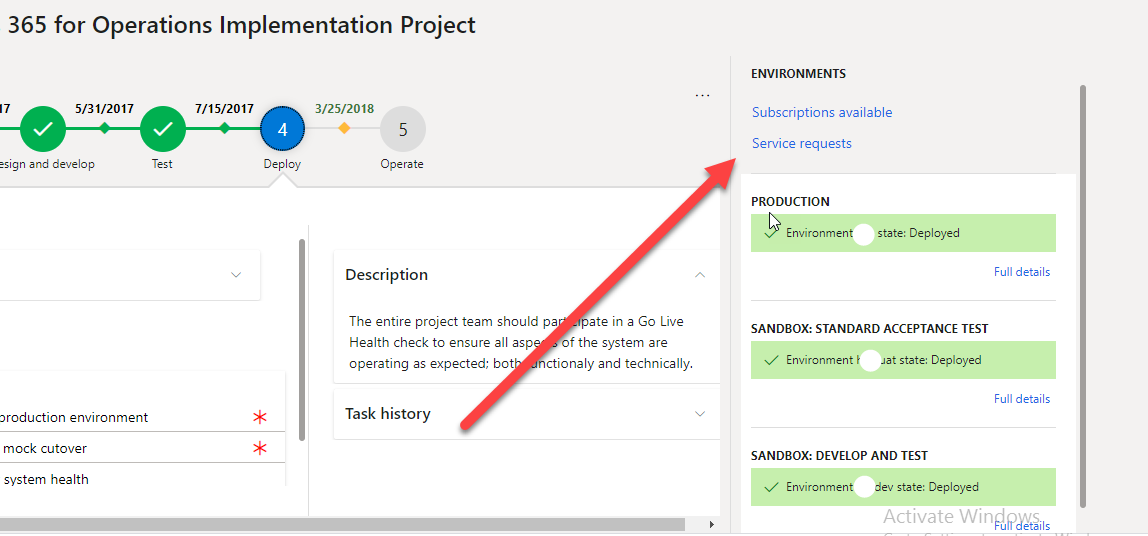
So first step is to login into LCS and then open your project

From project detail form click on create new service

Machine generated alternative text:
365 for Operations Implementation Project 
5/31/2017 
and develop 
oroduction environment 
mock cutover 
system health 
7/15/2017 
Deploy 
3/25/2018 
Test 
5 
Operate 
Description 
The entire project team should pa 
te in a Go Live 
Health check ta ensure all asp 
f the system are 
operating as expected; bat 
ctionaly and technically. 
Task history 
ENVIRONMENTS 
Subscriptions available 
SeNice requests 
PRODUCTION 
Environment hsa state: Deployed 
Full details 
SANDBOX: STANDARD ACCEPTANCE TEST 
V Environment 
'at state: Deplcyed 
Full details 
SANDBOX: DEVELOP AND TEST 
V Environment 
dev state: Deployed 
Activate Wins-dws 
u etails

From Service request window. Go to service request and click on add new

Machine generated alternative text:
tecycle 
Services 
namvcs 
Operations Implementation Project 
.A Corporate 
m ces 
Work items 
Open work items 
Support issues 
Service requests 
Hotfix requests 
Extensibility support requests 
+ Add 
p Filter 
View environment details Reschedule Cancel 
Show cancelled requests 
Show finished requests 
onment name 
-uat 
Actionable by 
Sep.•ice Provider 
Provider 
Provider 
Downtime start 
1/4/2020 PM (UTC +04:00) 
10/9/2018 AM (UTC +04:00) 
10/3/2018 AM (UTC +04:00) 
Downtime end da 
144... 
63066 
61762 
Maintenance Operation 
New deployment 
New deployment 
New deployment 
Service request st... 
Requested 
Requested 
Requested

From popup select Sandbox to production

Machine generated alternative text:
ics 365 for Operations Implementation Project 
View environment details Reschedule Cancel 
Show cancelled requests 
Corporate Services LLC.) 
Show finished requests 
v"aintenance Operation 
Qew deployment 
Qew deployment 
Qew deployment 
Environment name 
Qui-I at 
Service request st... 
Requested 
Requested 
Requested 
Actionable by 
Provider 
Provide 
Pr 
Down 
10 
10 
Create request 
Select request type 
Production Point-in-time restore 
Restore the database of an environment with an 
automatic backup taken at an earlier date. 
Sandbox to production 
Move e copy of sandbox database into production for 
Go Live 
Other request 
Create other requests 
Cancel

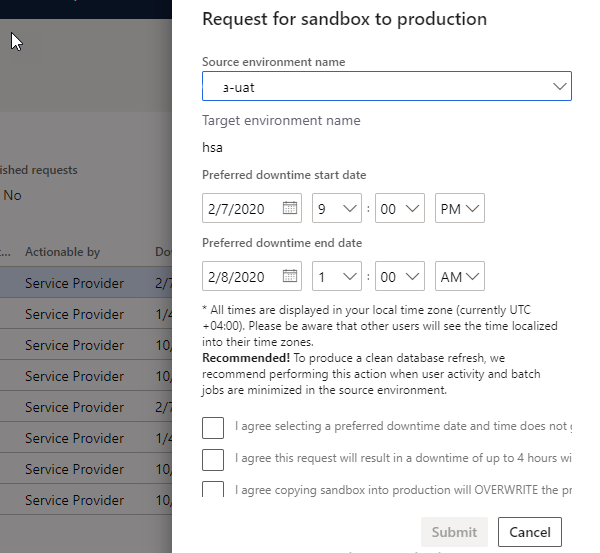
Next window you have to select the time. Sandbox source and prefer down time.

At least 4 hours from the creation of service request and 5 hours minimum downtime required
Machine generated alternative text:
ished requests 
No 
Actionable by 
Provider 
Provider 
Provider 
Provider 
Provider 
Provider 
Provider 
Provider 
Request for sandbox to production 
Source environment name 
3-uat 
Target environment name 
hse 
Preferred downtime start date 
2/7/2020 9 v 
Preferred downtime end date 
2/8/2020 1 v 
All times are displayed in your 'ocel time zone (currently UTC 
Please be aware that other users will see the time localized 
into their time zones. 
Recommended! To produce a clean database refresh, we 
recommend performing this action when user activity and batch 
jobs are minimized in the source em.'lronment. 
I agree selecting a preferred downtime date and time does not 
I agree this request will result in a downtime of up to 4 hours wi 
I agree copying sandbox into production will OVERWRITE the pr 
Submit 
Cancel

Check all check boxes for agreed after that submit button will enabled .click on submit for Microsoft request.

They reserve downtime for 5 hours but 90 percent deployment will complete with in couple of hours.
New courses are available for MB-700 solution architect certification on Microsoft learn

February 9, 2020 by alirazazaidi

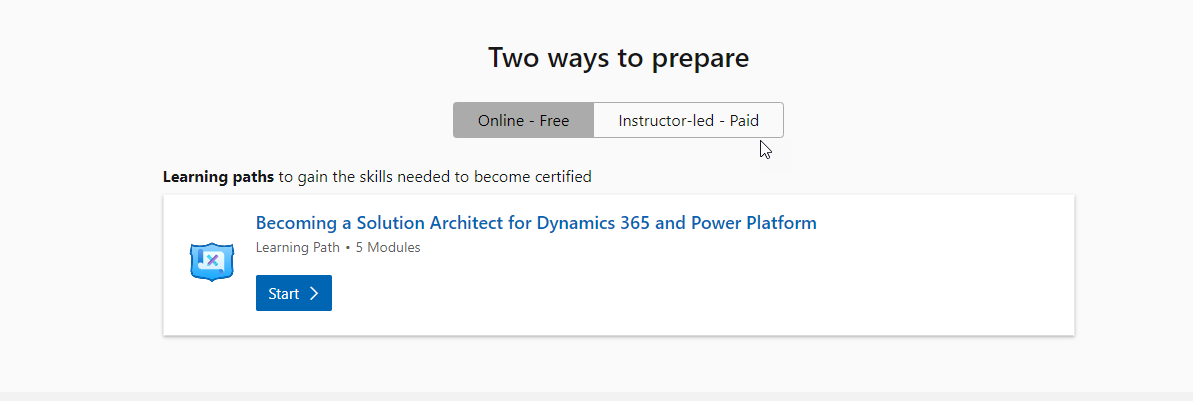
Microsoft just update the certification link. The courses are just quick start, rest is up to you.

https://docs.microsoft.com/en-us/learn/paths/become-solution-architect/https://docs.microsoft.com/en-us/learn/modules/becoming-solution-architect/index

https://docs.microsoft.com/en-us/learn/modules/discover-customer-needs/index

https://docs.microsoft.com/en-us/learn/modules/propose-solution/indexhttps://docs.microsoft.com/en-us/learn/modules/work-with-requirements/index

https://docs.microsoft.com/en-us/learn/modules/fit-gap-analysis/index

Validate Event form control Extensions- Dynamics 365 for finance and Operations

December 17, 2019 by alirazazaidi

Very handy and quick tip. How to validate and cancel / failed validation logic in Dynamics 365 for finance and operations.. Here is
FormControlCancelEventArgs is key to return false in the case of validation fail.Very similar logic works for form data source field validate events.

[FormControlEventHandler(formControlStr(BabayeeDaForm,  _BabayeDaTextBox), FormControlEventType::Validating)]
    public static void BabayeeDaForm_BabayeDaTextBox_OnValidating(FormControl sender, FormControlEventArgs e)
    {
var args = e as FormControlCancelEventArgs;
ret = checkFailed(' Main nahee mananah.');
            args.cancel(ret );
}

How to get calling menu name in extensions Dynamics 365 for finance and operations

December 16, 2019 by alirazazaidi

Today is small tip, Many times, we have to took decision based on the name of menu  on which form is called. By getting menu name we can use same form for different purposes.  We can write logic based on current form called from which menu item.

Following is the code snippet helps you to achieve this.

[FormEventHandler(formStr(LogisticsContactInfoGrid), FormEventType::Initialized)]
    public static void LogisticsContactInfoGrid_OnInitialized(xFormRun sender, FormEventArgs e)
    {
        FormRun formRun = sender;
        
        if (formRun.args().menuItemName() == "CustomerLogisticsContactInfoGrid")
        {
            FormDataSource      LogisticsElectronicAddress_ds =formRun.dataSource("LogisticsElectronicAddress");
            LogisticsElectronicAddress_ds.InsertIfEmpty(true);
            LogisticsElectronicAddress_ds.object(fieldNum(LogisticsElectronicAddress, Locator)).mandatory(true);
        }

MB-300 global address book and other address books Dynamics 365 for finance and Operations

December 10, 2019 by alirazazaidi

We are here

What is Global Address Book

Global Address book is common or single repository in Dynamics 365 for finance and Operations. The basic idea is that, everything is Party either it is Person, Organization, Customer, Vendor, Employee, worker, competitor or Contact.

Data is associated with Party, That have, Address, phone number,  email.

It is possible that one Party is Customer in one legal entity and Vendor in other legal entity.  Change in any place reflect any places.

Party detail can be vary based on either party is organization or  person.

Customer, vend, Contacts, Employee, worker, Applicate all identified as Party Role

The link between Global Address book and all other object can be explained clearly by Microsoft documentation

Machine generated alternative text:
Address Book 
t: 
Perso 
Customer 
Prospect 
Worker 
user 
can belong to one or more 
Or anization 
is a type of 
Part 
plays a role of 
Vendor 
Competitor 
Applicant 
Contact 
c 
o 
o 
Can have one or more 
relates to 
o 
Location 
can have 
Quotation 
Sales Order 
Invoice 
Request for 
Quote 
Purchase 
Order 
More 
entities

Party Roles are considered to be as follow.

Customer is person or organization, who purchase goods or services from one or more legal entities.

Vendor is person or organization from organization purchase goods or services.

Contact. Is person that representor from vendor who communicate with organization.

Competitor– Person or organization, who provide the similar services or goods.

Applicant. A person, who applied to Job posted in your organization.

Points needs to consideration for Configure Global Address book

Points need to care before Configure Global Address book in your organization.

  • Sequence of First Name, Last Name and middle name in your organization.
  • Party record is delete automatically on deletion of Employee, worker, vendor or customer.
  • Notification in the case of Duplicate Party.
  • Should the Data Universal Numbering System (DUNS) number be included in a party record’s information?
  • If the DUNS number is included in a party record, should the uniqueness of the number be checked?
  • Party default, as organization or Person.
  • Role setup for private addresses.

Reference :

https://docs.microsoft.com/en-us/learn/modules/plan-config-global-address-book-finance-operations/

https://docs.microsoft.com/en-us/dynamics365/fin-ops-core/fin-ops/organization-administration/overview-global-address-book

MB-300- Certification guide Determine when to use workspaces Dynamics 365 for finance and operations

December 3, 2019 by alirazazaidi

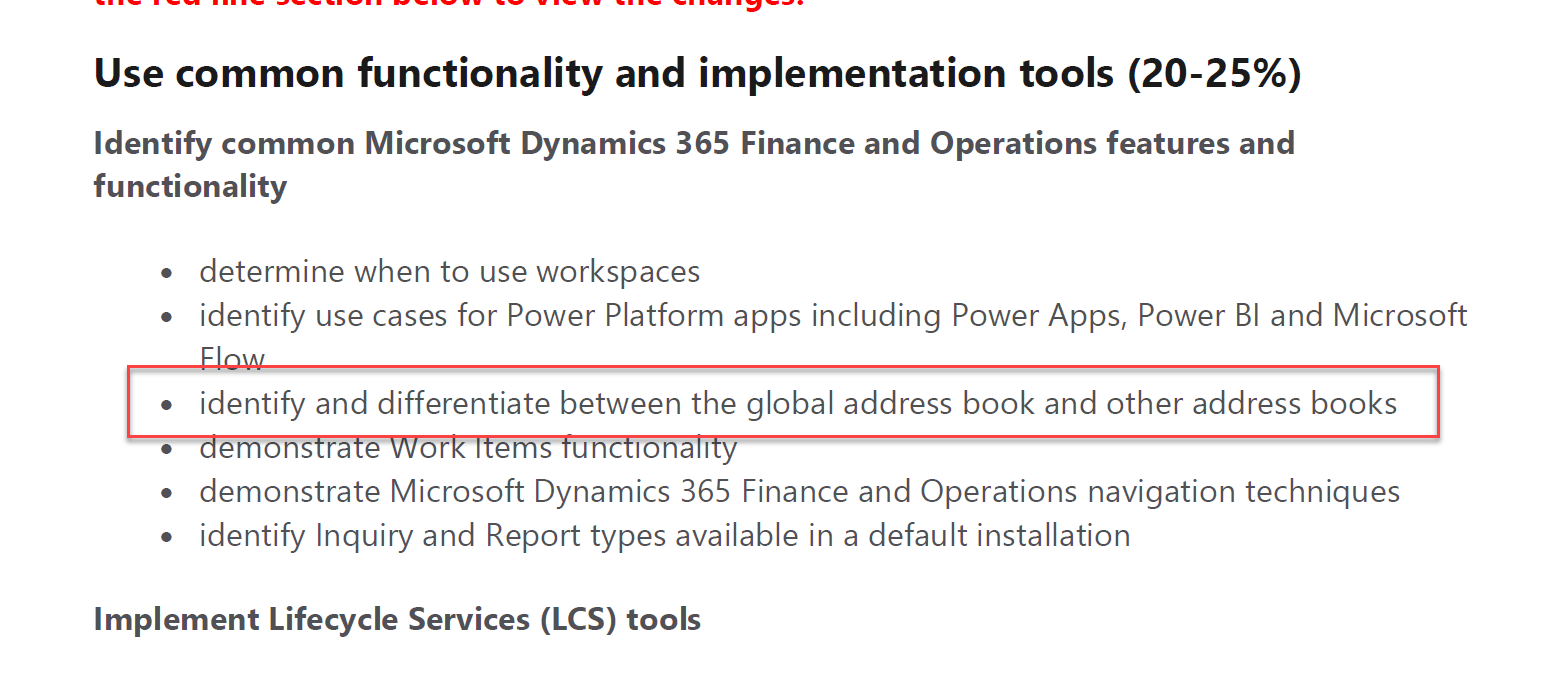
Hello, welcome to this post, In this post I will explain about navigation concept. If we go through the skilled measured PDF released measured by Microsoft it is follow

  • Determine when to use Workspace.
Machine generated alternative text:
Exam MB-300: Microsoft Dynamics 365: Core Finance 
and Operations - Skills Measured 
The content of this exam was updated on November 1, 2019. Please continue scrolling to 
the red line section below to view the changes. 
Use common functionality and implementation tools (20-25%) 
Identify common Microsoft Dynamics 365 Finance and Operations features and 
functionality 
• 
• 
determine when to use workspaces 
identify use cases for Power Platform appsl including Power Apps, Power Bl and Microsoft 
Flow 
identify and differentiate between the global address book and other address books 
demonstrate Work Items functionality 
emonstrateMicrosoftDnamics365hnance andO eratlons naviation techni ues 
identify Inquiry and Report types available in a default installation

So what is workspace.

Workspace is one window to all operations performed by one role. Yes.

As this blog post is notes, So I can copied and paste things from different blogs added reference here.

So According to Microsoft

A workspace is defined as…

  • Part of the primary navigation mechanism.
  • A form that supports a business activity (a logical group of tasks that make up the work of a target persona).
  • A way to provide an initial overview and to increase productivity in the activity by allowing simple tasks to be completed directly in the workspace.
Machine generated alternative text:
WORKSPACE 
Works ace Tile Pane 
Tabbed List Container 
Works ace Chart Pane 
Related Links Panel

When to use Workspace.

  • Provide deeper understanding of his task.
  • Without leaving Workspace End user can access all of pages.
  • Get Statistics of all operations, for example number of new sales order confirmed. Number of sales order delivered. And Number of Invoices generated.
  • Reduce the need of navigation.

If we explore the Customer Payments workspace it will something similar.

Machine generated alternative text:
New 
OPTIONS p 
Customer payments 
Summary 
Record 
customer 
payment 
Customer transactions 
Invoices past due 
Payments not 
settled 
Find transactions 
Settlement history 
Customer 
invoices past 
due 
Filter 
V Number 
FT-INV-OOO... 
CUS-INV 
CUS-INV 
-00... 
SALE-CR-NT... 
CUS-INV-OO 
CUS-INV-OO 
CUS-INV-OO 
CUS-INV-OO 
CUS-INV-OO 
CUS-INV-OO 
CUS-INV-OO 
CUS-INV-OO 
CUS-INV-OO 
CUS-INV-OO 
CUS-INV-OO 
CUS-INV-OO 
CUS-INV-OO 
CUS-INV-OO 
CUS-INV-OO 
CUS-INV-OO 
CUS-INV-OO 
Customer 
1 
Payment Journals - not 
posted 
Payment Journals - not 
posted assigned to me 
Electronic payments sent 
need bank confirmation 
Due date Y 
07/11/2019 
07/11/2019 
06/11/2019 
06/11/2019 
17/10/2019 
17/10/2019 
20/10/2019 
20/10/2019 
20/10/2019 
20/10/2019 
20/10/2019 
20/10/2019 
20/10/2019 
20/10/2019 
20/10/2019 
20/10/2019 
23/10/2019 
23/10/2019 
23/10/2019 
23/10/2019 
23/10/2019 
Currency 
AED 
USD 
AED 
AED 
AED 
AED 
AED 
AED 
AED 
AED 
AED 
AED 
AED 
AED 
AED 
AED 
AED 
AED 
AED 
AED 
AED 
Amount 
5,200.00 
2,280.60 
250.00 
125.00 
10,000.00 
1,200.00 
1,170.00 
1,170.00 
3,900.00 
3,900.00 
3,900.00 
3,900.00 
3,900.00 
3,900.00 
3,900.00 
3,900.00 
15,903.00 
15,903.00 
15,903.00 
15,903.00 
15,903.00 
Balance 
5,200.00 
780.60 
250.00 
-125.00 
10,000.00 
1,200.00 
1,170.00 
1,170.00 
3,900.00 
3,900.00 
3,900.00 
3,900.00 
3,900.00 
3,900.00 
3,900.00 
3,900.00 
15,903.00 
15,903.00 
15,903.00 
15,903.00 
15,903.00 
CD 
Related information 
Reports 
Customer aging report 
Customer balance list with credit limit 
Customer posted paymentjournal rep... 
Deposit summary by customer report 
Deposit summary by date report 
Deposit slip report 
Detailed due date list report 
All customers 
Customer 
invoices due 
today 
Customers on 
hold 
Deposit slips 
A IN) 
Integratio Customer 
Integratio Customer 
Integratio Customer 
Integratio Customer 
Integratio Customer 
Integratio Customer 
Integratio Customer 
Integratio Customer 
Integratio Customer 
Integratio Customer 
Integratio Customer 
Integratio Customer 
Integratio Customer 
Integratio Customer 
Integratio Customer 
Integratio Customer 
Integratio Customer

Tiles

Rectangle box which behaves like a menu button. When you click on it, it will leads you to specific page. This contains specific information, that 10 Sales are pending for confirmation, 2 Sales orders are invoiced.

For example Sales Invoice workspace contains Something similar.

Machine generated alternative text:
Customer payments 
Summary 
Record 
customer 
payment 
Customer 
invoices past 
due 
1 
Payment Journals - not 
posted 
Payment Journals - not 
posted assigned to me 
Electronic payments sent 
need bank confirmation 
All customers 
0 
Customer 
invoices due 
today 
Customers on 
hold 
0 
Deposit slips

List pages. This section contains the list pages For example sales Invoice contains following List Page.

  • Invoice past due
  • Payments not settled
  • Find transactions
Machine generated alternative text:
Customer transactions 
Invoices past due 
Payments not 
settled 
Find transactions 
Filter 
V Number 
FT-INV-OOO... 
CUS-INV 
-00... 
CUS-INV 
SALE-CR NT 
CUS-INV-OO 
CUS-INV-OO 
CUS-INV-OO 
CUS-INV-OO 
CUS-INV-OO 
CUS-INV-OO 
CUS-INV-OO 
CUS-INV-OO 
CUS-INV-OO 
CUS-INV-OO 
CUS-INV-OO 
CUS-INV-OO 
CUS-INV-OO 
CUS-INV-OO 
CUS-INV-OO 
CUS-INV-OO 
CUS-INV-OO 
Settlement history 
Customer 
Integratio Customer 
Integratio Customer 
Integratio Customer 
Integratio Customer 
Integratio Customer 
Integratio Customer 
Integratio Customer 
Integratio Customer 
Integratio Customer 
Integratio Customer 
Integratio Customer 
Integratio Customer 
Integratio Customer 
Integratio Customer 
Integratio Customer 
Integratio Customer 
Integratio Customer 
Due date Y 
07/11/2019 
07/11/2019 
06/11/2019 
06/11/2019 
17/10/2019 
17/10/2019 
20/10/2019 
20/10/2019 
20/10/2019 
20/10/2019 
20/10/2019 
20/10/2019 
20/10/2019 
20/10/2019 
20/10/2019 
20/10/2019 
23/10/2019 
23/10/2019 
23/10/2019 
23/10/2019 
23/10/2019 
Currency 
AED 
USD 
AED 
AED 
AED 
AED 
AED 
AED 
AED 
AED 
AED 
AED 
AED 
AED 
AED 
AED 
AED 
AED 
AED 
AED 
AED 
Amount 
5,200.00 
2,280.60 
250.00 
125.00 
10,000.00 
1,200.00 
1,170.00 
1,170.00 
3,900.00 
3,900.00 
3,900.00 
3,900.00 
3,900.00 
3,900.00 
3,900.00 
3,900.00 
15,903.00 
15,903.00 
15,903.00 
15,903.00 
15,903.00 
Balance 
5,200.00 
780.60 
250.00 
-125.00 
10,000.00 
1,200.00 
1,170.00 
1,170.00 
3,900.00 
3,900.00 
3,900.00 
3,900.00 
3,900.00 
3,900.00 
3,900.00 
3,900.00 
15,903.00 
15,903.00 
15,903.00 
15,903.00 
15,903.00

One optional link based on Graphs and Charts. Something similar.

Machine generated alternative text:
92.47%

Then comes Related links.

This section, contains hyperlinks with in Dynamics 365 for finance and operations which are related to workspace, for example. Sales Invoice workspace contains following links.

Machine generated alternative text:
Related information 
Reports 
Customer aging report 
Customer balance list with credit limit 
Customer posted paymentjournal rep... 
Deposit summary by customer report 
Deposit summary by date report 
Deposit slip report 
Detailed due date list report

References

https://docs.microsoft.com/en-us/dynamics365/fin-ops-core/dev-itpro/user-interface/build-workspaces
https://docs.microsoft.com/en-us/learn/modules/navigate-finance-operations/2-navigation-elements

Microsoft Power BI with Wikipedia

November 23, 2019 by alirazazaidi

Power BI study links on Microsoft learn and certification preparation guide link

November 23, 2019 by alirazazaidi

Hi, all, I found following links on Microsoft Learn.

https://docs.microsoft.com/en-us/learn/modules/get-started-with-power-bi/

https://docs.microsoft.com/en-us/learn/modules/get-data-power-bi/

https://docs.microsoft.com/en-us/learn/modules/get-data-power-bi/

https://docs.microsoft.com/en-us/learn/modules/visuals-in-power-bi/

https://docs.microsoft.com/en-us/learn/modules/analyze-data-power-bi/

https://docs.microsoft.com/en-us/learn/modules/model-data-power-bi/

https://docs.microsoft.com/en-us/learn/modules/explore-data-power-bi/

https://docs.microsoft.com/en-us/learn/paths/create-use-analytics-reports-power-bi/

https://docs.microsoft.com/en-us/learn/paths/consume-data-with-power-bi/

https://docs.microsoft.com/en-us/learn/modules/create-data-visualizations-using-azure-databricks-and-power-bi/

https://docs.microsoft.com/en-us/learn/browse/?term=Power%20Bi

https://docs.microsoft.com/en-us/learn/modules/power-platform-mobile-management/

https://docs.microsoft.com/en-us/learn/modules/create-data-visualizations-using-azure-databricks-and-power-bi/

And If you want to do preparation excellent certification guide by Sergio and Sabrina Zenatti

Power BI Exam – 70-778 Analyzing and Visualizing Data with Microsoft Power BI

Publish-AXReport : The user or group name is not recognized. Dynamics ax 2012

November 23, 2019 by alirazazaidi

Today I faced this issue, after restoring database of other server, on report deployment on new ssrs I found this error and deployment aborted

Solution is to delete all rows form SysServerSessions.

Power BI- How to connect with CSV comma separate values file

November 3, 2019 by alirazazaidi

« Previous Page
Next Page »

Primary Sidebar

About

I am Dynamics AX/365 Finance and Operations consultant with years of implementation experience. I has helped several businesses implement and succeed with Dynamics AX/365 Finance and Operations. The goal of this website is to share insights, tips, and tricks to help end users and IT professionals.

Legal

Content published on this website are opinions, insights, tips, and tricks we have gained from years of Dynamics consulting and may not represent the opinions or views of any current or past employer. Any changes to an ERP system should be thoroughly tested before implementation.

Categories

  • Accounts Payable (2)
  • Advance Warehouse (2)
  • AI (3)
  • Asset Management (3)
  • Azure Functions (1)
  • Books (6)
  • Certification Guide (3)
  • ChatGPT (3)
  • Claude (1)
  • Customization Tips for D365 for Finance and Operations (64)
  • D365OF (60)
  • Data Management (1)
  • database restore (1)
  • Dynamics 365 (59)
  • Dynamics 365 for finance and operations (139)
  • Dynamics 365 for Operations (175)
  • Dynamics AX (AX 7) (134)
  • Dynamics AX 2012 (274)
  • Dynamics Ax 2012 Forms (13)
  • Dynamics Ax 2012 functional side (16)
  • Dynamics Ax 2012 Reporting SSRS Reports. (31)
  • Dynamics Ax 2012 Technical Side (52)
  • Dynamics Ax 7 (65)
  • Exam MB-330: Microsoft Dynamics 365 Supply Chain Management (7)
  • Excel Addin (1)
  • Favorites (12)
  • Financial Modules (6)
  • Functional (8)
  • General Journal (1)
  • Implementations (1)
  • Ledger (1)
  • Lifecycle Services (1)
  • Logseq (4)
  • Management Reporter (1)
  • Microsoft Excel (4)
  • MS Dynamics Ax 7 (64)
  • MVP summit (1)
  • MVP summit 2016 (1)
  • New Dynamics Ax (19)
  • Non Defined (9)
  • Note taking Apps (2)
  • Obsidian (4)
  • Personal Knowledge Management (3)
  • PKM (16)
  • Power Platform (6)
  • Procurement (5)
  • procurement and sourcing (6)
  • Product Information Management (4)
  • Product Management (6)
  • Production Control D365 for Finance and Operations (10)
  • Sale Order Process (10)
  • Sale Order Processing (10)
  • Sales and Distribution (5)
  • Soft Skill (1)
  • Supply Chain Management D365 F&O (5)
  • Tips and tricks (278)
  • Uncategorized (165)
  • Upgrade (1)
  • Web Cast (7)
  • White papers (4)
  • X++ (10)

Wiki

  • SCM

Copyright © 2026 · Magazine Pro On Genesis Framework · WordPress · Log in