For my session for Integration with Dynamics Ax 2012. I have to consume SalesSalesOrderSerivce. In this article I am configure and consume Sales Order service and share c# code for calling a Sales service and consume.
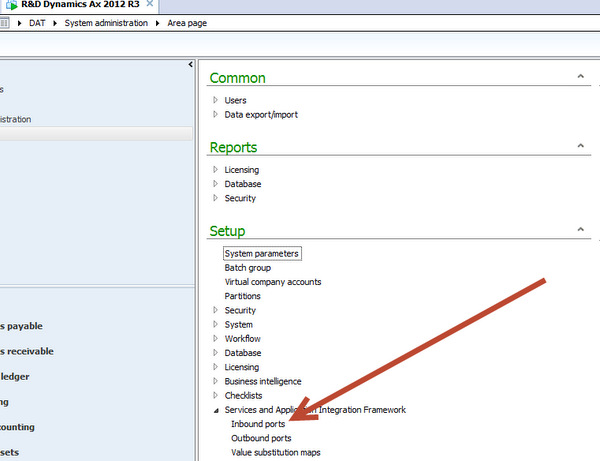
Enable the methods and configure the inbound port. For this you have to go at following link and open AIf Inbound

Right click on AIF menu and create a New
set the Name there “ for example I create the port with Name “MySalesOrderService”.

Click on Service Operations add following one

Click on arrow button and add these method to service

Now click on Close button to close it.
Now click to check box to enable data policy button document. Click on it.

New screen open for all possible fields, Click on Element to sort the list, Enable following fields which are minimum required for Sales Order creation.

Now save it. From port screen enable logging and Click on activate, Wait it will take time to deploy the service on port.

Info log appear to tell that port is successfully active.

Now copy the WSDL url

Create a new Console application in Visual studio, I am more familiar with C# so I created a console application in C#.
Add new Service reference and set its name “SalesOrderService” and get methods from WSDL.

Now Click on Ok button.
Calling the Create Method.
var line = new SalesOrderService.AxdEntity_SalesLine()
{
ItemId = “D0001”,
SalesQty = 42,
SalesUnit = “ea”
SalesOrderService.AxdEntity_InventDim inventDim = new SalesOrderService.AxdEntity_InventDim();
inventDim.InventSiteId = “JS”;
InventDim = new SalesOrderService.AxdEntity_InventDim[] {inventDim};
};
var order = new SalesOrderService.AxdEntity_SalesTable()
{
CustAccount = “US-003”,
PurchOrderFormNum = “ffg”,
ReceiptDateRequested = DateTime.Now.Date,
SalesLine = new SalesOrderService.AxdEntity_SalesLine[] { line }
};
// SalesOrderService. _salesOrder= new SalesOrderService.AxdSalesOrder();
var orderList = new SalesOrderService.AxdEntity_SalesTable[] { order };
var callContext = new SalesOrderService.CallContext() { Company = “USMF” };
SalesOrderService.SalesOrderServiceClient client = new SalesOrderService.SalesOrderServiceClient();
// _salesOrder.SalesTable=orderList;
try
{
client.create(callContext, orderList);
// client.create(callContext, orderList);
client.Close();
}
catch
{
client.Abort();
throw;
}
Read Method Code
try
{
SalesOrderService.KeyField keyField = new SalesOrderService.KeyField() { Field = “SalesId”, Value = “000767” };
// Create an entity key instance and put in the key field data
SalesOrderService.EntityKey entityKey = new SalesOrderService.EntityKey();
entityKey.KeyData = new SalesOrderService.KeyField[1] { keyField };
// Create an array of entity keys and put in the previously
SalesOrderService.EntityKey[] entityKeys = new SalesOrderService.EntityKey[1] { entityKey };
SalesOrderService.SalesOrderServiceClient _Client = new SalesOrderService.SalesOrderServiceClient();
SalesOrderService.CallContext _callContext = new SalesOrderService.CallContext();
_callContext.Company = “USMF”;
SalesOrderService.AxdEntity_SalesTable[] _SalesOrder= _Client.read(_callContext, entityKeys);
SalesOrderService.AxdEntity_SalesTable _SalesTable = _SalesOrder[0];
SalesOrderService.AxdEntity_SalesLine _SalesLineTable = _SalesTable.SalesLine[0];
Console.WriteLine(“Account Num : ” + _SalesTable.CustAccount.ToString());
Console.WriteLine(“Order date : ” + _SalesTable.ReceiptDateRequested.ToString());
Console.WriteLine(“ItemId : ” + _SalesLineTable.ItemId.ToString());
Console.WriteLine(“QTy : ” + _SalesLineTable.SalesQty.ToString());
Console.WriteLine(“Sales Unit : ” + _SalesLineTable.SalesUnit.ToString());
_Client.Close();
Console.ReadKey();
}
catch
{
// client.Abort();
throw;
}
Update Method Call code
SalesOrderService.KeyField keyField = new SalesOrderService.KeyField() { Field = "SalesId", Value = "000756" };
// Create an entity key instance and put in the key field data
SalesOrderService.EntityKey entityKey = new SalesOrderService.EntityKey();
entityKey.KeyData = new SalesOrderService.KeyField[1] { keyField };
// Create an array of entity keys and put in the previously
SalesOrderService.EntityKey[] entityKeys = new SalesOrderService.EntityKey[1] { entityKey };
SalesOrderService.SalesOrderServiceClient _Client = new SalesOrderService.SalesOrderServiceClient();
SalesOrderService.CallContext _callContext = new SalesOrderService.CallContext();
_callContext.Company = “USMF”;
SalesOrderService.AxdEntity_SalesTable[] _SalesOrderList = _Client.read(_callContext, entityKeys);
SalesOrderService.AxdEntity_SalesTable _SalesOrderTable = _SalesOrderList.First();
SalesOrderService.AxdEntity_SalesLine SalesLine = _SalesOrderTable.SalesLine.First();
decimal salesQty = 50;
SalesLine.SalesQty = salesQty;
_Client.update(_callContext, entityKeys, _SalesOrderList);
Delete method code
SalesOrderService.KeyField keyField = new SalesOrderService.KeyField() { Field = "SalesId", Value = "000757" };
// Create an entity key instance and put in the key field data
SalesOrderService.EntityKey entityKey = new SalesOrderService.EntityKey();
entityKey.KeyData = new SalesOrderService.KeyField[1] { keyField };
// Create an array of entity keys and put in the previously
SalesOrderService.EntityKey[] entityKeys = new SalesOrderService.EntityKey[1] { entityKey };
SalesOrderService.SalesOrderServiceClient _Client = new SalesOrderService.SalesOrderServiceClient();
SalesOrderService.CallContext _callContext = new SalesOrderService.CallContext();
_callContext.Company = “USMF”;
_Client.delete(_callContext, entityKeys);
Trouble shooting AIF service.
There are many possible failure of sales service call, You can trouble shoot it from System Administration section as

During writing code and I got many failures, All exceptions recorded here.
